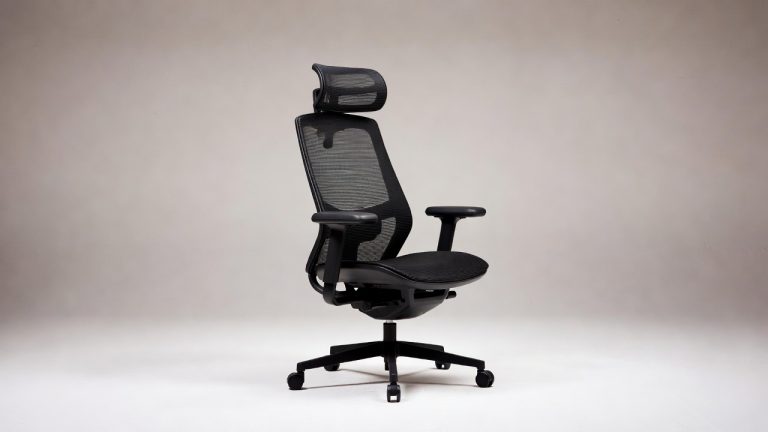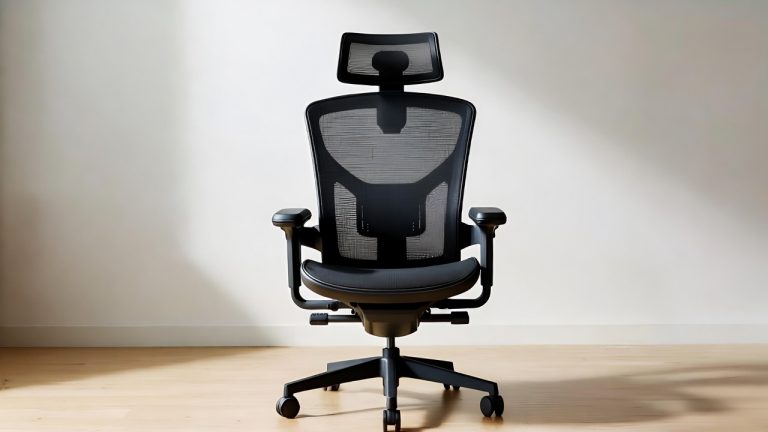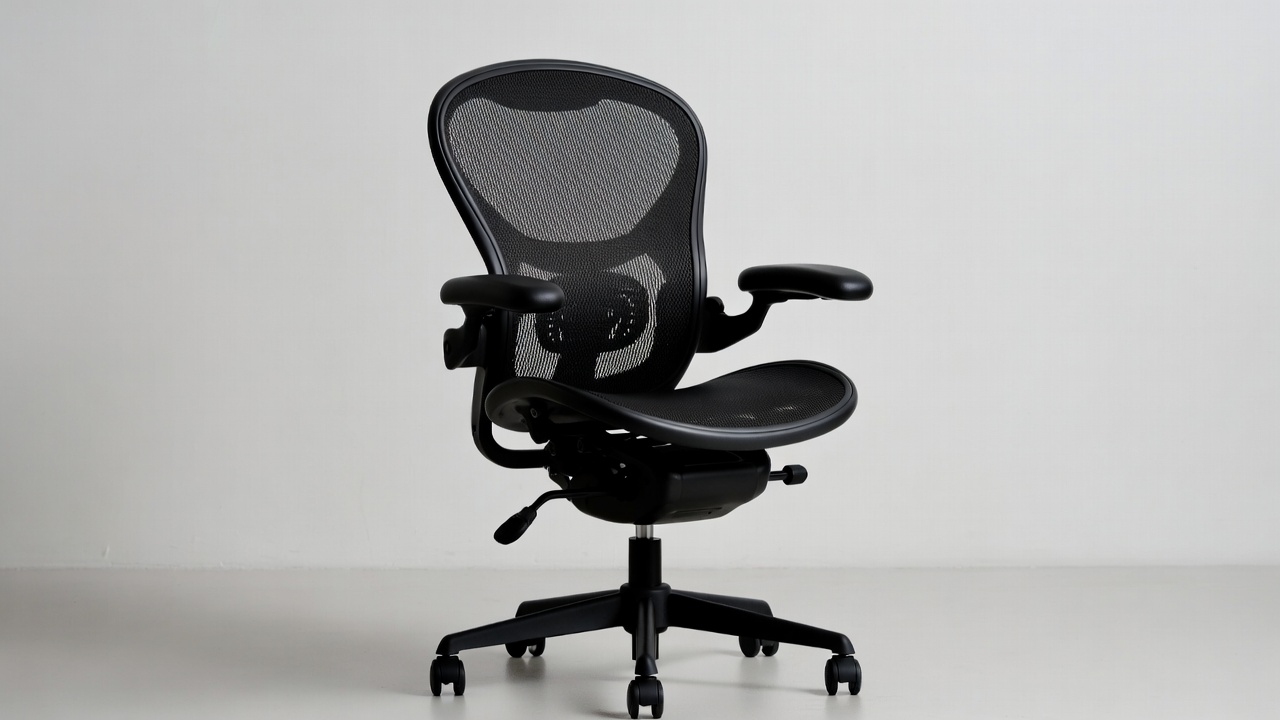
5 Best Desk Chair for Back and Hip Pain In 2026
If your back aches after a few hours at your desk, you are not alone. Millions of people deal with lower back pain, hip pressure, and tailbone soreness just from sitting in the wrong chair. The good news? The right ergonomic chair can make a real difference. It can keep your spine aligned, reduce pressure on your hips, and help you stay comfortable for long work sessions.
But here is the problem — there are hundreds of chairs on the market. Every brand claims to be the “best ergonomic office chair.” Most of them look similar in photos, and the specs can be confusing if you are not a furniture expert.
That is why this roundup exists. We went deep into five specific chairs that target back and hip pain relief. Each one brings something different to the table. Some are great for heavy users. Some are better for people who need heat and massage therapy. Some are clean and professional-looking. And some are just solid, affordable workhorses.
By the time you finish reading, you will know exactly which one fits your body, your budget, and your daily work routine.
List Of Best Desk Chair for Back and Hip Pain
Why Your Chair Matters More Than You Think
Sitting is hard on the body. That might sound strange, but it is true. When you sit for long hours, your hip flexors tighten, your lower back curves the wrong way, and your pelvis tilts forward. This creates pressure on your lumbar discs and compresses the nerves around your hips.
A good chair for back and hip pain does several things at once:
- It supports your lumbar spine so it stays in its natural curve
- It distributes your body weight evenly across the seat
- It keeps your hips at a healthy angle (usually 90 degrees or slightly open)
- It lets you adjust the height, armrests, and tilt to fit your body
- It reduces the need to constantly shift and fidget
Not every expensive chair does all of these things well. And not every affordable chair fails at them. The key is knowing what to look for — and matching it to your specific needs.
Quick Overview of the 5 Chairs Reviewed
Here is a fast snapshot before we go deep:
| Chair | Best For | Price Range |
|---|---|---|
| CAPOT Ergonomic Mesh Chair | Long work sessions, breathability | Mid-range |
| HOMREST Massage Executive Chair | Heat and massage therapy needs | Mid-to-high |
| Generic PU Leather Executive Chair | Budget buyers, clean office look | Budget |
| COLAMY High Back Executive Chair | Professional look, lumbar support | Mid-range |
| Smartue 500LBS Big and Tall Chair | Heavy users, back pain relief | Mid-range |
Now let’s look at each one in detail.
1.CAPOT Ergonomic Mesh Office Chair
What Is This Chair?
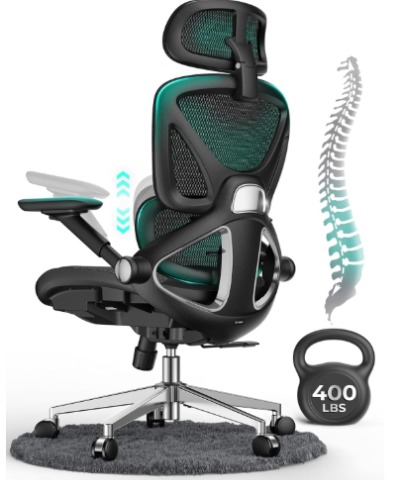
The CAPOT Ergonomic Mesh Office Chair is built for people who spend serious time at their desks. It has a high back mesh design, which means your back gets airflow instead of sweating against leather or foam. It holds up to 400 pounds and comes loaded with adjustable features that let you dial in the fit to your body.
This chair is aimed at office workers, remote workers, and anyone who needs a chair that can handle long hours without causing discomfort.
Key Features Explained Simply
4D Flip-Up Arms The “4D” means you can adjust the armrests in four directions — up and down, forward and backward, side to side, and pivot inward or outward. This is a big deal for shoulder and neck pain. When your arms rest naturally, your shoulders relax, which reduces tension all the way down your back. The flip-up function is great when you want to slide the chair under the desk or do a different task.
3-Level Tilt Backrest Most chairs either let you lean back freely or lock upright. The CAPOT gives you three fixed positions in between, so you can lock it at a slight recline, a medium recline, or fully upright. This is helpful because the right angle depends on what you are doing — writing, typing, reading, or taking a call.
3D Adjustable Headrest The headrest moves up and down and also angles forward and backward. If you have neck tension that travels down into your upper back, a properly placed headrest can help keep your head from jutting forward while you work.
Adjustable Lumbar Support The lumbar pad sits in the lower back region and can be moved up and down to fit your specific spine. People with different torso lengths need the lumbar support at different heights, so this adjustability is genuinely useful rather than just a marketing claim.
PU Caster Wheels The wheels are made with a polyurethane coating, which makes them gentle on hardwood floors and smooth on carpets. They roll quietly and do not scratch surfaces.
Mesh Back The breathable mesh keeps air circulating around your back. If you tend to get warm while sitting, or if you live in a warmer climate, mesh is a huge comfort upgrade over leather or thick foam.
Best Use Cases
- Working from home for 6 to 10 hours daily
- People who run hot and want airflow at the back
- Those with lumbar pain who need precise support positioning
- Users who need wide armrest adjustability to manage shoulder tension
Real-Life Usage Insight
Mesh chairs like this one tend to shine during the warmer months or in rooms without great air conditioning. The breathability keeps you fresher longer. The 4D arms take a few minutes to dial in at first, but once you find the right position, you tend to forget they are there — which is the point. The lumbar support is firm, not soft. People who like a gentle nudge in the lower back will appreciate it, while those who prefer softer cushioning might find it takes getting used to.
The 400-pound weight capacity also makes this one of the more inclusive options in the mid-range market. You get a solid chair that does not feel flimsy even at heavier weights.
Pros
- Excellent breathability thanks to mesh back
- Highly adjustable armrests work well for shoulder pain
- Lumbar support moves to fit different body types
- 400-pound weight capacity is generous for the price
- Quiet, floor-friendly PU wheels
- Tilt lock with multiple angle options
Cons
- Mesh does not provide the same cushioning as foam for the upper back
- Assembly can take 30 to 45 minutes
- The lumbar support is firm, which may feel stiff initially
- Not the most visually sleek option if aesthetics matter to you
Performance
For spinal support, the CAPOT does a good job at maintaining the natural lumbar curve during long sessions. The mesh keeps things comfortable without overheating. The 3D headrest is a genuine help for people dealing with tech neck. The tilt mechanism is smooth, not jerky.
Ease of Use
After setup, adjusting the chair is intuitive. The levers and knobs are clearly labeled. Most users can figure out all the adjustments without reading the manual.
Value for Money
At its price point, you get a lot of adjustability and features that you would typically pay more for. It competes well against chairs that cost significantly more.
2. HOMREST 6-Point Massage Executive Chair with Heat
What Is This Chair?
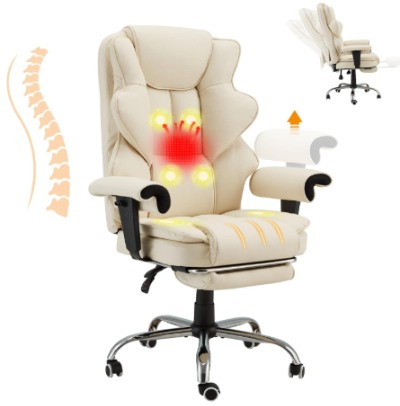
The HOMREST Massage Executive Chair is not your average office seat. It combines the features of an ergonomic executive chair with a built-in massage and heat system. The off-white leather look gives it a modern, upscale appearance. It has a retractable footrest, a reclining function, and adjustable armrests. This is the chair for someone who wants to work, relax, and even take a short rest in the same seat.
Key Features Explained Simply
6-Point Massage System The chair has six massage nodes built into the back. These hit the upper back, middle back, and lower back. You can usually adjust the intensity and select which zones you want to target. For people with chronic back pain or muscle tension from sitting all day, the massage function offers real temporary relief.
Heat Therapy The heating element targets the lumbar and lower back area. Heat helps loosen tight muscles and increases blood flow. It is especially helpful during cold months or for people whose lower back tends to stiffen after sitting. The heat is gentle and not intense, more like a warming pad than a heating blanket.
Retractable Footrest Slide out the footrest and you can elevate your legs when you need a break. This helps reduce pressure on the back of your thighs and takes load off your lower back. It is great for short rest breaks during the workday.
Reclining Function The chair can recline to a generous angle, turning it into something close to a lounge chair when you want to read, take a phone call, or simply rest your eyes. The reclining backrest works well with the footrest for a more complete resting position.
Adjustable Armrests The armrests move up and down to match your desk height and body proportions. This helps keep your elbows at a comfortable angle and reduces strain on your shoulders and neck.
PU Leather Exterior The off-white PU leather looks elegant and is easy to wipe clean. It does not breathe as well as mesh, but it provides a smooth, comfortable surface and a professional look.
Best Use Cases
- People who deal with chronic back pain and want active relief throughout the day
- Those who work and rest in the same chair
- Anyone who works in a cold environment where heat therapy would help
- Home office users who want a premium-looking piece of furniture
Real-Life Usage Insight
The massage function is genuinely useful for short sessions. Run it for 15 to 20 minutes during a break and you will notice reduced tension in the lumbar area. It is not a deep-tissue massage, but it does enough to loosen things up. The heat adds a comforting layer, especially in the lower back zone.
The footrest is a nice bonus for resting position but is not something most people will use while actively working. The reclining angle is impressive — you can get quite horizontal, which is unusual for an office chair. This makes it a great option for people who need to lie back and rest due to back injuries or chronic pain conditions.
The off-white leather looks sharp but does require some care. Spills need to be cleaned up quickly to avoid staining.
Pros
- Built-in massage with multiple zones and settings
- Heat therapy specifically targets lower back
- Retractable footrest adds genuine versatility
- Generous recline angle for resting
- Elegant appearance in off-white leather
- Good for people with chronic lower back and hip discomfort
Cons
- PU leather does not breathe as well as mesh
- Heat and massage do not run indefinitely (auto-shutoff kicks in)
- Off-white color requires more maintenance to keep clean
- Assembly involves more components and takes longer
- Not as customizable in terms of lumbar height positioning
Performance
As an office chair for back pain, it performs well when you take advantage of the heat and massage features. The recline is smooth. The seat cushioning is thick and comfortable. The lumbar area is well-padded.
As a pure ergonomic chair without those extras, it is decent but not outstanding. The value comes from the wellness features.
Ease of Use
The massage controller is simple. Heat and massage turn on with one or two button presses. The footrest is easy to slide in and out. The recline mechanism is smooth.
Value for Money
If you plan to use the massage and heat features regularly, this is excellent value. If you just want a plain ergonomic chair, there are better options for the money.
3. Office Desk Chair with Padded Flip-Up Arms and Adjustable Lumbar Support
What Is This Chair?
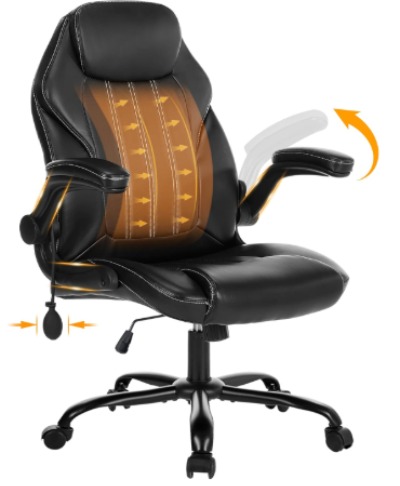
This is a clean, professional-looking PU leather executive chair designed for work and study environments. It has padded flip-up armrests, a tilt lock mechanism, adjustable lumbar support, and 360-degree swivel wheels. It is aimed at users who want reliable comfort and a polished appearance without a lot of extra bells and whistles.
Key Features Explained Simply
Padded Flip-Up Arms The armrests are cushioned with foam padding and can flip straight up when not in use. This makes it easy to push the chair under a desk or get in and out without the arms getting in the way.
Adjustable Lumbar Support A dedicated lumbar knob or pad sits in the lower back area and can be adjusted to fit your natural spine curve. This is one of the most important features for lower back pain relief, and having it adjustable rather than fixed means it can work for people of different heights and body types.
Tilt Lock The tilt lock lets you recline and then lock the seat at your preferred angle. This is great for reading or casual work when you want a slight lean-back without the chair rocking under you.
PU Leather Surface The leather look is professional and easy to clean. The seat cushion is thick enough to be comfortable for several hours of sitting.
360-Degree Swivel and Rolling Wheels The chair rotates fully and rolls smoothly, making it easy to move around your workspace. The wheels are designed to work on most floor surfaces.
High Back Design The tall backrest provides support from the lower back up to the shoulder blades. This reduces slouching and helps keep the spine in alignment.
Best Use Cases
- Office environments that require a neat, professional appearance
- Students who need a comfortable study chair
- People who want lumbar adjustability at a budget price
- Anyone who finds armrests get in the way and prefers the flip-up option
Real-Life Usage Insight
This chair punches above its price point in terms of appearance. It looks significantly more expensive than it is. The lumbar support knob is functional and does make a noticeable difference in lower back comfort compared to chairs without it.
The padded armrests are softer than most at this price range, which is a welcome upgrade. The flip-up mechanism works smoothly and makes the chair much more versatile in tight spaces.
The PU leather is comfortable but can feel warm after extended sitting in warmer environments. It is also worth noting that PU leather can crack over time with heavy use, so it is not the most durable long-term material.
For back and hip pain relief, this chair is solid for moderate daily use — say, four to six hours per day. For people who sit ten or more hours daily, you may want to upgrade to a more specialized ergonomic option.
Pros
- Clean, professional appearance at a budget price
- Padded flip-up arms are practical and comfortable
- Adjustable lumbar support genuinely helps lower back
- Easy to clean surface
- Smooth tilt lock with a good range of angles
- Swivel and wheels work well on most surfaces
Cons
- PU leather can get warm in hot conditions
- Not as breathable as mesh
- May not be durable enough for very heavy daily use over many years
- Limited adjustment range compared to premium chairs
- No headrest included
Performance
For its price, this chair offers solid daily comfort. The lumbar support works well for people with mild to moderate lower back pain. It is not a medical-grade ergonomic chair, but it is a real step up from a basic office chair.
Ease of Use
Very simple to adjust. The lumbar knob turns easily. The flip arms are intuitive. The tilt lock is a simple lever. No complicated settings to learn.
Value for Money
This chair offers outstanding value for its price. For people on a tight budget who still want lumbar support and a professional look, it is one of the best options available.
4. COLAMY Office Ergonomic Desk High Back Executive Chair
What Is This Chair?
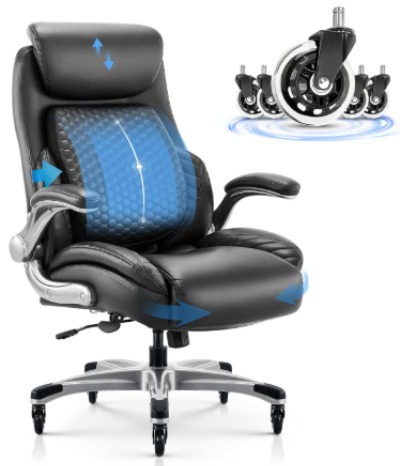
The COLAMY High Back Executive Chair is designed for people who want both comfort and professional style. It has a pop-out lumbar support system, upgraded caster wheels, an adjustable headrest, flip-up arms, and a thick padded seat cushion. The chair comes in black with a leather finish and is built for home office and executive office environments alike.
Key Features Explained Simply
Pop-Out Lumbar Support This is COLAMY’s standout feature. The lumbar support pops outward from the seat back, creating a firm but targeted push against your lower spine. It is fixed in vertical position but adjustable in how far it protrudes. This design is effective because it actively pushes your lumbar spine into its natural curve rather than just sitting passively behind you.
Upgraded Caster Wheels COLAMY uses heavier-duty wheels than most chairs in this class. They roll quietly, do not skid, and are less likely to crack or break over time. If you move your chair frequently, this is a meaningful upgrade.
Adjustable Headrest The headrest moves up and down and tilts forward to support the neck at different angles. It is especially helpful for people who tend to push their head forward toward a screen — a very common posture problem.
Flip-Up Arms Like the previous chair, the COLAMY’s armrests can flip up and out of the way. They adjust in height to keep your elbows comfortable at desk level.
Thick Seat Cushion The seat pad is notably thicker than average. This is important for hip pain because a thicker, well-contoured cushion distributes body weight more evenly across the thighs and reduces pressure on the sit bones and hip joints.
High Back Design The tall backrest wraps around the upper and lower back for full spinal support. This helps prevent the mid-back and shoulder fatigue that comes from chairs with shorter backs.
Best Use Cases
- People dealing with both lower back and hip pressure
- Those who want an executive look with real ergonomic substance
- Home office users who want a chair that looks great and works well
- People who tend to lean their head forward and need neck support
Real-Life Usage Insight
The pop-out lumbar support is the most talked-about feature of this chair, and for good reason. It works differently from a cushion-style lumbar pad. The firm protrusion feels unusual at first, but after a day or two most people find it corrects their posture naturally without them having to think about it.
The thick seat cushion is noticeably comfortable for hip pain sufferers. It takes the edge off the hard pressure points that normal chairs create. Combined with the lumbar support, the chair addresses both the back and hip at the same time, which is rare at this price range.
The upgraded wheels are a small but real difference. They feel more stable and roll more smoothly than standard office chair wheels.
One thing to be aware of — the black leather can feel warm in hot rooms. And like all leather-look chairs, it will require some maintenance over time to stay looking its best.
Pros
- Pop-out lumbar support actively promotes better posture
- Extra-thick cushion is great for hip and tailbone pain
- Upgraded wheels are more durable and quieter
- Adjustable headrest addresses neck and upper back tension
- Flip-up arms offer flexibility
- Professional black design suits most office settings
Cons
- Leather surface can feel warm in summer or hot rooms
- Lumbar support protrudes at a fixed vertical position
- No mesh option for breathability
- Some users may need time to adjust to the pop-out lumbar feel
- Armrests only adjust in height, not depth or angle
Performance
The COLAMY earns its place as one of the better chairs in this roundup for combined back and hip pain relief. The lumbar pop-out does its job consistently. The seat cushion holds its shape well over time, which is important because many budget chairs flatten out quickly. The headrest is above average for this price range.
Ease of Use
Setup is straightforward. The adjustment controls are simple. The lumbar protrusion is a manual pull-and-push adjustment, which some people may find slightly less intuitive than a knob system but works reliably once you understand it.
Value for Money
Excellent. The COLAMY gives you premium-looking design, real ergonomic features, and upgraded components at a price that competes with basic office chairs. It is one of the strongest value propositions in this roundup.
5.Smartue 500LBS Big and Tall Office Chair with 3D Kneading Massage Lumbar Support
What Is This Chair?
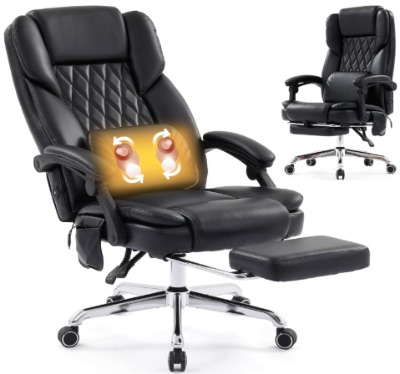
The Smartue 500LBS Big and Tall Chair is built for heavier users and anyone dealing with serious back pain. It holds up to 500 pounds — a rare capacity in the office chair market — and features a 3D kneading massage lumbar system, 130-degree reclining, and a design built to support larger body frames. This is a managerial-style chair aimed at people who need extra strength, extra width, and targeted pain relief.
Key Features Explained Simply
500-Pound Weight Capacity Most office chairs are rated for 250 to 300 pounds. The Smartue goes up to 500 pounds, making it genuinely suitable for big and tall users. The frame is reinforced, and the base is wider and sturdier than standard chairs.
3D Kneading Massage Lumbar Support Unlike basic vibration massage, 3D kneading mimics the motion of human hands pressing and rolling across the muscles. The lumbar area is the primary target, which directly addresses the source of most desk-related back pain. This is a significant feature because it provides active muscle relief rather than just structural support.
130-Degree Reclining The chair can recline to 130 degrees, which is close to a fully laid-back position. This is helpful for taking pressure off the spine during breaks. It is also helpful for people with herniated discs or spinal stenosis who cannot sit fully upright for long periods.
Wider Seat and Back The seat is broader than standard executive chairs, and the backrest is taller and wider too. This directly benefits larger body frames, giving full support across the hips and back rather than leaving parts of the body hanging off the edges.
Ergonomic Design for Back Pain Relief The chair is built with lower back pain specifically in mind. The backrest contour follows the natural S-curve of the spine, and the seat cushion is thick to reduce hip pressure.
Managerial and Heavy-Use Construction The gas cylinder, base, and frame are all heavy-duty. The wheels are wider and more stable than those on standard chairs. This chair is meant to handle daily hard use without degrading quickly.
Best Use Cases
- Big and tall users who have struggled to find a chair that fits
- People with chronic back pain who want massage therapy at the desk
- Heavy users who need a chair that won’t break down quickly
- Those who recline frequently for back pain management
- People recovering from back injuries who need extra support
Real-Life Usage Insight
For heavier users, this chair is a significant upgrade over most options on the market. The wider seat means your hips are not squeezed or hanging off the edges, which directly reduces hip discomfort. The extra back height means your entire back is supported, not just the lumbar area.
The 3D kneading massage is genuinely more effective than simple vibration. You can feel the rolling motion working through the lower back muscles. Running it for 10 to 15 minutes during a break can noticeably reduce muscle tension that builds up from hours of sitting.
The 130-degree recline is generous. Combined with the massage, this chair can double as a recovery seat for people managing spinal conditions.
One thing to note — the chair is on the larger side in terms of footprint. Make sure your workspace has enough room for it. Also, the motor for the massage system adds some weight, so moving the chair around is slightly less effortless than a standard office chair.
Pros
- 500-pound capacity covers a wide range of body sizes
- 3D kneading massage is more effective than basic vibration
- 130-degree recline helps reduce spinal compression
- Wide seat and back support larger frames fully
- Durable heavy-duty construction built for long-term use
- Targets back pain relief as a core design priority
Cons
- Larger footprint requires more desk space
- Heavier than standard chairs
- Less suitable for smaller body frames
- Massage system adds some complexity and potential long-term maintenance
- Style is more utilitarian than elegant
Performance
For its target audience — heavy users dealing with back pain — this chair performs exceptionally. The massage system is a standout. The structural durability is noticeable. For someone who has gone through two or three standard chairs that wore out quickly, this one is a meaningful step up.
Ease of Use
The massage controls are simple. The recline is smooth. Adjusting the chair’s basic settings is intuitive. The larger frame means it takes a bit more effort to set up initially, but day-to-day use is easy.
Value for Money
For big and tall users, this chair represents excellent value because alternatives in the 500-pound capacity range are often much more expensive. The added massage feature makes it even more competitive.
Comparison Insights: How These 5 Chairs Stack Up
Now that we have looked at each chair individually, here is how they compare on the things that matter most for back and hip pain:
For Lumbar Support: The COLAMY’s pop-out lumbar system and the Smartue’s massage lumbar are both standouts. The CAPOT offers adjustable but passive lumbar support. The HOMREST relies more on cushioning and the massage system. The budget leather chair has a basic but functional adjustable pad.
For Hip Pain Specifically: The COLAMY’s extra-thick cushion and the Smartue’s wide seat are the best choices for hip and sit-bone pain. If your hips are the bigger problem, prioritize these two.
For Breathability: The CAPOT mesh chair wins by a wide margin. All others use leather or faux leather, which traps heat.
For Active Therapy: The HOMREST and the Smartue both offer massage functions. The Smartue’s 3D kneading is more effective for deep muscle tension. The HOMREST adds heat therapy, which the Smartue does not have.
For Budget: The PU Leather Executive Chair is the clear budget winner. The COLAMY is close behind as a best-value option.
For Heavier Users: The Smartue is the obvious choice with its 500-pound capacity. The CAPOT at 400 pounds is the next best option.
For Professional Appearance: The COLAMY and the budget leather executive chair both look the most office-appropriate. The HOMREST in off-white is elegant but less traditional.
Buying Guide: What to Look for in a Chair for Back and Hip Pain
Before you click the buy button, here are the key factors to think through:
1. Lumbar Support Quality
This is the most important feature for lower back pain. Look for adjustable lumbar support that can move up and down to match your spine’s curve. Even better — look for adjustable depth, so you can control how firmly it pushes against your back.
Fixed lumbar supports work for some people and not at all for others, depending on body proportions. Adjustable is always safer.
2. Seat Cushion Depth and Density
Thin seat cushions flatten out quickly and create hard pressure points under your hips and thighs. Look for a chair with at least 3 to 4 inches of high-density foam. It should feel firm but not hard.
The seat should also be the right depth — you want about 2 to 3 inches of space between the back of your knees and the seat edge. If the seat is too deep, it cuts off circulation at the back of your legs.
3. Armrest Adjustability
Poor armrest positioning is one of the most overlooked causes of back and shoulder pain. Your elbows should rest at roughly 90 degrees when typing. Armrests that are too high force your shoulders up. Too low and your arms hang awkwardly.
4D armrests give you the most flexibility. 2D (up and down only) is the minimum you want for a pain-management chair.
4. Chair Height Range
Make sure the chair’s seat height range covers your leg length. Sit with your feet flat on the floor, knees at 90 degrees, and hips level or slightly above your knees. If the chair cannot get low enough or high enough to make this happen, it will cause posture problems regardless of other features.
5. Recline Ability
A little recline is actually good for your back. Sitting fully upright at 90 degrees puts more load on your lumbar discs than sitting at 100 to 110 degrees. A chair that lets you lock in a slight recline is better for all-day comfort.
6. Weight Capacity
Do not ignore this. Sitting in a chair that is rated too low for your weight means the materials — especially the gas cylinder, foam, and frame — will wear out much faster. Always choose a chair rated at least 50 pounds above your body weight for longer durability.
7. Material
Mesh: Best breathability, good for warm environments, lighter feel. Not as cushioned as foam.
PU Leather: Professional look, easy to clean, but traps heat and can crack over time.
Fabric: Breathable and soft, but harder to clean.
High-density foam: Best cushioning for hip pain, but no breathability on its own.
8. Additional Features
Massage and heat functions are genuine bonuses for pain management, not just gimmicks — as long as you actually use them. A retractable footrest helps during breaks. A 3D headrest helps with neck tension. These features add cost, so only pay for them if you know you will use them.
Who Should Buy Each Chair?
Buy the CAPOT Ergonomic Mesh Chair if: You sit for long hours in a warm space, sweat easily, need precise lumbar positioning, or want the most adjustment options in a mid-range mesh chair.
Buy the HOMREST Massage Executive Chair if: You have chronic muscle tension in your back, work in a cold space where heat therapy would help, want to relax in your chair during breaks, or simply want a more therapeutic seating experience.
Buy the Budget PU Leather Executive Chair if: You are on a tight budget, want a clean professional look, need basic but functional lumbar support, or are setting up a spare office or study space.
Buy the COLAMY High Back Executive Chair if: You deal with both back and hip pain, want an executive look with real ergonomic substance, need a pop-out lumbar that actively corrects your posture, or want a thicker seat cushion without paying premium prices.
Buy the Smartue 500LBS Big and Tall Chair if: You are a heavier or taller user, have tried chairs that wore out too quickly, need active massage therapy for lumbar pain, want the most recline angle for spinal decompression breaks, or simply need a chair built to handle heavy daily use for years.
Common Mistakes to Avoid When Buying a Chair for Back Pain
Mistake 1: Buying based on looks alone A chair that photographs beautifully does not always sit comfortably. Always check the specifications — seat height range, lumbar adjustability, weight capacity — before deciding on aesthetics.
Mistake 2: Ignoring your body measurements Your height and weight should directly influence your choice. A petite person does not need the same chair as a 6’4″ person. Check the manufacturer’s recommended height range if it is listed.
Mistake 3: Assuming expensive always means better Some mid-range chairs outperform more expensive ones for specific needs. The best chair is the one that fits your body and how you work — not the one with the highest price tag.
Mistake 4: Skipping the break-in period New chairs often feel different from how they will feel after a week of use. Foam settles, your body adapts to new support positions, and adjustment settings start making more sense. Give any new chair at least a week before deciding if it works for you.
Mistake 5: Not adjusting the chair properly after assembly Setting up a chair and leaving all the adjustments at factory defaults is a very common mistake. Take 10 minutes to set the seat height, lumbar position, armrest height, and tilt tension properly. A good chair badly adjusted is worse than a basic chair properly set up.
Mistake 6: Relying on the chair alone Even the best ergonomic chair is not a complete solution. Standing up and moving every 45 to 60 minutes is still important. Stretching your hip flexors and lower back during the day helps just as much as the chair itself. Use the chair to reduce pain, but do not stop moving altogether.
Mistake 7: Buying a chair without checking the return policy Ergonomic chairs are personal. What works for someone else may not work for you. Always check the return window and policy before purchasing. Some chairs have 30-day return policies, while others are more restrictive.
Tips for Setting Up Your Chair Correctly
Even with the best chair, wrong setup equals pain. Here is a quick checklist:
Seat height: Your feet should rest flat on the floor. Knees should be at a 90-degree angle. Hips should be level with or slightly higher than your knees.
Lumbar support: Position it so it presses gently against the small of your back — the natural inward curve just above your belt line. You should feel supported, not pushed forward.
Armrests: Set them so your elbows rest at about 90 degrees when your hands are on the keyboard. Your shoulders should feel relaxed, not raised.
Headrest: Adjust it so it supports the back of your head when you sit upright. It should not push your head forward.
Monitor distance: While not a chair setting, your monitor should be at arm’s length and the top of the screen at eye level. This reduces the neck strain that leads to back tension.
Tilt tension: Most chairs let you adjust how easily the back reclines. Set it so you can lean back with moderate effort — not so stiff that you cannot move, and not so loose that you constantly fall backward.
Final Verdict
If you are dealing with back and hip pain from sitting, any of these five chairs is a real improvement over a standard, unadjusted office chair. But each one fits a different type of user.
Overall best for back and hip pain: The COLAMY High Back Executive Chair hits the sweet spot for most users. The pop-out lumbar support is genuinely effective, the thick cushion relieves hip pressure, and the value for money is hard to beat.
Best for heavy users: The Smartue 500LBS Big and Tall Chair is the clear winner. No other chair in this roundup comes close for users who need a 500-pound capacity combined with serious lumbar massage.
Best for breathability: The CAPOT Ergonomic Mesh Chair is the top pick for anyone who runs warm or works in a hot environment. The mesh back is a genuine daily comfort upgrade.
Best therapeutic chair: The HOMREST Massage Executive Chair brings heat and massage together in a way that no other chair on this list does. If your back pain is chronic and muscle tension is a major factor, this is your best bet.
Best budget pick: The PU Leather Executive Chair with Flip-Up Arms gives you the basics done right at a price that works for tighter budgets. It will not dazzle you with features, but it will do its job.
The right chair for back and hip pain is the one that fits your body, your work style, and your specific pain points. Take the information in this guide, match it to your needs, and you will be in a much better position — literally.
Frequently Asked Questions
What type of chair is best for lower back and hip pain? A chair with adjustable lumbar support, a thick seat cushion, and proper seat height adjustment is best for combined lower back and hip pain. Ergonomic chairs specifically designed with these features — like the COLAMY or CAPOT models reviewed here — tend to perform better than generic office chairs.
How do I know if my office chair is causing my back pain? Common signs include pain that gets worse the longer you sit, relief when you stand up and walk around, and pain specifically in the lower back, hips, or tailbone area. If your pain eases significantly after switching to a better chair, the old chair was likely a major contributing factor.
Is mesh or leather better for back pain? It depends. Mesh is better for breathability and keeps you cooler, which can help with comfort over long sessions. Leather (or PU leather) offers more cushioning and a firmer surface. For hip pain, a thick padded leather seat often works better. For back support and breathability, mesh is usually the better option.
How often should I replace my office chair? Most quality office chairs last five to ten years with regular use. Signs that it is time to replace your chair include flattened cushioning, a chair that no longer adjusts properly, squeaking or unstable mechanisms, and increased pain compared to when the chair was new.
Can a chair really help with hip pain? Yes, a well-cushioned seat that distributes weight evenly can significantly reduce hip and sit-bone pain. Seats that are too hard, too narrow, or poorly contoured create pressure points directly on the hip joints. The right chair spreads your body weight across a larger surface area, taking the load off specific pressure points.
This article is for informational purposes only and is not a substitute for professional medical advice. If you are dealing with chronic or severe back or hip pain, consult a healthcare professional.

Hi, I’m Mary, the founder of Homygear.com. I’m passionate about creating a comfortable, smart, and beautiful home. I share practical insights and real-world experience on home gear that makes everyday life easier. Behind the scenes, my dedicated research team studies products in depth, and our writers craft honest reviews using trusted, authentic sources—so you can choose home gear with confidence.