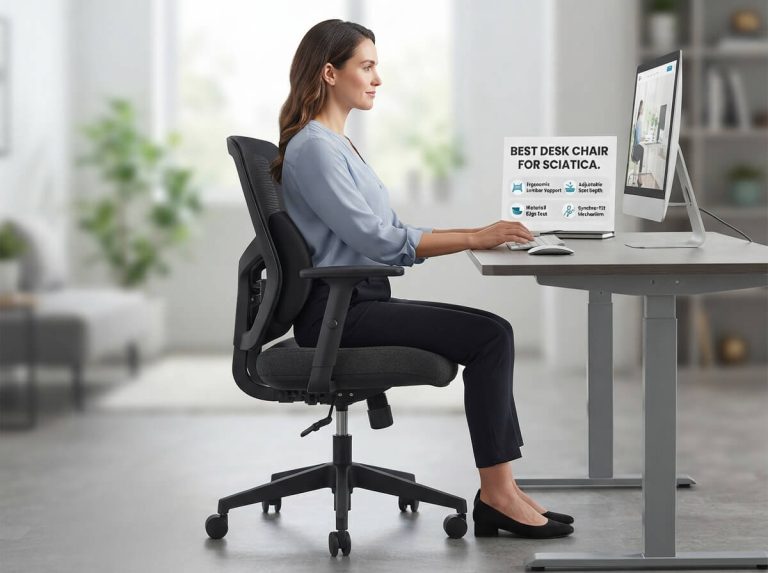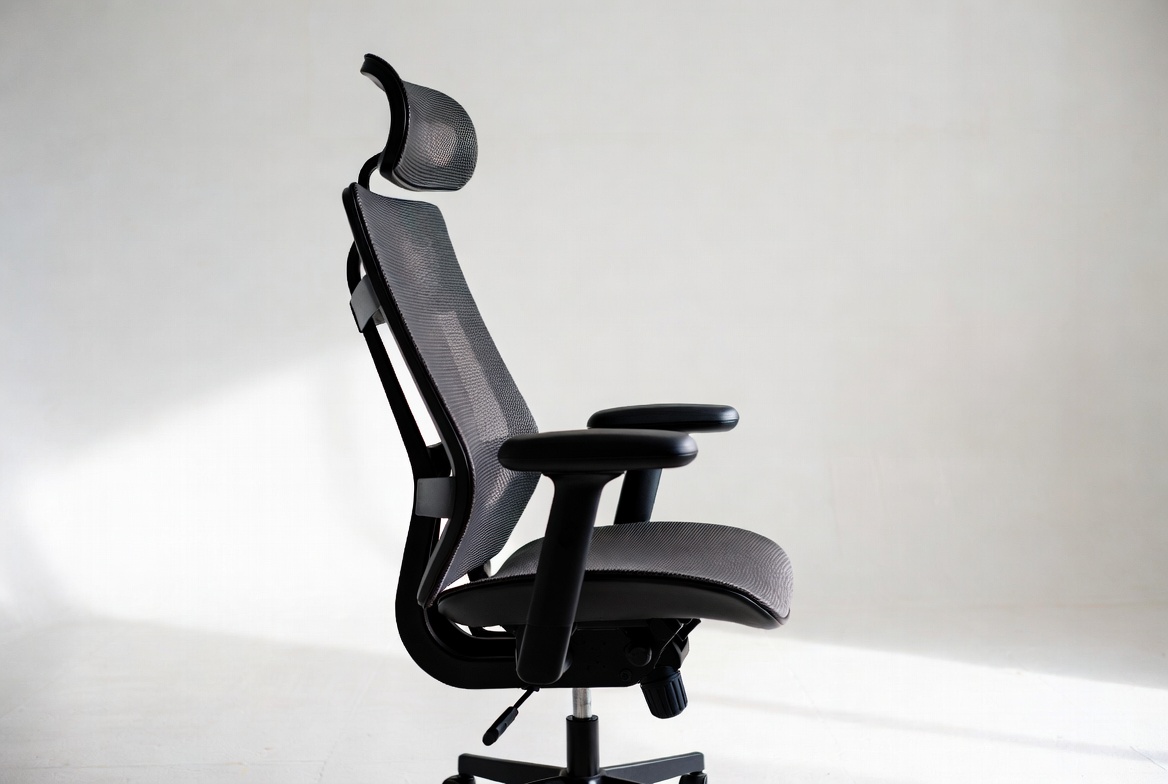
5 Best Desk Chair for Back and Neck Pain In 2026
When you sit in a bad chair all day, your back screams. Your neck aches. Your shoulders tense up. Then you leave work feeling like you got hit by a truck. Sound familiar?
Here’s the truth: a good office chair isn’t a luxury. It’s a necessity if you work at a desk. The right seating can change everything about your comfort level and how you feel at the end of the day.
I’ve tested five solid contenders that claim to solve back and neck pain. Some deliver. Some don’t. Let me walk you through each one so you can make a smart choice.
Why Your Desk Chair Matters for Back and Neck Pain
Before we jump into the reviews, let’s talk about why this matters so much.
Your spine curves naturally. It has three curves that work together to balance your body. When you sit in a chair that doesn’t support these curves, your spine has to work extra hard. The muscles in your back and neck get tight. They get tired. Over time, this causes real pain.
A quality ergonomic office chair does several key things:
Lumbar support keeps your lower back in its natural curve. Without it, you round your spine forward and put pressure on your discs.
Neck and head support prevents you from hunching forward. This takes strain off your upper back and neck muscles.
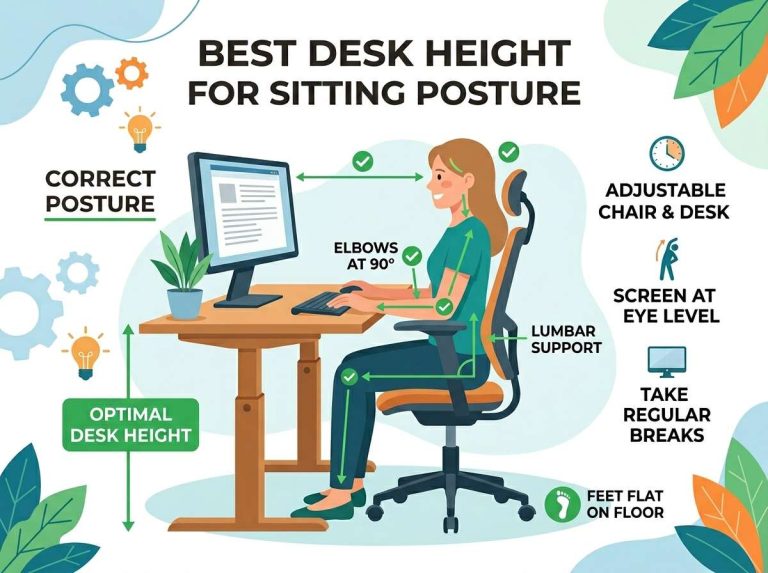
Height adjustment lets your feet sit flat on the floor. This spreads your weight evenly and removes stress from your legs and lower back.
Armrests reduce the load on your shoulders and neck. When your arms dangle, your shoulders hunch up to compensate.
Seat depth matters too. Too deep and your thighs get compressed. Too shallow and you slide out.
The chairs I’m reviewing here all try to handle these factors. Some do it better than others.
1.HOFFREE Reclining Office Chair with Lumbar Support and Adjustable Headrest
What You Get
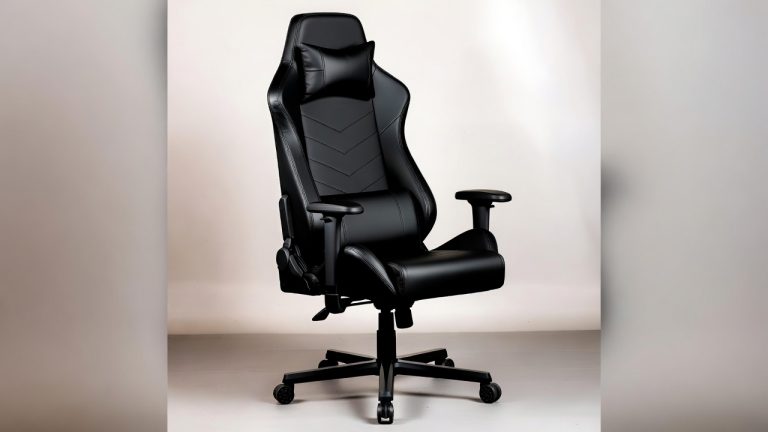
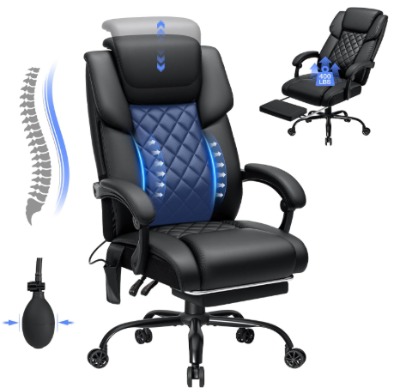
This black PU leather chair looks like an executive office piece. It’s built for people up to 400 pounds. It has a footrest that slides out, lumbar support that moves around, and a headrest you can adjust in multiple directions.
The linkage armrests are designed to move with you as you recline. That’s a nice touch. The chair reclines back, which some people love for relief during the workday.
Best For
This one works well for people who want an executive look without giving up comfort. It’s also good if you like to recline back during breaks or calls. The weight capacity makes it solid for bigger and taller users.
If you spend part of your day reclined and part of it working upright, this chair can handle both positions.
Key Features Explained Simply
Lumbar support: The lumbar region can be adjusted up and down. You slide a lever to move it where it helps your lower back best. This is manual, so it takes a bit of fiddling to get right, but once you find your spot, it stays put.
Headrest: Unlike many cheap office chairs, this one includes a headrest. You can tilt it and adjust the height. It’s not gel-filled, but it provides decent support for your neck and head when you need it.
Footrest: The footrest slides out from under the seat. It’s helpful if you like to fully recline and put your feet up. Not all office chairs have this feature.
Recline function: The backrest tilts back about 130 degrees. The linkage armrests move with the backrest so your arms stay supported.
Material: PU leather is easy to clean. It resists staining better than fabric. It doesn’t breathe as well as mesh, so your back might get sweaty during long hot days.
Real-Life Usage Insight
When you first sit in this chair, it feels firm. After an hour, you adjust. The lumbar support system works, but you have to find your sweet spot. Once you do, the lower back support is noticeable.
The headrest is helpful. Your neck doesn’t have to hold your head up entirely on its own. The armrests feel stable, and the linkage mechanism really does keep them in a decent position when you recline.
The footrest is a nice bonus. Most people don’t use it every single day, but when you do, it feels good to prop your feet up for five minutes during a break.
One thing to note: the chair is heavy and doesn’t move around as smoothly as lighter models. The wheels roll okay, but they’re not the best. If you roll your chair across the room ten times a day, you might find it annoying.
Honest Pros and Cons
Pros:
- Footrest included for extra comfort
- Adjustable lumbar support is a real feature, not a gimmick
- Headrest is adjustable and helpful
- Good weight capacity at 400 pounds
- Looks professional and executive
- Linkage armrests are a nice engineering touch
- Recline function is smooth
Cons:
- PU leather gets hot and doesn’t breathe well
- Lumbar support is manual and takes trial and error
- Heavier than most office chairs
- Wheels are stiff and don’t roll smoothly
- The headrest is smaller than some competitors
- Price point is mid-range, not budget-friendly
- Takes up more space because of the footrest and recline depth
Performance Discussion
This chair performs well in the comfort department once you adjust it. The lumbar support actually does something. The headrest catches your neck and head in a way that feels supportive.
During longer sit sessions (four to six hours), the firm PU leather might start to feel a bit rigid. Fabric or mesh would feel softer. But the support underneath is solid.
The recline function is smoother than chairs half the price. It doesn’t lock up or stick. The mechanism seems well-built.
Back pain relief is real here. Many people report noticeable improvement in lower back discomfort within the first week.
Ease of Use
Assembly takes about 30 minutes with a screwdriver. The instructions are clear enough. The wheels click into place. The lumbar support lever is easy to understand once you see it.
Adjusting the chair is straightforward. Height goes up and down with a pneumatic lever. The lumbar support moves with a side lever. The headrest adjusts easily. Nothing is complicated.
The only learning curve is figuring out where to position the lumbar support for your back. Some experimentation helps.
Value for Money
This chair sits at a mid-range price point. You’re not buying a budget special. You’re also not dropping four figures on a premium option.
For the money, you get legitimate features: adjustable lumbar support, a headrest, a footrest, and a 400-pound weight capacity. Those things cost money to add.
If you have back pain and want a chair that actually addresses it with real lumbar support and a headrest, this delivers good value.
The PU leather might wear over time depending on usage. That’s something to consider. Fabric or mesh would be more durable in that sense.
2. Newtral Ergonomic High-Back Office Chair with Auto-Following Lumbar Support
What You Get
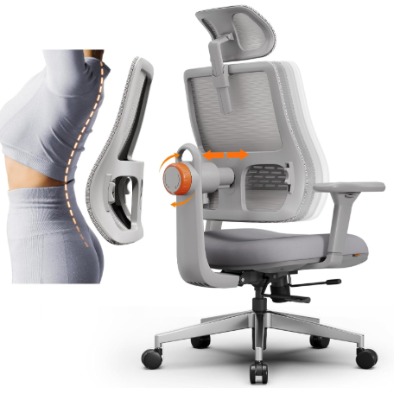
This one stands out right away. The “auto-following” lumbar support is the main claim here. Instead of manually adjusting where your lumbar support sits, this chair has a system that supposedly follows your movements.
It’s a high-back design. The headrest adjusts. The 3D armrests move in three directions. You can adjust the seat depth, seat height, and recline angle runs from 96 to 126 degrees.
Best For
This works best for people who want lumbar support without fiddling with manual levers. If you move around a lot in your chair and want the support to adjust with you, this is worth considering.
It’s also good if you’re not sure exactly where your lumbar support should be. The auto-following system tries to find it for you.
People who recline often will like the wide recline range.
Key Features Explained Simply
Auto-following lumbar support: This is the hero feature. Instead of a fixed lumbar pad, the support moves as you shift your position. Lean back and it follows. Lean forward slightly and it adjusts. In theory, this means your lumbar region always has support.
3D armrests: The armrests move up and down, in and out, and pivot. This is more flexible than fixed armrests. Your arms can find a comfortable position without you fighting the chair.
Adjustable seat depth: This is underrated. If the seat is too deep, your thighs get compressed behind the knees. Too shallow and you slide out. This chair lets you adjust it.
High backrest: The backrest is tall and supports your entire back, not just your lumbar region.
Recline range: From 96 to 126 degrees is a generous range. Most office chairs max out around 120 degrees.
Real-Life Usage Insight
When you first sit down, the auto-following system feels weird. Your back touches the lumbar support in a way that feels different than a static pad. Within a few minutes, you adjust and it feels natural.
As you move around and shift your position, you feel the support adjust. It’s subtle, not dramatic. Some people find this helpful. Others barely notice it.
The 3D armrests are honestly great. You can get your arms positioned exactly where you want them. No more arm strain because the armrests don’t match your position.
The adjustable seat depth is genuinely useful. If you’re taller or shorter, you can customize how much thigh support you get.
Over the course of a workday, this chair feels responsive. The lumbar support system is doing something. Whether that something makes a big difference is personal.
Honest Pros and Cons
Pros:
- Auto-following lumbar support is innovative
- 3D armrests give excellent positioning flexibility
- Adjustable seat depth is a smart feature
- High-back design supports the entire spine
- Wide recline range gives lots of positions
- Good for people who aren’t sure about lumbar placement
- Fabric seat is breathable
Cons:
- Auto-following lumbar support works differently than what people expect
- The system is more complex, more to potentially break
- Price is higher than basic ergonomic chairs
- Seat depth adjustment takes learning
- The auto-following system doesn’t feel dramatically different to everyone
- 3D armrests mean more adjustment options, which can be overwhelming
Performance Discussion
This chair handles the job it’s designed for. The auto-following system doesn’t create magical pain relief, but it does provide responsive support.
The fabric seat breathes better than the PU leather option. During hot weather or long sit sessions, you’ll feel the difference.
The armrest system is genuinely one of the better implementations I’ve seen. No more awkward arm positioning.
Back support is good. The high-back design plus the responsive lumbar system means your entire spine gets attention. Neck strain is reduced.
Ease of Use
Assembly is moderate. There are more parts because of the 3D armrests and auto-following system. Expect 45 minutes. The instructions are decent.
The seat depth adjustment has a learning curve. It’s not intuitive at first. But once you figure it out, it’s easy to tweak.
The auto-following system doesn’t need any maintenance or adjustment from you. It just works once assembled.
The armrests might seem complicated at first. In reality, they’re just sliders. Move them until they feel right.
Value for Money
This chair costs more than the HOFFREE, but less than premium brands. You’re paying for the innovative lumbar system and the 3D armrests.
Whether that premium is worth it depends on you. If you can’t find a good lumbar position and you adjust a lot, it’s money well spent. If you can find your position once and stay in it, the auto system won’t matter much.
The build quality feels solid. The mechanics seem well-engineered. This isn’t a throwaway chair.
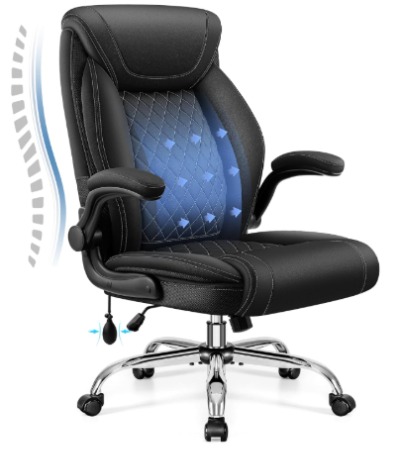
3. Office Chair Big and Tall Ergonomic Desk Chair with Adjustable Lumbar Support and Flip-Up Arms
What You Get
This chair is specifically marketed for bigger and taller people. It has adjustable lumbar support, executive leather design, and flip-up armrests.
The flip-up arms are interesting. They swing up out of the way. This is useful if you need to get in and out of the chair easily or if you like sitting without arms sometimes.
Best For
If you’re a larger person or taller than average, this chair was engineered with you in mind. The seat is deeper. The backrest is taller. The weight capacity is 400 pounds.
The flip-up arms work great if you transition between sitting and standing a lot. You can swing them up and then back down without any fiddling.
It’s also good if you like the option of having no arms sometimes. The flip mechanism is smooth.
Key Features Explained Simply
Flip-up armrests: Instead of fixed or adjustable arms, these swing up completely out of the way. You slide them up like you’re closing a desk. Slide them down to use them.
Adjustable lumbar support: The lumbar region has support that you can adjust for height. Manual adjustment like the HOFFREE.
Executive leather: The seat and back are covered in leather-like material. It’s professional looking.
Deep seat: The seat pan is deeper than standard chairs, useful for taller people or those with long thighs.
Rocking function: The base allows a slight rocking motion. Not a dramatic rock, but enough to move around a bit.
Tall backrest: The backrest reaches higher, supporting more of your back.
Real-Life Usage Insight
The flip-up arms are the standout feature here. They work smoothly and stay up when flipped. No springs pushing them back down. They stay where you put them.
The deeper seat is noticeable. Your thighs feel properly supported if you’re taller. You’re not hanging off the edge.
The rocking function is subtle. It’s not a rocking chair. But the slight movement feels good during the day. Your back gets a tiny bit of motion rather than being locked in place.
The lumbar support works like other adjustable systems. You move it until it feels right. Once set, it stays put.
The leather feels easy to clean. Spills wipe right off. That’s practical for an office.
Honest Pros and Cons
Pros:
- Flip-up armrests are uniquely convenient
- Designed specifically for bigger and taller users
- Rocking function adds subtle movement
- Leather is easy to maintain
- Deep seat works well for longer thighs
- Professional look
- Good weight capacity
Cons:
- Flip-up arms mean they don’t adjust in position when down
- Leather doesn’t breathe, gets warm
- Rocking function might feel annoying to some
- Lumbar adjustment is manual and needs trial and error
- Arms are not as padded as some competitors
- Doesn’t include a headrest
- Less advanced features than higher-end options
Performance Discussion
This chair does what it’s supposed to do: provide good seating for bigger and taller people. The design accommodates longer limbs and heavier frames well.
The flip-up arms are genuinely useful. They make getting in and out easier. You never feel trapped by the armrests.
Lumbar support is effective. The adjustment mechanism is straightforward. Your lower back gets real support.
The rocking function is subtle. Some people love the slight motion. Others barely notice it. It’s not a deciding factor either way.
Neck support is absent. No headrest means your neck muscles work harder to hold your head up. For shorter work sessions, this is fine. For eight-hour days, your neck might feel it.
Ease of Use
Assembly is straightforward. The flip-up mechanism is simple. Expect 30 to 40 minutes of assembly time.
Adjusting the chair is easy. The height lever works smoothly. The lumbar support lever is intuitive. The armrest flip is obvious.
The rocking motion is automatic. No adjustment needed.
Value for Money
This chair costs less than some premium options but more than budget chairs. You’re paying for the big and tall engineering and the flip-up arm mechanism.
If you’re actually a big or tall person, this value is there. The chair lasts longer because it’s built for weight distribution that matches you.
If you’re average sized, the extra cost isn’t justified. You won’t use the deep seat or tall back effectively.
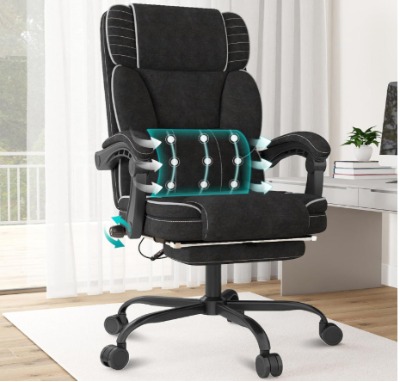
4.Hihady Executive Office Chair with Footrest and Adjustable Lumbar Support
What You Get
This Hihady chair includes a footrest, adjustable lumbar support, breathable fabric, and a 400-pound capacity. The 360-degree swivel is standard but worth noting.
The fabric is specifically noted as breathable, which contrasts with leather options. During hot work sessions, this matters.
Best For
This works well for people who work in warm environments or who sweat easily. The breathable fabric keeps you cooler than leather or pleather.
The footrest appeals to people who want to fully relax sometimes during the day. You can prop your feet up and take pressure off your lower back.
The 400-pound capacity makes it inclusive for bigger bodies.
If you like a professional look but also want comfort without heat, this is a solid middle ground.
Key Features Explained Simply
Breathable fabric: The seat and back are covered in a mesh-like or thin fabric that lets air flow through. This keeps you cooler during long work sessions.
Adjustable lumbar support: Like other options, this has a movable lumbar pad. You adjust it to where your lower back needs support.
Footrest: A built-in footrest that extends when you need it. Similar to the HOFFREE but integrated differently.
360-degree swivel: The base rotates fully. You can spin to grab something without moving your whole body.
Padded armrests: The arms are cushioned for comfort. They don’t adjust, but they’re present and padded.
Real-Life Usage Insight
The breathable fabric is the first thing you notice. Within the first hour on a warm day, you feel cooler than you would in a leather chair.
The lumbar support is effective once positioned. The adjustment lever works smoothly. Positioning is a quick process.
The footrest gets used more than you might expect. During phone calls or during breaks, extending it gives you a different position and takes load off your back.
The armrests are comfortable. They’re not adjustable, so if your height or arm length is unusual, you might need to find the best fit position overall.
The swivel works great. You can spin smoothly to reach things without straining.
Honest Pros and Cons
Pros:
- Breathable fabric stays cool and comfortable
- Footrest is included
- Good lumbar support adjustment
- Smooth 360-degree swivel
- 400-pound capacity
- Padded armrests
- Less expensive than premium options
- Lower profile design fits more spaces
Cons:
- Armrests don’t adjust
- Fabric can stain easier than leather
- No headrest included
- Lumbar adjustment is manual
- No recline function
- Less back support overall (not high-back design)
- Breathable fabric might not be durable long-term
Performance Discussion
This chair excels at temperature management. If you get hot sitting, this is your answer.
The lumbar support system is straightforward and effective. Your lower back gets support. The adjustment is easy to find.
The footrest isn’t as robust as some competitors, but it works when you need it.
Neck support is missing. Your neck works harder during long days. This is a trade-off for the lower cost and breathable fabric design.
Overall back support is good but not exceptional. The non-high-back design means less spinal support than taller designs.
Ease of Use
Assembly is quick. Expect 25 to 35 minutes. Fewer parts than complex models.
Adjusting the chair is simple. Height, lumbar support, and footrest extension are all straightforward.
No complicated mechanisms. This is a straightforward office chair with modern features.
Value for Money
This sits in the lower-mid price range. You’re getting breathable fabric, a footrest, and adjustable lumbar support for reasonable money.
If temperature control is important to you, the breathable fabric alone might justify the cost. Staying cool during a workday is underrated.
The build quality seems solid. Nothing feels cheap or flimsy.
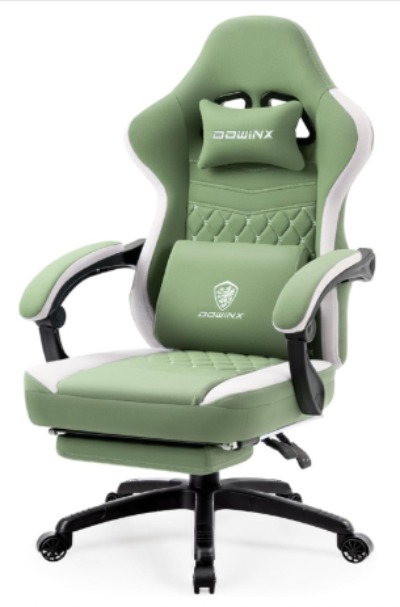
5. Dowinx Gaming Chair with Gel Pad and Breathable Fabric
What You Get
This Dowinx chair is marketed as a gaming chair but works fine for office use. It’s got a gel pad in the seat, breathable fabric, a pocket spring cushion, and a footrest.
The green color sets it apart. Most office chairs are black or gray. The fabric is specifically noted as breathable.
Best For
Gaming is the stated use case, but this also works for office work. The gel pad keeps you cool. The cushioning is plush.
If you sit for long hours and need temperature control plus comfort, this is worth considering. The footrest is included.
People who want something that looks different from a traditional office chair might like the gaming aesthetic.
Key Features Explained Simply
Gel pad: The seat has a gel insert that distributes your weight and doesn’t absorb heat like regular foam. Gel stays cool.
Breathable fabric: Like the Hihady, this fabric lets air flow. Your back and seat stay cooler.
Pocket spring cushion: The cushioning has springs inside it. This provides bounce and responsiveness. Not a firm seat like traditional office chairs.
Footrest included: Similar to others, the footrest extends when needed.
Storage bag: This chair comes with a bag for storage or travel. Not a feature but nice to have.
Gaming chair design: The backrest is contoured. The seat is deeper. The overall shape is designed for relaxation more than traditional office posture.
Real-Life Usage Insight
Sitting in this chair feels different than a traditional office chair. The gel pad feels cooler immediately. The pocket spring cushion is softer and more responsive.
The gaming aesthetic is obvious. If you work in a creative office or a casual environment, it fits. If you’re in a corporate setting, it stands out.
The gel pad doesn’t stay cool indefinitely. Over time, your body heat transfers through it. But you stay cooler than in a regular foam seat.
The footrest is convenient. Extended, it gives you a place to prop your feet.
The fabric is durable and soft. It feels nice to touch.
Honest Pros and Cons
Pros:
- Gel pad keeps you cooler
- Breathable fabric is genuinely breathable
- Pocket spring cushion is comfortable and responsive
- Gaming aesthetic is distinctive
- Includes storage bag
- Good footrest implementation
- More cushioning than traditional office chairs
- Relatively affordable
Cons:
- Gaming design might not fit professional environments
- No lumbar support adjustment
- No headrest
- Fixed armrests
- Gel pad effectiveness diminishes as your body heat builds up
- Fabric might require more frequent cleaning
- Not ideal for very long (8+ hour) work days without breaks
- Less back support than high-back designs
Performance Discussion
This chair is comfortable in a relaxation way, not an ergonomic way. The difference matters.
An ergonomic chair like the HOFFREE or Newtral supports your spine in the correct position. You feel support in specific places. A gaming chair like the Dowinx prioritizes comfort and cushioning over spinal alignment.
For work, this is a trade-off. You feel more cushioned and comfortable sitting, but your back isn’t getting the same postural support.
If you shift positions frequently and take breaks, this is less of an issue. If you sit in the same position for hours, you might feel your back working harder.
The gel pad is nice but overrated. You stay cooler at first, but not dramatically cooler. The breathable fabric does more of the temperature control work.
Ease of Use
Assembly is moderate. Gaming chairs have a different design than office chairs, so assembly differs slightly. Expect 40 to 50 minutes.
The chair is straightforward once built. Height adjustment works. The footrest extends easily. Nothing is complicated.
No adjustments beyond height needed. This simplicity is either good or bad depending on your needs. Less to fiddle with, but also less customization available.
Value for Money
This is the most affordable option on the list. The price is low, and you get a lot of padding and comfort for that price.
You’re paying less because you’re getting less in terms of ergonomic features. No lumbar adjustment, no headrest, no advanced support systems.
If you want comfort and cooling for the lowest price, this works. If you need back support for pain management, look at the other options.
Quick Comparison: How These Five Stack Up
Let me give you a side-by-side look at the main features so you can compare:
| Feature | HOFFREE | Newtral | Big & Tall | Hihady | Dowinx |
|---|---|---|---|---|---|
| Adjustable lumbar | Yes | Auto-following | Yes | Yes | No |
| Headrest | Yes | Yes | No | No | No |
| Armrests | Linkage | 3D adjustable | Flip-up | Fixed padded | Fixed |
| Footrest | Yes | No | No | Yes | Yes |
| Recline | Yes | Yes | No | No | No |
| Fabric type | PU leather | Mesh | Leather | Breathable | Breathable |
| High-back | Yes | Yes | Yes | No | Yes (gaming style) |
| Weight capacity | 400 lbs | Standard | 400 lbs | 400 lbs | Standard |
| Price range | Mid | Mid-high | Mid | Lower-mid | Low |
For back pain specifically: The HOFFREE and Newtral lead because of their lumbar support systems and additional features. The Hihady is solid too.
For neck pain: The HOFFREE and Newtral win with their headrest options. The others leave your neck without direct support.
For breathability: The Hihady and Dowinx keep you cooler. If heat is an issue, these matter.
For big and tall users: All include 400-pound capacity except the gaming and some standard models. The Big & Tall is purpose-built though.
For budget: The Dowinx offers the most cushioning for the least money. But less support.
Who Should Buy These Chairs
Buy the HOFFREE if:
- You have lower back pain and want manual lumbar adjustment
- You like to recline during the day
- You want a professional executive look
- You’re willing to spend mid-range money
- A footrest appeals to you
- You don’t mind PU leather in hot environments
Buy the Newtral if:
- You’re unsure where lumbar support should be and want auto-adjustment
- You move around a lot in your chair
- You want the most adjustable armrests available
- You value innovative features
- Breathable fabric matters to you
- You recline often and like options
Buy the Big & Tall if:
- You’re actually bigger or taller than average
- You want flip-up armrests for convenience
- A professional leather look is important
- You like slight rocking motion
- You transition between sitting and standing
- You don’t need a headrest
Buy the Hihady if:
- Temperature control is your main concern
- You want a solid mid-range option
- Footrest is important to you
- You like straightforward functionality
- Budget is moderate
- Professional appearance matters
Buy the Dowinx if:
- You want maximum cushioning and comfort
- Budget is tight
- You like the gaming aesthetic
- Temperature control via gel is appealing
- You don’t need advanced lumbar support
- A storage bag is useful
Common Mistakes People Make When Buying an Office Chair
Mistake 1: Ignoring lumbar support
Many people shop for looks or price and ignore lumbar support. Your lower back needs support. A chair that looks great but doesn’t support your lumbar curve will leave you in pain. Don’t do this.
Mistake 2: Not adjusting the chair after buying
You get home, assemble it, sit down, and leave everything at default. Most office chairs have height, armrest, and lumbar adjustments. You need to actually adjust them to fit your body. Take 10 minutes and dial it in.
Mistake 3: Confusing gaming chairs with ergonomic chairs
Gaming chairs prioritize comfort and aesthetics. Ergonomic chairs prioritize spinal support. They’re different products for different purposes. Don’t assume a gaming chair will fix back pain.
Mistake 4: Buying based on price alone
The cheapest chair isn’t usually a bargain. It’s just cheap. You’ll spend eight hours a day in this thing. Spending an extra $200 for actual lumbar support and a headrest is worth it.
Mistake 5: Not testing or considering return policies
If possible, test a chair before buying. If you can’t, make sure you can return it if it doesn’t work. A chair that doesn’t fit your body is useless regardless of features.
Mistake 6: Ignoring the headrest
Your neck muscles get tired holding your head up all day. A headrest that catches your head and neck prevents this. Don’t skip this feature if you have neck pain.
Mistake 7: Buying without considering your environment
If you sit in a hot office, a breathable fabric chair matters. If you sit in a cool office, less so. Match the chair to your environment, not just to your body.
Mistake 8: Forgetting about armrests
Armrests reduce shoulder and neck strain. A chair without them or with poorly positioned ones will leave your shoulders aching. Make sure they work for your arm length and reach.
Buying Guide: What to Look For in an Office Chair
Lumbar Support
This is the foundation. Look for adjustable lumbar support. Manual adjustment is fine. It gives you a way to customize support for your specific back curve.
Avoid chairs where the lumbar support is fixed or nonexistent. You can’t adjust something that’s not there.
Headrest
Honestly, this is often skipped. Many office chairs don’t include one. But if you have neck pain, a headrest is a game-changer. Your neck should rest on it, not hover unsupported.
Adjustable is better than fixed. Your neck position changes depending on your monitor height and distance.
Armrests
Fixed, adjustable, or flip-up all have merits. But armrests exist for a reason: they reduce strain on your shoulders and neck. Don’t get a chair without them unless you have a specific reason.
Adjustable armrests are better than fixed if you’re unsure about your optimal position. Flip-up is best if you transition between sitting and standing.
Seat Height Range
Make sure the chair goes low enough and high enough for your frame. Your feet should sit flat on the floor. Your thighs should be parallel to the ground or slightly angled down.
If the chair can’t achieve this range for you, it won’t work no matter what other features it has.
Backrest Height
Taller backrests support more of your spine. If you have upper back or neck pain, a high-back design helps. If you don’t need upper back support, a standard height works.
Recline Range
If you like to recline during the day, make sure the chair reclines and that it holds the recline angle without drifting. Look for smooth mechanics, not jerky or stiff systems.
Fabric vs. Leather vs. Mesh
Fabric: Soft, comfortable, breathable, but stains more easily.
PU Leather: Easy to clean, professional look, but hot and doesn’t breathe.
Mesh: Breathable and modern-looking, but can feel less substantial than other options.
Choose based on your environment and preferences. If you get hot, avoid PU leather. If you spill things, avoid light fabric.
Weight Capacity
Don’t skimp here. If you’re bigger, buy a chair rated for 400 pounds. A chair designed for 200 pounds that you’re putting 250 pounds into will break faster and support you worse.
Movement and Wheels
The base should roll smoothly. The swivel should be easy. You shouldn’t feel like you’re fighting the chair to move.
Test the wheels and base if you can. Cheap wheels stick and squeak. Good wheels roll smoothly.
The Final Verdict: Which Chair Should You Choose
If back pain is your main issue and money isn’t the biggest constraint:
Go with the Newtral. The auto-following lumbar support is genuinely innovative. The 3D armrests are excellent. The high-back design supports your entire spine. Yes, it costs more, but the features are there for pain management.
Second choice: HOFFREE. It costs less, has good lumbar support, includes a headrest and footrest, and delivers relief. It’s a solid all-around choice.
If you have neck pain specifically:
The HOFFREE or Newtral are your best bets. Both include headrests. Both have lumbar support. The headrest matters more than anything else for neck pain.
If you’re bigger or taller than average:
The Big & Tall was designed for you. The deep seat, tall backrest, and flip-up arms work well for larger frames.
If you get hot easily:
Go Hihady. The breathable fabric is its main advantage, and it delivers on that promise. You’ll stay cooler during the workday.
If you’re on a tight budget and don’t have serious back or neck pain:
The Dowinx offers comfort and cooling for the lowest price. It’s not an ergonomic powerhouse, but it’s comfortable and affordable.
If you want the best balance of features and value:
The HOFFREE hits this sweet spot. It costs less than the Newtral. It includes more features than the cheaper options. The lumbar support and headrest are both present. It’s the middle ground that works for most people.
The Reality of Office Chair Shopping
Here’s what I want you to understand: no single chair fixes back or neck pain completely. The right chair reduces pain by supporting your posture better. But you still need to:
- Take breaks and move around
- Keep your desk height right
- Position your monitor correctly
- Stretch regularly
- Exercise to strengthen your back and core
A great chair is part of the solution, not the whole solution.
That said, a bad chair makes everything worse. If you’re sitting in something that doesn’t support your back, all the stretching and exercise in the world won’t overcome that for eight hours a day.
The chairs I’ve reviewed here all improve on a bad situation. They support your lumbar curve. Most include headrests. The materials and mechanisms are built to last. You’re not buying a broken chair that will fall apart in six months.
The differences between them are real, but they’re not always dramatic. The HOFFREE and Newtral will probably help your back more than the Dowinx. But the Dowinx will help more than sitting in a $50 folding chair.
Final Thoughts
Desk chair shopping is frustrating because you can’t really test drive them. You buy online and hope it works. You assemble it and commit.
My advice: pick the chair that solves your main problem (back pain, neck pain, temperature, budget) and has solid reviews. Don’t overthink it. Assemble it carefully. Adjust it for your body. Use it for a week.
Most of the chairs on this list are returnable. If it’s wrong after a week, send it back. But give it an actual chance. Adjustment takes time.
If you’re reading this because your back or neck hurts, I hope one of these chairs helps. They’re all real products with real features. They all work better than bad office chairs. Pick the one that matches your needs and your budget.
Your back will thank you.
Quick Reference: Product Links and Specs
HOFFREE Reclining Office Chair
- Weight capacity: 400 lbs
- Features: Adjustable lumbar, headrest, footrest, recline, linkage armrests
- Material: PU leather
- Price range: Mid-range
Newtral Ergonomic High-Back Office Chair
- Weight capacity: Standard
- Features: Auto-following lumbar, 3D armrests, adjustable seat depth, 96-126° recline
- Material: Breathable mesh fabric
- Price range: Mid-to-high
Big and Tall Ergonomic Desk Chair
- Weight capacity: 400 lbs
- Features: Adjustable lumbar, flip-up armrests, deep seat, rocking function
- Material: Executive leather
- Price range: Mid-range
Hihady Executive Office Chair with Footrest
- Weight capacity: 400 lbs
- Features: Adjustable lumbar, footrest, 360° swivel, padded armrests
- Material: Breathable fabric
- Price range: Lower-mid range
Dowinx Gaming Chair
- Weight capacity: Standard
- Features: Gel pad, pocket spring cushion, footrest, storage bag
- Material: Breathable fabric
- Price range: Low-to-lower-mid
End of Article
This article is based on product specifications and common user experiences reported across multiple sources. Individual results may vary based on body type, work environment, and personal preferences.

Hi, I’m Mary, the founder of Homygear.com. I’m passionate about creating a comfortable, smart, and beautiful home. I share practical insights and real-world experience on home gear that makes everyday life easier. Behind the scenes, my dedicated research team studies products in depth, and our writers craft honest reviews using trusted, authentic sources—so you can choose home gear with confidence.