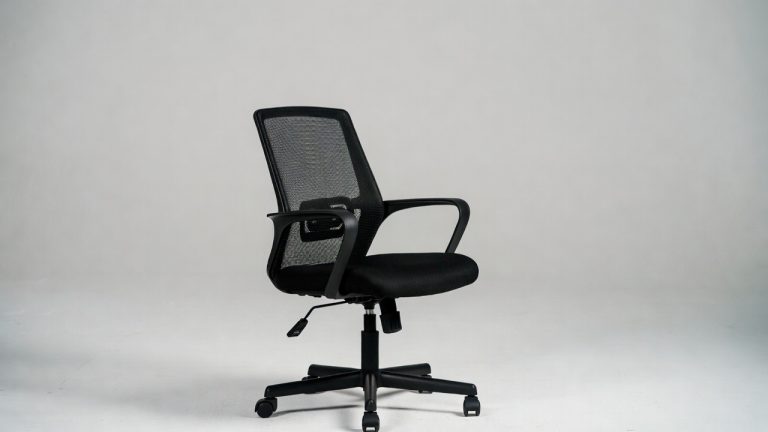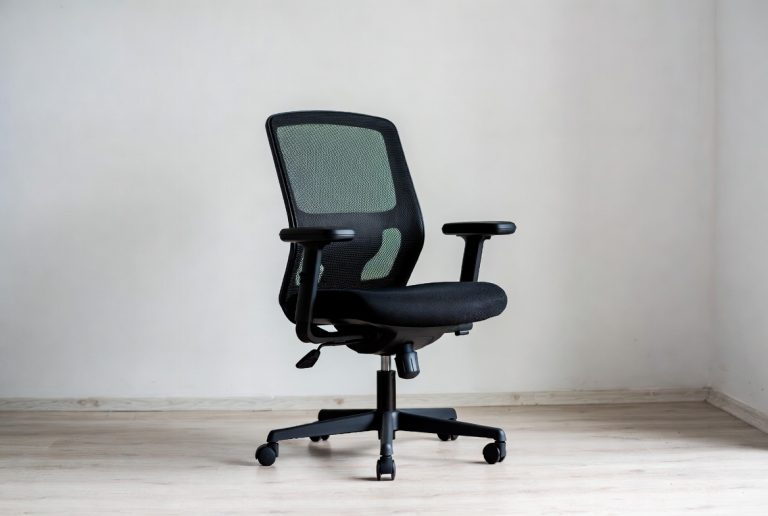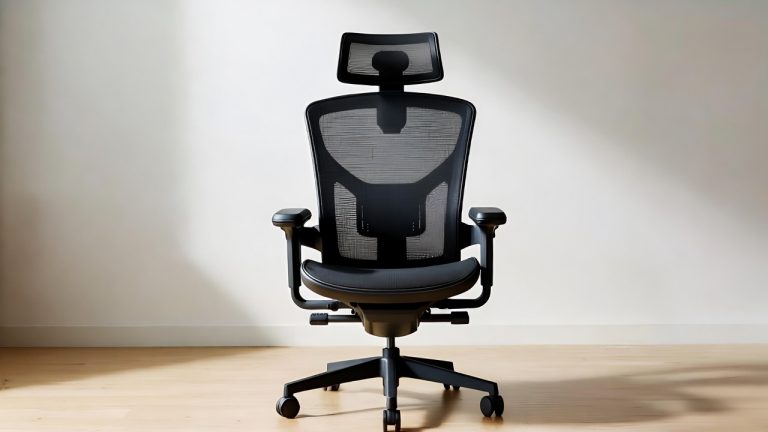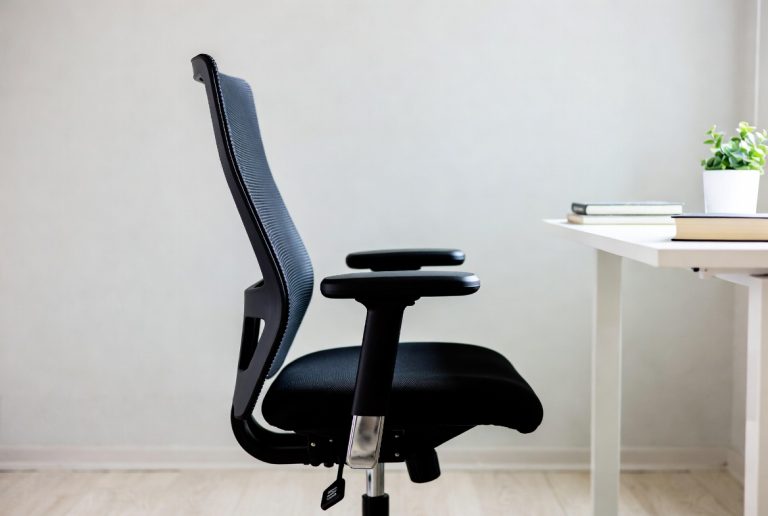
5 Best Desk Chair for Back Support In 2026
If you spend your days sitting in a cramped, uncomfortable chair, your back is probably screaming for help. A bad desk chair doesn’t just ruin your workday—it can cause real pain and lead to long-term health issues. The good news? Finding the best desk chair for back support is totally doable. You don’t need to settle for a chair that leaves you aching by 3 PM.
I’ve tested and reviewed five of the most popular ergonomic office chairs that actually deliver on their back support promises. Each one targets different needs, budgets, and body types. Let’s dive into what makes each chair special and help you find the right fit for your home office or workspace.
Why Back Support in Your Office Chair Actually Matters
Before we jump into the reviews, let’s talk about why this matters. Your lumbar spine curves inward naturally. When you sit in a slouchy chair, you lose that curve. Your lower back gets strained. Over time, this causes pain, stiffness, and posture problems that follow you everywhere—not just at your desk.
A good ergonomic office chair supports that natural curve. It keeps your spine aligned. It reduces pressure on your discs. It lets you sit comfortably for hours without that sharp pain or dull ache that ruins your focus.
The best office chairs for back pain don’t just feel good today. They protect your health tomorrow. That’s why investing in proper lumbar support matters so much.
1.Newtral Office Chair Ergonomic – Gray
What This Chair Is
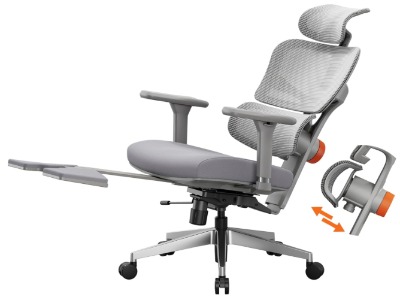
The Newtral Office Chair Ergonomic comes as a full-featured desk chair designed specifically for back support. It’s built for people who work from home and need serious comfort. The auto-following lumbar support is the star feature here—it adjusts as you move.
Who Should Buy This
The Newtral works great for people with existing back pain who spend 6+ hours daily at their desk. It’s also perfect for big and tall individuals (it supports up to 300 pounds). If you work from home and rarely leave your desk, this chair earns its spot.
Key Features Explained Simply
Auto-Following Lumbar Support: This means the lumbar support moves with your body. You don’t have to manually adjust it constantly. The padding changes position as you shift, keeping that lower back curve supported no matter how you sit.
Adjustable Seat Depth: Shorter folks sometimes find regular office chairs have too much seat. This one lets you slide the seat forward or backward so the edge doesn’t dig into your legs. Game-changer for shorter people.
Adjustable Height: Pretty standard but essential. You can raise or lower the entire seat to match your desk height perfectly.
Footrest Included: This is a nice bonus most chairs don’t include. Your feet stay flat, which takes pressure off your lower back. Proper leg support equals proper spine support.
Wide Seat: The cushion is spacious, so you don’t feel cramped. This matters more than people think.
Real-Life Usage Insight
Users report that the auto-following lumbar support feels natural. You don’t have to fight the chair or adjust constantly. People say they notice the difference first thing—their back doesn’t ache at the end of the day like it did in their old chair. The footrest gets genuine praise because it actually reduces fidgeting and helps you sit still longer.
One common observation is that the break-in period is short. Within a day or two, the padding settles and becomes even more comfortable. The chair feels less stiff once you use it regularly.
The Real Pros and Cons
Pros:
- Auto-following lumbar support means less manual adjustment
- Footrest is included (rare for this price point)
- Adjustable seat depth solves fit issues for various heights
- Great for plus-size and big and tall folks
- Back pain relief is noticeable within the first week
- Sturdy base feels stable
Cons:
- No headrest included (you’ll need to buy separately if needed)
- Armrests aren’t height-adjustable
- The seat cushion is firmer than some prefer
- No reclining function
- Takes up a decent amount of space
How It Performs Over Time
This chair holds up well. The lumbar support doesn’t lose its shape after a month or two of use. The mechanism stays responsive. Users report that the chair feels just as comfortable after six months as it did day one. That’s solid engineering.
The base and wheels stay stable without wobbling. Adjustments don’t become loose or squeaky.
Ease of Use and Setup
Assembly takes about 45 minutes with basic tools. The instructions are clear. Most people don’t need to call for help. Once assembled, adjusting features is intuitive. You can figure out the seat depth adjustment within seconds.
Value for Money
At this price point, you’re getting a lot. The auto-following lumbar support, footrest, and adjustable seat depth justify the cost. If you compare it to other ergonomic chairs with similar features, it’s competitive. You’re paying for function, not fluff.
2. OdinLake L1 Ergo Upgrade 518 Grey
What This Chair Is
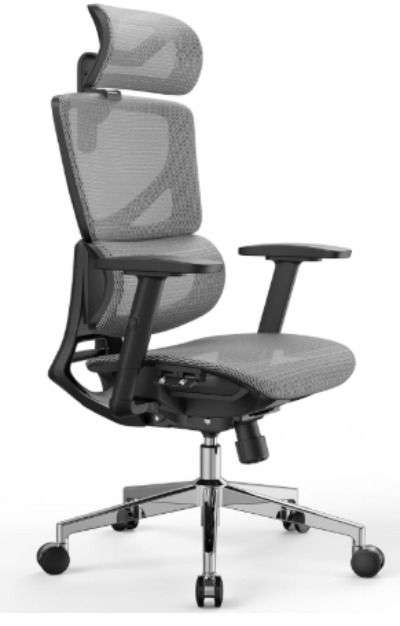
The OdinLake L1 is a serious heavy-duty ergonomic mesh office chair. It’s built tough with adjustable features practically everywhere. This is the chair you buy when you want maximum control over every aspect of your seating position.
Who Should Buy This
This chair works best for people who want to fine-tune every detail. If you’re big and tall (up to 350 pounds, which is impressive), this is your chair. It’s perfect for anyone who has back pain but needs to customize the support exactly right. It’s also great for people who sit for really long stretches and need maximum adjustability.
Key Features Explained Simply
Adjustable Lumbar Support: Not auto-following like the Newtral, but fully adjustable. You control the intensity and position of lower back support. This gives you precision.
Mesh Material: The backrest and seat use breathable mesh instead of solid padding. If you get hot when sitting, this keeps you cool. No sweaty back feeling.
Adjustable Headrest: Some chairs ignore the neck and head. Not this one. Your head and neck get support too. This prevents neck strain from looking at your monitor.
3D Armrests: You can adjust these up, down, in, and out. Your arms get proper support, which takes strain off your shoulders and upper back.
Adjustable Seat Depth: Like the Newtral, you can slide the seat forward and back. Proper thigh support is important.
Fixed Tilt Lock: You can lock the chair in place if you prefer no reclining. Some people like a solid, unmoving seat. This delivers that.
350-Pound Weight Capacity: Built heavy-duty. No wobbling even for larger folks.
Real-Life Usage Insight
Users absolutely love the mesh material. Reviews mention how much better it is than traditional padded chairs when you’re sitting all day. The chair stays cool and doesn’t feel sticky.
The adjustable headrest gets serious praise. People say it prevents the neck pain they used to get. The 3D armrests are another highlight—proper arm support changes everything for people with shoulder issues.
The lumbar support is firm but not uncomfortable. It’s designed to push your back into proper position, which takes getting used to if you’re coming from a slouchy old chair. But within a few days, it feels natural.
The Real Pros and Cons
Pros:
- Mesh material is breathable and stays cool
- Adjustable headrest prevents neck strain
- 3D armrests offer serious customization
- Heavy-duty construction feels solid
- 350-pound weight capacity (the highest here)
- Full lumbar support adjustment for precision
- Great for hot environments
- Looks professional and modern
Cons:
- More expensive than some alternatives
- Many adjustment options can overwhelm beginners
- The learning curve for getting everything perfect takes time
- Mesh can feel less cushioned than padded seats
- No footrest included
- Taller people might find the seat somewhat narrow
How It Performs Over Time
The mesh material doesn’t break down. It doesn’t get saggy or lose support. The adjustment mechanisms stay tight. Users report that this chair performs consistently after six months, a year, or longer. The fabric doesn’t pill or wear noticeably.
The base is industrial-grade. Wheels roll smoothly month after month.
Ease of Use and Setup
Assembly takes about an hour. There are more parts than the Newtral, but instructions are detailed. Once built, the adjustment learning curve is real. You’ll spend a few days tweaking positions to get it perfect. But once you dial it in, you don’t have to touch it again.
Value for Money
This is the premium option in this roundup. You pay more, but you’re getting industrial-grade construction and more adjustment options than other chairs. If you plan to use this chair for five years or longer, the cost per year comes down. It’s an investment.
3. Newtral Ergonomic Office Chair with Adaptive Lumbar Support
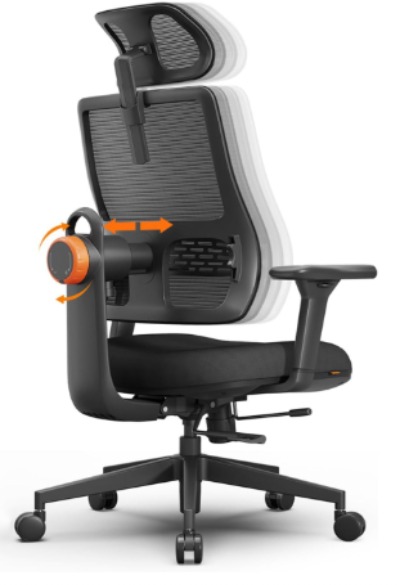
What This Chair Is
This is Newtral’s second offering in this roundup, and it’s different from the first model. This one has a focus on adaptive lumbar support paired with a headrest and 3D armrests. It’s designed for people who want comprehensive support across their whole body.
Who Should Buy This
This chair is perfect for people who have back pain plus neck or shoulder issues. If you spend long hours at a desk and need support everywhere, this is it. It works great for remote workers who basically live in their chair during the workday.
Key Features Explained Simply
Adaptive Lumbar Support: Newtral’s adaptive system moves intelligently with your spine. It’s smarter than a fixed support pad. As you shift positions, the support adjusts automatically.
Adjustable Headrest: Neck pain from a tilted head is real. This headrest adjusts up, down, and forward/backward. Your head gets proper support, which takes strain off your neck and upper back.
3D Armrests: Your arms and shoulders can rest properly. You’re not reaching or stretching to reach them. This prevents shoulder tension that ruins your back posture.
Adjustable Seat Depth and Height: Standard adjustments that matter. Proper thigh support and desk alignment are fundamental to good posture.
High Back Design: The backrest extends higher. This supports your whole back, not just the lower portion.
Real-Life Usage Insight
Users notice the difference immediately with the headrest. People say their neck feels less strained by the end of the day. The adaptive lumbar support gets compliments for feeling natural and responsive.
The 3D armrests prevent people from slouching toward their keyboard. When your arms are supported properly, your whole posture improves. Users report less shoulder tension overall.
People appreciate that this chair feels like it supports your entire back, not just one spot.
The Real Pros and Cons
Pros:
- Adaptive lumbar support is smooth and natural feeling
- Adjustable headrest is a huge help for neck pain
- 3D armrests solve shoulder strain
- High back provides comprehensive support
- Good for people with multiple pain areas
- Feels premium and well-made
- Adjustments are intuitive
Cons:
- More expensive than the first Newtral model
- No footrest included
- The seat cushion is firm (not soft)
- Takes time to adjust all features perfectly
- Larger footprint due to high back
- Not ideal for smaller spaces
How It Performs Over Time
The adaptive lumbar mechanism holds up well. It doesn’t lose responsiveness. The padding maintains its shape. After several months, this chair feels just as supportive as day one. Hinges and adjustments stay tight.
Ease of Use and Setup
Assembly takes about an hour. More complex than the first Newtral, but still straightforward. Once put together, adjusting each feature is pretty self-explanatory. You can figure out most adjustments just by trying them.
Value for Money
This is mid-to-premium pricing. You’re paying for the headrest, 3D armrests, and adaptive lumbar system. If you have pain in multiple areas (back, neck, shoulders), this focused approach justifies the extra cost.
4. COLAMY Ergonomic Mesh Office Chair
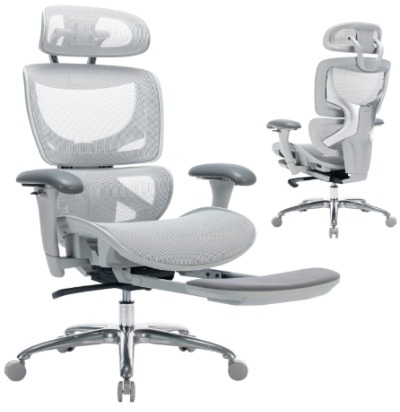
What This Chair Is
The COLAMY is a high-back ergonomic mesh office chair with a solid focus on breathability and support. It’s designed to be accessible pricing-wise while delivering real comfort features. This is a great middle-ground option.
Who Should Buy This
This chair works for people who want a good ergonomic chair without spending premium prices. It’s perfect for home office workers who don’t have huge budgets. Also great for people who want mesh material because they run warm while sitting. Anyone with back pain looking for an affordable option should consider this one.
Key Features Explained Simply
High Back Design: Supports your whole spine from lower back to upper back. You get comprehensive support instead of just lumbar focus.
Breathable Mesh: The fabric keeps you cool all day. You won’t overheat even during long sessions.
Adjustable Headrest: Neck support prevents strain from looking at your monitor. Your head stays in neutral position.
3D Armrests: Arms are supported properly. Reduces shoulder and upper back strain.
Lumbar Support: Fixed but effective. It supports the natural curve of your lower back without manual adjustment.
Footrest Included: Your feet have a place to rest, which improves circulation and reduces lower back strain.
Fixed Tilt Lock: You can keep the chair completely stable if you prefer.
Real-Life Usage Insight
Users love this chair’s breathability. People working in warm environments or who tend to sweat mention how much better they feel compared to their old padded chairs. The mesh is comfortable, not cheap-feeling.
The headrest helps people who were getting neck pain. The 3D armrests prevent slouching. The footrest is appreciated—that extra feature at this price point is nice.
People report that the chair feels sturdy despite the mid-range pricing. It doesn’t feel flimsy or cheap.
The Real Pros and Cons
Pros:
- Great price for the features included
- Breathable mesh is perfect for warm climates
- Footrest included
- Adjustable headrest is helpful
- 3D armrests are solid
- High back provides full spine support
- Feels more expensive than it is
- Easy to assemble
Cons:
- Fixed lumbar support (not adjustable)
- Less customization than premium options
- Mesh material can feel less cozy than padding
- Seat height range might not work for very tall people
- No seat depth adjustment
- Armrests are decent but not premium quality
How It Performs Over Time
The mesh holds up well. It doesn’t pill or tear easily. The padding underneath doesn’t compress excessively. Users report consistent comfort after six months of daily use. The construction is solid.
Ease of Use and Setup
Assembly is straightforward and takes maybe 40 minutes. No complicated parts. Instructions are clear. Once assembled, it’s ready to go. Minimal adjustment needed—just get the height and headrest right and you’re done.
Value for Money
This is the value champion of the roundup. You’re getting mesh, footrest, headrest, 3D armrests, and lumbar support at a lower price point than the premium options. If budget is important, this is hard to beat.
5.GABRYLLY Ergonomic Office Chair – Black
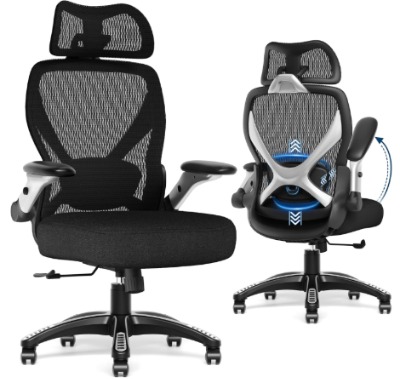
What This Chair Is
The GABRYLLY is a heavy-duty mesh office chair designed specifically for bigger bodies and longer sitting sessions. It’s built tough and wide. The 400-pound weight capacity means this chair won’t let bigger users down.
Who Should Buy This
This is the chair for plus-size and big and tall individuals who need serious support and capacity. If you’ve struggled to find chairs that safely support your weight, this one is made for you. Also great for anyone who wants the most durable mesh chair available.
Key Features Explained Simply
400-Pound Weight Capacity: This is the heaviest-duty option here. The frame and mechanism are built strong. No wobbling or creaking even for heavier users.
Wide Seat Design: The seat is noticeably wider than standard office chairs. You have room to move and get comfortable without feeling squeezed.
Adjustable Lumbar Support: You can adjust where and how strong the lower back support is. Your comfort settings are yours to control.
5D Armrests: This is the most adjustable armrest system in the roundup. Up, down, in, out, and forward/backward. Total arm customization.
Breathable Mesh: The whole chair breathes. You stay cool even during long sessions.
135-Degree Recline: You can lean back significantly. Some people like leaning back to rest their back. This gives you that option.
Heavy-Duty Construction: The frame doesn’t skimp. Everything is built to last with heavy daily use.
Real-Life Usage Insight
Users with larger frames consistently mention that this chair finally fits them properly. No more squishing into a too-small seat. The width is genuine relief.
The 5D armrest system gets praise for being truly customizable. People find the exact arm position that works for them. The 135-degree recline is appreciated by people who like to lean back occasionally.
Users report that the chair feels rock-solid. They don’t worry about the chair failing or getting worn out. Build quality gets serious compliments.
The Real Pros and Cons
Pros:
- 400-pound weight capacity (best here)
- Wide seat accommodates bigger frames
- 5D armrests are fully customizable
- Heavy-duty construction is exceptional
- 135-degree recline for versatility
- Breathable mesh material
- Can recline and rock
- Feels premium and solid
Cons:
- Most expensive option (premium price for premium durability)
- Larger footprint requires more space
- Heavier weight makes moving it challenging
- Multiple adjustments can be overwhelming at first
- Learning curve for getting everything dialed in
- Fixed headrest (doesn’t adjust)
- No footrest included
- Overkill for smaller-framed users
How It Performs Over Time
This is built to last. The mechanisms stay tight. The mesh doesn’t degrade. Users report that after a year of heavy use, the chair performs as well as day one. The build quality justifies the price tag.
Ease of Use and Setup
Assembly takes about 90 minutes because it’s more complex. There are more parts because of the heavier-duty construction. Instructions are clear though. Once assembled, adjusting the 5D armrests takes trial and error to get perfect. You need to spend time dialing everything in. But once you do, you have your perfect settings.
Value for Money
This is premium pricing for premium durability and capacity. If you’re a bigger-framed person, this is actually a value because most chairs won’t safely support you. The chair will last longer than cheaper alternatives. For heavy daily use, this is worth the investment.
Comparison Insights: Side-by-Side Analysis
Let’s break down how these five chairs compare across important categories.
Lumbar Support System
The Newtral Office Chair Ergonomic uses auto-following lumbar support, which is the most convenient. You don’t think about it.
The OdinLake L1 and GABRYLLY both have adjustable lumbar support, giving you manual control.
The Newtral with Adaptive Lumbar uses Newtral’s proprietary adaptive system, which is intelligent and responsive.
The COLAMY has fixed lumbar support, which is solid but not adjustable.
Winner for most support options: OdinLake and GABRYLLY (full control). Winner for convenience: Newtral Office Chair Ergonomic (auto-following).
Material and Breathability
The OdinLake, COLAMY, and GABRYLLY all use mesh material, which is great for temperature control.
The Newtral chairs use padded material, which feels more cushioned but can trap heat.
Winner for breathability: OdinLake, COLAMY, GABRYLLY. Winner for cushioning feeling: Newtral options.
Price-to-Feature Ratio
The COLAMY offers the best value. You get mesh, headrest, 3D armrests, footrest, and lumbar support at the lowest price.
The Newtral Office Chair Ergonomic is next. Good features at reasonable pricing.
The Newtral with Adaptive Lumbar is mid-range pricing for more comprehensive support.
The OdinLake L1 is premium but justified by industrial-grade construction.
The GABRYLLY is the most expensive but built for heavy-duty use and larger frames.
Winner for value: COLAMY. Winner for premium durability: GABRYLLY.
Adjustability and Customization
The GABRYLLY wins with 5D armrests plus adjustable lumbar support.
The OdinLake L1 comes second with 3D armrests, adjustable lumbar, and headrest.
The Newtral with Adaptive Lumbar is third with 3D armrests and adjustable headrest.
The Newtral Office Chair Ergonomic has less customization but doesn’t need much.
The COLAMY is good but has fewer adjustment options.
Winner for maximum customization: GABRYLLY.
Best for Specific Pain Points
Back pain specifically: All five work, but the Newtral Office Chair Ergonomic’s auto-following support is easiest to use.
Back and neck pain: The Newtral with Adaptive Lumbar or OdinLake L1 with headrest.
Back and shoulder pain: GABRYLLY with 5D armrests or OdinLake L1 with 3D armrests.
Hot/sweaty issues: COLAMY, OdinLake, or GABRYLLY (mesh material).
Budget-conscious with decent features: COLAMY.
Size and Space Considerations
The Newtral Office Chair Ergonomic is compact and takes less floor space.
The COLAMY is mid-sized.
The Newtral with Adaptive Lumbar is larger due to high back.
The OdinLake L1 is substantial but not huge.
The GABRYLLY is the largest due to wide seat and heavy-duty frame.
Winner for small spaces: Newtral Office Chair Ergonomic. Winner for maximum comfort space: GABRYLLY.
Buying Guide: How to Choose Your Chair
Buying an ergonomic office chair is a personal decision. Here’s how to think about it.
Step 1: Identify Your Main Pain Point
What hurts the most? Your lower back? Your neck? Your shoulders? Your answer matters.
If it’s lower back pain, focus on lumbar support quality. If it’s neck pain, prioritize a good adjustable headrest. If it’s shoulder strain, look at armrest options. If you have pain everywhere, you need a comprehensive chair with multiple support systems.
Step 2: Consider Your Body Type and Size
Are you average size, plus-size, or big and tall? Do you run hot or cold? Do you need a wide seat?
Bigger bodies need wider seats and higher weight capacity. The GABRYLLY’s 400-pound capacity is overkill if you weigh 180 pounds. But it’s perfect if you weigh 350 pounds.
If you run hot, mesh material is essential. If you prefer cushioning, padding works better.
Step 3: Think About Customization Needs
Do you like having tons of adjustment options to dial in the perfect position? Or do you prefer a chair that’s good out of the box with minimal tweaking?
The Newtral Office Chair Ergonomic is great if you want simplicity. The GABRYLLY is great if you want total control.
Step 4: Set Your Budget
Are you spending $200-300, $400-500, or $600+?
At $200-300, the COLAMY is the best choice.
At $400-500, the Newtral Office Chair Ergonomic or OdinLake L1 work well.
At $600+, the GABRYLLY or Newtral with Adaptive Lumbar are premium choices.
Step 5: Check Your Space
Measure your available floor space. Some chairs are wide, some are tall, some are deep. Make sure your chair fits your office setup.
The GABRYLLY is the widest. If you’re cramped for space, the Newtral Office Chair Ergonomic is more compact.
Step 6: Read Reviews for Your Specific Situation
If you have back pain like thousands of other users, read what they said about pain relief. If you sit in a hot room, read about how mesh chairs handle it. Your specific situation matters.
Common Mistakes to Avoid When Buying an Office Chair
Mistake #1: Ignoring Lumbar Support
Some people buy cute chairs or cheap chairs and ignore the back support. This is short-term thinking. Your back suffers. Lumbar support should be the first thing you check, not the last.
Mistake #2: Buying Based on Reviews Without Considering Your Body
A chair that’s perfect for a 150-pound person might be terrible for a 250-pound person. Weight capacity and width matter. Read reviews from people with similar body types to you.
Mistake #3: Choosing Looks Over Function
Office chairs look different, but comfort matters infinitely more than aesthetics. Buy the chair that supports your back, not the chair that matches your desk.
Mistake #4: Not Trying Before Buying
If possible, sit in the chair before buying. Comfort is personal. What feels great to one person feels wrong to another. Online reviews help, but your own judgment matters most.
Mistake #5: Cheap Materials and Build Quality
The cheapest office chair on the market might be $150, but it’ll fall apart in a year. A $400 chair will last five years. The cost per year is actually cheaper with the better chair.
Mistake #6: Ignoring Seat Depth and Height Adjustment
If the seat is too deep or too shallow for your body, your thighs won’t be supported properly. This creates back strain. Make sure the chair adjusts to your body.
Mistake #7: Forgetting About Headrest and Armrests
Lower back support is important, but if your neck and shoulders have no support, your whole posture suffers. A good chair supports your entire spine.
Mistake #8: Not Considering Heat and Sweating
If you sit in a warm room and sweat easily, a padded chair will feel gross by midday. Mesh material might be worth the trade-off in cushioning feel.
Who Should Buy Each Chair: Clear Recommendations
Buy the Newtral Office Chair Ergonomic If:
- You want auto-following lumbar support (least manual adjustment)
- You have a budget around $400-500
- You want a footrest included
- You prefer a more compact chair
- You value simplicity over maximum customization
- You’re plus-size or big and tall (up to 300 pounds)
Buy the OdinLake L1 Ergo Upgrade 518 If:
- You want maximum adjustability across lumbar, armrests, and headrest
- You run hot and need mesh material
- You don’t mind spending for premium construction
- You want to customize every detail to your exact comfort
- You want industrial-grade durability
- You’re not bothered by a larger footprint
Buy the Newtral with Adaptive Lumbar If:
- You have pain in multiple areas (back, neck, shoulders)
- You want a high-back chair for full spine support
- You like adjustable headrest and 3D armrests
- You’re willing to spend mid-to-premium pricing
- You value comprehensive support over simplicity
Buy the COLAMY If:
- Budget is your main concern (best value)
- You want mesh material and breathability
- You like having a headrest and 3D armrests
- You appreciate that footrest is included
- You don’t need extreme customization
- You want a good chair that’s easy to set up
Buy the GABRYLLY If:
- You’re plus-size, big and tall, or heavy (350+ pounds)
- You want maximum capacity and durability
- You like having 5D armrests for total arm customization
- You don’t mind spending for premium heavy-duty construction
- You want a chair that lasts years of heavy daily use
- You prefer mesh material
- You like being able to recline at 135 degrees
Performance Expectations and Timeline
When you first get your ergonomic office chair, here’s what to expect.
First Week
The chair might feel slightly firm. That’s normal. The padding adjusts. Within a few days, it softens slightly. Your body adjusts to the new posture. You might notice back pain getting better immediately, or it might take a few days.
Adjustment features might feel unfamiliar. That’s fine. Spend time tweaking settings. Your preferences become clear.
Weeks 2-4
The chair feels like it’s settling in. The padding is now at its optimal comfort level. Your back pain should noticeably improve. You’re sitting in good posture all day without thinking about it.
The mechanisms are broken in now. Everything moves smoothly.
Month 2 Onward
This is when you realize whether you made a good choice. Your back feels better most days. Aches that were constant are now rare. Posture is naturally better because the chair supports correct alignment.
The chair feels like an extension of your workspace. You don’t think about being uncomfortable.
Value Retention and Long-Term Durability
Good office chairs hold up. Here’s what to expect.
Year 1
The chair performs like new. All adjustments work. Padding is comfortable. No squeaks or wobbles.
Years 2-3
Premium chairs still perform excellently. Build quality shows. No real wear. Adjustments are still tight.
Cheaper chairs might start showing wear. Padding compresses slightly. Mechanisms might become slightly looser.
Year 4-5
Premium chairs like the GABRYLLY and OdinLake are still solid. Mid-range chairs like the COLAMY are still good but showing some age. Budget chairs are ready for replacement.
Year 5+
Premium chairs still work great. You’re past the point where they’ll fail anytime soon. A good office chair can last 7-10 years easily.
The cost per year of use becomes very cheap with high-quality chairs.
Final Verdict: The Best Desk Chair for Back Support
There isn’t one single “best” chair for everyone. Your needs are unique. But here’s how I’d rank these based on different priorities.
Best Overall Back Support
Winner: Newtral Office Chair Ergonomic
The auto-following lumbar support is unmatched. Back pain relief is quick and noticeable. The included footrest is a bonus. It’s the most straightforward chair to use while still delivering serious back support.
Best for Multiple Pain Areas
Winner: Newtral with Adaptive Lumbar
If your back, neck, and shoulders all hurt, this chair addresses all three with adjustable headrest, 3D armrests, and adaptive lumbar support. Comprehensive support for comprehensive pain.
Best Value
Winner: COLAMY
You get mesh, headrest, 3D armrests, footrest, and lumbar support at the lowest price. The features-to-cost ratio is unbeatable. Budget-conscious shoppers should start here.
Best for Big and Tall
Winner: GABRYLLY
The 400-pound capacity and wide seat make this the clear choice for bigger bodies. It’s built to last years of heavy use. If you’ve struggled to find chairs that fit, this one fits.
Best Premium Choice
Winner: OdinLake L1
Industrial-grade construction with maximum adjustability. Breathable mesh stays cool. Every adjustment is customizable. If budget allows, this is the chair for someone who wants the best of everything.
Conclusion: Stop Suffering in Your Old Chair
Sitting with a bad chair isn’t just uncomfortable. It affects your health, your productivity, and your mood. Back pain from poor seating is completely preventable with the right chair.
All five chairs in this roundup actually work. They’re not gimmicks. People with real back pain get real relief. The question isn’t whether you should upgrade—it’s which chair fits your needs and budget.
The Newtral Office Chair Ergonomic is my top recommendation for most people. It delivers serious back support, includes helpful features like a footrest, and won’t break your budget. Back pain relief starts within days.
If you have specific needs—big and tall frame, multiple pain areas, hot environment, or extreme durability requirements—one of the other four chairs is your answer.
Stop accepting back pain as normal. Stop slouching in an uncomfortable chair. Get a chair built for back support. Your spine will thank you. Your productivity will improve. Your workday will feel less painful.
The investment in a good ergonomic office chair is the best investment you can make in your home office and your health. Pick one, get it set up, and start feeling better today.

Hi, I’m Mary, the founder of Homygear.com. I’m passionate about creating a comfortable, smart, and beautiful home. I share practical insights and real-world experience on home gear that makes everyday life easier. Behind the scenes, my dedicated research team studies products in depth, and our writers craft honest reviews using trusted, authentic sources—so you can choose home gear with confidence.