How High Should a Desk Be for Gaming?
Gaming sessions can stretch for hours, and if your desk sits at the wrong height, your body will pay the price. Neck pain, back problems, and wrist strain can sneak up on you when you least expect it. The good news? Finding the right desk height for gaming isn’t complicated, and once you set it up correctly, you’ll notice an immediate difference in how you feel and how well you perform.
Let me walk you through everything you need to know about gaming desk height so you can create a setup that actually feels good.
Why Desk Height Matters for Gamers
Your gaming desk height affects more than just comfort. It shapes how your body sits, moves, and feels during those intense gaming marathons. A desk that’s too high forces your arms up, creating tension in your shoulders and neck. A desk that’s too low makes you hunch forward, which hurts your back and reduces your performance in competitive games.
The right height keeps your arms parallel to the ground when you rest them on your desk. This neutral position lets your muscles relax instead of constantly working to hold your arms up or down. When your muscles aren’t fighting against bad positioning, you can focus on the game instead of your aching body.
Gaming isn’t like regular office work. Gamers need quick reflexes, precise hand movements, and sustained focus. Any discomfort pulls your attention away from your screen and your gameplay. You’ll make mistakes, react slower, and ultimately play worse when your body feels stressed. That’s why nailing your desk height is one of the smartest investments you can make in your gaming setup.
The Standard Gaming Desk Height Rule
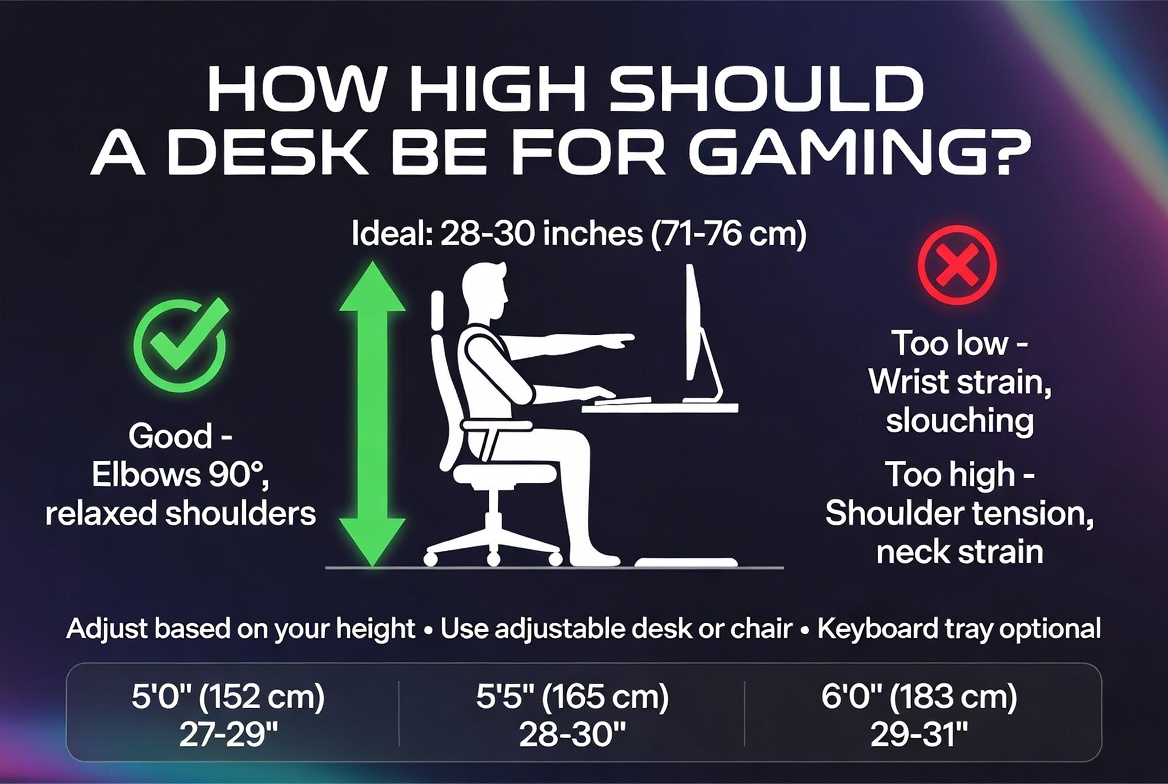
Here’s the basic rule that works for most people: your gaming desk should be between 28 and 30 inches high. This measurement is from the floor to the top surface of your desk where you actually rest your arms and mouse.
Most standard office desks sit right around this height, which is why so many people find them work well for gaming. The reason this height works? It aligns with the average person’s elbow height when sitting in a typical gaming chair.
That said, “most people” isn’t “you.” Your exact ideal height depends on several factors. If you’re shorter than average, you might need a desk closer to 26 inches. If you’re taller, you might want 32 inches or even higher. Your chair height plays a huge role too, since the desk and chair work together as a system.
Think of it this way: the desk height alone doesn’t matter. What matters is the relationship between your desk, your chair, and your body. Get that relationship right, and everything else falls into place.
How to Find Your Perfect Desk Height
The best way to figure out your ideal gaming desk height starts with your chair. Sit in your gaming chair with your feet flat on the floor. Your knees should bend at about a 90-degree angle. If your feet dangle or your knees push up too high, adjust your chair first before worrying about your desk.
Now that your chair height is locked in, rest your arms on the desk. Your elbows should bend at roughly 90 degrees as well. Your wrists should stay straight and neutral, not bent up or down. If you have to reach up or stretch down to hit your mouse and keyboard, the desk is the wrong height.
This is the sweet spot. Make a mental note of where the desk surface sits compared to your elbow. That’s the height you need.
Measure from the floor to the desktop surface to get your exact number. Write this down. If you ever need to replace your desk or gaming setup, you’ll know exactly what to look for.
Adjustable Desks for Gaming: The Game Changer
If you game for several hours at a time, you might want to consider an adjustable gaming desk. These desks let you move between sitting and standing positions, which changes everything about your gaming experience.
Sitting for four or five hours straight isn’t ideal for your body, no matter how perfect your desk height is. Blood pools in your legs, your back tightens up, and your circulation slows down. An adjustable desk lets you stand for part of your gaming session, which keeps your body fresh and energized.
Here’s how adjustable desks work for gaming: you set one height for sitting (usually around 28 to 30 inches) and another for standing (usually around 44 to 48 inches). When your back starts to feel tight after an hour or two, you press a button and the desk rises up. You can stand and game for another hour, then sit again when you’re ready.
The standing position also improves blood flow and engages different muscle groups than sitting does. Many gamers report that standing actually improves their focus and reaction times during competitive gameplay. You’re not slouching, so your posture naturally straightens out, and everything from your breathing to your concentration gets better.
Adjustable desks cost more than fixed desks, so this option isn’t for everyone. But if you take gaming seriously and spend long hours at your setup, the investment pays off through better performance and less body pain.
Monitor Height and Desk Height Work Together
Here’s something many gamers overlook: your monitor height is just as important as your desk height. They work as a team to create your overall gaming ergonomics.
Once your desk sits at the right height, position your monitor so the top of the screen is at or slightly below your eye level when you look straight ahead. The center of your screen should be about 15 to 20 degrees below horizontal eye level.
This setup keeps your neck in a neutral position. You’re not looking down hard, and you’re not craning your neck up. Your head stays balanced over your spine instead of leaning forward, which is what happens when your monitor sits too low.
Many gaming setups fail because gamers focus only on the desk height and ignore the monitor. You can have the perfect desk height, but if your monitor hangs too low or too high, you’ll still end up with neck pain and poor posture.
Invest in a monitor arm that lets you adjust height and angle. These arms mount to your desk or wall and hold your monitor exactly where you need it. Once you dial in the right position, leave it there. Your neck will thank you for it.
Gaming Chair Height and Desk Height Sync
Your gaming chair is the foundation of your entire setup. Everything else builds on top of it.
Start by setting your chair to the right height. Sit down and check that your feet rest flat on the floor or a footrest. Your thighs should be parallel to the ground, not angling down or up. This position keeps your legs from going numb during long sessions and prevents blood pooling in your feet.
Once your chair height is set, that’s when you measure your desk height. Never adjust your desk height first and then force your chair to match. Your body comes first. The desk should accommodate your sitting position, not the other way around.
If your chair has armrests, make sure they sit at about the same height as your desk surface. Your arms should rest on both the armrests and the desk without forcing your shoulders up or down. If your armrests sit too high, they’ll push your shoulders up and create neck tension. If they sit too low, they won’t provide support.
Some high-end gaming chairs let you adjust the armrests in multiple directions. This is a huge advantage because it means you can perfectly match your desk height and minimize arm and shoulder strain.
Desk Depth Matters Too
While we’re talking about desk dimensions, let’s cover desk depth. Your gaming desk should be deep enough that you can position your monitor at a proper viewing distance without it hanging off the edge.
Most gaming desks range from 24 to 30 inches deep. A 24-inch depth works fine if you only use a keyboard and mouse. But if you have a large monitor or use multiple screens, go deeper. You want at least 18 to 24 inches of space between your eyes and the monitor for comfortable viewing.
A desk that’s too shallow forces your monitor closer to your face than it should be. This causes eye strain and makes it harder to focus on your entire screen without moving your head. You end up leaning back in your chair to create distance, which throws off your entire posture and defeats the purpose of having the right desk height.
Depth becomes even more important if you have a full-size keyboard, mouse pad, and other gaming gear. You need room to move without your elbows hanging off the desk. Aim for at least 28 to 30 inches deep if you have the space.
How Desk Height Changes with Different Gaming Styles
Competitive gaming, casual gaming, and single-player games all feel different at your desk. Your ideal height might shift slightly depending on what you play.
For competitive shooters and fast-paced games, many pros prefer a slightly lower desk position. This lets them lower their chair a bit, which some players feel gives them better control and faster reflexes. The lower position also creates a more aggressive gaming posture that some people find helps them focus.
For casual gaming and long story-driven games, you might prefer a slightly higher desk position that encourages better posture. You’re not grinding for wins, so comfort matters more. A position that keeps your back straight and your neck neutral makes those long gaming marathons much more bearable.
For strategy games where you spend a lot of time clicking and reading text, a higher desk position that you could even stand at sometimes works great. These games don’t demand fast reactions, so you can focus on comfort and maintaining good circulation.
Try gaming at your current desk setup for a few days, then make small adjustments based on how it feels. You might find your ideal height is slightly different than the standard 28 to 30 inches, and that’s completely fine.
Common Desk Height Mistakes Gamers Make
Many gamers set up their desks all wrong without realizing it. Here are the mistakes I see most often.
First, people buy a gaming desk without checking the height. They assume all desks are the same, then wonder why their neck and shoulders hurt after gaming sessions. Always check the spec sheet or measure before you buy.
Second, gamers put their desk too high because they think it looks more professional or imposing. A desk that’s too high forces your arms up and creates shoulder strain. It doesn’t matter how impressive your setup looks if your shoulders are screaming in pain.
Third, people ignore their monitor positioning and focus only on desk height. Your monitor position is non-negotiable. If it’s wrong, even a perfectly positioned desk won’t save your posture.
Fourth, gamers leave their chairs at the wrong height and then adjust everything else to compensate. Start with the chair. Everything follows from there.
Fifth, people set up their desk and never adjust it again, even when it starts to hurt. Your body changes, your setup evolves, and your needs shift. Check your ergonomics every few months and make adjustments as needed.
Desk Pads and Wrist Support
Once your desk height is dialed in, think about comfort accessories that protect your wrists and hands.
A quality mouse pad with wrist support cushions your wrist and keeps it in a neutral position. This matters because your wrist position directly affects your arm, shoulder, and neck. A wrist rest that’s too thick forces your wrist down unnaturally. A pad that’s too thin provides no support. Aim for a wrist rest about half an inch thick that your wrist can sink into gently.
A keyboard wrist rest works the same way. It keeps your wrists straight as you type and type and type during gaming. Over time, proper wrist support prevents repetitive strain injuries that can sideline you from gaming.
These accessories are cheap compared to the discomfort and lost gaming time caused by wrist pain. They’re worth every penny.
Space and Comfort Around Your Desk
Your desk height only matters if everything around it supports good gaming. Make sure you have enough space to move your mouse arm freely. A cramped desk setup forces awkward movements and creates shoulder strain.
Your gaming chair should sit far enough from your desk that your knees don’t bump into the frame. You should be able to scoot back and stretch your legs without hitting anything. This space also lets you take short breaks where you stand up and move around.
Keep snacks, drinks, and distractions off your desk surface. A cluttered desk makes you lean forward to reach things, which throws off your posture. Everything you need regularly should sit within arm’s reach but not directly on your gaming surface.
Lighting matters too. A dim room makes you lean forward and squint, destroying your posture. Position a desk lamp or overhead light so you can see your entire gaming setup without glare on your monitor.
Your Body Will Thank You
Setting up your gaming desk at the right height feels like a small thing, but it makes a huge difference in how you feel and play. The standard 28 to 30-inch height works for most people, but your specific needs might be different. Take time to dial in your personal perfect height, and then stick with it.
Your desk height, chair height, monitor height, and overall posture all work together as a system. Get them all right, and gaming becomes more comfortable and more enjoyable. Ignore one element, and the whole system falls apart.
Start by checking your chair height, then adjust your desk to match. Position your monitor so it sits at eye level. Add wrist support and make sure you have room to move. These steps take maybe an hour total, and they’ll make every future gaming session feel better.
Long gaming sessions are hard on your body no matter what. But when your desk height is right, your body doesn’t fight against your setup. You stay comfortable, you stay focused, and you play better. That’s what a proper gaming desk setup gives you.
Take the time to get it right. Your back, your neck, and your gaming performance will all improve.

Hi, I’m Mary, the founder of Homygear.com. I’m passionate about creating a comfortable, smart, and beautiful home. I share practical insights and real-world experience on home gear that makes everyday life easier. Behind the scenes, my dedicated research team studies products in depth, and our writers craft honest reviews using trusted, authentic sources—so you can choose home gear with confidence.