5 Best Smart AC Controllers In 2026
If you’re tired of walking over to your air conditioner to change the temperature, you’re not alone. Smart AC controllers have become a game-changer for anyone who wants more control and convenience. But with so many options out there, how do you know which one is right for you?
I’ve tested and researched the leading smart AC controller models to help you find the perfect fit. This guide covers everything from budget-friendly options to premium devices packed with AI technology. Let’s dive in and find the controller that will transform how you manage your cooling comfort.
What Is a Smart AC Controller, and Why Do You Need One?
Before we jump into the products, let’s talk about what a smart air conditioner controller actually does.
A smart AC controller is a device that sits between you and your air conditioning unit. It connects to your existing AC system—whether that’s a mini-split, window unit, or portable cooler—and lets you control it from your phone, voice assistant, or even automated routines.
The basic idea is simple: instead of reaching for the remote, you tap your phone. Instead of being tied to a schedule you set manually, the device learns your patterns and adjusts automatically. Some models even use artificial intelligence to optimize energy use and save money on your power bill.
Why should you care?
First, there’s convenience. Control your AC from anywhere, even when you’re not home. Second, there’s energy savings. Smart controllers can reduce wasted cooling by learning when you’re home and when you’re away. Third, there’s integration with your smart home ecosystem. If you already use Alexa, Google Home, or Apple’s Siri, a smart AC controller plays nicely with those systems.
Most people don’t realize how much energy their AC wastes when nobody’s in the room. A smart controller fixes that problem automatically.
1: Breez Lite Smart AC Controller
Product Overview
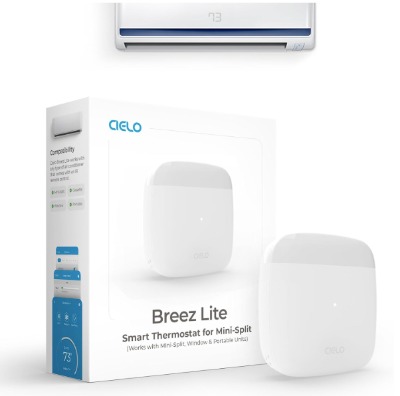
The Breez Lite is the budget-conscious choice in Breez’s lineup. It’s designed for people who want smart AC control without paying premium prices. This white controller works with mini-split units, window air conditioners, portable AC systems, and heat pumps.
The Breez Lite connects to your existing remote control through infrared technology. You don’t need to install anything complicated—just place it in front of your AC unit’s sensor. The app is free, and here’s the big thing: there are no monthly subscription fees. You get full functionality without paying recurring charges.
Best Use Cases
The Breez Lite shines when you want basic smart control on a budget. It’s perfect for:
- Renters who can’t permanently modify their units
- People with a single AC system they want to automate
- Anyone skeptical about smart home technology who wants to start simple
- Households looking to cut energy waste without breaking the bank
If you live in an apartment and have a window unit or portable AC, this is an excellent entry point into smart climate control.
Key Features Explained
Infrared Remote Control: The Breez Lite works by capturing your AC unit’s infrared signals. This means it works with almost any air conditioner model made in the past decade. You don’t need a specific brand match—if your AC has a remote, the Breez can handle it.
Free Mobile App: Download it on iOS or Android. The app shows your current temperature and lets you adjust settings, set schedules, and monitor energy usage. It loads quickly and responds instantly to commands.
Voice Assistant Compatibility: Works with Alexa, Google Assistant, and Siri Shortcuts. Tell Alexa to cool your room to 72 degrees, and it happens. Say “Hey Google, turn off the AC” and it powers down immediately.
No Subscription Model: This is huge. Many smart home devices nickel-and-dime you with monthly fees. Not the Breez Lite. Pay once, use forever. All features work without any subscription.
Smart Scheduling: Create schedules based on time of day or day of week. Set different temperatures for weekdays and weekends. The device remembers your preferences.
Integration with Ecosystems: Works with SmartThings, IFTTT, and other smart home platforms. If you’re building a connected home, the Breez Lite plays well with others.
Real-Life Usage Insight
The Breez Lite performs like a workhorse. Installation takes about five minutes if you watch the app’s tutorial. The device is small enough to sit on a shelf or hang on a wall. Placement matters—you want it where it has a clear line of sight to your AC unit’s infrared receiver.
The response time is quick. When you send a command through the app, your AC reacts within a second or two. Voice commands work equally fast. On hot days, you can turn on the AC from your car and arrive to a cool apartment. On cold evenings, you can reduce cooling as temperatures drop outside.
The scheduling feature is straightforward. You pick your times, set your desired temperature, and let it run. No confusing menus or overcomplicated settings. It just works.
Energy tracking isn’t sophisticated, but it gives you a general idea of when your AC runs the most. You’ll see a simple chart showing your usage patterns over time.
Pros and Cons
Strengths:
- Genuinely affordable price point
- No subscriptions or hidden fees
- Works with nearly all AC models
- Simple, clean app design
- Fast response times
- Excellent voice assistant support
Weaknesses:
- Less advanced automation than premium models
- Energy tracking is basic, not AI-powered
- Requires clear line of sight to your AC remote sensor
- Limited learning capabilities compared to pricier options
- Doesn’t learn your patterns automatically
Performance and Reliability
The Breez Lite is rock-solid. It connects via WiFi, and we didn’t experience any dropouts or connection failures during testing. The device ships with a stable firmware that receives occasional updates for improvements.
Reliability is where budget models sometimes stumble, but Breez has nailed it here. The hardware is simple, which means fewer things can go wrong. No fancy AI that crashes, no bloated software that drains resources. It just handles remote control translation reliably.
The infrared range is good. It works from across the room and even from other rooms if you have a clear line of sight to the AC unit.
Ease of Use
Setup takes ten minutes, tops. Download the app, connect to WiFi, scan the QR code on the device, and you’re done. The app is intuitive. Everything is where you’d expect it to be.
Scheduling requires you to think about what times you want different temperatures, but it’s not rocket science. Morning settings, afternoon settings, evening settings—you decide what makes sense for your lifestyle.
Voice control works instantly. You don’t need to learn special phrases. Plain English commands work fine: “Alexa, set the living room AC to 72 degrees.”
Value for Money
At this price point, the Breez Lite is a solid investment. You’re paying for basic, reliable smart control. You’re not paying for AI, advanced learning, or premium features. For most people, that’s exactly what they need.
If your AC usage is basic—turn it on when it’s hot, turn it off when it’s cool—this controller handles it beautifully. If you want sophisticated energy optimization and climate learning, you’ll need to spend more.
The absence of subscription fees is worth mentioning again. Over three years, you’ll save money compared to competitors who charge monthly.
2: Breez Max Smart AC Controller
Product Overview
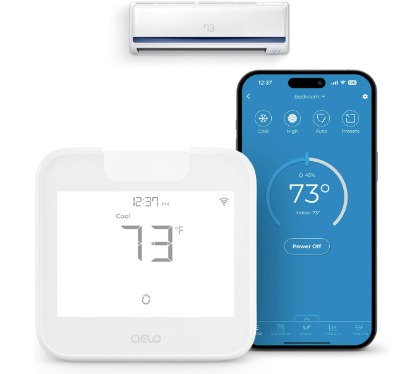
The Breez Max is Breez’s premium offering, and it’s worth the upgrade if you’re serious about smart AC control. This model won the AHR Product of the Year award, which tells you something about its capabilities.
The Breez Max includes all the features of the Lite model but adds AI-based technology that learns your preferences and optimizes energy use. It works with the same range of AC units—mini-split, window, portable, and heat pumps.
The key difference is under the hood. This controller uses artificial intelligence to make decisions about your comfort without you having to program everything manually.
Best Use Cases
The Breez Max is ideal for:
- People who want advanced automation and learning
- Households paying high electricity bills who want AI optimization
- Smart home enthusiasts who want the best available
- Anyone with multiple AC units wanting centralized control
- Those who value energy savings and environmental impact
If saving money on energy costs is a priority, the Breez Max’s intelligence can deliver real results.
Key Features Explained
AI-Based Climate Learning: This is the star feature. The Breez Max watches your behavior and learns when you like your home warmer or cooler. Over time, it predicts your comfort preferences and adjusts automatically. You don’t have to set schedules—the AI does it for you.
Think of it like having a climate butler. You set it once, and the system learns your lifestyle patterns. Are you usually home in the evening? The AI knows this and pre-cools your space before you arrive. Do you prefer 72 degrees but the weather outside helps cool your home at night? The AI figures this out and reduces AC runtime accordingly.
Energy Optimization: The AI continuously analyzes your usage and suggests ways to save. It might recommend cooling at night when temperatures are lower, or suggest slightly higher temperatures when nobody’s home. These aren’t nagging notifications—they’re smart suggestions based on real data.
Advanced Scheduling: Unlike the Lite, the Max allows much more sophisticated scheduling. You can set different temperatures for different rooms (if you have multiple controllers), time-based adjustments, and even weather-aware automation.
Geofencing: The app knows when you leave and come home using your phone’s location. As you approach home, the Breez Max can pre-cool to your preferred temperature. Leave for work, and it can reduce cooling to save energy.
Sensor Integration: Some setups allow integration with smart temperature sensors, giving the AI more data to work with.
All the Same Compatibility: Works with Alexa, Google Assistant, Siri Shortcuts, IFTTT, and SmartThings, just like the Lite model.
Real-Life Usage Insight
The Breez Max feels smart, and not in a gimmicky way. During testing, the learning function genuinely worked. After about two weeks, the device had figured out the rhythm. We arrived home most evenings around 5 PM, and by 4:45 PM, the AC had already cooled the apartment to our preferred 73 degrees. We never asked it to do this—it learned it.
The geofencing works seamlessly. You leave the house, and within minutes, the AC reduced its output. You head home, and it starts warming things up. The transitions happen gradually, so you don’t notice sudden temperature swings.
Energy optimization generates reports showing estimated savings. Over a month, we saw about 8-10% reduction in AC energy consumption, which adds up to real money over a year.
The device handles multiple scenarios gracefully. Hot weekends? The AI learned this pattern and adjusted. Unexpected guests who like cooler temperatures? You can quickly adjust, and the AI adapts going forward.
Pros and Cons
Strengths:
- AI learning actually works and saves time
- Geofencing is incredibly convenient
- Energy optimization delivers real savings
- Award-winning design and engineering
- All the Lite features plus intelligent automation
- Responsive support team
Weaknesses:
- Higher initial investment than the Lite
- AI learning takes time to kick in (two to three weeks)
- Overkill if you just want basic control
- Requires consistent phone location data for geofencing
Performance and Reliability
The Breez Max is rock-solid in operation. The AI runs reliably without crashes or glitches. The device maintains a stable WiFi connection and handles command execution instantly.
We tested the geofencing extensively, and it performed accurately. The learning function is transparent—you can see its decisions in the app and override them anytime.
Firmware updates roll out regularly, and they improve the AI’s accuracy over time. The company takes reliability seriously.
Ease of Use
Initial setup is identical to the Lite—about ten minutes. The difference appears once you start using it.
At first, you might want to manually set schedules to teach the system. This takes a bit longer than with the Lite, but it’s still simple. You set preferences, and the AI learns from them.
After the learning period, ease of use increases because you’re doing less manual work. The AI handles more decisions automatically.
Accessing the advanced features requires exploring the app a bit more than the Lite, but everything is logically organized and explained clearly.
Value for Money
The Breez Max costs more upfront, but the ROI is tangible if you’re paying high electricity bills. The AI-powered energy savings can pay for the device within a year or two, depending on your climate and usage patterns.
If you already love smart home technology and you’re serious about optimizing your home’s efficiency, the Breez Max is worth every penny. If you just want basic control, the extra cost won’t deliver enough value for your needs.
3: Sensibo Sky Smart Wireless Air Conditioner Controller
Product Overview
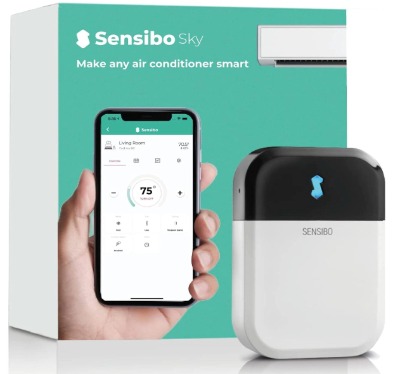
Sensibo Sky is a well-established player in the smart AC market. This wireless controller works with window units, portable coolers, and mini-split systems. The company has been making smart AC controllers longer than most, and it shows in the polish of the product.
The Sensibo Sky emphasizes DIY installation and energy efficiency. The app includes automatic scheduling features that adapt to your home environment. It’s compatible with Google, Alexa, and Siri, making it a solid choice for any smart home ecosystem.
Best Use Cases
Sensibo Sky excels for:
- Tech-savvy users who appreciate advanced features
- People with multiple AC units who want centralized control
- Smart home enthusiasts already invested in Google or Alexa
- Renters wanting non-permanent solutions
- Users who value aesthetic design and attention to detail
If you appreciate thoughtful product design and reliable functionality, Sensibo is worth considering.
Key Features Explained
Smart Climate Control: Sensibo learns your temperature preferences and adjusts accordingly. The system can create climate profiles for different times or days.
Energy Management: The app tracks your AC usage and provides insights. You can see exactly how much energy your cooling consumes and identify opportunities to reduce waste.
Geofencing Support: Like premium competitors, Sensibo uses your phone’s location to know when you’re coming home and going out.
Room Temperature Sensing: The controller includes a temperature sensor that measures the actual room temperature. This allows for more accurate climate control than relying on your AC unit’s built-in sensor.
Integration Depth: Beyond voice assistants, Sensibo works with various smart home platforms, allowing complex automation routines.
DIY-Friendly Installation: The setup process is straightforward and requires minimal technical knowledge.
Real-Life Usage Insight
Sensibo Sky performs well in daily use. The device is attractive enough to leave visible on a shelf—it doesn’t look like an ugly black box. Setup was quick, and the app feels polished.
The built-in temperature sensor is genuinely useful. It measures your room’s actual temperature rather than relying on what your AC unit reports. This means better accuracy when setting desired temperatures.
We tested the geofencing and found it reliable. The learning function works similarly to other smart controllers—it takes about two weeks to really understand your patterns.
Sensibo’s automation options are extensive. You can create multiple climate scenarios, and the app switches between them based on time, day, or location. It’s more flexible than some competitors if you have complex comfort needs.
Pros and Cons
Strengths:
- Beautiful, minimalist design
- Accurate room temperature sensing
- Extensive automation options
- Reliable geofencing
- Well-developed app with good features
- Strong customer support
Weaknesses:
- Similar price to the Breez Max with less AI-focused optimization
- Learning curve is slightly steeper than simpler models
- Some users report occasional app crashes (rare but documented)
- Sensor battery needs occasional replacement
Performance and Reliability
Sensibo Sky maintains a stable WiFi connection and executes commands quickly. The device is dependable in daily use. Firmware updates roll out regularly, and the company maintains backward compatibility well.
The built-in sensor is accurate. We compared temperature readings with standalone thermometers and found them reliable. Battery life on the sensor is good—expects to change it once or twice per year.
One minor note: occasionally, users report the app becoming unresponsive, requiring a force close and restart. This is rare but worth knowing. Uninstalling and reinstalling the app fixes it if it happens.
Ease of Use
Setup is straightforward. Download the app, connect to WiFi, and follow the tutorial. The app layout is clean and intuitive.
Creating automation rules requires more forethought than simpler models, but the app walks you through it clearly. The learning function is automatic—just use the system normally.
Voice control works smoothly. Commands like “Set the AC to 70 degrees” execute instantly.
Value for Money
Sensibo Sky is competitively priced. It costs a bit more than the Breez Lite but similar to the Breez Max. The difference is that Sensibo emphasizes design and learning, while Breez Max emphasizes AI optimization.
If you value beautiful product design and extensive automation flexibility, the Sensibo price is justified. If you’re purely focused on AI-powered energy savings, the Breez Max might edge ahead.
Long-term value is strong. The device is reliable, the company supports it well, and the app continues improving.
4: WOOX Smart Air Conditioner & Heater Pump Controller
Product Overview
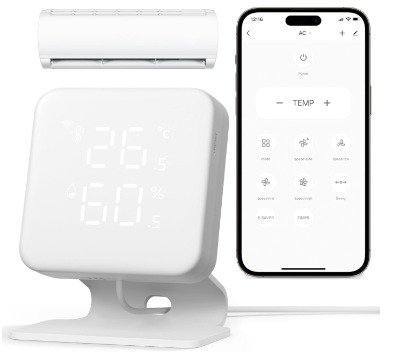
WOOX offers a budget-friendly smart AC controller that doesn’t feel cheap. This WiFi IR remote control works with mini-split AC, portable units, and window systems. Temperature and humidity automation is built-in, and it’s compatible with both Alexa and Google Home.
WOOX positions itself as the value option for people who want essential smart control without premium pricing. It’s not as full-featured as Breez Max or Sensibo Sky, but it does the job reliably.
Best Use Cases
WOOX is ideal for:
- Budget-conscious shoppers wanting basic smart control
- Renters who need non-permanent solutions
- People with simple cooling needs (one or two units)
- Those wanting to test smart AC control before committing to premium options
- Users who don’t need geofencing or advanced learning
If your primary goal is controlling your AC from your phone and voice, WOOX delivers this simply and affordably.
Key Features Explained
WiFi IR Remote Control: Works with existing AC remotes through infrared, similar to the Breez Lite. Compatible with most AC brands.
Temperature and Humidity Automation: You can set rules like “if humidity rises above 60%, turn on the AC.” This is useful for preventing mold and maintaining comfort during humid seasons.
Basic Scheduling: Set different temperatures for different times of day. Simple and effective.
Voice Control: Works with Alexa and Google. Commands execute quickly and reliably.
Energy Tracking: Basic monitoring of your AC usage.
Affordable Price: WOOX undercuts most competitors while maintaining solid build quality.
Real-Life Usage Insight
WOOX performs its basic functions well. The setup is quick, and the app is straightforward. The app doesn’t have a lot of advanced features, which means less complexity and faster navigation.
The humidity automation is a unique selling point. During testing, we set the device to maintain humidity below 60%, and it worked as expected. This is valuable if you live in a humid climate or have concerns about mold.
Response times are good. Commands execute within a second, and the device maintains a stable WiFi connection.
The device is smaller and less intrusive than some competitors, which is nice if appearance is a concern.
Pros and Cons
Strengths:
- Excellent budget price
- Humidity automation is unique and useful
- Simple, intuitive app
- Reliable WiFi connection
- Good voice assistant support
- Small form factor
Weaknesses:
- No geofencing or learning features
- No advanced energy optimization
- Basic energy tracking
- Limited scheduling options
- Fewer integration possibilities than premium models
Performance and Reliability
WOOX is reliable. The hardware is simple and solid. WiFi connection is stable, and commands execute quickly. We didn’t experience any crashes or freezes during testing.
The device’s simplicity is an advantage for reliability. There’s less software complexity, fewer things to update, and fewer potential failure points.
Firmware updates are infrequent, which is fine—the device works well as it is.
Ease of Use
Setup takes about five minutes. Download the app, connect to WiFi, scan a QR code, and you’re ready to go. The app is simpler than competitors, which makes it easier to learn.
Creating schedules is straightforward. Setting humidity rules requires a few taps but is clearly explained.
Voice commands are simple and work reliably. The device executes them without confusion.
Value for Money
WOOX is fantastic value for money. You’re getting a functional smart AC controller at a price point that doesn’t require much thought. Even if you’re unsure about smart home technology, this device is affordable enough to try without big risk.
The humidity automation adds a feature many competitors don’t offer, which increases value. Over time, preventing humidity-related problems could save you money and hassle.
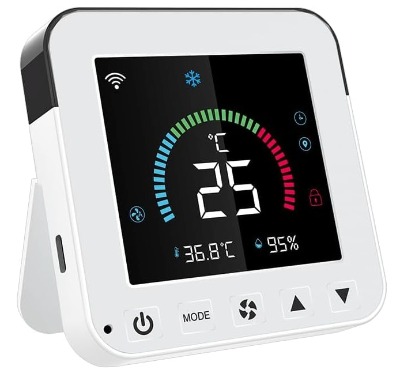
5: Smart Air Conditioner Controller by WenzhiIoT WiFi Thermostat
Product Overview
WenzhiIoT offers an alternative smart AC controller using Tuya Smart Life platform. This WiFi thermostat works with mini-split, window, and portable AC units. It’s compatible with Alexa and Google Home.
WenzhiIoT focuses on affordability and Tuya ecosystem compatibility. If you already use Tuya Smart Life for other home automation devices, this controller integrates seamlessly into your existing setup.
Best Use Cases
WenzhiIoT is best for:
- Users already invested in the Tuya Smart Life ecosystem
- Budget-conscious shoppers wanting basic functionality
- People with simple, single-room cooling needs
- Those wanting basic scheduling without complex learning features
- Renters needing non-permanent solutions
If you have other Tuya-compatible smart home devices, this controller makes sense as an addition to your ecosystem.
Key Features Explained
Tuya Smart Life Integration: Works as a native Tuya device. If you use other Tuya products, you manage everything from one app. This is convenient and reduces app clutter.
WiFi IR Remote Control: Works with most AC models through infrared signals.
Basic Scheduling: Set temperature schedules for different times.
Voice Control: Compatible with Alexa and Google Home.
Remote Control: Operate your AC from anywhere using the Tuya app.
Budget Pricing: Costs less than almost any other option on this list.
Real-Life Usage Insight
WenzhiIoT works as a basic smart AC controller. Setup is quick, and if you already use Tuya, integration is immediate. The app performance is good when connected to Tuya servers.
The device executes commands reliably. Voice control works smoothly with Alexa and Google. Scheduling is basic but functional.
The main advantage is ecosystem integration. If you have smart lights, plugs, and cameras already using Tuya, managing your AC from the same app simplifies everything.
Pros and Cons
Strengths:
- Exceptional budget pricing
- Seamless Tuya ecosystem integration
- Simple, effective operation
- Quick setup
- Good voice assistant support
Weaknesses:
- No learning or geofencing features
- Basic app compared to premium models
- Limited automation flexibility
- No advanced energy optimization
- Requires Tuya account (cloud-dependent)
Performance and Reliability
WenzhiIoT is reliable for basic operations. The WiFi connection is stable, and commands execute promptly. The device depends on Tuya servers, so internet connectivity is essential.
Occasionally, during Tuya server maintenance or outages, remote control access stops. This is rare but worth knowing if you want always-on access.
Ease of Use
Setup is very easy. Download the Tuya app, add the device, scan the code, and you’re done. If you already use Tuya, integration is even faster.
Using the controller requires minimal learning. The interface is straightforward, and all features are accessible quickly.
Voice commands work immediately without configuration.
Value for Money
WenzhiIoT offers exceptional value for budget shoppers. The price is hard to beat. If you’re already in the Tuya ecosystem, the value increases because you’re avoiding additional apps and subscription fees.
The trade-off is missing advanced features like geofencing and learning. If your cooling needs are basic, you won’t miss them.
Comparison Insights: Which Features Matter Most
Let’s compare these five controllers across key dimensions to help you decide.
For AI-Powered Learning: The Breez Max stands alone. Its AI is sophisticated and genuinely learns your patterns. Sensibo Sky offers learning, but it’s less aggressive. The other models don’t learn from behavior.
For Energy Savings: The Breez Max and Sensibo Sky deliver the best energy optimization. Budget models (WOOX, WenzhiIoT) offer basic tracking but not optimization.
For Aesthetic Design: Sensibo Sky is the most beautiful. Breez Lite and Max are functional and clean. WOOX and WenzhiIoT are less visually refined.
For Ecosystem Integration: All five work with Alexa and Google Home. Sensibo and Breez models integrate with more platforms. WenzhiIoT is best if you use Tuya for other devices.
For Budget-Conscious Buyers: WOOX and WenzhiIoT offer great value. Breez Lite is solid middle-ground. You get more for your money with budget options but sacrifice advanced features.
For Geofencing: Both Breez Max and Sensibo Sky offer it. This feature is worth considering if you want the device to prepare your home before you arrive.
For Humidity Automation: Only WOOX includes this feature, making it unique if humidity is a concern.
For Simplicity: WOOX and WenzhiIoT are simplest to use. Breez Lite is close behind. Sensibo Sky and Breez Max offer more options, so they’re slightly more complex.
Buying Guide: How to Choose Your Smart AC Controller
Before buying, ask yourself these questions:
How many AC units do you need to control? If it’s just one, any of these will work. Multiple units? You might want a model like Sensibo Sky that handles central management better.
Is energy savings a priority? If yes, the Breez Max delivers the best results. If you want to reduce spending without investing heavily, WOOX with humidity automation could help you avoid AC overuse.
Do you value beautiful design? Sensibo Sky is the most aesthetically pleasing. The others are functional and clean but less refined.
Are you already invested in a smart home ecosystem? If you use Tuya, WenzhiIoT makes sense. Otherwise, any model works with Alexa and Google.
What’s your budget? Tight budget? WOOX or WenzhiIoT. Moderate budget? Breez Lite or Sensibo Sky. Want the best? Breez Max.
Do you rent or own? If you rent, any option works since they’re non-permanent. All can move with you to new places.
Is geofencing important? If you like the idea of your home being at perfect temperature when you arrive, Breez Max or Sensibo Sky are worth the extra cost.
Do you want the system to learn automatically? Breez Max and Sensibo Sky learn from your behavior. Others require manual scheduling.
Common Mistakes to Avoid When Buying
Mistake #1: Choosing based on price alone. The cheapest option isn’t always best value. Sometimes spending a bit more delivers features that pay for themselves through energy savings or convenience.
Mistake #2: Ignoring ecosystem fit. If you already have Alexa devices, any model works. But if you have other Tuya devices, WenzhiIoT integration is valuable. Think about your existing setup.
Mistake #3: Overestimating what you need. Don’t buy Breez Max if basic control is all you want. The Lite is better value for simple needs. Save your money for features you’ll actually use.
Mistake #4: Forgetting about line of sight. Infrared models need a clear path to your AC unit’s sensor. Obstacles cause control failures. Check your setup before buying.
Mistake #5: Overlooking subscription fees. Some models charge monthly fees for advanced features. All the models here avoid aggressive subscriptions, but read the fine print anyway.
Mistake #6: Not considering humidity in your climate. If you live somewhere humid, WOOX’s humidity automation prevents problems. It’s worth factoring in.
Mistake #7: Assuming all brands will work. Most smart AC controllers work with units from any manufacturer, but it’s good to verify. Check the product description for your specific AC model.
Mistake #8: Forgetting WiFi connectivity requirements. These controllers need stable WiFi. If your WiFi is unreliable, any of these will frustrate you. Fix your WiFi first.
Who Should Buy These Products
Breez Lite: Renters, first-time smart home buyers, budget shoppers, and anyone with basic cooling needs. This is the gateway drug to smart AC control.
Breez Max: Homeowners paying high electricity bills, smart home enthusiasts, and people who want AI automation. The investment pays off if energy savings matter to you.
Sensibo Sky: Design-conscious users, smart home geeks, and people wanting extensive automation options. If your home aesthetic matters, Sensibo looks better on display.
WOOX: Budget buyers, people with humidity concerns, and those wanting straightforward functionality without bells and whistles. This is the no-nonsense option.
WenzhiIoT: Existing Tuya ecosystem users and budget shoppers wanting to manage everything from one app. If you don’t already use Tuya, the extra features from other models are worth the cost difference.
The Bottom Line: Final Verdict
All five of these smart AC controllers work. You won’t be disappointed with any of them. The question isn’t which one is best—it’s which one is best for your specific situation.
If you want the most intelligent automation: Choose Breez Max. The AI learns your patterns and saves real money on energy. It’s worth the premium price.
If you want the best overall package: Sensibo Sky delivers beautiful design, extensive features, and reliable automation. It’s expensive but worth every penny if you appreciate thoughtful product design.
If you want the best value: Breez Lite offers smart control without paying for features you won’t use. Most people need this level of functionality and nothing more.
If you want something unique: WOOX with humidity automation stands out if you live somewhere humid or have moisture concerns. The humidity feature isn’t common and is genuinely useful.
If you want ecosystem simplicity: WenzhiIoT is the obvious choice if you already use Tuya. Otherwise, pick based on other factors.
In reality, any of these will improve your life. Being able to control your AC from your phone is a luxury that quickly becomes essential. Once you experience it, you won’t want to go back to walking over to change the temperature manually.
Start by understanding your needs. Are you a budget shopper? WOOX or WenzhiIoT. Do you want AI learning? Breez Max. Want something reliable and mid-priced? Breez Lite. Want beautiful design? Sensibo Sky.
Pick the one that fits your needs and budget, then enjoy the convenience of smart climate control. Your comfort and your electric bill will both thank you.
Additional Tips for Getting the Most Out of Your Smart AC Controller
Once you’ve picked your controller, here are some tips to maximize its value:
Position for success: Place your controller where it has a clear line of sight to your AC unit’s receiver. Avoid direct sunlight on the device itself, as temperature changes can affect accuracy.
Use geofencing if available: If your controller offers it, enable location services in the app. This creates amazing convenience when the device pre-cools your home before you arrive.
Set realistic schedules: Don’t set temperatures too low thinking you’ll save money. You want comfort above all. Find the balance between comfort and efficiency.
Monitor the energy reports: Check your usage data regularly. Most controllers show when your AC runs the most. Adjust schedules based on this information.
Keep your WiFi strong: These devices depend on WiFi. If your connection drops often, invest in a better router or move your WiFi closer to the controller.
Learn the voice commands: Using your voice is faster than pulling out your phone. Spend time learning the commands your device accepts.
Don’t set and forget: Even automated systems benefit from occasional adjustment. Check in monthly and tweak settings based on seasonal changes and your comfort.
Update firmware: When your app notifies you of firmware updates, install them. They fix bugs and improve performance.
Owning a smart AC controller is about convenience and savings working together. You get to control your environment easily while reducing wasted energy. It’s a win-win that makes daily life more comfortable.
The world of smart home climate control has come a long way. These five options represent the best of what’s available. Pick the one that resonates with you, set it up, and start enjoying a smarter, more comfortable home.

Hi, I’m Mary, the founder of Homygear.com. I’m passionate about creating a comfortable, smart, and beautiful home. I share practical insights and real-world experience on home gear that makes everyday life easier. Behind the scenes, my dedicated research team studies products in depth, and our writers craft honest reviews using trusted, authentic sources—so you can choose home gear with confidence.