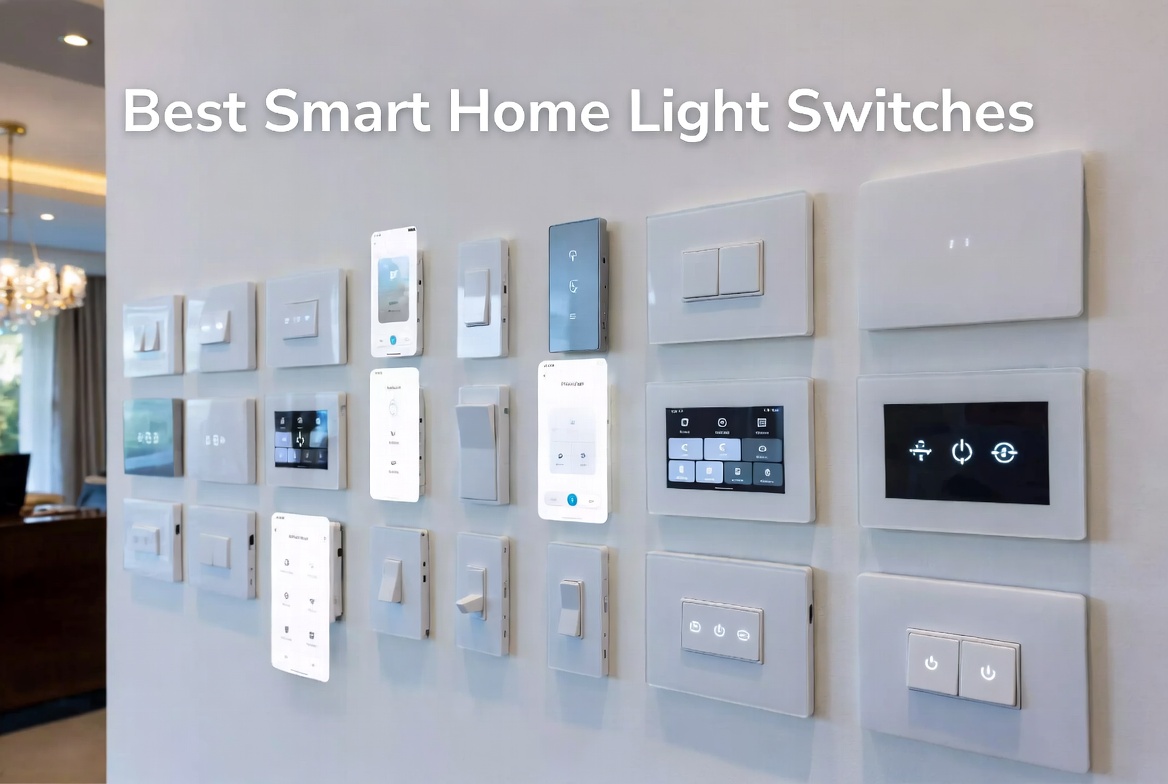
5 Best Smart Home Light Switches In 2026
Your home’s lighting is about to get a serious upgrade. Smart light switches are no longer just a fancy tech novelty—they’re becoming the standard way people control their lights. If you’re tired of fumbling for light switches in the dark or paying high energy bills, it’s time to join the smart home revolution.
Let me walk you through everything you need to know about smart home light switches. I’ve tested the top products on the market and broken down what actually works, what’s overhyped, and where to spend your money wisely.
What Are Smart Light Switches?
Smart light switches replace your regular wall switches. They connect to your home’s Wi-Fi network (or a hub) and let you control your lights from your phone, voice commands, or automation schedules. That’s the basic idea.
But here’s what makes them different from smart bulbs: smart switches work with any light bulb you already own. You don’t need to replace your entire lighting setup or spend hundreds on new bulbs. Just swap out the switch, and boom—your regular lights are now smart.
The main things to consider are installation difficulty, Wi-Fi connectivity, voice assistant compatibility, and whether you need a neutral wire.
Kasa Smart Light Switch HS200P3 – Best for Alexa Users
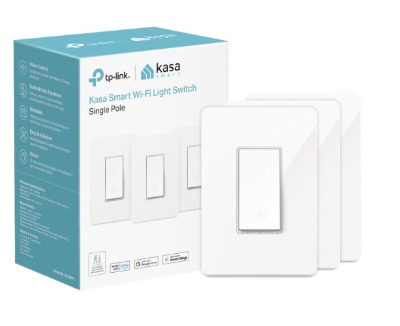
What You Get The Kasa HS200P3 is a single-pole smart switch that works with Alexa and Google Home right out of the box. No hub required. It comes in white and works with standard light fixtures. The pack includes one switch, though you can buy them individually or in bundles.
Real-World Usage If you already have an Alexa device in your home, this switch integrates seamlessly. Tell Alexa to turn off the lights before bed, and it just works. The switch sits flush against your wall and doesn’t stick out or look awkward like some smart switches do.
Key Features Explained
- Direct Wi-Fi connection using 2.4GHz
- No hub needed—saves money and setup time
- Remote control from anywhere using the Kasa app
- Voice control with Alexa or Google Assistant
- Timer and schedule features so lights turn on and off automatically
- UL Certified for safety
- Energy monitoring shows you how much power your lights use
Best Use Cases This switch is perfect if you’re just starting with smart home tech. You want something that works with your existing Alexa speakers or Google devices. Great for hallways, bedrooms, or any room where you want basic on-off control plus scheduling.
Pros
- Super easy setup—no electrician needed if you’re comfortable with basic wiring
- Affordable for what you get
- Reliable connection and quick response times
- Works great with voice commands
- The Kasa app is intuitive and doesn’t feel cluttered
Cons
- Requires a neutral wire in your wall (not all homes have this)
- Only single-pole, so 3-way switches need extra setup
- No dimming capability—just on and off
- Sometimes takes a few seconds to respond if your Wi-Fi is busy
- The paddle switch feels a bit plastic-y compared to premium alternatives
Performance & Reliability The HS200P3 performs reliably day to day. Voice commands respond within one to three seconds. The Wi-Fi connection stays stable in most homes. One thing to note: if your internet goes down, the switch still works as a regular light switch. You just lose the smart features temporarily.
Ease of Use Installation takes about 15 minutes if you’ve ever wired anything before. If not, YouTube has plenty of tutorials. The Kasa app is genuinely easy to navigate. Adding the switch to your Alexa device takes maybe five minutes.
Value for Money At around $20 per switch, this is one of the cheapest smart switch options. You get solid performance without paying premium prices. For a basic no-frills smart switch, this delivers.
TP-Link Tapo Matter Smart Light Switch – Best for Apple Ecosystem
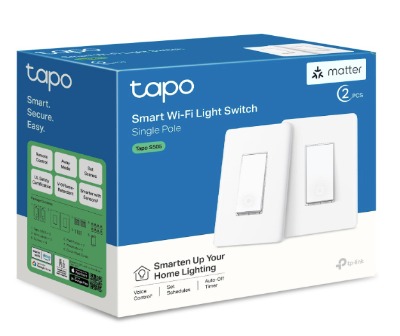
What You Get The Tapo S505 comes in a two-pack and supports Matter protocol, which means it works with Siri, Alexa, and Google Home. It’s a single-pole switch that requires a neutral wire. The build quality feels more premium than the Kasa.
Real-World Usage If you use iPhones and Apple devices, this is your answer. Matter protocol ensures that your home setup won’t become obsolete as new devices come out. You get genuine voice control across the Apple ecosystem. The responsiveness is noticeably faster than older Wi-Fi-only switches.
Key Features Explained
- Matter protocol support means future-proof compatibility
- Works with Siri, Alexa, and Google Home simultaneously
- Timer and scheduling features
- Easy guided installation walks you through wiring step by step
- Single-pole only
- Neutral wire required
- UL Certified
- Comes in two-pack, so you can set up multiple rooms
Best Use Cases Perfect for Apple users who want everything to work together. Great if you’re building a smart home from scratch and want your investment to stay current. Ideal for homes with multiple voice assistants.
Pros
- Matter protocol gives you peace of mind for the future
- Works with all three major voice assistants
- Installation guide is genuinely helpful
- Faster response times than standard Wi-Fi
- More premium feel overall
- Two-pack is better value than buying singles
Cons
- Requires a neutral wire
- More expensive than the Kasa
- Single-pole only, no 3-way support
- Matter protocol is still rolling out, so some features depend on hub compatibility
- Setup requires you to understand Matter and which hub you’re using
Performance & Reliability The Matter protocol is the future of smart homes, but here’s the real talk: it only makes a difference if you have a Matter hub. Without one, it works like a regular Wi-Fi switch. With a hub, you’ll notice snappier response times and better reliability. The switch itself performs well, with consistent, quick on-off action.
Ease of Use The guided installation is a major plus. Even if you’ve never touched electrical wiring, the step-by-step instructions make it manageable. The Home app integration (if you’re on Apple) is flawless.
Value for Money At roughly $40-50 per switch, the two-pack works out to around $20-25 each. Considering the Matter support and build quality, this is fair pricing. If you’re committed to Apple, the premium is worth it.
Lutron Claro Smart Light Switch – Best Premium Option
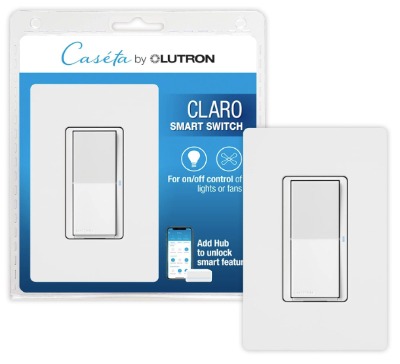
What You Get This is where smart switches get serious. The Lutron Claro is a single-pole switch that works with Lutron’s Caseta ecosystem. It requires a neutral wire and is built to last. No Wi-Fi drama, no hub headaches—it’s a complete, elegant system.
Real-World Usage Premium feel starts the moment you unbox it. The switch has a smooth, satisfying action. The wall plate looks high-end, not like an afterthought. If you’ve ever owned a Lutron dimmer, you know this company doesn’t mess around with build quality.
Key Features Explained
- Works with the Caseta ecosystem for reliability
- Supports dimmers and fans
- 5 Amp rating means it handles LED lights perfectly
- Single-pole or 3-way configuration options
- Neutral wire required
- Wall plate included in the package
- UL Certified
- Works with Alexa and Google Home through Caseta hub
Best Use Cases Use this if you want the absolute best in terms of build quality and reliability. Great for homes with high-end lighting systems. Perfect for people who plan to upgrade multiple rooms and want consistency. Ideal if you value durability over budget.
Pros
- Outstanding build quality that lasts for years
- Smooth, responsive action on the switch
- Professional installation quality right out of the box
- Excellent compatibility with various devices
- The wall plate looks premium
- Great dimming support for LED lights
Cons
- Expensive—roughly $80-100 per switch
- Requires the Caseta hub for voice control
- Hub cost adds another $50-100 to your setup
- More setup complexity than other options
- Overkill if you just want basic on-off control
- Takes up more space if you’re installing in tight areas
Performance & Reliability This switch performs flawlessly. The reliability is top-tier. You won’t experience random disconnections or sluggy response times. Lutron has engineered this for consistent performance, and it shows.
Ease of Use Installation is more complex than the Kasa or Tapo. You need to understand the Caseta ecosystem. Getting it working with Alexa or Google Home requires the hub, which adds extra steps. Once it’s set up, though, everything runs smoothly.
Value for Money This is expensive. If you’re only installing one or two switches, the cost might not make sense. If you’re overhauling multiple rooms, the premium build quality and reliability justify the price. You’re paying for durability and peace of mind.
Lutron Caseta Smart Light Switch 3-Way Kit – Best for Multi-Position Control
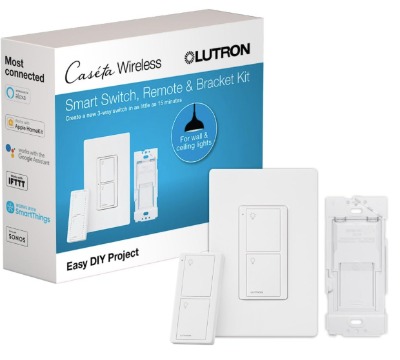
What You Get This is a complete kit that includes a smart switch, a Pico wireless remote, wall plate, and wall bracket. It’s designed to handle 3-way switching, which is when you have two switches controlling the same lights (like hallway lights controlled from both ends).
Real-World Usage This setup solves a real problem. In a 3-way configuration, traditional smart switches get complicated. The Lutron kit makes it simple. The wireless Pico remote is genuinely nice to use—it feels premium and responds instantly.
Key Features Explained
- Handles 3-way and multi-way setups
- Wireless Pico remote works without additional wiring
- On-off only, no dimming
- 5 Amp rating
- Neutral wire required
- Includes everything you need for installation
- Wall bracket keeps the remote accessible
- Integrates with Caseta ecosystem
Best Use Cases Install this in hallways, bedrooms, or any room with two light switches. Great for people who need 3-way control but don’t want the complexity of running new wires. Perfect if you want wireless remote control without a phone.
Pros
- Solves the 3-way switching problem elegantly
- The Pico remote is reliable and responsive
- Complete kit—everything included
- No need to rewire your walls
- Looks professional and finished
- Works seamlessly with other Caseta devices
Cons
- Expensive for the complete kit—roughly $150-170
- Only on-off, no dimming
- Requires the Caseta ecosystem
- The Pico remote needs batteries (usually lasts 2-3 years)
- Not ideal if you want voice control as your primary method
- Installation still requires electrical knowledge
Performance & Reliability The wireless connection between the switch and remote is rock solid. Zero delay. The battery life on the Pico remote is genuinely impressive. You won’t be replacing batteries constantly.
Ease of Use For a 3-way setup, this is as easy as it gets. The installation is straightforward compared to traditional 3-way wiring. The remote works instantly—no pairing hassles or Bluetooth drama.
Value for Money It’s expensive, but for solving a specific problem, the value is there. If you have 3-way switches and want smart control, your options are limited. This is the best option available, and it delivers.
Philips Hue Wall Tap Dial – Best Portable Option
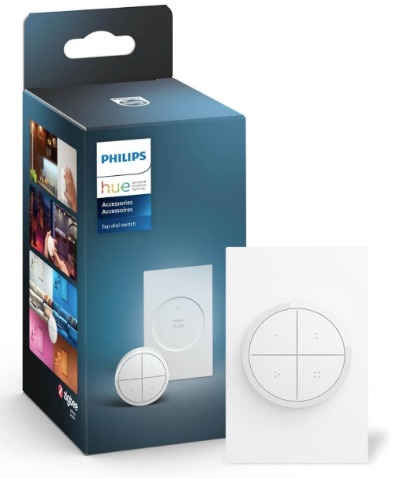
What You Get This is totally different from the other switches. It’s a wireless, battery-powered dial that sticks to your wall with adhesive. No wiring required. No neutral wire. Just peel and stick. It controls Philips Hue lights and requires a Hue Bridge.
Real-World Usage This isn’t a replacement for your main light switch. Think of it as an additional control point. Stick it on your nightstand, your bedside table, or any wall. The dial is responsive and satisfying to use.
Key Features Explained
- Wireless and battery-powered
- No installation required—adhesive backing
- Controls brightness with the dial
- Works with Philips Hue lights only
- Requires Hue Bridge
- Battery life roughly 2-3 years
- Modern, minimalist design
- Portable—move it anytime
Best Use Cases Perfect if you already have Philips Hue lights and want an elegant control option. Great for renters who can’t modify their walls. Ideal for bedside control or adjusting lights without your phone. Use this as a supplement to other smart switches.
Pros
- No wiring or installation nightmare
- Beautiful, minimalist design
- Satisfying dial control
- Easy to relocate
- Works great with Hue lights
- Long battery life
- Perfect for renters
Cons
- Only works with Philips Hue lights (major limitation)
- Requires Hue Bridge
- No voice control
- More expensive than basic smart switches when you factor in the Bridge requirement
- Doesn’t replace your main light switch
- You’re stuck in the Philips ecosystem
Performance & Reliability The dial feels premium and responds instantly. No lag. The wireless connection is reliable. Battery drain is minimal.
Ease of Use Setup is as easy as it gets—peel and stick. Adding it to your Hue system takes minutes. No electrical knowledge required.
Value for Money If you already have Philips Hue lights, this is a nice complement. If you don’t, the total cost (lights, bridge, dial) gets expensive fast. As a standalone option, it’s pricey compared to wired switches.
Comparison: Which Switch Comes Out Ahead?
Let’s cut through the noise and compare these directly.
Price Leader: Kasa HS200P3 The Kasa is the budget winner. At around $20 per switch, you get solid performance and voice control. If you’re testing the smart home waters, start here.
Best Overall: Tapo S505 Matter Switch For most people, the Tapo offers the best balance. Matter protocol future-proofs your investment. Works with all three voice assistants. Two-pack pricing is fair. This is the safe bet.
Premium Build: Lutron Claro If money isn’t an issue and you want the best quality switch ever, choose Lutron. It will outlast everything else and perform flawlessly.
3-Way Solution: Lutron Caseta Kit If you specifically have 3-way switches, this is your answer. No other option comes close.
Hue Users Only: Philips Wall Tap If your entire lighting is Philips Hue, this is a nice add-on. Otherwise, skip it.
How to Choose the Right Smart Light Switch
Start with what you already have. Do you use Alexa? Then the Kasa makes sense. Do you use Apple devices and want future-proof tech? Go Tapo. Do you have 3-way switches? The Lutron kit is your only real option.
Check your walls next. Do you have a neutral wire? Most homes built after 1990 do, but older homes might not. Without a neutral wire, you’re limited to the Philips Hue dial or you need to hire an electrician.
Think about your whole setup. Are you installing one switch or ten? For multiple switches, Lutron’s durability pays off. For a single switch, the Kasa is perfect.
Consider voice control importance. If you want Alexa voice commands, Kasa works. If you want to work with everything, Tapo Matter is better. If voice control isn’t important, the Lutron manual remote is elegant.
Installing Smart Light Switches: What to Expect
Most smart switches require a neutral wire. Here’s the honest truth: if your home doesn’t have one, you either need to hire an electrician or use wireless options.
Basic installation is straightforward. Turn off power at the breaker. Remove your old switch. Connect the wires to the new smart switch (usually black, white, and ground). Screw it to the box. Attach the wall plate. Power it back on.
The whole process takes 15-30 minutes per switch if you’re comfortable with basic electrical work. If you’re not, hire a professional. Getting shocked or burning your house down isn’t worth saving $200.
Once it’s physically installed, the app setup is usually painless. Download the app, scan a QR code, connect to Wi-Fi, and you’re done.
The hardest part for most people is understanding your home’s electrical setup, not the actual installation. Take a photo of your existing switch wiring before you remove it. Match those connections to your new switch’s diagram. You’ll be fine.
Common Mistakes People Make (And How to Avoid Them)
Buying a switch that doesn’t need a hub when your Wi-Fi is weak. If you have a large home or dead zones, the Lutron with its hub system might actually be more reliable than a direct Wi-Fi connection. Don’t assume no-hub means better.
Forgetting to check if you have a neutral wire. This stops most smart switch installations cold. Ask your electrician before you buy anything.
Mixing switch brands across your home. If you use Kasa in the kitchen and Tapo in the bedroom, you’ll need multiple apps. Stick with one brand for simplicity.
Not understanding voice control limitations. None of these switches have voice control if your internet is down. Your phone controls go away too. Plan accordingly.
Trying to use smart switches without some kind of hub or bridge. The Kasa and Tapo are exceptions with direct Wi-Fi. Everything else needs a hub, which adds cost and complexity.
Installing them in wet areas without proper protection. Bathrooms and kitchens get humid. Keep switches away from direct water and moisture.
Buying the most expensive option when you don’t need it. Lutron is amazing, but most people don’t need $100+ switches. Middle-ground options often offer better value.
Who Should Buy Smart Light Switches?
You should consider smart switches if:
- You want to automate your lighting schedule
- You care about energy efficiency
- You have voice assistants and want them integrated
- You travel and want to control lights remotely
- You’re building a smart home ecosystem
- You have accessibility issues and voice control helps
You probably don’t need them if:
- You just like flipping switches the old-fashioned way
- Your home’s electrical setup is complicated
- You’re only staying in the space temporarily
- You’re on a tight budget and can’t afford installation
- You travel rarely and don’t care about remote access
Real Talk on Smart Home Integration
The smart home industry is consolidating around Matter, which these newer switches support. The Tapo S505 with Matter is positioned well for the future. The older Wi-Fi-only switches will still work, but they might feel outdated in 5-10 years.
If you’re buying today, lean toward Matter-compatible switches. You’re future-proofing your investment. The Tapo delivers this at reasonable pricing.
The Philips Hue ecosystem is beautiful but proprietary. You’re locked into Hue lights and Hue products. It works great if that’s your preference, but you lose flexibility.
Lutron owns the premium market and probably will for a while. Their build quality is unmatched. But you’re paying for that premium.
Final Verdict: Which Switch Should You Actually Buy
For most people: TP-Link Tapo S505 Matter Switch It’s the Goldilocks option. Not too cheap, not too expensive. Matter protocol gives you future flexibility. Works with all three voice assistants. The two-pack pricing is sensible. This is what I’d recommend if someone asked me today.
For budget-conscious buyers: Kasa HS200P3 You get 80% of the functionality at 25% of the price. If you’re just starting with smart home tech, this proves the value before you invest heavily. No regrets at this price point.
For premium everything: Lutron Claro or Caseta Kit If you’re remodeling your entire home and money isn’t the main concern, Lutron is unbeatable. The build quality alone justifies the cost. You’ll still have this switch working perfectly in 20 years.
For specific situations: Philips Hue Wall Tap Only if you’re already deep in the Hue ecosystem. Otherwise, it’s an expensive solution to a problem that cheaper switches solve better.
Wrapping Up
Smart light switches aren’t a fad anymore. They’re becoming the standard way people control their homes. The switches covered here represent your best options, whether you’re on a budget or looking for premium everything.
The Tapo S505 with Matter protocol is the safe choice for most people. It balances cost, functionality, and future-proofing. If budget is your only concern, the Kasa works. If you want the absolute best switch ever made, Lutron delivers.
Your decision really comes down to three questions: How much do you want to spend? What voice assistants do you already use? And how many switches are you installing?
Answer those three questions, pick the switch that fits, and upgrade your home’s lighting today. You’ll be surprised how much you come to rely on them.
Smart lighting changes how you live. Once you have it, going back to regular switches feels outdated. Make the leap. Your home—and your electric bill—will thank you.

Hi, I’m Mary, the founder of Homygear.com. I’m passionate about creating a comfortable, smart, and beautiful home. I share practical insights and real-world experience on home gear that makes everyday life easier. Behind the scenes, my dedicated research team studies products in depth, and our writers craft honest reviews using trusted, authentic sources—so you can choose home gear with confidence.