5 Best Smart Temperature Sensor In 2026
Keeping track of temperature and humidity inside your home, greenhouse, wine cellar, or RV sounds simple. But if you have ever walked into a room that felt stuffy, found moisture damage in a storage space, or worried about your baby’s room getting too warm overnight — you already know how important it is to monitor conditions in real time.
That is where a smart temperature sensor comes in.
These compact little devices connect to your phone, send you alerts, and log data around the clock — without you having to check anything manually. They take the guesswork out of climate monitoring and give you real, actionable information at your fingertips.
But here is the thing: not every smart temperature and humidity sensor works the same way. Some rely on Wi-Fi. Others use Bluetooth or proprietary long-range radio. Some focus on data logging. Others are built to trigger smart home automations. The best one for you depends entirely on what you need it for.
In this guide, we reviewed five of the most popular options on the market right now. These include the YoLink Smart Temp & Humidity Sensor, the Govee Smart Thermometer Hygrometer, the ecobee Smart Sensor, a popular budget-friendly WiFi indoor thermometer, and the SensorPush HT1. We looked at each one carefully — how it works, where it performs best, what it does well, and where it falls short.
By the end, you will have a clear picture of which product fits your situation best.
Why You Actually Need a Smart Temperature Sensor
Before we jump into individual reviews, let us quickly cover why these devices matter.
A regular thermometer tells you the temperature when you look at it. A smart sensor tells you the temperature all the time — and it sends you an alert if something goes wrong while you are away.
Think about a wine cellar that gets too warm during summer. Or a nursery that drops below a safe sleeping temperature at night. Or a server room that starts heating up on a weekend. In all these cases, a smart sensor catches the problem before it becomes a disaster.
These devices also store historical data, which helps you spot patterns. You can see how temperature changes throughout the day, identify problem spots in your home, and make smarter decisions about heating and cooling.
They are also useful for humidity. Too much moisture leads to mold, wood damage, and health issues. Too little dries out wooden instruments, skin, and nasal passages. A good smart sensor tracks both temperature and relative humidity and keeps you informed on both fronts.
Now, let us look at the actual products.
Product Reviews
1. YoLink Smart Temp & Humidity Sensor — Best for Long-Range and Multi-Location Monitoring

Overview
The YoLink Smart Temp & Humidity Sensor is a standout choice for anyone who needs to monitor spaces that are far from a router or spread across a large property. It uses LoRa (Long Range) radio technology instead of standard Wi-Fi, which means it can reach much farther — up to 1,000 feet in open space. The two-pack with hub included makes it a solid value for getting started.
This product is designed with reliability in mind. The two-year battery life means you are not constantly swapping batteries, and the included hub connects your sensors to the internet without needing a strong Wi-Fi signal in the monitored area itself.
Best Use Cases
- Wine cellars or basements far from your router
- Garages, storage units, or outbuildings
- Large properties or farms with multiple zones to monitor
- RVs or remote cabins with limited internet connectivity
- Greenhouses located away from the main building
Key Features Explained Simply
LoRa Long Range Technology: Unlike standard sensors that depend on Wi-Fi or Bluetooth, YoLink uses LoRa radio. This is a low-power wireless protocol that punches through walls, floors, and interference far better than Wi-Fi. Your sensor can sit in a thick-walled basement and still communicate reliably with the hub upstairs.
Two-Year Battery Life: This is a big practical win. Two AA batteries power the sensor for about two years under normal conditions. You set it up, forget about it, and it just keeps working.
Included Hub: The kit comes with the YoLink hub. This hub plugs into your router via ethernet and bridges the LoRa sensors to your internet connection. The sensors talk to the hub; the hub talks to the app.
App, Email, and SMS Alerts: You can get notified through multiple channels if temperature or humidity crosses your set thresholds. You choose what triggers an alert and how you get notified — email, push notification, or SMS.
Alexa and IFTTT Compatibility: The sensors work with Amazon Alexa, so you can ask for current readings by voice. IFTTT integration lets you build automation routines — for example, turning on a fan if temperature gets too high.
Real-Life Usage Insight
The biggest real-world advantage here is range. If you have a detached garage, a large basement, or a greenhouse a hundred feet from your house, standard Wi-Fi sensors simply will not cut it. YoLink sensors keep working even in signal-poor locations. The hub can support many YoLink devices, so you can grow your monitoring network over time without needing additional hubs.
The app is functional and clear. You can see current readings, review historical data, and manage alert settings all in one place.
Honest Pros and Cons
Pros:
- Exceptional range thanks to LoRa technology
- Two-year battery life is genuinely impressive
- Hub included in the kit — no extra purchases needed
- Multiple alert methods (app, email, SMS)
- Scalable — add more sensors to the same hub
- Works with Alexa and IFTTT
Cons:
- Requires the YoLink hub (a dependency that others do not have)
- Accuracy is good but not laboratory-grade
- App interface is functional but not the most polished
- Not compatible with Google Home or Apple HomeKit natively
Performance Discussion
Temperature accuracy is within ±0.5°C under normal conditions, which is perfectly acceptable for home and agricultural use. Humidity accuracy is within ±3% relative humidity. These numbers are in line with most consumer-grade sensors.
The LoRa connection is rock solid. There are very few reports of dropped connections or missed readings, which puts it ahead of Wi-Fi sensors in environments where signal strength is inconsistent.
Ease of Use
Setup is straightforward. Plug in the hub, download the YoLink app, scan the QR code on the sensor, and you are done. Most users get up and running in under ten minutes. The app walks you through each step clearly.
Value for Money
The two-pack with hub is priced fairly when you consider you are getting two sensors plus the hub. Buying additional sensors separately is also reasonably priced. For someone who needs long-range monitoring across multiple zones, the value here is excellent.
Rating: 4.5/5
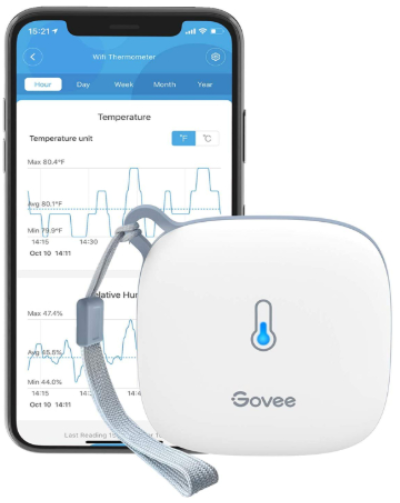
2. Govee Smart Thermometer Hygrometer — Best for Data Logging and Free Cloud Storage
Overview
The Govee Smart Thermometer Hygrometer is one of the most popular smart temperature sensors available, and for good reason. It connects via Wi-Fi and offers two years of free cloud data storage — a feature that most competitors either lock behind a subscription or skip entirely. If data history matters to you, Govee stands out immediately.
The sensor monitors both temperature and humidity in real time. It sends app alerts when readings cross your set thresholds and displays live readings in the Govee Home app.
Best Use Cases
- Home rooms where you want historical data trends
- Greenhouses where climate consistency is critical
- Incubators for reptile eggs, hatching eggs, or similar sensitive applications
- Wine cellars where you want to log temperature over weeks
- Plant rooms or indoor gardens
- Home offices or bedrooms
Key Features Explained Simply
WiFi Connectivity: No hub required here. The sensor connects directly to your 2.4GHz Wi-Fi network. As long as your router signal reaches the monitored area, you are good to go.
Two Years of Free Data Storage: Govee lets you export historical data going back two years. You can download a CSV file of all recorded readings, which is very useful if you need to track trends, troubleshoot problems, or show records to others (for example, if you store wine and want to document storage conditions).
App Notification Alerts: You set your own high and low thresholds for temperature and humidity. The app sends a push notification when readings go outside those limits.
Wireless Remote Monitor: You check the current readings from anywhere using the Govee Home app. There is no need to be near the sensor.
Swiss-Made Sensor: Govee uses a Swiss-manufactured sensor chip (Sensirion), which is known in the industry for high accuracy. This gives the Govee sensor a slight edge in accuracy over some competitors.
Real-Life Usage Insight
The data export feature is the killer advantage here. If you are a serious home brewer, an orchid grower, or a reptile keeper, being able to pull two years of logged readings and analyze them in a spreadsheet is genuinely useful. It turns the sensor from a simple alert device into a real monitoring tool.
The Govee Home app is also one of the cleaner apps in this space. It shows readings clearly, graphs them over time, and is generally intuitive even for non-technical users.
Honest Pros and Cons
Pros:
- Two years of free cloud data storage with export
- High accuracy thanks to Sensirion sensor chip
- No hub required — connects directly via Wi-Fi
- Clean, easy-to-use app
- Affordable price point
- Data can be exported as a file
Cons:
- Requires a stable 2.4GHz Wi-Fi signal in the monitored area
- Battery life is shorter than YoLink (typically around a year)
- No IFTTT or advanced automation support natively
- Limited smart home integration compared to some competitors
Performance Discussion
Govee’s use of a Sensirion sensor chip means readings are accurate. Typical temperature accuracy is ±0.54°F (±0.3°C), and humidity accuracy is ±2%. These are among the tighter tolerances you will find in consumer temperature sensors.
The Wi-Fi connection works well in areas with decent signal strength. In areas with weak or inconsistent Wi-Fi, the sensor may lose connection, which could mean missed alerts. This is the main vulnerability of any Wi-Fi-based sensor.
Ease of Use
Setup is very simple. Power the sensor, open the Govee Home app, follow the Wi-Fi pairing steps, and you are live. The app itself is well-designed and easy to navigate. Setting alert thresholds takes only a minute or two.
Value for Money
Govee sensors are very affordable for what they offer. Two years of free data storage alone would justify a price premium, but Govee keeps prices competitive. For casual home monitoring, this is one of the best bang-for-buck options available.
Rating: 4.4/5
3. ecobee Smart Sensor 2 Pack — Best for ecobee Thermostat Users and HVAC Optimization

Overview
The ecobee Smart Sensor is a different kind of product from the others on this list. It is not designed as a standalone temperature monitor. It is built to work hand-in-hand with ecobee smart thermostats to help balance temperature across multiple rooms and make smarter heating and cooling decisions.
It does two things particularly well: it detects temperature and it detects occupancy (whether someone is in the room). Together, these two functions let your ecobee thermostat focus heating or cooling where people actually are, rather than just where the main thermostat is located.
Best Use Cases
- Homes with ecobee thermostats looking to optimize comfort across rooms
- Rooms that tend to be hotter or cooler than the main thermostat location
- Bedrooms where temperature during sleep matters
- Energy efficiency — only condition rooms that are occupied
- Homes with multiple floors or problem zones
Key Features Explained Simply
Temperature Detection: The sensor reports the temperature in its specific room back to your ecobee thermostat. The thermostat can use this data to adjust heating or cooling based on where you actually are.
Occupancy Detection: Using a passive infrared (PIR) sensor, the ecobee Smart Sensor knows when a person is in the room. This lets the thermostat prioritize occupied spaces for comfort.
Comfort, Security, and Energy Savings: ecobee uses these sensors to run “Smart Home/Away” and “Follow Me” features. Follow Me uses occupancy data from all your sensors to condition only rooms in use. Smart Home/Away adjusts your schedule based on whether anyone is detected home.
Wireless and Battery-Powered: The sensors are wireless and run on a coin cell battery. They communicate with the ecobee thermostat using a proprietary wireless protocol.
Real-Life Usage Insight
If you have an ecobee thermostat and your home has rooms that never seem comfortable — too hot in summer or too cold in winter — the ecobee Smart Sensor is the answer. Placing one in the bedroom means your thermostat factors in that room’s actual temperature when deciding whether to heat or cool. It is a tangible comfort upgrade.
The energy savings aspect is also real. A system that knows nobody is in certain rooms and adjusts accordingly can meaningfully reduce your heating and cooling bills over time.
Honest Pros and Cons
Pros:
- Excellent integration with ecobee thermostats
- Occupancy detection adds a layer of automation others lack
- Helps balance temperature across multiple rooms
- Contributes to real energy savings
- Easy to install and use within the ecobee ecosystem
Cons:
- Only works with ecobee thermostats — no standalone use
- No standalone app monitoring or alerts outside ecobee’s system
- No humidity monitoring
- Not useful if you do not own an ecobee thermostat
- Battery life is shorter than sensors using AA batteries
Performance Discussion
As a thermostat accessory, the ecobee Smart Sensor performs very well. Temperature readings are accurate enough to meaningfully influence HVAC decisions. Occupancy detection works reliably within a normal room-sized range.
What this sensor does not do is give you granular data or alerts outside the ecobee ecosystem. It is a thermostat tool, not a monitoring device. That distinction is important.
Ease of Use
If you already have an ecobee thermostat, adding these sensors is seamless. The ecobee app guides you through the pairing process in minutes. Everything is managed within the ecobee interface.
Value for Money
The sensors are priced at a premium, especially for a two-pack. But if you have an ecobee thermostat, the comfort and energy savings they enable can justify the cost over time. If you do not have an ecobee thermostat, this product is simply not for you.
Rating: 4.2/5 (for ecobee thermostat owners specifically)
4. WiFi Temperature Humidity Sensor (1-Pack) — Best Budget-Friendly Option for Basic Home Monitoring

Overview
This WiFi-connected indoor temperature and humidity sensor is a solid, no-frills option for anyone who wants basic monitoring without spending much. It connects to 2.4GHz Wi-Fi, works with the associated app, sends push notification alerts, and is compatible with Amazon Alexa for voice-based queries.
It is a single-pack device aimed at people who want to dip their toes into smart temperature monitoring without committing to a big system. It covers the fundamentals well.
Best Use Cases
- Single-room home monitoring (bedroom, baby room, living room)
- Small greenhouses or grow tents
- Pet enclosures that need temperature tracking
- Home offices or server closets
- Renters or beginners who want a low-cost entry into smart monitoring
Key Features Explained Simply
Wi-Fi Connected: Direct Wi-Fi connectivity means no hub is needed. Plug in the sensor (or load the battery), connect it to your app, and it is online.
App Alerts: When temperature or humidity crosses your defined thresholds, the app sends a push notification to your phone. This works even when you are away from home.
Free Data Storage Export: Like Govee, this sensor offers data storage and export. You can review historical readings and download data for your records.
Alexa Compatible: Ask Alexa for current temperature or humidity readings in the monitored space. This works after linking the device through the app.
Indoor Thermometer and Hygrometer: Monitors both temperature and relative humidity, giving you a full picture of the indoor environment.
Real-Life Usage Insight
For everyday home use — keeping tabs on a baby’s nursery, a guest room, or a pet enclosure — this sensor does exactly what you need. It is unobtrusive, easy to set up, and keeps you informed. The alerts work reliably when connected to a stable Wi-Fi signal.
It is not the sensor you want for a large property or a mission-critical application. But for a homeowner who wants basic awareness in one or two rooms, it gets the job done.
Honest Pros and Cons
Pros:
- Very affordable price
- No hub required
- Simple setup
- Works with Alexa
- Free data export
- Compact and unobtrusive
Cons:
- Dependent on strong Wi-Fi signal
- No IFTTT or advanced automation
- Less precise than Govee’s Sensirion-based sensor
- Single pack only — buying multiple units adds up
- App quality varies and may not be as refined as Govee’s
Performance Discussion
Accuracy is acceptable for general home use — typically within ±1°C for temperature and ±5% for humidity. These numbers are not as tight as the Govee or SensorPush, but they are sufficient for most everyday purposes.
The sensor performs well in rooms with good Wi-Fi coverage. Connection stability is its biggest variable — in areas with weak signal, you may see occasional disconnections.
Ease of Use
Very easy to set up. The app walks you through pairing in just a few minutes. No technical knowledge required. The interface is basic but functional.
Value for Money
This is one of the most affordable options in the smart temperature sensor category. For the price, you get core functionality without frills. If budget is your primary concern, this is a practical starting point.
Rating: 3.9/5
5. SensorPush HT1 — Best for Precision Monitoring and Professionals

Overview
The SensorPush HT1 is the sensor for people who take accuracy seriously. It uses Bluetooth to communicate with your phone and an optional Wi-Fi gateway to enable remote monitoring from anywhere. What makes it stand out is its Swiss Sensirion sensor and calibrated accuracy — it is among the most precise consumer-grade temperature and humidity sensors you can buy.
It is used by serious hobbyists, small business owners, cigar humidor enthusiasts, craft beer brewers, reptile keepers, and anyone else who needs reliable, accurate data rather than just ballpark readings.
Best Use Cases
- Cigar humidors and wine cellars where precise humidity matters
- Refrigerators and freezers (it handles cold temperatures well)
- Reptile terrariums and incubators
- RVs and travel trailers
- Scientific hobbyist applications
- Commercial refrigeration monitoring for small businesses
Key Features Explained Simply
Bluetooth with Optional Wi-Fi Gateway: The HT1 communicates via Bluetooth to the SensorPush app on your phone. For remote monitoring (checking readings when you are away from home), you need to purchase the SensorPush Wi-Fi Gateway separately. This is an extra cost but makes the system fully remote-capable.
Swiss Sensirion Sensor: Like the Govee, SensorPush uses a Sensirion chip. This is a professional-grade component known for tight accuracy and repeatability. Readings are consistent and reliable over time.
Heat Index: The app calculates and displays the heat index — what the temperature actually feels like when humidity is factored in. This is useful in greenhouses and outdoor applications.
Indoor/Outdoor Temperature and Humidity Monitoring: The HT1 is rated for outdoor use (with some caveats around extreme conditions). It works in a fridge, freezer, greenhouse, RV, or outdoor storage area.
App Monitoring with Alerts: The SensorPush app is clean, well-designed, and provides clear historical charts. You can set alerts and receive push notifications when thresholds are crossed.
Real-Life Usage Insight
The SensorPush HT1 is the sensor you choose when readings really matter. A casual homeowner might not notice the difference between ±1°C accuracy and ±0.3°C accuracy. But a reptile keeper whose eggs need precise incubation, or a cigar collector maintaining humidity within a narrow band, will feel the difference immediately.
The build quality is also notably better than cheaper alternatives. The sensor feels premium, the housing is solid, and the finish suggests it is built to last.
The Bluetooth-first approach is both a pro and a con. On the pro side, it does not depend on Wi-Fi being available in the monitored space. On the con side, you need to be within Bluetooth range (roughly 100 feet) to get readings unless you purchase the gateway.
Honest Pros and Cons
Pros:
- Exceptional accuracy from a calibrated Sensirion sensor
- Clean, well-designed app with clear historical data
- Works in extreme conditions including freezers
- Heat index calculation is a useful extra
- Premium build quality
- No Wi-Fi dependency in the immediate space
Cons:
- Wi-Fi gateway sold separately — extra cost for remote monitoring
- More expensive than most competitors
- Bluetooth range limitations without the gateway
- No Alexa, Google Home, or IFTTT integration natively
- Not the best choice for users who need affordable multi-room coverage
Performance Discussion
The SensorPush HT1 delivers temperature accuracy of ±0.5°C and humidity accuracy of ±3% RH. These are tight tolerances for a consumer device. In practice, readings are consistent and match reference instruments closely.
The Bluetooth connection is stable within range. The app updates readings frequently and the alert system works reliably. Historical data is stored in the app and synced to the cloud (when paired with the gateway).
Ease of Use
Pairing the sensor with the app is simple. The SensorPush app is one of the better-designed apps in this category — intuitive navigation, clear data presentation, and logical alert settings. The learning curve is minimal.
Adding the Wi-Fi Gateway is also straightforward — plug it in, connect it in the app, and your sensors become remotely accessible.
Value for Money
The HT1 is priced at a premium compared to budget options. The additional cost of the Wi-Fi Gateway makes the full setup more expensive still. But if accuracy is your priority, the price is justified. You are paying for professional-grade measurements in a consumer package.
Rating: 4.6/5
Comparison Insights
Here is a quick side-by-side look at how these five sensors stack up across key criteria:
| Feature | YoLink | Govee | ecobee | Budget WiFi | SensorPush HT1 |
|---|---|---|---|---|---|
| Connectivity | LoRa + Hub | Wi-Fi | Proprietary | Wi-Fi | Bluetooth + Gateway |
| Range | Up to 1,000 ft | Router range | Thermostat range | Router range | ~100 ft (BT) |
| Battery Life | ~2 years | ~1 year | ~18 months | Varies | ~1 year |
| Accuracy | ±0.5°C | ±0.3°C | Moderate | ±1°C | ±0.5°C |
| Humidity | Yes | Yes | No | Yes | Yes |
| Data Export | Yes | Yes | No | Yes | Yes |
| Smart Home | Alexa, IFTTT | Govee app | ecobee only | Alexa | None natively |
| Hub Required | Yes | No | No (ecobee needed) | No | Optional gateway |
| Price Range | Mid | Low-Mid | Mid-High | Low | Mid-High |
The biggest takeaway: no single product wins across all categories. The best smart temperature sensor depends entirely on your specific situation.
Buying Guide — What to Look for in a Smart Temperature Sensor
Connectivity Type
Wi-Fi sensors are the most common and easiest to set up. But they depend on a strong wireless signal in the monitored space. Bluetooth sensors are reliable at short range but need a gateway for remote access. LoRa sensors like YoLink excel in long-range or signal-poor environments.
Accuracy
For casual home monitoring, ±1°C is fine. For sensitive applications like incubators, wine cellars, or scientific use, look for sensors using Sensirion chips with tighter tolerances.
Battery Life
If the sensor is going somewhere hard to access — a deep basement, a tall cabinet, a remote outbuilding — longer battery life matters a lot. The YoLink’s two-year battery is a meaningful advantage here.
Alert System
Make sure the sensor can send alerts the way you need. Some people want push notifications only. Others want SMS or email as a backup. Check what alert types are supported before buying.
Data Storage and Export
If tracking historical trends matters to you, look for a sensor that stores and exports data. Govee and SensorPush do this well. The budget option also includes this feature.
Smart Home Compatibility
If you use Alexa, Google Home, or Apple HomeKit, verify compatibility before purchasing. The ecobee sensor only works in its own ecosystem. SensorPush lacks native smart home integration. YoLink and Govee work with Alexa.
Humidity Monitoring
Most sensors on this list monitor both temperature and humidity. The ecobee sensor is the exception — it only tracks temperature. If humidity matters to you, make sure the sensor covers both.
Number of Sensors
Think about how many locations you want to monitor. YoLink lets you expand a single hub with multiple sensors at low cost. Govee and SensorPush sensors are priced individually.
Who Should Buy Which Product
Buy the YoLink if: You need to monitor large or remote spaces, have multiple locations to cover, want long battery life, or your monitored area has poor Wi-Fi coverage.
Buy the Govee if: You want easy setup, solid accuracy, free cloud data storage, and an affordable price. It is the best all-rounder for typical home and hobby use.
Buy the ecobee Smart Sensor if: You already own an ecobee thermostat and want to improve temperature balance across rooms. It is not useful for anyone without an ecobee.
Buy the Budget WiFi Sensor if: You are just starting out, monitoring a single room, or want to spend as little as possible while still getting basic smart monitoring. Good for nurseries, pet enclosures, or guest rooms.
Buy the SensorPush HT1 if: Accuracy is your top priority. You are monitoring a cigar humidor, incubator, refrigerator, or any application where precision matters. The extra cost is worth it for serious use cases.
Common Mistakes to Avoid
Ignoring Wi-Fi Signal Strength
Many smart sensors depend on 2.4GHz Wi-Fi. If the signal in your monitored space is weak or inconsistent, your sensor will disconnect, miss readings, and fail to send alerts. Always check signal strength before placing a Wi-Fi sensor.
Skipping the Alert Setup
A smart temperature sensor without configured alerts is just an expensive thermometer. Take five minutes to set your high and low thresholds when you first install the sensor. This is the whole point of buying a smart device.
Buying Without Checking Ecosystem Compatibility
The ecobee sensor only works with ecobee thermostats. Some sensors only work with specific apps. Others have limited smart home integration. Always verify compatibility with your existing devices before purchasing.
Placing the Sensor Poorly
Sensor placement matters. Keep sensors away from direct sunlight, heating vents, air conditioners, and drafty windows. These factors skew readings and make the data less useful. Place sensors in the center of a room, at head height, away from heat sources.
Forgetting About Gateway Costs
SensorPush is a good example here. The sensor itself is competitively priced, but remote monitoring requires a separate Wi-Fi gateway that adds to the total cost. Read the full product details so you know what you are buying.
Not Checking Battery Requirements
Some sensors use standard AA or AAA batteries. Others use coin cells. If a sensor uses a hard-to-find battery, factor in replacement costs and availability before buying.
Expecting Lab-Grade Accuracy
Consumer sensors are accurate for home and hobby use. They are not precision instruments. If you need laboratory-grade accuracy, you need professional equipment. For most use cases, ±0.5°C and ±3% RH is more than adequate.
Final Verdict
After reviewing all five products side by side, here is how things break down:
The SensorPush HT1 earns top marks for accuracy and build quality. It is the pick for serious users who need reliable, precise measurements. The need for a separate gateway is a minor inconvenience weighed against its overall performance.
The Govee Smart Thermometer Hygrometer is the best overall value for most people. It is accurate, affordable, easy to use, and comes with two years of free cloud data storage. For general home monitoring, greenhouses, or hobby use, it is hard to beat.
The YoLink Smart Temp & Humidity Sensor is the top pick for anyone with range challenges or multiple monitoring zones. Two-year battery life and LoRa connectivity make it the most versatile option for non-standard situations.
The ecobee Smart Sensor is excellent — but only for ecobee thermostat owners. If that is you, it is a worthwhile upgrade. If not, look elsewhere.
The Budget WiFi Sensor gets the job done at the lowest price. It is the right call for beginners, budget-conscious buyers, or anyone who needs simple single-room monitoring.
No matter which one you choose, getting a smart temperature sensor into your home, greenhouse, or storage space is a smart move. These devices are small, affordable, and can save you from real problems — a spoiled wine collection, a too-warm nursery, a flooded basement you never knew about. The peace of mind alone is worth it.
Start with your biggest concern, match it to the right product from this list, and you will not regret it.
Have questions about a specific use case? Drop them in the comments — we will do our best to help you find the right fit.