5 Best Smart Bulb for Apple HomeKit In 2026
So you finally decided to build a smart home around Apple HomeKit. Good call. The HomeKit ecosystem is clean, private, and works beautifully with Siri. But here’s the part that trips up most people — finding the right smart bulb.
Walk into any online store and you’ll see hundreds of options. Some work with HomeKit. Some claim to work but frustrate you for weeks. Some cost a fortune. Some fall apart in three months.
That’s why this guide exists.
We dug deep into five of the most talked-about smart bulbs compatible with Apple HomeKit. We looked at real-world performance, setup experience, color quality, brightness, app quality, and long-term value. By the end, you’ll know exactly which bulb fits your home, your budget, and your lifestyle.
Let’s jump in.
What Makes a Smart Bulb Great for Apple HomeKit?
Before we get to the reviews, let’s set the stage quickly.
Apple HomeKit has its own set of rules. Not every smart bulb plays nice with it out of the box. Some need a hub. Some need a specific Wi-Fi band. Some need a third-party bridge just to connect to your iPhone.
Here are the things that matter most when picking a HomeKit-compatible smart bulb:
Native HomeKit support — The bulb should connect directly to the Apple Home app without extra dongles or bridges.
Matter certification — Matter is the new universal smart home standard. Matter-certified bulbs work across Apple Home, Alexa, Google Home, and SmartThings all at once. This future-proofs your setup.
2.4GHz Wi-Fi — Most smart bulbs run on 2.4GHz, not 5GHz. Your router needs to support it. Most do.
Color quality — If you want color-changing bulbs, look for RGBW or RGBWW. The extra “W” means a dedicated white LED for cleaner, more natural whites.
Brightness — A standard living room bulb should hit at least 800 lumens to be actually useful.
App experience — You’ll use the manufacturer’s app for setup and advanced features. A bad app makes even a good bulb feel painful.
Keep these in mind as we walk through each product.
The 5 Best Smart Bulbs for Apple HomeKit
1. OREiN Matter Smart Light Bulb (4-Pack) — Best Budget Matter Bulb for HomeKit
Product Overview
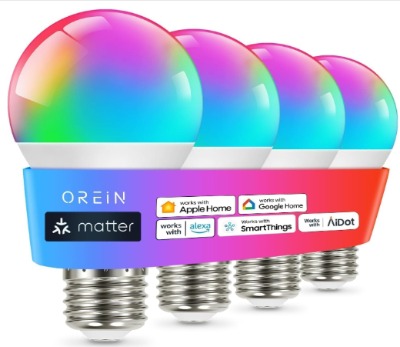
The OREiN Matter Smart Light Bulb is a solid entry point into the HomeKit world. It comes in a 4-pack, runs on 2.4GHz Wi-Fi, and works natively with Apple Home, Alexa, Google Home, and SmartThings through Matter. Each bulb delivers 800 lumens — the equivalent of a standard 60W incandescent — and offers full RGBTW color changing capability.
This is an A19 bulb with a standard E26 base, so it fits into most lamps and fixtures without any adapter. The big draw here is the price point and the Matter certification. For someone building their first HomeKit setup on a budget, this is a compelling package.
Key Features Explained Simply
- Matter support: One setup connects the bulb to Apple Home, Google Home, Alexa, and SmartThings simultaneously. No re-pairing needed if you switch ecosystems later.
- 800 lumens: Enough for a bedside lamp, reading nook, or accent light. Not ideal for large open spaces.
- RGBTW colors: Full color spectrum plus tunable white from warm to cool tones.
- 2.4GHz Wi-Fi: Direct connection to your router — no hub required.
- 4-pack value: Four bulbs at a competitive price makes it great for equipping multiple rooms at once.
Real-Life Usage Insight
Imagine setting up a living room with four lamps. You drop in the OREiN bulbs, scan the QR code on each one with the Apple Home app, and they’re live in under two minutes each. You set them to a warm 2700K for evening relaxation, then switch to a bright cool white when you need to work from home. On weekends, you cycle through colors for a party atmosphere.
The Matter protocol means you don’t have to commit to one smart home ecosystem. If you already use Alexa for other devices but want HomeKit for your bulbs, both apps see the same bulbs at the same time. That’s genuinely useful.
Best Use Cases
- Bedrooms and bedside lamps
- Small to medium living rooms with multiple lamp fixtures
- First-time smart home buyers
- People who use multiple smart home platforms (Alexa + HomeKit together)
Pros
- Very affordable per-bulb cost in 4-pack
- Matter certification means true multi-platform support
- Quick and painless setup through Apple Home
- Decent color accuracy for the price
- No hub or bridge required
- Solid build quality for a budget bulb
Cons
- 800 lumens is on the lower end for large rooms
- The companion app has fewer advanced features than premium brands
- Color consistency between bulbs in a pack can vary slightly
- No music sync feature
- Limited scheduling options within native HomeKit (you’ll rely on Apple Home automations)
Performance
The OREiN bulbs hold their connection reliably once set up. Color transitions are smooth. White light quality is clean — the warm tones feel genuinely warm, not yellow-orange like some budget bulbs. Response time to Siri commands is fast, usually under two seconds.
Dimming is smooth down to about 10% brightness without flickering. Below that, some users notice a slight flicker. For most everyday use, this isn’t an issue.
Ease of Use
Setup is genuinely simple. Scan, connect, done. The Apple Home app handles everything. The OREiN app itself is basic but functional for color picking and scene creation.
Value for Money
At this price for a 4-pack with Matter support, OREiN punches well above its weight. It’s not perfect, but for budget-conscious HomeKit users, it’s one of the best deals available.
2. Linkind Matter Smart Light Bulb (6-Pack) — Best Value Multi-Pack with Music Sync
Product Overview
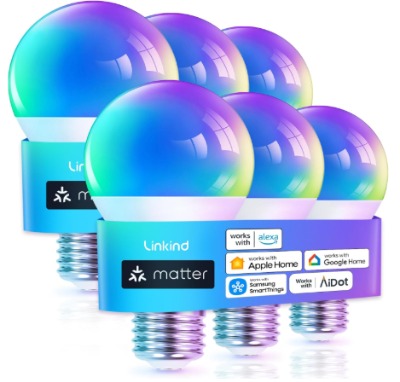
The Linkind Matter Smart Light Bulb comes in a generous 6-pack — giving it one of the lowest per-bulb costs on this list. Like the OREiN, it runs on 2.4GHz Wi-Fi and supports Apple Home, Siri, Alexa, Google Home, and SmartThings through Matter certification. It delivers RGBTW color changing with A19 form factor and E26 base.
What sets Linkind apart from OREiN is the music sync feature. The bulb can pulse and change colors in real time to the beat of whatever you’re playing. It’s a fun addition that makes it feel more premium than its price suggests.
Key Features Explained Simply
- 6-pack deal: More bulbs for less money — great for outfitting an entire apartment or multiple rooms.
- Music sync: The bulb responds to sound and music through your phone’s microphone — pulses and color shifts match your playlist.
- Matter-certified: Works across all major smart home platforms at once.
- RGBTW lighting: Full color range plus tunable whites for both mood and task lighting.
- Mood lighting presets: Built-in scenes for things like “reading,” “relaxing,” “party,” and “focus.”
Real-Life Usage Insight
Picture a home office setup with three Linkind bulbs in different lamps. During work hours, you set them to a cool 4000K white to stay alert. When your lunch break hits, you tap a “relax” scene and the lights shift to a warm amber. In the evening, music sync kicks in while you wind down with some lo-fi beats — the lights gently pulse in slow, mellow rhythms.
The 6-pack is perfect for someone moving into a new apartment and wanting to smart-home the whole thing in one shot. At the per-bulb price, it’s hard to argue against.
Best Use Cases
- Home parties and entertainment spaces
- Music lovers who want immersive lighting
- New apartment or full-room setups (6 bulbs covers a lot of lamps)
- Budget-conscious buyers who want a full smart lighting solution at once
- Living rooms, bedrooms, home offices
Pros
- Excellent value in a 6-pack
- Music sync adds fun without extra cost
- Matter support ensures future compatibility
- Smooth color transitions
- Good warm white quality
- Easy setup through Apple Home
Cons
- Music sync requires phone microphone to be active (no dedicated sound sensor in the bulb)
- Per-app scheduling can feel slightly redundant when using HomeKit automations
- Color accuracy at maximum saturation isn’t studio-grade
- The companion app UI feels a bit dated
- Occasional slight connectivity hiccup reported after firmware updates (usually resolves itself)
Performance
Linkind’s color range is wide and vibrant. Reds, blues, and greens all look punchy. White tones transition smoothly across the 2700K–6500K range. Dimming performance is reliable with no noticeable flicker above 15%.
Siri commands work consistently. “Hey Siri, set the living room to blue” gets a clean response. Music sync latency is minimal — the lights feel reactive, not laggy.
Ease of Use
The Matter setup process is identical to OREiN — scan and go. The Linkind app offers more scene customization than OREiN’s app, though it’s still not as polished as the premium options on this list. For HomeKit users who lean on Apple Home for daily control, the companion app is mostly just for initial setup and music sync.
Value for Money
Six Matter-certified RGBTW bulbs with music sync at this price is genuinely impressive. Linkind delivers solid real-world performance without cutting corners on the features that matter most.
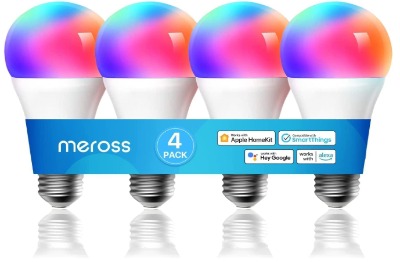
3. Meross Smart RGBWW WiFi LED Bulbs (4-Pack) — Best for Deep HomeKit Integration
Product Overview
Meross has built a strong reputation specifically in the Apple HomeKit community. The Meross Smart RGBWW WiFi LED Bulbs deliver 900 lumens per bulb — slightly brighter than the two options above — and use a dedicated warm white LED (the extra “WW” in RGBWW) for genuinely beautiful candlelight-style warm tones.
These are A19 E26 bulbs, 60W equivalent, and they connect directly to Apple Home without needing a hub or Matter bridge. Meross was one of the early brands to nail native HomeKit support, which shows in how well these bulbs behave inside the Apple ecosystem.
Key Features Explained Simply
- Native HomeKit support: These bulbs have HomeKit built in — not through Matter, but through direct Apple Home pairing. They show up reliably in the Home app every time.
- RGBWW: Regular color bulbs use RGB (red, green, blue). Adding warm white (WW) means the warm tones look genuinely warm and natural, not orange-tinted.
- 900 lumens: Brighter than most competitors at this price tier — good for actual room lighting, not just ambiance.
- No hub needed: Wi-Fi direct connection means less clutter and fewer devices to manage.
- 4-pack: Four bulbs with strong HomeKit pedigree at a reasonable price.
Real-Life Usage Insight
Meross bulbs are a favorite in HomeKit-specific communities for good reason. They just work. Drop them into a lamp, open Apple Home, add accessory, and you’re done. The RGBWW formula shines in a bedroom setup — at night, you dim to a very warm 2200K equivalent for a cozy, sleep-friendly glow that doesn’t blast blue light in your face.
The 900-lumen output makes these bulbs actually functional as primary room lighting, not just accent lighting. A small bedroom or home office feels well-lit at full brightness.
Best Use Cases
- Apple-first smart home users who primarily use HomeKit
- Bedrooms where warm white quality matters for sleep hygiene
- Home offices that need both task lighting and ambiance
- Anyone who wants deep Apple Home integration with scenes, automations, and Siri shortcuts
- Reliability-focused buyers who don’t want connection drops
Pros
- Excellent native HomeKit integration — rock solid reliability
- RGBWW formula produces genuinely beautiful warm whites
- 900 lumens is noticeably brighter than most budget competitors
- Works seamlessly with HomeKit scenes and automations
- Long-standing positive reputation in the HomeKit community
- Clean, simple Meross app for setup
Cons
- No Matter certification (uses native HomeKit instead, so cross-platform use requires separate app setup for each ecosystem)
- Slightly more expensive per bulb than OREiN or Linkind
- No music sync feature
- Color saturation at the bold/primary end isn’t as vivid as some competitors
- App can occasionally need a re-login after extended periods
Performance
Meross bulbs shine brightest (pun intended) in the white light department. The warm white tones are genuinely some of the best in this price bracket. Color rendering is good rather than great — pastels and mid-range tones look lovely, while deep saturated colors like bright red or electric blue are decent but not the most vivid.
Connection stability is where Meross earns its reputation. These bulbs rarely drop off the network. Siri responses are fast and accurate. HomeKit automations trigger reliably.
Ease of Use
For pure HomeKit users, Meross is arguably the easiest on this list. The pairing process is straightforward, and the Apple Home app takes over completely for day-to-day use. Meross’s own app is clean and well-designed — good for color picking and creating custom scenes.
Value for Money
Slightly pricier than the budget options but justified by the better white light quality, higher brightness, and exceptional HomeKit reliability. If you’re all-in on Apple Home, the Meross is worth the extra spend.
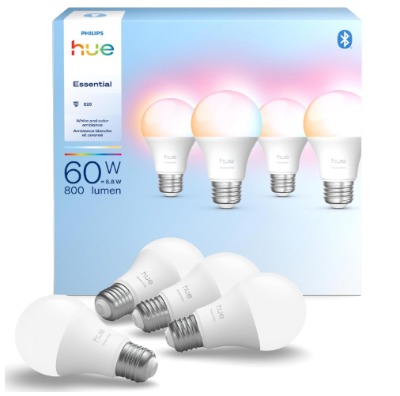
4. Philips Hue Essential Smart LED A19 Bulb (4-Pack) — Best Premium Option for Apple HomeKit
Product Overview
Philips Hue is the name most people think of first when smart bulbs come up, and for good reason. The Philips Hue Essential Smart LED A19 bulb in White and Color Ambiance delivers 800 lumens, runs from 2200K to 6500K for a wide range of whites, and works with Apple Home, Alexa, and Google. It’s an 8.8W bulb in an A19 form factor with E26 base.
The Hue ecosystem is the most mature smart lighting platform available. These bulbs work with or without the Hue Bridge (a hub that unlocks advanced features), and they integrate into Apple Home with exceptional reliability and polish.
Key Features Explained Simply
- 2200K–6500K white range: From warm candlelight to crisp daylight. This is one of the widest color temperature ranges on this list.
- White and Color Ambiance: Full RGB plus an exceptional white LED system. Color accuracy is noticeably better than budget competitors.
- Works with or without Hue Bridge: Without the bridge, you pair directly via Bluetooth. With the bridge, you unlock remote access, advanced automations, and Entertainment mode for gaming/movies.
- Hue ecosystem depth: Syncs with Hue Play bars, gradient strips, motion sensors, and dozens of accessories.
- Long lifespan: Philips rates these at 25,000 hours — significantly higher than most budget bulbs.
Real-Life Usage Insight
The Hue experience is a step above everything else on this list. Open the Hue app and you’re greeted with a polished interface full of professionally designed light scenes — “Savanna Sunset,” “Arctic Aurora,” “Soho,” “Tokyo.” Tap one and every Hue bulb in the room shifts instantly and beautifully.
With the Hue Bridge connected to HomeKit, the integration feels seamless. Your iPhone shows every room, every bulb, every scene. Siri commands work with precision. “Hey Siri, set the bedroom to Arctic Aurora” and the room transforms.
If you have an Apple TV 4K or HomePod, Hue can sync lights to movie content in real time through the Hue Sync feature — the walls glow with the colors of whatever you’re watching.
Best Use Cases
- Premium smart home setups
- Home theater and entertainment spaces
- Living rooms where light ambiance matters greatly
- Power users who want deep customization and automation
- Long-term investment buyers who don’t want to replace bulbs frequently
- Anyone building a full Hue ecosystem across multiple rooms
Pros
- Best-in-class color accuracy and white light quality
- Incredibly deep ecosystem — works with dozens of Hue accessories
- Rock-solid Apple HomeKit integration
- Hue app is polished, intuitive, and packed with professional scenes
- Wide color temperature range (2200K–6500K)
- Long rated lifespan (25,000 hours)
- Hue Sync for entertainment lighting is genuinely spectacular
- Remote access works flawlessly with the Hue Bridge + HomeKit
Cons
- Noticeably more expensive than all other options on this list
- Full feature set requires the Hue Bridge (sold separately, adds cost)
- 800 lumens is the same as budget options despite the premium price
- Some users find the Hue ecosystem can feel closed off from non-Hue devices
- Overkill for casual smart home users who just want a few bulbs to control with Siri
Performance
Philips Hue delivers the most polished performance of any bulb here. Color accuracy is exceptional — colors look rich, accurate, and consistent across multiple bulbs. White light is beautiful at every point on the spectrum. Transitions between scenes and colors are silky smooth.
Hue’s connection reliability with the bridge is essentially perfect. Without the bridge (Bluetooth only), the range is limited to one room and some advanced features aren’t available.
Ease of Use
Without the bridge: simple Bluetooth pairing, basic features, works fine for casual users. With the bridge: a few more setup steps, but unlocks a world of features. The Hue app is the best smart lighting app available, period. HomeKit integration is seamless either way.
Value for Money
This is where it gets complicated. Per-bulb cost is significantly higher than the others. Brightness is the same 800 lumens. If you just want to control lights with Siri and set a warm scene, a Meross or OREiN does that for less.
But if you want the best light quality, the deepest feature set, and a platform you can build on for years — Hue justifies every penny. It’s a long-term investment, not a quick purchase.
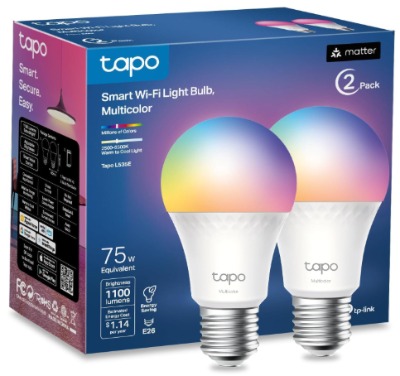
5. TP-Link Tapo L535E Smart Light Bulbs (2-Pack) — Best for Brightness and Matter Certification
Product Overview
The TP-Link Tapo L535E stands out immediately for one reason: 1100 lumens. That’s the brightest bulb on this list by a meaningful margin — equivalent to a 75W incandescent. It comes in a 2-pack, is Matter-certified, and works with Siri, Alexa, and Google Home. It delivers 16 million colors, is dimmable, and connects via 2.4GHz Wi-Fi with no hub required.
TP-Link’s Tapo brand has grown rapidly in the smart home space. The L535E sits at the top of their bulb lineup and brings premium specs at a mid-range price.
Key Features Explained Simply
- 1100 lumens: The brightest option on this list. Actually lights up a full room as a primary source, not just accent lighting.
- Matter-certified: Full cross-platform support — Apple Home, Alexa, Google, SmartThings, all at once.
- 16 million colors: Wide color range for vibrant, accurate color reproduction.
- Dimmable: Smooth dimming across the full range down to low percentages without flicker.
- TP-Link Tapo app: One of the most feature-rich smart bulb apps available, with scheduling, scenes, and group control.
Real-Life Usage Insight
If you have a larger room — a living room, a studio, a dining area — the L535E is the only bulb here that pulls its weight as an actual room light. At 1100 lumens, you get real brightness. You don’t need to supplement with other fixtures.
The Tapo app is genuinely impressive for a non-premium brand. You get granular scheduling, custom scenes, group control, and even a circadian rhythm mode that automatically shifts your light color temperature throughout the day to match natural daylight cycles. It’s a feature usually reserved for premium brands.
Matter certification means this bulb slots into Apple Home cleanly. Siri controls work well. HomeKit scenes behave exactly as expected.
Best Use Cases
- Larger rooms where 800 lumens isn’t enough
- Dining rooms, living rooms, studios, and open-plan spaces
- Anyone who wants HomeKit control but needs genuine brightness
- Tech-savvy users who want lots of app features
- People who want Matter compatibility for maximum ecosystem flexibility
Pros
- 1100 lumens is the highest brightness on this list — actually lights up large rooms
- Matter-certified for broad platform support
- Tapo app is feature-rich and well-designed
- Circadian rhythm / natural light mode is a great health-focused feature
- Smooth dimming performance
- Strong color accuracy at max saturation
- Good value for a 2-pack at this spec level
Cons
- Only a 2-pack — higher cost if you need to outfit multiple rooms quickly
- The Tapo app has a steeper learning curve than simpler apps
- Larger bulb profile than standard A19 — may not fit recessed fixtures with covers
- Some users report occasional Wi-Fi reconnection needed after power outages
- Not quite at Philips Hue’s level of white light quality
Performance
The L535E performs exceptionally well for its price. Brightness is its headline stat and it delivers. Colors are vibrant and accurate. The warm-to-cool white transition is smooth and natural. Dimming is clean across the range.
Siri responses are fast and consistent. HomeKit automations work reliably. The Matter setup process through Apple Home is smooth.
Ease of Use
Setup is standard Matter process — simple and quick. The Tapo app has a slight learning curve because there’s so much in it, but once you explore it, you’ll appreciate the depth. For daily use, Apple Home handles everything.
Value for Money
At a 2-pack price, the per-bulb cost is moderate. But for the brightness and feature set you get, it’s solid value. If brightness is your priority — and it often is for main room lighting — the L535E is the best cost-per-lumen option here.
Side-by-Side Comparison: Quick Snapshot
Here’s how all five bulbs stack up at a glance:
| Feature | OREiN | Linkind | Meross | Philips Hue | TP-Link Tapo L535E |
|---|---|---|---|---|---|
| Pack Size | 4 | 6 | 4 | 4 | 2 |
| Lumens | 800 | 800 | 900 | 800 | 1100 |
| Color Type | RGBTW | RGBTW | RGBWW | RGB+White | 16M Colors |
| Matter | ✅ | ✅ | ❌ (Native HK) | ❌ (Native HK) | ✅ |
| Music Sync | ❌ | ✅ | ❌ | ❌ | ❌ |
| Hub Required | No | No | No | Optional | No |
| Price Tier | Budget | Budget | Mid | Premium | Mid |
| Best For | Budget starter | Fun + value | HomeKit depth | Premium users | Bright rooms |
Buying Guide: How to Pick the Right HomeKit Smart Bulb
You’ve read through five solid options. Now let’s help you figure out which one actually belongs in your home.
Think About Your Room Size First
This one gets overlooked all the time. A 60W-equivalent bulb (800 lumens) works fine for lamps, small rooms, and accent lighting. But if you’re trying to light a 15×20 living room with a single overhead fixture, you need more. The TP-Link Tapo at 1100 lumens (75W equivalent) is the only one here that handles large spaces comfortably.
For bedrooms, home offices, and reading lamps — 800 to 900 lumens is plenty.
Matter vs. Native HomeKit — What’s the Difference?
Both work with Apple Home. The difference is flexibility.
Matter bulbs (OREiN, Linkind, Tapo) work across Apple Home, Alexa, Google Home, and SmartThings at the same time. One bulb, all platforms, no compromise.
Native HomeKit bulbs (Meross, Philips Hue) are built specifically for HomeKit first. They work with other platforms too, but you set them up separately for each one. In practice, if you’re purely Apple-focused, native HomeKit often feels smoother and more stable.
If you use multiple ecosystems — like Alexa speakers but HomeKit for automation — go Matter. If you’re 100% Apple, either works but native HomeKit often edges out.
Do You Care About Color?
If you just want white light that you can dim and control with Siri, you don’t need the full RGB color changing feature. But if you want to create moods, set party lighting, or use Hue’s entertainment sync — color is non-negotiable.
For the best color accuracy: Philips Hue. For the most fun colors at a budget: Linkind. For the best warm white quality: Meross (RGBWW format).
How Many Bulbs Do You Need?
This affects the cost conversation significantly.
- Outfit one room? A 2-pack Tapo makes sense.
- Three or four lamps in one space? OREiN or Meross 4-pack.
- An entire apartment or multiple rooms? Linkind’s 6-pack gives the lowest per-bulb cost.
- Long-term premium investment? Philips Hue 4-pack.
App vs. Apple Home — Which Will You Use?
All of these bulbs work through the Apple Home app. That’s where you’ll control them day-to-day. But each brand’s own app unlocks more advanced features — music sync, custom scenes, circadian rhythm modes, and fine-grained scheduling.
If you want to live purely in Apple Home: any of these works. If you want extra features beyond what HomeKit offers natively: the Tapo app and Hue app are the most feature-rich.
Budget Reality Check
Here’s the honest breakdown:
Tight budget, need coverage: Linkind 6-pack gives you the most bulbs for the least money. Or OREiN 4-pack.
Mid-range, want reliability: Meross 4-pack hits the sweet spot of quality and value for HomeKit users.
Brightness is priority: TP-Link Tapo L535E — worth paying more per bulb for that extra 300 lumens.
Best experience regardless of price: Philips Hue — the app, the ecosystem, the color quality, and the scene library are all class-leading.
Who Should Buy Each Bulb?
OREiN — You’re new to smart home. You want to try HomeKit without spending a lot. You have a few lamps to cover. Budget is tight. Start here.
Linkind — You want more bulbs at less cost, and you like the idea of music sync for parties or entertainment. Great for young renters furnishing a new place.
Meross — You’re all-in on Apple. You use HomeKit daily, love Siri shortcuts and automations, and you want bulbs that just work without fuss. The RGBWW warm whites are a bonus.
Philips Hue — You want the best. You’re willing to invest in a platform that you’ll build on over time. You care about light quality, app experience, and ecosystem depth. Or you want entertainment sync for movies and gaming.
TP-Link Tapo L535E — Your room is big. Standard 60W-equivalent bulbs don’t cut it. You want Matter flexibility and a powerful app. Brightness is your top priority.
Common Mistakes to Avoid When Buying HomeKit Smart Bulbs
Smart bulbs are mostly foolproof, but a few missteps can turn a great product into a frustrating experience. Here’s what to watch out for.
Mistake 1: Not checking your Wi-Fi band. All the bulbs here run on 2.4GHz Wi-Fi. If your phone is connected to a 5GHz network when you set them up, pairing can fail. During setup, temporarily connect your phone to 2.4GHz on your router. Most modern routers have a band-steering option — if your setup fails, turn band steering off temporarily.
Mistake 2: Buying bulbs for the wrong fixture type. A19 bulbs with E26 base fit most standard US lamps and fixtures. But recessed lighting, candelabra sockets, and flood light fixtures need different shapes. Always check the fixture before ordering.
Mistake 3: Assuming brightness is brightness. 800 lumens from one brand can look different from 800 lumens from another depending on the beam angle, diffuser, and LED quality. Read reviews for how bright the light actually feels in real rooms, not just the spec sheet.
Mistake 4: Not using a HomePod or Apple TV as a Home Hub. For HomeKit automations to run when you’re away from home, you need a Home Hub — an Apple TV 4K, HomePod, or HomePod mini on the same network. Without one, your automations only run when your iPhone is home. This isn’t a bulb issue, it’s an Apple Home architecture thing.
Mistake 5: Ignoring the ecosystem you already have. If your home already has Alexa everywhere, get a Matter-certified bulb. If your home is pure Apple, native HomeKit is often cleaner. Don’t fight your existing setup — find a bulb that fits it.
Mistake 6: Turning smart bulbs off at the wall switch. This is the #1 frustration for smart bulb newcomers. Smart bulbs need constant power to stay connected. When you flip the physical wall switch off, the bulb loses power and drops off your network. Use smart switches or dimmers designed for smart bulbs, or put a label on the switch to remind household members to use the app instead.
Mistake 7: Buying based on lumen spec alone without reading reviews. A bulb spec says 800 lumens. But that’s measured in a controlled environment. Real-room brightness depends on fixture design, beam angle, and diffuser quality. Read what actual users say about how bright the bulb feels in their rooms.
Final Verdict: Which Is the Best Smart Bulb for Apple HomeKit?
There’s no single “best” answer here because different homes have different needs. But here’s our clear-cut guidance:
For the absolute best HomeKit experience with no budget ceiling: The Philips Hue Essential 4-Pack is the obvious choice. The app, the scene library, the color accuracy, and the ecosystem depth are simply unmatched. Yes, it costs more. But it’s a platform you build on for years.
For the best balance of quality and value for HomeKit users: The Meross Smart RGBWW 4-Pack is the standout choice. Native HomeKit integration, beautiful warm whites from the RGBWW format, 900 lumens of brightness, and a rock-solid reputation in the Apple community.
For the best brightness in large rooms: The TP-Link Tapo L535E wins easily. 1100 lumens is meaningfully brighter than anything else here, and the Matter certification keeps your options open.
For the best budget buy: OREiN 4-Pack for reliable Matter support at the lowest cost. Or Linkind 6-Pack if music sync and more bulbs per dollar matter to you.
At the end of the day, all five of these bulbs work with Apple HomeKit. They all respond to Siri. They all let you create scenes and automations. The differences are in brightness, color quality, ecosystem depth, and extra features.
Pick the one that fits your room size, your budget, and the features that actually matter to your daily life. Any of these will make your home smarter — and your lighting genuinely better.
Frequently Asked Questions
Do these bulbs work without internet? Most smart bulbs lose remote control features without internet, but they can still be turned on/off manually. HomeKit local control (through a HomePod or Apple TV Hub) does allow some features to work locally without cloud dependence.
Can I use these bulbs with HomeKit scenes? Yes. All five bulbs support HomeKit scenes. You can set a “Movie Night” scene that dims everything to 20% warm white, then trigger it with one Siri command or tap.
Do smart bulbs use more electricity than regular bulbs? No. These are LED bulbs. A 9W smart LED uses far less power than a 60W incandescent. The smart features add a tiny standby power draw (usually 0.5W or less) even when “off” but connected — but this is negligible.
What happens if the Wi-Fi goes down? Bulbs stay in their last state (on or off, last color/brightness). You can still control them manually at the physical switch. HomeKit automations may pause until connectivity returns.
Can multiple people in my household control these bulbs? Yes. Through Apple Home, you can share your home with family members. Everyone with access can control the bulbs from their own iPhones.
Do I need to keep the manufacturer’s app installed? After setup, for daily use with HomeKit, you don’t need the companion app open. You can control everything through Apple Home. The companion app is useful for advanced features (music sync, circadian modes, custom scenes) and firmware updates.
This article contains affiliate links. We may earn a commission if you make a purchase through our links, at no extra cost to you. All opinions are our own based on research and analysis of user feedback and product specifications.

Hi, I’m Mary, the founder of Homygear.com. I’m passionate about creating a comfortable, smart, and beautiful home. I share practical insights and real-world experience on home gear that makes everyday life easier. Behind the scenes, my dedicated research team studies products in depth, and our writers craft honest reviews using trusted, authentic sources—so you can choose home gear with confidence.