5 Best Smart Home Security Camera In 2026
If you have been shopping around for a smart home security camera, you already know how messy the search gets. Every brand claims to be the smartest, the clearest, or the safest pick on the market. Some cameras want you to pay a monthly fee just to see your own footage. Others sit outside in the rain for months and still work fine, while a few struggle the moment the weather turns rough.
This guide cuts through the noise. We are looking closely at five popular smart home security cameras that cover different needs, budgets, and living situations. Some are built for indoor use, like watching a baby room or keeping an eye on a dog. Others are made for full outdoor coverage with solar power and zero monthly fees. By the end of this article, you will know exactly which camera fits your home, your budget, and your daily routine.
We will walk through each product one by one, explain the tech in plain language, point out where each camera shines, and be upfront about where it falls short. Then we will compare them side by side, share a simple buying guide, talk about who should buy what, list common mistakes people make, and close with a final verdict.
Let’s get into it.
Why a Smart Home Security Camera Matters
A smart home security camera does more than record video. It sends alerts to your phone the second it spots motion, lets you talk to whoever is at your door, and gives you peace of mind when you are away from home. For parents, it doubles as a baby monitor. For pet owners, it works as a way to check on a dog or cat during the day. For anyone living alone, it adds a layer of safety that a normal lock and door chain just cannot match.
The tricky part is that not every camera fits every home. A tiny indoor plug-in camera will not survive outside in the sun and rain. A big outdoor solar-powered camera is overkill if all you want is a baby monitor for a nursery. That is why this roundup covers a mix of indoor cameras, outdoor cameras, budget-friendly picks, and full security kits with sensors.
Before we dive into each product, keep two things in mind while reading: first, think about where the camera will actually sit in your home. Second, think about how much you want to pay every month, since some cameras charge a subscription fee for cloud storage and smart features, while others let you skip that cost entirely with local storage.
Now let’s look at each camera in detail.
1. ADT Blu Indoor Camera Kit — Best for a Complete Starter Security System
Product Description
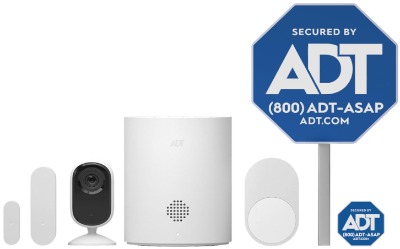
The ADT Blu Indoor Camera Kit is not just a single camera. It’s a small starter security system that bundles a 2K indoor camera with a door or window sensor and a motion detector. Everything connects through the ADT+ app, which is built by one of the most recognized names in home security. This kit is aimed at people who want more than a camera. They want a real system that can watch a room, sense when a door opens, and detect movement in a hallway or living room, all controlled from one app.
Key Features Explained Simply
The 2K camera resolution means sharper video than standard 1080p, so faces and small details come through more clearly on your phone screen. Night vision kicks in automatically when the room goes dark, so you still get a clear black-and-white picture even with the lights off. Two-way audio lets you speak through the camera, so you can greet a family member, warn off a person you don’t recognize, or soothe a pet from another room.
The door and window sensor is a small magnetic strip that alerts you the instant a door or window opens. Pair that with the motion detector, and you get a layered setup: the sensor tells you something opened, and the motion detector confirms if someone actually walked into the room. It’s a smart way to reduce false alarms compared to relying on a camera alone.
The kit is also labeled pet-friendly, meaning the motion sensor is tuned to reduce false triggers from a cat walking across the floor or a small dog running past.
Real-Life Usage Insight
This kit works well for a front entryway, a home office, or a main living area where you want layered coverage rather than just a single camera view. A common setup is placing the door sensor on the main entrance, the motion detector in the hallway, and the camera pointed at the living room. That way, if someone enters the home, you get three points of confirmation before you decide to check the live feed or call for help.
Because it runs through ADT+, this system also gives you a path to add professional monitoring later if you decide you want a monitored alarm response, without needing to buy a whole new setup.
Pros
- Bundled sensors give layered security, not just a camera
- 2K resolution is sharp for an indoor camera
- Two-way audio works clearly for talking to people or pets
- Pet-friendly motion detection cuts down false alerts
- Backed by ADT’s reputation and app ecosystem
- Easy path to add professional monitoring later if needed
Cons
- More expensive upfront than a standalone camera
- Full smart features may need an ADT+ subscription
- Indoor only, so it won’t cover your yard or driveway
- Setup involves a few extra steps compared to a plug-and-play camera
Performance Discussion
The camera itself delivers clear daytime footage and solid night vision for an indoor room. Motion alerts arrive fast, usually within a few seconds of movement being detected, and the two-way audio has low delay, so conversations don’t feel awkward or laggy. The sensors are reliable and rarely miss a door opening, though like most magnetic sensors, they do need to be lined up correctly during installation or they can throw false alerts.
Ease of Use
The ADT+ app walks you through pairing each device step by step, which is helpful for anyone who has never set up a smart home gadget before. It takes a bit longer to get the full kit running compared to a single camera, simply because there are more pieces to connect, but nothing about it requires technical skill.
Value for Money
If you only want a camera, this kit costs more than you need to spend. But if you want a starter security system with sensors and a camera working together, the price makes sense. You’re paying for the extra layer of protection, not just a lens and a microphone.
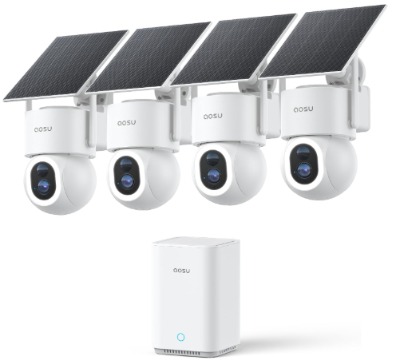
2. aosu SolarCam D1 Max 4-Cam Kit — Best for Full Outdoor Coverage Without Monthly Fees
Product Description
The aosu SolarCam D1 Max comes as a 4-camera kit built for outdoor use, and it leans heavily on solar power so you don’t have to keep swapping batteries. Each camera records in 4K, rotates a full 360 degrees, and can auto-track a person or vehicle moving across your yard. There is no subscription required, and you get up to 1TB of expandable local storage, which is a big deal for anyone tired of monthly camera fees.
Key Features Explained Simply
4K resolution means you get crisp, zoomed-in detail, which matters a lot outdoors where a person or car might be far from the lens. The 360° pan-tilt-zoom (PTZ) motor lets the camera physically turn to follow movement instead of just capturing a fixed frame, so you get a much wider effective field of view than a stationary camera.
Auto-tracking is the standout feature here. When the camera detects a person or a vehicle, it follows the motion automatically, keeping the subject centered in frame instead of losing them at the edge of the screen. Color night vision is another strong point, since most budget cameras switch to plain black-and-white at night, but this one keeps color visible in low light, making it easier to describe a car or clothing color if something suspicious happens.
Solar charging means the camera panel soaks up sunlight during the day and keeps the internal battery topped off, so in most sunny climates you rarely need to charge it by hand.
Real-Life Usage Insight
This kit shines for larger properties: a driveway, a backyard, a side gate, or a detached garage. Four cameras give you coverage from multiple angles instead of one narrow view, which matters if your property has more than one entry point. Homeowners with a long driveway often place one camera near the street to catch vehicles, another at the front door, and two more covering side or back entrances.
Because storage is local (SD card or the expandable 1TB option) rather than cloud-based, you get to keep full ownership of your footage without paying a recurring fee, which is a huge plus for budget-conscious homeowners who still want strong performance.
Pros
- No monthly subscription needed for full features
- 4K video with sharp outdoor detail
- 360° tracking follows people and vehicles automatically
- Color night vision instead of plain black and white
- Solar power reduces the hassle of manual charging
- Four-camera kit covers a full property, not just one spot
Cons
- Solar charging performance depends on sunlight exposure in your area
- Initial setup for four cameras takes longer than a single unit
- Local storage means you should still back up footage occasionally
- Bulkier hardware than small indoor cameras, so it’s less discreet
Performance Discussion
Video quality outdoors is genuinely strong, with sharp detail even at a distance thanks to the 4K sensor. The auto-tracking motor reacts quickly, and vehicle detection is a nice touch since many competing cameras only distinguish between “person” and “other motion.” Battery life holds up well in areas with decent sun exposure, though in cloudy regions or heavily shaded spots, the solar panel may not fully offset battery drain, so occasional manual charging could still be needed.
Ease of Use
The app setup process is straightforward, and pairing four cameras is guided one at a time. Mounting takes more effort since you’re dealing with four separate units, brackets, and ideally an unobstructed spot for the solar panel to catch sunlight. Once mounted, day-to-day use through the app is simple, with clear notifications and a smooth live-view experience.
Value for Money
Given that this is a 4-camera kit with 4K resolution, PTZ tracking, and zero subscription cost, the value here is excellent for anyone who would otherwise be paying for four separate cameras plus monthly cloud fees elsewhere. It’s a strong long-term investment for full outdoor coverage.
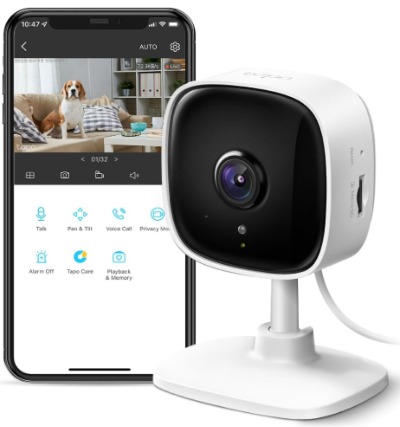
3. TP-Link Tapo C100 — Best Budget Indoor Camera for Baby and Pet Monitoring
Product Description
The TP-Link Tapo C100 is a compact, affordable 1080P indoor camera built with baby and pet monitoring in mind. It offers motion detection, two-way audio with a built-in siren, night vision, and flexible storage through either the cloud or a local SD card. It also connects smoothly with Alexa and Google Home, making it a solid pick for anyone already using those ecosystems.
Key Features Explained Simply
1080P resolution is the standard sharpness most people are used to from phone cameras, and for an indoor room, it’s more than enough to clearly see a baby’s crib or a dog lounging on the couch. Motion detection sends a push notification the moment something moves in frame, and the two-way audio lets you talk directly through the camera, which is handy for soothing a crying baby or telling a dog to get off the couch from another room.
The built-in siren is a nice extra layer of deterrence. If the camera detects unexpected motion, you can trigger the siren remotely to scare off an unwanted presence, which is a feature you don’t always see on budget cameras. Storage flexibility is another strong point: you can use a local SD card to avoid subscription costs entirely, or opt into cloud storage if you want offsite backup.
Real-Life Usage Insight
This is the kind of camera you place in a nursery, a kid’s playroom, or near a pet’s favorite spot. Parents commonly mount it near the crib to keep a live audio and video feed running on a phone or tablet overnight. Pet owners often place it near the front door or living room to check in on a dog during work hours, especially useful for dogs with separation anxiety, since the two-way audio lets you talk to them remotely.
Since it works with Alexa and Google Home, you can also pull up the live feed on a smart display in the kitchen, which adds convenience without needing to open the app every time.
Pros
- Very affordable compared to most smart cameras on this list
- Reliable motion detection with instant alerts
- Two-way audio and siren add real deterrent value
- Works with SD card storage, so no subscription is required
- Compatible with Alexa and Google Home
- Compact and blends into most rooms easily
Cons
- 1080P resolution is fine indoors but not as sharp as 2K or 4K options
- No pan or tilt movement, so the field of view is fixed
- Best suited for indoor use only
- Cloud storage plans cost extra if you want offsite backup
Performance Discussion
For the price, the Tapo C100 performs reliably. Motion alerts are fast and accurate, night vision is clear enough to check on a sleeping baby or a resting pet, and the two-way audio comes through without much delay. The fixed field of view is the main limitation, so placement matters more here than with a pan-tilt camera, since you can’t adjust the angle remotely later.
Ease of Use
Setup is quick through the Tapo app, usually done in a few minutes by scanning a QR code and connecting to Wi-Fi. This is one of the easier cameras on this list for a first-time smart home user to get running without help.
Value for Money
This camera delivers strong value. It covers the essentials, motion detection, two-way audio, night vision, and flexible storage, at a price point that makes it easy to recommend as a starter camera or a second unit for another room.
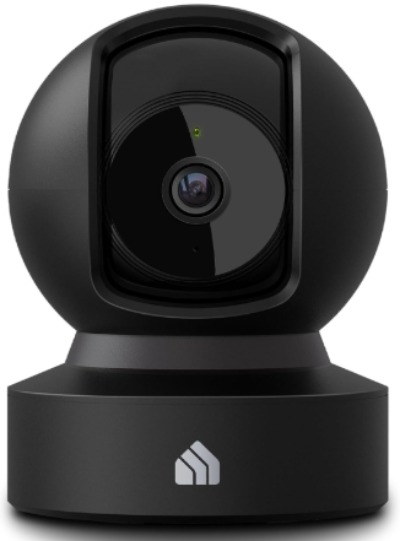
4. Kasa EC71 Indoor Pan/Tilt Camera — Best for Active Tracking Indoors
Product Description
The Kasa EC71 is a 1080p indoor camera with pan and tilt motion, meaning it can physically rotate to follow movement around a room instead of staying locked on one angle. It works well as a baby or pet monitor, includes motion detection with tracking, two-way audio, night vision, and gives you the choice between subscription-free local storage or optional cloud backup.
Key Features Explained Simply
Pan and tilt means the camera lens itself moves left, right, up, and down, either manually through the app or automatically when it detects motion. This is a step up from fixed cameras like the Tapo C100, since it can follow a toddler crawling across a room or a dog moving from one corner to another, keeping the subject in frame instead of losing them.
Motion tracking builds on this by having the camera automatically pan toward movement without you needing to control it manually. Two-way audio and night vision work the same way as most cameras on this list, letting you talk through the device and see clearly in the dark. The local storage option is a strong feature here, since it means you can record and store footage without paying a monthly cloud fee, while still having cloud backup available if you want it later.
Real-Life Usage Insight
This camera fits well in a nursery, a playroom, or any open living space where movement isn’t confined to one small area. Parents with an active toddler often prefer this over a fixed camera because the tracking keeps the child in view even as they move around the crib or play area. Pet owners with a more active dog or cat also benefit, since the camera can follow the pet from the couch to the food bowl without losing sight of them.
Because storage doesn’t require a subscription, this is also a good pick for anyone who wants smart tracking features without committing to a recurring cost.
Pros
- Pan and tilt movement covers more of a room than fixed cameras
- Automatic motion tracking follows movement smoothly
- Subscription-free local storage keeps ongoing costs low
- Two-way audio and clear night vision
- Works well for both baby and pet monitoring
Cons
- 1080p resolution, not 2K or 4K, though still solid for indoor use
- Wired power only, so placement is limited by outlet access
- Indoor use only
- Optional cloud plan adds cost if you want offsite storage
Performance Discussion
The pan and tilt motor moves smoothly and responds quickly to motion, which makes a real difference when monitoring a room with an active child or pet. Video quality is sharp enough for everyday monitoring, and night vision holds up well in a dark room. Since the camera is wired rather than battery-powered, you don’t need to worry about charging or battery drain, though it does mean you need an outlet nearby.
Ease of Use
Setup through the Kasa app is simple and quick, following the same scan-and-connect process common to most smart cameras. The pan-tilt controls in the app are intuitive, letting you manually adjust the view or rely on auto-tracking without any complicated settings.
Value for Money
Given the pan-tilt tracking and subscription-free storage, this camera offers solid value for anyone who wants more active coverage than a fixed camera without paying ongoing fees. It sits in a good middle ground between basic budget cameras and higher-end smart home kits.
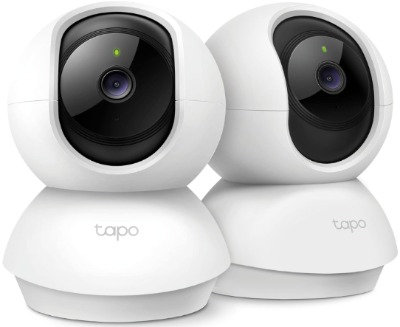
5. Tapo C210P2 — Best 2-Pack for Covering Multiple Rooms
Product Description
The Tapo C210P2 comes as a 2-pack of pan and tilt cameras with 2K resolution, making it a strong option for anyone who needs to cover more than one room without buying two separate products. It includes motion detection, two-way audio with a siren, night vision, and both cloud and SD card storage options, and it connects with Alexa and Google Assistant.
Key Features Explained Simply
Getting two cameras in one purchase is the main draw here. Instead of covering just a nursery or just a living room, you can place one camera in each space, which is a common need for parents with more than one child or homeowners who want to watch both a front room and a back room. The 2K resolution is a step up from standard 1080p, giving you noticeably clearer detail than the Tapo C100 while still staying budget-friendly for a 2-pack.
Like the other Tapo camera on this list, it includes pan and tilt movement, motion tracking, two-way audio, a built-in siren, and flexible storage. This combination of features across two units at once makes it a practical pick for larger households.
Real-Life Usage Insight
Families with two kids often place one camera in each child’s room, using the two-way audio to talk to either child from a single app without needing separate devices or accounts. Homeowners without kids might instead use one camera indoors and one in a garage or covered porch area, though it’s worth noting these are built primarily for indoor use, so outdoor placement should be somewhere sheltered from direct weather exposure.
The shared app experience means you can flip between both camera feeds quickly, which saves time compared to managing two completely separate camera systems from different brands.
Pros
- Two cameras in one purchase, ideal for multi-room coverage
- 2K resolution offers clearer detail than standard 1080p
- Pan and tilt with motion tracking on both units
- Two-way audio and siren on each camera
- Flexible cloud or SD card storage
- Works with Alexa and Google Assistant
Cons
- Best suited for indoor or sheltered spaces, not full outdoor exposure
- Two devices mean two separate motion zones to configure
- Cloud storage plan costs extra if you skip the SD card option
- Wired power needed for both units
Performance Discussion
Both cameras in the pack perform consistently with each other, which matters since inconsistent quality between paired devices can be frustrating. The 2K video is a clear step up in sharpness compared to standard 1080p cameras on this list, and the pan-tilt tracking works smoothly in both units. Motion alerts arrive promptly, and the siren function adds a useful extra layer of deterrence in each room.
Ease of Use
Setting up two cameras takes a bit more time than a single unit, but the Tapo app manages both devices under one account without any confusion. Switching between camera feeds is smooth, and the overall app layout stays simple, even with multiple devices connected.
Value for Money
For the price of a 2-pack, getting 2K resolution, pan-tilt tracking, two-way audio, and flexible storage on both units is a strong deal. It’s especially good value for larger households that need multi-room coverage without paying for two separate premium cameras.
Comparison Insights: How These Cameras Stack Up
Now that we’ve gone through each camera individually, let’s line them up side by side to see where each one truly stands out.
Best for a complete security system: The ADT Blu Indoor Camera Kit wins here, since it’s the only product on this list that bundles a camera with door sensors and motion detectors rather than just a standalone camera.
Best for outdoor coverage: The aosu SolarCam D1 Max is the clear pick for outdoor use, with 4K resolution, solar charging, and a 4-camera setup built specifically for covering a full property.
Best budget option: The TP-Link Tapo C100 stands out as the most affordable pick, delivering solid core features without a high price tag or subscription requirement.
Best for active tracking indoors: The Kasa EC71 and the Tapo C210P2 both offer pan and tilt tracking, but the Kasa EC71 is a single unit at 1080p, while the Tapo C210P2 gives you two cameras at 2K resolution.
Best for multi-room households: The Tapo C210P2 takes this category thanks to its 2-pack format, letting you cover two spaces at once without buying separate products.
Best resolution overall: The aosu SolarCam D1 Max leads with 4K, followed by the ADT Blu Camera and Tapo C210P2 at 2K, with the Tapo C100 and Kasa EC71 rounding things out at 1080p.
Best for skipping subscriptions: The aosu SolarCam D1 Max and Kasa EC71 both offer subscription-free storage as a core selling point, which matters a lot if you want to avoid ongoing costs.
A pattern worth noticing here is that indoor cameras tend to focus on baby and pet monitoring with two-way audio and tracking, while the outdoor option leans into wider coverage, tougher hardware, and independence from constant charging. The ADT kit stands apart from all of them by acting as a mini security system rather than a single-purpose camera.
Buying Guide: What to Look for in a Smart Home Security Camera
Shopping for a security camera gets easier once you know which specs actually matter for your situation. Here’s a simple breakdown of the key factors to weigh before you buy.
Indoor vs outdoor use. This is the first decision to make. Indoor cameras are usually smaller, cheaper, and designed for baby or pet monitoring. Outdoor cameras need weatherproofing, stronger night vision, and often a power source that doesn’t rely on a nearby outlet, like solar charging or a large battery.
Resolution. 1080p is fine for most indoor rooms where the camera is close to what it’s watching. 2K adds noticeably better detail, useful for larger rooms or when you want to zoom in on recorded footage. 4K is best for outdoor use where the camera might be covering a wide driveway or yard and needs to capture fine detail from a distance.
Storage type. Local storage through an SD card avoids monthly fees entirely, which is great for long-term savings. Cloud storage costs more over time but protects your footage if the camera itself gets damaged, stolen, or loses power. Some cameras, like a few on this list, let you use both depending on your needs.
Motion detection and tracking. Basic motion detection sends an alert when something moves in frame. Pan-tilt tracking goes further by physically following that movement, which is especially useful for active kids, pets, or anyone monitoring a larger space.
Two-way audio. This lets you talk through the camera, which is useful for soothing a baby, calling a pet, or letting a visitor know you’ll be right there. Nearly every camera on this list includes this feature, so it’s become close to a standard rather than a luxury.
Smart home compatibility. If you already use Alexa, Google Home, or a similar smart home ecosystem, check that the camera you’re considering connects with it. This makes daily use smoother since you can pull up a live feed by voice or on a smart display instead of opening an app every time.
Power source. Wired cameras need an outlet nearby but never run out of battery. Battery-powered or solar cameras give you more placement freedom, especially outdoors, but battery life depends on usage and, for solar units, on how much sunlight the area gets.
Subscription costs. Always check if the smart features you want, like advanced motion zones or extended cloud history, require a paid plan. A camera that looks cheap upfront can end up costing more over a year or two if it locks key features behind a subscription.
Who Should Buy These Products
Parents with a newborn or toddler should lean toward the Kasa EC71 or Tapo C210P2, since both offer pan-tilt tracking that keeps an active baby or toddler in frame as they move.
Pet owners will find the Tapo C100 a great starting point if they just need a fixed camera to check in on a dog or cat, while the Kasa EC71 suits pet owners with a more active animal that moves around a lot.
Homeowners with a larger property should look at the aosu SolarCam D1 Max, since the 4-camera kit and outdoor-rated hardware are built exactly for that kind of wide coverage.
Anyone wanting a full security setup, not just a camera should go with the ADT Blu Indoor Camera Kit, since the added door sensors and motion detector give a more complete picture of what’s happening in the home.
Budget-conscious buyers or anyone buying their first smart camera should start with the Tapo C100, since it covers the essentials without a big price tag or a steep learning curve.
Larger households or anyone needing multi-room coverage should consider the Tapo C210P2, since getting two cameras in one purchase saves both money and setup time compared to buying two separate products.
Common Mistakes to Avoid When Buying a Security Camera
Ignoring where the camera will actually be placed. An indoor camera won’t hold up outside, and an outdoor camera might feel oversized or unnecessary indoors. Always match the camera type to its intended spot before buying.
Overlooking subscription costs. Some cameras look affordable upfront but require a monthly plan to unlock features like extended cloud storage or advanced motion zones. Read the fine print before assuming a camera is subscription-free.
Skipping the storage decision. Local SD card storage saves money but means footage is lost if the card fails or the camera is stolen. Cloud storage protects against that but adds an ongoing cost. Decide which tradeoff matters more to you before buying.
Underestimating battery life for outdoor cameras. Solar-powered cameras depend on sunlight, so a shaded mounting spot can leave the battery struggling to keep up, especially in cloudy regions. Always mount solar panels where they’ll get consistent sun exposure.
Buying based on resolution alone. A higher resolution number doesn’t automatically mean a better camera. Motion tracking, audio quality, night vision, and app usability all matter just as much, sometimes more, for everyday use.
Forgetting about Wi-Fi signal strength. Cameras placed too far from the router can suffer from delayed alerts or choppy live feeds. Check your home’s Wi-Fi coverage in the intended camera spot before committing to a location.
Not testing motion sensitivity settings. Cameras with sensitive motion detection can send constant false alerts from shadows, pets, or moving curtains. Spend a few minutes adjusting sensitivity settings after setup instead of leaving factory defaults in place.
Final Verdict
Every camera on this list does its job well, but they’re built for different homes and different needs. If you want a real starter security system rather than just a lens on the wall, the ADT Blu Indoor Camera Kit is the strongest all-around pick thanks to its bundled sensors and ADT-backed app. If your main concern is covering a large yard or driveway without paying monthly fees, the aosu SolarCam D1 Max is the standout, with 4K clarity and a full 4-camera setup built for outdoor life.
For anyone starting simple, the Tapo C100 remains one of the best budget-friendly entry points into smart home cameras, especially for baby or pet monitoring. If tracking active movement indoors matters more to you, the Kasa EC71 handles that well with smooth pan-tilt motion and subscription-free storage. And if you need to cover more than one room without doubling your spending, the Tapo C210P2 gives you two capable 2K cameras in a single purchase.
There’s no single “best” camera that fits every home, and that’s actually a good thing. Instead, there’s a clear best fit depending on your space, your budget, and what you actually want to keep an eye on. Use the comparison and buying guide above to match your situation to the right pick, and you’ll end up with a camera setup that actually earns its spot on your wall, not just one that looked good in an ad.

Hi, I’m Mary, the founder of Homygear.com. I’m passionate about creating a comfortable, smart, and beautiful home. I share practical insights and real-world experience on home gear that makes everyday life easier. Behind the scenes, my dedicated research team studies products in depth, and our writers craft honest reviews using trusted, authentic sources—so you can choose home gear with confidence.