How Smart Doorbells Work?
Your doorbell has just become a lot smarter, and you might not even realize it. The humble device that sits by your front door has evolved from a simple mechanical buzzer into a sophisticated piece of technology that can talk to you, record visitors, and even chase away package thieves. If you’ve wondered how these devices work or whether you should get one, stick around. This guide will walk you through everything in easy-to-understand language.
What Exactly Is a Smart Doorbell?
Let’s start with the basics. A smart doorbell is basically a doorbell with a brain. Instead of just making a sound when someone presses it, a smart doorbell captures video, sends alerts to your phone, lets you talk to visitors remotely, and stores recordings for later viewing.
Think of it as having eyes and ears at your front door even when you’re not home. Some models work over the internet using WiFi, while others might use cellular data or a combination of both. The main goal stays the same though: give you visibility and control over who’s at your door.
The Main Parts of a Smart Doorbell
To really understand how these gadgets work, let’s break down what’s inside them.
The Camera
The camera is the star of the show. Most smart doorbells pack a pretty good quality camera that shoots video in high definition. This camera has a wide-angle lens so it can see a large area around your door. Some cameras can see up to 180 degrees, which means they capture what’s happening left, right, and straight in front of the doorbell.
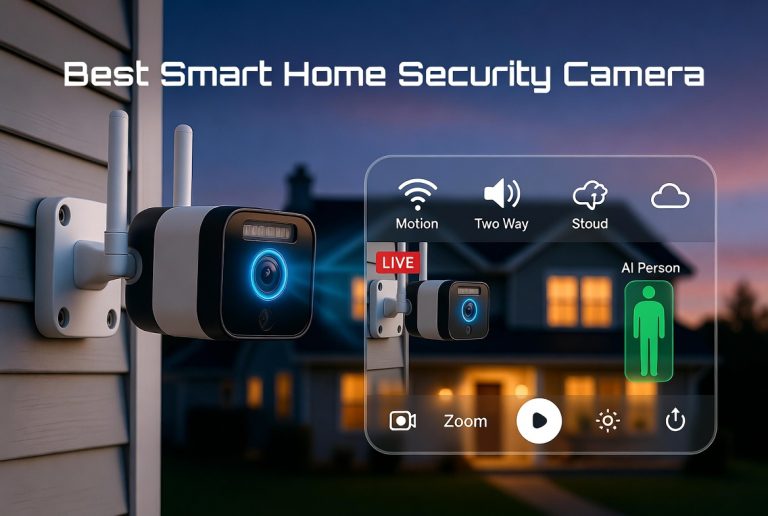
The camera doesn’t just record when someone presses the button. Many modern doorbells have motion detection built in. This means the camera can sense when something moves in front of it and automatically start recording. This is super useful because you get footage of packages being delivered, people lingering near your door, or anything else that happens.
The Microphone and Speaker
A smart doorbell has both a microphone and a speaker. The microphone picks up sound from visitors at your door, and the speaker lets your voice travel back to them. This two-way audio is what lets you have a conversation with someone at your door even if you’re miles away. Some people use this feature to scare off suspicious characters or to welcome friends who arrive while they’re away.
The quality of these audio components varies by model. Budget doorbells might have tinny speakers that are hard to hear, while premium models deliver crystal-clear sound.
The Processor and Software
Inside the doorbell is a small computer chip that runs the show. This processor handles recording video, compressing files, sending alerts, and managing the WiFi connection. Think of it as the brain that makes decisions about what to record and when to alert you.
The software on this chip is what gives the doorbell its smarts. It’s constantly working to detect faces, recognize people, notice strange behavior, and handle all the features you interact with through your phone.
The Power System
Smart doorbells need power, and this is where things get interesting. Some doorbells run on batteries, usually rechargeable ones that last weeks or even months between charges. Other models connect to your existing doorbell wiring, which means they get constant power from your home’s electrical system.
Battery-powered models are easier to install if you don’t have existing wiring, but they need regular charging. Hardwired models never run out of juice, but installation might require hiring an electrician if you’re not comfortable working with electrical connections.
How the Video Recording Works
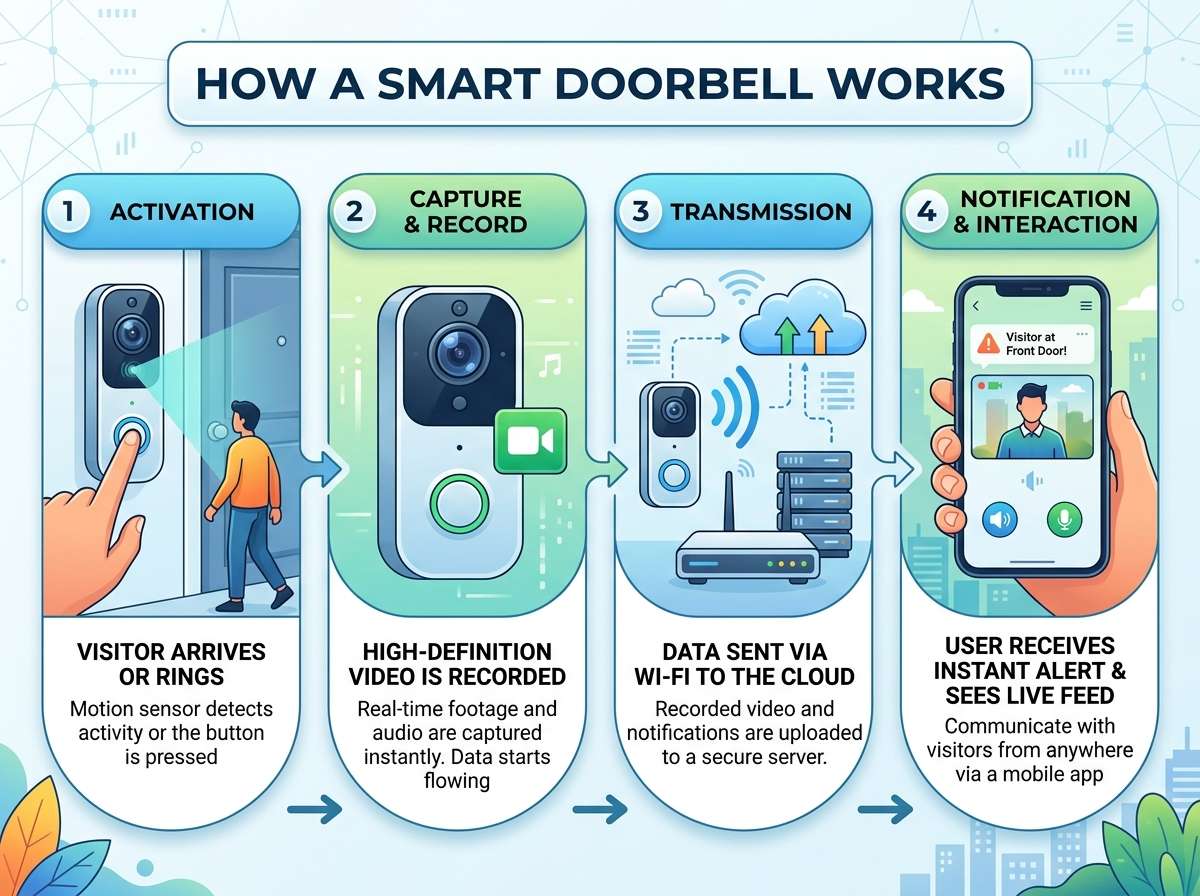
When a visitor presses your doorbell button or when motion is detected, the camera springs into action. Here’s what happens behind the scenes.
First, the camera captures video. The raw video file is huge, so the doorbell immediately compresses it to make it smaller. Compression is the process of removing extra data from the video without making it look terrible. This allows the doorbell to store more video using less space.
Next, the video has to go somewhere. Some smart doorbells store video locally on a small chip inside the device itself. This means the footage lives on the doorbell, and you can watch it anytime. Local storage is great for privacy because your videos don’t leave your home.
Other doorbells send the video to the cloud, which basically means servers owned by the company that made the doorbell. Cloud storage is convenient because you never run out of space, and you can access your videos from anywhere. The downside is that your footage is stored on someone else’s servers, which raises privacy questions for some people.
Many smart doorbells let you pick. You might be able to store video locally for free, then subscribe to cloud storage if you want to keep videos for longer.
The WiFi Connection and Internet
For a smart doorbell to send you alerts on your phone and let you view live video from anywhere, it needs an internet connection. This is why nearly every smart doorbell connects to WiFi.
Here’s how it works in simple terms. Your doorbell connects to your home WiFi network, just like your phone or laptop does. Once connected, it can talk to the company’s servers. When something happens at your door, the doorbell sends a signal through the internet to their servers, which then sends an alert to your phone.
This happens lightning fast. You might be at work, and your doorbell sends you an alert within seconds of someone pressing the button. The live video feed works the same way. When you open the app on your phone, you’re essentially asking the doorbell servers to show you what the camera sees right now.
For this to work smoothly, you need a decent WiFi signal at your door. If your WiFi is weak or far away, your doorbell might struggle to stay connected. Some models have better WiFi antennas than others, so they work better in homes with weak signals.
The Alert System
One of the most useful features of a smart doorbell is getting alerts. Let’s walk through how this works.
When motion is detected or someone presses the button, the doorbell processes this information. It takes the video, analyzes it to see if it’s really a person or just a blowing plastic bag, then decides to send you an alert.
You get a notification on your phone within seconds. The notification includes a thumbnail of what the doorbell saw, and often it tells you what kind of motion was detected. Some smart doorbells can tell the difference between a person, a package, an animal, or just wind moving something around.
You can then tap the notification to see a live view from your doorbell. This is when the real power comes in. You can speak to the person at your door, tell them you’re not interested, ask them to leave a package on the porch, or just chat. Everything happens in real time.
Face Recognition and Artificial Intelligence
Many newer smart doorbells use artificial intelligence to get smarter over time. This is where things get really interesting.
Face recognition works by analyzing the faces that appear in your doorbell videos. The doorbell can learn to recognize regular visitors like family members, friends, or delivery drivers. Once it learns a face, it can alert you differently when that person shows up. For example, you might get a notification that says “Mom is here” instead of just “Person detected.”
The AI can also notice suspicious patterns. If someone keeps showing up at your house at odd hours, the doorbell might flag this as unusual. Some doorbells can even identify whether someone is doing normal things like delivering a package or suspicious things like casing the neighborhood.
Artificial intelligence in smart doorbells is getting better all the time. As the system sees more faces and more situations, it learns to give you better alerts and more useful information.
How Two-Way Talk Works
When you want to chat with someone at your door through the doorbell app, here’s what happens.
You open the app on your phone and tap the talk button. Your phone uses your internet connection to reach the doorbell servers. Your voice gets sent to the doorbell through those servers. The doorbell’s speaker plays your voice so the person at your door can hear you.
They respond into the doorbell’s microphone. That sound gets sent back through the internet to your phone. You hear them through your phone’s speaker.
All of this happens almost instantly. There might be a tiny delay, usually less than a second, but it feels like a normal phone call. This real-time communication is one of the best features of a smart doorbell because it lets you interact with people at your door no matter where you are.
Local Storage vs. Cloud Storage Explained
Let’s dig deeper into where your videos actually live because this affects privacy and how long you can keep footage.
Local Storage
Some smart doorbells have storage built right into the device. This storage might be a small chip that can hold videos directly on the doorbell. The advantage is that your videos never leave your house. They don’t go to any company’s servers or the internet at all.
The disadvantage is that storage space is limited. A doorbell might only hold a few days or a couple of weeks of video depending on how much motion happens. Once the storage fills up, old videos get deleted to make room for new ones. You can download important videos to keep them, but this requires manual effort.
Cloud Storage
Cloud storage means your videos go to servers owned by the doorbell company. These servers store your footage so you can access it anytime from anywhere.
Cloud storage solves the space problem. You can store months or even years of video depending on your plan. Most companies offer free cloud storage for a limited time, like 24 hours of rolling footage, then charge a subscription fee if you want longer retention.
The privacy trade-off is real though. Your video footage lives on someone else’s computers. While most reputable companies encrypt your videos and have strong privacy policies, some people prefer knowing their videos never leave their property.
Many people use a hybrid approach. They keep recent videos in cloud storage for convenience but set their local storage to archive important footage like package deliveries or unusual visitors.
Night Vision and Infrared Technology
Your doorbell works great during the day, but what about at night? This is where infrared technology comes in.
Infrared light is invisible to human eyes but visible to the camera. Most smart doorbells have small infrared LED lights built into them. When it gets dark, these lights turn on automatically. The lights bounce off objects in front of the doorbell and back to the camera, letting it see in the dark.
This is why you can see clear video of someone at your door at midnight even though there’s no visible light. The doorbell is basically looking with infrared eyes.
Night vision quality varies between models. Some doorbells produce crisp, clear images in complete darkness. Others might be grainier or show less detail. If you live somewhere with good outdoor lighting, your night vision footage will be better because the doorbell won’t have to rely as much on infrared.
The Notification and Recording Features
Smart doorbells give you lots of control over what alerts you get and what gets recorded.
Most doorbells let you turn motion detection on or off. You can set it to alert you only during certain times, like when you’re away from home. This prevents your phone from blowing up with notifications when you’re home and movements are expected.
You can usually customize what counts as important motion. Some doorbells let you draw zones on your camera feed, telling the system to only alert you if motion happens in certain areas. This is useful if your doorbell points toward a busy street where lots of cars pass by.
Recording settings usually let you decide whether to record constantly, only record when motion is detected, or only record when someone presses the button. Recording constantly gives you the most complete picture but uses more storage and battery power.
Installation and Setup
Installing a smart doorbell isn’t rocket science, but it does come in different flavors depending on the model.
Battery-powered doorbells are the easiest. You just need to charge the battery, then mount the doorbell where you want it using screws or adhesive strips. Then you connect it to your WiFi through the app. Most people can do this in under ten minutes.
Hardwired doorbells take more work. If you don’t already have doorbell wiring, you need to run electrical wires from your breaker box to your door. If you do have existing wiring, you disconnect the old doorbell and connect the new one. This usually requires turning off power at the breaker box and being comfortable with basic electrical work. Many people call an electrician for this part.
Once the hardware is installed, setup is mostly the same. You download the doorbell’s app, create an account, add your doorbell to the app, and connect it to your WiFi. The app walks you through everything step by step.
Security and Privacy Considerations
Before you install a smart doorbell, it’s worth thinking about security and privacy.
Your doorbell is connected to the internet, which means it could theoretically be hacked. However, the major doorbell brands take security seriously. They encrypt your video, they protect your login credentials, and they regularly update their software to fix security problems.
You can make things more secure on your end too. Use a strong password for your doorbell account. Enable two-factor authentication if the company offers it. Keep your WiFi password strong and change it periodically. These simple steps dramatically reduce the risk of someone hacking into your doorbell.
Privacy is another consideration. Your doorbell is recording people who come to your door, including guests, delivery drivers, and strangers. Some people worry about this. You can address these concerns by putting up a sign that lets people know they’re being recorded. Some states have laws about this, so check your local regulations.
Think about who has access to your videos. If you live with family members, they might need access to the doorbell app. Make sure you’re comfortable with who can see your footage.
Cost and Value
Smart doorbells range quite a bit in price. Budget models might cost around fifty dollars, while premium options can run three hundred dollars or more.
The main features that drive up price are camera quality, storage options, advanced AI features, and brand reputation. A cheap doorbell gets the job done but might have lower video quality and fewer features. A premium doorbell delivers crystal-clear video, intelligent detection, and lots of customization.
Most people fall somewhere in the middle. Mid-range doorbells cost one hundred to two hundred dollars and deliver excellent video quality with good AI features.
Don’t forget about subscription costs. Many doorbells offer free basic service, then charge monthly or yearly fees for extended cloud storage or advanced features. These subscriptions usually run anywhere from three to ten dollars a month.
Is it worth it? That depends on your situation. If you get frequent packages delivered, or if you worry about package theft or home security, a smart doorbell pays for itself quickly. If you rarely get visitors or deliveries, the value might not be as clear.
Troubleshooting Common Issues
Even the best smart doorbells sometimes act up. Here are common problems and how to fix them.
Doorbell not connecting to WiFi: Move closer to your router, restart your WiFi, or restart the doorbell. Sometimes the WiFi password in the app is entered wrong. Check that you typed it correctly.
Video is grainy or blurry: Make sure the camera lens is clean. A dirty lens looks worse than low video quality. If it’s still blurry, your WiFi might be too weak. Try moving your router closer or upgrading to a better WiFi router.
Not getting alerts: Check that motion detection is turned on in the app. Make sure notifications are enabled for the doorbell app. Sometimes your phone’s battery saver mode turns off notifications, so check that too.
Two-way talk not working: Make sure you have internet on both your phone and the doorbell needs WiFi. Try turning off WiFi on your phone and using cellular data instead, or vice versa. Sometimes one connection works better than the other.
Battery dying too fast: If you have a battery-powered model, the battery might just need charging. Some features like high-definition video and constant recording drain batteries faster. Try lowering video quality or recording less frequently.
Future of Smart Doorbells
Smart doorbell technology keeps improving. We’re seeing better cameras, smarter AI, and cooler features.
Some new doorbells can detect packages and tell you when they arrive. Others can identify specific people and greet them by name. Some are adding features like weather monitoring, or integrating with smart home systems to do things like unlock your door or turn on lights.
Artificial intelligence is going to play a bigger role. In the future, your doorbell might be able to tell you not just that someone is at your door, but details about whether they look trustworthy, what they might want, or whether they pose any risk.
Battery technology is improving too, which means battery-powered doorbells will last longer between charges. Some companies are experimenting with solar panels to charge doorbells while they’re mounted on your door.
Choosing the Right Smart Doorbell for Your Needs
Different doorbells work better for different situations. Here are some things to think about.
If you live in an apartment and can’t do hardwired installation, get a battery-powered doorbell. If you live in a house and want the most reliable performance, a hardwired doorbell is better.
If you’re a privacy nut, look for doorbells that offer local storage so your videos don’t go to the cloud. If you’re always on the go and want to access footage from anywhere, cloud storage is more important to you.
If you have lots of package deliveries, look for doorbells with smart detection that can tell you when packages arrive. If you just want to know when people come to your door, a basic model works fine.
Do some research on which brands have good reviews and customer support. Read what real users say about video quality, reliability, and ease of use.
Wrapping Up
Smart doorbells are actually pretty simple devices when you break them down. They’re a camera with a microphone and speaker, connected to the internet to send you alerts and video. What makes them smart is the artificial intelligence that learns from what it sees and the apps that let you control and view everything from your phone.
If you’ve been on the fence about getting a smart doorbell, hopefully this guide has cleared up how they work. They’re not complicated, they’re quite affordable, and they add a real layer of security and convenience to your home.
Whether you’re worried about package theft, want to see who’s at your door when you’re away, or just like cool gadgets, a smart doorbell is definitely worth considering. Start with a mid-range model from a trusted brand, see how you like it, and you’ll probably wonder how you ever lived without one.
Your front door is about to get a whole lot smarter, and so will your home security. Welcome to the future of doorbells.

Hi, I’m Mary, the founder of Homygear.com. I’m passionate about creating a comfortable, smart, and beautiful home. I share practical insights and real-world experience on home gear that makes everyday life easier. Behind the scenes, my dedicated research team studies products in depth, and our writers craft honest reviews using trusted, authentic sources—so you can choose home gear with confidence.