5 Best Smart Thermostat In 2026
If your energy bill keeps climbing and your home never feels quite right, no matter how many times you touch the dial, a smart thermostat might be the easiest home upgrade you can make. It sounds like a small box on the wall, but it can change how your whole house feels, and it can also put real money back in your pocket every month.
The problem is that the market is packed with options. Some thermostats come loaded with sensors and voice assistants. Some are stripped down and dead simple. Some cost as much as a nice dinner out, and some cost as much as a weekend trip. So how do you find the best smart thermostat for your own home, without wasting money on features you’ll never touch?
That’s exactly what this guide is here to help you do. I’ve gone deep into five of the most talked-about smart thermostats on the market today, from budget-friendly Wi-Fi models to premium bundles with built-in security. Below you’ll find honest, no-fluff reviews for each one, along with a full buying guide, common mistakes people make, and a final verdict to help you land on the right pick for your home.
Let’s get into it.
Why a Smart Thermostat Is Worth Your Attention
Before jumping into the reviews, it helps to know why this small device matters so much. A regular thermostat just sits there and waits for you to adjust it. A smart thermostat, on the other hand, actively works to save you energy and keep your home comfortable, even when you’re not thinking about it.
Here’s what most smart thermostats bring to the table:
- Remote control through a phone app, so you can turn the heat down from your office or turn the AC on before you get home
- Learning or scheduling tools that adjust the temperature automatically based on your daily routine
- Energy reports that show you exactly where your heating and cooling dollars are going
- Voice assistant support, so you can just ask Alexa, Siri, or Google to change the temperature
- Sensor compatibility, which helps fix hot and cold spots in different rooms
- Geofencing, a feature that uses your phone’s location to know when you’ve left the house or are on your way back
On top of comfort, energy savings are the real selling point. Most models on this list carry the ENERGY STAR label, and manufacturers report double-digit percentage savings on heating and cooling costs when the thermostat is set up and used correctly. That’s not hype, that’s simply what happens when a device stops wasting energy on an empty house.
Now let’s look at the five thermostats in this roundup, one by one.
1. ecobee Comfort and Security Bundle (Smart Thermostat Premium + SmartSensor)
Product Description
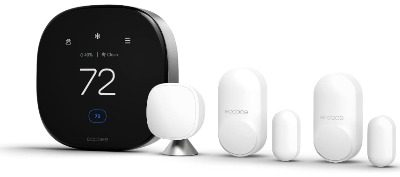
The ecobee Comfort and Security Bundle is the most feature-packed option on this list, and it’s built for people who want more than just temperature control. This bundle pairs the ecobee Smart Thermostat Premium with a freestanding SmartSensor and a two-pack of SmartSensors made for doors and windows. It blends home comfort with light home security, all managed from a single app and a single device on your wall.
The Smart Thermostat Premium itself has a crisp touchscreen display, built-in Alexa and Siri support, an air quality monitor, and radar-based occupancy sensing. Add the door and window sensors, and this thermostat starts acting like a mini security hub too, alerting you if something opens while you’re away and even pausing your heating or cooling automatically when a door is left open too long.
Best Use Cases
This bundle shines in larger homes with multiple rooms that never seem to be the same temperature, since the SmartSensor lets you prioritize comfort in a bedroom, home office, or living room rather than just the hallway where the thermostat sits. It’s also a strong fit for anyone who already leans on Alexa or Siri around the house, or who wants basic security monitoring without paying for a separate alarm system.
Key Features Explained Simply
- Built-in Alexa and Siri: You talk, the thermostat listens and responds, no extra smart speaker required
- Radar occupancy sensor: Uses motion detection to figure out if anyone’s home, which helps the thermostat decide when to save energy
- Doorbell live view: If you add ecobee’s video doorbell later, you can see who’s at the door right from the thermostat screen
- Smoke alarm detection: Listens for the sound of a smoke alarm and sends you an alert, even if you’re not home
- Open and close notifications: Tells you the moment a door or window sensor gets triggered
- SmartSensor for temperature: Placed in another room, it reports back the actual temperature there so the thermostat can balance the whole home instead of just the spot near the wall unit
Real-Life Usage Insight
In practice, this system feels less like a thermostat and more like a small smart home starter kit. Setup takes a bit longer than a basic model, generally somewhere around 45 minutes to an hour once you account for mounting the sensors and pairing everything in the app. That extra time pays off though, because once it’s running, the thermostat quietly balances rooms that used to run either too hot or too cold, and the door and window alerts add a layer of peace of mind that a plain thermostat simply can’t offer.
Some of the deeper security features, like the motion-based occupancy alerts, do rely on an ecobee Smart Security subscription to unlock their full potential, so it’s worth reading the fine print before assuming everything works for free forever.
Pros and Cons
Pros:
- Excellent temperature balancing across multiple rooms
- Built-in voice assistant means no extra hardware needed
- Strong energy-saving automation based on occupancy
- Doubles as a light home security system
- Clean, modern touchscreen interface
Cons:
- Higher upfront cost compared to basic thermostats
- Full security features need a paid subscription
- Installation takes longer due to extra sensors
- Overkill for a small apartment or single-zone home
Performance and Ease of Use
Day to day, the thermostat responds quickly to schedule changes and app commands, and the touchscreen is responsive and easy to read from across the room. The learning curve is a little steeper than a basic model simply because there’s more going on, more sensors, more settings, more automations to explore. Once it’s dialed in, though, most people find they rarely need to touch the screen at all.
Value for Money
This bundle sits at the premium end, but you’re getting a lot of hardware and a lot of long-term utility for that price. If you only want a simple, no-frills thermostat, this is more than you need. If you want comfort, air quality monitoring, and basic security rolled into one, it’s a strong value.
2. Sensi Touch 2 Smart Thermostat (ST76)
Product Description
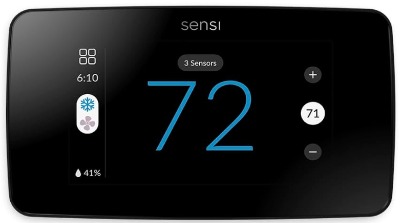
The Sensi Touch 2 is a Wi-Fi smart thermostat built by Emerson, known for its full-color touchscreen and clean, beveled design. It’s ENERGY STAR certified and designed to work with a wide range of HVAC systems, all while keeping the setup process approachable for people who’ve never installed a thermostat before.
Unlike the ecobee bundle above, the Sensi Touch 2 keeps things focused. There’s no built-in camera, no doorbell integration, no security hub ambitions. It’s a smart thermostat that does the core job really well, with room to expand later through optional Sensi room sensors.
Best Use Cases
The Sensi Touch 2 is a great match for anyone upgrading from a basic programmable thermostat who wants a real touchscreen experience and solid app control, without paying for security add-ons they won’t use. It also works well for households already using Alexa, since voice control is built right in.
Key Features Explained Simply
- Touchscreen color display: A bright, glass-covered screen that’s easy to tap and read
- Flexible 7-day scheduling: Set different temperatures for different times, every day of the week
- Geofencing: Uses your phone’s location to know when you’ve left home or are heading back
- Smart maintenance alerts: Reminds you when it’s time to change your air filter or flags a system issue early
- Room sensor compatible: You can add optional sensors later to fine-tune comfort in specific rooms
- Data privacy protection: Sensi states it does not sell your usage data to third parties for advertising
Real-Life Usage Insight
Setup usually takes about 30 minutes using the app’s step-by-step Bluetooth-guided process, and most people find the walkthrough clear enough to follow without calling in an electrician. One thing to know upfront: a C-wire is required for this model, so if your current setup doesn’t have one, you’ll need to grab an adapter kit before installing.
Once it’s running, the scheduling tools adapt well to typical routines, warming the house before you get home in the evening or easing off during the workday. Energy usage reports give a clear, visual breakdown of savings over time, which is genuinely useful if you like seeing the numbers behind your lower bills.
Pros and Cons
Pros:
- Bright, modern touchscreen that’s easy on the eyes
- ENERGY STAR certified with real energy-saving tools
- Strong Alexa integration for voice control
- Smart maintenance alerts catch issues early
- Room sensor support for balancing temperature
Cons:
- Requires a C-wire, which means extra setup for older homes
- No built-in humidity control
- Fewer smart home integrations compared to ecobee or Nest
- No Google Assistant support out of the box
Performance and Ease of Use
The touchscreen is responsive, the app is straightforward, and the whole system feels snappy for everyday use. Beginners tend to pick it up fast since the interface avoids clutter and sticks to the essentials. The lack of built-in humidity monitoring is really the only spot where it falls behind some of the pricier options on this list.
Value for Money
At its price point, the Sensi Touch 2 delivers a genuinely premium feel without the premium price tag of ecobee or the Nest Learning Thermostat. For most households, this is where the sweet spot between features and cost really lands.
3. Google Nest Learning Thermostat (4th Gen) + Nest Temperature Sensor
Product Description
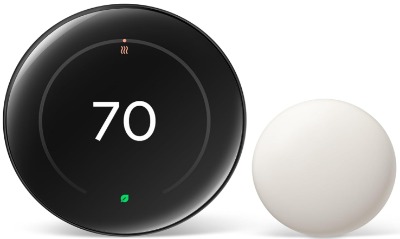
The Nest Learning Thermostat has been one of the most recognizable smart thermostats around for years, and the newer generation brings a bigger, sharper display along with a fresh set of energy-saving tools. This version comes bundled with a Nest Temperature Sensor, so you can place accurate temperature readings in a different room and let the thermostat adjust based on where you actually spend your time.
True to its name, this thermostat learns your habits over the first week or two of use and starts building a schedule around them automatically, so you barely have to touch it once it settles in.
Best Use Cases
This model is ideal for homes already tied into the Google ecosystem, especially households using Google Home, Google Assistant speakers, or other Nest devices. It also suits people who like the idea of a thermostat that adapts on its own rather than needing a manually built schedule from day one.
Key Features Explained Simply
- Learning algorithm: Watches how you adjust the temperature and slowly builds a schedule that matches your habits
- Nest Temperature Sensor: Placed in another room, it tells the thermostat the real temperature there, so hot or cold spots get fixed
- Adaptive Eco mode: Automatically shifts to an energy-saving temperature when it senses nobody’s home
- Farsight display: Lights up with useful info, like the time or current temperature, as you walk by
- Matter support: Works with the newer smart home interoperability standard, giving it broader compatibility with other connected devices
- Larger display: A 2.7-inch screen that’s noticeably easier to read from across the room than earlier Nest models
Real-Life Usage Insight
The unboxing and installation process feels premium, and most people can get it mounted and paired within half an hour. The temperature sensor is a genuine game changer for homes with an upstairs bedroom that always runs hot or a basement office that never quite warms up, since the thermostat can prioritize whichever room the sensor is placed in during set hours.
The learning feature does need a short adjustment period. Expect to manually tweak the temperature a fair bit during the first week or two while the system studies your patterns. After that, it mostly runs itself.
Pros and Cons
Pros:
- Sharp, modern 2.7-inch display that’s easy to read
- Learning feature builds a custom schedule without manual setup
- Included temperature sensor fixes hot and cold room issues
- Strong compatibility with Google Home and other connected devices
- Sleek design that fits most home styles
Cons:
- Higher price point than most competitors
- Learning period means less predictable behavior early on
- No longer sold in some international markets
- Some advanced features work best within the Google ecosystem specifically
Performance and Ease of Use
Daily performance is smooth, and the rotating dial control feels intuitive even for people who’ve never used a smart thermostat before. The app is clean and easy to navigate, and the temperature sensor pairs without much fuss. The main adjustment is just patience while the learning algorithm figures out your routine.
Value for Money
This is a premium thermostat with a premium price, and it earns that price mostly through its included sensor and its polished design. If a learning thermostat and a big, attractive display matter to you, it’s worth the extra cost. If you’d rather build your own schedule manually and skip the higher price, other options on this list get you there for less.
4. Google Nest Thermostat (Charcoal)
Product Description
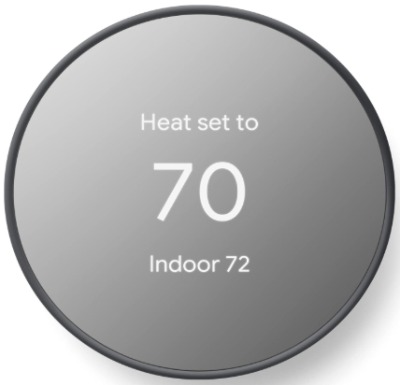
The standard Google Nest Thermostat is the more budget-friendly sibling of the Learning Thermostat above. It keeps the same mirrored glass design language but trims down the price, the display size, and some of the advanced features. It’s built for people who want the Nest name and app experience without paying for the full learning thermostat.
Instead of a rotating dial, you interact with this model using a small touch-sensitive slider built into the side of the display, which keeps the design minimal and clean.
Best Use Cases
This is a strong pick for smaller homes, apartments, or rental properties where a full-featured premium thermostat isn’t necessary. It also works well as a secondary thermostat for a vacation home or guest space, or for anyone who wants smart features on a tighter budget.
Key Features Explained Simply
- Quick Schedule: Lets you set a basic weekly schedule in just a few taps during setup
- Eco Temperatures: Automatically shifts to an energy-saving setting when your phone’s location shows you’ve left the house
- Wide system compatibility: Works with most 24V heating and cooling systems, and in many homes, no C-wire is needed
- Remote control through the Google Home app: Change the temperature from anywhere with an internet connection
- Voice control: Works with Google Assistant for hands-free adjustments
- System monitoring: Sends an alert if it senses something unusual with your heating or cooling system
Real-Life Usage Insight
Installation is genuinely quick, most people finish in around 30 minutes, and the lack of a C-wire requirement in most homes makes this one of the easier smart thermostats to self-install. The smaller 2.4-inch display is still easy to read up close, though it doesn’t have quite the same presence from across a large room as the Learning Thermostat’s bigger screen.
For everyday use, the slider control takes a few tries to get used to, but it becomes second nature quickly. The lack of a full learning algorithm just means you set the schedule yourself instead of the thermostat guessing it, which some people actually prefer since it gives more direct control from day one.
Pros and Cons
Pros:
- Budget-friendly compared to the Learning Thermostat
- Simple, guided installation process
- No C-wire needed in most standard setups
- Clean, minimal design that blends into most rooms
- Reliable Google Home and Assistant integration
Cons:
- Smaller display than the Learning Thermostat
- No learning algorithm, schedules are manual
- Slider control takes some getting used to
- Fewer advanced sensor options
Performance and Ease of Use
This thermostat handles the basics reliably and without fuss. It’s not trying to be a smart home hub, just a solid, dependable way to control your home’s temperature from your phone. Beginners tend to find it one of the easiest models on this list to get comfortable with quickly.
Value for Money
For the price, this is one of the better value picks in the Google lineup. You get real smart features, a trustworthy brand, and an easy setup, all without paying for extras like a learning algorithm or a bundled sensor that not everyone actually needs.
5. Sensi Smart Thermostat (ST55)
Product Description
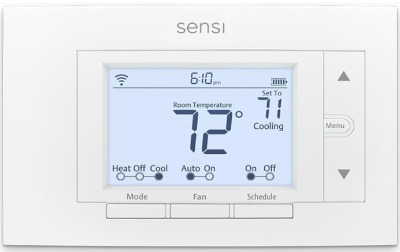
The Sensi ST55 is the entry-level model in the Sensi lineup, built with a simple button-and-display layout rather than a touchscreen. It’s designed with one goal in mind: make smart thermostat features accessible and affordable, without demanding a complicated install or a big learning curve.
Despite the lower price, it still carries the ENERGY STAR certification and includes core smart features like remote app control, scheduling, and Alexa compatibility.
Best Use Cases
This thermostat is a great fit for first-time smart thermostat buyers, renters looking for an affordable upgrade they can take with them later, or anyone who just wants reliable temperature control without paying for a touchscreen or extra bells and whistles.
Key Features Explained Simply
- Simple button interface: Physical buttons instead of a touchscreen, which some people find faster and more familiar
- No C-wire required in most homes: Makes DIY installation much easier for older houses
- Flexible scheduling: Set different temperatures throughout the day and week
- Remote access through the app: Adjust the temperature from anywhere with a Wi-Fi or cell connection
- Smart maintenance reminders: Alerts for filter changes and potential HVAC issues
- Data privacy protection: Like the Touch 2, Sensi states it won’t sell your data to outside advertisers
Real-Life Usage Insight
The built-in level and step-by-step app instructions make this one of the more approachable DIY installs on this list, especially for anyone nervous about working with thermostat wiring for the first time. Because it skips the C-wire requirement in most setups, it tends to fit into older homes more easily than touchscreen models that often need one.
Reviewers frequently point out that the ST55 isn’t flashy, but it’s dependable, a true “set it and forget it” option that just quietly does its job in the background without asking for much attention.
Pros and Cons
Pros:
- Very affordable compared to touchscreen models
- No C-wire needed in most homes
- Straightforward DIY installation
- Reliable scheduling and remote access
- ENERGY STAR certified for real energy savings
Cons:
- No touchscreen, just physical buttons
- Fewer smart home integrations than pricier models
- No room sensor support
- Basic design won’t appeal to everyone
Performance and Ease of Use
The button interface feels a little old-school compared to a touchscreen, but it’s fast and there’s zero learning curve, especially for anyone who’s used a traditional thermostat before. The app handles the smart features well, and scheduling is simple enough to set up in a few minutes.
Value for Money
This is the best budget pick on the list by a wide margin. You’re not getting a fancy screen or a bundle of sensors, but you are getting real energy savings, real remote control, and a genuinely easy installation, all at the lowest price point of the group.
Comparison Insights
Looking at all five thermostats side by side, a clear pattern shows up. The ecobee Comfort and Security Bundle sits at the top for households that want comfort and light security combined, thanks to its SmartSensors and built-in voice assistants. The Nest Learning Thermostat competes closely on style and smart automation, especially for anyone deep into the Google ecosystem, but it asks for a higher price in exchange for that learning algorithm and premium display.
The Sensi Touch 2 lands right in the middle, offering a touchscreen experience and strong energy tools at a friendlier price than ecobee or Nest’s flagship model. For buyers on a tighter budget, the standard Nest Thermostat and the Sensi ST55 both deliver real smart functionality without the higher cost, though the ST55 wins out on install simplicity thanks to skipping the C-wire requirement in most homes.
If multi-room temperature balancing matters most to you, ecobee and the Nest Learning Thermostat both include sensors right out of the box, giving them an edge over the more single-zone-focused Sensi and standard Nest models.
Buying Guide: What to Look for in a Smart Thermostat
Before you commit to any of these five, run through this quick checklist to make sure you’re picking the right fit for your home.
Check your HVAC compatibility first. Not every thermostat works with every heating and cooling system. Some models need a C-wire, and older homes often don’t have one installed. Look up your system type before buying to avoid a return trip to the store.
Think about how many rooms need balancing. If certain rooms in your home always run hotter or colder than the rest, a thermostat with sensor support, like ecobee or the Nest Learning Thermostat, will solve that problem far better than a single-zone model.
Decide how much you actually want automated. A learning thermostat builds its own schedule over time, which is convenient but takes a couple of weeks to settle in. A manually scheduled thermostat gives you full control from day one, with a bit more setup effort upfront.
Factor in your smart home ecosystem. If your home already runs on Alexa, Google Assistant, or Apple HomeKit, pick a thermostat that plays nicely with what you’ve already got, rather than adding a new app to juggle.
Set a realistic budget. Smart thermostats range from budget-friendly to premium, and the extra cost of higher-end models usually goes toward better displays, more sensors, and deeper smart home integration. If you just want lower energy bills and basic remote control, the cheaper models on this list do that job well.
Look at installation difficulty. DIY installation is common across this whole list, but the amount of time and tools needed varies. If you’re not confident with wiring, look for models that clearly state no C-wire is required, or budget time to call in a professional.
Who Should Buy These Thermostats
- Homeowners with multiple rooms that run hot or cold should lean toward the ecobee Comfort and Security Bundle or the Nest Learning Thermostat, since both come with sensors built in.
- Renters or first-time buyers on a budget will get the most out of the Sensi ST55, thanks to its low price and simple, no C-wire installation.
- Tech-savvy households already using Alexa or Google Home should match their thermostat to their existing ecosystem for the smoothest experience.
- Anyone wanting basic home security alongside comfort features should look closely at the ecobee bundle, since it’s the only option here with door, window, and motion sensing built in.
- People who want a modern touchscreen without the highest price tag will find the Sensi Touch 2 hits a nice middle ground.
- Buyers who just want a reliable, no-fuss upgrade from a traditional thermostat should consider the standard Nest Thermostat or the Sensi ST55.
Common Mistakes to Avoid
Skipping the compatibility check. This is the number one mistake buyers make. Always confirm your HVAC system works with the thermostat you’re eyeing before you order it, since return shipping and reinstalling a different model wastes both time and money.
Ignoring the C-wire question. Some homes simply don’t have one, and while several models on this list work around that, not knowing ahead of time can turn a 30-minute install into a frustrating afternoon.
Placing sensors in the wrong spot. Temperature and occupancy sensors work best in rooms where you actually spend time, not in hallways or near windows and vents where readings get thrown off by drafts or direct sunlight.
Expecting instant learning results. If you go with a learning thermostat, don’t judge it during the first week. It takes time to study your habits, and manually overriding it too often during that period can slow down how quickly it adapts.
Forgetting about subscription requirements. Some advanced features, especially security-related ones on bundles like ecobee’s, need an active subscription to fully work. Read the fine print so you’re not surprised later.
Overbuying for a small space. A studio apartment or single-zone home rarely needs a multi-sensor premium bundle. Save the money and go with a simpler model instead.
Final Verdict
There’s no single best smart thermostat for every home, but there is a best one for your home, and it comes down to what you actually need.
If you want the most complete package, with comfort, sensors, and a taste of home security rolled into one device, the ecobee Comfort and Security Bundle is the strongest all-around performer on this list. It costs more, but it earns that price with genuine functionality.
If you want a beautiful display and a thermostat that learns your habits on its own, the Google Nest Learning Thermostat (4th Gen) is a fantastic pick, especially for Google-connected homes.
For a balance of style, energy savings, and price, the Sensi Touch 2 is hard to beat, it delivers a touchscreen experience without the premium cost of the top two options.
If your budget is tighter, both the standard Google Nest Thermostat and the Sensi ST55 prove that smart thermostats don’t need to be expensive to genuinely lower your energy bills and add real convenience to daily life. Between the two, the ST55 pulls slightly ahead for easier installation in homes without a C-wire, while the standard Nest edges it out for anyone already tied into Google’s smart home apps.
At the end of the day, matching the thermostat to your home’s wiring, your existing smart home setup, and your actual comfort needs will get you a lot further than chasing the flashiest model on the shelf. Any of these five will get your home more comfortable and your energy bill smaller, it’s just a matter of finding the right fit.

Hi, I’m Mary, the founder of Homygear.com. I’m passionate about creating a comfortable, smart, and beautiful home. I share practical insights and real-world experience on home gear that makes everyday life easier. Behind the scenes, my dedicated research team studies products in depth, and our writers craft honest reviews using trusted, authentic sources—so you can choose home gear with confidence.