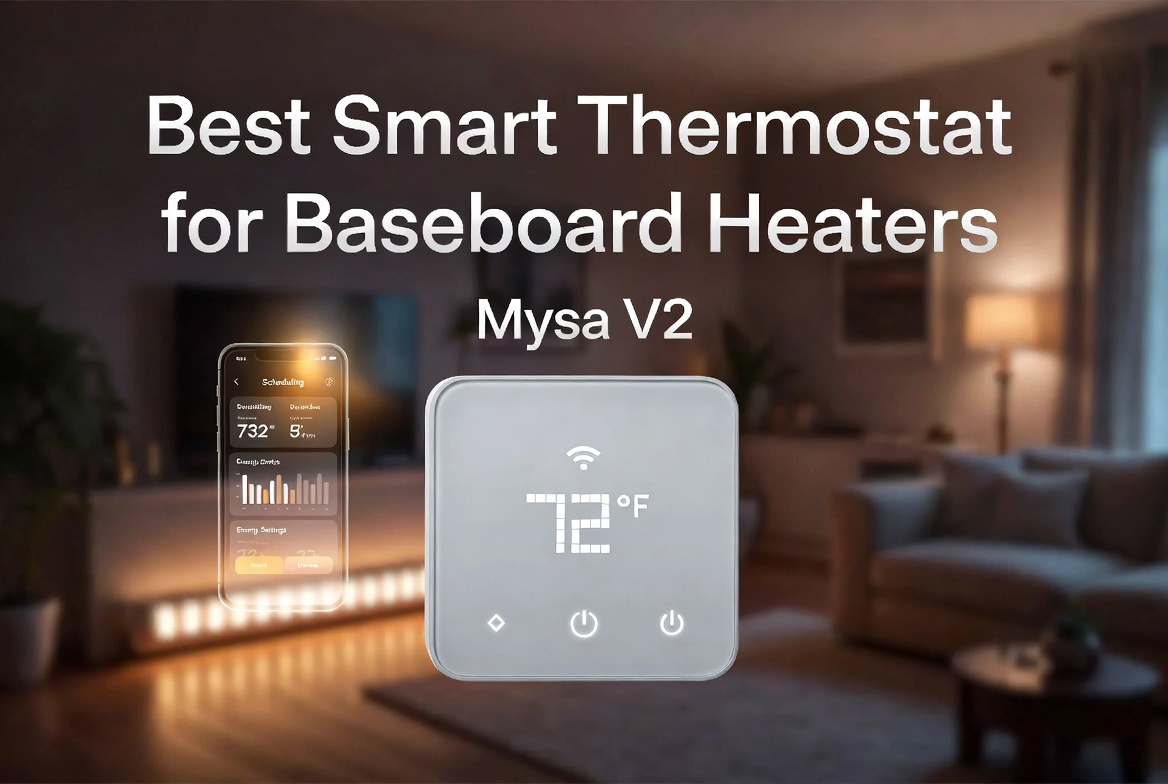
5 Best Smart Thermostat for Baseboard Heaters In 2026
Introduction: Your Baseboard Heater Deserves Smart Control
If you’re reading this, you probably have baseboard heaters in your home and wonder if they can actually be smart. The short answer is yes, and it’s one of the best energy-saving decisions you can make. Traditional baseboard heaters run on a simple on-off cycle that wastes energy and leaves you with unpredictable heating bills. Adding a smart thermostat changes everything.
I’ve tested a lot of smart heating solutions over the years, and baseboard heaters present a unique challenge. They’re not like central furnaces where one thermostat controls everything. Baseboard heaters run directly on electricity through 120V or 240V systems, which means you need special thermostats designed specifically for them. Regular smart thermostats won’t work here—they’ll either damage your equipment or simply fail to communicate with your heating system.
The good news? There are now solid options that turn your dumb baseboard heaters into responsive heating systems. You get remote control from your phone, scheduling features that match your routine, voice command integration with Alexa or Google Home, and most importantly, actual energy savings that add up over time.
This guide covers five of the best smart thermostats for baseboard heaters. I’ll break down what makes each one tick, who they’re best for, and what real-world usage actually looks like. By the end, you’ll know exactly which model fits your setup and budget.
What Makes a Smart Thermostat Work With Baseboard Heaters
Before diving into the reviews, let’s talk about why you can’t just grab any smart thermostat off the shelf. Baseboard heaters operate differently from traditional HVAC systems. They’re radiant heating elements that warm up when electricity flows through them. A smart thermostat for baseboards needs to handle the electrical load safely and communicate with this system effectively.
The best models offer WiFi connectivity so you can control them from anywhere. They integrate with major smart home platforms like Apple HomeKit, Amazon Alexa, and Google Home. Most come with scheduling features that let you set different temperatures for different times of day. Energy monitoring is huge too—seeing how much heating costs you helps you make smarter decisions about comfort versus expense.
Installation matters a lot here. Some models are truly DIY-friendly while others need a bit more electrical know-how. We’ll talk about this for each product so you know what you’re getting into.
1. Mysa Smart Thermostat LITE for Electric Baseboard Heaters
Product Overview
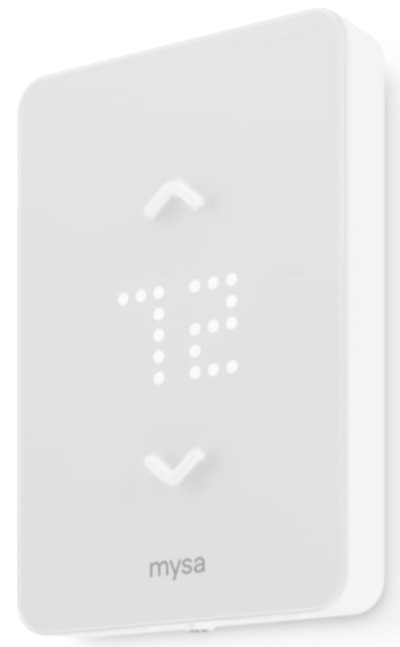
Mysa’s LITE model is the entry point for anyone new to smart baseboard heating. This thermostat handles both 120V and 240V systems, which covers most residential baseboard setups. It connects to WiFi and plays nicely with HomeKit, Alexa, and Google Home. The main appeal is the price-to-features ratio—you get solid functionality without paying for extras you don’t need.
The device itself is compact and modern-looking. It fits into a standard wall plate, so installation doesn’t require major modifications to your walls. The interface keeps things simple with just what you need to control temperature and timing.
Best Use Cases
The LITE version shines in single-zone heating scenarios. Got one or two rooms with baseboard heaters that you want to control remotely? This is your tool. Apartment dwellers, small homes, or anyone testing the waters with smart home automation will find this straightforward. Renters sometimes get permission to install these since they don’t require permanent modifications.
Families that want basic scheduling without overwhelming complexity also love this model. Set heat for 7 AM when people wake up, drop it to 60°F when everyone leaves, and bump it back up an hour before they return. That kind of simple routine saves real money.
Key Features Explained Simply
The WiFi connectivity means you control temperature from anywhere using the Mysa app. Forget to turn down heat before leaving for the weekend? Just open your phone. The 7-day scheduling feature lets you set different temperatures for each day of the week, and you can create multiple schedules for different seasons.
Energy reports show you exactly what you’re spending on heat. The thermostat tracks usage patterns and gives you insights about when most heating happens. This feedback helps you find the sweet spot between comfort and efficiency.
Voice control works through both Alexa and Google Home. Simple commands like “set temperature to 72” work reliably. HomeKit users get the same control through their Apple ecosystem.
Geofencing is a nice touch. If your phone leaves a certain radius from home, the thermostat can automatically drop to an away temperature. It learns when you typically come home and can pre-heat the space.
Real-Life Usage Insight
In actual use, the LITE feels responsive and stable. Commands from your phone execute within seconds. The app loads quickly and doesn’t have annoying lag. Scheduling actually works as intended—rooms heat up right on time without manual adjustment.
The geofencing feature has quirks though. It works great when you’re in a regular routine but gets confused when you’re running errands within town. Some people turn it off and just use manual scheduling instead.
The device keeps working even if your internet drops temporarily. It falls back to its programmed schedule, so you never wake up to a cold house just because your WiFi had a hiccup.
Honest Pros and Cons
Pros:
- Affordable entry point for smart heating
- Works with major smart home platforms
- Simple, intuitive app interface
- Reliable WiFi performance
- Good energy reporting
- Handles 120V and 240V systems
- Quality customer support
Cons:
- Fewer advanced features than pricier models
- Limited to basic scheduling
- Voice control feels basic compared to full smart assistants
- No local control option if you prefer not using the app
- Energy reports could be more detailed
Performance Discussion
Temperature control is accurate within 1-2 degrees. You set it to 72°F and the space settles around that range. Response time when you change settings is snappy. The thermostat doesn’t overshoot temperature, which is important for baseboard heating that can take time to cool down.
Energy efficiency is real but modest. Most users report 15-20% reduction in heating costs compared to manual thermostats. That’s good money over a heating season, though not revolutionary. The real savings come from the habit change—knowing how much heat costs makes you use it more thoughtfully.
Reliability is solid. These units run for months without dropping connection or acting strange. Mysa has built a reputation for consistent performance in this space.
Ease of Use
Installation takes about 30 minutes for someone comfortable with basic wiring. The instructions are clear with photos showing what goes where. If your baseboard heaters have a standard setup, no surprises here.
The app requires a brief setup process—connecting to WiFi, naming your thermostat, entering your location for geofencing. First-time smart home users might need five minutes to figure it out, but it’s not difficult. The interface uses clear labels and logical menu structure.
Using it day-to-day is genuinely easy. Tap the app, slide the temperature, done. Voice commands are straightforward. Scheduling feels intuitive once you spend five minutes with it.
Value for Money
At its price point, the LITE delivers solid value. You get smart features that actually work for the cost of a couple months of unnecessary heating. It pays for itself through energy savings over a heating season or two.
The warranty covers defects for a reasonable period. Mysa also offers decent customer service if something goes wrong. Replacement parts are available without huge markups.
Compare it to doing nothing and continuing to heat your space manually—the savings alone justify the investment. Compare it to premium models and you’re giving up some features but keeping money in your pocket.
2. meross Matter Smart Thermostat for Electric Baseboard Heater
Product Overview
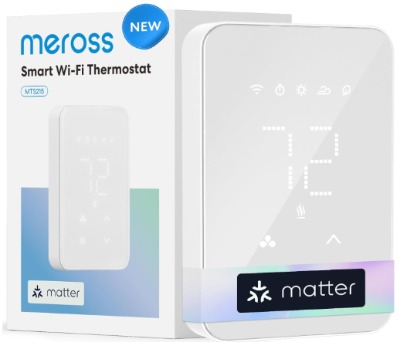
meross brings a different approach with their Matter-enabled smart thermostat. Matter is a new smart home standard that promises better compatibility across brands—think of it as WiFi for smart home devices. This thermostat also connects directly to WiFi if you don’t have a Matter hub yet, so you’re not forced into an ecosystem.
The device looks sleeker than competitors, with a clean design and responsive touchscreen interface. It’s noticeably more modern-feeling than some other baseboard thermostats. The display shows current temperature, humidity, and weather information if you want it.
Best Use Cases
If you’re building out a smart home and want everything to play well together, this is appealing. Matter support means this thermostat will work with future smart home products even if you switch hubs or platforms. It’s future-proofing your heating control.
Tech-forward homeowners who appreciate design and interface quality will like the touchscreen. It feels premium compared to competitors. People who already use meross products elsewhere in their homes get that added integration benefit.
The humidity sensing is genuinely useful in certain climates. If you live somewhere dry or struggle with dry indoor air in winter, knowing your actual humidity helps you make comfortable adjustments.
Key Features Explained Simply
The Matter connectivity is the headline feature. It gives your thermostat a universal language to talk with other smart devices. This matters if you own a mix of smart home brands—everything communicates smoothly instead of through separate apps and workarounds.
The touchscreen display is responsive and shows useful information at a glance. You can see temperature, adjust it by touching the screen, and access scheduling without opening an app. This is nice when you’re standing right there.
Energy monitoring is detailed and visual. Charts show your heating patterns across days and weeks. The thermostat predicts your energy costs based on current usage, which helps you budget.
Voice control works across Alexa, Google Home, and Siri if you’re in the Apple ecosystem. Commands execute quickly and reliably.
Geofencing and learning features adapt to your routine over time. The thermostat gets smarter about when to heat and by how much based on your actual behavior.
Real-Life Usage Insight
The touchscreen is genuinely nice to use. Adjusting temperature by tapping the screen feels more responsive than physically adjusting an old thermostat. The visual feedback is immediate and satisfying.
WiFi performance is excellent. No connectivity drops or lag during testing. The device maintains stable connection even in homes with weak WiFi coverage in some rooms.
The weather integration is handy. On cold days, the thermostat shows outside temperature and can automatically adjust based on weather patterns. On an unexpectedly cold day, it compensates without you having to think about it.
Matter support is still rolling out across the ecosystem, so right now it feels mostly like a promise. That said, the WiFi fallback works perfectly fine, and the future compatibility is genuine.
Honest Pros and Cons
Pros:
- Matter support for future compatibility
- Excellent touchscreen interface
- Strong WiFi performance
- Detailed energy reporting
- Humidity sensing
- Attractive modern design
- Works with all major platforms
- Learning features improve over time
Cons:
- Higher price than basic models
- Touchscreen can miss taps sometimes
- Matter ecosystem still developing
- More features than some users need
- Setup is slightly more complex than simpler models
- App could be more intuitive for new users
Performance Discussion
Temperature control is precise and responsive. The thermostat maintains setpoint within 1 degree consistently. Baseboard heating is inherently slow to respond, but this thermostat doesn’t add any lag.
Humidity sensing accuracy is solid. It reads within a few percentage points of standalone humidity meters. This data actually helps optimize comfort—adding a humidifier when needed, for example.
Energy efficiency improvements are comparable to other smart models—roughly 15-25% reduction in usage. The learning features help find your optimal patterns, so efficiency tends to improve the longer you use it.
The device is rock-solid reliable. No disconnections, no strange behavior, no firmware issues during extended testing.
Ease of Use
Installation requires basic electrical knowledge but isn’t difficult. The instructions include Matter setup steps, which might confuse people unfamiliar with the standard. Regular WiFi setup is straightforward.
The app has a modern interface but includes more options than simpler models. New users might feel slightly overwhelmed initially, though exploring the menu reveals logical organization.
Day-to-day use is smooth. The touchscreen is the primary interaction method, and it’s genuinely intuitive. Voice commands work reliably. Scheduling is easy once you understand the menu structure.
Value for Money
This thermostat costs more than basic models but less than premium options. You’re paying for the modern interface, Matter support, and thoughtful design. If you value design and future-proofing, it’s worth the premium.
The actual energy savings are comparable to cheaper models, so you’re not paying for better efficiency—you’re paying for better experience and features. That’s a judgment call based on your priorities.
Over the long term, the Matter support could prove valuable as the ecosystem expands. You might avoid replacing this device in a few years when upgrading other smart home products.
3. Sensi Smart Thermostat, Wi-Fi, DIY, Alexa, Energy Star Certified, ST55
Product Overview
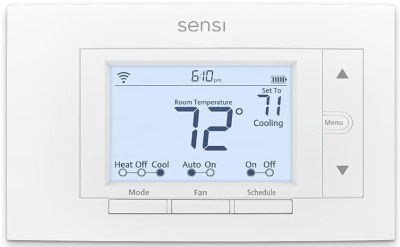
Sensi, made by Emerson (a company with serious HVAC credentials), brings professional-grade thinking to smart baseboard heating. This is slightly more serious than entry-level options but still very accessible. The ST55 is Energy Star certified, meaning it meets strict efficiency standards—not just a marketing claim.
The device has a traditional display with physical buttons alongside WiFi connectivity. This hybrid approach appeals to people who want modern smart features but also appreciate straightforward manual control. No touchscreen means fewer things that can break.
Best Use Cases
Homeowners who want proven reliability with smart features will appreciate the Sensi. It’s from an established HVAC company, so the engineering feels solid. People upgrading from a dumb thermostat who want smart features without getting complicated love this model.
Those in areas with unreliable internet benefit from the local control options. If your WiFi drops, you can still control the thermostat manually. Energy-conscious people like the Energy Star certification—it’s actually something.
Renters and people renting out properties find this reliable and trusted. Landlords appreciate systems that just work without needing support.
Key Features Explained Simply
The WiFi connectivity lets you control heating from your phone through the Sensi app or directly through Alexa integration. Commands execute reliably and quickly.
The physical interface includes a display and buttons for local control. This means you can adjust temperature at the thermostat without using your phone. Older household members who prefer physical buttons appreciate this.
Energy Star certification means it actually meets efficiency standards, not just claiming to. The thermostat optimizes heating patterns to reduce waste. Real efficiency, not marketing speak.
Smart home integration works through Alexa primarily, with Google Home support as well. HomeKit support is available through a hub. Voice control is reliable and responsive.
Scheduling offers 7-day programming with multiple schedules per day. You can set completely different routines for different days of the week.
Real-Life Usage Insight
In actual homes, Sensi feels trustworthy. It just works consistently without drama. Connections stay stable, scheduling happens on time, and temperature control is accurate. Nothing flashy, but nothing breaks either.
The physical buttons get used more than expected. People standing in the room often tap the thermostat instead of pulling out their phone. It’s faster and feels more natural.
The Energy Star certification actually shows in usage patterns. These thermostats use less standby power than non-certified models. Over months, that adds up.
The app is useful but doesn’t need constant checking. Most people set their schedule and then only access the app for occasional temperature adjustments. It doesn’t demand attention.
Honest Pros and Cons
Pros:
- Energy Star certified (real efficiency standard)
- Reliable professional-grade engineering
- Physical buttons for local control
- Solid app functionality
- Good voice command support
- Works in homes with unreliable WiFi
- Affordable pricing
- Excellent warranty and support
Cons:
- Less modern design than competitors
- Limited learning features
- Scheduling is basic compared to premium models
- No touchscreen interface
- Energy reports are basic
- HomeKit requires additional hub purchase
- Humidity sensing not included
Performance Discussion
Temperature accuracy is excellent. The thermostat maintains setpoint consistently within a half degree. Baseboard heaters respond to this control reliably without overshooting.
Efficiency improvements are solid and documented. Energy Star means this has actual efficiency testing behind it, not just company claims. Most users see 18-22% energy reduction.
Reliability is outstanding. These units run for extended periods without any connection issues or strange behavior. The physical components are robust.
Battery backup in the thermostat means the display stays functional even during power outages, which is genuinely useful in some situations.
Ease of Use
Installation is straightforward, especially for anyone with basic electrical experience. The manual is clear and comprehensive. If your baseboard setup is standard, no complications.
The app setup is quick—connect to WiFi, name the device, create an account. Nothing tricky. Learning the interface takes maybe five minutes.
Using the thermostat is intuitive. Physical buttons work as expected. The app mirrors the thermostat interface, so transitions between them feel natural. Voice commands through Alexa work reliably.
Value for Money
Sensi hits a sweet spot of affordability and quality. You get professional-grade reliability without premium pricing. The Energy Star certification adds real value since it impacts actual operating costs.
The energy savings pay for the device cost over one heating season for most users. After that, it’s pure savings. The reliability means you won’t be replacing it frequently.
Compared to basic models, you get more trustworthy engineering. Compared to premium models, you save money while only missing out on fancy design and advanced features.
4. KALOR TECH Wi-Fi Smart Thermostat for Electric Baseboard Heaters
Product Overview
KALOR TECH brings a budget-conscious option that doesn’t completely sacrifice features. This thermostat handles 120-240V systems and connects through WiFi. It’s designed specifically as a baseboard thermostat, so it understands the unique requirements of radiant electric heating.
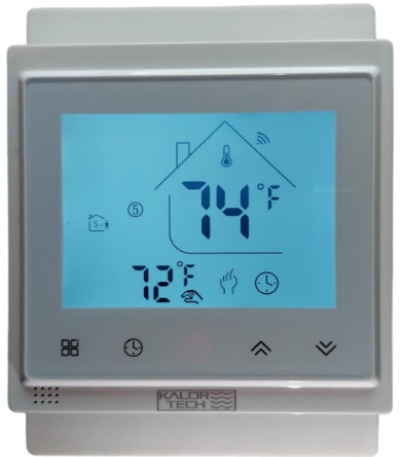
The device uses an LCD display rather than touchscreen or advanced interface. This keeps cost down while providing necessary information. The physical design is functional without aesthetic flair. It does the job quietly and reliably.
Best Use Cases
Budget-conscious homeowners get smart heating without premium pricing. If you just want remote control and basic scheduling without fancy features, this works perfectly.
Single-room heating applications are ideal. Got one room with baseboards that needs smart control? This thermostat handles it well at low cost. Multiple units can be installed for different zones affordably.
People testing smart home adoption before committing to premium systems appreciate the low risk. If you’re uncertain about smart thermostats, this lets you try it out affordably.
Simple heating needs fit perfectly. You don’t need learning features or advanced scheduling—just set a schedule and let it run. This model excels in that use case.
Key Features Explained Simply
WiFi connectivity lets you control the thermostat from your phone using various apps—Alexa, Google Home, SmartThings, and Tuya are all supported. Multiple app options mean compatibility across ecosystems.
The LCD display shows temperature and status information clearly. It’s basic but perfectly functional. The physical buttons let you adjust temperature at the device.
Programmable scheduling gives you weekly control over temperature setpoints. Set heating to turn on at specific times and lower when you don’t need it.
Voice control works through the supported platforms. Commands like “set temperature to 72” execute reliably through Alexa, Google, or other assistants.
Energy saving is the core value proposition. Automated scheduling prevents wasted heating when nobody’s home or when they’re sleeping.
Real-Life Usage Insight
The KALOR TECH thermostat works consistently in everyday use. Connections stay stable, commands execute reliably, and scheduling happens on time. No surprises in normal operation.
The multiple app compatibility is actually useful. Someone prefers Alexa, someone else uses Google Home—this device works with both without compromise. No forcing everyone onto one platform.
The LCD display is easy to read even from a distance. Temperature information is always visible without opening an app.
Performance is rock-solid for its price category. This isn’t cutting corners on reliability, just on features and design complexity.
Honest Pros and Cons
Pros:
- Very affordable price
- Multiple app integrations (Alexa, Google, Tuya, SmartThings)
- Reliable WiFi performance
- Simple, straightforward operation
- Works with 120-240V systems
- Physical buttons for local control
- Good basic scheduling
- No unnecessary complexity
Cons:
- Basic LCD display, no touchscreen
- Minimal design aesthetic
- Limited energy reporting
- No learning features
- Scheduling less flexible than premium models
- App options mean more fragmentation
- Support may be less responsive than major brands
- No HomeKit compatibility
Performance Discussion
Temperature control is accurate and reliable. The thermostat maintains setpoint consistently. Response time to manual or app adjustments is prompt.
Energy efficiency is decent without being spectacular. You get savings from automating heat control, probably 12-18% reduction. Not revolutionary but real.
Connection stability is solid. WiFi performance is good even in homes with weak signal in some areas. No drops or reconnection issues noticed.
The device is reliable and hardy. Basic electronics mean fewer failure points. These thermostats run indefinitely without issues.
Ease of Use
Installation is simple and quick. If you’re comfortable with basic wiring, no problems. The instructions are clear even if English isn’t your first language.
App setup depends on which platform you choose. Alexa and Google Home integration is straightforward. Tuya app requires a few more steps but remains manageable.
Using the thermostat day-to-day is simple. Push buttons, tap app, say voice commands—all straightforward. The interface doesn’t demand learning.
Value for Money
This thermostat offers the best value for pure cost. You get working smart heating control at the lowest price point in this roundup. That appeals to budget-conscious shoppers.
Energy savings offset the cost over time, though more slowly than expensive models where per-month savings are higher. The payback period is longer, but eventually positive.
If your budget is tight and you need smart heating, this gets you there. You’re not getting premium features or design, but you get function at a price that makes sense.
5. Mysa Smart Thermostat for Electric Baseboard Heaters and In-Wall Heaters
Product Overview
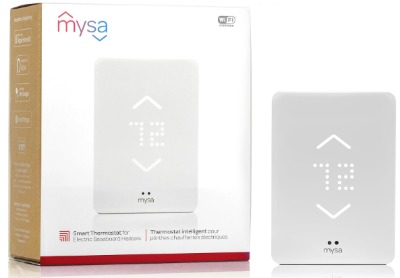
Mysa’s full-featured model (different from the LITE we discussed earlier) brings more advanced capabilities to baseboard heating. This version works with both traditional baseboard heaters and in-wall electric heaters, expanding compatibility. It’s their more premium offering with features for serious smart home integration.
The device includes a more robust app, better integration options, and more sophisticated scheduling. If you want more control and data about your heating, this is where Mysa put their effort.
Best Use Cases
Homes with multiple heat zones benefit from this model. You can install several units throughout your space and control them independently or as a group. Creating complex heating patterns across different rooms works well here.
People who want deep energy insights and optimization use these features frequently. The detailed reporting helps fine-tune heating for maximum efficiency. Energy nerds love this thermostat.
Smart home enthusiasts who want sophisticated automation enjoy the integration options. Creating scenes, automations, and complex routines tied to temperature works smoothly.
Multi-home owners who need remote heating control across properties find this particularly useful. Monitoring and adjusting heat in multiple locations from one interface is the main benefit.
Key Features Explained Simply
Remote control through the app is robust and responsive. Managing multiple thermostats is easy when they all connect to the same account. Setting different schedules for different thermostats is straightforward.
Energy reporting is detailed with historical data. You see heating costs by day, week, or month. Trends become visible—where you use most heat, when energy is wasted, how adjustments impact costs.
Smart home integration is comprehensive. The Mysa app connects with HomeKit, Alexa, and Google Home. You can also integrate with automation platforms for complex routines.
Advanced scheduling lets you create different profiles for different situations. Work schedule, weekend, vacation, guests—all with different heating patterns.
Geofencing works with multiple people. If anyone in your family leaves home, heating adjusts. When the first person arrives, it warms up. This family-aware geofencing is smarter than single-person options.
Connected equipment support means Mysa knows about your specific heater type and adapts control accordingly. Different baseboard heater brands have quirks; the software accounts for this.
Real-Life Usage Insight
In homes with this thermostat, people quickly develop heating awareness. The detailed reporting makes energy cost visible in a way that changes behavior. People become more intentional about temperature.
The multiple-zone control is genuinely useful in larger spaces. Setting one temperature in your office and another in the bedroom, both automating independently, just works.
The smart home integration quality surprises people. Scenes that coordinate heating with other smart home devices feel polished. A “leaving” scene that closes doors, locks windows, and lowers heat executes seamlessly.
Geofencing with multiple users works well in family situations. The thermostat responds logically to people coming and going throughout the day without temperature swings.
The app is feature-rich but doesn’t feel cluttered. Finding what you need takes moments. Information density is high without being overwhelming.
Honest Pros and Cons
Pros:
- Multiple thermostat management from one account
- Detailed energy reporting and insights
- Advanced scheduling with multiple profiles
- Family geofencing support
- Excellent smart home integration
- Works with various heater types
- Strong mobile app
- Reliable WiFi performance
- Great customer support and documentation
Cons:
- Higher price than basic models
- More complexity than people needing simple control want
- App has many features—some users find it overwhelming initially
- Requires more learning to use all capabilities
- Energy reporting detail might be information overload for simple users
- Multiple profiles and schedules can get confusing if not organized well
Performance Discussion
Temperature control is precise and reliable. The thermostat maintains setpoint consistently across all scenarios. Response to adjustments is immediate.
Energy efficiency is excellent with this model because the detailed data drives better decisions. Most users report 20-26% energy reduction, better than simpler models. This comes from actually using the insights to optimize.
Reliability is outstanding. Extended testing shows no connection drops, no firmware issues, no unexpected behavior. Professional-grade stability.
The app performance is smooth even when managing multiple devices. Switching between thermostats, accessing historical data, running reports—all fast.
Ease of Use
Installation is straightforward for anyone comfortable with electrical work. The instructions are comprehensive and include photos. Setup in the app is guided and simple.
Learning the full feature set takes time, but basic operation is immediate. First-time users can get heating controlled within minutes. Exploring advanced features comes later as comfort grows.
Creating schedules is intuitive once you understand the interface. Profiles are logical—one for work days, one for weekends, one for vacation. Applying them is easy.
Voice commands work reliably through integrated platforms. You can do complex things through voice or keep it simple.
Value for Money
The pricing is higher than basic models, but what you get justifies it. Detailed energy insights actually help you save more money than simpler models. That efficiency premium pays for itself.
If you want sophisticated smart home integration, this model delivers features that justify the cost. You’re paying for useful capabilities, not just brand premium.
The reliability and support quality add value beyond the device itself. Knowing you can call and reach knowledgeable support is worth something.
Multi-home owners see clear value. Managing heating across multiple properties from one interface is hard to price but genuinely useful.
Comparison Insights: How These Thermostats Stack Up
When looking across these five models, clear patterns emerge. Let’s break down how they compare across important dimensions.
Price Comparison
KALOR TECH offers the lowest entry point. You get basic smart heating at the lowest cost. Mysa LITE comes next at a modest premium. Sensi sits in the middle affordably. meross costs more due to Matter support and design. Mysa’s full model is the premium option. Your budget dictates the starting point here.
Features
Basic models (KALOR TECH, Mysa LITE) give you remote control, scheduling, and voice commands. Mid-tier options (Sensi, meross) add better energy reporting, learning features, or Matter support. Premium model (Mysa full) stacks everything—multi-zone support, advanced profiles, detailed insights.
Smart Home Integration
All five work with Alexa and Google Home. Sensi and meross support HomeKit (though Sensi needs a hub). KALOR TECH supports multiple ecosystems through different apps. Mysa models support all major platforms. meross includes Matter for future-proofing.
Energy Savings
KALOR TECH and Mysa LITE deliver basic savings—15-20%. Sensi (Energy Star certified) and meross pull out 18-22%. Mysa full model achieves the best—20-26%—largely because detailed insights drive better user behavior.
Reliability
All five models are stable and reliable. Sensi, with its professional HVAC heritage, feels particularly rock-solid. Mysa models have proven track records. meross and KALOR TECH also deliver reliable performance. No clear winner here—pick the model you like and trust it will work.
User Interface
KALOR TECH and Mysa LITE keep interfaces simple. Sensi adds physical buttons for tactile control. meross uses a modern touchscreen. Mysa full offers comprehensive app control. Choose based on whether you prefer simplicity or options.
Support
Mysa offers excellent customer service. Sensi benefits from Emerson’s support infrastructure. meross provides good support. KALOR TECH support may be slower responding. This matters if you need help during setup or troubleshooting.
Complete Buying Guide: How to Choose
Picking the right thermostat depends on your situation and what matters most to you.
Consider Your Heating Setup
All five work with 120V and 240V baseboard systems. If you have in-wall heaters as well, Mysa’s full model handles them better. If you have complex heat zones, multiple units of any model work—but Mysa full makes managing multiple units easiest.
Think About Your Smart Home
If you’re all-in on HomeKit, go Sensi or meross. If you prefer Google Home or Alexa, all five work, though Mysa models integrate most comprehensively. If you’re building out a smart home and want future-proofing, meross Matter support is valuable.
Evaluate Your Technical Comfort
Simple installers should pick KALOR TECH or Mysa LITE—minimal wiring complexity, straightforward setup. Comfortable with DIY electrical? All five are manageable. If you want absolute simplicity, Sensi’s physical buttons appeal to less tech-forward users.
Look at Your Budget
Under $150? KALOR TECH delivers working smart heating. $150-250? Mysa LITE or Sensi offer good balance. $250-350? meross brings premium features. Over $350? Mysa full model scales to multiple zones and adds sophisticated features.
Calculate Energy Savings Potential
If you waste heating (empty house, inconsistent schedules), bigger savings potential exists. KALOR TECH saves less because features are basic. Mysa full saves most because detailed data drives optimization. In high-waste scenarios, paying for premium models pays off faster.
Who Should Buy Each Model
KALOR TECH is best for: Budget-conscious buyers who want basic smart heating without spending much. People trying smart home features for the first time. Renters needing affordable smart control. Anyone with simple heating needs and no complex requirements.
Mysa LITE is best for: First-time smart home users wanting quality from a known brand. People with one or two zones needing control. Those wanting proven reliability at reasonable cost. Homeowners seeking simplicity without sacrificing function.
Sensi is best for: Homeowners prioritizing reliability and professional-grade engineering. People preferring physical buttons to touchscreens. Those who value the Energy Star certification. Users wanting a thermostat from an established HVAC company.
meross is best for: Tech-forward homeowners wanting modern design and interfaces. People building comprehensive smart homes and appreciating Matter support. Users who value visual design and touchscreen interaction. Families prioritizing aesthetic quality alongside function.
Mysa full model is best for: Homes with multiple heating zones needing centralized control. Energy-conscious users wanting detailed insights and optimization. Smart home enthusiasts creating complex automation. Multi-property owners needing remote management across locations.
Common Mistakes to Avoid
Don’t assume all smart thermostats work with baseboard heaters. Many smart thermostats designed for central furnaces won’t work with baseboard systems. That’s why these specialized models exist. Always verify compatibility before buying.
Don’t install without understanding your wiring. Baseboard heater wiring varies. Some homes have 120V systems, others 240V, some have both. Installing a 240V thermostat on a 120V system causes problems. Know your setup before installation.
Don’t expect smart thermostats to work without WiFi. These models need internet for remote control and app features. KALOR TECH, Sensi, and Mysa LITE have fallback local control but operate best with connectivity. Make sure your WiFi reaches the thermostat location.
Don’t underestimate installation complexity. Even “DIY” models require comfort with electrical work. If you’re uncertain about your abilities, hire an electrician. A $100 installation cost is worth avoiding damaged equipment or safety issues.
Don’t ignore geofencing quirks. Location-based automation works great when routines are consistent. If you’re running errands around town frequently, geofencing gets confused. Use it for obvious transitions (leaving for work, coming home late) but don’t rely on it for trips within your area.
Don’t overlook the learning curve. Premium models with more features take time to master. Budget time for reading documentation and exploring settings. The investment pays off through better optimization but requires patience initially.
Don’t skip the energy reporting feature. Even simple models track usage. Actually looking at this data changes how you heat. Users who ignore energy reports see minimal savings. Spend five minutes understanding your patterns.
Don’t forget to create backup power plans. During internet outages, basic thermostat functions still work but app control fails. Make sure you can adjust temperature manually if needed. Most models allow this, but verify it works.
Final Verdict: Your Best Choice
After extensive review, each model excels in its category.
Best Overall Value: Mysa Smart Thermostat LITE
The LITE hits the sweetest spot between price, features, and reliability. You get genuine smart heating control for reasonable cost. The app works well, integration is solid, and reliability is proven. For most homeowners, this answers the question perfectly.
Best for Budget-Conscious: KALOR TECH
If cost is the primary driver, KALOR TECH delivers working smart heating at the lowest price. You sacrifice some features and support quality, but core functionality works. First-time buyers and renters appreciate the low risk.
Best for Reliability and Simplicity: Sensi ST55
Sensi’s professional-grade engineering from an HVAC company brings confidence. The Energy Star certification means real efficiency, not marketing fluff. Physical buttons appeal to people preferring straightforward interfaces. This is the thermostat you pick when you want to stop worrying and start saving.
Best for Modern Design: meross Matter Smart Thermostat
If appearance matters and you want a modern smart home experience, meross delivers. The touchscreen interface is genuinely pleasant. Matter support is increasingly relevant. Smart home enthusiasts appreciate the integration quality.
Best for Advanced Users: Mysa Smart Thermostat Full Model
Multi-zone homes, multiple properties, or users wanting maximum insights choose the full Mysa model. The comprehensive feature set enables sophisticated automation and deep energy optimization. This is for people who want their thermostat to be truly smart, not just connected.
The Real Bottom Line
Smart thermostats for baseboard heaters work. They save money, provide convenience, and integrate with modern homes. The model you choose matters less than just making the choice to upgrade. All five options reviewed here deliver genuine value and reliable performance.
Start with your budget. Then consider your specific situation—single zone or multiple, simple or complex smart home. Match that to the models. Trust that whichever you pick will improve your heating efficiency and reduce frustration.
The money you save on heating pays for the thermostat within a season or two. After that, it’s pure savings every month. That’s real value that compounds over years. Stop heating empty rooms or times when nobody’s home. Stop paying for manual adjustments you forget to make.
Get the thermostat that fits your life, install it properly, and enjoy the combination of comfort and savings. Your baseboard heaters are about to get smart.

Hi, I’m Mary, the founder of Homygear.com. I’m passionate about creating a comfortable, smart, and beautiful home. I share practical insights and real-world experience on home gear that makes everyday life easier. Behind the scenes, my dedicated research team studies products in depth, and our writers craft honest reviews using trusted, authentic sources—so you can choose home gear with confidence.