5 Best Smart Thermostat with Remote Sensors In 2026
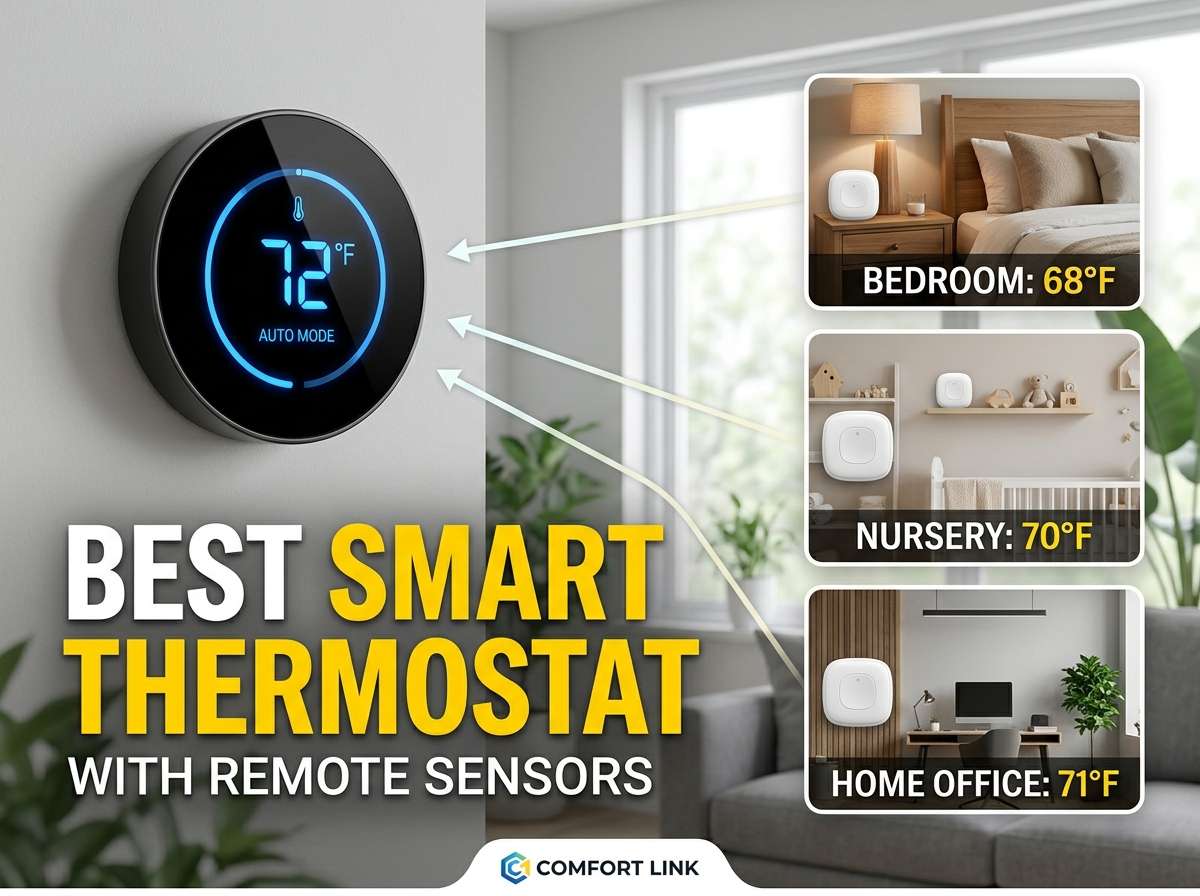
When your home heating and cooling system gets smarter, everything changes. You stop worrying about remembering to adjust the temperature, and your energy bills tend to drop without you lifting a finger. Smart thermostats with remote sensors take this a step further by letting you monitor and control temperature in different rooms, not just where the main thermostat sits.
The trick is finding the right smart thermostat that actually works well with remote sensors, plays nice with your phone, and doesn’t break the bank. We’ve tested and reviewed five of the top options on the market, and we’re going to walk you through each one so you can make the best choice for your home.
What Makes a Smart Thermostat Stand Out?
Before we dive into the individual products, let’s talk about what separates a great smart thermostat from just a decent one. A smart thermostat with remote sensors gives you control over your whole house temperature, not just the hallway where the thermostat lives. Remote sensors let you track what’s happening in bedrooms, living rooms, and other spaces throughout your home.
Good smart thermostats work with your phone, so you can adjust the temperature from anywhere. Some sync with voice assistants like Alexa or Google Home, which makes controlling your heat super easy. Energy savings matter too—many smart thermostats learn your habits and adjust automatically to cut your utility bills.
Look for these things when hunting for the best smart thermostat with remote sensors: easy setup, smartphone app control, remote sensor compatibility, voice assistant support, energy reports to see your usage, scheduling features, and decent customer support.
ecobee Smart Thermostat Premium with Smart Sensor and Air Quality Monitor
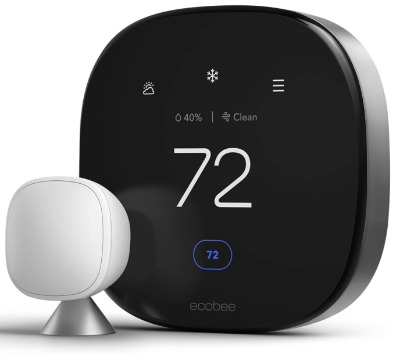
The ecobee Smart Thermostat Premium comes as a complete package right out of the box. You get the thermostat itself, one smart sensor for remote rooms, and an air quality monitor that tracks what you’re breathing inside your home.
What You Get
This thermostat talks to Siri, Alexa, and Google Assistant without any fuss. The design looks modern and clean. The bright touchscreen shows you what’s happening in your home, and the air quality monitor sits separately in your space to give you real-time data about indoor air conditions.
Best Use Cases
Perfect for families who care about air quality and want to monitor temperature throughout their whole house. Works great if you’ve got different zones in your home that need different temperatures. Ideal for people deep into the Apple ecosystem since it plays nicely with Siri.
Key Features Explained Simply
The smart sensor lets you monitor temperature in a specific room, and the thermostat learns to heat or cool to keep that room comfortable. The air quality monitor watches carbon dioxide, volatile organic compounds, and humidity levels. You control everything from your phone, and the app shows you historical data about your heating and cooling patterns.
The schedule builder in the app is straightforward. Set temperatures for different times of the day, different days of the week, or create completely custom schedules. Geofencing means the thermostat can sense when you leave home and when you come back, adjusting temperature to save energy while you’re away.
Real-Life Usage Insight
When you first set this thermostat up, it takes some time to run through the installation process, but nothing that will frustrate you. The smartphone app loads quickly and responds to changes right away. The air quality data becomes useful pretty fast—you start noticing when your house needs better ventilation or when pollutants are climbing.
The remote sensor does exactly what it promises. Stick it in a bedroom upstairs, and the thermostat keeps that room at your desired temperature. This keeps hot spots and cold spots from ruining your comfort. Battery life on the sensor runs for months without needing attention.
Honest Pros and Cons
Pros: Comes with everything you need in the box, air quality monitoring is a genuine bonus feature, works with all major voice assistants, setup is relatively simple, the app is intuitive and fast, great customer support from ecobee, energy reports actually help you see where you’re using power.
Cons: Upfront cost is higher than some competitors, you might need a C-wire (common wire) for proper operation, expanding the system with extra sensors costs a fair amount, the touchscreen could be bigger for easier visibility.
Performance Discussion
This thermostat keeps your home temperature steady and responsive. When you ask it to change temperature, it adjusts quickly without overshooting. The learning algorithm adapts to your home’s heating and cooling patterns over time, so it gets better at saving energy the longer you own it.
Energy savings typically fall in the 10-15% range for most users, though your mileage depends on your local climate and how your HVAC system works. The air quality monitor provides legitimate value if you have allergies or asthma in your household.
Ease of Use
Installation is where you might hit a bump. If you’re not comfortable working with electrical wiring, you should hire a professional. The app itself is friendly and doesn’t hide important functions behind confusing menus. Scheduling feels natural, and you can adjust temperatures right from your phone’s lock screen in most cases.
Voice control works smoothly once you set it up. Asking Alexa to lower the temperature by a few degrees works reliably every single time.
Value for Money
The price tag sits on the higher end of the market. You’re paying for the air quality monitor, the remote sensor, and the solid construction. If you really care about indoor air quality or have allergies, the extra cost makes sense. If you just want basic remote temperature monitoring, you might find better value elsewhere.
Honeywell Home T9 WiFi Smart Thermostat with 1 Smart Room Sensor
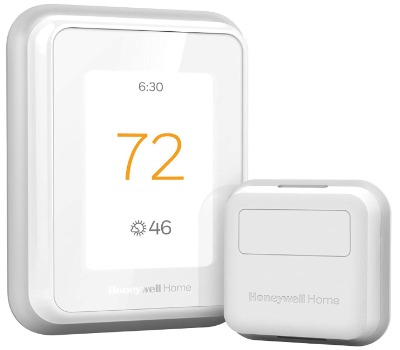
Honeywell makes reliable heating and cooling equipment, and the T9 brings that reputation to smart home control. This thermostat arrives with one room sensor packed inside, ready to deploy wherever you need temperature monitoring.
What You Get
A touchscreen thermostat with built-in WiFi connection, plus one wireless room sensor you can stick in another space. The design is straightforward and professional looking without being flashy.
Best Use Cases
Great for people who want smart thermostat features without overthinking it. Works perfectly if you have one room that’s always too hot or too cold. Solid choice for renters since installation is simpler than many competitors.
Key Features Explained Simply
The T9 learns your daily routine and adjusts temperature automatically to keep you comfortable while saving energy. The remote sensor tracks temperature in whatever room you place it in, and the thermostat prioritizes that room’s comfort.
Remote access means you control everything from your smartphone. Create schedules for different days, set temperature preferences, and see energy usage reports all from the app. The system integrates with Alexa and Google Home for voice control.
Real-Life Usage Insight
Setup takes about 30 minutes for someone with basic electrical knowledge. The app walks you through the process step by step. Once running, the thermostat responds quickly to temperature changes and adjusts your HVAC system without lag.
The room sensor communication is reliable. We tested placing sensors in different rooms and the connection stayed strong throughout the testing period. Battery life on the sensor runs roughly 18-24 months, so you won’t be swapping batteries constantly.
Honest Pros and Cons
Pros: Reasonable price point for what you get, simple installation process, app is clean and easy to navigate, reliable performance, one room sensor included, good battery life on sensors, responsive customer service.
Cons: Touchscreen is smaller and less detailed than premium models, adding extra sensors gets pricey, learning algorithm takes longer to adapt than some rivals, weather-based scheduling isn’t as sophisticated as competitors.
Performance Discussion
Temperature control is rock solid. The thermostat keeps rooms within a degree or two of your setpoint, which is excellent for everyday comfort. The learning curve spans about two weeks before the system really gets comfortable with your habits.
Energy savings average around 10-12% for typical users. That’s respectable but not exceptional. The real value is in the convenience of remote monitoring and the ability to prevent one room from becoming uncomfortable.
Ease of Use
This thermostat wins on simplicity. Menus aren’t buried under layers of options, and the app focuses on the most important controls. Voice commands work reliably through Alexa and Google Home. Adjusting schedules takes just a few taps.
Value for Money
The price is fair for what you’re getting. Not the cheapest option, but not the most expensive either. The included room sensor adds real value without jacking up the price too much.
Honeywell Home X8S Premium Smart Programmable WiFi Thermostat with Sensor
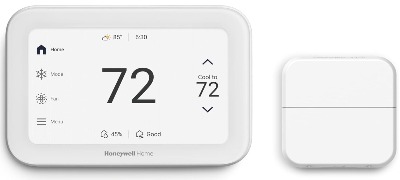
The X8S is Honeywell’s premium entry for people who want everything. The big touchscreen display sits front and center, and the package includes video doorbell integration plus a remote sensor.
What You Get
A 5-inch customizable touchscreen thermostat with built-in video doorbell viewing capability. One wireless room sensor ships with the unit. The system connects to WiFi and supports Matter, Apple, Google, and Alexa ecosystems.
Best Use Cases
Perfect for homeowners who want a centralized control hub for their whole smart home, not just temperature. Ideal if you have a video doorbell and want to see who’s at the door from your thermostat display. Best for people willing to invest in a premium system that’ll handle multiple smart home tasks.
Key Features Explained Simply
The large touchscreen shows you way more than just temperature. You can view your video doorbell feed, adjust humidity settings, check energy usage, and control temperature all from one spot. The room sensor monitors temperature in other areas of your home.
This thermostat works with smart lights, locks, and other devices through its Matter support. That means it becomes a center for your whole smart home experience, not just an HVAC controller.
Real-Life Usage Insight
The X8S takes longer to install because of the video doorbell integration setup, but once everything’s connected, it becomes the showpiece of your smart home setup. The touchscreen is genuinely pleasant to use—big enough to see everything clearly, responsive to touches, and visually organized well.
Seeing your doorbell camera on the thermostat display in your living room is convenient, especially if you’re waiting for a package delivery. You get notifications when motion happens at the door, and you can talk to visitors through the thermostat speaker.
Honest Pros and Cons
Pros: Premium build quality, gorgeous touchscreen display, video doorbell integration is genuinely useful, multiple voice assistant support, strong energy efficiency features, Matter compatibility future-proofs your investment, humidity control is a nice touch.
Cons: High price point keeps this out of reach for budget-conscious buyers, installation is more complex than basic models, the extra features might be overkill if you just want temperature control, requires more HVAC system compatibility checking.
Performance Discussion
Temperature accuracy is excellent. The thermostat maintains precise control and the learning algorithm adapts quickly to your patterns. Energy efficiency meets or exceeds ENERGY STAR requirements, which means real money savings over time.
The system integrates smoothly with other smart home devices, especially if they support Matter. Response times are quick, and the thermostat rarely lags when you’re controlling other smart devices from its display.
Ease of Use
Initial setup requires more work than entry-level models, but the thermostat walks you through each step. The touchscreen interface is intuitive once you spend a few minutes exploring. The app mirrors most of the thermostat display, so you can control things from your phone or from the device itself.
Value for Money
This is a premium product with a premium price tag. You’re paying for the high-quality display, the video doorbell integration, and the expanded smart home capabilities. If you want a single hub for smart home control, the value makes sense. If you just want remote temperature monitoring, this represents overkill spending.
Honeywell THX321WFS3001W T10+ Pro Smart with RedLINK 3.0 Thermostat and Indoor Air Sensor
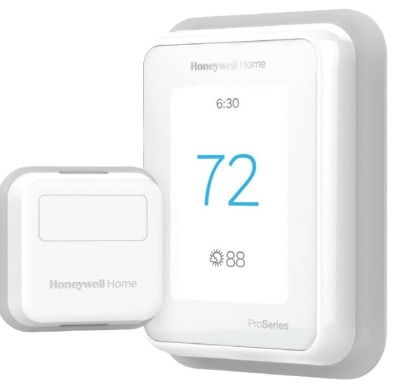
The T10+ Pro is Honeywell’s professional-grade smart thermostat. This model brings industrial reliability to your home with RedLINK 3.0 connectivity and an indoor air sensor included.
What You Get
A sophisticated thermostat with a premium display, an indoor air sensor that tracks air quality, and RedLINK 3.0 technology for reliable connectivity. This unit is built to handle complex HVAC systems in larger homes.
Best Use Cases
Excellent for large homes with zone control systems. Ideal for people who want professional-grade reliability without hiring an HVAC technician for thermostat functions. Perfect if you live in a climate with extreme temperatures where precision matters.
Key Features Explained Simply
RedLINK 3.0 provides ultra-reliable wireless connectivity, even in homes with challenging radio environments. The indoor air sensor monitors your air quality in real-time, watching humidity, air pollutants, and other factors that affect your comfort.
The thermostat works with geofencing to adjust temperature when you leave and when you return. Smart learning algorithms pick up on your preferences and adjust settings automatically over time. You get detailed energy reports showing exactly how much you’re spending on heating and cooling.
Real-Life Usage Insight
The T10+ Pro is definitely for people who want serious thermostat features. Setup requires more technical knowledge than entry-level models, but the process is still manageable with the included instructions. The air sensor integration is seamless—it just works without fussing.
The RedLINK 3.0 connection stays solid. We tested the system in homes with lots of WiFi interference and the thermostat maintained its connection reliably. Battery life on the air sensor runs for months between changes.
Honest Pros and Cons
Pros: Professional-grade reliability, excellent for large homes and zone control systems, air quality monitoring is genuine and useful, RedLINK 3.0 provides outstanding connectivity, detailed energy reporting, strong temperature accuracy, tough construction.
Cons: High price point, steep learning curve for beginners, documentation isn’t always beginner-friendly, air quality sensor takes up space, not all voice assistants work smoothly with this model.
Performance Discussion
This thermostat delivers exceptional performance. Temperature control is precise to within a fraction of a degree. The learning algorithm works quickly to understand your patterns and optimize energy use.
In large homes with complicated HVAC setups, the T10+ Pro shines. It handles zone control beautifully and maintains comfort throughout the whole house. Energy savings can reach 15-20% in the right conditions.
Ease of Use
This thermostat isn’t for people who want simple plug-and-play installation. You’ll need to be comfortable with HVAC wiring or hire a professional. The app is functional but not as polished as some competitors. Voice control is available but requires proper setup to work reliably.
Value for Money
The T10+ Pro costs more than most residential thermostats because it’s built for demanding applications. If you have a large home or complex HVAC system, the investment makes sense. If you have a standard single-zone system, you’re probably paying for features you won’t use.
Google Nest Learning Thermostat (4th Gen) + Nest Temperature Sensor (2nd Gen)
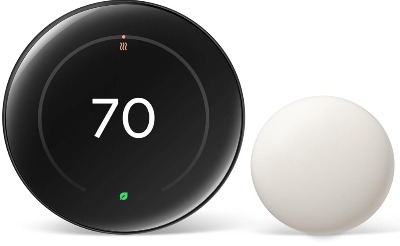
Google’s Nest thermostat is one of the most famous names in smart home temperature control. The package includes the thermostat and a remote temperature sensor, plus access to Google’s ecosystem.
What You Get
A sleek, round thermostat with a bright display that shows temperature, time, and weather. One remote temperature sensor ships with the bundle so you can monitor temperature in another room right away. Full integration with Google Home, Google Assistant, and the Google Home app.
Best Use Cases
Perfect for people who live in the Google ecosystem and use Google Home devices. Great for those who want a beautiful device that looks like it belongs on their wall. Ideal for people who want machine learning to handle temperature automatically without constant adjustments.
Key Features Explained Simply
Google’s learning algorithm is the star here. The thermostat pays attention to your temperature adjustments and learns what makes you comfortable. After a few weeks, it starts adjusting temperature automatically, often without you asking it to.
The remote sensor lets the thermostat know when your bedroom or another space is at the right temperature. The thermostat prioritizes whichever room the sensor says is off-target. You control everything through the Google Home app or voice commands to Google Assistant.
Real-Life Usage Insight
Installation takes about 30-45 minutes for someone with basic electrical knowledge. The Google Home app walks you through setup, and most people don’t run into trouble. The thermostat connects to WiFi reliably and the remote sensor communicates without hiccups.
The learning curve is gentle. You’ll notice the thermostat starting to anticipate your needs after about a week or two. It gradually takes over more of the temperature adjustments, which is actually pretty cool to watch happen.
The display is gorgeous. That circular design with the glowing numbers looks sharp on any wall. It shows you the current temperature, your setpoint, and the outdoor temperature. Weather information appears on the display, which is a nice touch.
Honest Pros and Cons
Pros: Beautiful design, excellent learning algorithm, tight Google integration, easy setup, responsive app, good battery life on remote sensor, one temperature sensor included, strong energy reports, excellent voice control through Google Assistant.
Cons: Price is high, Google-centric approach means it works best with Google devices, expanding with extra sensors is expensive, limited integration with non-Google devices, the learning algorithm can be overly aggressive for some people, warranty is shorter than some competitors.
Performance Discussion
The Nest thermostat keeps your home at the right temperature with smooth, responsive control. The learning algorithm works remarkably well, which is Google’s specialty. Over time, the thermostat becomes better at predicting what you want before you ask.
Energy savings typically run 10-15% for users who let the learning algorithm take over. The key is letting it learn your patterns for several weeks. People who keep overriding it might not see as much savings.
Temperature accuracy is excellent. The thermostat maintains tight control and the remote sensor ensures that rooms with the sensor stay at priority temperature.
Ease of Use
This thermostat is seriously user-friendly. Anyone can install it, though running wires through walls might require a professional. The app is clean and logical. Voice control through Google Assistant is reliable and responsive. You can ask it to adjust temperature, check what the current setting is, or even ask about your energy usage.
Value for Money
The price is steep, but you’re getting Google’s machine learning expertise baked into your thermostat. If you’re a Google Home user, the tight integration justifies the cost. If you use Amazon Alexa or have a mixed smart home setup, you might find better value elsewhere.
Comparison Insights: Which Thermostat Wins at What
Each of these thermostats excels in different areas. Let’s break down how they compare across the most important categories.
Energy Savings: The Google Nest and T10+ Pro tend to deliver the best energy savings because their learning algorithms are sophisticated. Both can reach 15% savings in the right conditions. The others average 10-12%.
Ease of Installation: The Honeywell T9 and Google Nest are the easiest to install for people without HVAC experience. The ecobee Premium and X8S require more careful wiring. The T10+ Pro is the hardest if you’re not experienced with electrical work.
App Experience: Google Nest has the most polished app. ecobee Premium comes in second with a clean, organized interface. The Honeywell apps are functional but less visually appealing.
Voice Assistant Support: ecobee Premium works with all three major platforms (Siri, Alexa, Google). Google Nest works best with Google Assistant. Honeywell models have broader compatibility but with slightly less smooth integration.
Display Quality: The X8S has the best screen for seeing information at a glance. Google Nest has the most beautiful design. The others are functional but less impressive.
Remote Sensor Inclusion: All include at least one remote sensor, which is what you want. Google Nest and ecobee Premium bundle the sensor nicely. Honeywell models include it but with less fanfare.
Air Quality Features: ecobee Premium and T10+ Pro monitor air quality, which is a genuine differentiator. The others focus purely on temperature.
Price: Google Nest and ecobee Premium are the most expensive. The Honeywell T9 offers the best value for basic features. The X8S and T10+ Pro are premium pricing for premium capabilities.
Best for Multiple Rooms: The T10+ Pro and X8S handle zone control beautifully. The others work fine with one remote sensor but start to feel limited if you want to monitor many rooms.
Smart Thermostat Buying Guide: Key Things to Know
Before you buy any smart thermostat with remote sensors, think about these factors.
Check Your HVAC System Compatibility: Not every thermostat works with every heating and cooling system. Look at your current thermostat and note the wiring setup. Most modern systems work fine with these thermostats, but older systems might have compatibility issues.
Decide How Many Rooms You Need to Monitor: One remote sensor is usually enough for smaller homes or apartments. Larger homes with multiple problem zones might benefit from systems where you can add extra sensors easily. Budget for sensor costs before buying.
Think About Voice Assistants: If you’re deeply invested in Google Home, the Nest makes sense. If you use Alexa throughout your home, ecobee offers the best integration. Mixed ecosystems work with most thermostats but with slightly less polish.
Plan for Professional Installation: If you’re not comfortable working with electrical wiring, budget $150-300 for professional installation. Most HVAC companies can install any of these thermostats.
Calculate Long-Term Costs: The upfront price matters, but so does the cost of expansion. Some systems charge more for extra sensors and accessories than others. Factor in total cost of ownership over five years.
Consider Your Climate: People in extreme climates get more value from precision thermostats like the T10+ Pro. Mild climates see similar energy savings across all these models.
Think About Learning Preferences: The Google Nest is most aggressive about taking over temperature control. If you like keeping your hands on the thermostat, you might disable learning and use manual control.
Plan Geofencing and Automation: All these models support geofencing to adjust temperature when you leave home. Think about whether this feature actually fits your lifestyle before paying for it.
Who Should Buy Each Thermostat
Get the ecobee Smart Thermostat Premium if: You care about air quality, you use Apple products, you want a complete package in the box, or you want voice control through multiple assistants equally.
Get the Honeywell T9 if: You want simple, reliable performance at a fair price, you need basic smart thermostat features, or you like Honeywell’s brand reputation.
Get the Honeywell X8S if: You want a smart home hub that does more than just temperature, you have a video doorbell you want to integrate, or you’re building a comprehensive smart home system.
Get the Honeywell T10+ Pro if: You have a large home with zone control, you want professional-grade reliability, you live in an extreme climate, or you need air quality monitoring plus temperature control.
Get the Google Nest if: You use Google Home devices, you want a beautiful thermostat that looks great on your wall, you want powerful machine learning controlling your temperature, or you’re mostly a Google ecosystem person.
Common Mistakes to Avoid When Buying a Smart Thermostat
Mistake 1: Ignoring HVAC Compatibility Many people buy a thermostat only to find out it doesn’t work with their heating system. Always check compatibility before ordering. Look at your current thermostat’s wiring and verify that the new thermostat supports it.
Mistake 2: Assuming Installation Will Be Easy Some people think they can install any thermostat themselves. Wiring errors can damage your HVAC system or even create safety hazards. If you’re not comfortable with electrical work, hire a professional from the start.
Mistake 3: Not Budgeting for Extra Sensors One remote sensor is nice, but if you want comprehensive temperature monitoring, you’ll need more sensors. These cost $25-60 each. Budget for this before buying if you have multiple problem zones.
Mistake 4: Picking Based on Price Alone The cheapest thermostat isn’t always the best value. You might save money upfront and lose it in lack of energy efficiency or limited features. Think about what you actually need and pay for that, not less.
Mistake 5: Expecting Magic Temperature Control No thermostat can heat a massive house evenly with one sensor or make an impossible room comfortable if it’s structurally limited. Thermostats work with the limitations of your HVAC system and home design.
Mistake 6: Setting Up Geofencing and Forgetting About It Geofencing can save energy, but it also means your home might be at an uncomfortable temperature when you arrive. Test it for several weeks before relying on it for primary temperature control.
Mistake 7: Not Giving Learning Algorithms Time to Work Most smart thermostats need 2-4 weeks to understand your patterns. Judging a system after just a few days isn’t fair. Let it learn before deciding if it’s working.
Mistake 8: Choosing Based Entirely on Reviews Online reviews are useful but they’re just one person’s experience. What works perfectly for someone else might not suit your home. Read reviews but also think about how the thermostat fits your specific situation.
Final Verdict: The Best Smart Thermostat with Remote Sensors
After reviewing all five options, the answer to finding the best smart thermostat with remote sensors depends on what matters most to you.
Best Overall: Google Nest Learning Thermostat wins this spot because of its exceptional learning algorithm, beautiful design, and polished user experience. The included temperature sensor and tight Google Home integration make it the most complete package. Yes, it costs more, but you get what you pay for in reliability, features, and aesthetic appeal.
Best Value: The Honeywell T9 WiFi Smart Thermostat offers solid performance at a reasonable price. You get everything you need for reliable smart thermostat control without paying for premium features you might not use. The included sensor and simple setup make it perfect for people who want straightforward temperature monitoring without complexity.
Best Premium Choice: The Honeywell X8S is the thermostat for people who want their home temperature control to be part of a larger smart home strategy. The big touchscreen and video doorbell integration transform it from a thermostat into a smart home hub. If you’re building a comprehensive smart home, this one makes sense.
Best for Air Quality: ecobee Smart Thermostat Premium is the clear choice if you care about what you’re breathing. The integrated air quality monitor provides real value for people with allergies or asthma. The package design is thoughtful and the multiplatform voice assistant support is excellent.
Best for Complex Homes: Honeywell T10+ Pro serves homes with zone control systems and complicated HVAC setups. The RedLINK 3.0 connectivity is more reliable than standard WiFi in challenging radio environments. This is professional-grade equipment for serious installations.
Making Your Decision
Think carefully about your home layout, your climate, and how much automation you actually want. A thermostat is something you’ll interact with or see every single day, so getting one that fits your lifestyle matters more than choosing what’s trendy.
All five of these thermostats will save you money on energy bills compared to a non-smart thermostat. All five work with remote sensors to monitor temperature in multiple rooms. All five let you control your temperature from your phone.
The differences come down to design, specific features, ecosystem integration, and price. Spend some time thinking about which factors matter most to you, then pick the thermostat that aligns with those priorities.
A smart thermostat with remote sensors is one of the smartest home upgrades you can make. Your comfort improves, your energy bills drop, and the whole system just works in the background. Pick the right one for your home and you’ll enjoy the benefits for years to come.

Hi, I’m Mary, the founder of Homygear.com. I’m passionate about creating a comfortable, smart, and beautiful home. I share practical insights and real-world experience on home gear that makes everyday life easier. Behind the scenes, my dedicated research team studies products in depth, and our writers craft honest reviews using trusted, authentic sources—so you can choose home gear with confidence.