How to Expand Your Smart Home System?
So you’ve got a few smart lights, maybe a smart speaker, and life feels pretty automated. Now you want to add more devices and take your home to the next level. The good news? Expanding your smart home setup doesn’t need to be complicated or expensive. This guide walks you through everything you need to know.
Start With a Strong Foundation
Before you rush out and buy every smart gadget in sight, take a step back and think about what you already have. Do you have a smart hub? This device acts like the command center for your entire connected home. Many people skip this step and regret it later because their devices don’t talk to each other properly.
Your smart home foundation includes three main parts: a central hub, a WiFi network, and a plan for which ecosystem you’ll use. Amazon Alexa, Google Home, and Apple HomeKit are the big three. Each one works differently, so stick with one for simplicity. You can always add devices from other ecosystems later, but your main platform keeps everything running smoothly.
Check your current internet setup too. A reliable WiFi connection is non-negotiable. If your WiFi barely reaches your bedroom, adding more smart home devices won’t help. They need a stable connection to work properly. Consider upgrading to a mesh WiFi system if you’re having coverage problems. This creates a stronger network that reaches every corner of your home.
Map Out Your Expansion Plan
Think of your smart home expansion like building a house—you need a blueprint. Sit down and write out which rooms you want to automate first. Most people start with the bedroom, living room, and kitchen because they spend the most time there.
Once you pick your spaces, decide what problems you want to solve. Do you want better lighting control? Improved security? Lower energy bills? Your goals shape what devices you buy. If energy savings matter most, focus on smart thermostats and plugs that track power use. If security is your priority, invest in cameras, door locks, and motion sensors.
Create a budget too. Smart home devices range from cheap ($20 smart bulbs) to expensive ($300+ door locks). Set a realistic number for what you can spend, then prioritize. You don’t need everything at once. Start small and add devices gradually as your comfort level grows.
Smart Lighting: Your First Expansion Target
Smart lights are the perfect starting point for expanding your home automation setup. They’re affordable, easy to install, and they make an immediate impact on how your home feels.
Most smart bulbs screw directly into your existing fixtures, so no electrician needed. Brands like Philips Hue, LIFX, and Wyze offer bulbs that connect to your smartphone and your main hub. You can dim lights, change colors, and set schedules without touching a physical switch.
When you add smart lights, think about which rooms give you the most benefit. Bedrooms work great because you can automate wake-up routines with gradually brightening lights. Living rooms let you create different moods for movie nights or dinner parties. Kitchens help you see what you’re cooking and save energy by automating daytime lights.
Smart bulbs also work with routines. Tell your home to turn on the coffee maker, start your shower, and brighten the bathroom light all at the same time. These automation features save time every single day.
Pro tip: Don’t throw out all your old bulbs at once. Replace them room by room and test them out. You might find that some spots need warmer light, while others look better with cooler tones. Smart bulbs let you experiment and adjust until everything feels right.
Temperature Control and Climate Automation
Adding a smart thermostat ranks as one of the best smart home improvements you can make. These devices learn your patterns and adjust your home’s temperature automatically.
A good smart thermostat saves money on heating and cooling bills. It knows when you leave home and lowers the temperature. It learns your favorite settings and applies them without you asking. Over time, many people see ten to fifteen percent drops in energy costs.
Smart thermostats also give you remote control. Stuck in traffic? Adjust the temperature from your phone before you get home. Cold night? Change settings without getting out of bed. This convenience adds up fast.
When you install a smart thermostat, make sure it’s compatible with your HVAC system. Most work with standard furnaces and air conditioners, but some older systems need special equipment. Check before buying.
Pair your thermostat with smart radiator valves if you have a heating system with individual radiators. These small devices sit on your radiators and let you control heat room by room. You can warm the bedroom while keeping the living room cooler, which saves energy and keeps everyone comfortable.
Security Devices That Actually Keep You Safe
Security is a major reason people expand their smart home systems. Smart door locks, cameras, and motion sensors give you real peace of mind and let you monitor your home from anywhere.
Smart door locks replace your regular locks (or sit on top of them) and let you unlock your door with your phone. Forget your keys? No problem. Your kids locked themselves out? You can unlock it instantly. Many smart locks also keep logs showing who entered and when, which builds accountability and security awareness.
Cameras are another key piece of home security. Doorbell cameras let you see who’s at your door before you answer. Indoor cameras help when you’re away. You’ll get alerts if motion is detected, and you can watch live video on your phone anytime.
Don’t forget about motion sensors. These devices trigger other smart home actions when they detect movement. Your lights can turn on automatically when you walk into a dark room at night. Your security system can arm itself when everyone leaves. Motion sensors create responsive, intuitive homes that feel safer and more convenient.
When expanding your security setup, store camera footage securely. Use strong passwords and enable two-factor authentication on all your accounts. Treat your smart home security like you treat your car keys—don’t leave it lying around.
Smart Plugs and Power Management
Smart plugs might sound boring, but they’re incredibly useful for expanding your smart home on a budget. These small devices fit into regular outlets and let you control any device plugged into them.
Use smart plugs to turn off power-hungry items automatically. Television sets, coffee makers, and game consoles drain power even when you’re not using them. Smart plugs cut the power completely after you leave the room or at set times. This saves energy and money with almost no effort.
Smart plugs also help you create automation routines. Plug a lamp into a smart plug and set it to turn on at sunset. Plug in your computer and have it power down at 9 PM automatically. You can even monitor how much electricity each device uses, which helps you spot energy wasters.
One smart plug costs between ten and twenty dollars. That’s a cheap way to add smart home features to devices that aren’t smart themselves. Old appliances, fans, and speakers all become controllable through your phone.
Place smart plugs in the rooms where you spend the most time first. Over time, you can expand them throughout your home. Each one gives you more control and typically saves a few dollars monthly on energy bills.
Voice Control and Smart Speakers
Smart speakers do way more than play music. They serve as your smart home’s voice interface and help you control devices hands-free.
Talking to your home feels silly at first, but once you try it, you’ll wonder how you lived without it. Say “turn on the kitchen light” instead of pulling out your phone. Ask “what’s the weather” while you’re making breakfast. Voice control makes your home feel genuinely smart and responsive.
When you add a smart speaker to each room, you create a whole-home audio system. Play music in the kitchen while you cook, then have it follow you to the living room. Announcements can reach every room at once, which is perfect for large homes or when you need to call everyone to dinner.
Smart speakers also handle your security announcements. Someone rings your doorbell? Your speaker tells you instantly. Motion detected in your garage? You get an alert through your speaker. This keeps you informed without checking your phone constantly.
Don’t buy the most expensive smart speaker. Mid-range options work great and have better sound quality than basic models, but they cost less than premium versions. Start with one or two and add more as your smart home grows.
Smart Blinds and Window Treatments
Want to look fancy? Add smart blinds to your expansion plan. These motorized window treatments open and close automatically, controlling light and heat naturally.
Smart blinds save energy by blocking summer heat and letting in winter warmth. They add privacy and security—visitors can’t tell if you’re home based on your windows. They also make your home feel secure when you’re away traveling.
Installation can be simple or complex depending on your windows and the brand you choose. Some smart blinds replace your existing blinds entirely, while others fit over your current setup without any renovation.
Start with smart blinds in one room to see if you like them. The master bedroom is a good choice because waking up to gradually opening blinds feels amazing. Living rooms work well too if you want to control light throughout the day. Once you love them, expand to other windows.
Smart blinds pair beautifully with smart lighting. Have your lights brighten as your blinds open in the morning, creating a natural wake-up experience. In the evening, close the blinds and dim the lights automatically to get ready for sleep.
Entertainment and Media Expansion
Your smart home can become your entertainment hub too. Smart TVs, sound systems, and media players integrate with your home automation and give you total control.
If you’re buying a new TV anyway, grab a smart TV that works with your ecosystem. You can control it from your phone and integrate it into routines. Pause the show when motion is detected near your door. Dim the lights and close the blinds when you hit play. Your entertainment setup becomes part of your automated home.
Smart sound systems go beyond speakers. Add speakers to multiple rooms and enjoy whole-home audio. Stream music everywhere, set different songs for different rooms, or have everything play the same thing. This transforms how you experience music and audio at home.
Media players like streaming devices also deserve a place in your expansion. They let you access all your shows, movies, and music through one simple interface. Control them with your voice or phone, no remote needed.
Water and Appliance Automation
As your smart home grows, consider adding water and appliance devices. These handle the things you use every day and save time and resources.
Smart water monitors alert you to leaks before they cause damage. A small sensor detects water where it shouldn’t be and sends you an alert instantly. Catching a leak early saves thousands in repairs and water waste.
Smart washing machines and dishwashers notify you when cycles finish. Never leave wet clothes sitting in the washer again. Some smart refrigerators let you check what’s inside from your phone before shopping. Smart ovens preheat while you’re driving home so dinner cooks faster.
These appliances are nice upgrades, not necessities. Add them when you’re replacing old appliances anyway. Most smart homes don’t need every appliance automated—focus on the ones you use most frequently.
Getting Everything to Talk Together
The biggest challenge when expanding your smart home is making devices work together smoothly. You need integration between different devices so they can respond to each other.
Automation is where the magic happens. Create routines that trigger multiple actions at once. “Leaving home” can turn off lights, lock doors, adjust the thermostat, and arm the security system. “Good morning” can brew coffee, open blinds, turn on news, and start music.
Use your main hub’s app to set up these routines. It’s usually simple—pick a trigger (like a time or location), then choose which devices react. Test everything first to make sure it works the way you imagined.
Some devices won’t work perfectly together at first. That’s normal. Check if software updates fix connection issues. Restart your hub and devices sometimes. Join online communities where people share solutions to common problems.
Budget-Friendly Expansion Tips
Expanding slowly keeps costs manageable and lets you learn as you go. Start with one or two budget-friendly devices and add more monthly.
Look for sales during big shopping events. Brands often discount smart home gear heavily, so waiting for the right moment saves money. Sign up for deal alerts from major retailers so you don’t miss opportunities.
Buy from brands that work with your ecosystem. Don’t get random off-brand devices that might not integrate well. Stick with proven names that have good customer support.
Consider certified refurbished devices. These work exactly like new ones but cost significantly less. They come with the same warranty as new devices too, so you get peace of mind.
Solving Common Expansion Problems
When you add more devices, problems sometimes pop up. Slow response times happen when your WiFi is crowded. Add a mesh network to improve coverage and speed.
Devices disconnecting from your hub means your WiFi signal is weak in that area. Move your router, add a WiFi extender, or switch to mesh WiFi for better range.
Automation not working usually means devices aren’t connected properly or your routines have errors. Check connections first, then simplify your automation routines and test them individually.
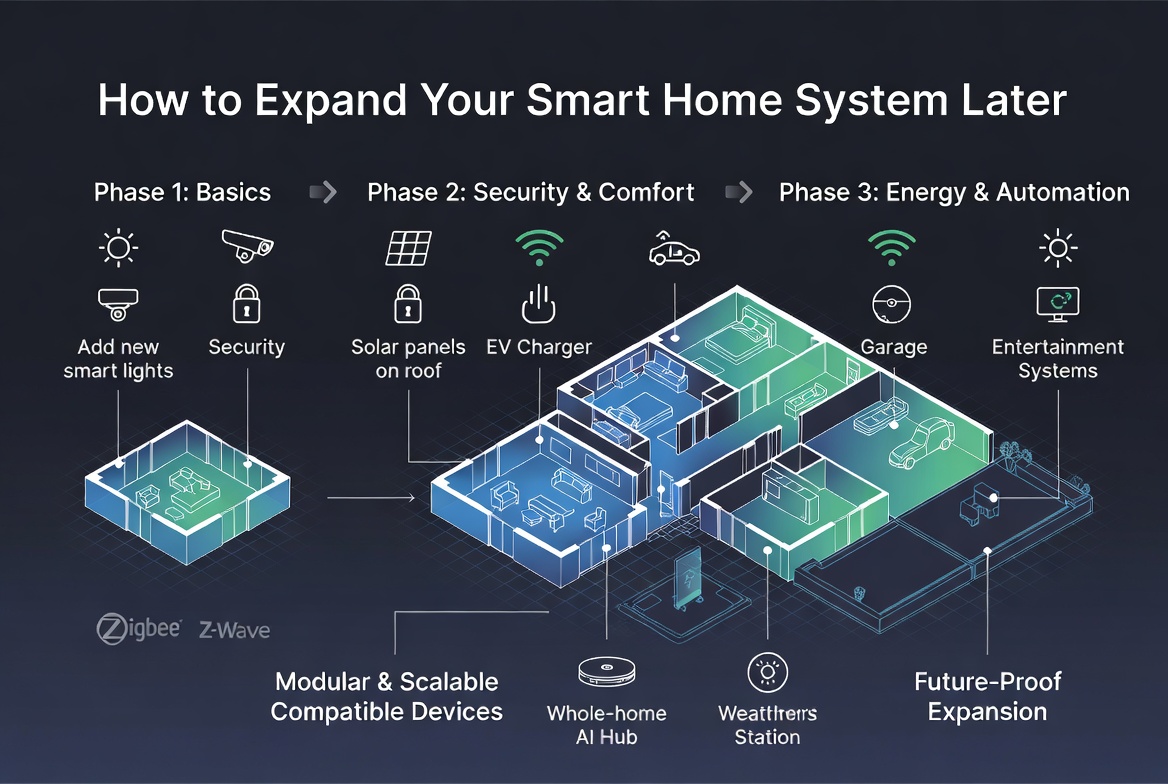
Looking Forward: What to Add Next
As your comfort grows, your expansion possibilities expand too. Smart pet feeders keep pets on schedule. Video doorbells let you see who visits when you’re not home. Air purifiers clean your home automatically.
Consider your specific needs as you expand. Some homes need better security focus. Others prioritize energy savings. Some people want total convenience through automation. Your expansion plan should reflect your unique lifestyle.
Don’t feel pressured to make everything smart. A home that’s 50% automated is still a smart home if those devices solve real problems for you. Focus on features that genuinely improve how you live.
Your Smart Home Journey Starts Now
Expanding your smart home doesn’t require tech expertise or tons of money. Start with one area, learn how it works, then add more devices gradually. Each addition teaches you something new about home automation.
Pick your first expansion target—whether that’s smart lights, a thermostat, or security cameras. Get that working smoothly. Then move on to the next piece. In a few months, you’ll have a sophisticated smart home that feels natural and intuitive.
Remember that technology should make life easier, not more complicated. If a device frustrates you or doesn’t work well, get rid of it and try something else. Your smart home should adapt to your needs, not the other way around.
The best time to start expanding was when you had your first smart device. The second best time is right now. Take action, stay patient with the learning curve, and watch your home transform into something genuinely smart and wonderfully convenient.

Hi, I’m Mary, the founder of Homygear.com. I’m passionate about creating a comfortable, smart, and beautiful home. I share practical insights and real-world experience on home gear that makes everyday life easier. Behind the scenes, my dedicated research team studies products in depth, and our writers craft honest reviews using trusted, authentic sources—so you can choose home gear with confidence.