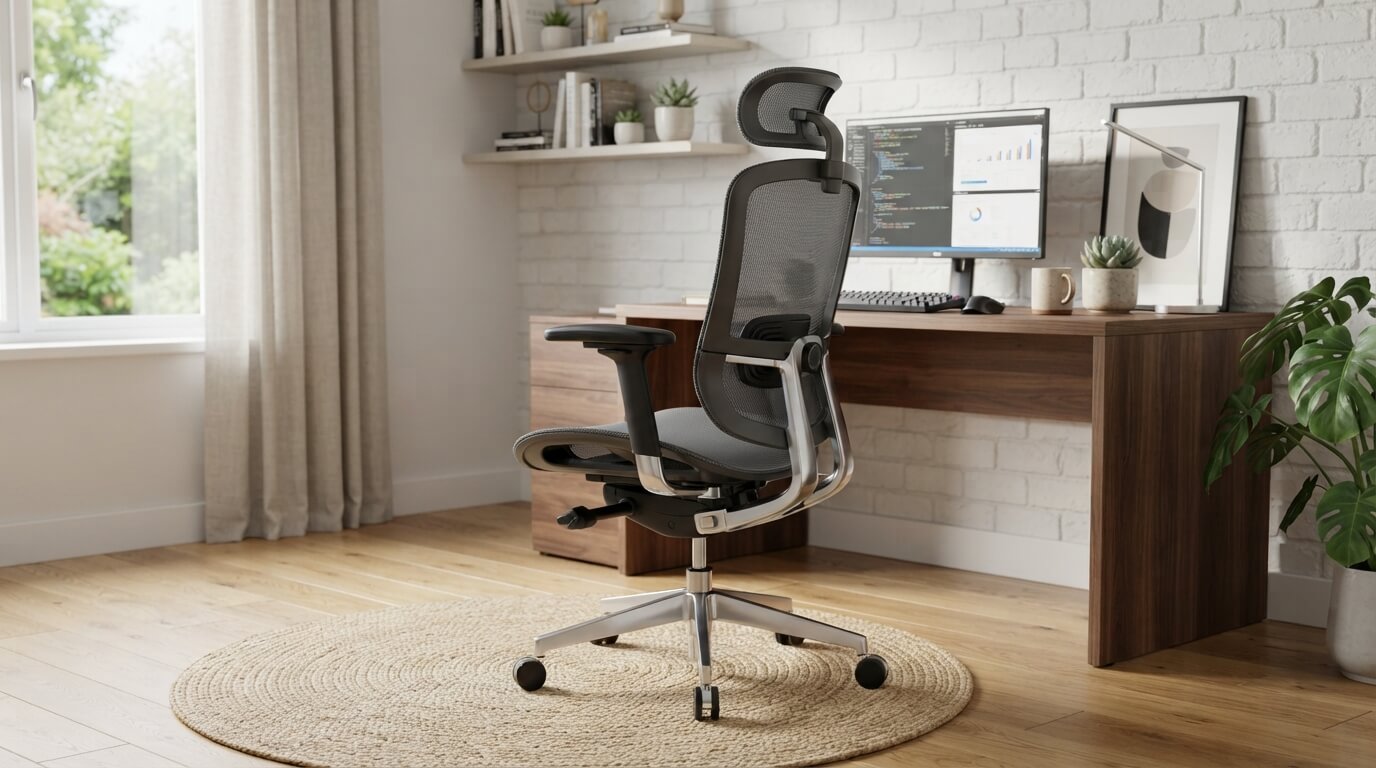
5 Best Desk Chair for Posture In 2026
If your back hurts by lunch time, your chair is probably to blame. A lot of us sit for eight, nine, even ten hours a day, and most desk chairs just were not built with that kind of use in mind. They look fine in a product photo, but after a few weeks the padding flattens out, the lumbar support stops doing its job, and you end up slouching without even noticing it.
This is a big deal because bad sitting posture does not just cause a sore back. It can lead to neck stiffness, tight hips, poor circulation in your legs, and even headaches from tension that builds up in your shoulders. Your spine has a natural curve, and a good chair is supposed to support that curve instead of fighting against it.
The good news is that you do not need to spend a fortune to get real support. In this roundup, I am going over five ergonomic office chairs that are built with posture in mind. I looked at lumbar support, seat depth, headrest design, armrest flexibility, and overall build quality for each one. I also point out who each chair is best for, because the “best” chair really depends on your body type, your budget, and how you sit.
By the end of this guide, you should have a clear idea of which chair fits your needs, plus a simple buying guide so you know exactly what to look for the next time you shop for office seating.
Let’s get into it.
Quick Comparison Table
| Product | Best For | Lumbar Support | Weight Capacity | Headrest |
|---|---|---|---|---|
| ELABEST X100 | Larger users, tall people | Adjustable 3D | Big and tall rated | Yes |
| CleverSeat Ergonomic Chair | All-day desk work | Breathable mesh back | Up to 330 lbs | 3D adjustable |
| Ergonomic Chair (White/Gold) | Style plus comfort | 2D adjustable | Standard | 3D headrest |
| HUANUO Ergonomic Chair | Budget-friendly comfort | Adjustable lumbar | Up to 300 lbs | Yes |
| Marsail Ergonomic Chair | Compact home offices | Adjustable lumbar | Standard | 3D headrest |
How I Reviewed These Chairs
Before jumping into each review, here is a quick note on what actually matters when we talk about posture support in a chair. I looked closely at five things for every chair on this list:
- Lumbar support — does it push into the lower back at the right spot, and can it be adjusted up and down or in and out?
- Seat design — is the cushion firm enough to hold its shape, and is the seat depth right for average and taller users?
- Backrest angle and recline — can you tilt back safely without losing lower back contact?
- Headrest and armrests — do they take pressure off your neck and shoulders?
- Build quality and adjustability — does the chair feel sturdy, and can you actually customize it to your body?
Keep these points in mind as we go through each chair below, because they show up again and again in the comparison section later on.
1. ELABEST X100 Ergonomic Mesh Office Chair with Footrest
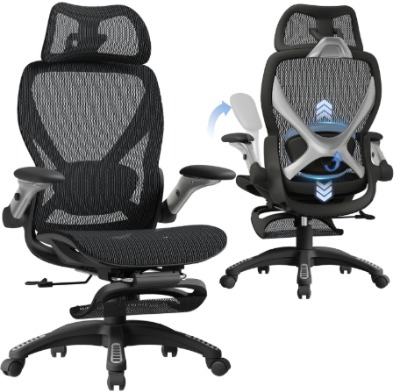
The ELABEST X100 is built for people who need a bit more room and a lot more support. It comes with a pull-out footrest, flip-up 5D arms, and an adjustable 3D lumbar pad, which makes it stand out from a lot of standard desk chairs. This one is marketed as a big and tall option, so it is made to handle bigger frames without the seat sagging or the frame feeling shaky.
Best Use Cases
This chair works well for home offices, long gaming sessions, and remote work setups where you are sitting for most of the day. It is also a solid pick for taller users who often find regular office chairs too short or too narrow.
Key Features Explained Simply
- 3D Lumbar Support: You can move the lumbar pad up, down, and forward or back until it sits right where your lower back curves in. That means less guessing and more actual support where you need it.
- 5D Flip-Up Arms: The armrests move in five directions, so you can angle them to match your desk height and your natural arm position. This helps take weight off your shoulders and wrists.
- Built-In Footrest: A pull-out footrest lets you stretch your legs during a break or lean back for a quick rest without leaving your desk.
- Mesh Backrest: The mesh material lets air flow through, so your back does not get sweaty during long stretches of sitting, especially in warmer rooms.
Real-Life Usage Insight
For someone working a full eight-hour shift from home, the footrest becomes surprisingly useful during short breaks between meetings. Instead of standing up every single time, you can recline slightly and rest your legs for a few minutes, which helps with circulation. Taller users especially notice the difference in seat depth compared to standard chairs, since their thighs get proper support instead of hanging off the edge.
Pros
- Roomy seat that suits bigger and taller body types
- Lumbar support adjusts in multiple directions for a custom fit
- Footrest adds comfort during short breaks
- Flip-up arms save space when not needed
- Breathable mesh keeps the back cooler than foam-backed chairs
Cons
- The larger frame takes up more floor space, so it may not suit small rooms
- Assembly takes a bit longer than simpler chair models
- Some users may find the footrest a bit stiff at first before it loosens up
Performance and Comfort
The chair holds its shape well after weeks of daily use, and the lumbar pad does not slip out of position easily. The mesh back keeps things breathable, which matters a lot if you tend to run warm while working. The recline feels stable, and it does not wobble even when leaning back at an angle.
Ease of Use
Adjusting the lumbar support and arms is fairly straightforward once you get used to the levers. The footrest slides out smoothly with a light pull, and folding it back in is just as easy.
Value for Money
Given the footrest, the tall-user sizing, and the flexible lumbar system, this chair offers strong value for anyone who has struggled to find a comfortable fit in standard-sized office chairs.
2. CleverSeat Ergonomic Office Chair Comfy
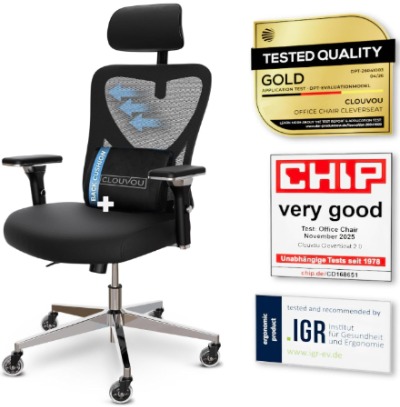
The CleverSeat chair markets itself as a top pick in independent comfort tests, and it is built around a breathable mesh back paired with a 3D headrest. It is rated to hold up to 330 pounds, which puts it in a solid spot for users who need sturdy, dependable support without paying big-and-tall pricing.
Best Use Cases
This chair fits well in a standard home office or a shared workspace where more than one person might use the same chair. Since the headrest and lumbar area are both adjustable, it works for people of different heights sitting at the same desk on different days.
Key Features Explained Simply
- Breathable Mesh Back: The mesh panel stretches slightly to follow your back’s shape while letting air pass through, so you stay cooler during long sitting sessions.
- 3D Headrest: You can slide the headrest up and down and tilt it forward or back, which helps support your neck when you lean back to think or take a call.
- Smooth-Rolling Wheels: The caster wheels move quietly across most flooring types, including hardwood and low-pile carpet.
- 330 lbs Weight Rating: The frame is reinforced to support heavier loads without the seat pan flexing or creaking over time.
Real-Life Usage Insight
During long work sessions with back-to-back video calls, the headrest becomes one of the most-used features, since it gives your neck a place to rest while you listen instead of straining forward toward the screen. The mesh back also holds up well through a full day, staying supportive instead of going flat like foam-backed chairs sometimes do.
Pros
- Strong weight capacity for the price point
- 3D headrest genuinely helps reduce neck strain
- Mesh back stays supportive and breathable over long use
- Smooth wheel movement on multiple floor types
- Simple, clean design that fits most office decor
Cons
- The armrests are not as flexible as some pricier models
- Seat cushion may feel a touch firm for users who prefer plush padding
- Instructions during setup could be clearer for first-time assemblers
Performance and Comfort
This chair performs consistently well for full workdays. The lumbar area holds its position, and the mesh back does not sag or lose tension after months of regular use. The recline mechanism feels secure, without the sudden drop-back some cheaper chairs have.
Ease of Use
The adjustments are mostly tool-free after assembly, with lever controls for height, tilt, and recline tension. The headrest slides smoothly along its track, and it locks in place without slipping during normal movement.
Value for Money
With its high weight rating and dependable mesh design, the CleverSeat chair delivers strong comfort for the price, especially for shared or multi-user setups.
3. Ergonomic Office Chair for Back & Neck Pain Relief (White/Gold)
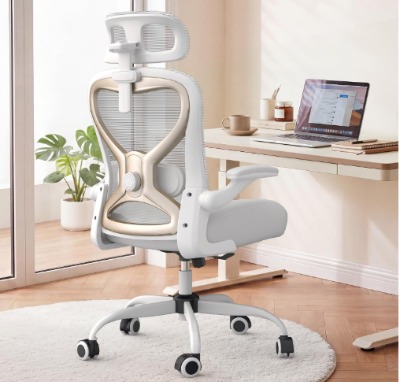
This chair takes a slightly different approach by combining a stylish white and gold finish with practical support features like a 2D adjustable lumbar system and a 3D headrest. It also uses a virgin foam seat, which is a denser type of foam known for holding its shape longer than standard foam padding.
Best Use Cases
This chair suits home offices where style matters just as much as comfort, such as a shared workspace visible on video calls or a home study that doubles as a reading nook. It also works well for users dealing with mild back or neck discomfort who want gentle, adjustable support rather than a rigid, heavy-duty setup.
Key Features Explained Simply
- Virgin Foam Seat: This type of foam is made without recycled material, so it tends to stay firm and supportive longer instead of compressing flat after a few months.
- 2D Adjustable Lumbar: You can move the lumbar support up and down and adjust how far it presses into your back, giving you a more personal fit than a fixed lumbar pad.
- 3D Headrest: Like the CleverSeat model, this headrest slides and tilts to support your neck during recline.
- Tilt and Rock Function: The chair lets you rock gently back and forth or lock the tilt in place, which is nice for short mental breaks during long work sessions.
Real-Life Usage Insight
The tilt and rock feature turns out to be genuinely relaxing during short breaks between tasks, almost like a mini recliner moment without leaving your desk. The virgin foam seat also holds its shape noticeably better over time compared to cheaper foam chairs, so the seat does not develop that dreaded dip in the middle after a few months of daily sitting.
Pros
- Attractive design that stands out from typical black office chairs
- Virgin foam seat resists flattening better than standard foam
- Tilt and rock function adds a relaxing option during breaks
- 2D lumbar adjustment offers a more custom fit
- Lightweight frame makes it easy to move around a room
Cons
- Weight capacity is more limited compared to the ELABEST or CleverSeat models
- Light-colored fabric may show stains more easily over time
- Armrests are fixed rather than fully adjustable
Performance and Comfort
The seat comfort is a real highlight here, since the firmer foam keeps its shape well beyond what you would expect from a chair in this style category. The lumbar support does its job for light to moderate back discomfort, though it may not be firm enough for users who need heavy-duty lower back correction.
Ease of Use
Setup is fairly quick thanks to the lighter frame, and the tilt lock is simple to engage or release with one lever. The lumbar adjustment knob is easy to reach without needing to stand up or twist awkwardly.
Value for Money
For the design quality and the durable foam seat, this chair is a good pick for anyone who wants their office chair to also look good in a home setting, without giving up real posture support.
4. HUANUO Ergonomic Office Chair
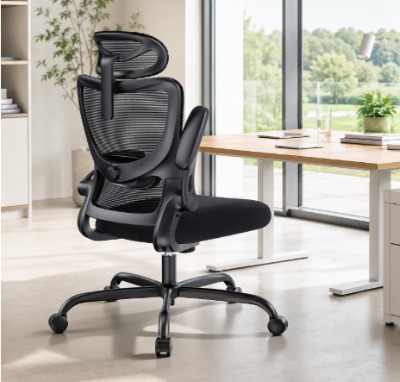
The HUANUO chair is a solid, no-frills option that covers the basics of posture support well: adjustable lumbar support, an adjustable headrest, and 3D armrests, all rated to hold up to 300 pounds. It has built a reputation as a reliable budget-friendly pick in the ergonomic chair space.
Best Use Cases
This chair is a great fit for students, freelancers, and anyone setting up a home office on a tighter budget who still wants real ergonomic features instead of a basic task chair with no support at all.
Key Features Explained Simply
- Adjustable Lumbar Support: The lumbar pad moves to match your lower back curve, offering support without needing a separate cushion.
- Adjustable Headrest: You can raise, lower, and angle the headrest to fit your neck position when reclining.
- 3D Armrests: These move up and down, side to side, and can pivot, which helps line up your arms with your keyboard and mouse.
- High Back Design: The tall backrest supports your upper back and shoulders, not just your lower spine.
Real-Life Usage Insight
For a typical work-from-home setup involving typing, spreadsheets, and video calls, the 3D armrests make a noticeable difference in shoulder comfort by letting you match arm height to desk height instead of forcing your shoulders to hunch up or drop down. The high back design also helps users who tend to slouch forward toward their screen, since it gives your upper back something to lean into.
Pros
- Budget-friendly price for the number of adjustable features included
- High backrest supports the full spine, not just the lower back
- 3D armrests adjust well for different desk heights
- Reasonably easy to assemble with included tools
- Good option for smaller body frames and average height users
Cons
- Mesh quality is a step below pricier models in this list
- Recline tension may feel a bit loose for heavier users
- Casters can feel slightly noisy on hard flooring
Performance and Comfort
For the price, this chair holds up well over regular daily use. The lumbar support stays in place, and the high backrest genuinely helps with upper back posture, which some cheaper chairs skip entirely. It is not the plushest chair on this list, but it gets the ergonomic basics right.
Ease of Use
Assembly is straightforward, and most of the adjustments use simple pull-levers or knobs that do not require extra tools once the chair is built. The armrests take a little practice to fully understand since they move in several directions.
Value for Money
This is one of the best value picks in the group. You get lumbar support, a headrest, and flexible armrests, all the core posture-friendly features, without paying premium chair prices.
5. Marsail Ergonomic Office Chair
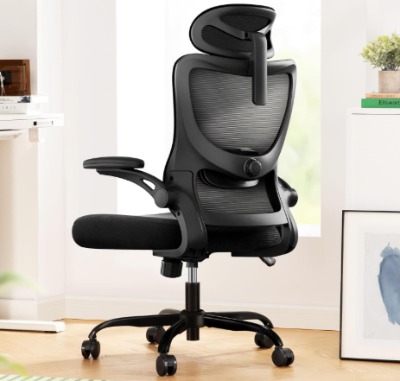
The Marsail chair rounds out this list with a high back mesh design, adjustable lumbar support, 3D armrests, and a headrest, all wrapped into a fairly compact frame that suits smaller home offices well.
Best Use Cases
This chair works nicely in tighter spaces like apartment offices, small bedrooms turned into workspaces, or corner desk setups where a bulky chair would feel out of place. It is also a good fit for lighter to average body types who want solid ergonomic support without a heavy-duty frame.
Key Features Explained Simply
- High Back Mesh: The tall mesh backrest supports your spine from your lower back up through your shoulders, while staying breathable during longer sitting sessions.
- Adjustable Lumbar Support: Like the other chairs here, you can move the lumbar pad to match your lower back curve.
- 3D Armrests: These adjust in height, width, and angle, helping reduce shoulder and wrist strain during typing.
- Swivel Base with Wheels: The chair rotates a full 360 degrees and rolls smoothly, which is handy in smaller rooms where you need to reach different parts of a desk without standing up.
Real-Life Usage Insight
In a smaller home office setup, the compact frame of this chair makes it easy to tuck under a desk without taking up extra space, while the high mesh back still gives full spine support during long writing or study sessions. The swivel base also comes in handy when the desk setup includes a side table or printer stand within arm’s reach.
Pros
- Compact frame fits well in smaller rooms
- High back mesh offers full spine support
- Smooth 360-degree swivel and rolling base
- 3D armrests help reduce shoulder tension
- Lighter weight makes it easy to reposition around a room
Cons
- Not the best fit for larger or taller body types
- Weight capacity is on the lower end compared to the ELABEST or CleverSeat
- Cushion padding is moderate rather than plush
Performance and Comfort
The chair performs well for average-sized users doing typical desk work like writing, browsing, or video calls. The lumbar support holds its position, and the mesh back stays cool and supportive through long sessions. It is not built for heavy-duty, all-day industrial use, but for standard home office work, it holds up nicely.
Ease of Use
Setup is simple and quick, and the armrest and lumbar adjustments are easy to figure out without needing a manual close by. The swivel and roll function smoothly right out of the box.
Value for Money
For anyone working with limited space and a moderate budget, this chair delivers solid ergonomic basics in a frame that will not overwhelm a small room.
Comparison Insights
Now that we have gone through each chair individually, let’s line them up side by side to see how they stack up in the areas that matter most for posture.
On lumbar support, the ELABEST X100 and the White/Gold ergonomic chair stand out because they offer multi-directional adjustment (3D and 2D respectively), letting you fine-tune the exact spot and pressure of support. The CleverSeat, HUANUO, and Marsail all include adjustable lumbar support too, but with fewer directions of movement.
On weight capacity, the CleverSeat leads the pack at 330 pounds, followed by the HUANUO at 300 pounds and the ELABEST built for big and tall users. The White/Gold chair and the Marsail chair are better suited to lighter or average body types.
On armrest flexibility, the ELABEST’s 5D arms and the HUANUO’s 3D arms offer the most range of motion, which helps more people find a comfortable typing position. The White/Gold chair has fixed armrests, which is its main tradeoff for the stylish design.
On space and footprint, the Marsail chair is the most compact and best suited for tight rooms, while the ELABEST takes up the most floor space due to its larger frame and footrest.
On budget, the HUANUO tends to offer the most ergonomic features for the lowest price, making it a strong pick for anyone furnishing a home office without a big budget.
Buying Guide: What to Look for in a Posture-Friendly Desk Chair
If none of these five chairs feel like an exact match, here is what to keep in mind while shopping for any ergonomic office chair.
Lumbar Support That Actually Adjusts
Look for a chair where the lumbar pad moves up, down, and ideally in and out. A fixed lumbar bump might not land in the right spot for your spine, and pressing into the wrong area can cause more discomfort than sitting with no lumbar support at all.
Seat Depth and Width
Your seat should let you sit with your back against the backrest while leaving two to four fingers of space between the edge of the seat and the back of your knees. Too deep, and you will end up sitting forward without back support. Too shallow, and your thighs will not get proper support.
Headrest Positioning
A good headrest should support the base of your skull and upper neck without pushing your head forward. It should also be adjustable, since a headrest set too low or too high can create more neck tension rather than relieving it.
Armrest Adjustability
Look for armrests that move in height and width at minimum. This lets your shoulders relax instead of hiking up toward your ears, which is a common cause of shoulder and neck tightness during long computer sessions.
Recline and Tilt Lock
A chair with a locking recline lets you find a slight backward angle, somewhere around 100 to 110 degrees, which takes pressure off your lower spine compared to sitting bolt upright all day.
Material and Breathability
Mesh backs tend to stay cooler and hold their shape longer than foam-backed chairs, though foam can offer a plusher feel. Think about your room temperature and how much you tend to sweat during long sitting sessions when picking between the two.
Weight Capacity and Frame Strength
Always check the listed weight rating and choose a chair with some buffer above your body weight, since a chair working near its maximum capacity tends to wear out faster.
Who Should Buy These Chairs
People with existing back or neck discomfort should prioritize chairs with multi-directional lumbar support and an adjustable headrest, such as the ELABEST X100 or the White/Gold ergonomic chair.
Remote workers doing long daily hours will benefit most from chairs with strong build quality and breathable mesh, like the CleverSeat or HUANUO, since these hold up well through repeated daily use.
Larger or taller users should lean toward the ELABEST X100 or the CleverSeat, given their higher weight ratings and roomier seat design.
Students or freelancers on a budget will likely get the most value from the HUANUO chair, since it covers the ergonomic basics without a high price tag.
Anyone working in a small room or apartment should consider the Marsail chair, thanks to its compact frame and lighter build.
Common Mistakes to Avoid When Buying a Posture Chair
Ignoring the weight rating. A chair pushed near or past its rated capacity will wear out faster and may not offer proper support, even if it looks sturdy at first glance.
Skipping the lumbar adjustment. Many people buy a chair with lumbar support built in, then never actually adjust it to their body. Take a few minutes after setup to find the right height and depth for your lower back.
Choosing looks over function. A stylish chair is great, but if the armrests do not adjust or the lumbar support is fixed in the wrong spot, comfort should win out over appearance.
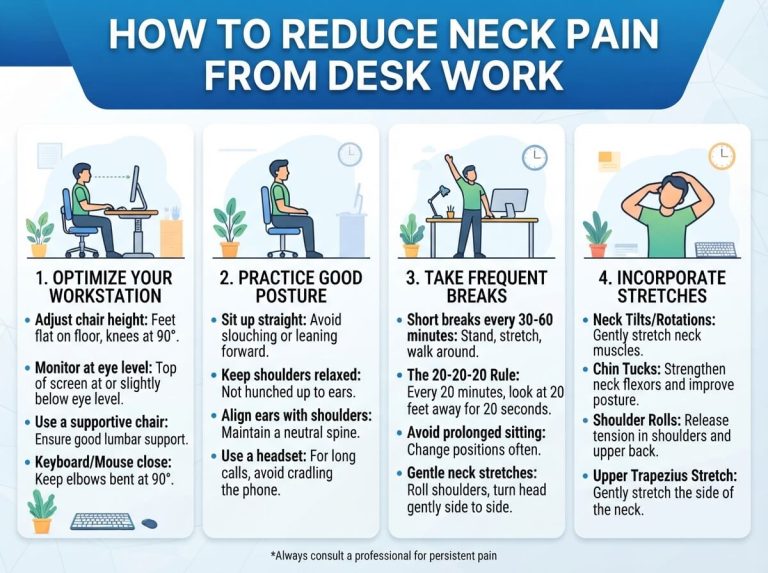
Setting the chair too high or too low. Your feet should sit flat on the floor with your knees at roughly a 90-degree angle. A chair set at the wrong height throws off your whole posture, no matter how good the lumbar support is.
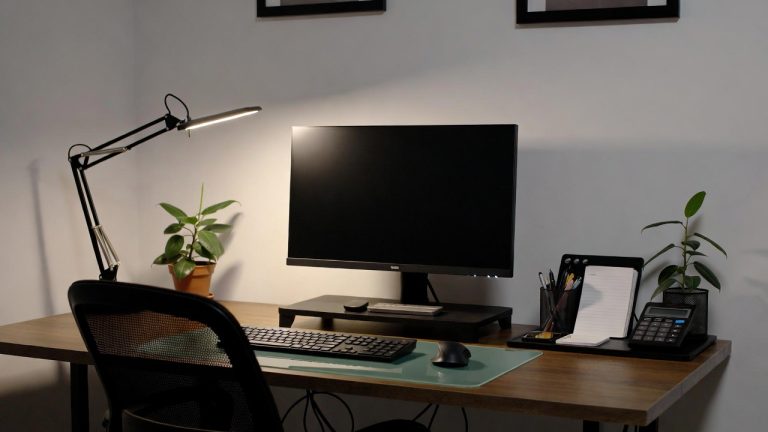
Forgetting to pair the chair with a proper desk height. Even the best posture chair cannot fully fix bad posture if your monitor sits too low or your desk forces your shoulders to hunch forward.
Not giving the chair a break-in period. Foam and mesh can feel slightly different during the first week of use as they settle. Give a new chair a few days before deciding it is not the right fit.
Final Verdict
All five chairs on this list bring real ergonomic value, but they serve slightly different needs.
If you want the most complete posture support package and do not mind a larger frame, the ELABEST X100 is the strongest overall pick thanks to its 3D lumbar system, flexible arms, and built-in footrest.
If durability and weight capacity matter most to you, the CleverSeat Ergonomic Chair is a dependable choice with a breathable mesh back and a solid 330-pound rating.
If you want a chair that looks as good as it feels, the White/Gold Ergonomic Chair stands out with its virgin foam seat and relaxing tilt function.
If you are working with a tighter budget, the HUANUO Ergonomic Chair delivers the best mix of features and price on this list.
And if space is tight, the Marsail Ergonomic Chair fits neatly into smaller rooms without giving up on real lumbar and neck support.
No matter which one you pick, the most important step is actually using the adjustments. A great ergonomic chair only works if it is set up to match your body, so take the time to fine-tune the lumbar height, armrest position, and seat height once your new chair arrives. Your back will thank you after a long day at the desk.

Hi, I’m Mary, the founder of Homygear.com. I’m passionate about creating a comfortable, smart, and beautiful home. I share practical insights and real-world experience on home gear that makes everyday life easier. Behind the scenes, my dedicated research team studies products in depth, and our writers craft honest reviews using trusted, authentic sources—so you can choose home gear with confidence.