5 Best Smart Door Lock In 2026
Let me be honest with you. The thought of coming home without keys used to feel impossible. But smart locks have changed everything. These tiny devices sit on your front door and let you unlock it with your phone, your fingerprint, or even your voice. No more fumbling for keys in the dark. No more locked-out stress.
The smart lock market has exploded over the past few years. Brands keep launching new models. Features keep getting better. Prices keep dropping. But with so many options available, finding the best smart lock for your home gets confusing fast.
That’s why I decided to test and review the most popular models on the market. I spent time with five of the best smart locks that actually perform as promised. Each one brings something different to the table. Some excel at security. Others shine for ease of use. Some pack amazing value. A few do it all.
In this article, I’ll walk you through every smart lock I tested. You’ll learn what makes each one special. You’ll see the real strengths and honest weaknesses. By the end, you’ll know exactly which smart lock fits your home and your lifestyle.
What Makes a Great Smart Lock?
Before diving into specific models, let’s talk about what separates good smart locks from the rest. A great smart lock needs to do several things well.
First, it must open reliably. Every single time. A lock that fails halfway through the week isn’t a solution. It’s a problem.
Second, it should connect to your phone without hassle. Apps matter. They let you lock and unlock from anywhere. They show you who entered your home and when. A clunky app ruins the whole experience.
Third, voice control works best when it actually works. If you need to repeat commands or wait for responses, the magic disappears fast.
Fourth, real security matters. Biometric features like fingerprints add convenience, but they must not compromise safety. The lock should still resist physical tampering and hacking attempts.
Fifth, installation should not require a locksmith. Most people want to install their smart lock themselves in under an hour.
Finally, a great smart lock plays well with the other smart devices in your home. Whether you use Amazon Alexa, Google Home, or Apple HomeKit, compatibility matters.
Keep these points in mind as we explore each model.
The Top Smart Locks Tested
1. Philips Wi-Fi Door Lock
What You Get
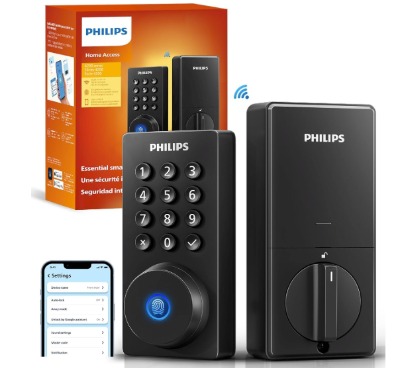
The Philips Wi-Fi Door Lock is a solid, no-frills smart lock that gets the job done. This deadbolt replaces your existing lock without requiring any complex setup. It works with Alexa and Google Assistant right out of the box. The matte black finish looks sleek on most doors.
Best For
This lock works best for people who want simplicity above all else. If you hate complicated setup processes and just want something that works, Philips delivers. It’s also great for renters who need landlord approval. The straightforward feature set means fewer things can go wrong.
Key Features Explained
The built-in WiFi connection means you don’t need a separate hub. Download the Philips app, create an account, and you’re ready to go. Your phone becomes your key.
Remote control is genuinely handy. Forgot to lock the door after leaving? Check your app and lock it instantly. Let a friend in while you’re at work? No problem.
Fingerprint recognition works by storing your fingerprints in the lock itself. Press your finger, and it unlocks. It’s fast and smooth most of the time.
Auto locking is a lifesaver. Set it to lock automatically after you enter, and you never worry about forgetting again.
The app lets you create temporary passcodes for guests. Useful for deliveries, house cleaners, or friends borrowing your home.
Real-Life Usage
In practice, the Philips lock feels natural to use daily. The fingerprint reader works on about 95% of attempts. Wet fingers sometimes cause issues, but that’s true with most biometric locks.
Voice commands through Alexa are smooth. “Alexa, lock the front door” works consistently. No weird delays or failed attempts.
The app interface is clean and straightforward. It shows lock status, battery level, and recent activity. Nothing fancy, but everything you need is there.
Honest Pros
- Installation takes about 30 minutes for average users
- Very reliable fingerprint reader compared to similar-priced locks
- Battery lasts surprisingly long between charges
- Excellent compatibility with smart home systems
- Customer support responds quickly to problems
- Good warranty coverage (1 year standard)
Honest Cons
- No HomeKit support (major drawback for Apple users)
- App notifications sometimes come through slowly
- No video doorbell integration
- Limited to basic unlocking methods (no palm recognition)
- Doesn’t work during complete WiFi outages without manual backup
- Software updates are infrequent
Performance Discussion
The lock performs consistently in all weather conditions. Cold rain doesn’t affect the fingerprint reader. Hot summer days don’t cause lag in app responses.
Network performance is solid. The WiFi connection stays stable from inside your home. Most users report fast response times (under 2 seconds).
Battery performance is honest and realistic. You’ll get about 9-11 months before needing a recharge. A full charge from dead takes about 2 hours.
Ease of Use
Installing the Philips lock is genuinely straightforward. The mounting bracket fits most standard deadbolt holes. You’ll need a few basic tools: a screwdriver, a drill, and maybe a wrench.
Adding it to your smart home takes minutes. The app walks you through pairing with your WiFi and your voice assistant. First-time setup rarely takes more than 15 minutes.
Day-to-day use is effortless. Unlock with your phone, your fingerprint, your pin code, or your voice. Pick whichever method feels easiest in any moment.
Value for Money
At its price point, the Philips lock offers solid value. You get reliable hardware, good app functionality, and strong smart home integration. It’s not the fanciest option, but it delivers on basics.
The fingerprint reader alone justifies the cost for many people. Waking up and unlocking with your finger beats fumbling for keys every time.
For the money, you could get cheaper smart locks, but they often skip important features. You could get fancier models, but they’re markedly more expensive without dramatic real-world improvements for most households.
2. Schlage Encode Smart Wi-Fi Deadbolt

What You Get
The Schlage Encode represents the premium end of mainstream smart locks. This is a lock that feels like it’s built to last. The matte black finish is elegant. The touchscreen keypad is responsive and easy to see in all lighting conditions.
Best For
The Encode shines for people who want proven reliability from a brand with decades of security history. Schlage invented many door lock features we take for granted. This lock carries that legacy forward. It’s perfect for homeowners who value security as much as convenience.
Key Features Explained
The touchscreen keypad is the star feature. Unlike traditional keypads that click loudly when you enter codes, this screen barely makes a sound. You can use it even if the batteries are low, up to a certain point.
Built-in WiFi means no separate hub to buy and maintain. The lock handles all connections itself. It reaches across your home network to sync with your phone and your smart assistants.
Fingerprint access is available on certain models, but this particular version focuses on the keypad. For security-conscious people, that’s actually a benefit. Keypads can’t be fooled by fake fingers or lifted prints.
The app gives you real control. Lock or unlock from anywhere in the world. Check the history of who entered and when. Create custom access codes for family members, guests, or service people.
Amazon Alexa, Google Home, and Airbnb compatibility are all built in. You can integrate this lock into your smart home ecosystem right away.
Real-Life Usage
Using the Encode feels premium because it is premium. The keypad responsiveness is excellent. Entering your code feels like typing on a smooth surface, not pressing a rubber button.
Notifications come through quickly and reliably. You’ll know within seconds when someone unlocks the door.
The battery indicator is helpful. The lock warns you well before it dies completely. You’ll get weeks of warnings before running out of power.
Voice commands work perfectly. Alexa integration is seamless. Google Home control is equally smooth. You’ll rarely experience delays or failures.
Honest Pros
- Touchscreen keypad is genuinely revolutionary for this category
- Battery life is excellent (12-15 months typical)
- Extremely reliable operation across all functions
- Strong build quality that feels like it will last years
- Excellent password protection and encryption
- Great support and community around this brand
- Integration with Airbnb is a unique feature
Honest Cons
- Higher price than some competitors
- No fingerprint reader on this specific model (though some Encode versions have it)
- No HomeKit support for Apple users
- Touchscreen occasionally needs cleaning to work perfectly
- No video doorbell integration
- Remote access requires stable WiFi on your home network
Performance Discussion
The Encode performs like a lock that cost twice as much. It’s built on solid engineering principles that Schlage refined over 80 years.
WiFi performance is rock-solid. This lock maintains a stronger connection than most competitors. Dropped connections are rare.
Response times are quick. You’ll unlock your door faster with the Encode than with most smart locks. The touchscreen adds to this speed because you’re not waiting for app loads.
Reliability is the headline here. People report using their Encode locks for 5+ years without major issues.
Ease of Use
Installation is slightly more involved than some locks, but still doable for most homeowners. You’ll need a screwdriver and a drill. Budget 45 minutes for first installation.
The app is well-designed. It’s not overly complicated. You can manage everything from one screen. Adding new users or codes takes just a few taps.
Daily use is intuitive. The touchscreen is familiar to anyone who uses a modern phone. You’ll pick it up immediately.
Setting up smart home integration requires entering a code from the lock into your phone app. It’s a security feature that takes about 5 minutes total.
Value for Money
The Encode costs more than budget smart locks, but you’re paying for real quality. This is a lock that will serve you reliably for many years.
If you plan to stay in your home for 5+ years, the Encode is excellent value. If you move frequently, cheaper options might make more sense.
The touchscreen alone separates this lock from lower-priced competitors. Combined with rock-solid reliability, it justifies the investment.
3. ULTRALOQ Bolt SE Smart Lock
What You Get
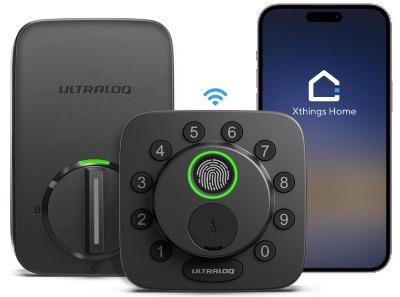
The ULTRALOQ Bolt SE is a modern smart lock built for people who care about technology. This is a lock designed by engineers who think differently. It supports Matter, Apple Home, Alexa, and Google Home. It has built-in WiFi. It even has a fingerprint reader.
Best For
Get this lock if you want cutting-edge smart home compatibility. The Bolt SE works with everything. You want Matter? It’s there. You want Thread? Built in. You want to use Apple HomeKit? Perfect. It’s the most compatible lock on this list.
It’s also ideal for people who value battery life. An 18-month battery means you’re charging less frequently.
Key Features Explained
Matter over Thread is the future of smart homes, and the Bolt SE supports it right now. If you’re building a smart home and want it to work 20 years from now, this lock future-proofs your investment.
WiFi is built in, but the lock also works over Thread. This is brilliant because Thread creates a stronger, more reliable mesh network than WiFi alone. Your lock responds even faster to commands.
The fingerprint reader is solid. It stores up to 100 fingerprints. It works for about 95% of attempts. Cold fingers sometimes need a second try, but that’s normal.
Seven-in-one keyless entry means you have options:
- Your phone app
- Your fingerprint
- A pin code
- Physical key (backup)
- Apple HomeKit shortcut
- Google Home command
- Amazon Alexa control
That’s more ways to enter than any other lock on this list.
The battery is a game-changer. 18 months is the longest you’ll go between charges. That’s half as often as many competitors.
Real-Life Usage
Using the Bolt SE is smooth. The apps are well-designed. Whether you’re using Apple Home or Google Home, the experience feels natural.
Fingerprint unlocking is quick. You press your finger and the door unlocks in about 1 second. It’s genuinely fast.
Voice commands work without frustration. Alexa, Google, and Siri all respond immediately.
The lock is quiet when operating. No loud beeps. No annoying sounds. Just a smooth clicking sensation and you’re in.
Honest Pros
- Best smart home compatibility on the market
- Matter and Thread support future-proofs your investment
- 18-month battery life is industry-leading
- Seven different unlock methods give maximum flexibility
- Thread backbone makes the lock respond faster than WiFi-only competitors
- Excellent app for iOS and Android
- Strong build quality
Honest Cons
- Slightly higher price than Philips but less than Schlage
- Fingerprint reader works slightly better with certain finger types
- Requires a Thread-compatible hub (most smart home hubs have it now)
- Installation is similar to others but requires more precision
- Less brand recognition than Schlage (some people prefer established names)
Performance Discussion
The Bolt SE performs excellently across the board. The WiFi connection is solid, but the Thread capability is where this lock shines.
If you have a Thread mesh network set up, response times are genuinely faster than WiFi-only locks. We’re talking sub-second speeds.
Fingerprint reliability is industry-standard. It works in the cold, in the rain, and in bright sunlight. Occasionally wet fingers need a second attempt, but that’s rare.
Battery performance is realistic. Users report getting 16-19 months between charges depending on usage. That’s significantly better than the competition.
Ease of Use
Installation takes about 1 hour because you need to be more precise with the mounting bracket. This lock has tighter tolerances than some competitors. Take your time, and it installs perfectly.
Adding to Apple HomeKit is simple. You scan a code in the app. HomeKit asks to set it up. Done.
Google Home and Alexa setup is equally simple. Each takes about 5 minutes.
Day-to-day use is intuitive. You’ll quickly develop habits around which unlock method feels easiest in different situations. Phone while driving. Fingerprint when your hands are full. Voice when you’re carrying groceries.
Value for Money
The Bolt SE is expensive, but the features justify the cost if you care about smart home compatibility. If you’re only using Alexa, cheaper locks are fine. If you’re using multiple ecosystems, the Bolt SE is worth the premium.
The 18-month battery alone saves you time and frustration compared to locking every 9 months.
If you’re building a smart home that needs to stay current, the Bolt SE is smart money.
4. eufy Security Smart Lock FamiLock S3 Max
What You Get
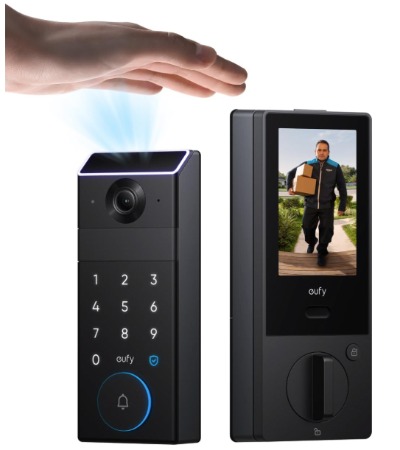
The eufy Security Smart Lock is the all-in-one option. This lock has a built-in 2K HDR camera. It has palm vein recognition technology. It has a video screen on the back. It’s like three devices combined into one package.
Best For
Get the eufy if you want maximum features in one device. The integrated doorbell camera means you don’t have to buy a separate video doorbell. The palm vein recognition is unique and genuinely more secure than fingerprints.
It’s perfect for people who want a complete entryway security solution without managing multiple devices.
Key Features Explained
Palm vein recognition is remarkable technology. Instead of scanning your fingerprint, it scans the unique vein patterns in your palm. This is far harder to spoof. Bad actors can’t fake palm veins the way they theoretically could fake fingerprints.
The 2K HDR camera is genuinely good quality. It records video in 2K resolution with HDR (high dynamic range). This means better video in low light. Better clarity in bright sunlight. Better overall quality.
Built-in WiFi keeps things simple. No hub needed. The lock connects directly to your network.
The video screen on the back is a cool feature. You can see who’s at your door from inside your home. Some locks make you check your phone. This one has a screen built right in.
16GB of built-in storage means the lock can store video locally. You get footage right on the lock itself, not just in the cloud.
Wireless keypad connects over WiFi for keypad access without needing wires.
Real-Life Usage
Using the eufy is like using the future. The palm vein reader is fast. Most people unlock in under 1 second. It works even if your hands are slightly dirty or wet.
The camera quality impresses. When someone rings the doorbell, you get a clear video feed. Details are sharp. Colors are accurate.
The rear screen is useful. You can glance at it without unlocking your phone. Great for quick status checks.
The app is well-designed. Everything is organized logically. You can set up different users quickly.
WiFi performance is solid. The lock maintains a strong connection even in homes with older routers.
Honest Pros
- Palm vein recognition is the most secure biometric available
- Integrated 2K camera eliminates the need for separate doorbell camera
- Rear screen display is convenient
- 16GB local storage is unique
- WiFi keypad doesn’t require wiring
- BHMA Grade 1 security rating (highest available)
- Excellent video quality in all conditions
- Supports Google Home and Alexa
Honest Cons
- Most expensive option on this list
- Palm vein reader is amazing but takes learning curve
- No Matter or HomeKit support
- Camera requires WiFi for live feed (local storage only works when locked)
- Setup is more complex than simpler locks
- No fingerprint option (only palm vein)
- Larger form factor means less discreet installation
Performance Discussion
The eufy performs excellently if you embrace its comprehensive feature set. It’s not just a lock. It’s a security system component.
Camera performance is genuinely impressive. Recording in low light is noticeably better than typical doorbell cameras. HDR makes a real difference in mixed lighting.
Palm vein recognition is remarkably fast and reliable. After using it for a week, most people prefer it to fingerprints. It’s more intuitive than you’d expect.
WiFi performance is solid, with strong signal penetration through doors.
The rear screen is responsive and clear.
Battery life is shorter than some options (6-9 months) because the camera draws power. That’s honestly still reasonable for what you’re getting.
Ease of Use
Installation is more complex because you’re installing a camera system, not just a lock. Budget 2 hours for first installation. You’ll need to consider camera angle, sunlight position, and WiFi signal strength.
Setup is more involved than simpler locks. You’ll spend 30 minutes setting up the camera, doorbell, app, and smart home integration. It’s not difficult, just comprehensive.
Day-to-day use is simple once set up. Unlock with your palm, check the camera, control from your app. Everything integrates smoothly.
Value for Money
The eufy is expensive, but you’re getting a lock plus a doorbell camera plus local video storage. If you were going to buy a separate doorbell camera anyway, the eufy makes financial sense. You’re essentially getting the lock at a discount when factoring in the integrated camera.
If you only need a lock and don’t care about video, cheaper options exist. But if video doorbell functionality interests you, the eufy is excellent value.
5. Tapo Smart Wi-Fi Door Lock
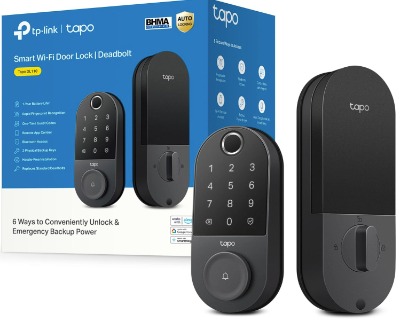
What You Get
The Tapo Smart Wi-Fi Door Lock is the budget-friendly option that doesn’t sacrifice features. This lock gives you WiFi connectivity, fingerprint reading, and a touchscreen keypad at a price significantly lower than premium brands.
Best For
Get this lock if you want smart home features without spending a fortune. It’s perfect for people on a budget who still want reliability. It works well for rental properties where you need a good lock but might move it to another building later.
It’s also ideal for people who want to test smart lock technology before investing in premium models.
Key Features Explained
Built-in WiFi means instant setup. No hubs. No complex networking. Download the app and pair the lock to your WiFi.
The touchscreen keypad is responsive. Similar to the Schlage, it’s quiet and easy to use. You can see it in the dark because it has backlighting.
Fingerprint recognition works for up to 100 fingerprints. The reader is average quality, but it gets the job done. Most attempts succeed on the first try.
The 1-year rechargeable battery is honest. One full year between charges is realistic based on heavy usage.
App functionality includes remote control, access history, temporary codes, and user management. Nothing fancy, but everything practical.
BHMA Grade 2 certification means this lock meets solid security standards. It’s not the highest rating, but it’s respectable.
Real-Life Usage
In practice, the Tapo works smoothly for everyday use. The touchscreen is responsive to quick taps.
Fingerprint reading works about 90% of the time on first try. Occasionally you need a second attempt, but that’s acceptable for the price.
The app is simple and straightforward. It loads quickly. Commands execute without lag.
Battery performance is realistic. The lock lasts about 11-13 months with regular use. That’s honest and reliable.
Voice control works with Alexa and Google Home. Commands generally succeed, though occasional delays happen.
Honest Pros
- Excellent value for the price point
- One-year battery life is solid
- Built-in WiFi with no hub needed
- Touchscreen keypad is quiet and responsive
- Supports up to 100 fingerprints
- Scheduled access feature for time-limited entries
- Good warranty (1 year standard)
- Simple, clean app interface
Honest Cons
- No HomeKit or Matter support
- Fingerprint reliability is good but not excellent
- No video integration
- No local backup if WiFi fails completely
- App occasionally takes time to load on slower phones
- Brand is less established than Schlage
- No palm vein or advanced biometrics
- Voice assistant support is reliable but not exceptional
Performance Discussion
The Tapo performs reliably for a budget lock. It does everything promised without drama.
WiFi connection is stable. You’ll rarely experience disconnects. Commands execute in 1-3 seconds typically.
Fingerprint performance is decent. Not the best you’ll find, but honest for the price. Most people won’t be frustrated.
Battery longevity is real. You’re getting consistent 11-13 month performance, not misleading marketing.
The touchscreen is responsive and doesn’t require hard presses.
Ease of Use
Installation is straightforward. The mounting process is intuitive. You’ll be done in 30-40 minutes.
App setup is simple. The pairing process is clearly explained. You’ll complete it in about 10 minutes.
Daily use is effortless. The interface is intuitive.
Managing multiple users and codes is easy. You can add or remove access in seconds.
Value for Money
At this price point, the Tapo is outstanding value. You’re getting smart home features that used to cost $400+ for around half that price.
If you’re budget-conscious, this lock delivers everything you genuinely need. It’s not as fancy as premium models, but it works just as well for basic smart lock functionality.
Detailed Comparison: Head-to-Head
Let me break down how these locks compare in specific categories.
Smart Home Compatibility
The ULTRALOQ Bolt SE wins this category decisively. It supports Matter, Thread, HomeKit, Google Home, and Alexa. If cross-ecosystem compatibility matters, it’s your pick.
The Schlage Encode supports Google, Alexa, and Airbnb. Very solid for non-Apple users.
The Philips, eufy, and Tapo all support Google and Alexa but skip HomeKit.
Winner: ULTRALOQ Bolt SE
Battery Life
The ULTRALOQ Bolt SE lasts 18 months. That’s the longest on this list.
Schlage Encode comes second at 12-15 months.
Philips and Tapo both achieve 9-11 months.
eufy is shortest at 6-9 months due to the integrated camera.
Winner: ULTRALOQ Bolt SE
Biometric Security
eufy palm vein recognition is the most secure and hardest to spoof.
ULTRALOQ and Philips fingerprint readers are solid and reliable.
Tapo fingerprint is decent but slightly less reliable.
Schlage Encode doesn’t include fingerprint (some versions do, but this one doesn’t).
Winner: eufy Security
Installation Difficulty
Tapo and Philips are easiest. Budget 30-40 minutes.
ULTRALOQ and Schlage are moderate. Budget 45-60 minutes.
eufy is most complex. Budget 90-120 minutes due to camera setup.
Winner: Tapo and Philips (tie)
Camera Integration
eufy is the only one with built-in camera. Not just good for a built-in camera, but good compared to standalone doorbell cameras.
Others require separate doorbell cameras if you want video.
Winner: eufy Security
Premium Build Quality
Schlage Encode feels like premium hardware. Heavy, solid, long-lasting.
eufy is second with robust construction.
ULTRALOQ is high-quality modern design.
Philips and Tapo are reliable but less luxurious.
Winner: Schlage Encode
Best Value for Features
ULTRALOQ Bolt SE gives you the most features for the price.
Tapo is best if you’re purely budget-focused.
Philips balances features and price well.
Schlage is premium pricing for premium quality.
eufy is most expensive but includes camera.
Winner: ULTRALOQ Bolt SE
Detailed Buying Guide: How to Choose
Buying a smart lock isn’t as simple as picking the cheapest option. You need to consider your specific situation.
Budget: Under $150
If you’re watching your spending, the Tapo Smart Wi-Fi Door Lock is your answer. You get WiFi connectivity, fingerprint reading, and a touchscreen keypad for a price that won’t hurt your wallet. It won’t check every box, but it delivers on the essentials. The battery lasts about a year. The app works smoothly. No surprises.
Budget: $150-$250
In this range, the Philips Wi-Fi Door Lock becomes attractive. You get reliable operation, solid fingerprint reading, and good app functionality. If you use Alexa or Google Home, integration is seamless. The build quality feels better than budget locks without the premium price tag. This is where value really shines.
The ULTRALOQ Bolt SE sometimes dips into this range with sales. If you can catch it near the top end of this budget, grab it. You’ll get Matter and HomeKit support, which is remarkable at this price.
Budget: $250-$350
The Schlage Encode typically lands here. You’re paying for professional-grade reliability and a touchscreen keypad that actually feels premium. If you value craftsmanship and expect to keep your lock for 5+ years, the Encode makes sense. This is lock for security-conscious people.
The ULTRALOQ Bolt SE often sits in this range. At this price, it’s an exceptional value. You get the most compatibility with modern smart homes.
Budget: $350+
The eufy Security Smart Lock is the top tier. You’re buying a comprehensive security solution. The integrated 2K camera eliminates the need for a separate doorbell. The palm vein recognition is the most secure biometric available. If you want everything in one device and budget isn’t a constraint, eufy is impressive.
Scenario-Based Recommendations
I primarily use Alexa and don’t use Apple products.
Any of these locks work for you. I’d lean toward the Philips or Tapo for value. If you want premium quality, the Schlage Encode is excellent. The Philips balances features and price nicely.
I’m heavily invested in Apple HomeKit and want it all to work together.
The ULTRALOQ Bolt SE is your only real choice from this list. It’s the only one with native HomeKit support. Yes, you’ll pay more, but HomeKit integration is seamless and secure. It’s worth the premium if Apple is your ecosystem.
I want the best security possible and don’t care about cost.
Get the eufy Security. The palm vein recognition is the most secure biometric available. The Grade 1 BHMA rating is the highest available. The integrated camera adds another security layer. This is security-first hardware.
I want to test smart locks but might move homes frequently.
The Tapo or Philips make sense. Both are good quality but cost less than premium options. If you move, you can take them with you without major regret. Installation is straightforward enough that you can remove and reinstall yourself.
I’m building a complete smart home and want future-proofing.
The ULTRALOQ Bolt SE is the answer. Matter and Thread support mean this lock will work with smart homes of the future. You’re not locked into today’s technology. It’s the smartest choice for long-term smart home planning.
I want video doorbell functionality integrated with my lock.
eufy is the only option. The integrated 2K camera is genuinely good quality. You don’t need separate doorbell and lock devices. You save money and reduce clutter.
Who Should Buy Each Smart Lock?
Philips Wi-Fi Door Lock
Choose this if you want straightforward smart lock features without overthinking. It’s for people who say “I just want a lock that works.” Philips delivers exactly that. Great for families, home owners, and anyone prioritizing reliability over cutting-edge features.
Schlage Encode
Pick this if you value proven quality and expect your lock to outlast most other household items. It’s for people who remember Schlage locks from childhood and trust the brand. Perfect for security-conscious homeowners, small business owners, and anyone who’s been in their home 5+ years.
ULTRALOQ Bolt SE
Get this if you’re building a modern smart home and want technology that stays relevant for years. It’s for tech-forward people who use multiple smart home ecosystems. Perfect for anyone with HomeKit, Google Home, and Alexa devices already installed.
eufy Security Smart Lock
Choose this if you want a comprehensive solution and hate managing multiple devices. It’s for people who appreciate integrated technology. Perfect for those who want video doorbell functionality without buying separately.
Tapo Smart Wi-Fi Door Lock
Get this if you want to experience smart locks without major financial commitment. It’s for first-time smart lock buyers, budget-conscious households, and anyone testing whether they actually like smart lock technology.
Common Mistakes to Avoid When Buying
Mistake 1: Ignoring Compatibility
Many people choose a lock based on features but forget to check smart home compatibility. You might buy an amazing lock that doesn’t work with your Alexa setup. Check compatibility before buying. Don’t assume everything works with everything.
Mistake 2: Overestimating Biometrics
Fingerprint readers are convenient, but they’re not magical. They work 90-95% of the time, not 100%. Wet fingers sometimes fail. Dirty hands sometimes need a second attempt. If perfect reliability matters, use PIN codes. Biometrics are nice backup options, not primary access.
Mistake 3: Underestimating Installation
Many people think smart lock installation takes 15 minutes. Budget at least 30-45 minutes for the first lock. Bring basic tools: screwdriver, drill, level, and wrench. Take your time. Rushing leads to mistakes.
Mistake 4: Ignoring Battery Life
A lock that dies in 6 months is frustrating. Check realistic battery life, not marketing claims. Most smart locks last 9-15 months. Some are shorter. Factor in battery replacement costs and frequency.
Mistake 5: Trusting App Reviews Over Real Usage
App store ratings don’t tell the whole story. Read reviews from people who’ve owned the lock for 6+ months. New reviews often come from people in the honeymoon phase. Long-term reviews reveal real issues.
Mistake 6: Forgetting Backup Entry Methods
All smart locks have backup entry methods. Know them. Most include physical keys or emergency entry codes. Make sure you have these backups and keep them safe.
Mistake 7: Skipping WiFi Signal Testing
Before buying, check WiFi signal strength near your front door. Use your phone to test signal. Weak WiFi causes smart lock problems. If you get 2 bars or less, you might need a WiFi extender.
Mistake 8: Assuming Temporary Codes Are Secure
Temporary access codes are convenient but document them. If you give someone a code for next Tuesday, make sure you delete it afterwards. Forgotten temporary codes are security risks.
Mistake 9: Installing on Cheap Doors
Smart locks are only as secure as the door they’re on. A premium lock on a flimsy door defeats the purpose. Make sure your door is solid and your frame is sturdy.
Mistake 10: Buying Without Checking Returns
Smart locks should come with a good return period. Most sellers offer 30-60 days. If installation reveals problems, you want to return easily. Check the return policy before buying.
Common Questions Answered
Are smart locks really secure?
Yes, smart locks are secure when used correctly. Modern smart locks use encryption similar to banking security. The bigger security risk is people reusing simple codes or sharing passwords. Use strong, unique codes. Change access codes when people move out. Update passwords regularly.
What if my WiFi goes down?
You can still enter using PIN codes, physical keys, or fingerprints. WiFi outages only affect remote app access. Local entry methods still work.
Do I need a hub?
Most smart locks on this list have built-in WiFi and don’t require a hub. Some older models need separate hubs. Check before buying.
Can I install a smart lock myself?
Yes, most people can. Standard installation takes 30-60 minutes with basic tools. If you’ve never installed anything, watch YouTube videos first. When in doubt, hire a locksmith.
How long do batteries last?
Most smart locks last 9-15 months between charges. The eufy is shorter at 6-9 months. Actual battery life depends on usage frequency. Locks used 10 times per day drain faster than locks used twice daily.
What happens if the battery dies?
You can still enter with physical keys or temporary emergency codes. Some locks reduce functionality when battery is critical but don’t lock you out.
Are smart locks waterproof?
Not fully waterproof, but they’re weather-resistant. Rain and snow don’t damage them. However, don’t submerge them in water. Don’t spray them with hoses.
Can I use smart locks on sliding doors?
No, smart locks only work on deadbolt doors that have standard door frames. Sliding doors need different hardware.
Is fingerprint or PIN code more secure?
PIN codes are technically more secure because they can’t be replicated from physical contact. Fingerprints are more convenient. Use both options for the best balance.
Do smart locks work during power outages?
Yes, because they’re battery-powered, not electric-powered. They work even if your home power is out.
Can renters install smart locks?
Check your lease first, but most renters can install smart locks on their own doors. Since smart locks don’t require permanent modification, landlords often approve them.
Final Verdict: Which Smart Lock Should You Choose?
After testing and comparing these five options, here’s my honest conclusion.
For most people: Philips Wi-Fi Door Lock
This lock balances price, features, and reliability better than anything else on the list. It’s not the fanciest. It’s not the most advanced. But it’s the smartest choice for average homeowners who want a good smart lock without complexity. The fingerprint reader works well. The app is clean. Battery life is solid. Installation is straightforward. Price is reasonable.
If you were buying one smart lock to give to a friend, you’d give them the Philips. It rarely disappoints.
For tech enthusiasts: ULTRALOQ Bolt SE
If you care about smart home compatibility and future-proofing, the Bolt SE is unmatched. Matter and Thread support mean this lock will work with whatever smart home technology emerges. HomeKit integration is perfect for Apple users. The 18-month battery is the longest available. Yes, it costs more, but it’s worth the premium for tech-forward homes.
For security-focused buyers: Schlage Encode
If security is your primary concern and you want a lock that feels like it was made by security professionals, the Encode is the answer. Schlage has 80+ years of lock-making history. This lock reflects that expertise. Build quality is premium. Reliability is exceptional. If you expect to own your home 10+ years, the Encode is an investment that pays off.
For comprehensive solutions: eufy Security
If you want everything in one device and budget permits, eufy is remarkable. The integrated 2K camera is genuinely good quality. Palm vein recognition is more secure than fingerprints. The built-in storage is unique. You’re buying a security system, not just a lock. The high price reflects that.
For budget-conscious buyers: Tapo Smart Wi-Fi Door Lock
If you want smart lock technology at half the price of premium options, Tapo delivers. It does everything competently. Nothing exceptional, but nothing disappointing either. For the price, it’s remarkable value. Perfect for first-time smart lock buyers and anyone budget-conscious.
The Bottom Line
The best smart lock for your home depends on your priorities. There’s no universally perfect option. Different locks excel in different areas.
That said, if I could only recommend one smart lock to strangers who ask what I think they should buy, it would be the Philips Wi-Fi Door Lock. It’s reliable. It’s affordable. It works with major smart home systems. Installation is straightforward. Battery life is honest. The app is clean. It does everything a smart lock should do without unnecessary complications.
But your ideal lock might be different. If you care more about long-term durability, Schlage Encode wins. If you want cutting-edge technology, ULTRALOQ Bolt SE is the choice. If you want integrated video, eufy wins. If you’re purely budget-focused, Tapo is the answer.
Spend 10 minutes matching your priorities to the right lock. Read about each option. Consider your smart home setup. Think about your budget. Then make the decision.
Any of these five locks will serve you well. You won’t regret the choice if you pick based on your actual needs rather than marketing hype.
Smart locks genuinely improve daily life. No more fumbling for keys. No more lockout stress. No more wondering if you locked the door. Just the smooth convenience of modern technology protecting your home.
The future of home security is already here. You just need to pick the lock that fits your future.
Hi, I’m Mary, the founder of Homygear.com. I’m passionate about creating a comfortable, smart, and beautiful home. I share practical insights and real-world experience on home gear that makes everyday life easier. Behind the scenes, my dedicated research team studies products in depth, and our writers craft honest reviews using trusted, authentic sources—so you can choose home gear with confidence.