5 Best Smart Motion Sensor In 2026
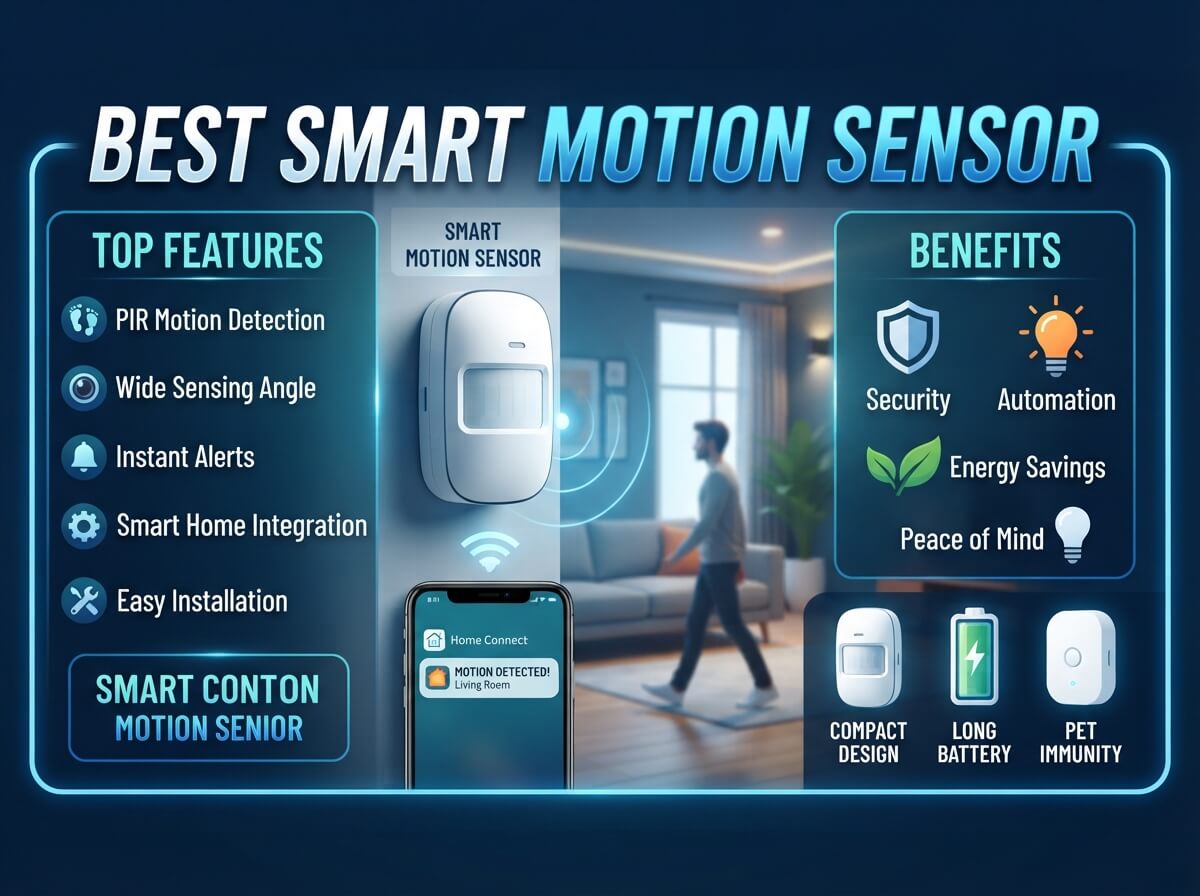
If you have ever walked into a dark room and fumbled for a light switch, or wondered who was creeping around your driveway at 2 AM, you already know why a good motion sensor matters. These small gadgets do a big job. They watch, they alert, and in many cases they turn lights on before you even reach for a switch.
The tricky part is that “motion sensor” is not one single product. It can be a full camera system, a solar light, a wall switch, a tiny add-on sensor, or a standalone alarm for your driveway. Each type solves a different problem, and buying the wrong one for your situation is one of the most common mistakes people make.
In this roundup, we break down five different motion sensor products that cover almost every use case a homeowner or property owner might have. We will look at a wireless security camera kit, a solar-powered area light, a smart switch, a small add-on occupancy sensor, and a long-range driveway alarm. By the end, you should have a clear picture of which one (or which combination) fits your home, your budget, and your daily habits.
Let’s get into it.
Why Motion Sensors Matter More Than You Think
A motion sensor is not just about catching a package thief on camera. It is about convenience, energy savings, and peace of mind. Think about a garage that never has clean hands to hit a switch, a backyard that turns pitch black at night, or a long gravel driveway where you cannot see a car pull up until it is already at your door.
Smart motion sensors solve these small daily headaches. They also form the backbone of a lot of home automation setups. Lights that turn on automatically, cameras that only record when something actually moves, alarms that alert you the second someone steps onto your property — all of this runs on motion detection technology.
The five products below were picked because they represent different price points, different technologies (PIR sensors, dual-tech sensors, and camera-based motion detection), and different jobs around the house. Some work indoors, some outdoors, some need wiring, and some are fully wireless and battery powered.
Quick Overview Table
| Product | Best For | Power Source | Hub Required | Approx. Price Range |
|---|---|---|---|---|
| aosu 2K QHD Battery Security Camera (2-Cam Kit) | Outdoor home security with recording | Battery | No | Mid-range |
| Solar Street Light (Of-5600W) | Large outdoor areas, parking lots, barns | Solar | No | Mid to high |
| Kasa Smart Motion Sensor Switch (KS200MP2) | Indoor rooms with wiring already in place | Hardwired (needs neutral wire) | No | Budget-friendly |
| Lutron Caseta Occupancy Motion Sensor (PD-OSENS-WH) | Hallways, bathrooms, closets, garages | Battery | Needs Lutron bridge for full smart features | Mid-range |
| Dakota Alert DCMA-4000 Driveway Alarm | Long driveways, rural properties, gates | Battery | No | Mid-range |
Now let’s break each one down in detail.
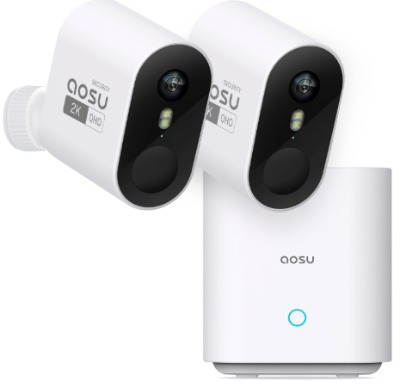
1. aosu 2K QHD Battery Security Cameras Wireless Outdoor System (2-Cam Kit)
What It Is
This is a wireless outdoor camera system that comes with two cameras. It records in 2K QHD resolution, runs on battery power, and does not need a monthly subscription to store or view footage. It also has built-in motion detection, a spotlight, and a siren for scaring off unwanted visitors.
Best Use Cases
This system shines on front doors, backyards, driveways, and side gates. If you want to actually see and record what triggers the motion alert, rather than just get a beep or a light, this is the type of product you want. It works well for people who travel often and want to check on their property from a phone app, and for anyone who wants extra eyes around the house without paying a cloud storage fee every month.
Key Features Explained Simply
- 2K QHD Night Vision: The camera captures clear video even at night, so you are not stuck squinting at grainy black-and-white footage.
- No Subscription Required: Footage saves locally instead of forcing you into a paid cloud plan. This is a big deal for anyone tired of recurring fees.
- Long Battery Life: The cameras run for weeks or even longer on a single charge, depending on how much activity they detect.
- 166° Wide View: A wider lens angle means fewer blind spots. You get to see more of your yard or driveway in a single shot instead of missing what happens just outside the frame.
- Spotlight & Siren Alarm: When motion is detected, the camera can light up the area and sound an alarm at the same time, which is a strong deterrent against anyone lurking around.
- Motion Alert: Push notifications go straight to your phone the moment movement is picked up, so you are never caught off guard.
Real-Life Usage Insight
For a typical suburban home, mounting one camera near the front door and one near a side entrance or driveway covers the most common blind spots. Since the system runs on battery, there is no need to run wires through walls or hire an electrician, which makes it a strong pick for renters or anyone who wants a quick weekend install.
The spotlight and siren combo tends to work well as a deterrent, since most people who are up to no good will leave the moment lights and noise kick in. The wide 166° view also helps reduce the number of “almost caught it” moments where a person walks just outside the frame.
Pros
- No monthly subscription fee, which saves money long term
- Sharp 2K video quality, even in low light
- Wide viewing angle reduces blind spots
- Spotlight and siren add a real security layer, not just recording
- Simple wireless setup, no electrician needed
Cons
- Battery still needs regular charging, especially in high-traffic areas
- Two cameras may not be enough for larger properties
- Wireless signal strength can drop if the router is too far away
Performance Discussion
In terms of raw video clarity, this camera holds up well against pricier subscription-based systems. The night vision performs solidly for a battery-powered camera, though extremely dark areas with zero ambient light will always be tougher for any camera, including this one. Motion detection is fairly responsive, though like most PIR-based or hybrid systems, it can occasionally trigger from moving tree branches or passing cars if sensitivity is set too high.
Ease of Use
Setup is straightforward through a companion app. You mount the cameras, pair them with your Wi-Fi, and adjust motion zones and sensitivity from your phone. Most users can get the whole system running within thirty minutes without any technical background.
Value for Money
Given that there is no subscription cost, the long-term value here is strong. You pay once for the hardware and keep using it without extra monthly bills. For anyone comparing this to a subscription-based brand, the savings add up fast over a year or two.
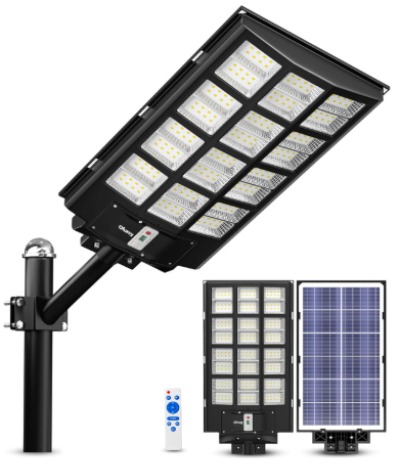
2. Solar Street Lights Outdoor Commercial Parking Lot Light (Of-5600W)
What It Is
This is a heavy-duty solar-powered light designed for large outdoor spaces. It comes with a built-in motion sensor, dusk-to-dawn automatic operation, and a remote control for adjusting settings. It is marketed for commercial use but works just as well for large residential properties, barns, and rural land.
Best Use Cases
If you have a big backyard, a farm, a barn, a long driveway, or even a small parking area, this light is built for that scale. It is not meant for a small porch or a narrow hallway. Think wide open spaces that need serious brightness without running electrical wiring.
Key Features Explained Simply
- Solar Powered: No wiring, no electric bill increase. The panel charges during the day and powers the light at night.
- Motion Sensor: The light can stay dim as a base setting and jump to full brightness when it senses movement, saving battery while still lighting up when needed.
- Dusk to Dawn Operation: The light automatically turns on when the sun goes down and off when it comes back up, so there is no manual switching required.
- Remote Control: You can adjust brightness levels, timers, and modes without climbing a ladder every time.
- High Wattage Output: Rated for serious brightness, ideal for areas that need to be lit up well enough for security cameras or general visibility.
Real-Life Usage Insight
Rural properties and barns tend to benefit the most from this kind of light because there is often no nearby power source to tap into. Mounting it high on a pole near a driveway entrance or barn door gives a wide coverage area. The motion-triggered brightness boost is especially useful for anyone who wants to save battery during quiet hours but still get full illumination the second a car or person approaches.
For parking lots or larger yards, one unit may cover a surprising amount of ground, though very large areas may need two or more lights spaced out for even coverage.
Pros
- Zero electricity cost since it runs entirely on solar power
- No wiring needed, which saves on installation cost and effort
- Motion sensor helps balance brightness with battery life
- Remote control adds convenience for adjusting settings
- Strong output suitable for large open areas
Cons
- Performance depends on how much sunlight the panel gets during the day
- Cloudy stretches can reduce brightness or runtime at night
- Mounting a unit this size may require a sturdy pole and some physical effort
- Not ideal for small spaces like porches or single doorways
Performance Discussion
In areas with decent sun exposure, this light performs reliably and holds a charge well through the night. The dusk-to-dawn sensor is accurate and rarely misfires. The main variable is weather. In regions with long stretches of cloudy days, output can dip, so it helps to mount the solar panel where it gets the most direct sunlight possible, away from tree shade.
Ease of Use
Installation takes a bit more effort than plug-and-play indoor gadgets, mainly because of the mounting process. Once it is up, day-to-day use is simple thanks to the remote control, which lets you tweak settings without any tools.
Value for Money
For the amount of light output and the fact that there is no ongoing electric cost, this is a solid long-term investment for anyone with a large property. It pays for itself over time compared to running a wired floodlight setup.
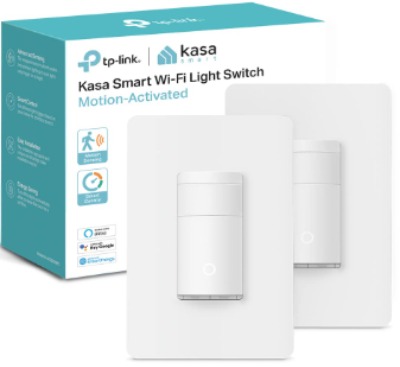
3. Kasa Smart Motion Sensor Switch (KS200MP2, 2-Pack)
What It Is
This is a wall-mounted smart switch that replaces your existing light switch and adds motion detection. It connects directly to your home Wi-Fi without needing a separate smart home hub, and it works with both Alexa and Google Assistant. It comes as a two-pack, which is handy for covering two rooms at once.
Best Use Cases
This is perfect for rooms you walk into with your hands full, like a laundry room, garage, closet, pantry, hallway, or kids’ room. Since it needs a neutral wire, it is meant for homes with standard modern wiring rather than very old houses without one.
Key Features Explained Simply
- Motion-Activated Switch: The light turns on automatically when you walk in and off after a set period of no motion.
- 2.4GHz Wi-Fi Connection: Connects directly to your router, no hub or bridge needed.
- Works with Alexa & Google Assistant: You can control it with voice commands or set up routines, like turning off all motion switches at a certain time.
- UL Certified: This means it has passed safety testing standards, which matters a lot for anything wired into your electrical system.
- Single Pole Design: Works with a standard single switch setup, not a three-way switch, so it is important to check your existing wiring type before buying.
Real-Life Usage Insight
Garages and laundry rooms are two of the most popular spots for this kind of switch, since people often walk in with full hands and cannot easily flip a switch. Setting the auto-off timer to a reasonable window, like five minutes, works well for rooms where you are only in and out briefly.
For hallways or closets, this switch removes the need to ever think about the light again. You walk in, it is on. You leave, it turns off after a short delay. It becomes background convenience you stop noticing after the first week.
Pros
- No smart hub required, keeps setup simple
- Budget-friendly compared to full smart lighting systems
- Reliable motion detection for everyday indoor use
- Works with major voice assistants
- Two-pack means better value if you need multiple rooms covered
Cons
- Requires a neutral wire, so it will not work in every home
- Single pole only, not compatible with three-way switch setups
- Installation involves working with your home’s wiring, which some people may not be comfortable doing themselves
Performance Discussion
Once installed, the switch responds quickly to motion and the Wi-Fi connection tends to stay stable since it talks directly to the router. The auto-off timer options give a good amount of control, and adjusting sensitivity is simple through the companion app.
Ease of Use
The app setup is beginner-friendly, but the physical installation does require basic comfort with switching off your breaker and working with wires. If you have installed a smart switch before, this will feel familiar. If not, it may be worth having an electrician handle the wiring portion, especially the neutral wire requirement.
Value for Money
For the price of a two-pack, you get motion automation in two rooms without paying for a hub, which makes this one of the more affordable ways to add smart lighting behavior to your home.
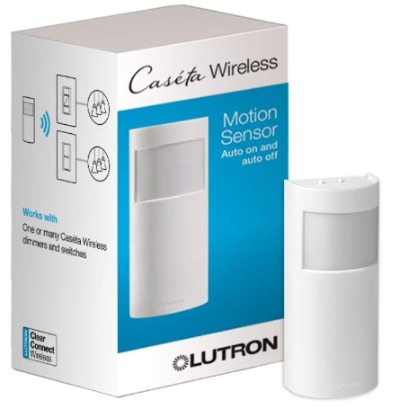
4. Lutron Caseta Wireless Occupancy Motion Sensor (PD-OSENS-WH)
What It Is
This is a small, wireless, battery-powered occupancy and motion sensor built to pair with Lutron Caseta dimmers, switches, and fan controls. It does not replace your switch. Instead, it works alongside your existing Lutron switch to trigger lights or fans based on movement in the room.
Best Use Cases
This sensor is designed for spots like bathrooms, hallways, garages, and closets, especially in homes that already use the Lutron Caseta ecosystem for lighting. It requires no wiring at all for the sensor itself, which makes it easy to add to a room after the fact.
Key Features Explained Simply
- No Wires Required for the Sensor: It runs on battery and communicates wirelessly with your existing Lutron switch or dimmer.
- Auto On/Off: Lights or fans turn on automatically when someone enters and off when the room is empty for a set amount of time.
- Works with Dimmers, Switches, and Fan Controls: This gives flexibility since it is not limited to just lights.
- Occupancy and Vacancy Modes: You can set it to fully automatic (turns on and off by itself) or vacancy-only mode (you turn it on manually, but it turns off automatically), which is great for spaces where you do not always want the light popping on right away, like a nursery.
Real-Life Usage Insight
Bathrooms are one of the best spots for this sensor, since it is genuinely handy to have the light turn on the moment you walk in and off automatically after you leave, especially for kids who tend to forget to turn lights off. Garages also benefit a lot, since carrying groceries or tools in with your hands full makes hands-free lighting extremely convenient.
The vacancy-only mode is worth mentioning because it solves a common annoyance with fully automatic sensors, which is lights turning on when you do not want them to, like walking past a room at night. This flexibility is one of the standout parts of the product.
Pros
- Truly wireless sensor installation, no wiring needed for the sensor itself
- Works with multiple device types, not just lights
- Occupancy and vacancy modes give more control than basic on/off sensors
- Reliable, well-known brand in the smart lighting space
- Battery life tends to last a long time due to efficient design
Cons
- Requires an existing Lutron Caseta switch or dimmer to actually work, so it is not a standalone product
- Full smart home features and remote access need a separate Lutron bridge
- Slightly higher price point compared to basic PIR sensors
Performance Discussion
Motion detection is smooth and responsive, with minimal lag between entering a room and the light turning on. Lutron’s reputation for reliable wireless communication holds up here, and users generally do not experience the false triggers or delayed responses that cheaper sensors sometimes have.
Ease of Use
Since it pairs directly with existing Lutron switches, setup mainly involves mounting the sensor and syncing it through simple button presses. No app is strictly required just to get basic motion functionality working, though the Lutron app unlocks more customization if you have the bridge.
Value for Money
This is best viewed as an add-on rather than a standalone purchase. If you are already using Lutron Caseta switches, this sensor is a smart and reasonably priced upgrade. If you are starting from scratch, factor in the cost of the compatible switch as well.
5. Dakota Alert DCMA-4000 1-Mile Wireless Driveway Alarm & Motion Sensor
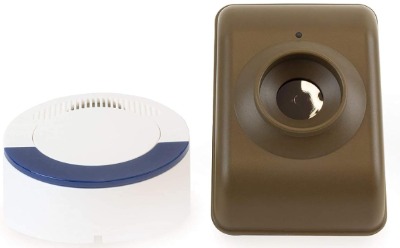
What It Is
This is a long-range motion sensor built specifically for driveways, gates, and large outdoor properties. It uses a passive infrared sensor to detect movement and sends a wireless signal up to one mile to a receiver inside your home, alerting you the moment a vehicle or person approaches.
Best Use Cases
This product is built for rural homes, farms, long driveways, and properties where you cannot see the road or gate from inside the house. It is less about video and more about early warning, giving you a heads-up before someone even reaches your front door.
Key Features Explained Simply
- 1-Mile Range: The sensor can be placed far from the house and still reliably send a signal to the receiver.
- Motion Detection via PIR Sensor: Detects heat and movement, so it picks up on cars, people, and even large animals crossing the sensor zone.
- Wireless Design: No trenching or burying wires across your yard, which saves a huge amount of installation effort compared to older hard-wired driveway alarms.
- Battery Powered Sensor: Runs on batteries, so it can be placed almost anywhere without needing a nearby outlet.
- Audible Alert Indoors: The receiver inside your home chimes or beeps when motion is picked up, giving you a heads-up in real time.
Real-Life Usage Insight
For long rural driveways, this is genuinely one of the most useful gadgets you can add, since it solves the exact problem of not knowing someone has arrived until they are already knocking on the door. Placing the sensor near the driveway entrance, angled toward the direction vehicles approach from, gives the most reliable detection.
Farms and larger properties also use this to monitor gates or barn entrances, since the long wireless range means the sensor does not need to be anywhere close to the house or receiver.
Pros
- Long 1-mile wireless range covers large properties easily
- No trenching or wiring required for installation
- Reliable early-warning system for vehicles and people
- Simple, no-frills design that just works without an app or subscription
- Battery powered, so placement is flexible
Cons
- No camera or video, so it only alerts you rather than showing you who or what triggered it
- Sensitivity can pick up large animals as well as people, leading to occasional false alerts
- Range can be affected by obstacles like trees, hills, or buildings between sensor and receiver
Performance Discussion
In open, clear line-of-sight conditions, the range and reliability of this alarm are strong. Thick tree cover, hills, or long distances with obstacles can reduce effective range, so it helps to test placement before fully committing to a permanent spot. The PIR detection is sensitive enough to reliably catch cars and people, though very small movements like a cat or a bird are usually filtered out by the sensor’s design.
Ease of Use
Setup is refreshingly simple. Mount the sensor, plug in or power the receiver, and you are done. There is no app to configure and no account to create, which some users will actually prefer over more complex smart home gadgets.
Value for Money
For anyone with a long driveway or rural property, the peace of mind this alarm provides is well worth the price. It is a focused tool that does one job and does it reliably, without extra fees or ongoing costs.
Comparison Insights: How These Five Products Stack Up
Each of these products solves a different problem, so a direct head-to-head comparison only tells part of the story. Still, a few patterns stand out when you look at them side by side.
For visual security and recording, the aosu camera system is the clear pick since it is the only product here that actually captures footage of what triggers the motion alert. If you want to see faces, license plates, or package theft in action, this is the tool for that job.
For lighting up large outdoor spaces, the solar street light wins by a wide margin. It is not designed for small indoor rooms, but for barns, lots, and long stretches of yard, nothing else on this list comes close in raw brightness and coverage.
For everyday indoor convenience, the Kasa switch and the Lutron sensor both compete in similar territory, though they work differently. The Kasa switch replaces your existing switch entirely and needs a neutral wire, while the Lutron sensor works alongside an existing Lutron switch wirelessly. If you already use Lutron products, the sensor is the natural add-on. If you are starting fresh and want a simpler, single-purchase solution, the Kasa switch is easier to reason about.
For early-warning detection over long distances, the Dakota Alert driveway alarm stands completely alone on this list. None of the other products are designed to alert you from a mile away without wiring, and none focus purely on detection without video or lighting.
A well-rounded home setup could realistically use two or three of these together. For example, a camera system at the front door, a driveway alarm at the entrance for early warning, and a motion switch in the garage all work toward the same larger goal without stepping on each other’s job.
Buying Guide: How to Pick the Right Motion Sensor for Your Needs
Before buying any motion sensor, it helps to ask a few honest questions about your situation.
What are you actually trying to solve? If the goal is catching footage of intruders or package thieves, a camera-based system like the aosu kit makes more sense than a basic alarm. If the goal is simply knowing when someone arrives, a driveway alarm does that job without the extra cost of video storage or app management.
Do you need wiring or a wireless setup? Battery-powered and solar options are far easier to install, especially for renters or anyone unwilling to touch electrical wiring. Hardwired switches like the Kasa model offer a cleaner, permanent solution but require an electrician-friendly setup with a neutral wire present.
How big is the area you are covering? A tiny hallway sensor is a poor fit for a five-acre property, just as a heavy commercial solar light is overkill for a small closet. Match the product’s intended scale to your actual space.
Do you already own a smart home ecosystem? If you already use Lutron Caseta products, the occupancy sensor is a smart add-on rather than a whole new system. If you use Alexa or Google Assistant heavily, the Kasa switch fits neatly into that setup without needing extra hubs.
Are you comfortable with subscriptions? Some security camera brands charge monthly fees for cloud storage. The aosu system avoids this, which is worth factoring into your long-term budget, especially if you plan to run multiple cameras.
What is your local climate like? Solar-powered products depend on consistent sunlight. If you live somewhere with long overcast seasons, factor that into your expectations for brightness and battery life.
Who Should Buy These Products
Homeowners with a front porch or backyard security gap should look closely at the aosu camera system. It fills the most common security blind spots without demanding an electrician or a monthly bill.
Farm and rural property owners get the most value from the solar street light and the Dakota Alert driveway alarm, since both are built for large, open, and often un-wired spaces where traditional electric lighting or alarm wiring is not practical.
Renters and apartment dwellers will likely find the Kasa switch tricky if their wiring lacks a neutral wire, but the Lutron sensor and aosu cameras are both easier to install without permanent changes, making them friendlier options for people who cannot modify walls.
Smart home enthusiasts already invested in Alexa, Google Assistant, or Lutron products will get the smoothest experience from the Kasa switch or Lutron sensor, since both integrate cleanly into existing routines and voice commands.
Anyone with a long or hidden driveway should strongly consider the Dakota Alert alarm. It is a low-effort, low-maintenance way to know the moment someone pulls up, especially for properties where the front door is far from the road.
Common Mistakes to Avoid When Buying a Motion Sensor
Buying based on price alone. A cheap sensor that constantly false-triggers or fails to detect real motion is more frustrating than helpful in the long run. Balance cost with actual reliability and reviews.
Ignoring wiring requirements. Products like the Kasa switch need a neutral wire. Skipping this check before buying often leads to a return or an awkward mid-installation surprise.
Placing sensors in the wrong spot. Motion sensors, especially PIR-based ones, work best when placed at the right height and angle. Mounting too high, too low, or facing direct sunlight or heat sources can cause missed detections or constant false alarms.
Overlooking battery maintenance. Battery-powered sensors and cameras need occasional charging or battery swaps. Forgetting this defeats the purpose of having a security device in the first place, so it helps to set a reminder every few months.
Assuming one product covers every need. A single camera cannot replace a wide-area solar light, and a driveway alarm cannot record footage. Matching the right tool to the right job avoids disappointment.
Not checking sensitivity settings. Many motion sensors let you adjust detection sensitivity. Leaving it on factory default settings sometimes leads to too many false alerts from pets, cars, or blowing branches. Spend a few minutes tuning this after installation.
Forgetting about weather exposure. Outdoor sensors, lights, and cameras need to be rated for outdoor use. Double check weather resistance ratings before mounting anything outside permanently.
Final Verdict
There is no single “best” motion sensor that fits every home, and that is actually a good thing, since it means you can pick a tool built specifically for your situation instead of settling for a one-size-fits-all gadget.
If video recording and visible deterrence matter most to you, the aosu 2K QHD Camera System stands out as the strongest all-around pick, especially thanks to the lack of subscription fees. For large outdoor areas that need serious brightness without an electric bill increase, the solar street light is hard to beat. If you want simple, reliable indoor automation and already have compatible wiring, the Kasa Smart Motion Sensor Switch offers excellent value. For those inside the Lutron ecosystem, the Lutron Caseta occupancy sensor adds smart convenience with minimal hassle. And for anyone with a long driveway who just wants to know the second someone arrives, the Dakota Alert DCMA-4000 remains one of the most dependable and straightforward tools on this list.
The smartest approach for many households is not picking just one, but combining a couple of these based on where the real gaps are around the house. Start with the area that bothers you the most, whether that is a dark backyard, an unmonitored driveway, or a garage light you always forget to flip on, and build outward from there. A thoughtful, layered setup almost always beats a single expensive gadget trying to do everything at once.

Hi, I’m Mary, the founder of Homygear.com. I’m passionate about creating a comfortable, smart, and beautiful home. I share practical insights and real-world experience on home gear that makes everyday life easier. Behind the scenes, my dedicated research team studies products in depth, and our writers craft honest reviews using trusted, authentic sources—so you can choose home gear with confidence.