5 Best Smart Home Control Panel In 2026
Introduction
Smart home control panels have become the beating heart of modern home automation. If you’ve ever dreamed about controlling every light, lock, and thermostat from a single touchscreen on your wall, then you’re in the right place. A good smart home control panel transforms how you interact with your living space. Instead of juggling multiple apps on your phone, you get one central hub that handles everything.
The market has exploded with options lately, and picking the right one can feel overwhelming. That’s exactly why I’ve tested and reviewed the leading smart home control panels available. This guide walks you through five top contenders, giving you the real story about what works, what doesn’t, and which one fits your needs best.
Smart home hubs serve as the command center for your entire automation ecosystem. They let you voice control your devices, set up routines, monitor everything from one place, and automate tasks without lifting a finger. The best ones feel natural to use, work with your existing devices, and deliver actual convenience instead of just being fancy gadgets.
The Smart Home Panel Landscape: What You Need to Know
Before diving into individual products, let’s talk about what makes a smart home control panel truly excellent. You want something that integrates with your current devices, responds instantly to commands, looks good on your wall, and doesn’t break the bank.
The ideal smart home touchscreen panel acts as a central control point for your whole house. It displays live camera feeds, shows temperature readings, lets you lock doors, dim lights, and manage scenes all from one interface. Some panels work with voice assistants, others run their own systems, and some do both.
Screen size matters because you’ll be interacting with it daily. Smaller panels work for quick checks, while larger screens give you more room to see information and tap controls. Build quality impacts how long your device lasts, and the software determines how easy it is to set everything up and use it regularly.
1.Amazon Echo Hub: The Alexa-Powered Wall Station
Product Overview
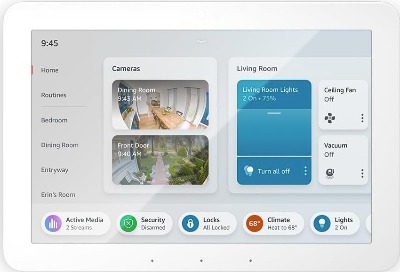
The Amazon Echo Hub represents Amazon’s latest push into smart home control territory. This 8-inch smart display mounts on your wall as a dedicated control center for your Alexa ecosystem. It’s designed specifically for homes already invested in Amazon’s smart home devices and services.
The device features a bright 8-inch touchscreen with an anti-glare coating that keeps the display readable even in sunlight. Amazon built it to work seamlessly with Alexa, their voice assistant, and it comes pre-loaded with capabilities to control thousands of compatible smart devices.
Best Use Cases
The Echo Hub shines in homes where Amazon Alexa already handles most automation. If you’ve got Echo devices throughout your house, Alexa routines running your daily life, and mostly Amazon-compatible smart home devices, this panel becomes incredibly useful.
It’s perfect for quick voice commands from your kitchen or living room. Need to turn off all the lights before bed? Just say the word. Want to check your front door camera while cooking? The screen displays it instantly. This device serves best as a secondary hub that extends your Alexa capabilities rather than replacing dedicated control systems.
Key Features Explained Simply
The touchscreen displays information at a glance. Temperature readings, security camera feeds, doorbell notifications, and home status appear right on the screen. You don’t need to open your phone to see what’s happening.
Alexa integration means you talk to the panel like you would any Echo device. Voice commands work perfectly, and the microphone picks up what you’re saying from across the room. The built-in speaker plays music, podcasts, and notification sounds clearly.
Communication features let you drop in on other Echo devices, send announcements to your whole house, or call family members through the device. It functions as a wall-mounted intercom system for your home.
Camera integration shows live feeds from your Alexa-compatible doorbell cameras and security cameras. You can see who’s at your front door without opening the door or pulling out your phone.
Real-Life Usage Insight
Using the Echo Hub feels natural if you’re already an Alexa person. The touchscreen responds quickly to taps, and the interface looks clean without feeling cluttered. Notifications arrive fast, so you see alerts about security events, door activity, or timers you’ve set right away.
The device handles multiple requests without slowing down. Switch between camera feeds, adjust lighting, and check the weather forecast smoothly. The speaker quality is decent for announcements and music, though it won’t replace a good Bluetooth speaker for serious listening.
Honest Pros and Cons
Strengths:
- Works flawlessly with existing Alexa devices and services
- Beautiful 8-inch display with responsive touchscreen
- Voice control combined with physical buttons and touch
- Great camera integration for security devices
- Reliable Amazon ecosystem support
Weaknesses:
- Limited to Alexa-compatible devices; struggles with non-Amazon ecosystems
- Can’t control devices that only work with Google Home or Apple HomeKit without additional hubs
- Fewer customization options compared to open-platform alternatives
- Requires WiFi and Amazon account connection
- Smaller screen compared to some competitors
Performance Discussion
The Echo Hub runs Amazon’s custom software specifically designed for this form factor. Performance is snappy, with no noticeable lag when opening apps, switching views, or issuing voice commands. The processor handles multitasking without stuttering.
Network performance depends on your WiFi quality. With a strong connection, commands execute instantly. If your WiFi drops, the device holds some local functionality but loses cloud-based features until reconnected.
Battery life isn’t relevant since this is a wall-mounted device that stays plugged in. The power adapter provides consistent performance without worry.
Ease of Use
Setup takes minutes. Plug it in, download the Alexa app, scan the code on the screen, and follow the prompts. Most people get it working in under ten minutes.
Daily use is intuitive. The touchscreen responds like a tablet, and voice commands work naturally. No steep learning curve here. If you’ve used any Alexa device before, this feels instantly familiar.
Customizing your display to show the information you care about requires tapping through menus, but it’s straightforward. You can arrange widgets, choose what feeds appear on the home screen, and adjust notification settings without technical knowledge.
Value for Money
At its price point, the Echo Hub offers good value if you’re already buying Alexa devices. You get a quality 8-inch display, solid smart home integration, and reliable voice control. It’s priced competitively with other smart displays in its size range.
However, if you use Google Home, HomeKit, or other platforms, the value drops significantly because you can’t fully utilize its features. The device plays best with an Amazon ecosystem, which factors into the overall equation.
2.Shelly Wall Display XL: The Platform-Agnostic Heavy Hitter
Product Overview
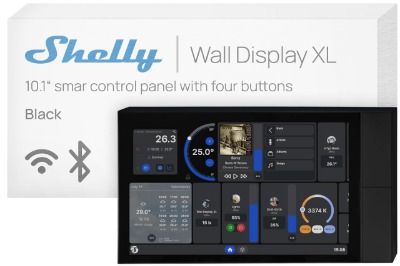
The Shelly Wall Display XL Black stands as one of the most capable smart home touchscreen panels available. This 10.1-inch wall display works independently and integrates with virtually any smart home platform you’re using. Shelly designed it to be the central controller your home needs, regardless of what other devices you own.
The large touchscreen dominates a wall beautifully while fitting within a standard wall box. Built-in relay switching handles local automation tasks without needing separate devices. The panel supports Alexa, Google Assistant, Home Assistant, HomeKit, and many other platforms simultaneously.
Best Use Cases
The Shelly Wall Display XL excels in multi-platform homes where you’ve invested in different ecosystems. If you have HomeKit devices in one room, Google Home in another, and Alexa somewhere else, this panel talks to everything equally well.
It works great as your primary home control hub because it handles local automation independently. You don’t need cloud services running to control basic functions. The built-in relay lets you manage smart lights, switches, and other devices directly from the panel without complex setups.
This panel suits tech-savvy users who like flexibility and don’t mind exploring configuration options. It also works perfectly for people who want professional-grade automation but prefer open standards over proprietary systems.
Key Features Explained Simply
The 10.1-inch touchscreen gives you plenty of room to see information and tap controls comfortably. Resolution is sharp, and the display stays visible in bright rooms thanks to good brightness levels.
The built-in 5A relay lets the panel control circuits locally. If you wire it to light switches or other devices, it can handle switching loads without sending commands through the internet. This makes your automation faster and more reliable.
Four physical buttons on the device provide direct control without touching the screen. You can program these buttons for different functions, making them quick shortcuts for your most common tasks.
The lux sensor detects how bright your room is. Use this data to trigger automatic lighting adjustments or to customize how the display behaves in different lighting conditions.
WiFi connectivity keeps your panel connected to your network and lets it communicate with all your smart devices. The open architecture means it plays nicely with platforms like Home Assistant, which gives you incredible customization power.
Real-Life Usage Insight
The Shelly panel feels responsive and stable during daily use. Commands execute quickly, screens load fast, and the interface never hiccups. The build quality is excellent, with a solid feeling that suggests longevity.
Physical button shortcuts save time for tasks you do frequently. Program one button to turn on all your evening lights, another to secure the house before bed, and you can control everything with a single tap.
The local processing capability means your basic automation continues working even if your internet goes down. Lights still respond to buttons, relays still switch, and core functions remain available. This reliability is something cloud-dependent systems can’t match.
Integrating multiple platforms takes effort. You’ll spend time setting up each ecosystem, but once configured, everything works together smoothly. Home Assistant integration opens possibilities for complex automations that rival professional systems.
Honest Pros and Cons
Strengths:
- Works with virtually any smart home platform
- Large, bright 10.1-inch touchscreen
- Local relay switching provides fast, reliable control
- Physical buttons for quick shortcuts
- Excellent build quality and design
- Open architecture enables advanced customization
- Works offline with local automation
Weaknesses:
- Requires neutral wire installation (not all homes have it in switch boxes)
- Setup complexity higher than closed systems
- Multiple platform integration requires technical knowledge
- Pricier than single-ecosystem alternatives
- Learning curve steeper for beginners
Performance Discussion
The Shelly panel handles heavy loads without slowing down. Multiple automations running simultaneously don’t cause lag. Cloud responsiveness depends on your internet, but local functions work at hardware speed, which is nearly instantaneous.
The relay handles switching loads smoothly. Whether you’re controlling a light circuit, motor, or other electrical load, the relay performs reliably without noise or delay.
Processing power is adequate for the interface and local operations. The panel runs smoothly whether you’re managing two devices or two hundred. Shelly’s software gets regular updates that improve stability and add features.
Ease of Use
Initial setup requires a bit more patience than simpler systems. You need to understand your WiFi network, access your router if necessary, and decide which platforms you want to use. Installing the physical panel involves electrical work if you’re integrating the relay.
Once operational, daily use is straightforward. The interface makes sense, buttons respond immediately, and voice control works flawlessly. Most users adapt quickly even if the initial setup takes longer.
Customization requires willingness to explore settings and experiment. Creating complex automations demands some technical thinking, but the panel supports it all. If you enjoy tinkering with systems and want full control, you’ll love this flexibility.
Value for Money
The Shelly Wall Display XL costs more than single-ecosystem alternatives, but you get significantly more capabilities. The ability to unify multiple platforms, local relay switching, and professional-grade features justify the price for homes with diverse device ecosystems.
If you’re building a smart home from scratch and want one system that grows with you, this panel’s long-term value is excellent. You can add devices from any platform and integrate them without limitations.
For simpler setups with only one major ecosystem, the cost might seem high compared to cheaper alternatives that do less. But if flexibility and expandability matter to you, the investment pays dividends.
3.SONOFF NSPanel Pro 120: The Budget-Friendly Powerhouse
Product Overview
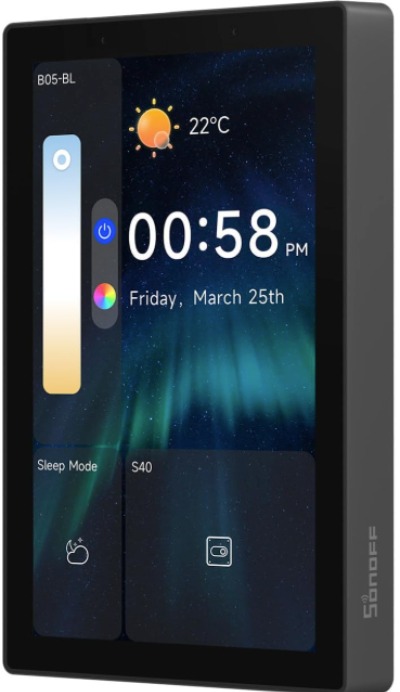
SONOFF’s NSPanel Pro 120 is a 4.3-inch smart home control panel that proves size doesn’t limit functionality. This compact device packs serious features into a small footprint, making it ideal for homes where wall space is limited or you want multiple panels throughout your house.
Don’t let the smaller screen fool you. The NSPanel Pro 120 handles extensive smart home automation and integrates with major platforms. SONOFF designed it as an affordable entry point into smart home control without compromising on capability.
Best Use Cases
The NSPanel Pro 120 works perfectly in hallways, bathrooms, bedrooms, or anywhere you want a compact control point. Its small size lets you install multiple units throughout your home without prominent wall placements.
It’s ideal for people on budgets who still want touchscreen control. The lower price point compared to larger panels makes it easier to justify buying several units to cover different areas of your house.
This panel suits homes with established automation systems. Add it as an additional control point rather than relying on it as your sole interface. In hallways or mudrooms, it handles simple commands beautifully.
Tech-savvy users appreciate it for Home Assistant integration and customization possibilities. The open platform allows deep automation integration for those who want it.
Key Features Explained Simply
The 4.3-inch touchscreen displays information clearly despite its compact size. Brightness is good, and the responsive screen handles quick taps without issues. You can see temperature, status icons, and control buttons comfortably.
Built-in relay output lets the panel control electrical circuits directly. Like the Shelly panel, this local control capability means basic automation works even without internet.
Temperature and humidity sensors built into the device monitor your home’s environment. This data triggers automations or displays on your dashboard for awareness.
Support for Home Assistant and other open platforms means you can integrate it deeply with your automation system. SONOFF provides the hardware; you decide the logic through Home Assistant configurations.
The device connects via WiFi and works with both 2.4GHz and 5GHz networks. It also supports optional hub connections for extended range and reliability.
Real-Life Usage Insight
Despite the small screen, navigating is smooth and intuitive. Swiping between pages reveals different sections, and tapping controls responds instantly. You won’t feel limited by the size during typical use.
The compact form factor is genuinely convenient. Installing one in your hallway near the front door takes seconds with simple adhesive or light mounting. People naturally walk past it and can check status or control devices without pulling out phones.
Reliability is strong. The device stays connected, processes commands quickly, and handles automations without crashes. SONOFF’s track record with quality hardware shows in the build.
Home Assistant integration opens possibilities for advanced users. Creating complex automations, custom dashboards, and logic sequences is straightforward if you’re comfortable with configuration files.
Honest Pros and Cons
Strengths:
- Compact size perfect for multiple installation points
- Excellent value for the money
- Local relay control for independent automation
- Built-in temperature and humidity sensors
- Great Home Assistant integration
- Fast, responsive interface
- Affordable enough to buy several units
Weaknesses:
- Smaller screen limits information displayed at once
- Home Assistant setup requires technical comfort
- Relay capacity is lower than some alternatives
- Basic design feels utilitarian compared to premium options
- Integration with proprietary ecosystems is limited
Performance Discussion
The NSPanel Pro 120’s processor handles its duties efficiently. The touchscreen responds instantly, and navigating between screens is smooth. Load times are negligible, making the interface feel snappy.
Network performance is solid. Commands through Home Assistant or local connections execute quickly. Cloud integration works reliably when you’re using it.
The relay switching performs reliably, though the 5A limit is lower than the Shelly panel. For standard lighting circuits and small loads, it works perfectly. Heavy-load applications might require external relays.
Ease of Use
Getting started is straightforward. Connect to power, join your WiFi network, and use the interface immediately. The home screen shows basic controls, and swiping reveals more options.
Home Assistant integration requires access to your HA configuration, but SONOFF provides good documentation. If you’ve set up Home Assistant before, adding the NSPanel takes minutes.
Daily operation is simple. Tap to control devices, swipe between screens, and use voice commands if integrated with Alexa or Google. The learning curve is minimal.
Value for Money
The NSPanel Pro 120 offers outstanding value. You get a capable smart home control panel for a fraction of what larger screens cost. The ability to buy multiple units affordably is huge.
If you already have Home Assistant running, the integration is seamless and adds genuine value. The local relay control removes dependency on cloud services.
Even for people not using Home Assistant, basic functionality is accessible and useful. The device performs well at its price point, making it hard to beat for budget-conscious shoppers.
4.MOES Smart Home Touchscreen Control: The Alexa-Integrated Wall Panel

Product Overview
The MOES Smart Home Touchscreen Control brings voice and touch control together in a slick wall-mounted 1-switch panel format. This device integrates Alexa directly, handles Smart Life device control, and functions as both a smart switch and a control hub.
It’s designed specifically for people who want voice control paired with physical switching capability. The panel works in-wall like a traditional switch, taking up minimal space while providing smart home control.
Best Use Cases
The MOES panel works best in locations where you need both switching capability and control interface. Install it where you’d traditionally put a light switch and gain smart features.
It’s ideal for people already using Smart Life apps and devices. If your home runs on this ecosystem, the MOES panel integrates naturally and provides central control points.
Home automation beginners appreciate the straightforward design. It looks like a normal wall switch, feels familiar, and doesn’t require complex setup or technical knowledge.
Multiple panels throughout your home create voice control access in every room. Each panel can control the Smart Life ecosystem, making it convenient to manage devices from wherever you are.
Key Features Explained Simply
The touchscreen on this panel responds to taps and swipes. Icons represent different devices, and tapping controls them. The interface is intuitive enough that first-time users figure it out instantly.
Alexa built-in means you talk to this panel to control your Smart Life devices. Voice commands work reliably, and you can set up routines to automate common tasks.
Physical buttons let you control lights and devices even when the screen is off. You can wake the screen with a tap or use the buttons for immediate control.
Scene support lets you create and save groups of commands. Set one scene for “leaving home” that locks doors, turns off lights, and adjusts thermostats. Trigger the entire sequence with one tap or voice command.
Smart Life compatibility means it controls thousands of third-party devices designed for that platform. Lights, plugs, switches, cameras, and sensors all work together.
Real-Life Usage Insight
The panel integrates smoothly into your daily routine. Using it feels natural compared to digging out your phone every time. Voice commands work reliably, and the touchscreen responds immediately.
The switch-like form factor means people adapt to it quickly. It occupies familiar space in your home, making smart home control feel less like technology and more like a natural part of living.
Alexa integration is seamless. Your routines sync perfectly, voice commands execute instantly, and ecosystem features work as expected. If you’re already an Alexa person, this feels like a natural addition.
Smart Life device management is straightforward. The app and the panel communicate reliably, status updates arrive quickly, and controlling multiple devices in sequence works smoothly.
Honest Pros and Cons
Strengths:
- Alexa built-in provides excellent voice control
- In-wall design saves space and looks clean
- Smart Life ecosystem integration is strong
- Intuitive interface for beginners
- Physical buttons provide tactile control
- Affordable pricing
- Scene creation enables complex automations
Weaknesses:
- Screen real estate is limited for complex layouts
- Limited to Smart Life ecosystem; other platforms require workarounds
- No local relay switching for independent operation
- Requires cloud connection for full functionality
- Installation must be done by someone comfortable with electrical work
Performance Discussion
The MOES panel runs smoothly during regular use. Voice recognition accuracy is good, picking up your commands from across the room reliably. Touch response is instant.
Network dependency means performance relies on your WiFi quality. With a solid connection, everything works quickly. Weak signals cause occasional delays.
The processor handles multiple connected devices without slowing down. Managing dozens of Smart Life devices from the panel works smoothly.
Ease of Use
Setup is genuinely easy. Install the panel in your wall (or place it in a standard outlet box), connect to power, download the app, and scan the QR code. Within minutes, you’re controlling devices.
Daily operation requires no learning curve. Tap icons to control devices, say voice commands to Alexa, and create scenes for common tasks. Everything makes intuitive sense.
The app controls settings and device management, while the panel handles quick access and voice commands. The division of labor is clean and sensible.
Value for Money
The MOES panel costs less than many alternatives, making it accessible to people with limited budgets. You get integrated Alexa, touchscreen control, and Smart Life compatibility for a reasonable price.
If you’re building a Smart Life ecosystem, having multiple MOES panels throughout your home is affordable. You can create a comprehensive voice-control system without spending thousands.
Long-term value is solid if you’re committed to the Smart Life and Alexa ecosystems. However, if you plan to diversify platforms, the limitation to this ecosystem becomes a drawback.
5.10.1″ POE Smart Home Touch Panel: The Android-Powered Professional System
Product Overview
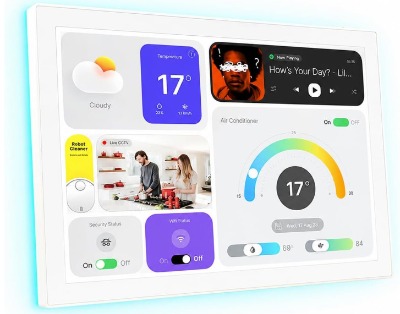
This 10.1-inch wall panel runs Android 14 with 4GB RAM and 64GB storage, functioning as a complete computer for smart home control. The professional-grade specifications and extensive connectivity options position it as a premium solution for serious automation enthusiasts.
Built with in-wall installation in mind, the panel includes an 86 box mount and POE (Power Over Ethernet) capability for clean installation without visible power cables. WiFi 6E support ensures fast, stable network connectivity.
Best Use Cases
This panel suits homes where you want professional-grade automation without compromise. If you run Home Assistant or other open-platform systems and want full control, this device delivers.
It’s perfect for homes requiring extensive control and monitoring. Multiple cameras, complex automations, environmental sensors, and integration with various systems all work reliably on this platform.
Tech enthusiasts building sophisticated smart home systems appreciate the raw power and connectivity options. The device can run Android apps, handle local processing, and integrate with virtually any system.
Commercial settings like offices, retail spaces, or rental properties benefit from the professional capabilities and remote management options.
Key Features Explained Simply
The 10.1-inch touchscreen is large, bright, and responsive. You see plenty of information at once, and controls are big enough to tap easily. Resolution is sharp and clean.
Android 14 means the panel functions like a tablet. You can install apps, customize the interface extensively, and run whatever software you want. This flexibility is unmatched by dedicated smart home panels.
Onboard storage with 4GB RAM and 64GB internal space provides room for apps, dashboards, and local data storage. You’re not limited to minimal local processing like many alternatives.
WiFi 6E support is genuinely useful if you have a modern router. The faster, more reliable connection improves response times and handles more simultaneous devices.
POE power means you run a single Ethernet cable that provides both power and data. No separate power adapter needed, resulting in cleaner installations and redundancy if your WiFi fails.
RS232 and RS485 connectivity opens possibilities for integrating older systems, building automation equipment, and specialized hardware. Few smart panels offer this level of integration.
LED light strip integration lets the panel control RGB lighting directly. Create ambient lighting effects or use the strips for notifications and status indicators.
Proximity sensor detects when you’re near the panel. Trigger automations based on presence or adjust display brightness automatically.
Real-Life Usage Insight
Using this panel feels like using a high-end tablet mounted on your wall. The interface is smooth, responsive, and capable of displaying complex information. The processing power handles everything quickly.
The large screen makes information accessible without squinting. Camera feeds, sensor data, controls, and status information all coexist without feeling cramped.
Android flexibility means customizing your interface exactly as you want. Install whatever dashboard app you prefer, use widgets for quick access, and create a personalized smart home command center.
Home Assistant integration works flawlessly. The panel serves as an excellent display device for your automations, showing detailed status and providing beautiful controls.
Professional appearance matters if the panel is visible in your home. The sleek design and bright screen look modern and intentional rather than geeky or temporary.
Honest Pros and Cons
Strengths:
- Powerful specs with real computing capability
- 10.1-inch screen is large and readable
- Android 14 allows app installation and customization
- POE power simplifies installation
- RS232/RS485 ports for specialized integrations
- Excellent Home Assistant compatibility
- WiFi 6E for modern network speeds
- LED light control and proximity sensor
- Professional build quality
Weaknesses:
- Significantly more expensive than other options
- Android setup requires technical comfort
- Power over Ethernet installation needs proper network infrastructure
- More complexity than needed for simple automation
- Overkill for users who want basic control
Performance Discussion
This panel’s performance is exceptional. The processor and RAM handle multiple apps, complex dashboards, and heavy automation loads without any lag. Responsive touchscreen feedback is immediate.
Network performance excels with WiFi 6E. Devices connect faster, data transfers smoothly, and commands execute with minimal latency. POE connection provides rock-solid stability.
Local processing capability means the panel can run intelligent automations, process sensor data, and make decisions without relying on cloud services. Home Assistant running locally on the panel enables true independence.
Ease of Use
Setup requires technical knowledge. You’ll need to configure Android, connect to your network, install apps, and integrate with your automation system. This isn’t a plug-and-play device for beginners.
Once configured, daily use is intuitive. The Android interface is familiar to most people, and your specific dashboard setup determines ease of use.
Customization is essentially unlimited. You have full control over how information displays and which controls appear on your screen. This flexibility is powerful but requires effort to optimize.
Value for Money
This panel is expensive compared to alternatives, but the price reflects genuine capabilities. You’re getting a real computer, not a simplified smart home appliance.
If you run Home Assistant and want a dedicated display device with professional features, the value is excellent. The panel handles tasks that dedicated single-purpose devices can’t.
For simple smart home needs, the price is excessive. For professional-grade automation, the investment makes sense and will last for years.
Comparison Insights: How These Panels Stack Up
Looking at these five options side by side reveals clear differences in philosophy and capability.
For Ecosystem Loyalty: The Echo Hub wins if you’re all-in on Alexa. The MOES panel works best for Smart Life devotees. Both require you to stay within their respective ecosystems, but they excel at that focused approach.
For Maximum Flexibility: The Shelly Wall Display XL reigns supreme. Working with every platform equally well means you’re never limited by your choice. The Android-powered panel comes close but requires more technical expertise.
For Budget-Conscious Shopping: The SONOFF NSPanel Pro 120 offers the best price-to-capability ratio. Buying multiple units for different rooms remains affordable, and Home Assistant integration opens advanced possibilities without additional cost.
For Professional-Grade Control: The 10.1″ POE panel is unmatched. Raw processing power, customization depth, and integration possibilities far exceed alternatives. You’re paying for genuinely advanced capabilities.
For Traditional Aesthetics: The MOES panel looks most like a normal switch, requiring no explanation to guests or service technicians. It blends seamlessly into your home.
For Screen Real Estate: The Shelly panel and Android system both offer 10.1 inches, providing plenty of space for information and controls. The Echo Hub and MOES panel sacrifice size for different advantages.
For Installation Flexibility: The Shelly panel, NSPanel Pro 120, and MOES panel all work as in-wall installations. The Echo Hub and Android panel work best wall-mounted outside boxes.
Smart Home Panel Buying Guide
Selecting the right panel for your home requires honest assessment of your needs and preferences.
First, Know Your Ecosystem: What devices do you already own? If you’re 70% Alexa, 20% WiFi smart plugs, and 10% other devices, the Echo Hub makes sense. If you have devices from multiple ecosystems, the Shelly panel or Android system is necessary.
Second, Assess Your Space: Where will the panel live? A kitchen counter suits the Echo Hub. In-wall installation favors the other options. Multiple rooms benefit from several smaller panels.
Third, Consider Your Technical Comfort: Beginners should stick with the Echo Hub, MOES, or NSPanel Pro 120. Home Assistant enthusiasts benefit from the NSPanel Pro 120 or Android panel. Multi-platform integrators need the Shelly panel.
Fourth, Set Your Budget: What can you realistically spend? You can build a whole-home solution with multiple NSPanel Pro 120 units for the price of one Android panel.
Fifth, Think About the Future: Are you building a system that will grow? Choose something that accommodates expansion. Locked ecosystems will frustrate you as you add diverse devices.
Sixth, Evaluate Reliability Needs: Do you need local control that works offline? The Shelly, SONOFF, and Android panels all work locally. Echo Hub and MOES rely on cloud connection for most features.
Seventh, Consider Aesthetics: How important is appearance? The MOES panel disappears into your wall. Others make obvious design statements.
Who Should Buy Each Panel
Amazon Echo Hub: Alexa-focused households, people who want simplicity, Amazon ecosystem investors, families wanting voice control accessibility.
Shelly Wall Display XL: Multi-platform homes, tech-savvy users, people wanting maximum flexibility, homes with diverse automation systems, users needing local control.
SONOFF NSPanel Pro 120: Budget-conscious shoppers, Home Assistant users, people wanting multiple control points, those who enjoy tinkering, cost-effective multi-room installation seekers.
MOES Smart Home Touchscreen: Smart Life ecosystem users, people wanting familiar switch-like appearance, beginners seeking simplicity, Alexa households, those wanting affordable multi-room solutions.
10.1″ POE Smart Home Panel: Serious automation enthusiasts, Home Assistant professionals, those wanting maximum customization, people building advanced systems, users needing specialized integrations.
Common Mistakes to Avoid
Mistake One: Choosing Based on Screen Size Alone
Big screens look impressive in stores but smaller panels often serve better in practical use. The NSPanel Pro 120’s small display doesn’t limit functionality. Focus on capabilities, not dimensions.
Mistake Two: Ignoring Your Current Ecosystem
Buying a panel that doesn’t integrate well with devices you already own creates frustration. Assess compatibility before purchase, not after. Switching ecosystems later is expensive and time-consuming.
Mistake Three: Overcomplicating Setups
Starting with the Android panel when you need basic control is like buying a truck when you only need a car. Begin with something simpler and upgrade when you genuinely outgrow it.
Mistake Four: Neglecting Local Control Capabilities
Cloud-dependent systems fail when your internet drops. If reliability matters in your home, prioritize panels with local control and relay switching.
Mistake Five: Forgetting Installation Requirements
The Shelly panel requires a neutral wire, which not all homes have readily available. Check electrical requirements before purchasing. Some installations need professional electricians.
Mistake Six: Ignoring Expansion Potential
Choose something that grows with your smart home. Don’t lock yourself into proprietary ecosystems if you think you’ll add diverse devices later.
Mistake Seven: Underestimating Setup Time
The Android panel requires substantial configuration. Echo Hub and MOES panels need minimal setup. Match installation complexity to your patience level.
The Real Talk: Performance, Reliability, and Long-Term Satisfaction
All five panels work reliably when properly installed and configured. None are unreliable or prone to frequent failures. Your decision should focus on features and compatibility rather than worrying about durability.
The Echo Hub and MOES panels excel at cloud reliability. Amazon and Tuya have robust infrastructure, so you rarely experience outages. The tradeoff is losing functionality if your internet fails.
The Shelly panel, SONOFF, and Android system continue working locally if internet drops. This resilience appeals to people who can’t tolerate outages affecting basic home functions.
Response times are fast across all options. Commands execute within milliseconds. You won’t experience frustrating delays regardless of which you choose.
Longevity depends on how the manufacturer supports your device. Shelly, SONOFF, and Amazon all provide regular updates. The generic Android system’s support depends on the specific manufacturer.
Final Verdict: The Best Smart Home Control Panel
Declaring a single “best” panel is impossible because “best” depends entirely on your situation.
If you have an Alexa-focused home and want simplicity: Amazon Echo Hub wins. It’s straightforward, reliable, and excellent for its purpose.
If you value flexibility above all else: Shelly Wall Display XL is unbeatable. Yes, it costs more, but you’re paying for the ability to use any platform you choose.
If you want maximum capability without breaking the bank: SONOFF NSPanel Pro 120 delivers surprising value. Home Assistant integration opens professional-grade possibilities at an entry-level price.
If you want voice and traditional aesthetics: MOES Smart Home Touchscreen Control blends seamlessly into your home while providing excellent functionality.
If you demand everything: 10.1″ POE Smart Home Touch Panel provides the most raw capability, customization, and power. You’re buying a genuine computer, not just a smart home appliance.
The absolute best smart home control panel for your home is the one that matches your ecosystem, respects your budget, fits your installation requirements, and grows with your needs. Each of these five does that for different people.
Start by honestly assessing your current smart home situation. Count your devices by platform. Evaluate your technical comfort level. Consider your installation space and budget. Then match those answers to the panel that aligns best.
Smart home control should enhance your life, not complicate it. The right panel feels intuitive, works reliably, and becomes so natural you forget it’s technology. Any of these five panels can deliver that experience in your home.

Hi, I’m Mary, the founder of Homygear.com. I’m passionate about creating a comfortable, smart, and beautiful home. I share practical insights and real-world experience on home gear that makes everyday life easier. Behind the scenes, my dedicated research team studies products in depth, and our writers craft honest reviews using trusted, authentic sources—so you can choose home gear with confidence.