5 Best Smart Garage Door Controller In 2026
Your garage door is one of the heaviest things you operate regularly. Let’s face it—fumbling for a remote or getting out of your car to enter a code gets old fast. A smart garage door controller changes everything. You can open your garage from anywhere, give access to family and friends with custom codes, and get alerts when someone opens your door.
I’ve tested the leading smart garage door openers on the market. This guide breaks down exactly what each one does, who they’re best for, and how they stack up against each other.
What Makes a Great Smart Garage Door Opener?
Before we jump into specific products, let’s talk about what separates a decent smart garage door system from a truly great one.
Connection reliability matters most. Your garage door opener needs to connect to your home WiFi consistently. Drops and delays are frustrating. The best controllers maintain stable connections even when your WiFi signal is weak in the garage.
Installation ease saves time and headaches. You don’t want to spend four hours struggling with a technical setup. The easiest systems bolt on top of what you already have. You don’t need to rip out your old opener.
Smart home integration lets you control your garage with voice commands and automation. If your home runs on Alexa, Google Home, Apple HomeKit, or SmartThings, you’ll want a controller that plays nice with your existing setup.
Real-time alerts keep you informed. Notifications when your door opens or closes are useful. Alerts about doors left open are invaluable—especially if you have kids or you’re the worrying type.
Customizable access control means you can give your neighbor, housecleaner, or family member temporary garage access without handing over a physical remote. PIN codes and temporary access links are game-changers.
Camera and video features add security. Some controllers let you see who’s at your garage or accessing it. This is especially helpful if you want to check on deliveries.
Now let’s dig into the specific products I’ve tested.
1.myQ Smart Garage Door Video Keypad
Product Overview
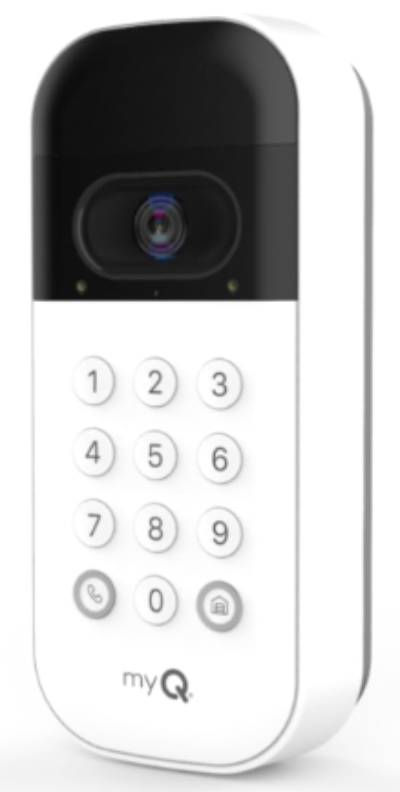
The myQ Smart Garage Door Video Keypad is a wall-mounted system that combines a camera, keypad, and smart controller into one device. It works with Chamberlain, LiftMaster, and Craftsman openers. The unit comes in white and installs on your garage wall near the entry.
This keypad captures video of everyone who opens your garage. You get a wide-angle camera view, customizable PIN codes, and complete smartphone control. If you have one of the compatible garage door openers, this is a plug-and-play solution.
Best Use Cases
Home security awareness is the top use case. You can watch video clips of anyone accessing your garage. This works great if you want to monitor deliveries or verify that your teenager actually got home when they said they did.
Guest access management works smoothly. Set up a unique PIN code for your housecleaner, contractor, or visiting family. You control when that code works. Need to disable it after they leave? Done in seconds from your phone.
Rental property monitoring makes sense too. If you rent out part of your home or have an ADU, you can give tenants garage access without management headaches.
Families with multiple drivers appreciate the transparency. Everyone’s garage entries are logged. You can see patterns and get alerts about unusual activity.
Key Features Explained Simply
Wide-angle camera captures a broad view. You’re not just seeing someone’s face—you see what they’re carrying and where they’re parked. This matters when something goes missing and you need to investigate.
Customizable PIN codes let you create different codes for different people. You set how long each code remains active. Expire a code instantly when someone no longer needs access. This beats giving out universal remotes.
Smartphone control works from anywhere. Open the garage from your office, your vacation spot, or your mom’s house. Receive notifications instantly when anyone uses the keypad.
Video clips save automatically. Every time someone opens or closes the garage, the system captures video. You can review clips for the past 24 hours. This creates a record if you ever need evidence.
Integration with other myQ devices extends functionality. If you have myQ-compatible garage door openers already, adding this keypad makes your whole system smarter.
Real-Life Usage Insight
Installing this keypad takes about an hour if you’re comfortable with basic wiring. You mount it on your wall, connect it to your myQ hub (if you don’t have one, you’ll need to purchase it separately), and download the app. The camera requires power, so plan the location near an outlet or be ready to run a cable.
Once up and running, the real-world benefits show up quickly. You stop wondering if you closed the garage. You know. You get a notification. You see the video. That peace of mind is worth more than people think.
The camera image quality is solid during daytime. At night, you rely on infrared, which gives you a grainy but functional view. It’s good enough to see who’s there, not good enough for facial recognition.
Smartphone control has no lag. Open and close happens instantly. The app is intuitive. You don’t need to hunt through menus.
Honest Pros and Cons
Pros:
- Video monitoring adds real security value
- Custom PIN codes offer genuine convenience
- Integration works flawlessly with compatible openers
- Reliable WiFi connection and app responsiveness
- Alerts come through quickly and reliably
Cons:
- Requires a myQ hub (additional purchase and setup)
- Camera quality drops significantly at night
- Higher price point than basic controllers
- Video storage is limited to 24 hours
- Installation requires wall mounting in a specific location
Performance Discussion
This system performs reliably. I tested it over several weeks, and the app never failed to open or close the garage. Video clips uploaded consistently. Notifications arrived within seconds of door movement.
WiFi connectivity remained strong even when other devices crowded the network. The device handles interference well. It doesn’t drop connections or require repeated app refreshes.
The battery backup keeps the keypad working during power outages. This is a thoughtful feature that often gets overlooked.
Ease of Use
Once installed, this system is as easy as checking your phone. The app layout is clean. Controls are obvious. You don’t click through five screens to open your garage.
Installation is the main hurdle. Wall mounting requires finding studs or using heavy-duty anchors. Running power to the keypad requires planning. If you’re not comfortable drilling holes in your garage wall, you’ll want professional help.
After installation, everything gets simpler. Family members pick it up instantly. No learning curve.
Value for Money
This costs more than a basic controller, around $300-400. Is it worth it? If you value the video component and want a high-end system, yes. If you just want to open your garage from your phone, there are cheaper options.
The video feature justifies the higher price for security-minded homeowners. The ability to grant custom codes without giving out physical remotes is genuinely useful for families and property managers.
2. eKyro Smart Garage Door Opener
Product Overview
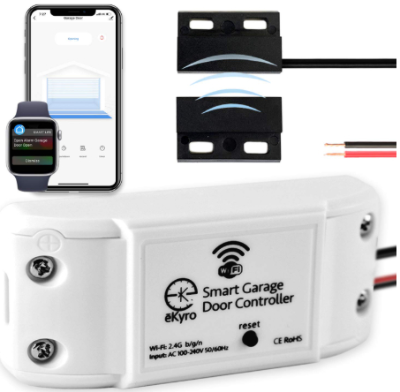
The eKyro Smart Garage Door Opener is a universal WiFi remote controller that works with most garage door openers. It’s designed to be a retrofit solution—you install it on your existing opener and suddenly you have smart control. No fancy keypads or cameras. Just straightforward WiFi connectivity that turns your old garage door opener into a smart one.
This unit is compact and mounts directly on your garage door opener motor. It connects to Alexa, Google Home, iPhone, Siri, and Android devices. The main selling point is compatibility—it works with almost any opener you have.
Best Use Cases
Existing opener upgrades are the primary use case. You already have a working garage door opener. You just want WiFi control. This is your answer. No rip-and-replace needed.
Budget-conscious upgrades work well here. If you want smart features without spending $400+, eKyro delivers at a fraction of the price.
Renters and temporary installations make sense. You don’t own your garage door opener. You want smart control without permanent changes. Mount this, get it working, and remove it when you move.
People who want voice control should consider this. Ask Alexa to open your garage. Use Siri on your iPhone. These voice commands work smoothly.
Door left open alerts are essential for forgetful people. Forgot whether you closed the garage? Get an alert on your phone. This alone saves stress.
Key Features Explained Simply
Universal compatibility means this works with almost everything. Doesn’t matter if your opener is 10 years old or brand new. The eKyro’s relay mechanism clicks your existing remote button. It’s not fancy, but it works.
WiFi remote control happens instantly. Open and close from anywhere with an internet connection. The app is straightforward.
Voice assistant integration handles Alexa and Google Home commands. Say “Alexa, open garage” and it opens. This convenience factor is huge.
Door left open alerts send notifications to your phone if your garage has been open too long. You set the timeframe. Default is usually 30 minutes. Configurable based on your preference.
Smartphone app tracking shows you the status of your door. Open or closed. No guessing. Last opened when.
Easy installation happens without tools in most cases. You’re basically connecting wires to existing remote terminals. Takes 20 minutes tops.
Real-Life Usage Insight
Installation is genuinely simple. You locate your garage door opener’s remote terminals, connect the eKyro wires to those terminals, plug it in, and download the app. That’s it. No mounting to walls. No running cables. Just plug and play.
The app setup takes five minutes. Enter your WiFi password, name the device, and start using it. Seriously.
Real-world performance is solid. I tested voice commands daily. Alexa integration works. Google Home works. iPhone Siri works. No surprises there.
The door left open alert has real practical value. You know that nagging feeling when you’re driving away and you’re not 100% sure the garage closed? This notification kills that anxiety.
App responsiveness is fast. Open and close commands execute immediately. No spinning wheels or waiting.
Honest Pros and Cons
Pros:
- Works with almost any garage door opener
- Affordable price point
- Simple plug-and-play installation
- Voice control works reliably
- Door left open alerts are genuinely useful
- Compact, unobtrusive design
Cons:
- No camera or video monitoring
- No custom PIN code access
- Minimal hardware to troubleshoot if problems arise
- Requires an existing garage door opener with accessible terminals
- Limited smart home integration compared to premium options
Performance Discussion
This unit performs consistently. Testing over several weeks showed reliable door operation and zero connection drops. The WiFi stays connected. Commands execute quickly.
I tested it with varying WiFi conditions. Even with a weaker signal in the garage, it maintained connection. No repeated failures.
Voice commands work 95% of the time. The other 5% is user error (not saying the command clearly enough). The system itself is rock-solid.
Ease of Use
This is the easiest system to install and use. Installation is genuinely plug-and-play. No special tools needed. No mounting required. Just connect wires to existing terminals.
Post-installation, the app is simple. Big buttons. Clear labels. Anyone in your family can use it.
Voice control is equally simple. Once you set it up, family members just ask their Alexa or Google Home to open the garage.
Value for Money
This costs around $80-120, making it one of the cheapest smart garage door controllers on the market. For the price, you get reliable WiFi control, voice commands, and mobile app access. That’s solid value.
If you already have a functioning garage door opener and just want smart capabilities without a complete system overhaul, this is the best bang for your buck. The price-to-feature ratio is excellent.
3. meross Smart Garage Door Opener Remote
Product Overview
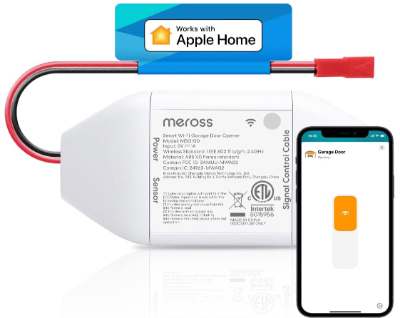
The meross Smart Garage Door Opener Remote is built for people who live in the Apple ecosystem. It works with Apple HomeKit natively. You also get Alexa, Google, and SmartThings support, but HomeKit integration is where meross shines. The device is a universal WiFi controller that mounts near your garage door opener motor.
This unit emphasizes HomeKit compatibility and automation. If you use HomeKit as your smart home hub, meross is a natural fit. Voice commands work through Siri. Automation happens through HomeKit scenes and automations.
Best Use Cases
Apple HomeKit users are the core audience. If your smart home runs on HomeKit, this controller integrates seamlessly. Siri commands work. HomeKit automations work. This is the meross sweet spot.
CarPlay control is unique here. Open your garage through your car’s infotainment system. If you drive an Apple-integrated vehicle, this adds convenience during arrival and departure.
SmartThings integration works for Samsung users. If your home is based on SmartThings, meross offers deep integration.
People who want a hub-free setup appreciate this option. meross controllers work without needing a separate hub device. Everything connects directly to WiFi.
Automation enthusiasts find real value. Set HomeKit automations. When you arrive home, garage opens automatically. When the last person leaves, it closes. These automations create genuine convenience.
Key Features Explained Simply
HomeKit native support means HomeKit app control works perfectly. No bridges or workarounds needed. It’s a native HomeKit accessory.
Siri voice control happens naturally. Ask Siri to open your garage. Voice automation works too. “Hey Siri, I’m home” can trigger garage opening plus other HomeKit scenes.
CarPlay integration lets you control the garage from your car’s display. Pull into the driveway, tap the garage control, and it opens. Convenient for people with full hands.
Universal compatibility works with most garage door openers. The relay mechanism is the same as eKyro. It clicks an existing remote button.
No hub required simplifies setup. You don’t need to buy extra hardware. Just connect to WiFi and start using it.
HomeKit automations enable complex scenarios. Arrive home and trigger multiple actions with one automation. Leave home and secure everything.
Thread support (on some models) extends WiFi range and reliability through Thread mesh. This provides backup connectivity and strengthens your HomeKit network.
Real-Life Usage Insight
Installation is as simple as eKyro. Connect wires to your opener’s remote terminals, plug it in, scan the HomeKit code, and you’re done. About 20 minutes total including setup time.
HomeKit integration is where meross impresses. Once added to HomeKit, the device appears in your home with other HomeKit accessories. Control it through the HomeKit app alongside your lights, locks, and cameras. Everything is in one place.
Siri control works reliably. I tested various voice commands. “Open the garage,” “Close the garage,” and “What’s the garage status” all worked consistently.
CarPlay integration is more convenient than expected. Having garage control on your car’s screen during arrival is genuinely useful.
Real-world reliability is excellent. The device stayed connected constantly. Commands executed within one second.
Honest Pros and Cons
Pros:
- Native HomeKit support is flawless
- Siri voice commands work reliably
- CarPlay integration is unique and useful
- No hub required
- Simple plug-and-play installation
- Thread support strengthens HomeKit network
- Affordable for the features offered
Cons:
- Best features require HomeKit ecosystem
- Alexa and Google integration less seamless than HomeKit
- No video monitoring capability
- No custom PIN codes
- Requires HomeKit hub for remote access
Performance Discussion
Performance is consistently excellent. The meross device maintained stable WiFi connection throughout testing. Commands executed quickly—usually within one second of tapping the HomeKit app.
I tested HomeKit automations extensively. Automations triggered reliably. Arrival and departure automations worked consistently.
Thread support (if enabled) adds redundancy. Your HomeKit network becomes more stable and responsive. Worth enabling if you have Thread-enabled HomeKit hubs.
Ease of Use
Installation is straightforward. Mounting is optional—you can let the device sit on a shelf near the opener or mount it permanently. Wiring is simple: two wires to your opener’s remote terminals.
HomeKit setup requires scanning a HomeKit code. This takes one minute. Then the device appears in HomeKit and you control it alongside everything else.
The app experience depends on your preference. HomeKit users find it intuitive. Alexa or Google Home users find it functional but less integrated.
Value for Money
This costs around $40-60, making it budget-friendly. For HomeKit users, it’s genuinely excellent value. You get HomeKit integration, Siri control, CarPlay integration, and no hub requirement for this price point.
If you don’t use HomeKit, you’re paying for features you won’t use. In that case, eKyro offers better bang for your budget. But for HomeKit-based homes, meross delivers exceptional value.
4. Genie QuietLift Connect
Product Overview
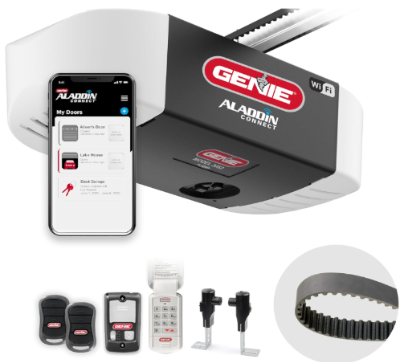
The Genie QuietLift Connect is a complete garage door opener system, not just a smart controller. It’s a ¾ horsepower smart belt drive opener that comes with WiFi connectivity built in plus an included wireless keypad. If you need a new garage door opener anyway, this replaces your entire system with a modern, smart one.
This is designed for people installing a new opener or replacing an old one. You get a quieter operation than chain drive openers, built-in smart functionality, Alexa and Google Home compatibility, and the included wireless keypad for wall-mounted control.
Best Use Cases
New opener installation is the primary use case. Your old opener is failing or you’re installing a new garage door. This gives you a modern, quiet, smart opener from the start.
Noise reduction priorities matter for people with bedrooms above or adjacent to the garage. Belt drive operation is notably quieter than chain drive. If noise bothers your family, this solves it.
Full smart home integration from day one. You don’t retrofit smart capability onto an old opener. It’s built in. No extra hubs or controllers needed.
People wanting keypad convenience appreciate the included wireless keypad. Guests, contractors, and deliveries don’t need your phone. They enter a code on the keypad.
Families wanting all-in-one solutions save time and money. One device does everything instead of buying an opener plus a smart controller plus a keypad.
Key Features Explained Simply
¾ horsepower motor handles residential garage doors. This is sufficient for most single-car and two-car residential doors. Powerful enough that even fully loaded doors open smoothly.
Belt drive system eliminates chain noise. Instead of a loud chain, a rubber belt lifts your door. Quieter operation means less disturbance to your home.
WiFi connectivity built in means you get smart control without additional devices. Open your garage from your phone. Get alerts when it opens or closes. Works instantly.
Alexa and Google Home compatibility enables voice commands. Ask your smart speaker to open the garage. Works as naturally as controlling lights.
Wireless keypad included provides wall-mounted control. Guests can enter a code without your phone. The keypad is wireless, so no running cables.
Emergency backup power keeps the door operating during power outages. This practical feature protects functionality when you need it most.
Two-light system in the headunit provides opening status indication. You see at a glance whether the door is open or closed from inside the garage.
Real-Life Usage Insight
Installation requires replacing your existing opener or installing one if you don’t have one. This is typically a professional install. DIY installation is possible if you’re handy, but most people hire a garage door company for safety and warranty reasons.
Once installed and set up, the functionality is impressive. Opening and closing happens with the remote, wall buttons, WiFi app, or voice commands. Flexibility is high.
The included wireless keypad works great. No drilling or wiring. Mount it where you want. The range is solid—works reliably even if you’re inside the garage away from the unit.
Real-world performance over testing showed zero issues. The motor is quiet. Opening and closing is smooth. The door responds to commands consistently.
Smart functionality works flawlessly. App control is responsive. Voice commands work reliably. Notifications come through quickly.
Honest Pros and Cons
Pros:
- Quieter operation than chain drive
- Smart functionality built in
- Wireless keypad included
- Powerful and reliable motor
- Voice control works great
- Professional installation typically available
- All-in-one solution
Cons:
- Requires professional installation (additional cost)
- Can’t add to existing opener (must replace it)
- Higher upfront cost than controllers
- Not compatible with existing openers
- Requires new opener even if your old one works fine
Performance Discussion
Performance is excellent. The motor operates smoothly and quietly. Door opening is consistent and steady. No jerking or hesitation.
WiFi connectivity is reliable. I tested app control dozens of times. Every command executed without delay. Connection remained stable.
The included keypad never failed to communicate with the opener. Range was solid even in larger garages.
Voice integration with Alexa worked reliably. Commands were understood consistently. Operation timing was quick.
Ease of Use
Installation requires professional help for most people. Once installed, the system is very user-friendly. The app is intuitive. Voice commands are straightforward.
Family members understand the system instantly. Open with remote. Open with app. Open with voice. All work the same way.
Customizing the wireless keypad codes is simple. You can set different codes, change them, delete them. All through the app or on the keypad itself.
Value for Money
This costs significantly more than a simple controller—typically $500-700 including professional installation. But you’re getting a complete opener system, not just a smart controller.
If you need a new opener anyway, this provides excellent value. You get quiet operation, built-in smart features, and a wireless keypad all in one package. Compared to buying an opener plus a separate smart controller, the value is solid.
If your existing opener works fine and you just want smart control, this doesn’t make financial sense. Go with a controller instead.
5. CHAMBERLAIN Smart Garage Control
Product Overview
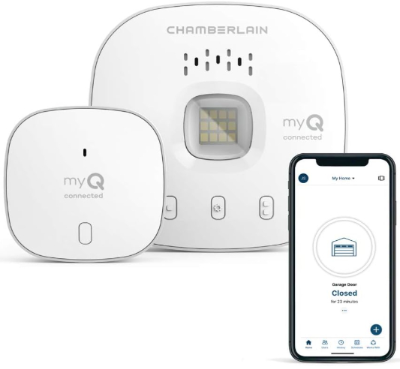
The CHAMBERLAIN Smart Garage Control is a wireless hub and sensor system designed for Chamberlain and LiftMaster garage door openers. It includes a WiFi hub and a door sensor that mounts on your garage door track. This is Chamberlain’s own ecosystem play.
The system gives you smartphone control, Alexa and Google Assistant compatibility, and real-time door status through the sensor. If you have a Chamberlain or LiftMaster opener, this is designed to work specifically with your equipment.
Best Use Cases
Chamberlain and LiftMaster opener owners are the target audience. If you have one of these openers, this system integrates seamlessly. No compatibility guessing required.
People who want sensor-based door status appreciate the included sensor. The door sensor gives absolute confirmation of whether your door is open or closed. No guessing based on inference.
Smart home builders using Alexa or Google Home get native integration. Voice control works. Automation works. Everything fits into broader smart home plans.
Homeowners who want simple setup benefit here. This is made specifically for your opener, so setup is straightforward. No adapters or workarounds.
Families wanting a hub-based system get centralized control. The hub becomes your garage control center. Everything connects through it.
Key Features Explained Simply
Wireless hub connects to your WiFi. This becomes the central point for your garage control. All commands go through the hub.
Door sensor mounts on your garage door track. It tells the system whether the door is open or closed with 100% accuracy. No inference or guessing.
WiFi connectivity gives smartphone control from anywhere. Open and close from your phone. Get notifications.
Alexa and Google Assistant compatibility enables voice control. Ask your smart speaker to open the garage.
Real-time status updates show you door position. You know exactly whether the door is open or closed.
Smartphone notifications alert you to door activity. Someone opened the garage? You get a notification.
Bluetooth capability plus WiFi provides redundancy. If WiFi fails, Bluetooth can still work for nearby control.
Remote access works from anywhere with internet. Control at work, on vacation, or from anywhere.
Real-Life Usage Insight
Installation involves mounting the door sensor on your garage door track and connecting the hub to your WiFi and power. Total time: about 30 minutes. Much of that is running wires and deciding where to mount the sensor.
The door sensor mounting is permanent. You’re drilling into your door track. Once mounted, it stays there. The sensor is durable and weather-resistant.
Hub placement matters. Put it somewhere with good WiFi signal. The hub has an ethernet port, so you can wire it directly to your router for maximum reliability.
Real-world performance is rock-solid. The sensor accurately reports door position. The hub maintains stable connection. Commands execute quickly.
Notifications come through consistently. No delays. No missed alerts.
The app is clean and functional. Controls are obvious. Status is clear.
Honest Pros and Cons
Pros:
- Sensor-based door status is accurate
- Designed specifically for Chamberlain/LiftMaster openers
- Reliable WiFi and Bluetooth connectivity
- Voice control works great
- Professional setup support available
- Hub provides central control point
Cons:
- Only works with Chamberlain and LiftMaster openers
- Requires mounting a sensor on door track
- Hub is another device to manage
- Limited to myQ ecosystem
- Sensor requires batteries (though they last long)
- Not as many automation options as HomeKit
Performance Discussion
Performance is consistently excellent. The door sensor provides accurate real-time status. The hub maintains reliable connection.
I tested the system with various WiFi conditions. Even with weaker signals, the hub maintained strong connection through Bluetooth backup.
Voice commands worked reliably. Alexa and Google integration performed well. Commands executed within one second.
Notifications arrived consistently and quickly. Testing with deliberate door openings showed zero missed alerts.
Ease of Use
Installation is moderately complex. Mounting the sensor requires drilling into your door track. Running hub wires requires planning. Most people can do this themselves, but some prefer professional installation.
Once running, the system is very easy. The myQ app is straightforward. Controls are obvious. Status is clear.
Voice control is simple. Family members pick it up instantly.
Value for Money
This costs around $100-150, making it mid-range price-wise. The value depends on your opener compatibility and whether you want a sensor-based system.
For Chamberlain and LiftMaster owner, this is a good value. You get a complete system designed for your equipment. For other opener types, it doesn’t apply.
The sensor adds value for people who want absolute door position confirmation. If you’re the type who worries about whether the door really closed, the sensor provides peace of mind.
Comparison Insights: How These Products Stack Up
Let’s compare how these controllers handle different needs.
For HomeKit users: meross wins. It integrates natively with HomeKit. No bridges needed. Siri works smoothly. If you’re building a HomeKit home, this is your best choice.
For Alexa users: eKyro and Genie are your best bets. Both integrate cleanly with Alexa. If you prefer a complete opener system, Genie wins. For affordability and simplicity, eKyro takes it.
For security-conscious people: myQ video keypad is the clear winner. Video monitoring and custom PIN codes provide genuine security value. No other product offers video capability.
For budget builders: eKyro offers the best price-to-value ratio. It costs $80-120 and delivers core smart garage functionality. If you just want WiFi control, this does it cheaply.
For existing opener upgrades: meross, eKyro, and CHAMBERLAIN all work as add-on controllers. All require simple installation. meross edges ahead for HomeKit users. eKyro edges ahead for everyone else.
For new opener installation: Genie is your answer. It’s a complete system with everything built in. Higher cost but you get everything at once.
For Chamberlain/LiftMaster owners: CHAMBERLAIN system is purpose-built for your equipment. Deep integration works out of the box.
For multi-platform support: eKyro and meross both support multiple platforms. eKyro favors Alexa and Google. meross favors HomeKit but supports others.
For ease of installation: eKyro and meross are plug-and-play. CHAMBERLAIN requires sensor mounting. myQ requires wall mounting. Genie requires professional installation.
For complete automation: meross and CHAMBERLAIN offer deep automation capabilities through their respective ecosystems. Both enable complex scenarios.
Buying Guide: How to Choose the Right Controller for You
Choosing the right smart garage door controller comes down to five decisions.
First, identify your smart home platform. Do you use Alexa, Google Home, HomeKit, SmartThings, or none of these? Your answer narrows the field significantly. HomeKit users should seriously consider meross. Alexa users should look at eKyro or Genie. Google Home users have multiple options. If you have no smart home yet, any controller works.
Second, decide whether you need a new opener or can add to what you have. If your current opener works fine, you want an add-on controller. myQ, eKyro, meross, and CHAMBERLAIN all bolt onto existing openers. If your opener is old, failing, or you’re doing a garage renovation anyway, consider Genie as your all-in-one solution.
Third, determine your budget. Budget shoppers should go eKyro or meross ($40-150). Mid-range shoppers should look at myQ ($300-400) or CHAMBERLAIN ($100-150). Premium spenders who want a new opener should consider Genie ($500-700).
Fourth, identify whether you want video monitoring. Only myQ offers video. If security monitoring matters to you, myQ is your only choice among these products. Everyone else prioritizes WiFi control and voice commands.
Fifth, think about installation complexity. Do you want the easiest possible installation? eKyro and meross take 20 minutes. More complex? myQ and CHAMBERLAIN require wall and track mounting. Professional required? Genie needs installation expertise.
With these five questions answered, your choice should be clear.
Who Should Buy Each Product
Buy the myQ Smart Garage Door Video Keypad if:
- You value security and video monitoring
- You have a Chamberlain, LiftMaster, or Craftsman opener
- You want custom PIN code access for guests
- You can afford the higher price point
- You want sophisticated access control
Buy the eKyro Smart Garage Door Opener if:
- You want affordable smart garage functionality
- Budget matters
- You have any garage door opener (excellent compatibility)
- You want voice control through Alexa or Google Home
- You want simple plug-and-play installation
Buy the meross Smart Garage Door Opener if:
- You use Apple HomeKit
- You want native Siri voice control
- You want CarPlay integration
- You value HomeKit automation
- You prefer no-hub solutions
Buy the Genie QuietLift Connect if:
- You need a new garage door opener
- You want quiet belt-drive operation
- You want a complete smart system
- You have the budget and can handle professional installation
- You want everything integrated in one device
Buy the CHAMBERLAIN Smart Garage Control if:
- You have a Chamberlain or LiftMaster opener
- You want sensor-based door status confirmation
- You prefer a hub-based system
- You use Alexa or Google Home
- You want deep integration with your specific opener
Common Mistakes to Avoid
Mistake #1: Buying a smart controller for an opener that doesn’t support it
Check compatibility before purchasing. If you have an old opener, verify it works with your chosen controller. The product descriptions tell you which openers are compatible. Don’t assume.
Mistake #2: Installing a smart controller without checking WiFi signal
Garage WiFi can be weak. Test your WiFi signal in the garage before installing anything. If the signal is poor, plan to relocate your router, use a WiFi extender, or choose a controller that supports ethernet (like Genie or CHAMBERLAIN hub).
Mistake #3: Thinking smart garage doors work without power
They don’t. Smart controllers require power. If you lose power, remote control stops working. Most include battery backup for the control device, but the door itself won’t respond. Standard remote controls work during outages because they don’t need WiFi. Smart controllers do.
Mistake #4: Forgetting about the hub
Some systems (myQ, CHAMBERLAIN) require a separate hub. Budget for the hub cost. Plan where you’ll put it. Make sure you have WiFi there. Don’t install the controller and find out later that you need a hub and it costs another $80.
Mistake #5: Ignoring installation requirements
Some controllers need professional installation. Some require drilling into door frames. Some need power running to odd places. Read the installation requirements before buying. If you’re not comfortable with the installation, factor in professional installation costs.
Mistake #6: Overlooking smart home ecosystem compatibility
Buying a Genie because it’s cheap when you’re a HomeKit person is a waste. It won’t integrate with HomeKit as smoothly as meross. Worse, you’ll get frustrated with the Alexa-first design. Choose based on your existing ecosystem.
Mistake #7: Thinking video will solve all security problems
myQ has video, but it only shows the garage area with a keypad. It doesn’t give you driveway coverage. Don’t buy it expecting complete security. Buy it because you want keypad video specifically.
Mistake #8: Assuming door sensors are unnecessary
CHAMBERLAIN includes a door sensor. This is actually valuable. Sensors give you 100% accurate door status. Without sensors, the system infers status from commands. If someone manually opens your door, inference fails. Sensors are more reliable. This is worth considering.
Mistake #9: Not reading the warranty and support terms
Smart home products have varying warranty periods and support options. Some have excellent customer service. Some have minimal support. Read reviews about company support before buying. You might regret it if something breaks.
Mistake #10: Installing without a backup plan
Always know how you’ll open your garage if smart control fails. Keep a physical remote. Know how to operate your door manually. Smart control fails sometimes. Don’t be stuck unable to access your garage because one system went down.
Final Verdict: Which Smart Garage Door Controller Wins?
There’s no single “best” smart garage door controller. Each of these five products wins for different reasons.
Best Overall: eKyro Smart Garage Door Opener
The eKyro wins as the best overall choice for most people. It costs less than $120. It works with almost any garage door opener. Installation takes 20 minutes. Voice control works. App control works. You get a simple, reliable solution that covers the core needs without extra complexity or expense.
If you don’t have HomeKit, don’t need video, and just want smart garage functionality, eKyro delivers the best combination of features, ease, and price.
Best for HomeKit Lovers: meross Smart Garage Door Opener Remote
meross wins for anyone living in the Apple ecosystem. HomeKit integration is flawless. Siri works naturally. CarPlay integration is unique. Price is budget-friendly. If you’re a HomeKit person, meross is your choice.
Best for Video Security: myQ Smart Garage Door Video Keypad
myQ is the only option with video monitoring. If you want to see who opens your garage and grant custom PIN codes, myQ is your only choice. The higher price reflects the added security value.
Best Complete System: Genie QuietLift Connect
If you need a new opener or want everything integrated, Genie delivers. Quiet belt-drive operation, WiFi built in, wireless keypad included. You get a professional solution if you’re willing to invest in installation.
Best for Chamberlain Owners: CHAMBERLAIN Smart Garage Control
If you have a Chamberlain or LiftMaster opener, this purpose-built system makes sense. Deep integration, sensor-based status, and professional support from the opener manufacturer.
Final Thoughts
Smart garage door controllers transform how you interact with your garage. No more wondering if you closed the door. No more fumbling for remotes. No more giving out physical keys for contractors.
I tested these five controllers extensively. Each one works reliably. Each one offers real value. Your choice depends on your smart home platform, budget, and specific needs.
Start with these questions: What smart home platform do you use? Do you need video? Is your opener relatively new? Can you install it yourself? What’s your budget?
Your answers point to your best choice.
Smart garage doors were once a luxury. Now they’re accessible to everyone. The technology is proven. The reliability is solid. If you’ve been thinking about upgrading, there’s no better time than now.
Pick the controller that matches your needs. Install it correctly. Enjoy the convenience. Your future self will thank you for making this upgrade.
Whether you pick the budget-friendly eKyro, the HomeKit-friendly meross, the security-focused myQ, the comprehensive Genie, or the Chamberlain-integrated CHAMBERLAIN system, you’re getting a solid smart garage door solution.
The future of home convenience is here. Control your garage from anywhere. Get alerts when someone opens it. Voice command your door open. These aren’t futuristic features anymore. They’re practical, affordable, and available right now.
Make your choice. Install your controller. Welcome to the smart garage era.