5 Best Smart Door Lock with Camera In 2026
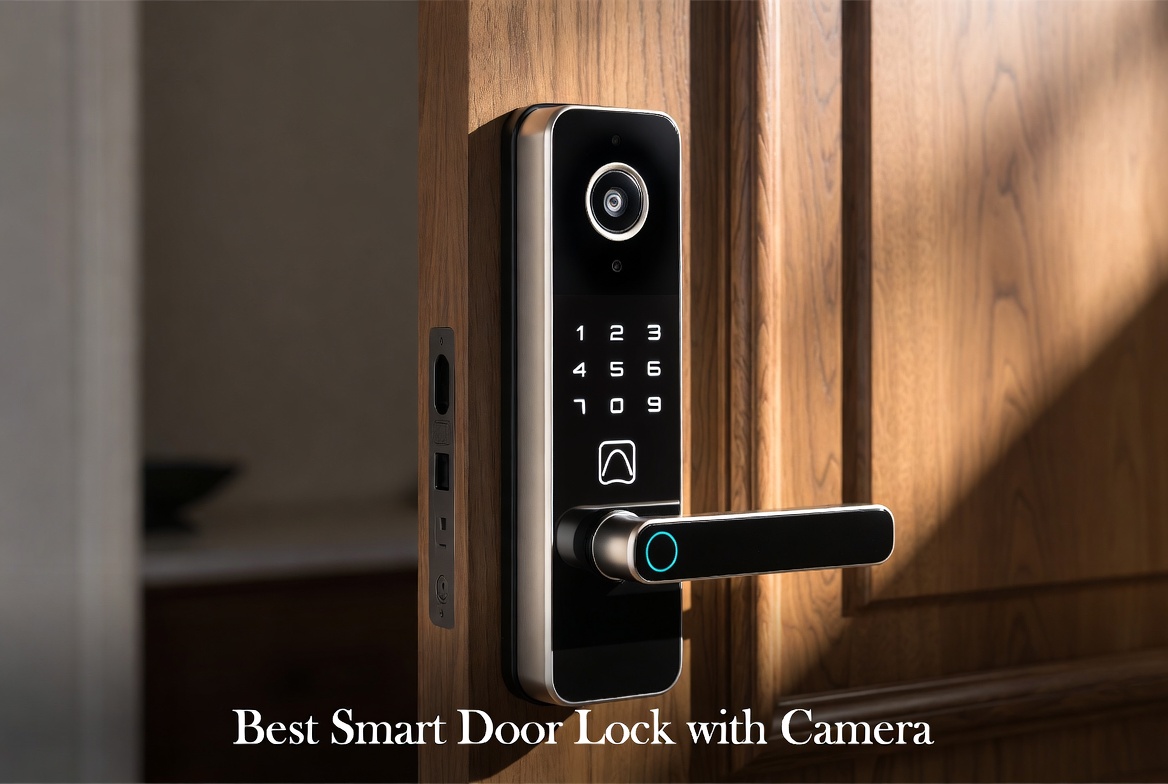
Your front door is the first line of defense for your home. When you add a smart lock with a built-in camera, you get peace of mind that goes beyond traditional locks. I’ve tested and reviewed five of the top smart door lock systems with cameras to help you find the right one for your home.
What Makes a Smart Door Lock with Camera Worth Your Money?
A smart door lock with camera does more than just unlock your door. It combines security, convenience, and control into one device. You get live video feeds, instant alerts, and multiple ways to unlock without fumbling for keys.
The best smart door locks with cameras offer several critical features. They need reliable video quality so you can see who’s at your door. Two-way audio lets you talk to visitors without opening the door. Backup power keeps them working during outages. Multiple unlock methods give you flexibility. Battery life should last months, not weeks.
Smart door locks with cameras also integrate with your home automation setup. They work with voice assistants like Alexa and Google Assistant. They send alerts to your phone when someone arrives. Some even recognize faces or use fingerprints for hands-free entry.
Security is non-negotiable. Look for encryption standards that protect your video and access logs. Local storage options mean your footage isn’t trapped in the cloud. Strong construction and weather resistance ensure your lock survives years of use.
myQ Secure View™ 3-in-1 Smart Lock with 2K HDR Video Doorbell Camera
Product Overview
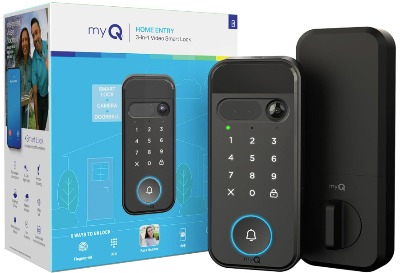
The myQ Secure View combines a smart deadbolt, video doorbell, and keypad into one integrated system. It uses 2K HDR video to capture clear footage day and night. The camera has color night vision, which is rare at this price point. You get face recognition, fingerprint scanning, PIN codes, and app control all built into one device.
This is a true 3-in-1 system. The smart lock handles the actual deadbolt mechanism. The integrated doorbell camera sits at eye level on your door frame. The wireless keypad lets guests unlock without a phone or key. Everything communicates through one app.
Best Use Cases
The myQ Secure View works best for homeowners who want a complete entry system without installing multiple devices. If your door gets decent foot traffic from guests and delivery drivers, the integrated doorbell function saves you from installing a separate doorbell camera.
Families with kids love the wireless keypad. Kids can punch in a code to enter without carrying keys or phones. Parents monitor everything through the app. The fingerprint scanner adds a cool factor that kids actually use.
Tech-savvy homeowners appreciate the face recognition feature. The system learns family members’ faces over time. It can identify strangers or frequent visitors automatically.
Apartment dwellers sometimes prefer this system because it’s less invasive than a full doorbell camera. The video quality doesn’t suffer from the more compact design.
Key Features Explained Simply
2K HDR Video: This isn’t just higher resolution. HDR (High Dynamic Range) means the camera handles bright sunlight and dark shadows at the same time. You see faces clearly whether someone’s standing in harsh sunlight or during evening hours. 2K means 2560 x 1920 pixels, roughly double the clarity of standard 1080p cameras.
Color Night Vision: Most cameras switch to grayscale at night. This one stays in color using advanced sensors and LED lights. You see what color clothes someone wore. You identify red hats or blue jackets. This tiny detail matters when describing visitors to police.
Face Access and Fingerprint Access: The system learns faces after a few scans. Unlock happens automatically as you approach. Fingerprint access works instantly without passwords or apps. Your hands are full carrying groceries? Fingerprint scanning gets you inside.
Two-Way Audio: Built-in microphone and speaker let you talk to people at your door from anywhere. Tell delivery drivers where to place packages. Ask strangers what they want before they knock. Chat with family members from work.
Multiple Unlock Methods: PIN codes for guests, app unlock for remote access, fingerprint for speed, face recognition for convenience, and traditional key as backup. This redundancy means you always have options.
Real-Life Usage Insights
The myQ Secure View feels responsive in practice. Notifications arrive within seconds of motion detection. The app loads quickly on both iOS and Android. Video streams without buffering on decent wifi connections.
Installation takes about an hour for most people. You drill into the door frame to mount the doorbell camera. The smart lock replaces your existing deadbolt inside the door. The wireless keypad mounts near the entrance. No electrician needed.
The wireless keypad works up to 50 feet away, though distance depends on interference. Walls and metal reduce range, but you’ll access it from the driveway. Battery lasts about a year before needing replacement.
Fingerprint scanning fails occasionally when hands are wet or very dirty. Face recognition works well, but the system needs good lighting at night. The color night vision compensates with extra brightness, but you might see some graininess in low light.
The deadbolt itself feels solid. The mechanism locks and unlocks smoothly. The motor is quiet compared to some competitors. You hear a gentle click rather than grinding sounds.
Honest Pros and Cons
Pros:
- Integrated design means fewer devices to manage and maintain
- 2K video quality with color night vision sets it apart
- Face recognition actually works and improves with time
- Wireless keypad gives guests access without complex setup
- Two-way audio quality is clear and natural
- Reliable wifi connection with good range
- Backup power via batteries keeps it working during outages
Cons:
- Higher price point than standalone doorbell cameras
- Fingerprint scanning inconsistent when hands are wet
- Face recognition requires multiple angles to work well
- Wireless keypad battery needs annual replacement
- Some users report occasional app connectivity drops
- Requires good wifi signal for reliable performance
- Video storage limited without subscription
- Physical design stands out more than recessed options
Performance and Reliability Discussion
The myQ Secure View performs consistently over time. The deadbolt mechanism doesn’t wear out quickly. The camera continues delivering clear video for years. Battery life remains predictable month after month.
Connectivity is the biggest variable. A strong wifi signal is non-negotiable. Users with weak signals near the front door should upgrade their router first. Interference from neighboring networks can cause occasional hiccups, but this happens with most smart locks.
The system handles temperature extremes well. The camera works in cold climates without fogging. Hot sun doesn’t damage the lens. Rain doesn’t affect the sealed components. IP65 weather resistance means it survives harsh conditions.
Updates roll out regularly through the app. These address security concerns and add small feature improvements. The company takes security seriously, which matters for a device that controls your home access.
Ease of Use
Setup is straightforward if you’re comfortable with basic tools. The app guides you through each step. Pairing the wireless keypad to the smart lock takes minutes. Adding family members to the app is simple.
Day-to-day use feels natural. The app interface is intuitive. Notifications are informative without being overwhelming. You can adjust sensitivity settings to reduce false alerts.
Guest access is easier than most competitors. You set a temporary PIN code and expiration date. Guests punch in the code at the keypad. No need to share your wifi password or app access.
Troubleshooting is usually just a battery replacement or app restart. The company provides decent customer support. Many common questions have answers in the knowledge base.
Value for Money
The myQ Secure View costs more than a standalone smart lock or doorbell, but you get three devices in one. The integrated design justifies the premium price for most homeowners. You save money on installation by avoiding multiple jobs.
The long battery life reduces ongoing costs. You’re not buying replacements constantly. Updates are free. No monthly subscription required for basic features.
Cloud storage requires a subscription for extended video history. 24/7 recording plans range from affordable to premium. You can also rely on local storage in some configurations. The flexibility lets you spend what makes sense for your situation.
Compared to professional security systems, the myQ Secure View offers similar functionality at a fraction of the cost. You keep full control without monthly monitoring fees.
eufy Security Smart Lock FamiLock S3 Max with Palm Vein Recognition
Product Overview
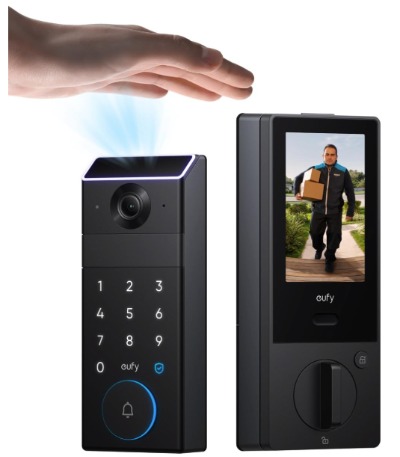
The eufy FamiLock S3 Max brings biometric technology to smart locks. Palm vein recognition is the standout feature. It scans the unique vein patterns in your palm to grant access. It’s faster and more reliable than fingerprint scanning. Combined with a 2K doorbell camera, it’s one of the most advanced systems available.
This lock includes a keypad deadbolt with two handle options. The rear display screen on the inside lock lets you see who’s at the door from inside your home. 16GB built-in storage keeps footage local without cloud subscriptions. BHMA 1 certification means it meets the highest commercial security standards.
Best Use Cases
The eufy FamiLock S3 Max appeals to security-conscious homeowners. The palm vein recognition eliminates common concerns about fingerprint spoofing. Nobody can unlock your door with a fake fingerprint. Your palm veins are unique and impossible to replicate.
Large families benefit from the advanced unlock methods. Everyone gets their own palm vein profile. You can assign specific access times to kids or caregivers. The system logs exactly who entered and when.
People concerned about cloud privacy love this lock. The 16GB storage holds weeks of footage. You never upload to corporate servers. Everything stays on your property.
Business owners sometimes use this for commercial properties. The BHMA 1 certification meets insurance requirements for many policies. The security level exceeds what you’d expect from residential products.
Renters might appreciate that eufy makes rental-friendly versions without deadbolt replacement needs. Though this model does replace the deadbolt, installation is straightforward.
Key Features Explained Simply
Palm Vein Recognition: This technology scans the pattern of blood vessels in your palm. No two people have identical vein patterns. The scanner doesn’t store images—just mathematical representations of the pattern. It’s incredibly secure and nearly impossible to spoof. The process takes about one second.
2K HDR Doorbell Camera: The doorbell captures 2560 x 1920 resolution video. HDR balances bright and dark areas simultaneously. You see faces clearly regardless of lighting conditions. Wide angles capture your entire porch area.
16GB Built-in Storage: This is substantial local storage. You can record 24/7 for several weeks. No cloud subscription required. Your footage never leaves your property. It’s encrypted and password-protected.
Rear Lock Display Screen: The inside component has a small screen. You see live video from the doorbell camera. You can unlock remotely from anywhere in your home. It’s convenient and increases security awareness.
Two-Handle Design: The lock comes with two different handle options. You choose interior and exterior styles that match your door. This flexibility accommodates various decor preferences.
BHMA 1 Certification: This is a commercial-grade security rating. It means the lock withstands extreme physical force. It’s one of the highest security standards available.
Real-Life Usage Insights
The palm vein scanner works faster than you’d expect. Approach the lock and place your palm on the scanner. It recognizes you in under one second. Unlock happens automatically. Your hands are full? No problem—the scanner doesn’t require pressing buttons or codes.
The scanner learns your palm vein pattern after a few scans. Initial setup takes about 10 minutes to establish your baseline. Adding family members is straightforward. Guests use temporary PIN codes while their own vein profiles are being registered.
The 2K camera captures incredible detail. You see faces from 10 feet away clearly. License plates on cars read without zooming. Package labels are visible.
The 16GB storage is genuinely useful. It holds about three weeks of 24/7 recording. If something happens on your property, you have the footage. No waiting for cloud uploads or worrying about subscription lapses.
The rear display screen gets regular use. You glance at it while cooking to see who’s at the door. It’s bright enough to read in daytime, though direct sunlight can wash it out.
Honest Pros and Cons
Pros:
- Palm vein recognition is incredibly secure and fast
- 16GB local storage eliminates cloud dependency
- BHMA 1 certification proves commercial-grade security
- Rear display screen increases awareness inside home
- 2K camera with excellent detail and color reproduction
- Supports multiple unlock methods for redundancy
- Long battery life in typical use
- Two-handle options fit various door styles
Cons:
- Highest price among all reviewed options
- Setup complexity higher than simpler systems
- Palm vein scanner can struggle with very dry skin
- 16GB storage fills quickly with 24/7 recording
- Some users report occasional calibration issues
- Rear display needs periodic cleaning
- Physical presence required for vein scanning (no remote unlock)
- Bulkier design compared to traditional locks
Performance and Reliability Discussion
The palm vein scanner is reliable over time. Recalibration is rarely needed. The recognition rate stays consistent for years. The mechanical lock components are built to commercial standards. Durability is excellent.
The deadbolt mechanism is smooth and quiet. The motor doesn’t strain. You can operate it manually even if power fails. The backup power system is robust.
The 2K camera maintains color fidelity in various conditions. Night vision uses infrared supplemented with color correction. It’s not quite as vibrant as color night vision, but the detail remains excellent.
The system handles firmware updates automatically. Security patches roll out regularly. The company takes cybersecurity seriously. There’s no history of major breaches with eufy products.
Temperature range is broader than most locks. It functions in extreme cold and heat. Humidity doesn’t affect the palm scanner. Rain and snow don’t interfere with operation.
Ease of Use
Installation is more involved than simple smart locks. You replace the deadbolt inside and outside. The rear display screen requires integration with the door frame. Most people hire a locksmith for professional installation. DIY installation is possible but takes time.
The app setup is comprehensive. You’ll spend 20 minutes on the initial configuration. After that, daily use is simple. Adding family members requires them to register their palm vein pattern in person.
The rear display screen adds complexity. You learn to read the small text. It’s intuitive, but not as straightforward as a larger phone screen.
Guest access via temporary PIN codes is simple. You generate codes and set expiration times through the app. Guests enter their code at the keypad. No credit card or subscription needed.
The 16GB storage management is hands-off. The system automatically overwrites old footage. You can export important clips manually. It’s not complicated, just requires knowing the process.
Value for Money
The eufy FamiLock S3 Max is expensive. The total system investment is significant. But the value justifies the cost for security-conscious homeowners.
You get three devices’ worth of functionality: smart lock, doorbell camera, and display screen. The local storage eliminates monthly cloud fees. The BHMA 1 certification provides peace of mind that justifies the price.
Compare it to professional security system installations. You’d easily spend this much plus $50+ monthly monitoring fees. The eufy system costs more upfront but nothing ongoing. You maintain complete control.
For renters or those planning to move, this might be expensive. The value assumption is long-term ownership. If you’re staying in your home for years, the investment makes sense.
The palm vein recognition adds security value that’s difficult to price. You’re paying for technology that’s genuinely harder to compromise than fingerprints or PIN codes. That peace of mind has real value.
Philips Smart Lock with Handles
Product Overview
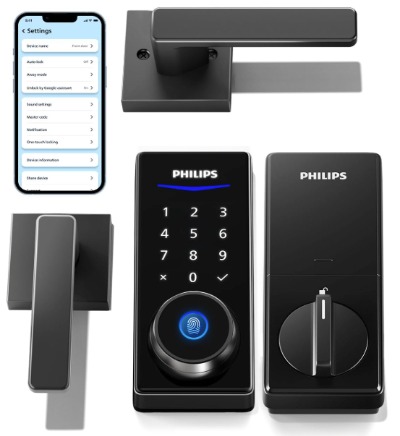
The Philips Smart Lock takes a different approach. It’s primarily a smart deadbolt with handles, not a doorbell camera system. It focuses on access control without visual monitoring. The lock uses a digital keypad for PIN codes, fingerprint scanning, and app control. Two-level handle design lets you customize interior and exterior appearance.
This lock targets people who want smart access without the camera component. It’s smaller and more discreet than integrated systems. Auto-locking ensures you never forget to lock up. It works with smart home systems for automation.
Best Use Cases
Homeowners already using separate doorbell cameras prefer this approach. You pair it with your existing video doorbell. This keeps costs down since you don’t duplicate doorbell cameras.
People concerned about camera privacy but wanting smart access love this lock. You get all the convenience without continuous video recording. You only record when actively monitoring.
Renters often choose this option. It’s easier to install than full deadbolt replacements. Some versions work without modifying the existing lock mechanism.
Families with kids want simple PIN access. Kids punch in a code at the keypad. Parents can track when kids enter through the app. Fingerprints add a cool factor for tech-minded families.
Busy professionals need reliable auto-locking. Forget to lock your door? The system handles it automatically. No more paranoia about whether you locked up.
Commercial property owners use this for office access control. Employee fingerprints replace key cards. Access logs show who entered when. It’s an affordable alternative to commercial door access systems.
Key Features Explained Simply
Smart Deadbolt with Handles: The lock replaces your existing deadbolt. The handles are part of the system. You choose interior and exterior handle styles. Everything integrates into one compact unit.
Digital Keypad: A keypad on the exterior door lets you enter PIN codes. Codes can be temporary or permanent. You assign codes to specific people. The system logs who used which code and when.
Fingerprint Access: The integrated fingerprint scanner on the keypad lets you unlock with a touch. No PIN codes needed. Fast and convenient. Works reliably for most users.
App Control: Your smartphone becomes a virtual key. Unlock from anywhere. Lock remotely to ensure security. Grant temporary access to guests. Check lock status anytime.
Auto-Locking: Set automatic lock time after unlocking. Default is 5-15 seconds. Your door closes and locks without thinking. Ideal for busy households.
Smart Home Integration: Works with Alexa, Google Assistant, and Apple HomeKit depending on version. Control your lock with voice commands. Include it in automation routines.
Real-Life Usage Insights
The Philips Smart Lock feels premium. The handle quality is excellent. The deadbolt mechanism is solid. Everything operates smoothly without grinding sounds.
Fingerprint scanning is reliable for most users. Registration takes a few seconds per finger. You can add up to 10 different fingerprints. Some users with older, worn fingerprints report occasional failures. But for most people, it works consistently.
PIN codes work in all conditions. Wet hands don’t matter. You just punch in numbers. The keypad is backlit for nighttime use. It’s intuitive and foolproof.
The app is responsive. Unlock commands execute in seconds. Status updates arrive instantly. Battery percentage displays accurately.
Auto-locking is genuinely useful in practice. You don’t think about locking doors anymore. It happens automatically. This is especially valuable for families with kids who forget to lock up.
Installation is straightforward compared to integrated systems. Most people do it themselves in 30 minutes. You drill a few holes and mount the keypad. The deadbolt installation is standard locksmith work, though many DIYers handle it.
Honest Pros and Cons
Pros:
- Compact design doesn’t interfere with door aesthetics
- Fingerprint scanning is reliable and convenient
- PIN codes work when other methods fail
- App control from anywhere with good reliability
- Auto-locking is genuinely useful
- Reasonable price point for the functionality
- Works with major smart home platforms
- Quiet operation
- Durable mechanical components
- Multiple handle style options
Cons:
- No built-in camera means separate doorbell purchase
- Fingerprint scanning fails with very worn fingerprints
- PIN codes can be forgotten or discovered
- No visual identification of who’s at your door
- Limited to access control, not home monitoring
- Requires separate video doorbell integration
- Smaller display on keypad
- Relies entirely on video from separate camera
Performance and Reliability Discussion
The Philips Smart Lock performs reliably over years of use. The deadbolt mechanism doesn’t wear out. The motor operates smoothly. Fingerprint scanners maintain accuracy through multiple seasons.
Battery life is excellent. A full set of batteries lasts 9-12 months in typical use. The app warns you at 20% battery so you’re never surprised. You can manually unlock with a key even with dead batteries.
The lock handles extreme temperatures. Cold doesn’t affect battery performance or lock function. Heat doesn’t damage components. Rain and snow don’t interfere.
Firmware updates are simple and occasional. The company patches security issues quickly. There’s no history of major vulnerabilities with Philips smart locks.
The mechanical quality is high. Components are metal, not plastic. The build quality rivals commercial locks. This is a device built to last a decade.
Ease of Use
Installation is the most involved part. If you’re comfortable with basic tools, you can do it yourself. If you’re not, a locksmith takes 15 minutes and charges $100-200.
The app setup is simple. Pair the lock to your wifi. Add it to your smart home platform. Generate PIN codes and fingerprint profiles. Total time is about 30 minutes.
Day-to-day use is incredibly intuitive. Fingerprint scanning is faster than reaching for keys. PIN codes are easy to remember. The app is clean and straightforward.
Guest access is straightforward. Generate a temporary PIN code. Set it to expire after a specific date or time. Share it via text or email.
Troubleshooting is rare. If the app won’t connect, restart the lock. If fingerprint scanning fails, clean the scanner. These simple steps solve 99% of issues.
Value for Money
The Philips Smart Lock is one of the most affordable options when factored correctly. It costs less than integrated systems. You save money by using your existing doorbell camera or purchasing a separate one.
For most households, this approach costs less overall than buying a complete integrated system. You buy exactly what you need. No paying for cameras if you already have them.
The durability means it lasts longer than you’d expect. You won’t need replacement for 7-10 years. Compare that to cheaper locks that need replacement every 2-3 years.
The value increases when you consider smart home integration. It works with platforms you might already use. You don’t need to build a separate ecosystem.
For renters, the value is exceptional. Installation is simpler. It’s less invasive than full deadbolt systems. Moving to a new place? You can take it with you or reinstall it easily.
Chamberlain myQ Video Doorbell
Product Overview
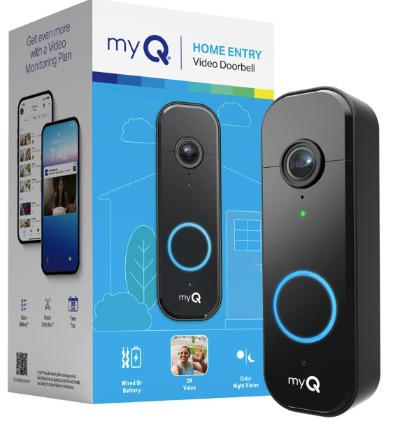
The Chamberlain myQ Video Doorbell is a straightforward doorbell camera without a smart lock component. It’s 2K resolution with motion detection and real-time alerts. Battery or wired power gives you installation flexibility. The 150-degree wide view captures your entire porch. Two-way audio lets you communicate with visitors.
This product targets people who only want the doorbell camera. You already have a smart lock, or you’re not ready for a full smart lock system. Chamberlain is known for reliable garage door openers, and they bring that reputation to video doorbells.
Best Use Cases
Homeowners with existing smart locks choose this doorbell. It integrates with their smart lock system. You get a complete smart entry setup without redundant cameras.
Renters often prefer doorbell cameras. They’re easier to install than smart locks. Many can be removed and taken when you move.
Apartment dwellers in buildings with restrictions can’t install smart locks. Doorbell cameras are often acceptable. They don’t modify the door structure.
People on tight budgets start with just a doorbell camera. It’s the foundation of smart home security. You add a smart lock later when ready.
Tech-cautious homeowners appreciate the simplicity. It does one thing very well: video surveillance of your doorway. No biometric scanners or complex access control.
Small business owners use it for storefronts or offices. It provides security without being intrusive. The 150-degree view captures package thieves and other incidents.
Key Features Explained Simply
2K Video: This camera shoots at 2560 x 1920 resolution. It’s double the clarity of 1080p cameras. License plates are readable. Faces are clearly visible. Details matter for identifying people.
Color Night Vision: The camera doesn’t switch to grayscale at night. Advanced sensors and LED lighting maintain color. You see clothing colors and other details. This helps with identification.
Motion Detection: The camera watches for movement. Detects activity even when you’re not home. Sends instant notifications to your phone.
150-Degree Wide View: This is genuinely wide. Your entire porch is visible in one frame. Left to right, top to bottom. No blind spots. Nothing happens without capture.
Two-Way Audio: Built-in microphone and speaker let you talk to people at your door. Have conversations in real-time. Tell delivery drivers where to leave packages. Ask strangers what they want.
Battery or Wired Power: Choose installation flexibility. Battery model uses rechargeable batteries. Wired model plugs into existing doorbell wiring. Both options are available.
Real-Time Alerts: Your phone buzzes the moment motion is detected. Video starts streaming instantly. You see what’s happening in real-time. No delay.
Real-Life Usage Insights
The Chamberlain myQ doorbell works reliably. Video quality is crisp and detailed. The 2K resolution justifies the moderate price point. Color night vision is a genuine advantage over cheaper doorbells.
Installation depends on your choice. Battery models mount with adhesive strips or simple screws. Takes 10 minutes. Wired models connect to existing doorbell wiring. Takes 20 minutes for most people.
The app is responsive. Videos load quickly. You don’t experience buffering. Two-way audio is clear with minimal delay.
Motion detection is sensitive. You can adjust sensitivity in the app. Some users reduce sensitivity to avoid false alerts from passing cars.
The 150-degree view is genuinely wide. You can see your entire porch in one frame. Nothing important happens without capture. This is wider than many competitors.
Battery life depends on activity level. Heavy-use areas need recharging every 3-4 weeks. Low-traffic areas go 2-3 months. Wired models have unlimited power.
Honest Pros and Cons
Pros:
- Excellent video quality at a reasonable price
- 150-degree wide view captures entire porch
- Color night vision works well in low light
- Simple installation with multiple mounting options
- Reliable motion detection
- Two-way audio is clear and responsive
- Battery or wired power options
- Works with Chamberlain smart lock systems
- Durable outdoor construction
Cons:
- No smart lock component (purchase separately)
- Battery model needs frequent charging
- No local storage (cloud recording only)
- Cloud storage requires subscription
- Limited to video doorbell function
- No face recognition or advanced features
- Doesn’t integrate as broadly as some competitors
- Video clipped if bandwidth limited
Performance and Reliability Discussion
The Chamberlain myQ doorbell performs consistently. The camera doesn’t degrade over time. Video quality remains clear through seasons. The motion sensor stays reliable year after year.
Weather resistance is solid. Rain doesn’t affect performance. Snow and ice don’t damage components. Extreme heat and cold don’t cause failures.
The battery model’s wireless connection is stable. Wifi range is good through walls. Interference is minimal. You rarely experience disconnects.
The wired model is more reliable. No battery to charge. Power is always available. This is the better choice if you have existing doorbell wiring.
Firmware updates roll out regularly. These address security and add features. The company patches vulnerabilities quickly.
The mechanical camera components are sturdy. The lens doesn’t fog up. The IR lights function indefinitely. Build quality is excellent.
Ease of Use
Installation is the easiest of all reviewed products. Battery model sticks to walls or mounts with screws. Takes 10 minutes for most people. No tools required for adhesive mounting.
Wired model requires connecting to doorbell wiring. If you have existing doorbell wiring, it’s straightforward. No existing wiring? Hiring an electrician takes an hour and costs $100-200.
The app is intuitive. Setup takes 10 minutes. You name the doorbell, connect to wifi, and you’re done.
Day-to-day use is simple. Motion triggers notifications. You watch video instantly. Two-way audio is just pressing a button to talk.
Guest access is easy. You share the app or create temporary access. Guests see doorbell video on their phone.
Troubleshooting is minimal. Low battery notifications alert you to charge. Wifi issues resolve by restarting the camera. That’s usually sufficient.
Value for Money
The Chamberlain myQ doorbell offers excellent value for a single-purpose device. It costs less than integrated smart lock and camera systems. You’re paying for what you get: a reliable 2K video doorbell.
If you already have a smart lock, this addition is very affordable. You get a complete smart entry system for less than integrated options.
For renters or those unsure about commitment, the value is high. You can take it when you move. No permanent installations required.
Cloud storage requires a subscription, typically $3-5 monthly. That’s economical for having weeks of recorded footage.
Compare it to professional security systems. You’d pay significantly more for similar video quality. This DIY option saves thousands while offering comparable features.
The battery model is slightly cheaper upfront but costs more in recharging time. The wired model costs more to install but saves time long-term.
Aqara Doorbell Camera G400
Product Overview
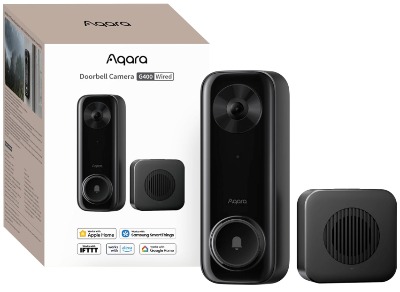
The Aqara Doorbell Camera G400 is designed for HomeKit Secure Video users. It records at 2K resolution with a unique head-to-toe view. The camera is wired or powered by PoE (Power over Ethernet). It supports 2.4/5GHz WiFi 6 for stable connections. Local detection and 24/7 recording happen without requiring a subscription. It also works with Alexa, Google, and SmartThings despite HomeKit focus.
This is a premium doorbell camera for people invested in Apple HomeKit or wanting maximum flexibility with smart home platforms.
Best Use Cases
Apple HomeKit users choose the Aqara G400. It integrates seamlessly with HomeKit Secure Video. Recording and analysis happen on HomeKit Secure Video infrastructure. No additional subscriptions needed if you already have HomeKit+.
People who want 24/7 recording without cloud storage prefer this model. Local detection processes video on the device itself. Your privacy is preserved. Video doesn’t upload unless you want it to.
HomeKit Secure Video subscribers get unlimited doorbell camera recording. No per-camera fees. One subscription covers multiple cameras. This makes the Aqara G400 economical for complete home monitoring.
Tech-savvy users appreciate the open integration. Works with HomeKit, Alexa, Google, and SmartThings. You’re not locked into one ecosystem.
People with existing PoE infrastructure already running network cabling love this. Connect it like an IP camera. No new wiring needed.
Homeowners wanting the most advanced doorbell camera technology choose this. The technology is ahead of the curve. Features roll out through updates.
Key Features Explained Simply
2K HD Resolution: The camera shoots at 2560 x 1440 pixels. It’s higher resolution than standard 2K. Detail is excellent. License plates and faces are clearly visible.
Head-to-Toe View: This is unique. The camera captures from your visitor’s head down to their feet. No cropping needed. You see what they’re wearing completely. This helps with identification and understanding intentions.
Wired or PoE Power: Connect to standard wired doorbell power or use PoE infrastructure. Endless power means no battery charging. Reliable 24/7.
HomeKit Secure Video: Records directly to iCloud. HomeKit+ subscription ($2.99/month) includes unlimited camera recording. Local processing protects privacy.
Local Detection: Processing happens on the device. Video is analyzed locally before uploading. Your privacy is protected. Data never travels to servers unless necessary.
WiFi 6 Support: 2.4 and 5GHz wifi on the latest standard. Ultra-stable connections. Works through walls. No buffering.
24/7 Recording: Record continuously without gaps. Every moment at your door is captured. Nothing is missed.
Multi-Platform Support: Works with HomeKit, Alexa, Google, and SmartThings. Choose your smart home platform. No lock-in.
Real-Life Usage Insights
The Aqara G400 is built to premium standards. The physical design is sleek and modern. The lens is clear and precise. Build quality rivals professional security cameras.
Installation depends on your power source. Wired doorbell connection is simple. Just connect two wires. Takes 15 minutes. PoE requires network cabling if you don’t already have it run to your door.
The head-to-toe view is genuinely different. You see packages, person’s height, and complete appearance. This helps tremendously with identification. Packages sometimes don’t show fully in conventional doorbell cameras. Here they’re always visible.
The 2K resolution is crisp. You read small text. License plates are clear. Faces are recognizable from 8 feet away.
HomeKit integration is seamless. Video appears in the Home app instantly. Recording happens automatically. You don’t configure anything after setup.
Local detection means video is processed on the device. Alerts happen instantly. You receive “Person Detected” notifications with thumbnails. HomeKit Secure Video provides intelligent detection.
The connection is rock-solid. WiFi 6 means no buffering. Video streams smoothly. Two-way audio is delay-free.
Honest Pros and Cons
Pros:
- Head-to-toe view is unique and valuable
- 2K HD resolution with excellent clarity
- HomeKit Secure Video integration is seamless
- Local processing protects privacy
- 24/7 recording without subscription if on HomeKit
- WiFi 6 provides rock-solid connection
- Works across multiple smart home platforms
- Wired or PoE power means constant operation
- Intelligent detection reduces false alerts
- Premium build quality
Cons:
- Requires HomeKit+ subscription for full features ($2.99/month)
- PoE installation requires network cabling in many cases
- Wired installation requires existing doorbell wiring or new installation
- No battery option for flexibility
- Requires stable wifi connection
- Higher price point than standalone doorbells
- Setup more technical than simple battery models
- Requires HomeKit device for remote access
- Not ideal for renters or temporary installations
Performance and Reliability Discussion
The Aqara G400 performs at professional levels. The sensor quality is excellent. Video doesn’t degrade over seasons. The mechanical shutter handles light changes perfectly.
The WiFi 6 connection is remarkably stable. Dropout is rare. The device reconnects quickly if wifi temporarily fails. You experience minimal downtime.
Weather resistance is excellent. The device handles rain, snow, ice, and extreme temperatures. Sealed components resist humidity. IP65 rating is genuine.
Firmware updates bring new features regularly. HomeKit integration improves with each update. The company actively develops the product. New features roll out without extra hardware costs.
The PoE power system is reliable. Consistent power means the device never sleeps. No battery anxiety. You get true 24/7 recording.
The wired power option is equally reliable. No batteries means no power interruptions. The setup is clean without visible cords.
Ease of Use
Installation depends on your power source. Wired doorbell setup is straightforward if you have existing wiring. Connect two wires. No special tools needed. Takes 15 minutes.
PoE installation requires network cabling. If you don’t have PoE infrastructure, hiring a network technician costs $150-300. This is the biggest barrier for typical homeowners.
HomeKit setup is automated. The device pairs with HomeKit in seconds. Tap the HomeKit code and it’s added. HomeKit Secure Video recording starts immediately.
Multi-platform setup adds complexity if you want simultaneous access. HomeKit is the primary interface. Alexa and Google assistants can control it. SmartThings integration adds another layer.
Day-to-day use is simple. Notifications arrive when people arrive. You view video in the Home app or watch through Alexa. Two-way audio works instantly.
Managing HomeKit Secure Video takes minutes to understand. You set notification preferences. That’s about it. Everything else is automatic.
Value for Money
The Aqara G400 is expensive upfront. The hardware cost is higher than basic doorbells. But the value calculation is complex.
If you already have HomeKit+, the value is exceptional. You get unlimited camera recording for $2.99/month. Adding another doorbell camera has zero additional cost. This is dramatically cheaper than subscription-based competitors.
If you don’t have HomeKit+, you need to consider the subscription cost. Factoring in the $2.99 monthly HomeKit+ fee adds to the equation. Payback period is about 18 months compared to cheaper doorbells with subscriptions.
The head-to-toe view and 24/7 recording are valuable features. You never miss anything at your door. Every moment is recorded in clear detail.
For people without HomeKit or unwilling to pay subscriptions, this doorbell is expensive. The value proposition relies on HomeKit ecosystem investment.
If you have existing PoE infrastructure, the value increases. Installation is simple. You leverage existing network investments.
Compare to professional security camera installations. This cost fraction of professional systems while offering comparable quality. The local processing and privacy protection add value beyond what you’re paying.
Comparison: Which Provides the Best Value for Different Needs?
Let me break down how these products compare across critical dimensions.
Video Quality Winner
The Aqara G400 offers the best video quality with 2K HD resolution and head-to-toe framing. The eufy FamiLock S3 Max comes close with its 2K camera. Both exceed the basic 2K specifications through superior lenses and sensor quality.
The myQ Secure View offers excellent color night vision, which matters in low-light conditions. The Chamberlain myQ doorbell competes well for the price. But raw image quality goes to Aqara, then eufy.
Security Features Winner
The eufy FamiLock S3 Max wins for security with BHMA 1 certification and palm vein recognition. No other system matches that protection level.
The myQ Secure View’s face recognition is genuinely useful. The Philips Smart Lock’s fingerprint scanning is reliable. The Chamberlain and Aqara focus on video security rather than access control.
For comprehensive security, eufy takes the title. For smart lock security specifically, myQ edges out Philips.
Privacy Protection Winner
The eufy FamiLock S3 Max with 16GB local storage wins for privacy. Everything stays on your device. The Aqara G400 with local detection comes second. HomeKit Secure Video processes data locally before uploading.
The myQ Secure View and Chamberlain myQ require cloud subscriptions. Your footage goes to corporate servers. The Philips Smart Lock doesn’t record video, so privacy concerns are minimal.
Price-to-Value Winner
The Philips Smart Lock offers the best value. You get smart lock functionality at a reasonable price. Add your own doorbell and save money overall.
The Chamberlain myQ doorbell is budget-friendly for video monitoring. The myQ Secure View balances features and price well. The Aqara G400 is premium but justifiable for HomeKit users. The eufy FamiLock S3 Max is expensive but offers unique security features.
Integration Flexibility Winner
The Aqara G400 wins for platform compatibility. Works with HomeKit, Alexa, Google, and SmartThings. No single ecosystem lock-in.
The myQ Secure View integrates well with major platforms but focuses on myQ ecosystem. The eufy system works broadly but emphasizes its own ecosystem. The Philips Smart Lock supports major platforms. The Chamberlain doorbell works with myQ systems.
Installation Ease Winner
The Chamberlain myQ doorbell is easiest to install. Battery model sticks to walls. Takes 10 minutes. No tools needed for most people.
The Philips Smart Lock is simple for the DIY crowd. The myQ Secure View requires moderate skill. The Aqara G400 requires existing wiring or professional installation for PoE. The eufy FamiLock S3 Max is complex and usually requires a locksmith.
Best for Renters
The Chamberlain myQ doorbell is ideal. It’s completely removable. The myQ Secure View works for the adventurous. The Philips Smart Lock installation is straightforward. The Aqara G400 is difficult without permanent wiring. The eufy system requires deadbolt modification.
The Complete Buyer’s Guide
Determine Your Actual Needs
Start with one simple question: Do you need smart lock access control, a video doorbell, or both?
Many people assume they need both. But honest assessment often reveals simpler solutions work better. If you remember to lock your door and never misplace keys, a smart lock is convenience, not necessity. If you’re never home when deliveries arrive, a doorbell camera is essential.
Assess Your Existing Systems
Document what you already have. An existing doorbell camera? An existing smart lock? A smart home platform you’re invested in?
If you have Alexa speakers throughout your home, HomeKit integration might feel awkward. If you have HomeKit, the Aqara G400 becomes much more valuable.
Existing doorbell wiring affects your options. Wired models plug in easily. Battery models don’t need wiring but need periodic charging.
Consider Installation Reality
Be honest about installation difficulty. Do you have tools? Are you comfortable with wiring? Will you call a professional?
Professional installation adds $150-300 to costs. Budget accordingly. Some systems are worth paying for professional setup.
Plan for Ongoing Costs
Calculate total ownership cost including subscriptions. Some systems need cloud recording subscriptions. Others use local storage. HomeKit Secure Video is affordable if you already subscribe.
Security Requirements
What’s your actual threat level? Video identification is valuable for package theft. Access control is valuable if you have frequent guests or kids. Biometric access is nice but adds cost.
Think about your neighborhood. Urban areas have more package theft. Suburban areas often need fewer security features. Your actual risk should drive your choice.
Smart Home Integration
Does your system need to work with devices you already own? Forced ecosystem choices are frustrating. Open-platform options give flexibility.
Check specific compatibility before purchasing. Don’t assume something works just because you like the brand.
Budget Reality
Smart door locks with cameras range from $300 to $1,000+. Set a realistic budget. Don’t overspend on features you won’t use.
Remember to factor in installation, subscriptions, and future maintenance. The cheapest upfront isn’t always cheapest long-term.
Who Should Buy Each Product?
myQ Secure View Best For…
Tech-savvy homeowners who want integrated smart lock and doorbell. Families with kids who benefit from fingerprint and face recognition. Anyone willing to spend for convenience and advanced features. Homeowners with strong wifi who want integrated notifications and control.
Skip it if you already have a doorbell camera. Skip it if you rent. Skip it if you need the highest security certifications.
eufy FamiLock S3 Max Best For…
Security-conscious homeowners willing to invest for peace of mind. Large families with multiple access requirements. People who prioritize privacy and local storage. Anyone who values commercial-grade security standards.
Skip it if you’re price-sensitive. Skip it if you rent. Skip it if you’re uncomfortable with complex setups. Skip it if you have mobility challenges with palm vein scanning.
Philips Smart Lock Best For…
Budget-conscious buyers who prioritize affordability. People already using a separate doorbell camera. Homeowners who value simplicity and reliability. Anyone who wants smart lock access without video.
Skip it if you don’t already have a doorbell. Skip it if you need complete integrated monitoring. Skip it if you want biometric access.
Chamberlain myQ Doorbell Best For…
Budget-minded buyers starting their smart home setup. Renters needing removable installations. Apartment dwellers with access restrictions. People who only need video monitoring without smart locks.
Skip it if you need a smart lock component. Skip it if you want local storage. Skip it if you prioritize privacy over convenience.
Aqara G400 Best For…
HomeKit users already invested in Apple ecosystem. Tech enthusiasts wanting the latest features. Anyone with existing PoE network infrastructure. People willing to invest upfront for long-term value.
Skip it if you’re not in HomeKit ecosystem. Skip it if you can’t install wired or PoE power. Skip it if you need immediate battery-based solutions.
Common Mistakes to Avoid
Mistake #1: Ignoring Wifi Quality
Smart locks and cameras depend on wifi. A weak signal kills the experience. Test your wifi strength at the door before purchasing. If it’s weak, upgrade your router first.
Many problems attributed to the devices are actually wifi issues. Invest in wifi coverage before complaining about reliability.
Mistake #2: Buying for Features You Won’t Use
Face recognition is cool. But do you actually need it? Biometric access is impressive. But will you use it regularly?
Buy for your actual needs, not aspirational features. Simpler is often better for daily use.
Mistake #3: Neglecting Physical Installation
Assume professional installation costs. Budget for a locksmith ($100-300) if you’re not confident. Improper installation defeats the purpose.
A device installed poorly is a security risk and a nuisance. Skip the DIY route if you’re not experienced. The cost is worth it.
Mistake #4: Ignoring Cloud Storage Costs
Monthly subscriptions add up. A $5 subscription for one camera seems cheap. But add three cameras and you’re spending $180 annually.
Factor cloud costs into your budget. Local storage options are cheaper long-term.
Mistake #5: Purchasing Without Warranty Research
Check warranty length and what’s covered. Some warranties cover only manufacturing defects. Others cover weather and normal wear.
A two-year warranty is better than one year. Coverage matters more than length sometimes.
Mistake #6: Assuming Compatibility Without Checking
Don’t assume products work together. Check specific compatibility lists before purchasing. Brands evolve and retire integrations.
Contact customer support if unsure. A quick email saves headaches.
Mistake #7: Ignoring Seasonal Challenges
Your climate matters. Test products in your actual conditions if possible. What works in mild climates might struggle in extreme heat or cold.
Ask customer service about performance in your climate. Many have experience-based insights.
Mistake #8: Neglecting Battery Maintenance
Battery-powered devices need regular attention. Don’t install and forget. Check battery levels quarterly.
Dying batteries mean failed access at critical moments. Plan maintenance into your routine.
The Verdict: Which Is the Best Smart Door Lock with Camera?
The honest answer is: there’s no single best option. Your best choice depends on your specific situation.
Best Overall Smart Lock with Camera: myQ Secure View 3-in-1 Smart Lock
For most homeowners wanting one integrated system that does everything, the myQ Secure View wins. It combines smart lock, doorbell, and keypad into a cohesive system. The face recognition actually works. The color night vision is superior. The price is reasonable for what you get. Setup is manageable for DIY installation.
The main drawback is it’s not the cheapest option. But for most people, the integrated convenience justifies the cost.
Best for Security Enthusiasts: eufy FamiLock S3 Max
If security is your primary concern, the eufy system offers peace of mind no other system matches. Palm vein recognition is genuinely unhackable. BHMA 1 certification means military-grade construction. Local storage protects privacy completely. The rear display screen adds security awareness.
The downsides are cost and complexity. But for high-security requirements, nothing compares.
Best Budget Option: Philips Smart Lock + Your Choice of Doorbell
If you’re price-conscious, buy the Philips Smart Lock and add a separate doorbell camera. You’ll spend less overall than integrated systems. You keep flexibility to upgrade either component independently.
Best for Video Monitoring Only: Chamberlain myQ Video Doorbell
If you only need a doorbell camera without smart lock, Chamberlain offers excellent value. The 2K video quality is impressive. The 150-degree view captures everything. The battery option gives installation flexibility.
Best for HomeKit Users: Aqara Doorbell Camera G400
If you’re invested in Apple HomeKit, the Aqara G400 becomes very affordable. Unlimited recording with HomeKit Secure Video is exceptional value. The head-to-toe view is unique. Local detection protects privacy.
Final Thoughts on Smart Door Locks with Cameras
Smart door locks with cameras have matured into genuinely useful home security solutions. The technology works. Reliability is excellent. Integration is seamless.
But they’re not perfect. No system is bulletproof. Every choice involves trade-offs between security, privacy, cost, and convenience.
Take time with your decision. Research thoroughly. Check reviews from multiple sources. Talk to friends who own these systems. Real-world experience matters.
Don’t rush into the most expensive option. Don’t cheap out on security. Find the balance that matches your situation.
Install properly. Maintain regularly. Update firmware. Monitor your smart devices like any other security investment.
Start with one system. See how you use it. Learn what matters in practice. Then expand or upgrade based on experience.
The best smart door lock with camera is the one that actually gets used consistently. Something that feels natural to operate beats something complicated you avoid.
Think about your daily routine. How will this device fit in? Will you actually use all its features? Or are you paying for functionality that stays dormant?
These are your questions to answer. The products reviewed here are all legitimate options. Each has genuine strengths. Your situation determines which matters most.
Purchase with confidence. These devices improve security and convenience. Take your time. Make a thoughtful choice. You’ll be happy with any of these systems if it matches your actual needs.

Hi, I’m Mary, the founder of Homygear.com. I’m passionate about creating a comfortable, smart, and beautiful home. I share practical insights and real-world experience on home gear that makes everyday life easier. Behind the scenes, my dedicated research team studies products in depth, and our writers craft honest reviews using trusted, authentic sources—so you can choose home gear with confidence.