5 Best Smart Thermostat for Heat Pump In 2026
If you own a heat pump, you already know it does not act like a regular furnace or AC system. It runs longer, it works at lower temperature swings, and it needs a thermostat that actually understands how it operates. A regular thermostat can make your heat pump switch on the backup heat strips too often, and that alone can send your power bill through the roof.
That is exactly why this guide exists. I have gone through five of the most talked-about smart thermostats on the market right now and broken down how each one handles heat pump systems, what makes them different, and who should actually buy them. No fluff, no hype, just a plain-English breakdown so you can pick the right one for your home.
We will look at the Google Nest Thermostat, Sensi Touch 2, ecobee Smart Thermostat Essential, Aqara Smart Thermostat W200, and the Honeywell Home X2S. Each one has its own strengths, and none of them is perfect for every single home, so I will walk you through the real pros and cons of each.
Why a Heat Pump Needs a Special Kind of Thermostat
A heat pump moves heat instead of generating it directly, so it behaves very differently from a gas furnace. When the temperature outside drops low enough, most heat pump systems switch to a backup heat source called auxiliary heat or emergency heat. This backup heat uses a lot more electricity than the heat pump itself.
A basic thermostat that is not built for heat pumps might trigger that backup heat way too soon, just because it is trying to reach the target temperature fast. A proper heat pump thermostat is smarter about this. It knows how to pace the heating so the system relies on the efficient heat pump mode as much as possible, only calling for backup heat when it is truly needed.
This is why compatibility matters so much here. Not every smart thermostat on store shelves is built with heat pump logic in mind, and some need an extra wire called the C-wire, or a specific setup for multi-stage heat pumps. Keep this in mind as we go through each product below.
Quick Comparison Insights Before We Dive In
Before jumping into full reviews, here is a fast snapshot of how these five stack up against each other in the areas that matter most for heat pump owners.
- The Google Nest Thermostat is the easiest one to live with day to day, with a simple screen and solid auto-scheduling, though it is priced a bit high for what you get in the base model.
- The Sensi Touch 2 gives you a big, bright touchscreen and strong heat pump support without draining your wallet.
- The ecobee Smart Thermostat Essential brings excellent app control and remote sensor support, and it plays nicely with more voice assistants than most rivals.
- The Aqara Smart Thermostat W200 stands out for Apple Home fans and anyone who wants a built-in motion sensor for smarter presence detection.
- The Honeywell Home X2S is the most no-nonsense, budget-friendly pick built specifically with heat pump and conventional system compatibility in mind.
Now let’s get into the details of each one.
1. Google Nest Thermostat (Charcoal)
Product Description
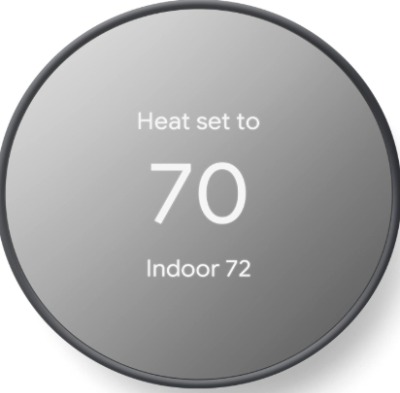
The Google Nest Thermostat is the more affordable sibling of the Nest Learning Thermostat. It keeps the clean, minimal look Google is known for, with a soft display that shows the temperature and a simple color scheme in every room. It connects to your Wi-Fi network and pairs with the Google Home app, so you can adjust your home’s temperature from your phone no matter where you are.
Unlike the pricier Nest Learning model, this version does not auto-learn your habits right out of the box. Instead, it comes with a feature called Savings Finder, which suggests small tweaks to your schedule that could lower your energy use, and you approve or skip each suggestion.
Best Use Cases
This thermostat fits best in homes where the residents want an easy setup and a clean interface, and don’t mind manually building a schedule instead of relying on full auto-learning. It also works nicely for anyone already deep into the Google ecosystem, such as households with Google Nest cameras, speakers, or Android phones.
Key Features Explained Simply
- Savings Finder: The thermostat looks at your current schedule and daily habits, then offers small changes that could cut down energy use, like lowering the temperature slightly while you’re usually asleep.
- Quick Schedule: Instead of setting every single hour manually, you can pick a general routine, like “sleep” or “away,” and the app builds a starter schedule around it that you can fine-tune later.
- Home/Away Assist: Using your phone’s location, the thermostat can tell when nobody is home and adjust the temperature so you are not heating or cooling an empty house.
- Voice control: It works with Google Assistant, so you can simply say the temperature you want out loud.
Real-Life Usage Insight
For a household running a heat pump, this thermostat handles the basics of heat pump control well, keeping the compressor running steadily instead of jumping straight to backup heat. However, it does not offer detailed heat pump balance settings the way some higher-end models do, so in very cold climates, homeowners have reported it can lean on auxiliary heat a bit more often than ideal during sharp cold snaps.
Pros
- Clean, easy-to-read display that fits into almost any home decor
- Simple app that most people figure out within minutes
- Reliable Wi-Fi connection and quick response to schedule changes
- Works smoothly with other Google smart home devices
- Solid build quality with a soft-touch dial
Cons
- No built-in room sensors, so it only reads temperature from where it’s mounted
- Less advanced heat pump staging control compared to ecobee or Honeywell
- Requires a C-wire in most installations, which some older homes lack
- Price sits higher than some rivals with similar core features
Performance Discussion
In everyday use, the Nest Thermostat keeps a steady temperature and responds fast to app changes. Where it shows a small weakness is with multi-stage heat pump systems, since the fine control over stage switching is not as deep as some competitors. For a single-stage heat pump in a mild climate, though, it performs reliably.
Ease of Use
This is one of the simplest thermostats to operate day to day. The touch-and-turn dial feels intuitive, and the app layout avoids clutter. Even someone who has never used a smart thermostat before can get comfortable with it in a single afternoon.
Value for Money
The price is a bit steep for the feature set, especially since it lacks room sensors that competitors include even at lower prices. Still, the strong build quality and smooth software experience justify the cost for buyers who want simplicity above all else.
2. Sensi Touch 2 Smart Thermostat (ST76)
Product Description
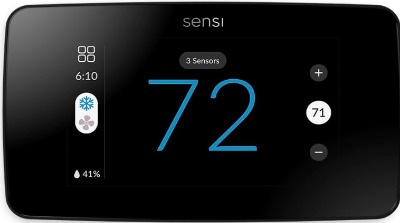
The Sensi Touch 2 is a Wi-Fi thermostat with a large, bright touchscreen that is easy to read from across the room. It carries Energy Star certification, meaning it meets efficiency standards set for reducing home energy waste. It supports Alexa voice control directly, without needing a separate hub, and the Sensi app is built to walk you through setup step by step.
One detail that stands out is how well this thermostat is designed for DIY installation. Sensi includes a level built right into the wall plate and clear wiring labels, which cuts down on installation mistakes.
Best Use Cases
This model suits homeowners who want strong heat pump compatibility without paying premium prices. It also fits well for people who prefer installing things themselves rather than hiring a technician, thanks to the guided setup process.
Key Features Explained Simply
- Large touchscreen display: Bigger and brighter than many rivals, so reading the temperature from across the room is effortless.
- Geofencing: The thermostat can detect when your phone leaves a set radius around your home and adjust settings automatically to save energy.
- Flexible wiring support: It works with or without a C-wire in many setups, which is a big advantage for older homes.
- Custom schedules: You can build separate weekday and weekend routines, so your thermostat matches your actual lifestyle instead of a single repeating pattern.
Real-Life Usage Insight
Owners running heat pump systems tend to praise the Sensi Touch 2 for its stable performance during temperature swings. It manages compressor cycling smoothly, and its heat pump-specific settings menu lets you fine-tune how aggressively it uses auxiliary heat, which is a feature not every thermostat in this price range offers.
Pros
- Bright, easy-to-read touchscreen even in low light
- Strong heat pump and auxiliary heat control settings
- No mandatory hub required for Alexa integration
- Flexible installation that works without a C-wire in many homes
- Reasonable price for the feature set included
Cons
- App interface feels a bit dated compared to some newer rivals
- Google Assistant support is more limited than Alexa support
- No motion or occupancy sensor built in
- Geofencing accuracy can lag slightly behind GPS-based competitors
Performance Discussion
The heat pump handling here deserves credit. The thermostat lets you set the difference in temperature that triggers auxiliary heat, giving you real control over energy costs during cold weather. This kind of manual fine-tuning is rare at this price point, and it shows Sensi built this model with heat pump owners specifically in mind.
Ease of Use
Setup is genuinely simple thanks to the built-in wiring guide and level. The touchscreen menus are logically laid out, though the overall app design feels a step behind more modern competitors in terms of visual polish.
Value for Money
This is one of the strongest options if you want heat pump-focused features without paying flagship prices. The balance between price and functionality here is hard to beat.
3. ecobee Smart Thermostat Essential
Product Description
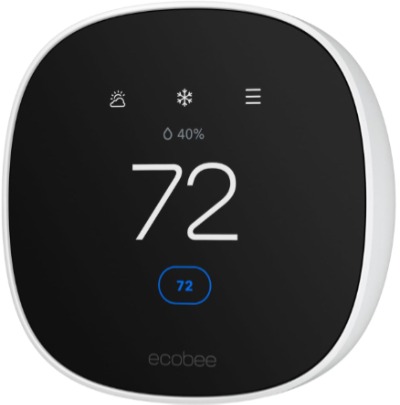
The ecobee Smart Thermostat Essential is a streamlined version of ecobee’s lineup, offering Wi-Fi control, Energy Star certification, and support for Siri, Alexa, and Google Assistant all in one device. It comes with a clean touchscreen and connects through the ecobee app, which also tracks your energy usage trends over time.
While the higher-end ecobee models include a bundled remote sensor, the Essential version focuses on core smart features while keeping the price more accessible.
Best Use Cases
This thermostat is a strong pick for households that use multiple voice assistants, since it does not lock you into one ecosystem. It also suits people who want detailed energy usage reports to track how their habits affect their bills over time.
Key Features Explained Simply
- Triple voice assistant support: You get compatibility with Siri, Alexa, and Google Assistant, so you are not stuck picking just one smart speaker brand.
- Energy reports: The app breaks down your heating and cooling usage into readable charts, so you can spot patterns and adjust habits.
- Follow Me compatibility: While the bundled sensor is not included here, the thermostat still supports ecobee’s remote sensors if purchased separately, letting the system average temperature readings from multiple rooms.
- Smart recovery: The thermostat starts adjusting the temperature slightly before your scheduled time, so the room reaches your target temperature exactly when you need it, not sometime after.
Real-Life Usage Insight
For heat pump owners, ecobee’s software has a strong reputation for smart staging, meaning it manages when to bring in secondary heat stages without wasting energy. Even the Essential model carries over much of this heat pump logic from ecobee’s pricier models, which is a nice bonus considering the lower price tag.
Pros
- Works with three major voice assistants instead of just one or two
- Detailed and genuinely useful energy usage reports
- Smart recovery keeps rooms at target temperature right on schedule
- Solid heat pump staging logic inherited from ecobee’s flagship models
- Clean, modern touchscreen interface
Cons
- No bundled remote sensor, unlike ecobee’s higher-tier thermostats
- Requires a C-wire for full functionality in most homes
- Slightly smaller screen than some competitors
- Setup wizard can feel a bit long for first-time users
Performance Discussion
Heat pump performance is genuinely one of the strong points here. The thermostat does a good job pacing the compressor and delaying auxiliary heat activation until it’s actually necessary, which translates into real energy savings during colder months. Response time to app commands is fast, and the display updates without noticeable lag.
Ease of Use
The touchscreen is responsive, and the icons are large enough to tap accurately. First-time setup takes a little longer than something like the Sensi Touch 2, mainly because the wizard walks through more configuration screens, but the payoff is a system that’s properly tuned from day one.
Value for Money
Given the triple voice assistant support and the inherited smart staging logic from ecobee’s higher-end lineup, this thermostat delivers strong value, especially for heat pump households looking to actually see a difference in their utility bills.
4. Aqara Smart Thermostat W200
Product Description
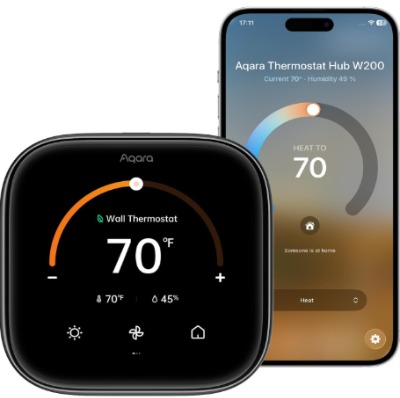
The Aqara Smart Thermostat W200 takes a different approach from the others on this list. It features a 4-inch touchscreen, works as a Matter controller, and includes a built-in radar sensor that can detect presence in the room without needing your phone’s location. It supports Apple Home with Adaptive Temperature, along with Siri, Google Assistant, and Alexa.
This model is built around the idea of context-aware comfort. Instead of relying purely on a fixed schedule or your phone leaving a geofence, the radar sensor picks up whether someone is actually in the room, which lets it adjust more intelligently.
Best Use Cases
This is a great match for Apple Home households, especially anyone who already has HomeKit devices and wants everything working from a single app. It also fits well in homes where family members often forget their phones, since the radar sensor does not rely on phone location the way geofencing does.
Key Features Explained Simply
- Built-in radar sensor: Detects whether someone is present in the room using motion and presence sensing technology, rather than guessing based on your phone’s GPS signal.
- Matter controller support: Since it works as a Matter hub, it can help connect and control other Matter-compatible smart home devices, adding value beyond just temperature control.
- Apple Adaptive Temperature: This feature works with Apple Home to fine-tune comfort settings automatically based on patterns Apple’s system picks up over time.
- 4-inch touchscreen: A larger display than most rivals, making it easier to see detailed information at a glance.
Real-Life Usage Insight
Households running heat pumps have found the radar-based presence detection genuinely useful for avoiding wasted heating in empty rooms, particularly in homes where people leave without grabbing their phone. Heat pump-specific staging control is present, though it’s not quite as deep or customizable as what ecobee or Sensi offer for aux heat thresholds.
Pros
- Radar sensor gives more accurate presence detection than phone-based geofencing
- Doubles as a Matter controller, adding extra smart home value
- Large, sharp touchscreen display
- Strong Apple Home integration with Adaptive Temperature
- Modern design that fits well in contemporary interiors
Cons
- Heat pump auxiliary heat control is less customizable than some rivals
- Matter ecosystem is still catching up in terms of device compatibility
- Setup can be more involved for non-Apple households
- Limited long-term track record compared to more established thermostat brands
Performance Discussion
Day-to-day temperature regulation is smooth, and the radar sensor does add a genuinely different layer of smart control that most rivals lack. For heat pump systems specifically, it handles basic staging fine, but if you’re someone who wants to manually dial in exactly how aggressive the auxiliary heat kicks in, you’ll find fewer options here than with the Sensi Touch 2 or ecobee Essential.
Ease of Use
The touchscreen is responsive and the layout is clean, though Apple Home users will get the smoothest experience overall. For homes without any Apple devices, setup takes a little more patience since certain features rely more heavily on HomeKit integration.
Value for Money
Considering it functions as both a thermostat and a Matter controller, along with the radar-based presence detection, this model offers strong value, particularly for Apple Home users and anyone already investing in a broader Matter smart home setup.
5. Honeywell Home X2S Smart Wi-Fi Thermostat
Product Description
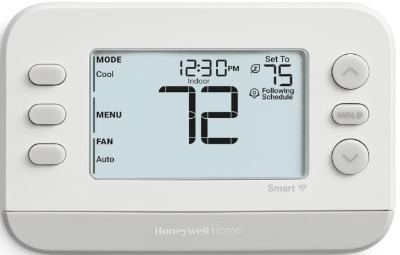
The Honeywell Home X2S is built with a clear focus on compatibility, supporting both conventional heating and cooling systems as well as heat pumps. It comes in a simple gray finish with a straightforward display, and it connects through the Honeywell Home app for remote control and scheduling.
Honeywell has decades of experience in the thermostat space, and the X2S reflects that with dependable heat pump-specific settings baked directly into the setup process, rather than requiring you to dig through menus to find them.
Best Use Cases
This thermostat is a solid pick for anyone who wants a no-frills, dependable option that specifically calls out heat pump compatibility right in its design. It also works well for people replacing an older Honeywell thermostat, since the setup process and wiring terminals feel familiar.
Key Features Explained Simply
- Heat pump and conventional system compatibility: The setup wizard specifically asks about your system type, including heat pump configurations, and adjusts its logic accordingly.
- Geofencing: Like several other models here, it can detect when you’re away from home based on your phone’s location and adjust the temperature to save energy.
- 7-day flexible scheduling: You can set a different schedule for each day of the week, which suits households with varying daily routines.
- Compatibility with Alexa and Google Assistant: Voice control is supported, letting you adjust settings without touching the app or the thermostat itself.
Real-Life Usage Insight
For homes running heat pump systems, especially in regions with colder winters, the X2S has a reputation for handling auxiliary heat transitions carefully, which helps keep energy bills more predictable. It is often recommended by HVAC technicians specifically because the wiring terminals and setup screens are labeled clearly for heat pump configurations, reducing installation errors.
Pros
- Built specifically with heat pump and conventional system compatibility in mind
- Clear, technician-friendly wiring labels reduce installation mistakes
- Reliable geofencing and scheduling features
- Straightforward app that avoids unnecessary complexity
- Competitive price point compared to other heat pump-focused options
Cons
- Display design feels more basic compared to Nest or Aqara
- No built-in room sensor or radar detection
- App lacks some of the deeper energy usage analytics that ecobee offers
- Touchscreen response can feel a step slower than pricier rivals
Performance Discussion
Where the X2S really shines is in heat pump-specific reliability. The setup process for auxiliary heat and compressor lockout settings is more direct than some competitors, which is valuable for households in colder climates that want to avoid running up their electric bill with excessive backup heat use.
Ease of Use
Setup is fairly simple, especially since the wizard directly asks about heat pump configuration rather than expecting you to know your system’s technical details ahead of time. The app is functional and easy to navigate, even if it does not look as polished as some newer rivals.
Value for Money
Given how directly this thermostat addresses heat pump compatibility, along with its lower price compared to some competitors, it stands out as one of the better value picks for heat pump households specifically.
Comparison Insights: How These Five Stack Up
Looking at all five side by side, a few patterns become clear. For pure heat pump-specific control, the Honeywell X2S and Sensi Touch 2 edge ahead because both let you manually adjust how the system handles auxiliary heat thresholds, which directly affects your energy bill in cold weather.
For overall software polish and remote sensor support, the ecobee Smart Thermostat Essential takes the lead, especially for households that use more than one voice assistant brand at home. The Google Nest Thermostat wins on simplicity and design, making it a great fit for people who just want something that works without digging into detailed settings.
The Aqara W200 stands apart from the rest because of its radar sensor and Matter controller functionality, which goes beyond just thermostat control. If you are deep into the Apple ecosystem, this is likely your best match, even though its heat pump-specific settings are not as deep as Honeywell’s or Sensi’s.
In terms of price versus performance, the Sensi Touch 2 and Honeywell X2S generally offer the best balance for heat pump households on a budget, while ecobee and Nest lean more toward buyers who value software experience and ecosystem integration over squeezing every last bit of value from auxiliary heat settings.
Buying Guide: What to Actually Check Before You Buy
Confirm Your System Type First
Before anything else, find out if your heat pump is single-stage, two-stage, or a variable-speed system. Not every thermostat on this list supports advanced multi-stage heat pumps equally well, so check the product listing or manual against your system’s specs.
Check for a C-Wire
Many smart thermostats need a C-wire, sometimes called a common wire, to get continuous power. If your current thermostat setup does not have one, look at models like the Sensi Touch 2 that offer more flexible wiring options, or plan to have a technician add a C-wire adapter during installation.
Think About Auxiliary Heat Control
If you live somewhere with cold winters, look closely at how much control a thermostat gives you over auxiliary or emergency heat settings. This single factor can make a noticeable difference in your winter electric bill, so models like the Honeywell X2S and Sensi Touch 2 deserve extra attention here.
Consider Your Smart Home Ecosystem
If your home already leans toward Apple products, the Aqara W200 will likely feel the most natural to use. For Google-heavy households, the Nest Thermostat integrates smoothly. If you want flexibility across multiple assistants without picking a side, ecobee’s triple compatibility is worth the extra look.
Look at Sensor Needs
If your home has rooms that run hotter or colder than others, a thermostat with room sensor support, like ecobee’s Essential model paired with add-on sensors, can even out the temperature far better than a single sensor stuck in one hallway.
Who Should Buy These Thermostats
If you want the absolute simplest setup and don’t care about squeezing out every bit of heat pump efficiency, the Google Nest Thermostat is a safe, attractive pick.
If you’re on a budget but still want real heat pump-specific control, the Sensi Touch 2 or Honeywell X2S are your best bets, and picking between them mostly comes down to whether you prefer Sensi’s bigger touchscreen or Honeywell’s slightly more direct heat pump setup wizard.
If you want strong software, detailed energy reports, and flexibility across voice assistants, go with the ecobee Smart Thermostat Essential.
If you’re an Apple Home user who wants presence detection that doesn’t rely on your phone leaving a geofence, the Aqara W200 is worth the investment, especially if you’re also building out a broader Matter smart home setup.
Common Mistakes to Avoid When Buying a Heat Pump Thermostat
Ignoring the C-wire requirement. A lot of buyers order a thermostat, get it home, and realize their wiring setup does not include a C-wire. Check your existing thermostat’s wiring before ordering, or pick a model built to work without one.
Assuming every thermostat treats heat pumps the same way. Not all of them offer the same depth of auxiliary heat control. If lowering your winter energy bill matters to you, don’t skip this detail during research.
Skipping the compressor lockout setting. Many heat pump systems have a compressor lockout temperature, below which the system should rely more on backup heat. Setting this correctly during installation avoids unnecessary wear on your compressor in extreme cold.
Overlooking multi-stage compatibility. If your heat pump is a two-stage or variable-speed system, double check that your chosen thermostat actually supports that setup, since some budget models are built mainly for single-stage systems.
Forgetting about placement. Installing your thermostat near a window, vent, or direct sunlight can throw off its temperature readings, causing it to cycle your heat pump more than necessary. Pick a central, shaded wall for the most accurate readings.
Final Verdict
All five of these thermostats are solid choices, but they serve slightly different needs. If your main goal is squeezing the most efficiency out of your heat pump system without paying a premium, the Sensi Touch 2 and Honeywell X2S stand out as the strongest all-around performers, thanks to their direct, adjustable auxiliary heat controls.
If software polish, energy reporting, and cross-platform voice assistant support matter more to you, the ecobee Smart Thermostat Essential is hard to beat, and it still carries solid heat pump staging logic despite being the more affordable option in ecobee’s lineup.
For simplicity and clean design above all else, the Google Nest Thermostat remains a reliable, attractive option, even though it lacks some of the deeper heat pump customization found elsewhere on this list.
And for Apple Home households who want a bit of extra smart home functionality baked into their thermostat, the Aqara W200 brings something genuinely different to the table with its radar sensor and Matter controller support.
There is no single “best” answer that fits every home, since so much depends on your climate, your existing smart home setup, and how much manual control you want over your heat pump’s auxiliary heat behavior. Use the buying guide above to match your specific situation, and you’ll end up with a thermostat that actually helps your heat pump run the way it’s supposed to, efficient, steady, and without unnecessary energy waste.

Hi, I’m Mary, the founder of Homygear.com. I’m passionate about creating a comfortable, smart, and beautiful home. I share practical insights and real-world experience on home gear that makes everyday life easier. Behind the scenes, my dedicated research team studies products in depth, and our writers craft honest reviews using trusted, authentic sources—so you can choose home gear with confidence.