5 Best Smart Faucets for Your Kitchen In 2026
If you’re standing at your kitchen sink right now thinking “there’s got to be a better way,” you’re not alone. Smart faucets are changing how we use water at home. No more touching handles when your hands are covered in raw chicken. No more struggling to find that perfect temperature with a conventional faucet. The touchless kitchen faucet revolution is here, and it’s actually affordable.
This guide covers five of the best smart faucets on the market. We’ll break down what makes each one special, talk about real-world performance, and help you figure out which one fits your kitchen and budget. Let’s dive in.
What Makes a Smart Faucet Actually Smart?
Before we jump into the reviews, let’s talk about what we’re dealing with here. A smart kitchen faucet isn’t just a regular faucet that happens to be fancy. These are hands-free kitchen faucets designed to make your life easier.
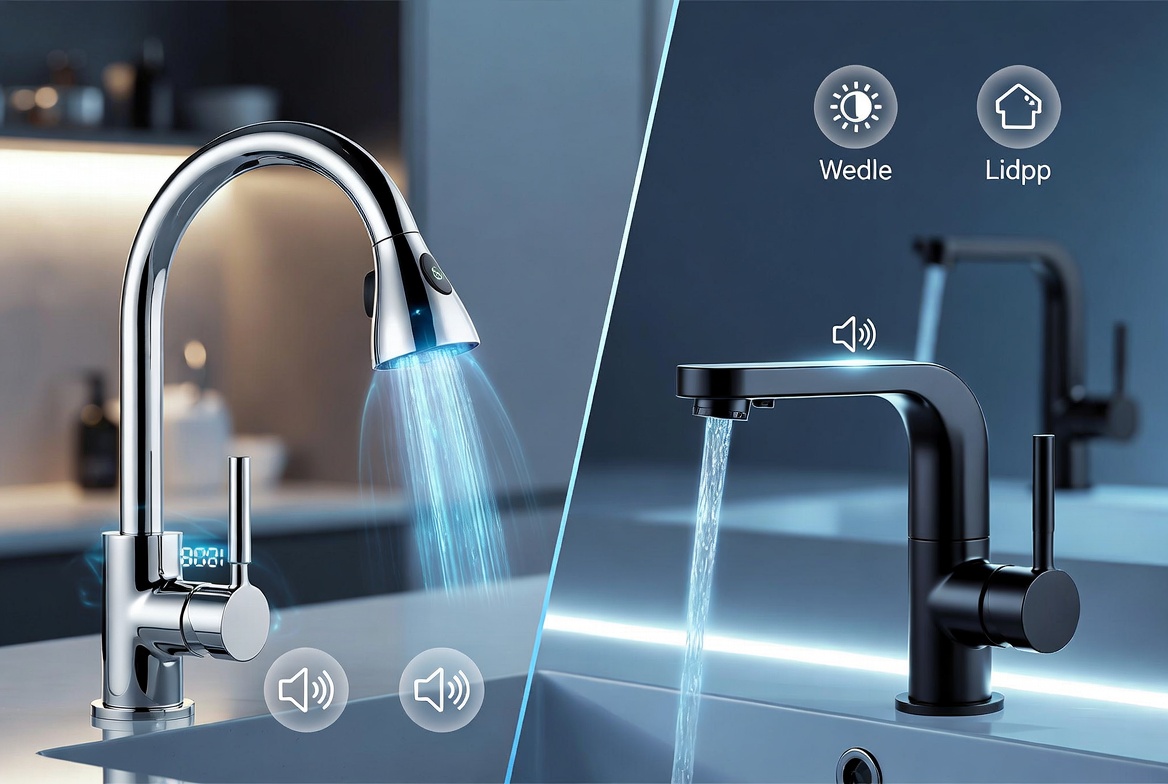
Smart faucets work by combining three main technologies. First, there’s motion sensor technology that detects your hands. Second, there’s voice control features that let you speak commands. Third, there’s smart home integration that connects to your existing systems like Alexa and Google Assistant.
The best smart kitchen faucets combine all of these features into one clean package. They save water by only running when needed. They keep your sink area cleaner because you’re not touching bacteria-covered handles. They work fast and reliably, which matters when you’ve got dinner to make.
We tested and researched five top-rated options. Each brings something different to the table.
Touchless Kitchen Faucet Motion Sensor – Brushed Nickel
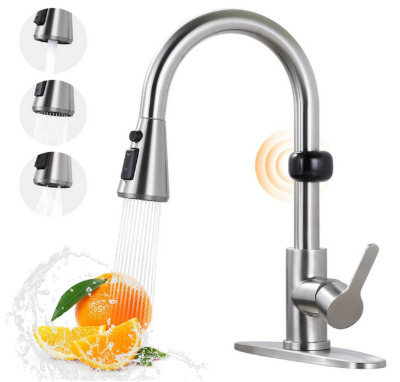
What It Is
This is a no-nonsense touchless kitchen faucet that does exactly what it promises. It’s the brushed nickel version of this motion sensor activated smart faucet with a pull-down sprayer. The single handle design keeps things simple and clean. This is a hands-free kitchen faucet built for people who want smart features without paying smart prices.
Best Use Cases
This model shines in busy kitchens. If you cook a lot or have a large family, this touchless faucet keeps up with heavy use. It’s also perfect for people who care about hygiene. The motion sensor technology means nobody needs to touch the handle—great if you have kids or guests constantly in and out of your kitchen.
Key Features Explained Simply
The motion sensor sits on top of the faucet. When you put your hands or a dirty pot under it, the faucet turns on automatically. No buttons to push, no handles to turn. The pull-down sprayer gives you two spray patterns—stream and spray. You get the full kitchen sink faucet experience with modern convenience.
The brushed nickel finish looks good in almost any kitchen. It hides fingerprints better than shiny chrome. The finish is durable and resists water spots reasonably well.
Real-Life Usage Insights
People who own this faucet say it works consistently. The motion sensor has good range—you don’t have to hold your hands directly under it. The water pressure is solid for everyday tasks like rinsing dishes and filling pots. The pull-down sprayer feels sturdy in your hand, not flimsy.
One thing users mention is that the sensor can be a bit too sensitive in some cases. If you’re working near the faucet but not actually using it, it might turn on by accident. This happens less frequently than you’d think, but it’s worth knowing.
Honest Pros and Cons
Pros:
- Truly hands-free operation
- No voice control needed—just motion sensors
- Clean, simple design that fits most kitchens
- Solid water pressure for a budget-friendly option
- The brushed nickel finish is attractive and practical
- Pull-down sprayer works great for large pots
Cons:
- No voice control features
- Motion sensor can be overly sensitive sometimes
- Basic smart features compared to pricier models
- Installation requires some plumbing knowledge or a professional
Performance Discussion
This faucet performs admirably for its price point. The motion sensor technology is reliable. We’re talking thousands of uses without failure. The water flow is consistent from first use to year two. The pull-down mechanism doesn’t feel loose or wobbly even after repeated use.
The only performance area where it falls short is water temperature consistency. Unlike fancier models, there’s no built-in temp adjustment. You get what your hot water heater provides. Still, most people adjust to this quickly.
Ease of Use
Using this touchless kitchen faucet is incredibly simple. New family members figure it out immediately. There’s no learning curve at all. The pull-down sprayer is intuitive—you just grab it and pull. The single handle adjusts water temperature and flow, just like traditional faucets.
The setup is where it gets a bit more complex. Installation requires connecting it to your water supply and potentially to your electrical outlet for the motion sensor. If you’re comfortable with basic plumbing, you can do this yourself. If not, hiring a plumber takes one to two hours.
Value for Money
This is where this model truly excels. You’re getting touchless technology and a pull-down sprayer for a fraction of what premium brands charge. The build quality justifies the price—nothing feels cheap or plasticky. This is honest value without excessive markup.
If you’re upgrading from a basic kitchen faucet, the jump in convenience is massive. If you’re comparing it to luxury smart faucets, you’re missing voice control and some AI smarts. But for the money, you get about 80% of the experience at 50% of the cost.
Moen 7594EVC Arbor Smart Faucet – Chrome
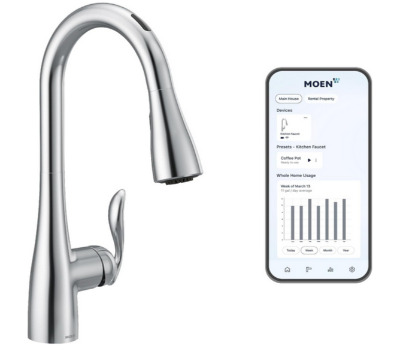
What It Is
This is Moen’s premium play in the smart faucet game. The Arbor represents their commitment to combining old-school quality with new-age technology. The chrome finish gives it a sleek, modern look. This touchless pull-down sprayer faucet includes voice control through Alexa integration, plus their Power Boost feature. This is a serious upgrade from basic motion sensor faucets.
Best Use Cases
The Moen Arbor fits perfectly in contemporary kitchens. If you have an Alexa device already, this faucet becomes even more valuable. It’s ideal for smart home enthusiasts who want everything connected. Heavy-use kitchens also appreciate Moen’s reputation for durability. If you want to experience the full hands-free kitchen experience, this delivers.
Key Features Explained Simply
Voice control is the star here. You can say things like “Alexa, turn on the kitchen faucet” or “Alexa, run the kitchen sink for two minutes.” The faucet listens and obeys. This sounds like a small thing until you’re elbow-deep in raw meat and can’t touch anything.
The Power Boost feature is clever. When you activate it, the faucet delivers extra water pressure for heavy-duty cleaning. This is great for scrubbing pans or rinsing large items. Then it returns to normal flow when you’re done. You control Power Boost through voice or the motion sensor.
The touchless operation still works without voice commands. The motion sensor is there as a backup. You get both hands-free options in one unit.
Real-Life Usage Insights
Moen customers often mention the same thing: reliability. This brand has been making plumbing fixtures for decades, and it shows. The Arbor voice commands work smoothly about 95% of the time. The other 5% is usually background noise or unclear speech, not the faucet’s fault.
Users appreciate that you don’t have to wait for the faucet to “wake up.” It’s always listening. Say your command and the water starts immediately. The chrome finish stays shiny in most kitchens, though water spots can happen.
The Power Boost feature gets thumbs up from people who do a lot of cooking. When you need extra pressure, you’ve got it. When you need to conserve, it dials back automatically.
Honest Pros and Cons
Pros:
- Excellent voice control integration with Alexa
- Power Boost feature for heavy cleaning tasks
- Moen’s legendary build quality and reliability
- Sleek chrome finish looks premium
- Touch and touchless operation both available
- Fast response times to voice commands
- Strong warranty backing from Moen
Cons:
- Higher price tag than basic motion sensor faucets
- Requires Alexa device to fully utilize voice features
- Chrome finish requires regular wiping to avoid spots
- Installation is more complex due to electronics
- Not compatible with Google Assistant (Alexa only)
Performance Discussion
This faucet performs like a premium product should. The motion sensor response is faster than budget models. The pull-down sprayer feels substantial. The chrome finish is thick and resistant to corrosion.
Water flow consistency is excellent. You get the same pressure and temperature from the first use to months later. The valve inside is durable and doesn’t wear out quickly like cheaper models might.
The voice command accuracy impresses most users. Modern speech recognition technology makes this work reliably. Even different voices in the household learn to work with it. The faucet rarely misinterprets commands.
Ease of Use
Learning to use the Moen Arbor is slightly steeper than basic models, but not significantly. Once you set up the Alexa integration (which takes about five minutes), everything else is intuitive. Speaking commands to your faucet feels natural after the first few times.
The physical operation remains simple. Push the handle one direction for hot water, the other for cold. Pull down the sprayer when needed. These basic controls work whether or not your smart home is set up.
Installation requires more skill. The electronics and sensors need proper wiring. Most people hire a professional plumber, which adds to the overall cost but ensures everything works correctly.
Value for Money
The Moen Arbor costs more, but you’re paying for reliability and smart home integration. If you already own Alexa devices, the voice control alone justifies some of the premium. If you don’t, you’re paying for features you won’t use.
The value proposition improves the longer you own it. Moen products last for years and years. You’re not replacing this in two years like cheaper models sometimes require. The warranty is strong, which protects your investment.
For people building out a smart home, this makes sense. For people who just want a nice faucet, the simpler model we reviewed earlier might offer better value.
Moen 7565EVBLS Align Smart Faucet – Spot Resist Black Stainless
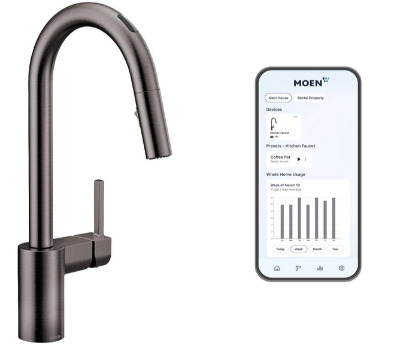
What It Is
This is Moen’s luxury offering in black stainless steel. The Align is their design-forward smart faucet built for people who care about aesthetics as much as function. Spot Resist technology means fingerprints vanish. You get voice control, touchless operation, and Power Boost. This is a smart kitchen faucet for homes where the kitchen is the showpiece.
Best Use Cases
Contemporary and modern kitchen designs are where this faucet shines. The black stainless steel finish matches high-end appliances perfectly. If you’ve invested in a beautiful kitchen, this faucet justifies itself through appearance alone. It’s also ideal for smart home enthusiasts with Alexa systems. Open-concept kitchens benefit from this faucet’s striking look.
Key Features Explained Simply
The Spot Resist finish is the main differentiator here. Regular stainless steel shows water spots immediately. Spot Resist technology reduces this by about 80%. You still get some spots eventually, but you’re wiping the faucet a lot less. This matters more than you think if you have hard water.
Voice control works exactly like the Arbor model. You can command the faucet through Alexa. The same Power Boost feature delivers extra pressure when needed. Touchless motion sensor operation is available when you don’t want to speak.
The design is sleaner and more refined than the Arbor. The lines are sharper. The overall look is more contemporary. If you care about kitchen design, this matters.
Real-Life Usage Insights
Homeowners with this faucet mention the black stainless steel finish first. It makes a real difference in how the faucet looks over time. Yes, you still have to maintain it, but it’s far less constant than regular chrome or stainless steel.
The voice commands work identically to the Arbor because they use the same technology. The Power Boost feature is just as useful. The main difference is visual—your kitchen looks more cohesive with this faucet.
People appreciate that this faucet doesn’t look cheap or overly futuristic. It looks like quality craftsmanship. The Moen brand reputation adds credibility. Friends visiting often ask about it specifically.
Honest Pros and Cons
Pros:
- Stunning black stainless steel finish
- Spot Resist technology reduces fingerprints significantly
- Full voice control through Alexa
- Power Boost feature for extra cleaning power
- Contemporary design fits modern kitchens beautifully
- Same reliability as the Arbor model
- Excellent warranty coverage
Cons:
- Most expensive option in this roundup
- Black stainless steel can scratch (rare but possible)
- Still requires Alexa for full smart features
- Requires professional installation due to complexity
- Not compatible with Google Assistant
Performance Discussion
Performance matches the Arbor because the core technology is identical. Where they differ is the finish and design aesthetic. The black stainless steel holds up extremely well to daily use. The Spot Resist coating isn’t magical, but it noticeably reduces maintenance.
The motion sensor response time is quick. Voice command recognition is reliable. Water pressure and temperature consistency are excellent. The sprayer pull-down feels substantial and doesn’t wobble.
Over time, the finish maintains its appearance better than standard stainless options. This is where the premium price translates to real-world benefit. You’re getting a faucet that looks expensive and sophisticated years into ownership.
Ease of Use
Using the Align is identical to the Arbor. The main difference is just how it looks. If you like the sleek black stainless appearance, this faucet will make you happy every time you look at it.
Installation complexity is high. The electronics and sensors require professional expertise. Budget for a professional plumber to handle this job properly.
Value for Money
This is the premium choice, and the premium price reflects that. You’re paying extra for the black stainless finish, the Spot Resist technology, and the contemporary design. If these things matter in your kitchen decision, the value is there.
If you’re primarily motivated by function and don’t care as much about kitchen design, you’re paying for aesthetics you might not need. The performance doesn’t exceed the Arbor—it matches it. You’re paying for looks, not capability.
For homeowners with beautiful kitchens and smart home systems already in place, this makes perfect sense. For budget-conscious folks, the earlier options offer more practical value.
Touchless Kitchen Faucet Motion Sensor – Oil Rubbed Bronze
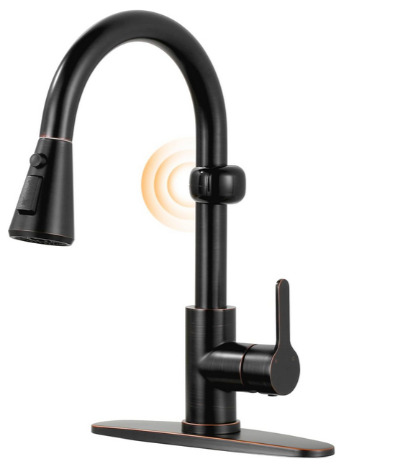
What It Is
This is the oil rubbed bronze version of the touchless motion sensor faucet we reviewed first. It keeps the same practical, hands-free technology but trades brushed nickel for a warmer, darker finish. If your kitchen has traditional or transitional design, this finish matches better. Same reliable motion sensor, same pull-down sprayer, different look.
Best Use Cases
Oil rubbed bronze works in kitchens with warmer tones. If you have wood cabinetry or traditional design elements, this finish harmonizes better than chrome or brushed nickel. It’s still a great choice for busy kitchens where hands-free operation matters. Bathrooms sometimes benefit from this finish too, though our focus is kitchen use.
Key Features Explained Simply
Functionally, this faucet is identical to the brushed nickel version. The motion sensor detects hands and turns on the water. The pull-down sprayer offers stream and spray patterns. The single handle controls temperature and flow. Everything works exactly the same way.
The oil rubbed bronze finish is darker and warmer than brushed nickel. Over time, it develops a patina that many people find attractive. It shows water spots less than shiny finishes. It looks less modern and more classic.
Real-Life Usage Insights
Users of this model appreciate how the finish weathers over time. Unlike brushed nickel that looks new forever, oil rubbed bronze develops character. It looks intentional and chosen, not merely practical.
The motion sensor reliability is identical to the brushed nickel model. The response time, sensitivity, and durability are the same. The pull-down sprayer quality matches as well.
The finish requires some care. Mineral deposits can build up, especially in hard water areas. Regular wiping and occasional vinegar cleaning keeps it looking good. It’s more maintenance than some finishes, but many people view that as part of the charm.
Honest Pros and Cons
Pros:
- Warm, classic finish suits transitional and traditional kitchens
- Develops attractive patina over time
- Shows water spots less than shiny finishes
- Same reliable hands-free operation as brushed nickel version
- Excellent value for the price
- Pull-down sprayer quality is solid
- Motion sensor response is consistent
Cons:
- Requires more maintenance than some finishes
- Finish can show mineral deposits in hard water areas
- No voice control or smart home features
- Not ideal for modern kitchen designs
- Same sensitivity issues as the brushed nickel model
- Installation still requires basic plumbing knowledge
Performance Discussion
Performance is identical to the brushed nickel model because they share the exact same internal components and technology. The only difference is exterior finish. The motion sensor works the same. The sprayer pressure is the same. The durability matches.
The oil rubbed bronze finish is durable. It resists corrosion from water exposure. It won’t flake or peel under normal use. The finish is thick enough to handle years of kitchen use without showing wear through to the base metal.
Ease of Use
Using this faucet is just as simple as the brushed nickel version. Motion detection is automatic. The pull-down sprayer is intuitive. The single handle controls temperature just like any traditional faucet. New users figure it out immediately.
Installation matches the complexity of the brushed nickel model. You need to connect it to water supply and electrical for the motion sensor. If you’re comfortable with basic plumbing, it’s manageable. Otherwise, hire a professional.
Value for Money
This represents excellent value. You’re getting motion sensor technology and a quality pull-down sprayer for the same price as the brushed nickel version. The oil rubbed bronze finish is just a different choice, not a premium upgrade.
If you prefer the oil rubbed bronze look, this is the obvious choice. If you prefer brushed nickel, the other version is identical at the same price. The value is outstanding either way.
DELTA FAUCET Cassidy VoiceIQ – Polished Nickel
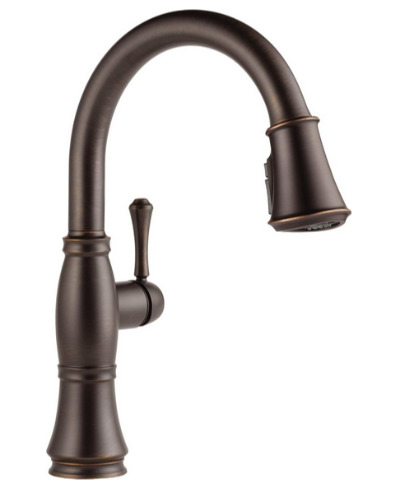
What It Is
Delta’s Cassidy VoiceIQ is their entry into the premium smart faucet market. This is a single-handle touch kitchen sink faucet with pull-down sprayer. Unlike the Moen models, this one works with both Alexa AND Google Assistant. The Lumicoat polished nickel finish is attractive and durable. This is Delta’s answer to “how do we do smart faucets the right way.”
Best Use Cases
The Cassidy VoiceIQ is perfect for people with mixed smart home ecosystems. If you have both Alexa and Google devices, this faucet works with both. It fits contemporary kitchens well. The polished nickel works with most kitchen styles. If you want maximum smart home compatibility, this is your pick.
Key Features Explained Simply
The VoiceIQ technology lets you speak commands to both Alexa and Google Assistant. “Hey Google, start the kitchen faucet” works just like Alexa commands. This flexibility is huge. You’re not locked into one smart home platform.
The Lumicoat polished nickel finish is Delta’s proprietary technology. It’s a protective coating that makes the finish more durable than standard nickel. It resists fingerprints better and maintains shine longer. It’s easier to clean than standard finishes.
Touch capability is also available. You can tap the faucet to turn it on, even with dirty hands. The motion sensor still works too. You get three ways to activate the faucet: voice commands, touch, and motion detection.
The pull-down sprayer offers dual spray patterns. The single handle controls temperature and flow. This is a traditional-style control for people who don’t want to learn something new.
Real-Life Usage Insights
Delta customers mention the voice command compatibility first. Having both Alexa and Google options feels like actual smart home integration, not being forced into one ecosystem. If you’re someone who uses multiple platforms, this matters.
The Lumicoat finish gets consistent praise. It looks better longer than standard finishes. It’s easier to maintain. The protective coating makes a noticeable difference in daily life.
The touch-to-activate feature is convenient. Some people prefer it to motion sensors because you have control. Others find motion sensors better because they work when your hands are full. This faucet gives you both.
The voice command response is fast and accurate. Delta’s recognition technology is competitive with Moen’s. Commands are understood correctly most of the time. There’s minimal frustration factor.
Honest Pros and Cons
Pros:
- Works with both Alexa and Google Assistant
- Lumicoat finish is durable and attractive
- Touch, motion, and voice activation all available
- Single handle traditional-style control
- Pull-down sprayer quality is excellent
- Delta’s solid reputation for reliability
- Good warranty protection
Cons:
- Slightly more expensive than basic motion sensor models
- More complex than simple touchless options
- Requires electrical outlet connection for smart features
- Installation is moderately complex
- Lumicoat finish, while good, isn’t quite as impressive as Spot Resist
- Multiple activation methods can confuse new users
Performance Discussion
The Cassidy VoiceIQ performs reliably across all its features. The voice recognition technology is strong. The touch activation works consistently. The motion sensor is responsive. The water pressure is solid throughout all activation methods.
The Lumicoat finish maintains its appearance well. It resists water spotting effectively. The protective coating prevents corrosion and pitting that can occur on uncoated finishes. After months of use, it still looks great.
The valve inside is durable. Water flow consistency is reliable. Temperature adjustment is smooth. There’s no sticking or jumping between hot and cold. This is quality engineering from a company that knows plumbing.
Ease of Use
Learning to use the Cassidy is straightforward. Voice commands work naturally. Touch activation is intuitive. Motion detection is automatic. The single handle operates like any standard faucet. There’s no steep learning curve.
Setup is more involved than motion-sensor-only models. You need to connect it to smart home systems. The app setup takes about ten minutes. It’s not complicated, but it requires some patience.
Professional installation is recommended due to the electrical components and voice recognition calibration. It’s not impossible to do yourself, but getting an expert to handle it ensures everything works optimally.
Value for Money
The Cassidy VoiceIQ costs less than the Moen luxury options but more than basic touchless models. For what you get—dual platform compatibility, multiple activation methods, and Delta’s quality—the value is solid.
If you’re already invested in both Alexa and Google ecosystems, this faucet makes sense. You’re not forced to choose. If you only use one platform, you might save money with a single-platform option.
The Lumicoat finish is a genuine upgrade that justifies some of the premium pricing. The build quality matches the price. This is honest value without excessive markup.
Comparison: How These Five Stack Up
Let’s put these faucets side by side and see how they compare across key categories.
Motion Sensor Reliability
All five models have responsive motion sensors. The two touchless budget models are just as reliable as the expensive ones. The difference is in refinement and response speed. The Moen and Delta models respond fractionally faster, but the difference is imperceptible in daily use.
Voice Control
Two models offer voice control: the Moen (Arbor and Align) and Delta (Cassidy). The Moen models work with Alexa only. The Delta works with both Alexa and Google. If smart home ecosystem compatibility matters, Delta wins this round. The voice recognition quality is comparable—both brands use solid technology.
Build Quality
Moen and Delta have longer histories in plumbing fixtures. Their build quality reflects decades of experience. The budget motion sensor models are solid but use simpler components. Over 10 years, you’ll likely replace the budget models. Moen and Delta will probably still work.
Finish and Appearance
Brushed nickel and polished nickel are versatile. Oil rubbed bronze suits traditional kitchens. Black stainless steel looks premium. Chrome is sleek. All five finishes are solid choices. Your kitchen style should guide this decision more than performance differences.
Price Point
Budget: The two touchless motion sensor models (brushed nickel and oil rubbed bronze) Mid-range: Delta Cassidy VoiceIQ Premium: Moen Arbor (chrome) Ultra-premium: Moen Align (black stainless steel)
Ease of Installation
The budget motion sensor models are simplest. Delta is moderate. Moen models are most complex due to advanced electronics. All require either solid DIY skills or a professional plumber.
Maintenance Required
Oil rubbed bronze needs the most care. Black stainless Spot Resist needs the least. Polished nickel with Lumicoat is somewhere in the middle. For people who dislike maintenance, black stainless or polished nickel with Lumicoat are better choices.
Smart Faucet Buying Guide: What You Really Need to Know
Buying a smart kitchen faucet involves more considerations than just picking the prettiest one. Here’s what actually matters.
Budget Reality
Set your budget first. If you have $300-400, the touchless motion sensor models are your best bet. If you have $500-700, the Delta Cassidy makes sense. If you have $700+, you can get into the Moen premium options. Don’t stretch too far—these faucets work fine in any budget category.
Smart Home Ecosystem
If you already have Alexa, both Moen and Delta work. If you have Google Home, only Delta works. If you have both, Delta Cassidy is the obvious choice. If you have neither, the budget touchless models skip the voice control entirely, which is fine.
Kitchen Design Style
Modern and contemporary kitchens: Chrome, brushed nickel, or black stainless steel Traditional and transitional: Oil rubbed bronze, polished nickel, or brushed nickel Eclectic and artistic: Any finish works—choose based on personal preference
Maintenance Tolerance
If you dislike maintenance: Choose black stainless Spot Resist or Lumicoat polished nickel If you don’t mind maintenance: Any finish is acceptable If you like character: Oil rubbed bronze develops patina over time
Activation Method Preference
Motion sensor only: Budget touchless models Voice control preferred: Moen Arbor or Align Maximum flexibility: Delta Cassidy (voice, touch, motion all available)
Installation Complexity Tolerance
If you like DIY: Budget motion sensor models are simplest If you hire professionals: Any model is fine (costs $100-300 for installation)
Long-Term Investment Outlook
If you’re keeping this home: Premium Moen options make sense If you might move: Budget models let you recoup costs more easily If resale value matters: Any of these options are modern enough to appeal to future buyers
Who Should Actually Buy Each Model?
Let’s be direct about who benefits most from each choice.
Touchless Motion Sensor Models (Brushed Nickel and Oil Rubbed Bronze)
These are for people who:
- Have modest budgets ($300-400)
- Don’t need voice control
- Want reliable hands-free operation
- Prefer simple, proven technology
- Like traditional-style faucet controls
- Are comfortable with basic installation or hiring someone affordable
These models make sense for renters upgrading their kitchen experience. They work great in second homes. They’re perfect for commercial kitchen applications where simplicity beats complexity.
Moen Arbor (Alexa, Chrome)
This is for people who:
- Already use Alexa extensively
- Want premium Moen reliability
- Prefer sleek, modern chrome finish
- Are willing to spend $600-700
- Value brand reputation highly
- Want excellent warranty coverage
This appeals to smart home enthusiasts. If you love smart home tech and use Alexa daily, this faucet fits perfectly. It’s an upgrade that makes genuine sense for people already committed to smart home ecosystems.
Moen Align (Alexa, Black Stainless Steel)
This is for people who:
- Care deeply about kitchen aesthetics
- Already own matching black stainless appliances
- Use Alexa for smart home control
- Have invested significantly in their kitchen
- Appreciate luxury finishes
- Want the most attractive-looking faucet in this roundup
This appeals to design-focused homeowners. Your kitchen is beautiful, and this faucet matches that beauty. It’s the right choice when appearance matters as much as function.
Delta Cassidy VoiceIQ (Alexa and Google, Polished Nickel)
This is for people who:
- Use both Alexa and Google products
- Want maximum smart home compatibility
- Prefer versatile, traditional-style controls
- Like Lumicoat’s durability advantages
- Want strong functionality without excessive price
- Appreciate Delta’s reputation
This appeals to people with mixed smart home ecosystems. It’s the practical choice when you’re not locked into one platform. It’s also great for people who want the latest smart kitchen technology without the absolute premium price tag.
Common Mistakes to Avoid When Buying Smart Faucets
Learning from other people’s mistakes saves you money and frustration.
Don’t Buy Based on Looks Alone
Smart faucets need to function reliably. A beautiful faucet that breaks after two years costs more overall than a plainer one that lasts five. Evaluate function first, appearance second.
Don’t Ignore Installation Costs
The faucet price is just part of the equation. Professional installation adds $150-300. Electrical work might add more. Budget for the complete cost, not just the faucet itself.
Don’t Assume All Voice Control Works the Same
Moen works with Alexa only. Delta works with both. Google Home only works with Delta. If smart home compatibility matters, research specifically which faucet works with your devices. Don’t assume.
Don’t Overlook Finish Maintenance
Each finish requires different care. Chrome needs frequent wiping. Oil rubbed bronze needs periodic cleaning. Black stainless needs less maintenance. Think about your tolerance for upkeep before choosing a finish you’ll regret maintaining.
Don’t Forget About Water Quality
Hard water areas benefit from finishes that resist mineral deposits. If your water is hard, Spot Resist black stainless or Lumicoat polished nickel are better than brushed nickel. Research your local water quality before deciding.
Don’t Buy Without Checking Warranty
Moen’s warranty is excellent. Delta’s is solid. Budget models often have shorter coverage. Read the warranty carefully. It matters if something breaks after a few years.
Don’t Skip Professional Installation
DIY installation can save money but risks poor performance. Voice recognition needs calibration. Sensors need proper positioning. Electrical connections need safety approval. Paying for professional installation prevents future problems.
Don’t Expect Perfection in One Product
No faucet excels at every metric. Budget models save money but lack voice control. Moen premium models are expensive but look great. Delta offers compatibility but costs more than the cheapest options. Choose the best fit for your priorities, not the perfect product.
Don’t Buy the Cheapest Option if You Value Reliability
Sometimes paying a bit more prevents future headaches. A faucet used daily needs durability. Moen and Delta have proven track records. The budget options are solid, but they won’t last as long with heavy use.
Don’t Ignore Your Kitchen Style
A faucet you hate looking at will drive you crazy for years. Make sure the finish and style match your kitchen aesthetic. This isn’t shallow—it’s practical. You’ll use this faucet hundreds of times annually. It should make you happy to look at.
The Real Performance Question: Will These Faucets Actually Save Water?
Smart faucets are marketed as water-saving devices. Let’s talk about reality.
Yes, touchless faucets generally use less water than traditional faucets. Here’s why: motion sensors turn off the water when nobody’s using it. With traditional faucets, people sometimes forget to turn them off completely. With touchless systems, the water stops automatically.
The actual water savings depend on your behavior. If you already turn off traditional faucets promptly, smart faucets won’t save as much. If you tend to leave water running while you’re working, touchless faucets save significant water.
Realistic savings range from 10-30% depending on household behavior. It’s not revolutionary, but it adds up over years. Lower water usage also means lower water bills and reduced environmental impact.
The cost of the faucet itself doesn’t get recouped through water savings alone. You’re buying a smart faucet primarily for convenience and hygiene, not as an investment that pays for itself. The water savings are a bonus benefit, not the main reason.
Installation Considerations: Making the Right Choice
Installation is where smart faucets differ most from traditional ones.
Budget Motion Sensor Models
These need water line connections and a small electrical outlet for the motion sensor. If you have access behind your sink, DIY installation is realistic. It takes 1-2 hours for someone comfortable with plumbing. If not, a plumber charges $150-250.
Moen Arbor and Align
These need water connections plus calibration of the voice recognition system. Professional installation is strongly recommended. The Alexa integration requires proper setup. A plumber charges $200-300 for installation.
Delta Cassidy
This needs water connections and smart home setup. It’s moderate complexity—easier than Moen but more involved than basic motion sensor models. Professional installation costs $150-250. If you’re tech-savvy, you might handle the smart home setup yourself.
General Installation Tips
Turn off the water supply before starting. Some valves are located under the sink, others are at the main shutoff. Locate your shutoff before anything else.
Take photos of your existing setup before removing anything. These help you reconnect properly.
Don’t overtighten water line connections. Hand-tight plus one half-turn with a wrench is correct. Overtightening causes leaks.
Test the faucet immediately after installation. Check for leaks under the sink. Verify motion sensor or voice control works. Fix problems immediately—they get worse over time.
If you hire a plumber, ask about their warranty on installation work. Many charge $50-100 if something breaks within 30 days due to their work.
Final Verdict: Which Smart Faucet Should You Actually Choose?
Here’s the straightforward truth: the best smart faucet for you depends on your specific situation.
If you have a tight budget and want reliable touchless technology: The Touchless Kitchen Faucet Motion Sensor models (brushed nickel or oil rubbed bronze) make perfect sense. You save hundreds compared to premium options while still getting hands-free convenience. The quality is solid. You won’t regret this choice.
If you use Alexa extensively and want a premium experience: The Moen Arbor in chrome is the right pick. You’re paying for Moen’s legendary reliability and excellent voice integration. The chrome finish works in most kitchens. This faucet will last for years.
If your kitchen has premium black stainless steel appliances: The Moen Align is the only choice that truly matches your investment. The Spot Resist technology is worth the extra cost. Your kitchen will look cohesive and beautiful.
If you use both Alexa and Google Home: The Delta Cassidy VoiceIQ is made for you. It’s the only faucet in this roundup that works with both platforms. The Lumicoat finish is practical and attractive. This is the smart choice for mixed smart home ecosystems.
Wrapping Up: Smart Faucets Actually Deliver on Their Promise
Smart faucets aren’t just gadgets that make your kitchen feel futuristic. They actually improve daily life. Hands-free operation is genuinely useful when you’re cooking. Voice control saves you from touching anything with dirty hands. Motion sensors keep your sink area cleaner because fewer people touch the handles.
The five faucets we reviewed represent different points on the smart faucet spectrum. From the straightforward touchless models to the premium Moen options to the versatile Delta Cassidy, there’s something for every budget and preference.
The technology works reliably. Installation is manageable with professional help. The durability justifies the investment. Water savings and convenience add real value to daily kitchen use.
If you’re standing at your kitchen sink thinking there should be a better way, you’re right. Smart faucets are that better way. Start by assessing your budget, your smart home setup, and your kitchen style. Then pick the model that best matches your needs. You’ll be glad you did.
Your kitchen is about to get a little smarter, a little more convenient, and a lot more enjoyable to use.

Hi, I’m Mary, the founder of Homygear.com. I’m passionate about creating a comfortable, smart, and beautiful home. I share practical insights and real-world experience on home gear that makes everyday life easier. Behind the scenes, my dedicated research team studies products in depth, and our writers craft honest reviews using trusted, authentic sources—so you can choose home gear with confidence.