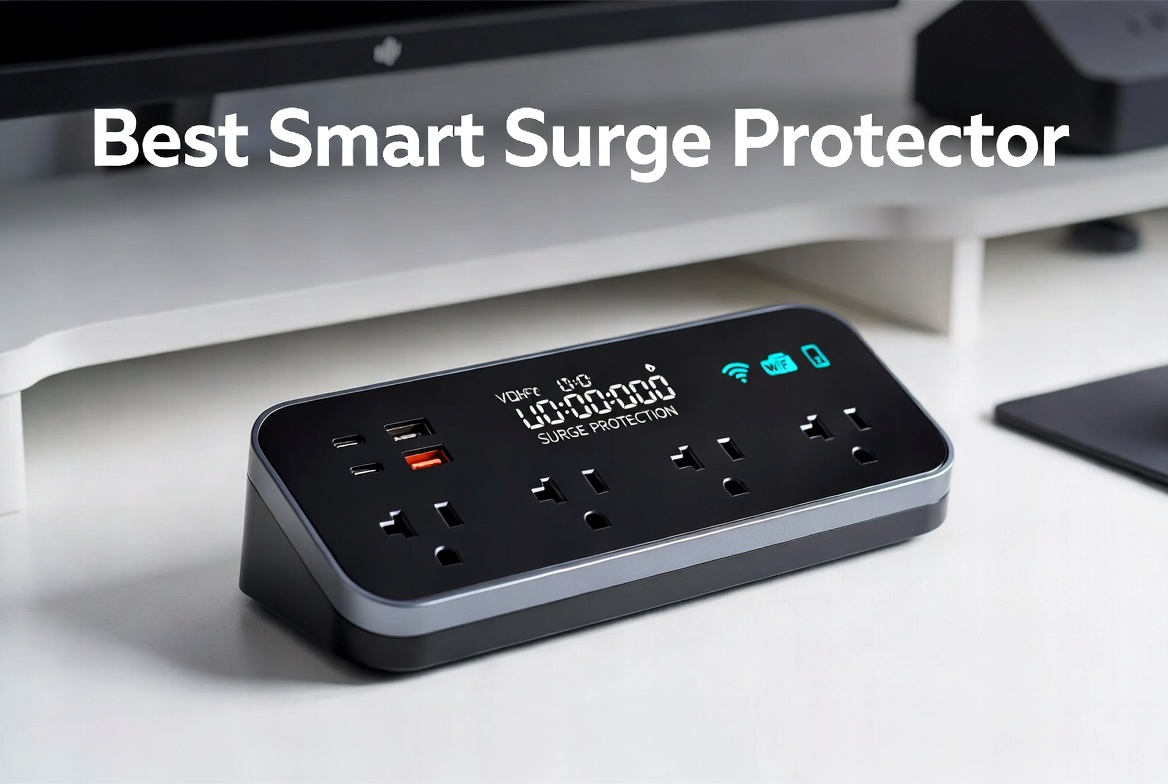
5 Best Smart Surge Protectors In 2026
Your electronics are valuable. Your laptop, phone charger, and smart home devices all deserve protection from power surges. A basic power strip gets the job done, but a smart surge protector takes things to the next level. It protects your gear AND lets you control everything from your phone.
We tested and researched five of the top smart surge protectors on the market. This guide breaks down each one so you can find the right fit for your home or office.
Why Smart Surge Protectors Matter More Than You Think
Power surges happen all the time. Lightning strikes, utility issues, or even appliances turning off and on can send dangerous voltage spikes through your outlets. A regular surge protector stops these spikes from frying your devices. That’s good.
But a smart surge protector does more. You get remote control from anywhere. You can monitor energy usage. You turn devices on and off without touching them. Some models work with voice assistants like Alexa and Google Home. That means you can say “Turn off my desk lamp” while sitting on the couch.
The best ones offer both protection AND convenience. They protect what matters while making your life easier.
Kasa Smart Plug Power Strip HS300
What This Product Does
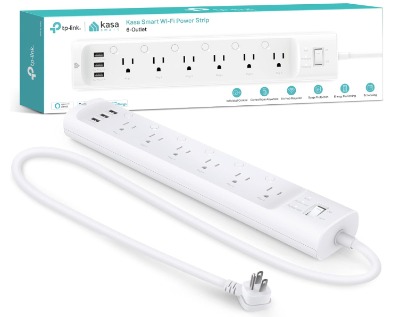
The TP-Link Kasa HS300 is a full-featured smart surge protector that takes up minimal space. It has six outlets that you can control individually, three USB ports for your charging needs, and solid surge protection built in. The flat plug design saves space behind furniture. No hub required—it connects straight to your Wi-Fi.
Who Should Use This
The HS300 works best for people who want individual control over multiple devices. The six outlets mean you can connect a lamp, coffee maker, computer monitor, speaker, and two other items. Each one gets turned on or off separately through the app. That flexibility matters if some devices draw more power than others.
It’s ideal for:
- Home office workers who want to power down everything at once
- People with lots of USB devices (phones, tablets, smartwatches)
- Anyone wanting voice control throughout their home
- Dorm rooms where space is tight
How It Actually Works
Set up takes about five minutes. Download the Kasa app, connect the power strip to Wi-Fi, and name your outlets. Give each outlet a name like “Desk Lamp” or “Monitor.” Once named, you control them individually from the app on your phone.
The real magic happens when you set schedules. Your coffee maker can turn on at 7 AM on weekdays. Your monitor shuts down at 9 PM automatically. Your TV turns off if you forget it’s on. You build routines that work for your life.
Voice control gets surprisingly useful. Say “Alexa, turn off my desk lamp” and it happens instantly. Works with Google Home too. No need to say “turn off the device connected to the third outlet”—just name them and talk naturally.
The three USB ports on the front solve a real problem. Your phone and tablet and smartwatch can all charge without eating up regular outlets. USB power is separate from the surge protection circuits, so you don’t lose outlets to charging cables.
The Good Stuff
Individual outlet control makes a huge difference. You’re not turning everything on and off as one group. Each outlet is independent.
The flat plug is a genuine convenience feature. Standard plugs stick out and block other outlets. This one lies flat against the wall, saving space and letting you use outlets above and below it.
App is simple and fast. You don’t need a computer science degree to figure out the Kasa app. It’s clean, straightforward, and responds instantly to taps.
No hub required. Some smart devices need a central hub sitting in your home. The HS300 connects directly to Wi-Fi. That’s one less thing to buy and set up.
USB ports are genuinely useful. Three USB ports means three devices charging without taking regular outlets.
Energy monitoring. The app shows real-time power usage. You can see exactly how much electricity each outlet is using. That helps you spot power-hungry devices.
The Honest Downsides
Price tag is higher than basic strips. You’ll pay more for smart features and individual outlet control. Basic power strips cost way less, but they don’t do what this does.
Relies on Wi-Fi. If your internet goes down, you can still use the outlets (the surge protection still works), but you lose app control. Local control through a wall switch would be better, but you don’t get that.
Limited to 2.4 GHz Wi-Fi. Some newer routers default to 5 GHz. You might need to set up a 2.4 GHz band separately. It’s not complicated, but it’s an extra step.
Six outlets might not be enough for some setups. If you need ten outlets, this falls short.
Real-World Performance
In regular use, the HS300 handles everything thrown at it. Powering down a computer setup at night actually happens through the app—you’re not fumbling with a power button. Midday energy surges don’t cause problems. The protection works silently in the background.
One surprise benefit: you notice how much power things actually use. When the app shows your space heater pulling 1,500 watts, you understand why your electric bill jumps in winter. That awareness changes behavior.
The scheduling feature prevents a common frustration. You stop forgetting to turn things off. Your monitor shuts down automatically. Your chargers stop drawing power at night.
Ease of Use
Set up is straightforward. Plug it in, download the app, connect to Wi-Fi. Naming outlets takes two minutes total. Using it is even easier—tap an icon in the app to turn something on or off. Voice commands work instantly if you use Alexa or Google Home.
The learning curve is flat. If you can use a smartphone app, you can use this.
Value for Money
The HS300 costs more than a basic surge protector. You’re paying for smart features, individual outlet control, and the USB ports. If you value convenience and automation, the price makes sense. If you just want surge protection and don’t care about remote control, save your money on a basic model.
For someone building a smart home, this is a solid investment. For a home office worker, it pays for itself in time saved. For a student dorm, it’s genuinely useful.
Belkin 12-Outlet Surge Protector Power Strip
What This Product Does
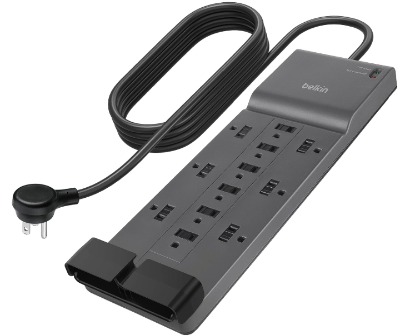
The Belkin 12-outlet surge protector is a heavy-duty monster. It gives you twelve regular outlets plus a serious amount of surge protection—3,940 Joules. The 8-foot flat plug cord means you can reach an outlet far away. This is built for people who need lots of outlets right now, without thinking about smart features.
Who Should Use This
The Belkin works best for:
- Offices with lots of equipment (monitors, printers, speakers)
- Entertainment centers with many devices
- Garage workshops with multiple tools
- Anyone who simply needs more outlets than they currently have
- Situations where you need maximum protection and don’t want smart features
This isn’t a smart power strip. It’s the serious protection option.
How It Actually Works
Plug it in and everything’s ready. No app to download. No Wi-Fi connection. No setup at all. The outlets work the same as any outlet in your wall, but with surge protection added.
Twelve outlets sounds like a lot, but think about a typical desk. Monitor takes one. Computer tower takes one. Lamp takes one. Speaker takes one. Phone charger takes one. You’re at five outlets already. Add a printer, external drive, and webcam, and you’re looking for more.
The 3,940 Joule rating means this thing is serious about protection. For context, that’s high protection for a residential setup. It handles the big power surges that lightning strikes or utility issues can cause.
The 8-foot flat plug cord is practical. Your nearby outlet might be inconvenient. An 8-foot cord lets you reach further without running cords across the room messily. The flat plug doesn’t block other outlets on the wall.
The Good Stuff
12 outlets is genuinely lots. You don’t have to choose which devices to plug in. Everything you need can connect simultaneously.
3,940 Joules is serious protection. This is professional-grade surge protection. You’re not cutting corners on safety.
Flat 8-foot cord. Reaching a distant outlet becomes possible. The flat design saves space.
Durable construction. This feels heavy and well-made. It’s designed to last years of daily use.
UL-listed. The UL mark means it passed rigorous safety testing. You know what you’re getting.
No learning curve. Plug and use. That’s it.
Great for workshops and offices. If you need outlets more than features, this delivers.
The Honest Downsides
No smart features at all. You can’t control it remotely. You can’t schedule things. You can’t monitor energy. If you want any of that, this isn’t it.
Takes up space. With 12 outlets and a heavy-duty design, this power strip is bulky. It won’t fit in a tight space.
Heavy. When you pick this up, you feel the weight. That’s quality, but it’s not portable.
Price is high for non-smart options. You’re paying for capacity and protection, not features. If you want the same protection from a smaller unit, look elsewhere.
Outlet spacing. With 12 outlets packed in, larger plugs might block neighboring outlets. Check your specific devices before assuming everything fits.
Real-World Performance
For pure protection and outlet availability, this performs as promised. Plug six monitors and three hard drives and a printer and speakers all into the same unit—everything runs without issues. The protection works transparently. You don’t feel it doing its job because things just work.
The heavy gauge wiring and construction mean it stays cool under load. A cheap power strip heats up when powering many devices. The Belkin stays relatively cool, which means it’ll last longer.
Ease of Use
Easiest to use of anything you can buy. Plug in. Done. No app. No buttons to figure out. No setup required. If you just want outlets, this is as simple as it gets.
Value for Money
The Belkin costs more than a basic power strip because of the 3,940 Joules of protection and the 12-outlet capacity. You’re not paying for smart features. You’re paying for protection and convenience. If you simply need more outlets, the price is reasonable. If you want smart home features, spend the same money on a smart model instead.
Kasa Smart Plug Power Strip KP303
What This Product Does
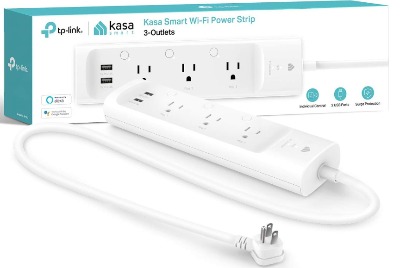
The Kasa KP303 is the smaller sibling of the HS300. It has three individual smart outlets and two USB ports. It costs less but gives up some outlets. It’s for people who want smart features but don’t need six outlets worth of control.
Who Should Use This
The KP303 works well for:
- Small desks with three to four devices
- Bedroom nightstands where you want smart control
- Closet spaces where you need a compact solution
- Apartments with limited outlet availability
- Anyone who wants smart features without the larger footprint
Think of it as the “just right” version. Not too big, not too small.
How It Actually Works
Set up matches the HS300. Download the Kasa app, connect to Wi-Fi, name your outlets. You control three individual outlets through the app. Each one turns on and off independently. The two USB ports handle charging without eating regular outlets.
The smaller size means it fits anywhere. Your nightstand. Your kitchen counter. Your office shelf. Anywhere you have a single wall outlet available.
Automation still works. You can schedule outlets to turn on and off at certain times. Voice control through Alexa and Google Home still happens. The features are the same as the bigger model—you’re just getting fewer outlets.
The Good Stuff
Smaller and more affordable. Not everyone needs six outlets. Three outlets satisfy most single-person setups. The lower price makes it accessible.
Same smart features as HS300. You get scheduling, automation, voice control, and energy monitoring. All the intelligent features in a compact package.
Two USB ports. Your phone and tablet charge without using regular outlets.
Perfect for small spaces. A dorm room or studio apartment doesn’t need six outlets. Three is actually plenty.
Flat plug design. Same space-saving design as the bigger model.
Still no hub required. Direct Wi-Fi connection keeps things simple.
The Honest Downsides
Only three outlets. If you need four or five devices controlled, this falls short.
Still relies on Wi-Fi. Same as the HS300, if internet goes down, you lose app control.
Small USB ports might not fit larger plugs. Some USB adapters are chunky. They might block a neighboring outlet or not fit properly.
Less power capacity than HS300. This has less capacity for simultaneous power draw. It’s fine for phones, lamps, and small devices. It’s not ideal for a space heater or multiple high-power items.
Real-World Performance
For the expected use cases, this performs reliably. Three outlets handle most small-space situations. The USB ports work smoothly for charging. Scheduling does exactly what you tell it to do.
Energy monitoring is less useful on a smaller model because you’re plugging in fewer things, but it’s still there if you want it.
Ease of Use
Just as easy as the HS300. Download app. Connect Wi-Fi. Name outlets. Use from your phone. Voice commands work. No complexity.
Value for Money
The KP303 costs less than the HS300, which makes sense—you get fewer outlets. But you’re paying for the same smart features and individual control. If three outlets is enough for your situation, you save money compared to buying the bigger model. For someone who truly needs more, spending extra on the HS300 makes sense.
Anker Power Strip with 2000J Surge Protector
What This Product Does
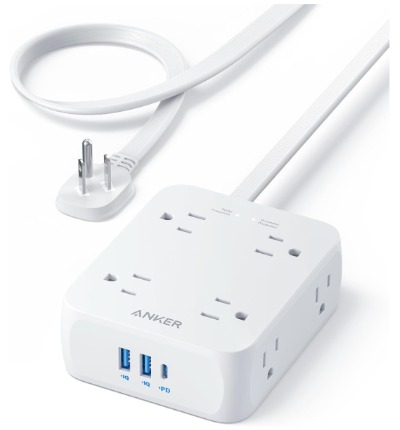
The Anker power strip offers a middle ground. You get eight AC outlets, two USB-A ports, and one USB-C port with 20W power. That’s useful for modern devices. The 2000J surge protection is solid. The 5-foot cord reaches most nearby outlets. This is a non-smart option that’s practical for everyday use.
Who Should Use This
The Anker works best for:
- Home office setups without smart home devices
- College dorms where simplicity is valued
- Travel situations where you need portable protection
- Small apartments or studio spaces
- Anyone who doesn’t need smart features but wants good protection and a decent outlet count
This is the practical middle option.
How It Actually Works
Plug it in and use it like a regular power strip. Everything works immediately. No setup. No app. No Wi-Fi. Just plug things in and they get power with surge protection.
Eight outlets handle most home office situations. USB ports charge phones and tablets without eating regular outlets. The 5-foot cord reaches across a desk or to a nearby outlet without excessive extension.
The flat plug design is the same as the Kasa models—it saves space and doesn’t block other outlets.
The Good Stuff
Eight outlets is practical. More than the Kasa KP303, less than the Belkin. Right in the middle for most situations.
2000J protection is solid. That’s enough protection for residential use. It’s not as much as the Belkin’s 3,940, but it’s still very good.
Three USB ports including USB-C. Modern phones and tablets often charge via USB-C. The 20W USB-C power is genuinely useful for fast charging.
Flat plug design. Saves space like the other models.
Compact and portable. Smaller than the Belkin, bigger than the Kasa KP303. It balances size and capacity well.
Good price point. Less expensive than smart options, comparable to other non-smart models.
TUV listed for safety. Independent testing confirms the safety standards.
The Honest Downsides
No smart features at all. You can’t control it from your phone. No scheduling. No automation. If you want any of that, this isn’t it.
USB-C port only on one port. If you have multiple USB-C devices, you’re limited. Two USB-A ports plus one USB-C might not be enough for your situation.
5-foot cord might be too short for some situations. The Belkin offers 8 feet. If you need to reach further, this falls short.
Less surge protection than the Belkin. 2000J is good, but 3,940J is better. If maximum protection is your priority, the Belkin wins.
Real-World Performance
This handles typical home office situations reliably. Power monitor, laptop, lamp, phone charger, tablet charger, speaker, and two more devices all plug in and work. The USB-C port actually gets used because modern devices expect it. The flat plug means it fits without blocking other wall outlets.
The 5-foot cord is actually long enough for most desks. If your outlet is right next to where you’re setting up, you barely use it. If it’s a few feet away, the 5-foot cord handles it comfortably.
Ease of Use
Simplest possible to use. Plug in. The outlets work. No app. No buttons. No learning anything. Unplug and take it with you. It just works.
Value for Money
The price is reasonable for eight outlets, USB ports, and solid surge protection. You’re not getting smart features, so you shouldn’t pay as much as a smart option. If you simply need outlets and protection, this delivers good value. For travelers and dorm rooms especially, the price and compact size make sense.
Tapo Smart Wi-Fi Power Strip – P316M
What This Product Does
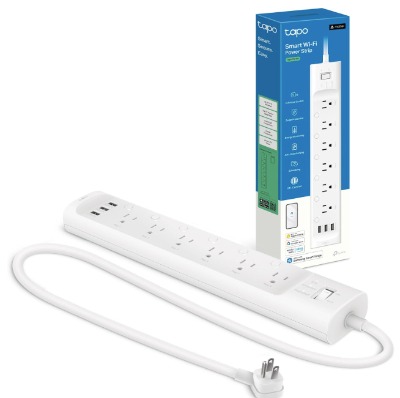
The Tapo P316M is a newer smart surge protector from TP-Link’s Tapo line. It offers six individually controlled smart outlets, three USB ports, and Matter compatibility. Matter is important because it’s becoming the standard for smart home devices across different brands. Energy monitoring and surge protection are included.
Who Should Use This
The Tapo P316M is best for:
- People invested in the Matter smart home standard
- Apple Home users who want compatibility
- Anyone who wants a modern smart surge protector with future-proofing
- Homes already using Tapo devices
- People who want complete device compatibility across brands
Matter compatibility makes this future-proof in ways other smart devices aren’t.
How It Actually Works
Set up is similar to Kasa models. Download the Tapo app or add it to Apple Home using Matter. Connect to Wi-Fi. Name your outlets. Control them individually from your phone or with voice commands through Alexa, Google Assistant, or Siri.
The Matter compatibility is the big difference. Matter is a smart home standard that works across brands. An Apple Home device can control Tapo devices. A Google Home can control Tapo devices. Amazon devices can. They all work together smoothly. That’s different from Kasa, which has better integration with TP-Link’s own ecosystem.
Energy monitoring works exactly like Kasa models. You see real-time power usage for each outlet. Scheduling and automation are built in.
The Good Stuff
Matter compatibility is future-proof. As smart home standards shift, Matter devices stay relevant. Other smart devices will play nicely with Tapo gear.
Works with Siri and Apple Home. Apple users get native integration. That’s a big deal if you’re already in the Apple ecosystem.
Six individually controlled outlets. Same capacity as the Kasa HS300.
Three USB ports for charging. Your devices charge without eating regular outlets.
Energy monitoring is detailed. You know exactly how much each outlet is pulling.
Flat plug design. Saves space like the Kasa models.
Works with multiple voice assistants. Alexa, Google, Siri, Bixby all work.
The Honest Downsides
Still newer, so less information available. Kasa has been around longer. More reviews and troubleshooting info exist for Kasa. Tapo is solid but less established in smart surge protector space.
Matter adoption is still early. The technology is real, but not all devices support it yet. That’s changing rapidly, but right now it’s something to know.
Price is slightly higher than Kasa HS300. You’re paying for the Matter compatibility and newer technology.
Relies on Wi-Fi like other smart options. Internet down means you lose app control.
Limited 2.4 GHz Wi-Fi. Same as Kasa models—some newer routers need a separate 2.4 GHz band.
Real-World Performance
In practice, the Tapo P316M performs identically to the Kasa HS300. The outlets work. Control is instant. Automation happens as scheduled. Energy monitoring is accurate.
The real difference shows up if you use Apple Home or a mix of different smart home brands. Kasa works better if you’re all-in on TP-Link. Tapo works better if you want cross-brand compatibility.
Ease of Use
Setup is straightforward, similar to Kasa. Using it is simple. Apple users might actually find it easier because Apple Home integration is native. Android users get the same experience as Kasa.
Value for Money
The Tapo P316M costs about the same as the Kasa HS300, perhaps slightly more. You’re paying for Matter compatibility and the newer technology. If you care about cross-brand smart home integration, it’s worth it. If you’re all-in on TP-Link and Kasa, spend less on the HS300. If you’re just starting your smart home and want flexibility, the Tapo makes sense.
Comparing the Five Options: Which Wins in Different Categories
Best Overall Smart Surge Protector: Kasa HS300
The HS300 balances features, price, and reliability. Six outlets, individual control, USB ports, no hub required. It does everything well without overwhelming you with unnecessary features.
Best for Maximum Outlets: Belkin 12-Outlet
If you need a ton of outlets and don’t care about smart features, the Belkin is the answer. Twelve outlets is hard to beat. 3,940 Joules is excellent protection.
Best for Small Spaces: Kasa KP303
Three outlets and two USB ports in a compact size. Costs less. Takes up less space. Perfect for dorms and small apartments.
Best for Travel and Portability: Anker 2000J
Eight outlets, USB-C, compact size, flat plug. Great price. No smart features to worry about. Pick it up and go.
Best for Future-Proof Smart Homes: Tapo P316M
Matter compatibility means this device plays well with everything. If you’re building a modern smart home, this position matters.
A Practical Buying Guide
How Much Surge Protection Do You Actually Need?
For most homes, 2000 Joules is plenty. That’s what the Anker offers. If you want more protection and have the budget, the Belkin’s 3,940 Joules is better. The difference matters if you live somewhere with frequent lightning strikes or unstable power. In most neighborhoods, 2000 Joules handles the job.
Do You Want Smart Features?
Answer this honestly. Smart features are fun and genuinely useful. But they cost extra. They require Wi-Fi. They need an app. If you travel frequently or live somewhere with unreliable internet, smart might frustrate you. If you stay in one place and have solid Wi-Fi, smart features solve real problems.
How Many Outlets Do You Need?
Count your devices. Include your phone charger, computer, monitor, lamp, speaker, and anything else you regularly plug in. Add one or two extra for future devices. The Kasa KP303 with three outlets works for minimal setups. The Kasa HS300 and Tapo P316M with six outlets work for most people. The Anker with eight outlets handles more. The Belkin with twelve outlets is overkill for most home setups but perfect for offices.
What About USB Devices?
Modern life includes lots of USB charging. Three USB ports are common now. Some devices have USB-C. The Anker is the only one with dedicated USB-C charging (20W fast charge). If you charge an iPad or modern laptop via USB-C, that matters.
Does Matter Compatibility Matter?
Not right now for most people. But it will. If you’re building a smart home from scratch, Tapo’s Matter support is genuinely valuable for the future. If you already own smart devices and they work fine, don’t buy something just for Matter compatibility.
What’s Your Budget?
Budget determines everything. Under $30, you get basic non-smart protection. $30-$50 gets you the Anker or Belkin. $50-$80 gets you Kasa KP303 or Tapo. $80+ gets you Kasa HS300 and unlocks the best smart features.
Who Should Actually Buy Each Product
Buy the Belkin 12-Outlet if:
- You need lots of outlets right now
- You don’t want smart features
- You value durability and protection above all else
- You have a desk, workbench, or entertainment setup with many devices
Buy the Kasa HS300 if:
- You want smart home integration
- Six outlets is enough for your setup
- You use Alexa or Google Home
- You want to automate and schedule devices
- You have the budget for premium features
Buy the Kasa KP303 if:
- You want smart features on a budget
- Three outlets is enough
- You have limited space
- You live in a dorm or small apartment
- You want to dip your toes into smart home
Buy the Anker 2000J if:
- You want a good balance of outlets and protection
- You don’t care about smart features
- You travel and need portability
- You want solid surge protection at a fair price
- USB-C charging matters to you
Buy the Tapo P316M if:
- You want future-proof smart home compatibility
- You use Apple Home
- You value cross-brand device compatibility
- You want six individual outlets with smart control
- Matter support is important to you
Common Mistakes People Make When Buying Surge Protectors
Assuming all surge protectors are the same. They’re not. Protection levels vary. Smart features vary. Outlet counts vary. You get what you pay for.
Plugging a power strip into another power strip. This creates fire hazards and defeats surge protection. Plug directly into a wall outlet.
Ignoring Joule ratings. Higher Joules means better protection. It matters. Don’t pick the cheapest option if protection is important to you.
Overloading outlets. Just because something has six outlets doesn’t mean you plug in six space heaters. Check the amperage limits. Read the instructions.
Forgetting about cable length. A 5-foot cord seems long until your outlet is 8 feet away. Check before buying.
Expecting smart features to work without good Wi-Fi. Smart features require solid Wi-Fi signal. If you have dead zones in your home, placement matters. Your router’s strength matters.
Assuming you need the most expensive option. The Belkin with twelve outlets is impressive but wasteful for most homes. The Kasa KP303 handles most situations perfectly. Don’t buy more than you need.
Not naming your outlets clearly. “Outlet 1” means nothing. “Desk Lamp” means everything. Spend two minutes naming outlets when you set up. Future you will be grateful.
Forgetting to use scheduling. This is the coolest feature. Your coffee maker turns on before you wake up. Your TV turns off automatically. Actually set this up. Don’t buy smart and skip the automation.
Ignoring USB ports. Three USB ports solve real problems. Charging without eating regular outlets is genuinely useful. Account for this when comparing options.
Final Verdict: The Best Smart Surge Protector Overall
The Kasa Smart Plug Power Strip HS300 is the best overall choice for most people.
Here’s why: It offers six individually controlled smart outlets, which is enough for typical desks and small entertainment setups. The three USB ports handle modern charging needs. Individual outlet control means each device can be scheduled and automated separately. The app is intuitive. Voice control works with Alexa and Google Home. Energy monitoring helps you understand power usage. No hub is required. The flat plug design saves space. The price is fair for the features.
Is it the cheapest option? No. The Anker and Belkin cost less.
Is it the most features? No. The Belkin has more outlets.
Is it perfect for every situation? No. Some people need the Belkin’s capacity. Some people need the KP303’s compact size.
But for the average person building or upgrading their home office, bedroom, or small apartment—the HS300 hits the sweet spot. You get genuine smart home functionality. You get enough outlets. You get solid protection. You get excellent value.
If you prefer Apple’s smart home system, the Tapo P316M is a close second and worth considering. If you need more outlets and don’t want smart features, the Belkin wins. If you want smart on a budget, the KP303 is excellent. If you need portability, the Anker is perfect.
But the Kasa HS300 is the one most people should buy.
Final Thoughts
Smart surge protectors have changed how we think about electrical safety and convenience. A device that protects your equipment AND lets you control it remotely and schedule it to turn on and off automatically is genuinely useful. It’s not just hype.
That said, you don’t need smart features if they don’t match your situation. A solid non-smart surge protector with good protection is better than a cheap smart one you’ll never use properly.
Take your time deciding. Count your outlets. Know your needs. Check your Wi-Fi situation if you’re considering smart. Then pick the one that fits your life best.
Your devices are valuable. They deserve protection. Your wallet is also valuable. It deserves to be spent wisely.
All five of these options will serve you well. They’re all legitimate choices from reputable brands. Pick the one that matches your actual needs, not the one with the most features. You’ll be happy with your choice.

Hi, I’m Mary, the founder of Homygear.com. I’m passionate about creating a comfortable, smart, and beautiful home. I share practical insights and real-world experience on home gear that makes everyday life easier. Behind the scenes, my dedicated research team studies products in depth, and our writers craft honest reviews using trusted, authentic sources—so you can choose home gear with confidence.