How Does a Smart Home System Work?
If you’ve ever walked into your home and wished your lights turned on automatically, or wanted to adjust your thermostat from your phone, you’re thinking about a smart home system. The good news? Smart home technology is way easier to understand than you might think, and it’s becoming more affordable every day.
Let me walk you through how these connected devices work together to make your home smarter and more convenient.
What Exactly Is a Smart Home?
A smart home isn’t some futuristic sci-fi concept anymore. It’s simply your regular house equipped with devices that talk to each other and respond to your commands. Think of it as giving your home a digital nervous system.
These smart devices can do things on their own or follow instructions you give them. Your smart lighting system can brighten up when you get home. Your smart thermostat learns your temperature preferences. Your smart security cameras watch your front door. All of this happens because the devices are connected and working together as a network.
The core idea behind home automation is making your daily life easier by automating routine tasks and giving you remote control over your household devices.
The Building Blocks: What Makes a Smart Home Work
A smart home system has several key parts working in sync. Let me break down each component so you understand how the whole thing comes together.
Smart Devices and Connected Devices
At the heart of any smart home are the devices themselves. These are regular appliances and fixtures that have been upgraded with digital technology. A smart bulb looks like a regular lightbulb but can change colors and brightness. A smart door lock works like a regular lock but you can unlock it from your phone. A smart camera watches your home the same way a regular camera does, but it sends video to your phone or computer.
The magic happens because each device has a small computer chip inside that lets it connect to the internet and communicate with other devices. This is what we call IoT (Internet of Things) technology.
The Central Hub: The Brains of Your System
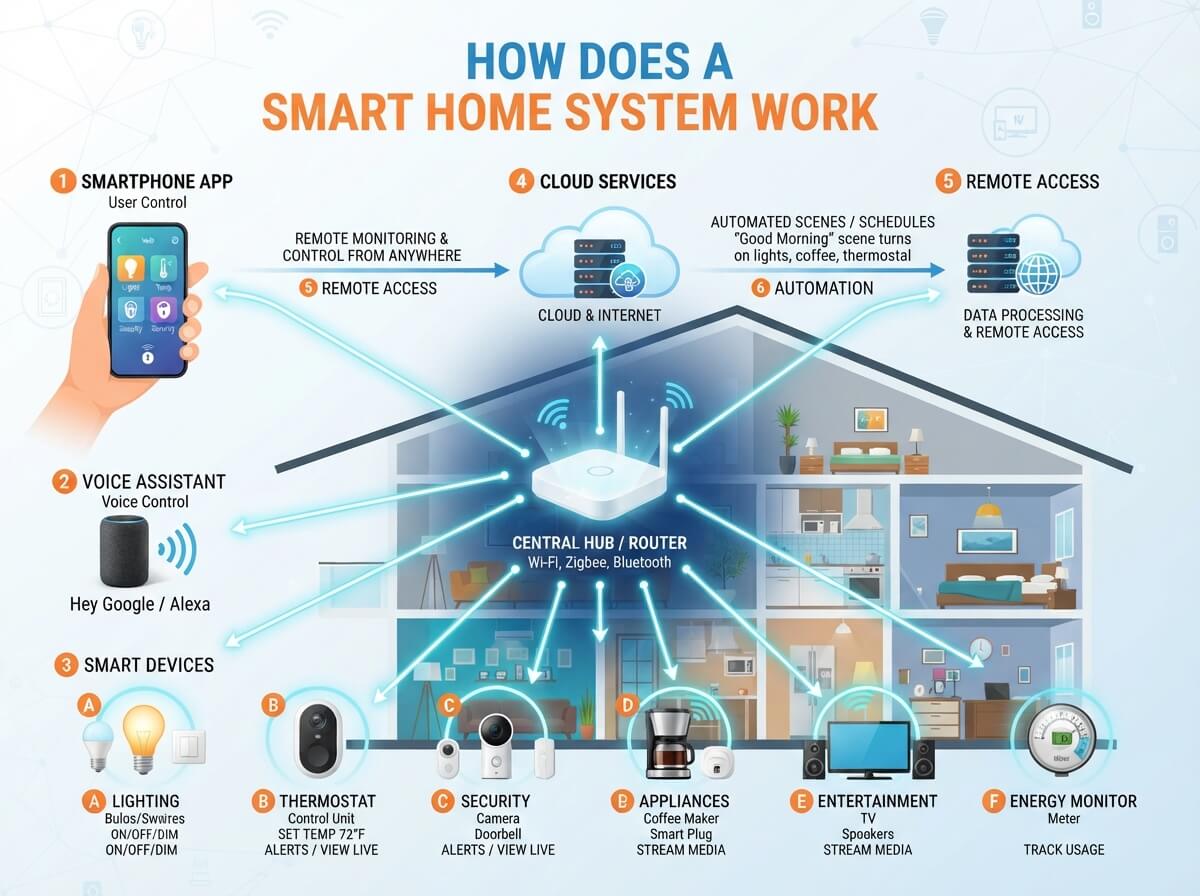
Most smart homes have a central hub or control center. Think of this as the meeting point where all your smart devices gather to communicate. Popular hubs include Amazon Echo, Google Home, Apple HomeKit, and Samsung SmartThings.
This hub sits in your home and connects to your internet router. When you give a voice command to your smart speaker, it talks to the hub. The hub then sends instructions to your other devices. It’s like having a translator that all your devices speak to.
Some smart devices work without a central hub by connecting directly to your Wi-Fi network. However, having a hub makes everything run smoother and faster. It also keeps your system working even if the internet goes down temporarily, which is pretty handy.
Internet Connection: The Lifeline
Your home’s Wi-Fi network carries all the communication between devices. When you tell your smart speaker to turn off the lights, that command travels through your Wi-Fi to the hub, which then sends it to your smart bulbs.
This is why a strong, stable internet connection matters so much for smart home systems. Weak Wi-Fi means slow responses or devices that drop out of the network. Many people upgrade their router or add Wi-Fi extenders once they start building out their smart home setup.
How Smart Devices Actually Communicate
Devices in your smart home can’t just talk to each other in English. They use special languages called protocols. Here are the main ones you’ll encounter.
Wi-Fi: The Standard Connection
Most smart devices use your regular home Wi-Fi network to connect. This is the easiest method because your home already has Wi-Fi. Phones and computers use it, so adding smart devices is just extending what you already have.
The downside? Wi-Fi uses more battery power than other connection types. This doesn’t matter for plugged-in devices like smart speakers or smart displays. However, battery-powered devices like wireless door sensors drain faster on Wi-Fi.
Bluetooth: For Close-Range Communication
Bluetooth connects devices that are near each other. Your phone can connect directly to a Bluetooth speaker without using Wi-Fi. Some smart home devices use Bluetooth to communicate with each other or with your smartphone.
Bluetooth doesn’t require much power, which is great for battery-powered devices. The catch? It only works over short distances. You can’t use Bluetooth to control a device in another room if there’s too much distance or too many walls between them.
Zigbee and Z-Wave: The Smart Home Specialists
These are wireless protocols made specifically for smart homes. Both work over longer distances than Bluetooth while using less power than Wi-Fi. Many smart home devices use one of these standards.
When you connect a Zigbee or Z-Wave device to your smart home, you need a hub that supports that protocol. The hub translates between these protocols and your internet connection. This lets your phone control a Zigbee light bulb even when you’re at work across town.
Voice Control: Speaking to Your Home
One of the coolest features of smart homes is voice control. You can tell your smart speaker what to do, and it listens and acts.
Here’s how it works: You speak to your smart speaker, like Amazon Alexa or Google Assistant. The speaker records your voice and sends it to the company’s servers over the internet. The artificial intelligence software there understands what you’re asking. It then sends a command back to your smart home hub. The hub translates that command and sends it to the right device.
For example, you say “Turn on the bedroom lights.” The speaker records this. Alexa’s software recognizes that you want to control lights in your bedroom. It sends the instruction to your hub. Your hub finds the bedroom light device on your network and turns it on. All of this happens in just a second or two.
Voice control feels magical because the response is so fast. In reality, it’s a chain of computers working together to figure out what you want and make it happen.
Smart Lighting Systems Explained
Smart lights are one of the easiest smart home devices to start with, so let’s look at how they work.
A smart bulb has three main parts: the light source (LED), a small computer chip, and a wireless radio. You screw the bulb into a regular light socket. When you turn on the power to that socket, the bulb connects to your home network automatically.
Now you can control that bulb from anywhere. You can dim it, brighten it, or change its color if it’s a color-changing bulb. You do this through your smart speaker, your phone app, or wall switches if they’re also smart.
Here’s something cool: you can set up lighting routines. You tell the system “when I say good night, turn off all lights in the house and lock the front door.” Then every night, one command does all those things at once. No more walking around checking that every light is off.
Smart lights also work with your daily schedule. You can program them to gradually brighten in the morning to wake you up gently. They can turn on at dusk and off at dawn. Some smart homes even sync their lights to match your body’s natural rhythm, which helps you sleep better.
Smart Thermostats and Climate Control
Your smart thermostat works like a personal assistant for your heating and cooling. It learns your temperature preferences and creates schedules to match your routine.
A smart thermostat has sensors that measure the current temperature in your home. It talks to your HVAC system (that’s your heating and air conditioning). When the temperature gets too hot or cold, the thermostat tells the HVAC system to kick in.
The genius part? The thermostat learns when you’re home and when you’re away. If nobody is home, it adjusts the temperature to save energy. When you’re coming back, it brings your home to a comfortable temperature before you arrive.
You control all of this through your phone. Stuck in traffic? You can tell your thermostat to cool down your home, so it’s nice and comfortable when you walk in. At work on a hot day? You can lower your air conditioning from your desk.
Many smart thermostats can save you real money on your energy bills. They track your energy use and suggest ways to save. Some even let you see exactly how much energy each climate control event costs you.
Home Security and Monitoring
Smart security devices let you keep an eye on your home from anywhere in the world.
Smart door locks replace traditional keys. You install one on your front door and then unlock it with your phone, a code, or even your face or fingerprint. No more fumbling for keys in your purse or pockets.
Smart cameras are like security guards that never take breaks. They record video and send it to your phone or cloud storage. Many have two-way audio, so you can talk to someone at your door even when you’re not home.
Smart doorbells work the same way. When someone rings your doorbell, you get an alert on your phone with a video of who’s there. You can talk to them through the doorbell’s speaker.
Motion sensors detect when someone enters a room. Combined with cameras, these create a complete picture of what’s happening in your home. If motion is detected while you’re away, your system can send you an alert right away.
All of this security data gets stored either on your devices themselves or in cloud storage. Cloud storage means your videos are safe even if someone breaks into your home and damages your equipment.
Smart Plugs and Outlets: The Simple Starting Point
One of the easiest ways to make something “smart” is to use a smart plug. You plug a regular appliance into the smart plug, and the plug connects to your smart home network.
Now you can turn that appliance on or off from your phone. You can set schedules so the coffee maker turns on every morning at 6 AM. You can monitor how much electricity each device uses.
Smart plugs are cheap and don’t require any installation. You just plug them in. This makes them perfect for beginners who want to dip their toes into home automation without a big investment.
Automation and Routines: The Time-Saving Magic
The real power of a smart home comes from automation. You tell your system what conditions you want, and it makes those things happen automatically.
Here are some examples of automation routines that many people create:
Morning routine: When your alarm goes off, lights brighten gradually, the coffee maker starts, and the news briefing plays.
Leaving home: When the last person leaves, all lights turn off, the thermostat goes into away mode, and doors lock.
Movie time: One command dims lights, closes blinds, turns off notifications on smart displays, and starts your streaming service.
Bedtime: Lights dim and turn off, doors lock, cameras go into night mode, and the thermostat adjusts for sleeping.
These routines save you time every single day. More importantly, they make your home more comfortable because your devices are always working with your needs in mind.
Controlling Everything from Your Phone
Your smartphone becomes the remote control for your entire home. Apps from your device manufacturers let you see what’s happening and send commands.
From your phone, you can:
- Check your security cameras in real time
- Adjust your thermostat
- Lock or unlock doors
- Turn lights on, off, or dim them
- Monitor who’s at your door
- See energy usage
- Start routines and automations
- Get alerts when things happen (like motion detected)
Some apps combine multiple devices into one place. Instead of opening Amazon Alexa, Google Home, and your thermostat’s separate apps, everything works from a single hub app.
This remote control is huge when you’re away from home. You can make sure everything is secure. You can adjust your thermostat if you’re coming home to extreme weather. You can talk to someone at your door even if you’re on vacation overseas.
How Devices Work Together: Integration
The real magic happens when your devices work together. A motion sensor detects you walking downstairs in the morning. This triggers your system to turn on hallway lights at dim brightness. At the same time, your coffee maker starts. When you reach the kitchen, the lights there turn on to full brightness.
None of this happens because you programmed each device individually. It happens because you set up one routine that integrates multiple devices.
Different smart home platforms handle integration differently. Amazon Alexa, Google Home, and Apple HomeKit all let you create these integrated routines. Some work better than others, and compatibility depends on which devices support which platforms.
This is why choosing devices that work with your main platform matters. If you’re using Google Home, pick devices that support Google. That way everything integrates smoothly.
Security and Privacy: Important Considerations
When your home is connected to the internet, security matters. Here are things to know:
Your smart home devices collect data about your habits. When you wake up, when you leave home, when you’re away—devices know all of this. This data usually goes to the company that made your device.
To stay safe, use strong, unique passwords for your smart home accounts. Keep your devices updated with the latest software. Read privacy policies from your device makers so you know what data they collect.
Consider which devices you’re comfortable having in your home. Some people don’t want cameras recording audio. Others avoid smart displays that always listen. There’s no wrong answer—it’s about your comfort level.
Getting Started: Building Your Smart Home
You don’t need to buy everything at once. Most people start with one or two devices and expand over time.
A good starting point is a smart speaker with a hub (like Amazon Echo Show or Google Nest Hub). These give you voice control and a central point for your system.
Next, add smart lights or smart plugs. These are affordable and easy to set up. Just plug them in, connect to your network, and you’re done.
Then add a smart thermostat. This one costs more, but it saves money on energy bills over time.
Finally, add security devices like smart cameras and door locks.
Start with one ecosystem—either Amazon, Google, or Apple. Once you understand how it works, you can expand or switch if you want.
The Bottom Line
A smart home system works by connecting devices through your Wi-Fi network, having them communicate through a central hub, and letting you control everything from your phone or by voice. It’s not magic—it’s just computers talking to each other.
The best part? You don’t need a tech degree to use one. Start simple, learn as you go, and add devices when you’re ready. Your home automation can grow and evolve as your needs change.
Smart homes are practical, they save time, they help you save money on energy, and they make your home more secure. That’s why so many people are building them right now.
Ready to make your home smarter? Start with one device and see how it changes your daily life.

Hi, I’m Mary, the founder of Homygear.com. I’m passionate about creating a comfortable, smart, and beautiful home. I share practical insights and real-world experience on home gear that makes everyday life easier. Behind the scenes, my dedicated research team studies products in depth, and our writers craft honest reviews using trusted, authentic sources—so you can choose home gear with confidence.