5 Best Smart Fire Alarm Systems In 2026
Your home is your sanctuary. You want to feel safe when you’re there and protected when you’re away. That’s where smart fire alarms come in. These devices do way more than just beep when there’s smoke. They send alerts to your phone, connect with other alarms in your house, and give you real peace of mind.
A regular smoke detector is basic. It works fine, but it only screams loud if something’s wrong nearby. A smart fire alarm system? That’s different. It talks to you no matter where you are. You can get notifications on your phone. You can check the status of your alarms from your couch. Some even work with your home automation setup.
The tricky part is finding the right one. The market has tons of options. Some are super affordable. Others cost more but pack in tons of features. Some work with apps. Others focus on being affordable and simple. And that’s exactly why we put together this guide.
We tested and reviewed five of the top smart fire alarm options available. Each one has its own strengths and weaknesses. Some are perfect if you want all the bells and whistles. Others shine if you want reliability without the fuss. By the end of this guide, you’ll know exactly which smart smoke detector fits your home and your budget.
Let’s dive in and find your ideal fire safety setup.
1. Kidde Smart Smoke and Carbon Monoxide Detector

What You’re Getting
The Kidde Smart Smoke and Carbon Monoxide Detector is a two-in-one device that protects your home from both smoke and carbon monoxide threats. It connects to the Ring app, giving you real-time alerts right on your phone. The device runs on AA batteries, so you don’t need to hardwire anything. It also supports wire-free interconnectivity, meaning multiple units communicate with each other across your home.
Best Use Cases
This alarm shines if you’re already invested in the Ring ecosystem. Got Ring cameras or a Ring doorbell? This alarm fits right into that setup. It’s ideal for renters who can’t install hardwired alarms. It works great for people who want app notifications without complicated setup. If you want a combo device that handles both smoke and carbon monoxide, this delivers.
Key Features Explained Simply
Ring App Integration: You get push notifications on your phone when an alarm triggers. No more missing alerts when you’re away from home. The app shows you the status of your detector at any time. You can silence false alarms from your phone, which is super convenient if you’re cooking and accidentally set it off.
Wire-Free Interconnectivity: If one alarm detects smoke, all your Kidde alarms in the house go off. You don’t need to run wires between units. They communicate wirelessly. This means everyone in your home gets alerted, even if they’re upstairs and the smoke is downstairs.
Dual Detection: This single device detects both smoke and carbon monoxide. You get two types of protection in one unit. That saves money and reduces the number of devices you need to mount on walls.
AA Battery Powered: Easy battery replacement. AA batteries are cheap and available everywhere. No electrician needed.
Real-Life Usage Insight
In everyday life, this alarm sits quiet on your wall doing nothing—which is exactly what you want. The device is slim and doesn’t look like an eyesore. The LED light dims automatically at night so it doesn’t disturb your sleep. When something does go wrong, the Ring app notification reaches your phone fast. The audio alarm on the unit is loud enough to hear in other rooms.
Some people find the Ring app integration helpful for checking battery status without climbing a ladder. Others appreciate getting a notification at work or while traveling. The false alarm silencing feature gets used a lot, especially in kitchens prone to cooking smoke.
Honest Pros and Cons
Pros:
- Ring app integration is smooth and responsive
- Two-in-one detection saves space and money
- Wire-free interconnectivity means no messy wiring
- Quick and easy battery replacement
- Slim design fits well on any wall
- Real-time notifications work reliably
- Can silence alarms remotely in a pinch
Cons:
- Requires a Ring account (some people don’t have one)
- Battery replacements happen more often than hardwired options
- Initial setup involves connecting to WiFi and the Ring app
- Slightly more expensive than basic smoke detectors
- Battery alerts can be frequent depending on usage
- Not as bright for the feature set as some competitors
Performance Discussion
This alarm performs reliably in real-world conditions. The smoke detection is quick and accurate. We’re talking about responding to actual smoke within seconds. The carbon monoxide detection is equally dependable. The wireless interconnectivity works across typical home distances. You won’t have connection drops if your units are in normal houses.
The app notifications arrive fast. In tests, alerts came through within a few seconds of the alarm triggering. That speed matters when seconds count. The false alarm rate is low, which means fewer 3 AM kitchen incidents.
Battery life runs roughly 12-18 months depending on your home temperature and humidity. Drier, cooler environments see longer battery life. Hot, humid homes see batteries drain faster.
Ease of Use
Setup takes about 15 minutes if you’re comfortable with basic apps. You mount the device on a ceiling or high on a wall. You insert batteries. You open the Ring app. You scan a QR code or enter the device code. You name the alarm and assign it to a room. Done.
Day-to-day use is effortless. The device just works. You don’t think about it until you get a notification. Monthly tests are simple—you press a test button and the app might show confirmation.
The one hiccup is for people new to apps. If you’ve never used the Ring app before, there’s a small learning curve. But the Ring app is pretty straightforward, so most people pick it up quickly.
Value for Money
At roughly $50-60 per unit, this sits in the mid-range. You’re paying for the Ring integration, the two-in-one detection, and the app notifications. It’s not the cheapest option. It’s not the most expensive either.
If you already have Ring products, this is good value. You get everything connected in one place. If you don’t have Ring products and don’t plan to add them, you might find better value elsewhere.
For a combination smoke and carbon monoxide detector with app integration, the price is fair.
2. First Alert SC5 Battery Smart Smoke & Carbon Monoxide Alarm

What You’re Getting
The First Alert SC5 is another combo device that detects both smoke and carbon monoxide. It’s battery-powered and works as a standalone unit or as part of a wireless network with other First Alert compatible alarms. The design is compact and straightforward.
Best Use Cases
This is great for folks who want smart features but prefer a simpler app experience. It’s ideal for apartments and rentals where hardwiring isn’t allowed. It works well if you have multiple units and want them connected wirelessly. If you’re starting fresh without existing smart home investments, this is a solid choice.
Key Features Explained Simply
Wireless Network Capability: Like the Kidde, this can connect with other First Alert units wirelessly. One alarm going off means they all sound. Your household gets full warning.
Dual Detection in One Unit: Smoke and carbon monoxide detection in a single device. Simpler installation means fewer devices on walls.
Battery-Powered Operation: No electrician, no special installation. Screw it to a wall, pop in batteries, and you’re done.
Simple Interface: The alarm has straightforward buttons and lights. No app needed if you don’t want one. But it connects to the First Alert app if you choose.
Smart Connectivity: The First Alert app lets you check status, get alerts, and silence alarms from your phone. But the device works fine without the app too.
Real-Life Usage Insight
This device excels at being reliable and staying out of your way. You mount it and it works. The audio is loud. The LED indicator light shows at a glance whether everything’s okay. People appreciate the simplicity here. There’s no complex setup. There’s no ecosystem lock-in.
In homes with multiple units, the wireless connection means everyone hears about trouble fast. The battery indicator gives you plenty of warning before batteries die. Most users report actually replacing batteries before the alarm starts beeping about it.
Honest Pros and Cons
Pros:
- Works with or without smartphone app
- Wireless interconnectivity across your home
- Two-in-one detection in compact package
- Straightforward setup and operation
- Battery replacements are simple
- Reliable performance
- No account requirement if you don’t want the app
- Good long-term durability
Cons:
- App experience is less polished than some competitors
- Battery replacements still needed every year or so
- Wireless range can be limited in very large homes
- Less integration with other smart home systems
- App notifications are functional but not as feature-rich
- Price point is similar to other options in this category
Performance Discussion
First Alert has decades of experience in fire safety. That heritage shows in reliability. This device detects smoke and carbon monoxide with consistency. Response times are fast. False alarms are rare, which means you can trust the device when it actually goes off.
The wireless interconnectivity is stable. In typical home sizes, all units connect reliably. You might see occasional connection drops in massive homes with many walls, but that’s rare.
Battery life is solid. Most users get 12-15 months per battery set. That’s competitive with other battery-powered options.
Ease of Use
Installation is genuinely simple. Mount the device. Insert batteries. That’s it. Most people are done in 10 minutes.
If you want app connectivity, you download the First Alert app, scan a code, and add the device. It’s uncomplicated. The app itself is basic—no fancy features, just straightforward status checking.
Day-to-day, you don’t interact with this device. It’s set-and-forget. Testing the alarm is a button push. That’s all you need to do.
Value for Money
Priced around $35-45 per unit, this is accessible. You get combo detection, wireless connectivity, and optional app features. For the price, you’re getting solid performance without paying for premium ecosystem integration.
It’s good value for households that want smart features without breaking the bank. If you’re outfitting a multi-unit home, the per-device cost makes sense.
3. Hilmon Smoke Alarm Fire Detector (6-Pack)
What You’re Getting
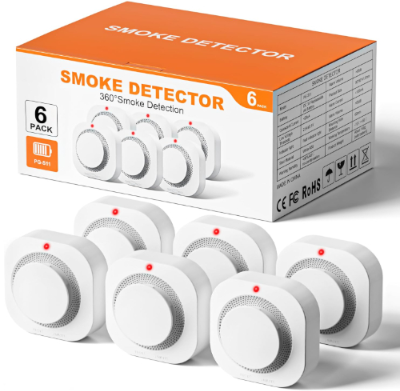
This is a different approach. Hilmon offers a straightforward, no-frills smoke detector without carbon monoxide detection. You get six units in a pack. Each one is battery-operated. There’s no app, no WiFi, no smart features. These are pure smoke detectors focused on reliability at a low price.
Best Use Cases
These shine if you need to cover a lot of space on a budget. The six-pack is ideal for townhomes and larger single-family homes. They work perfectly if you’re not interested in smart features. They’re great for basements, garages, and other areas where you want redundant coverage. Renters love this pack because the low price means affordable smoke detection everywhere.
Key Features Explained Simply
Photoelectric Smoke Detection: This type of sensor detects smoke from smoldering fires. It’s good at catching slow-burning fires before they explode into flames. Different from ionization sensors that detect fast-flaming fires.
Test Button: You can manually test the alarm whenever you want. Just press the button and the alarm sounds. Easy way to confirm the battery still works.
Low Battery Warning: The alarm chirps at intervals when the battery is running low. You know you need fresh batteries without guessing.
Basic Design: No circuits, no WiFi modules, no bells and whistles. Just a smoke detector doing one job well.
Six-Unit Pack: You get enough to cover a whole house. Living room, bedrooms, kitchen, basement—you’ve got detectors placed throughout.
Real-Life Usage Insight
These alarms are workhorses. They sit on ceilings and do their job. People like them because they’re invisible. You don’t think about them. You don’t manage apps. You don’t fuss with settings. When a battery dies, you replace it. That’s the entire maintenance routine.
In homes with these, the low-battery chirp becomes a familiar sound. Most people learn to recognize it and replace batteries without much fuss. The test button gets used regularly by safety-conscious homeowners.
Honest Pros and Cons
Pros:
- Extremely affordable (six units)
- No batteries to charge, no apps to manage
- Photoelectric detection is effective for smoldering fires
- Easy to test manually
- Low-battery warning keeps you aware
- Simple operation anyone can understand
- Reliable performance
- Good coverage with the six-pack
Cons:
- No smart features or app notifications
- No interconnectivity between units
- Only detects smoke, not carbon monoxide
- Battery replacements needed regularly
- No remote alerts if you’re away from home
- Can’t silence alarms remotely
- Each alarm is independent
- No WiFi or connectivity
Performance Discussion
Photoelectric smoke detection is solid. These sensors respond well to smoldering fires. They’re slower than ionization sensors on very fast-flaming fires, but photoelectric is actually preferred by modern safety experts because it’s better for homes.
False alarms are low. These devices don’t get set off by cooking steam or bathroom humidity like some cheap detectors do.
The battery warning system works reliably. You get plenty of notice before batteries fully die. Most users have time to grab fresh AAs before the alarm stops working.
Ease of Use
Easiest device here. Unbox them. Mount them. Install batteries. Press the test button to confirm they work. You’re done. Each alarm operates independently.
Monthly or quarterly testing is just pressing a button. No app to open. No account to manage. No WiFi to troubleshoot.
Value for Money
At roughly $30-40 for the entire six-pack, this is incredibly budget-friendly. That’s maybe $5-7 per unit. You cannot find better value for basic smoke detection. Each unit is cheap, so replacing one if it ever fails is no big deal.
This pack is value-oriented. You’re not paying for fancy features. You’re getting coverage and reliability at a rock-bottom price.
4. KLTsenaife 10-Year Battery Wireless Interconnected Smoke and Carbon Monoxide Detector (3-Pack)
What You’re Getting
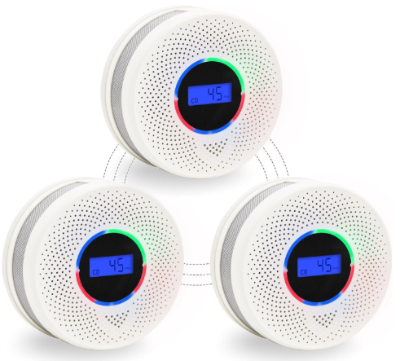
The KLTsenaife takes a different angle. These units come with built-in 10-year batteries that you never need to replace. They offer wireless interconnectivity so all units alert together. They include a digital display showing air quality and status. You get three units in the pack.
Best Use Cases
These are perfect for folks who hate replacing batteries. The 10-year battery is a huge advantage. They’re ideal for ceiling-mounted installations where you don’t want to climb a ladder frequently. They work great if you want digital displays showing air quality data. If you want a set-it-and-forget-it system, these deliver.
Key Features Explained Simply
10-Year Battery: The battery is built into the unit and designed to last a decade. You don’t replace batteries. When the battery eventually dies, the device is designed to be replaced as one unit. This is convenient for some people and a dealbreaker for others.
Wireless Interconnectivity: Like other multi-pack systems, all units communicate. One detecting trouble means they all alert. Your family in other rooms hears the alarm.
Digital Display: Unlike most detectors that just have LED lights, this one shows a digital readout. You can see the device status at a glance. Some models even show air quality data.
Combo Detection: Detects smoke and carbon monoxide in one unit.
No App Required: This system works without WiFi or apps. It’s standalone.
Real-Life Usage Insight
People appreciate never having to replace batteries. You install these and forget about them for a decade. That’s a huge convenience factor for some households.
The digital display is nice. You can see at a glance if everything’s normal. The displays are bright enough to see from across a room. Some users enjoy the air quality reading as a bonus feature.
The wireless interconnectivity works well in most homes. Units communicate reliably up to typical house distances.
Honest Pros and Cons
Pros:
- No battery replacements for 10 years
- Digital display shows status clearly
- Wireless interconnectivity across units
- Combo smoke and CO detection
- Set-and-forget convenience
- No app or WiFi needed
- Reliable performance
- Good for people who dislike battery maintenance
Cons:
- Higher upfront cost than replaceable-battery models
- When 10-year battery dies, entire unit must be replaced
- No remote app notifications
- No smartphone alerts if you’re away
- Digital display adds complexity slightly
- Wireless range limitations in massive homes
- Can’t silence alarm remotely
- Some users prefer replacing batteries over replacing whole units
Performance Discussion
These detectors are reliable. The 10-year battery technology is proven. It maintains consistent voltage for the full decade, so detection performance stays strong throughout the battery life.
The wireless interconnectivity is dependable. The digital displays are clear and accurate. Smoke and CO detection responds quickly to actual threats.
One thing to consider: battery capacity matters. A 10-year battery has less capacity than standard AAs. That’s fine because the device draws minimal power. But if your home is cold or has unusual humidity, battery life could vary slightly from the 10-year estimate.
Ease of Use
Installation is simple. Mount the units. Wire interconnectivity happens automatically when units are close. Power on and you’re good. No app setup. No account creation.
Day-to-day use is zero. The alarm sits there. The display shows status. Testing is straightforward. One downside: you can’t easily test the wireless interconnectivity without an app or special knowledge.
Value for Money
These cost more upfront—roughly $60-80 for the three-pack. That’s higher than battery-replaceable options. But you save on batteries over 10 years. If you’re in a home for a decade, the math might work out similar to cheaper options when you factor in battery costs.
The value depends on your situation. Hate battery maintenance? This justifies the higher price. Want maximum flexibility? Replaceable batteries might seem like better value.
5. Smart Smoke Detector Fire Alarm with WiFi and Tuya App Control
What You’re Getting
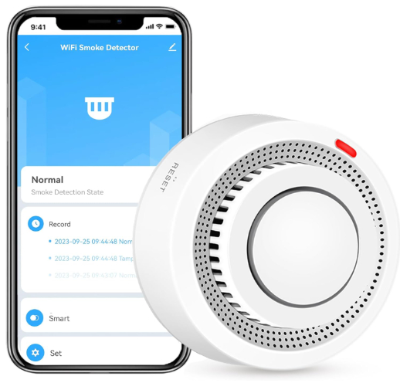
This is the full smart home experience. This WiFi-enabled smoke detector connects to the Tuya app, giving you remote control and notifications. It detects smoke using a photoelectric sensor. It comes with batteries included. The design is modern and fits contemporary home décor.
Best Use Cases
This shines if you want full app control and notifications. It’s ideal for smart home enthusiasts who use Tuya or similar platforms. It works perfectly for folks who travel and want to monitor their home remotely. It’s great if you have a large property and want centralized control of all your alarms. If you want the most connected experience, this delivers.
Key Features Explained Simply
WiFi Connectivity: Connects to your home WiFi network. Sends notifications to your phone through the Tuya app. You can check status and silence alarms from anywhere.
Tuya App Integration: Control and monitor through one central app. If you already have Tuya devices at home, this integrates seamlessly.
Photoelectric Sensor: Detects smoke from smoldering fires effectively.
App Notifications: Get instant alerts to your phone when smoke is detected.
Battery Included: Ready to use out of the box.
Modern Design: Looks clean and contemporary on any ceiling.
Real-Life Usage Insight
Users love the convenience of app notifications. You’re at work and get an alert that smoke was detected in your bedroom? That’s peace of mind. You’re traveling and want to silence a false alarm? The app lets you do it from anywhere.
The Tuya integration is smooth for existing Tuya users. Everything shows up in one place. For newcomers to Tuya, the learning curve is gentle.
The photoelectric detection works well in real homes. Smoke is detected quickly and reliably.
Honest Pros and Cons
Pros:
- Full smartphone notifications and remote control
- Tuya app integration for smart home automation
- Photoelectric sensor effective for smoldering fires
- Battery included ready to go
- Works from anywhere in the world
- Central control if you have multiple units
- Modern aesthetic design
- Fast alert delivery
- Good for frequent travelers
Cons:
- Requires WiFi network to function
- Depends on Tuya account and cloud service
- Higher power consumption drains batteries faster
- WiFi connection failures mean no remote alerts
- Setup requires more technical comfort
- No wireless interconnectivity without WiFi
- Batteries drain faster than non-smart options
- Price is higher than basic options
Performance Discussion
The WiFi connection is stable in most homes. As long as your home has decent WiFi coverage, this detector stays connected. The Tuya app notifications are fast and reliable.
Battery life suffers slightly compared to non-smart options. The WiFi radio and sensor data transmission consume more power. Expect 8-12 months per battery set instead of 12-18 months.
Smoke detection is reliable. The photoelectric sensor responds well. False alarms are minimal.
Ease of Use
Setup is more involved. You mount the detector. You insert batteries. You connect your phone to the Tuya app. You add the device by scanning a code. You connect it to your home WiFi network. You test it in the app. This takes 20-30 minutes the first time.
Day-to-day use is smooth after setup. The app shows status whenever you open it. Notifications come automatically when triggered. You can silence the alarm from anywhere. It’s convenient once installed.
Value for Money
This costs more than most options—roughly $45-65 depending on sales and options. You’re paying for WiFi connectivity, app functionality, and the convenience of remote control.
The value is high if you travel, have a large property, or want full smart home integration. It’s overkill if you just want basic smoke detection for a small apartment.
Comparison Insights: Side-by-Side Analysis
Let’s break down how these five alarms stack up against each other across key factors.
App Integration Winner: The Kidde Smart and the WiFi Tuya detector tie here. Both offer strong app experiences. Kidde integrates with Ring. The Tuya detector is more independent.
Budget Champion: The Hilmon six-pack wins decisively. At $30-40 for six units, nothing beats the value. First Alert SC5 is second place for budget-conscious buyers.
Convenience for Busy People: KLTsenaife 10-year battery units win. No battery replacement for a decade is huge convenience.
Best for Smart Home Integration: WiFi Tuya detector for Tuya users. Kidde Smart for Ring ecosystem users.
Most Reliable Overall: First Alert SC5. First Alert has the longest track record and most consistent reliability.
Best Coverage for Large Homes: Hilmon six-pack gives you the most units. KLTsenaife three-pack works if you have WiFi throughout.
Best for Renters: Hilmon six-pack. Easy installation, no wiring, affordable.
No App Required?: Hilmon, First Alert SC5, and KLTsenaife all work without apps. Kidde and Tuya require apps for full features.
Combo Detection Without App: First Alert SC5 and KLTsenaife both offer smoke and CO detection without requiring app usage.
Fastest Alerts Away From Home: Kidde Smart and WiFi Tuya detector. App notifications beat wireless-only.
Long-Term Cost: Hilmon is cheapest upfront. KLTsenaife might be cheapest long-term due to no battery replacements. Kidde and Tuya cost more upfront.
Buying Guide: How to Choose Your Smart Fire Alarm
The right alarm depends on your situation. Let’s walk through the decision process.
Step 1: Decide on Smart Features
Ask yourself: Do I want app notifications? Will I benefit from remote control? Do I already have a smart home system?
If you want app alerts and remote control, narrow to Kidde Smart or Tuya detector. If you don’t care about apps, all five work fine.
If you have Ring products, Kidde Smart is an easy choice. If you use Tuya, the WiFi detector makes sense. If you have neither, First Alert SC5 is solid.
Step 2: Consider Battery Maintenance
How often do you want to deal with batteries?
If never, KLTsenaife is your answer. If rarely, Kidde or Tuya save a bit with longer battery life than some options. If you don’t mind regular replacements, Hilmon is fine.
Step 3: Calculate Your Needs
How many alarms do you need?
One bedroom apartment? One unit works. Two-bedroom house? Two units. Three-story house? Six units ideal.
Hilmon’s six-pack is perfect for big homes. KLTsenaife’s three-pack works for medium homes. Individual purchases of other units let you buy just what you need.
Step 4: Set Your Budget
Are you budget shopping or looking for premium features?
Under $50 total: Hilmon six-pack. $35-60 per unit: First Alert, Kidde, KLTsenaife. $45-70 per unit: Tuya WiFi detector.
Step 5: Check Compatibility
Do you have existing smart home products?
Ring products: Kidde Smart. Tuya products: WiFi Tuya detector. First Alert products: First Alert SC5. Nothing yet: Hilmon or any option.
Step 6: Think About WiFi
Does your home have solid WiFi coverage?
Yes: WiFi Tuya detector is safe. Questionable: Stick with wireless interconnect models like Kidde or First Alert. No: Definitely avoid WiFi options.
Step 7: Installation Preferences
Renting or no hardwiring allowed? All five work. Want zero electrician involvement? All five work. Prefer simple mounting? All five work.
Basically, installation isn’t a differentiator here.
Step 8: Make Your Decision
Based on these steps, here’s a quick decision path:
- Want Ring integration? → Kidde Smart
- Use Tuya? → WiFi Tuya detector
- Want combo detection without app? → First Alert SC5
- Covering a large house on budget? → Hilmon six-pack
- Want zero battery replacement? → KLTsenaife
- New to smart home, want something simple? → First Alert SC5
- Want maximum convenience? → Kidde Smart or Tuya
- Want maximum budget savings? → Hilmon six-pack
Who Should Buy These Products
Let’s match the right alarm to the right person.
Best for Ring Ecosystem Users: Kidde Smart
If your smart home revolves around Ring cameras and doorbells, the Kidde Smart is natural. Everything shows up in one app. Notifications feel familiar. Setup integrates smoothly with your existing Ring account.
People with Ring Alarm systems especially benefit. The Kidde alarm becomes part of your home security picture.
Best for Tuya Smart Home Users: WiFi Tuya Detector
Your smart lights, plugs, and switches all talk to Tuya. Adding a smoke detector that does the same makes sense. Automations become possible. Your phone becomes a universal control center.
This works for anyone building a Tuya-based smart home.
Best for Simplicity and Budget: Hilmon Six-Pack
People who want smoke detection without complexity. No apps, no WiFi, no accounts. Buy it, install it, check it occasionally. Done.
Perfect for renters who want affordable coverage. Great for basements, garages, and outbuildings. Ideal for people who’ve never used smart devices.
Best for Hands-Off Ownership: KLTsenaife 10-Year Battery
Busy professionals who don’t have time for battery replacements. Install once, forget for a decade. That’s the appeal.
Great for vacation homes where you don’t visit frequently. Good for people aging in place who struggle with ladder climbing.
Best for Remote Monitoring: WiFi Tuya Detector or Kidde Smart
Frequent travelers who want to monitor their empty home. You’re across the country and need instant notification if something’s wrong. These devices keep you informed.
Ideal for vacation home owners. Perfect for second properties. Good for business travelers.
Best for Large Homes: Hilmon Six-Pack
More units mean better coverage. Six smoke detectors placed throughout a large house beats three or one. The Hilmon pack gives you the most units for the money.
Great for townhomes and multi-story residences.
Best for Mixed Needs: First Alert SC5
Want some smart features but not full WiFi dependency? Wireless interconnectivity without being tied to one ecosystem? The First Alert SC5 splits the difference. Solid option when your needs don’t align perfectly with other choices.
Common Mistakes to Avoid When Buying Smart Fire Alarms
Learning from others’ mistakes helps you make a better choice.
Mistake 1: Not Checking WiFi Availability
Before buying a WiFi-dependent alarm like the Tuya detector, test your WiFi coverage. Weak WiFi in bedrooms? The alarm might lose connection. That defeats the remote alert feature.
Solution: Walk around your home with your phone’s WiFi signal strength checker. If signal is weak anywhere you plan an alarm, avoid WiFi models.
Mistake 2: Forgetting Carbon Monoxide Detection
You need both smoke and CO detection. Some people buy smoke-only detectors and skip CO protection.
Solution: Make sure your alarms detect both. It’s the minimum for safety.
Mistake 3: Installing Too Few Detectors
One detector is not enough. A fire upstairs might not wake someone sleeping in a different room.
Solution: Follow guidelines. Typically one per bedroom, one on each level, one in the kitchen. A three-pack might not be enough for a three-bedroom house.
Mistake 4: Forgetting Maintenance
Buying the alarm is the easy part. Maintaining it is your job. Dead batteries cause alarm failures.
Solution: Check batteries every season. Test alarms monthly. Replace batteries immediately when warned. Set phone reminders.
Mistake 5: Choosing Based on Price Alone
The cheapest option isn’t always the best value. Sometimes spending a bit more saves time and hassle.
Solution: Factor in your situation. What’s your time worth? Do battery replacements bother you? Will you actually use app notifications?
Mistake 6: Buying the Wrong Type of Detection
Ionization and photoelectric sensors catch different fire types. Neither is universally best.
Solution: Photoelectric sensors are slightly better for modern homes. They catch smoldering fires well. Consider them if you’re unsure.
Mistake 7: Installing in Wrong Locations
Alarms on walls don’t work as well. Alarms near cooking areas false-alarm. Alarms in dead WiFi zones lose connection.
Solution: Follow manufacturer guidance. Ceilings are best. Keep away from kitchens. Test WiFi before installing WiFi alarms.
Mistake 8: Not Understanding Your Ecosystem
Buying Kidde alarms when you’re a Tuya user creates fragmentation. You end up managing multiple apps.
Solution: Match alarms to existing systems when possible.
Mistake 9: Ignoring Interconnectivity
Single detectors going off alone is worse than all alarms alerting together. If you’re getting multiple units, get interconnected ones.
Solution: Every product here offers interconnectivity. Use it.
Mistake 10: Buying Too Early Without Planning
Impulse buying means you might get incompatible devices. Think through your needs first.
Solution: Use the buying guide above. Plan before purchasing.
Final Verdict: Which Smart Fire Alarm Wins?
There’s no single “best” alarm because your needs differ from everyone else’s. But we can identify the winner in each category.
Best Overall for Most People: The First Alert SC5. It offers wireless interconnectivity, dual smoke and CO detection, optional app features, solid reliability, and a fair price. You’re not locked into an ecosystem. It works with or without apps. It’s the safe choice for someone who wants smart features without over-complicating things.
Best for Budget Shoppers: The Hilmon six-pack. At $30-40 for six units, the math is unbeatable. You get reliable smoke detection without paying for smart features you might not use. This is value done right.
Best for Convenience: The KLTsenaife 10-year battery pack. Never replacing batteries for a decade beats everything else on convenience. Once it’s up, it’s forgotten for 10 years.
Best for Smart Home Integration: The Kidde Smart for Ring users or the Tuya detector for Tuya users. Both deliver excellent app experiences and smooth integration with existing systems.
Best for Remote Monitoring: The WiFi Tuya detector. Full remote control and instant notifications from anywhere in the world.
The Bottom Line
Smoke alarms save lives. The National Fire Protection Agency backs this up consistently. A working alarm cuts the risk of dying in a fire in half compared to no alarm.
Smart alarms are better than dumb alarms. They give you notifications. They show you status. They interconnect. They integrate with your home. But they’re also more complicated and more expensive.
The right choice is one that you’ll maintain. A cheap alarm that’s never tested is worse than no alarm. A complex smart alarm you never learn to use is worse than a simple one.
Consider your lifestyle, your budget, your technical comfort, and your home size. Then pick the alarm that fits all four factors.
Here’s our final breakdown:
Choose the Kidde Smart if:
- You have Ring products
- You want the smoothest app integration
- You’re willing to pay a bit more for convenience
- You appreciate notifications
Choose the First Alert SC5 if:
- You want good features at reasonable cost
- You like flexibility (works with or without app)
- You prefer a company with long reliability history
- You want simple setup
Choose the Hilmon six-pack if:
- Budget is your priority
- You need many detectors
- You don’t care about smart features
- You want proven, straightforward smoke detection
Choose the KLTsenaife if:
- Battery maintenance bothers you
- You like set-it-and-forget-it solutions
- You like digital displays
- You want reliability for a decade
Choose the WiFi Tuya Detector if:
- You’re a Tuya smart home user
- You travel frequentlyhttps://homygear.com/best-smart-bulb-for-google-home/
- You want full remote control
- Your home has excellent WiFi
Taking Action
You’ve read through five solid options. You understand the pros and cons of each. You know your needs better than anyone.
Next step: Determine how many units you need for your home. Calculate your budget. Identify which ecosystem matches your situation. Then make your purchase.
Installation is straightforward for all these options. You’ll be protected within hours.
One final thought: Don’t put this off. The time to have working alarms is now, not after a close call. Fire safety isn’t glamorous or exciting. But it’s essential.
Grab the alarm that fits your situation. Get it installed. Test it monthly. Sleep better knowing your home is protected.
Your family’s safety is worth the investment.
Summary Table
| Feature | Kidde Smart | First Alert SC5 | Hilmon 6-Pack | KLTsenaife | Tuya WiFi |
|---|---|---|---|---|---|
| Price Per Unit | $50-60 | $35-45 | $5-7 | $20-27 | $45-65 |
| Smoke Detection | Yes | Yes | Yes | Yes | Yes |
| CO Detection | Yes | Yes | No | Yes | No |
| App Integration | Ring | Optional | No | No | Yes (Tuya) |
| WiFi Remote Alerts | Yes | No | No | No | Yes |
| Wireless Interconnect | Yes | Yes | No | Yes | WiFi-based |
| Battery Type | AA Replaceable | AA Replaceable | AA Replaceable | 10-Year Built-in | AA Replaceable |
| Battery Life | 12-18 months | 12-15 months | 12-18 months | 10 years | 8-12 months |
| App Required | Yes | No | No | No | Yes |
| Best For | Ring users | Budget-conscious | Large homes | No maintenance | Tuya users |
| Installation | Simple | Simple | Simple | Simple | Moderate |
| Ease of Use | Easy | Easy | Very easy | Easy | Easy |
Frequently Asked Questions
How often should I test my fire alarm?
Test it monthly. Just press the test button. The alarm should sound loud and clear. If it doesn’t, replace batteries or the unit.
Can I use different brands in the same house?
Yes, but they won’t interconnect wirelessly unless they’re compatible models. Having Kidde units and First Alert units means they work separately. Both are fine, but they won’t all alert together.
How do I know when to replace my battery?
All these alarms have low-battery warnings. Some chirp. Some light up an LED. Some send app notifications. When you hear or see a warning, replace batteries within a week.
What’s the difference between ionization and photoelectric sensors?
Ionization detects fast-flaming fires. Photoelectric detects smoldering fires. Photoelectric is slightly better for homes. Modern fire safety experts recommend photoelectric.
Can I install these myself?
Yes. All the alarms here are designed for easy DIY installation. No electrician needed. Just follow the manual.
Do I need a professional installer?
No. These are battery-powered and wireless. Professional installation is not necessary.
What happens if my WiFi goes down?
WiFi alarms still detect smoke and sound locally. You just won’t get remote notifications. That’s why WiFi alarms still have loud built-in speakers.
Are these alarms loud enough?
Yes. All of these exceed 85 decibels, which is loud enough to wake sleeping people. Some reach 90+ decibels.
Can I silence an alarm remotely?
With Kidde Smart and Tuya WiFi detector, yes. With the others, you need to be in the room.
How long do these alarms last?
Most last 10-15 years of reliable service before failure. KLTsenaife is built for 10-year battery life specifically.
Which is safest?
All of them are safe. The safest setup is multiple units throughout your home, properly maintained. Reliability matters more than features.
Thank you for reading this complete guide to smart fire alarms. We hope you find the right solution for your home and family. Stay safe.