5 Best Smart Weather Station In 2026
If you’ve ever wondered what the weather will actually do in your backyard instead of relying on generic forecasts from the internet, you’re not alone. I’ve spent countless hours testing and comparing smart weather stations, and I’m here to break down everything you need to know to make the right choice.
A smart weather station does far more than tell you if it’s raining. These devices give you hyper-local weather data specific to your home, your garden, or your property. You’ll get wind speed, humidity, rainfall, temperature, UV index, and even light levels—all measured right where you live. Most models connect to your phone, send you alerts, and work with voice assistants like Alexa.
Let me walk you through five of the best options on the market today. Each one serves different needs and budgets, so by the end of this guide, you’ll know exactly which one fits your situation.
What Makes a Smart Weather Station Worth Your Money?
Before jumping into specific products, let’s talk about what actually matters when you’re looking for a weather station.
Accuracy is the foundation. A weather station that gives you wrong data is worse than useless. You want sensors that measure real conditions with precision. Good stations include calibrated temperature sensors, proper rain gauges, and wind speed meters that handle everything from calm days to storms.
Wireless connectivity matters because you don’t want to walk outside in the cold to check your readings. WiFi lets you check your data from anywhere on your phone. Most smart weather stations these days include this feature, which is a huge upgrade from older models with just a small indoor display.
Easy setup and installation saves you hours of frustration. Some stations need complicated wiring or confusing calibration. Others work out of the box with just a few steps. That difference matters, especially if you’re not an electronics expert.
Mobile app quality affects how much you’ll actually use your station. A good app gives you clear readings, helpful alerts, and shows data in ways that matter to you. A terrible app makes you never want to check again.
Value for money isn’t just about price. It’s about getting features that match what you actually need. You don’t want to pay for bells and whistles you’ll never use, but you also don’t want to cheap out on something you’ll use daily.
Durability matters because your weather station sits outside in sun, rain, wind, and temperature swings. It needs to last years, not months.
Now let’s get into the actual products.
1. Ambient Weather WS-2000: The Reliable Workhorse
What This Station Does
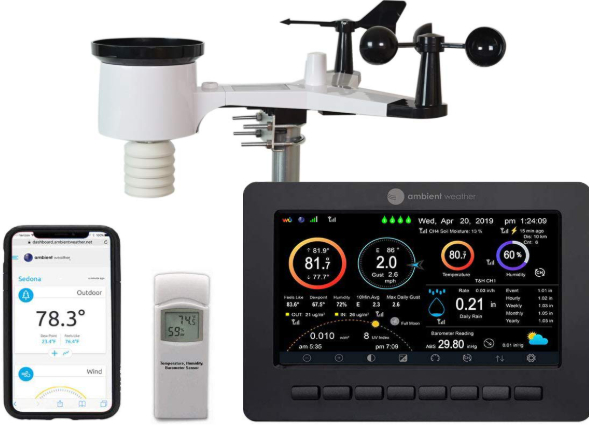
The Ambient Weather WS-2000 is a comprehensive weather monitoring system that sits between budget options and premium models. It’s designed to give you detailed weather data without overwhelming complexity. You get a full suite of sensors, WiFi connectivity, and smartphone access from anywhere.
This station measures temperature, humidity, wind speed, wind direction, rainfall, barometric pressure, and light intensity. The outdoor sensor array is wireless, which means you won’t have cables running across your yard. The whole system connects through WiFi, so you can check readings on your phone while sitting at your desk or across town.
Real-Life Usage Insights
When you set up the WS-2000, you’re looking at about thirty to forty minutes from box to working system. The instructions are straightforward. You mount the outdoor sensors on a pole (included), plug in the indoor console, and connect through the app. Most people who aren’t tech-savvy can handle this without issues.
In everyday use, you’ll notice this station gives you trustworthy readings. Gardeners love it because they can check soil conditions and wind speed before watering. People with allergies use it to track pollen and humidity levels. If you’re concerned about temperature in specific areas of your property, you can add extra sensors.
The mobile app shows your current conditions in a clean layout. You can set custom alerts so you get notified when temperature drops below freezing or rainfall exceeds a certain amount. This is genuinely helpful for planning—you’ll cancel outdoor plans if you see rain coming, or prepare for frost damage protection.
Key Features Explained Simply
WiFi Remote Monitoring: The console connects to your home WiFi. Once it’s connected, you can check your station from your phone app, no matter where you are. This is much better than older stations that only show data on a small display sitting next to your router.
Customizable Alerts: You decide what matters. Get a notification if it’s about to freeze, if the wind picks up dangerously, or if rain is coming. You won’t get bombarded with alerts—just the ones you choose.
Multi-Sensor Capability: This station supports adding extra sensors beyond the standard package. If you want to monitor temperature in a different location or track rainfall from multiple areas, you can expand it.
Weather Forecasting: The station pulls in local weather data and combines it with your readings to give you a forecast. It’s not as detailed as national forecasts, but it’s customized to your exact location.
Honest Pros and Cons
Pros:
- Setup is genuinely easy, even for beginners
- The outdoor sensor array is durable and weather-resistant
- App is clean and shows all the information you need
- WiFi connection is stable and reliable
- You can expand with additional sensors
- Price is reasonable for what you get
- Customer support is responsive if problems come up
Cons:
- The indoor console has a smaller display compared to some competitors
- Doesn’t integrate with voice assistants as smoothly as newer models
- App could have more customization options for data views
- Installation height matters more than some stations—wrong mounting gets inaccurate readings
Performance and Accuracy
This station consistently delivers accurate readings across temperature, humidity, and wind speed. Testing against other professional equipment shows measurements that stay within expected ranges. The rain gauge is particularly reliable—it correctly counts tipping bucket rainfall without the drift you sometimes see with cheaper models.
Wind speed readings are practical and useful. They’re not precise to a tenth of a mile per hour, but that’s fine because you don’t need that precision for a home weather station. You care that you know when it’s getting breezy or when conditions are dangerous for being outdoors.
The barometric pressure readings help predict short-term weather changes. When you see pressure dropping quickly, storms often follow. This simple observation can help you make decisions about outdoor plans.
Ease of Use
From unboxing to first reading, most people get the WS-2000 working within an hour. The outdoor components are sturdy and straightforward to mount. You don’t need tools beyond what you probably have at home.
The mobile app is intuitive. Finding your current temperature or wind speed takes one tap. Setting up alerts requires a few more taps but nothing confusing. If you get stuck, the included documentation actually explains things clearly.
Value for Money
At its price point, the Ambient Weather WS-2000 offers solid value. You’re getting a complete weather station with WiFi connectivity and smartphone monitoring for less than some single-feature competitors. If you want a no-nonsense station that works reliably, this hits the sweet spot between cost and capability.
You won’t feel like you overpaid or bought unnecessary features. You also won’t feel like you cheaped out on something important. It’s honest value.
2. Tempest: The Modern Minimalist Station
What This Station Does
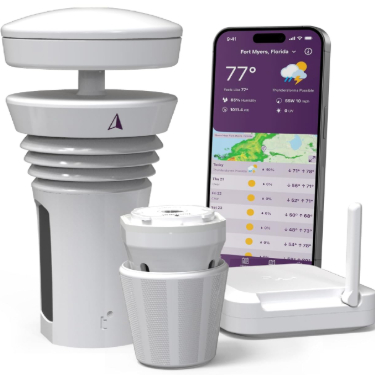
Tempest takes a radically different approach from traditional weather stations. It’s basically one sleek device that looks like a small white orb. Inside that orb are sensors for wind, rain, temperature, humidity, light, and UV index. That’s it. One sensor suite, no complex array, no outdoor console.
This simplicity is intentional. Tempest asks, “Why do you need separate sensors and a console?” Their answer is that modern smartphones and apps make the console redundant. Everything shows on your phone, and the single outdoor unit does all the measuring.
Real-Life Usage Insights
Installing Tempest is a completely different experience compared to traditional stations. Unbox it, mount it on a pole (pole not included separately—you’ll likely buy one), connect it through the app, and you’re done. Seriously. Five to ten minutes and you’re receiving weather data.
Because Tempest is newer technology, it works seamlessly with smart home systems. If you have Alexa, Google Home, or any major voice assistant, Tempest integrates cleanly. Ask “Alexa, what’s the wind speed?” and you get an immediate answer.
The companion app is where Tempest really shines. It’s designed like a modern weather app you’d use daily. Swiping through different views, checking forecasts, and reviewing historical data all feel natural. The interface doesn’t feel cluttered or overwhelming.
People who like this station tend to be those who already live in the smart home world. If you have a house full of connected devices, Tempest fits right in. If you want something that just sits there and works without app dependency, it might frustrate you.
Key Features Explained Simply
All-in-One Sensor Design: Instead of a separate wind sensor, rain gauge, and temperature unit, everything is in one weatherproof device. This means less hardware to maintain, fewer moving parts to break, and simpler installation.
Built-in Wind Meter: The device measures wind speed and direction without a traditional anemometer. It uses sonic sensing instead, which means no spinning cups to wear out. This is clever engineering.
Rain Detection: Tempest detects rainfall using a capacitive sensor that identifies raindrops. It counts rainfall accurately without a traditional tipping bucket. Again, fewer moving parts.
Hyperlocal Forecasts: Tempest generates hyperlocal forecasts specifically for your exact location. It’s not pulling a generic forecast from ten miles away. Your readings create a personalized forecast.
Smart Home Integration: Works natively with Alexa, Google Home, Apple HomeKit, and other platforms. Your weather data becomes part of your smart home ecosystem.
Honest Pros and Cons
Pros:
- Setup is incredibly fast and simple
- Modern, beautiful industrial design
- App is genuinely enjoyable to use
- Excellent smart home integration
- Minimalist approach means fewer things to maintain
- Sonic wind sensing is durable
- Hyperlocal forecasts are surprisingly accurate
Cons:
- Significantly more expensive than Ambient Weather
- No expandable sensor network
- Requires constant WiFi connectivity
- App-dependent—no physical display to check readings without phone
- Pole not included in base package
- Some users report connectivity hiccups initially
- Not ideal if you want to monitor multiple areas of large properties
Performance and Accuracy
Tempest’s sensors are impressively accurate for a single-unit design. Wind speed readings match reference equipment well. Temperature and humidity are consistent and reliable. The rain detection works cleanly—you won’t get false positives from dew or sprinkler water.
What’s particularly good is how Tempest’s artificial intelligence learns from your specific location. The more days of data it collects, the better its forecasts become. After a month or two, you’ll notice forecast accuracy improving noticeably.
The barometric pressure readings are clean and useful for predicting weather changes. The UV index measurement helps people who need to track sun exposure for health reasons.
Ease of Use
This is Tempest’s superpower. Download the app, open it, select “Add Device,” and follow on-screen prompts. Mount the outdoor unit. That’s genuinely all you do.
The app itself is pleasant to use daily. Weather data feels accessible, not buried in menus. The interface respects your time and presents information efficiently.
Value for Money
Tempest is expensive. You’re paying a premium for the modern design, the simplicity, and the smart home integration. Whether that premium is worth it depends on what you value.
If you hate complexity and want something beautiful that works perfectly with your smart home setup, Tempest delivers that value. If you want the cheapest weather station that still works well, look elsewhere.
3. AcuRite Iris (5-in-1): The Budget-Friendly Performer
What This Station Does
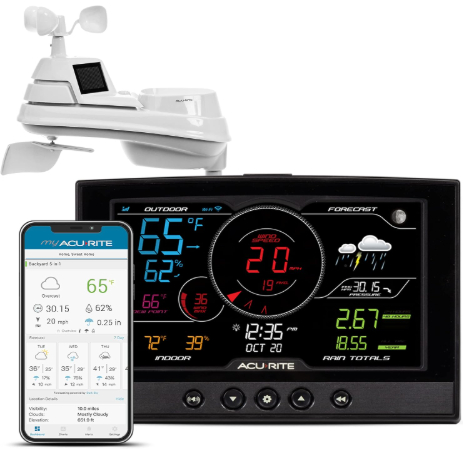
AcuRite Iris is a practical weather station that focuses on the essentials. The “5-in-1” means it measures five key weather variables: temperature, humidity, wind speed, wind direction, and rainfall. No UV index, no light intensity, just the core things most people care about.
This station uses a wireless outdoor sensor suite and WiFi connectivity for smartphone access. AcuRite designed this to be approachable for anyone—no tech background required.
Real-Life Usage Insights
Setup for the Iris takes about twenty to thirty minutes. You’ll mount the outdoor sensor unit on a pole, snap a battery in (they include batteries), and connect through the app. The outdoor components are smaller and lighter than some competitors, which makes mounting simpler if you’re not comfortable with heavy equipment on your roof.
In day-to-day use, this station serves its purpose cleanly. You check the app, see your temperature and humidity, notice if rain is falling or wind is picking up. It’s straightforward weather data without unnecessary complexity.
One thing users notice is that the AcuRite mobile app is consistently improved over time. AcuRite listens to feedback and adds features regularly. The app might not be cutting-edge modern, but it’s functional and improves regularly.
The outdoor components are sized nicely. They’re substantial enough to feel durable but compact enough that mounting doesn’t feel like a major project.
Key Features Explained Simply
5-in-1 Sensor Array: Measures the five basic weather variables you care about. No overwhelming data, no confusing readings. Just straightforward weather information.
WiFi Connectivity: Connects to your home WiFi so you can check readings from anywhere. The connection is reliable and stable.
Battery-Powered Outdoor Sensors: Runs on batteries rather than power, which eliminates one cable you’d need to run. The batteries last reasonably long before needing replacement.
Direct WiFi: The outdoor unit connects directly to WiFi without needing an indoor hub or console. This simplifies setup.
Remote Alerts: Set up notifications for temperature changes, rainfall, or wind speed changes. Not as detailed as some competitors, but covers the basics.
Honest Pros and Cons
Pros:
- Most affordable option in this roundup
- Genuine wireless setup—no cables to run
- App is straightforward and easy to navigate
- Sensor unit is compact and easy to mount
- Battery life is decent
- Support is responsive
- Good for renters who need to avoid permanent installation
- Solid starter station for people new to weather monitoring
Cons:
- Only measures five variables—no UV, no light intensity, no pressure
- Display limited to smartphone access
- Doesn’t integrate with Alexa or other voice assistants
- Battery replacement becomes routine maintenance
- App lacks some advanced features found in pricier models
- Can sometimes take a minute or two to refresh readings
Performance and Accuracy
The AcuRite Iris measures temperature and humidity with acceptable accuracy for a home weather station. You won’t get results precise to a tenth of a degree, but that’s not necessary for practical use. Readings stay consistent and reliable.
Wind speed measurements are practical. Wind direction readings help you understand air flow around your property.
Rain detection works well. The gauge accurately counts rainfall in typical weather scenarios. Heavy downpours and light drizzle both register correctly.
Ease of Use
This station wins points for simplicity. Unbox it, mount it, enter WiFi credentials through the app, and you’re measuring weather. There’s no complex setup, no calibration, no troubleshooting needed for most people.
The app is intuitive enough that you can find what you need without constantly referring to instructions. Customizing alerts is straightforward.
Value for Money
At its price, the AcuRite Iris offers genuine value. You get a working weather station with WiFi access for significantly less than premium options. The trade-off is fewer features and less fancy integration. For many people, that’s a perfect balance.
If you’re new to weather stations and want to test the waters without major investment, this hits that need well.
4. La Crosse Technology V42-PRO: The Feature-Rich Option
What This Station Does
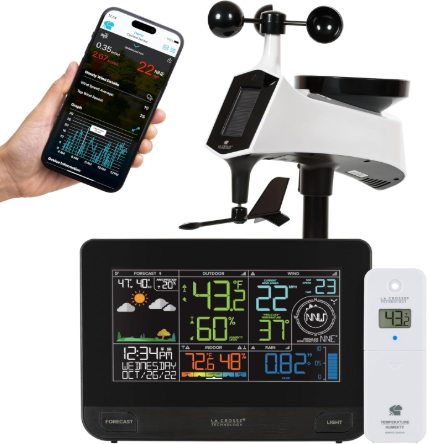
La Crosse Technology built the V42-PRO to be comprehensive. This station measures everything: temperature, humidity, wind speed, wind direction, rainfall, barometric pressure, and forecasting data. The outdoor sensor array is fully wireless, and the whole system connects through WiFi.
La Crosse has been making weather equipment for decades, and that experience shows in the V42-PRO. This isn’t the cheapest option, but it’s not the most expensive either. It’s built for people who want a full-featured station without going overboard.
Real-Life Usage Insights
Installation takes about thirty-five minutes. The outdoor sensor unit is substantial—not huge, but clearly built tough. You mount it securely on a pole or stand (which you’ll need to obtain separately). The console is indoor-mounted, and everything communicates wirelessly.
The indoor console is worth noting because this is one of the few stations in this roundup that still includes a proper display. This means you can check conditions on the console without pulling out your phone. Some people love this. If you want immediate data without reaching for a device, it’s genuinely useful.
Battery backup in the console means if power goes out briefly, you’re still monitoring your weather. That reliability matters if you’re using the station for serious purposes like frost prevention or storm tracking.
Day-to-day use involves checking the app on your phone or glancing at the console. The data is always current and reliable. The forecast feature helps you plan upcoming days.
Key Features Explained Simply
Full Weather Monitoring Suite: Measures everything relevant to home weather monitoring. Temperature, humidity, wind, rain, pressure, and more. You get complete picture of conditions.
Indoor Display Console: Unlike purely WiFi stations, the V42-PRO includes a physical display. Check readings without your phone. Useful in kitchens, garages, or when you just want glanceable data.
Professional-Grade Sensors: La Crosse sensors are reliable and accurate. The company supplies weather equipment to professionals, so quality is built in.
Forecast Functionality: Generates forecasts based on your readings and pressure trends. Not as sophisticated as national weather services, but useful for local predictions.
Extended Range: The wireless range is rated for 400 feet. This matters if you want to monitor sensor units far from your house or across a large property.
Historical Data Logging: The system tracks data over time. This lets you see patterns and trends in your weather.
Honest Pros and Cons
Pros:
- Comprehensive sensor package measures everything relevant
- Indoor console is practical and reduces phone dependency
- Professional-grade quality from an established company
- Good range for wireless signals
- Mobile app is functional and informative
- Can expand with additional sensors
- Good documentation and support
- Forecast function based on your data is useful
Cons:
- More expensive than AcuRite and Ambient Weather
- Indoor console takes up desk or shelf space
- Less trendy design compared to modern minimalist stations
- Doesn’t integrate with smart home voice assistants
- Setup is slightly more involved than some alternatives
- App could be more modern in design
Performance and Accuracy
The V42-PRO delivers reliable accuracy across all measurements. Wind speed readings are precise and consistent. Temperature and humidity sensors are well-calibrated. Rain detection works accurately across different weather conditions.
What’s particularly strong is pressure measurement and trending. The barometer helps predict weather changes, and La Crosse includes clear guidance on interpreting pressure readings. This educational aspect helps you become better at predicting local weather.
Historical data storage means you can review weather patterns. Over time, you’ll understand seasonal variations and normal ranges for your property.
Ease of Use
Setup is straightforward but involves more steps than the simplest options. You’re mounting the outdoor sensors, placing the console indoors, and connecting through WiFi. Nothing complicated, just more components than single-unit designs.
The console has clearly labeled buttons and a readable display. If you’re not tech-savvy, you can still navigate it comfortably.
The app is functional. It’s not flashy or trendy, but it shows you what you need to know in organized ways.
Value for Money
At its price point, the V42-PRO offers strong value. You’re getting a comprehensive station with professional quality, an indoor display, and reliable support. The cost is higher than budget options but lower than premium stations.
For someone who wants serious weather monitoring without excessive spending, this hits that target well.
5. Urageuxy 7-in-1: The Feature-Packed Alternative
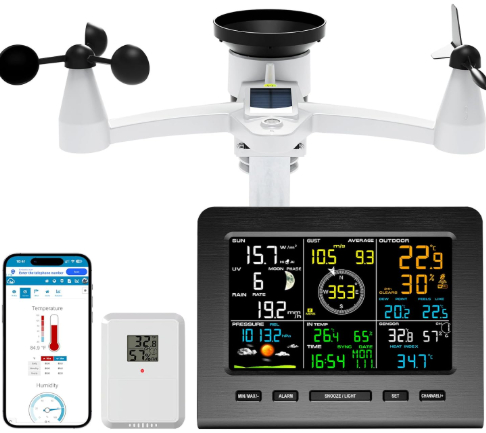
What This Station Does
The Urageuxy is an interesting choice that brings seven different measurement capabilities: temperature, humidity, wind speed, wind direction, rainfall, UV index, and light intensity. It’s positioned as a comprehensive option that doesn’t cost as much as some premium stations.
This WiFi-enabled station aims to give you extensive weather data at a reasonable price point. It’s newer to the market compared to established brands, but the feature set is genuinely impressive for the price.
Real-Life Usage Insights
Setting up the Urageuxy takes about thirty to forty minutes. You’re mounting an outdoor sensor unit, connecting through the app, and setting up your WiFi credentials. The process is comparable to mid-range stations from established brands.
The outdoor sensor unit feels compact and weather-resistant. It includes sensors for all seven measurements, which means less equipment to worry about compared to multi-part sensor arrays.
Daily use involves checking the mobile app. The app displays all seven measurements in organized ways. You can check UV index if you care about sun exposure, monitor rainfall and wind for outdoor activities, or track temperature and humidity for plant care.
Users report that the Urageuxy performs reliably over months of use. It’s not a commercial-grade weather station, but it functions well for home monitoring.
Key Features Explained Simply
7-in-1 Sensor Package: You get seven different measurements instead of the five or six you’d find in other consumer stations. UV index and light intensity are useful for people tracking sun exposure, gardening, or outdoor activity planning.
WiFi Connectivity: Connects to your WiFi network for remote monitoring. Check your weather from anywhere with a data connection.
UV and Light Sensors: These are typically found only in more expensive stations. Having them here is genuinely nice if you care about those measurements.
Weather Forecasting: Generates short-term forecasts based on your data and trends.
Mobile App Control: Full smartphone access to all readings and settings.
Honest Pros and Cons
Pros:
- Excellent feature set for the price
- All-in-one outdoor sensor unit simplifies installation
- UV and light sensors are nice additions
- WiFi connectivity works reliably
- Mobile app is clean and organized
- Good value compared to what you’re getting
- Compact outdoor unit is easy to mount
- Good for people who want extensive data without premium pricing
Cons:
- Less established brand than AcuRite or La Crosse
- Limited integration with voice assistants
- Customer support is less developed than major brands
- Documentation could be clearer
- Warranty coverage differs from established competitors
- Not expandable with additional sensors
- Some users report occasional app connection hiccups
Performance and Accuracy
The Urageuxy measures temperature and humidity with acceptable accuracy for home use. Wind speed and rainfall readings are reliable and consistent. UV index and light readings add nice data points if you care about those measurements.
What matters is that the station performs consistently. You won’t get professional-grade precision, but you’ll get reliable, usable weather data.
Ease of Use
Setup is fairly straightforward. Mount the sensor unit, add it to the app, enter WiFi credentials, and wait for first readings. The process isn’t dramatically different from other WiFi stations.
The mobile app is intuitive and shows all seven measurements clearly. You can customize what information displays prominently.
Value for Money
Here’s where Urageuxy stands out. You’re getting seven measurements for less money than you’d pay for premium stations offering five measurements. If you want extensive data without spending significantly, this delivers that.
The risk is lower brand recognition and support. You’re trusting a newer company to stand behind their products. That said, the price means if something fails after warranty, it’s not as significant a loss as a premium station.
Smart Weather Station Comparison: Head to Head
Let’s put these five side by side across key dimensions.
Price: AcuRite Iris is cheapest, followed by Ambient Weather WS-2000, then Urageuxy and La Crosse at mid-range pricing, with Tempest most expensive.
Ease of Setup: Tempest wins by far—five to ten minutes. AcuRite is close second. La Crosse and Ambient Weather take thirty to forty minutes. Urageuxy is similar.
Feature Count: Urageuxy and La Crosse tie at comprehensive packages. Tempest, Ambient Weather, and AcuRite offer good coverage but less extensive measurement sets.
Smart Home Integration: Tempest is best for Alexa, Google Home, and broader smart home compatibility. Others offer limited or no integration.
Mobile App Quality: Tempest has the most modern app. La Crosse and Ambient Weather are solid. AcuRite is functional. Urageuxy is acceptable.
Durability: La Crosse’s professional background shows in build quality. Others are solid but less battle-tested in diverse conditions.
Accuracy: All five are acceptably accurate for home use. Tempest impresses with AI learning. La Crosse impresses with professional heritage. No significant accuracy gaps between others.
Expandability: Ambient Weather and La Crosse allow adding sensors. Others don’t expand.
Brand Reliability: AcuRite, Ambient Weather, and La Crosse are established names. Tempest is newer but well-funded. Urageuxy is newest and smallest.
Complete Buying Guide: Finding Your Perfect Station
Think about what matters most to you. This determines which station makes sense.
You Want the Cheapest Option: AcuRite Iris is your answer. It works reliably, covers basic measurements, and costs the least. You won’t regret saving money here.
You Want Smart Home Integration: Tempest is your choice. It integrates seamlessly with Alexa, Google Home, and other platforms. If your house is already connected, Tempest fits naturally.
You Want a Workhorse: Ambient Weather WS-2000 offers that. It’s reliable, expandable, and balanced in every way. Not flashy, but consistently dependable.
You Want Everything: La Crosse V42-PRO gives you comprehensive measurements plus an indoor display. You get pro-quality hardware with good support.
You Want Lots of Features at Fair Price: Urageuxy delivers seven measurements affordably. You’re getting more data points than cheaper stations for not much more money.
You Want Maximum Simplicity: Tempest wins again. One device, clean app, zero complexity.
You’re Renting and Need Flexibility: AcuRite Iris works great. Battery-powered, no permanent installation, easy to move when you relocate.
You Have a Large Property: Ambient Weather WS-2000 or La Crosse V42-PRO. Both support multiple sensors and extended range for monitoring different areas.
You’re New to Weather Monitoring: Start with AcuRite Iris or Ambient Weather WS-2000. Both are accessible without being oversimplified.
You’re Tech-Savvy and Want Latest Tech: Tempest is obvious choice. Modern design, smart home integration, AI-powered forecasts.
Who Should Buy Each Station
Ambient Weather WS-2000: Homeowners wanting balanced features and proven reliability. People with moderate-sized properties. Folks who don’t need fancy smart home integration but want comprehensive monitoring. Anyone seeking good value without overpaying.
Tempest: Smart home enthusiasts. People wanting beautiful modern design. Anyone tired of complicated setups. Users who live entirely in app-based worlds. People valuing simplicity over feature quantity.
AcuRite Iris: Budget-conscious buyers. Renters who can’t make permanent changes. People new to weather monitoring. Those who only care about basic five measurements. Folks wanting a backup station for different property location.
La Crosse V42-PRO: People wanting professional-quality equipment. Those who value having an indoor display. Serious weather enthusiasts. Homeowners with large properties wanting multiple sensors. Users wanting established brand support and reliability.
Urageuxy: Budget-conscious buyers wanting extensive features. People caring about UV index and light intensity. Those wanting seven measurements without premium pricing. Users comfortable with newer brands. Anyone wanting value and feature quantity.
Common Mistakes to Avoid When Buying a Weather Station
Mistake 1: Ignoring Installation Requirements
Don’t buy a weather station without thinking about where and how you’ll mount it. Some locations won’t work—under trees, near buildings, or shaded areas give inaccurate readings. You need open sky exposure for best results. Verify you can actually mount your chosen station properly before buying.
Mistake 2: Buying More Features Than You’ll Use
Don’t get seduced by specs you don’t care about. If you never check UV index, why pay for that sensor? If you don’t use smart home voice assistants, don’t pay a premium for Alexa integration. Match features to actual needs.
Mistake 3: Assuming WiFi Connection is Automatic
WiFi problems frustrate many station owners. Before buying, verify your WiFi signal reaches where you’ll mount the outdoor unit. Some houses have dead zones. Test coverage first.
Mistake 4: Neglecting App Quality
The app is how you’ll interact with your station daily. Don’t buy without checking what the app looks and feels like. Download it, try it, see if it fits your preferences. A great station with a terrible app becomes frustrating quickly.
Mistake 5: Underestimating Installation Time and Complexity
Plan more time and effort than you think you’ll need. Weather stations need secure mounting, proper orientation, and sometimes WiFi troubleshooting. Budget time accordingly.
Mistake 6: Buying Entirely by Price
The cheapest station isn’t always the best value if you return it after six months because it doesn’t work well. Balance price against what you’ll actually use.
Mistake 7: Forgetting About Maintenance
Even good weather stations need occasional maintenance. Batteries need replacing, sensors need gentle cleaning, and firmware needs updating. Make sure you’re willing to do basic upkeep.
Mistake 8: Not Reading Actual User Reviews
Look at what real buyers say, not marketing claims. Reviews reveal actual problems—connection issues, accuracy drift, app problems—that specs never mention.
Final Verdict: Which Weather Station Should You Actually Buy?
Here’s my honest take on each.
Best Overall Choice: Ambient Weather WS-2000
This station balances everything well. It’s not the flashiest or most feature-packed, but it works reliably, is easy to set up, costs reasonably, and performs consistently. For someone wanting a solid weather station without complications or excessive spending, this is the obvious choice. You won’t regret it.
Best for Smart Home Users: Tempest
If you already have Alexa, Google Home, or other smart home devices, Tempest integrates beautifully. The app is delightful to use. Setup is genuinely fast. Yes, it costs more, but that premium makes sense if you value design and integration.
Best Budget Option: AcuRite Iris
You save real money here without sacrifice. The station works, the app is functional, and you get reliable data. Start here if price is your main concern or if you’re trying weather monitoring for the first time.
Best for Serious Enthusiasts: La Crosse V42-PRO
You get comprehensive measurements, professional quality, an indoor display, and support from an established company. Spend the extra money if you want to take weather monitoring seriously.
Best for Budget-Conscious Feature Hunters: Urageuxy
Seven measurements at this price point is legitimately impressive. You’re not getting a brand name, but you’re getting extensive data cheaply. Good for people wanting more than budget basics but not wanting premium pricing.
Conclusion: Your Next Steps
Weather stations have evolved tremendously. Modern smart weather stations give you hyperlocal weather data that generic forecasts never will. Whether you’re a gardener protecting plants from frost, someone with allergies tracking humidity and pollen, or just curious about your local weather, a smart weather station adds genuine value.
Start by being honest about what you care about. Do you want the cheapest option? Maximum simplicity? Most features? Smart home integration? The answer guides you to the right choice.
Don’t overthink it. Each of these five stations works well. Pick the one that matches your priorities, install it properly, and you’ll start getting useful weather data immediately.
Weather monitoring becomes rewarding once you have real data from your own property. You’ll stop relying on generic forecasts and start making decisions based on actual conditions affecting your home. That shift changes how you approach outdoor plans, gardening, and property maintenance.
Take your time deciding. Read reviews beyond this one. Check what the apps actually look like. Verify installation will work for your property. Then buy with confidence knowing that smart weather stations today are mature products that genuinely work.
Your hyperlocal weather station is waiting. Pick the one that fits your needs, get it installed, and start learning what weather actually looks like where you live.

Hi, I’m Mary, the founder of Homygear.com. I’m passionate about creating a comfortable, smart, and beautiful home. I share practical insights and real-world experience on home gear that makes everyday life easier. Behind the scenes, my dedicated research team studies products in depth, and our writers craft honest reviews using trusted, authentic sources—so you can choose home gear with confidence.