How to Add an Extra Chime to Your Eufy Wireless Doorbell?
If you have a big house, live in an apartment with multiple rooms, or just can’t hear your doorbell ring from everywhere, adding an extra chime might be the perfect solution. A Eufy wireless doorbell system is already great, but you can make it even better by setting up additional chimes. This guide walks you through the entire process—no tech degree required.
Why You Need an Extra Chime for Your Eufy Doorbell
Let’s be honest. A single doorbell chime might not reach every corner of your home. Maybe you’re in the shower. Maybe you’re working in the garage. Maybe you’re just too far away to hear it ring from the living room.
An extra chime solves this problem completely. You can place additional speakers throughout your home so you never miss a guest, delivery, or visitor again.
Benefits of Adding Multiple Chimes
Better Coverage A wireless doorbell chime system with multiple units covers your entire home. Place one chime in the bedroom, another in the kitchen, and a third in the garage. You’ll hear the doorbell ring no matter where you are.
Peace of Mind You won’t worry about missing important packages anymore. The signal travels wirelessly, so installation is simple and flexible.
Easy to Relocate Unlike wired doorbells, Eufy wireless systems let you move chimes around whenever you want. No rewiring. No mess.
Cost-Effective Buying an extra wireless chime costs way less than upgrading your entire system. You get quality results without breaking the bank.
Works Independently Each chime unit works on the same frequency as your doorbell button. They sync up automatically without complicated setup.
Understanding Your Eufy Wireless Doorbell System
Before you add a new chime, let’s talk about how your current system works.
Your Eufy wireless doorbell consists of two main parts: the button (mounted at your door) and the chime receiver (placed inside). When someone rings the button, it sends a wireless signal to your chime. The chime plays a sound to alert you.
The button uses batteries. The chime plugs into an outlet and also has backup batteries. This dual-power system keeps your doorbell working even during a power outage.
How the Wireless Signal Works
The wireless frequency used by Eufy doorbells is secure and reliable. It doesn’t interfere with Wi-Fi, cell phones, or other wireless devices in your home. The signal range typically covers up to 300 feet in open space, though walls and obstacles reduce this distance.
When you add an extra chime, both units receive the same signal from your doorbell button. They work together as a team.
Compatibility Check
Not all Eufy doorbell models support multiple chimes. Before you buy an extra chime, verify that yours does.
Check your doorbell’s manual or the Eufy website. Look for terms like “expandable,” “multi-chime compatible,” or “additional chime support.” Most modern Eufy wireless doorbells support extra chimes, but it’s always best to confirm first.
What You’ll Need to Get Started
Gathering the right tools and equipment makes the process smooth and quick.
Required Items
Extra Chime Unit Buy an authentic Eufy chime that matches your doorbell model. Check the model number on your current doorbell. You can find replacement or additional chimes on Amazon, the Eufy website, or electronics retailers.
Power Outlet You need a standard electrical outlet near where you want to place your second chime. The outlet should be easily accessible but not in a high-traffic area where someone might trip on the cord.
Batteries (Optional) Extra chimes come with backup batteries. They’re usually AA or AAA alkaline batteries. Have a few extras on hand just in case.
Wi-Fi Network (If Applicable) Some Eufy doorbell models integrate with Wi-Fi for app notifications. Make sure your second chime connects to your home network if needed.
Nice-to-Have Items
Extension Cord If no outlet is nearby, a short extension cord helps. Use a surge-protected power strip for safety.
Wall Mount Most chimes mount to walls with adhesive strips or screws. Mounting strips usually come included.
Instruction Manual Keep the manual for your specific chime model nearby. Different Eufy models have slightly different setups.
Step-by-Step Installation of Your Extra Eufy Chime
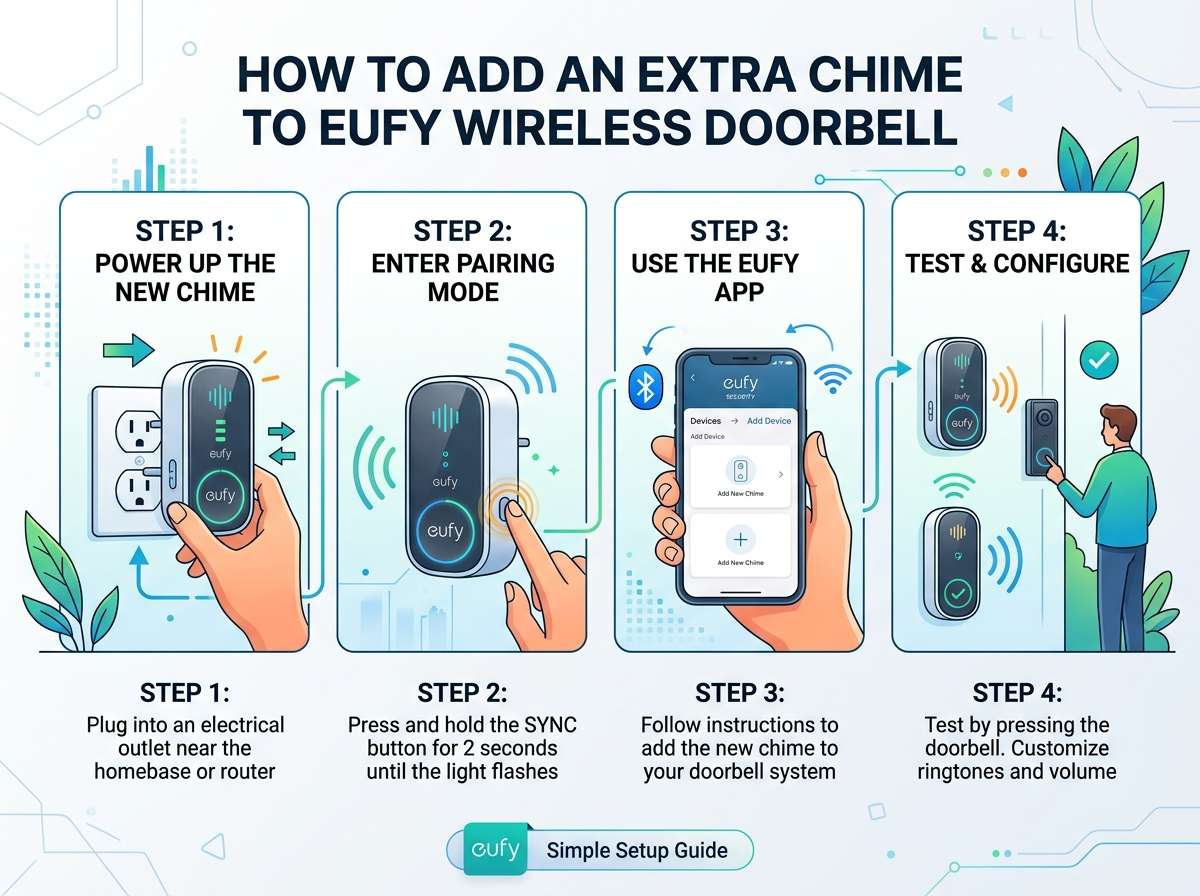
Now let’s get down to business. Follow these steps to add your new chime to your system.
Step 1: Choose the Perfect Location
Location matters more than you think. Pick a spot where you’ll actually hear the chime ring clearly.
Best Locations
- Kitchen (high-traffic area)
- Bedroom (if you sleep through quiet sounds)
- Home office (if you work from home)
- Hallway (central location)
- Laundry room (if it’s far from the main chime)
Avoid These Spots
- Inside closets or cabinets
- Behind heavy furniture
- In damp bathrooms
- Near heat sources like radiators
- In extremely cold areas
The location should be somewhere you spend time regularly. Think about where you’d want to hear the doorbell most urgently.
Step 2: Prepare the Chime Unit
Take the extra chime out of the box. Inspect it for any damage. Check that all parts are included—the chime unit itself, power cord, mounting hardware, and backup batteries.
Read the quick-start guide that comes with your chime. Look for any specific instructions about your model. Set aside the original packaging for at least 30 days. You might need it for warranty purposes.
Install the backup batteries into the chime unit. Usually, there’s a small battery compartment on the back or bottom. Align the positive and negative ends correctly. Close the compartment firmly.
Step 3: Mount the Chime Unit
Eufy chimes mount easily. Most use adhesive strips, though some models let you screw them to walls.
Using Adhesive Strips
- Locate the adhesive strip attachment points on the back of the chime
- Clean the wall surface where you’ll mount the chime with a dry cloth
- Remove the backing from the adhesive strips
- Press the chime firmly against the wall for 10 seconds
- Wait 24 hours before plugging in (adhesive needs time to set)
Using Screw Mounting
- Hold the chime against the wall where you want it
- Mark the screw holes with a pencil
- Drill pilot holes if needed (optional for drywall)
- Screw the mounting bracket to the wall
- Attach the chime unit to the bracket
Step 4: Plug In and Power On
After 24 hours (if using adhesive strips), plug the chime into the nearest electrical outlet. Look for a small LED light on the unit. It should turn on or blink to show the chime is receiving power.
If nothing happens, check that the outlet is working. Plug a lamp into the same outlet to confirm. If the outlet is dead, find another one nearby.
Step 5: Sync Your Extra Chime to the Doorbell Button
This is the crucial part. Both chimes need to recognize the same doorbell button signal.
For Most Eufy Models
- Locate the pairing button on your new chime unit. It’s usually small and recessed
- Press and hold the pairing button for 3-5 seconds until you see the LED blink or hear a sound
- Go to your doorbell button and press the button or trigger the motion sensor
- Wait 10-15 seconds. The chime should sound when it syncs
- If it works, you’re done. If not, repeat the process
Syncing Multiple Chimes
If you already have a chime in your system, you don’t need to re-pair the first one. Just sync the new chime to the doorbell button following the steps above.
However, some Eufy models require a different process for multiple chimes. Check your specific manual for details about adding a third or fourth chime.
Step 6: Test Your Setup
Now test that everything works correctly.
Press the doorbell button at your front door. Listen carefully. Both chimes should ring at the same time. If they don’t, wait a few seconds and try again.
If only one chime rings, check that the second one is plugged in, has batteries installed, and was properly synced.
Ring the doorbell from different parts of your home. Walk around to confirm you can hear both chimes clearly.
Test the chime volume. You should be able to hear it but not find it too loud. Most Eufy chimes have volume controls—usually buttons on the back or side.
Troubleshooting Common Issues
Even with careful setup, you might hit a snag. Here’s how to fix the most common problems.
Extra Chime Won’t Sync
If your new chime refuses to sync with the doorbell button:
Try These Solutions
- Make sure the chime is fully charged and plugged in
- Check that backup batteries are installed correctly
- Move closer to the doorbell button and try syncing again
- Restart the chime by unplugging it for 30 seconds, then plug it back in
- Check for interference from other wireless devices (microwaves, cordless phones)
- Reset the chime to factory settings if your model supports it
If interference is the problem, move the chime away from other wireless devices. Place it in a different room temporarily and test.
Doorbell Button Won’t Ring the New Chime
If your original chime works but the new one doesn’t ring when the button is pressed:
Check These Items
- Confirm the chime was properly synced (LED should indicate successful pairing)
- Test the chime volume—it might be muted or on the lowest setting
- Ensure the chime is plugged in and turned on
- Check that the doorbell button has fresh batteries
- Try moving the chime closer to the button temporarily
Most of the time, this happens because the chime volume is turned all the way down. Look for a volume dial or buttons on the back of the unit.
Both Chimes Ring But at Different Times
A slight delay between chimes is normal. Wireless signals take milliseconds to transmit. If there’s a noticeable delay of more than one second:
- Check for interference and move the delayed chime away from sources
- Ensure both chimes have adequate signal strength
- Replace batteries in both units if they’re old
Signal strength typically improves when chimes are in open spaces rather than enclosed cabinets or closets.
Sound Quality Issues
If the chime sounds distorted, too quiet, or unclear:
- Adjust the volume dial to a middle setting (not too high)
- Check that speakers aren’t blocked by dust or debris
- Ensure the chime isn’t placed in an area with too much noise
- Test from different locations in your home
Chime Keeps Disconnecting
If your chime syncs at first but then disconnects:
- Check that backup batteries are installed
- Ensure the outlet doesn’t turn off periodically
- Confirm no other devices use the same frequency
- Factory reset the chime and re-sync
Outlets controlled by wall switches can cause disconnection. Plug into a permanent outlet instead.
Optimizing Your Multi-Chime System
Once everything is set up, you can fine-tune your system for the best experience.
Adjusting Volume Levels
Each chime can have its own volume setting. This lets you customize sound levels for different rooms.
Set the bedroom chime to a gentler level. Keep the kitchen chime loud and clear. Control the garage chime separately. Most users adjust volumes over a few days as they get used to the system.
Choosing the Right Chime Sounds
Eufy chimes typically offer multiple sound options. Classic doorbell sounds, musical tones, or custom sounds. Cycle through the options and pick what you like best.
If you have multiple chimes, you can use different sounds for each. This lets you know which chime is ringing, which is helpful if you have a large home.
Creating a Routine
Over time, you’ll learn which chime rings first or loudest. This helps you pinpoint which room to check when someone arrives at the door.
Most people adjust to their multi-chime system within days. Your brain learns to recognize the sounds as an alert that someone is at the door.
Backup Battery Maintenance
Check backup batteries every few months. Replace them if they’re over a year old or if the LED light seems dim.
Keep extra batteries on hand. When a battery dies, the chime still works on main power but loses backup protection during outages.
Regular System Checks
Once per month, test your entire system. Press the doorbell button and confirm both chimes ring. Listen from different rooms. Test the button’s battery level if it’s wireless.
A quick monthly check catches problems early before they become annoying.
Advanced Features and Customization
Most Eufy doorbell systems offer features beyond simple chiming.
Mobile App Integration
Many modern Eufy doorbells connect to an app on your smartphone. You get notifications when the doorbell rings, even when you’re away from home. Some models include video streaming so you see who’s at the door.
The extra chime usually doesn’t need separate app setup. It works alongside the app-enabled button automatically.
Motion Detection Alerts
Some Eufy models detect motion and send alerts to your phone. Extra chimes might also trigger on motion depending on your model.
Check your doorbell’s app settings to customize what triggers alerts and chime sounds.
Scheduling Chime Sounds
A few advanced models let you schedule when chimes ring. Disable chimes during sleeping hours or when you’re away. Re-enable them automatically during daytime hours.
This feature lives in the app settings and typically applies to all chimes simultaneously.
Customizing Notification Settings
Through the Eufy app, you can control:
- Chime volume for each unit
- Sound selection
- Which events trigger chimes (rings, motion, packages)
- Time-based automation
Not all models support every feature. Check your app to see what’s available.
Maintaining Your Wireless Doorbell System
A little maintenance keeps your system working for years.
Regular Cleaning
Dust accumulates on speakers. Clean the chime grilles quarterly with a dry soft cloth. This keeps sound quality crisp and clear.
Wipe the doorbell button occasionally. Remove dirt and debris that might interfere with the wireless signal.
Battery Replacement Schedule
Replace main chime batteries every 12 months, or whenever the LED indicator dims.
Replace doorbell button batteries every 6-8 months depending on use frequency. More visitors mean more battery drain.
Keep track of replacement dates in a calendar or notes app.
Storage During Winter
If you live in a cold climate and the button experiences extreme temperatures, consider removing the button during winter and reinstalling it in spring. This extends battery life and protects electronics.
Bring the chime indoors if you’re not using it. Cold damages lithium batteries faster.
Warranty Information
Eufy doorbells typically come with 1-2 year warranties. Register your product on the Eufy website to activate warranty coverage.
Keep proof of purchase. Store it with your product manual and original packaging.
Frequently Asked Questions About Extra Eufy Chimes
Q: How many extra chimes can I add? A: Most Eufy systems support 2-4 additional chimes depending on the model. Check your manual for the maximum number.
Q: Do all Eufy chimes work with all Eufy doorbells? A: No. Match the chime model to your doorbell model. Using incompatible chimes causes syncing problems.
Q: Can I use the original chime with the extra chime? A: Yes. They work together without any issues. Both receive signals from the same button.
Q: What if my house is too big for chimes to reach? A: Most Eufy systems have a 300-foot range. If your home is larger, place chimes strategically in central locations or look at Wi-Fi enabled models.
Q: Can chimes work if I’m away from home? A: Basic chimes only work within range. Wi-Fi enabled doorbells send app notifications to your phone anywhere.
Q: Will extra chimes drain the doorbell button battery faster? A: Slightly. Each chime that rings uses a tiny bit of power from the button. Modern Eufy buttons handle multiple chimes without significant battery drain.
Q: Can I use an extra chime in a garage or outdoor space? A: Yes, but protect it from weather. Consider a weatherproof cover if it’s outside. Chimes aren’t typically waterproof.
Q: What happens if I lose power to the outlet? A: The chime stops working but continues on backup batteries until they’re depleted. Install a battery backup system if power outages are common.
Q: Can I replace the sounds on my chimes? A: Most Eufy chimes have built-in sound selection buttons. You cycle through different tones. Custom sounds require app control on Wi-Fi models.
Q: Is installation really that easy? A: Yes. Most people install an extra chime in under 10 minutes. No special tools or electrical knowledge needed.
Conclusion: Enjoy Your Expanded Doorbell System
Adding an extra chime to your Eufy wireless doorbell is a smart, affordable upgrade. You gain coverage throughout your entire home without complicated rewiring or professional installation.
The process takes less than an hour from start to finish. Within days, you’ll wonder how you ever managed with just one chime.
Start with the location planning phase. Pick rooms where you spend the most time. Mount the chime securely. Sync it to your doorbell button. Test thoroughly. Then relax knowing you’ll never miss another visitor.
Your home is now fully protected. Whether you’re upstairs, downstairs, in the garage, or working in the back room, you’ll hear when someone rings the doorbell.
The investment in an extra chime pays dividends in peace of mind, convenience, and security. No more missed deliveries. No more unexpected visitors catching you off-guard.
Enjoy your improved doorbell system. Ring once more just for the satisfaction of hearing your new multi-chime setup work perfectly in unison.

Hi, I’m Mary, the founder of Homygear.com. I’m passionate about creating a comfortable, smart, and beautiful home. I share practical insights and real-world experience on home gear that makes everyday life easier. Behind the scenes, my dedicated research team studies products in depth, and our writers craft honest reviews using trusted, authentic sources—so you can choose home gear with confidence.