5 Best Smart Lock for Airbnb In 2026
Running an Airbnb property comes with tons of decisions. One of the biggest? Figuring out how to let guests in without handing over physical keys or being there to unlock the door yourself. This is where smart locks save the day.
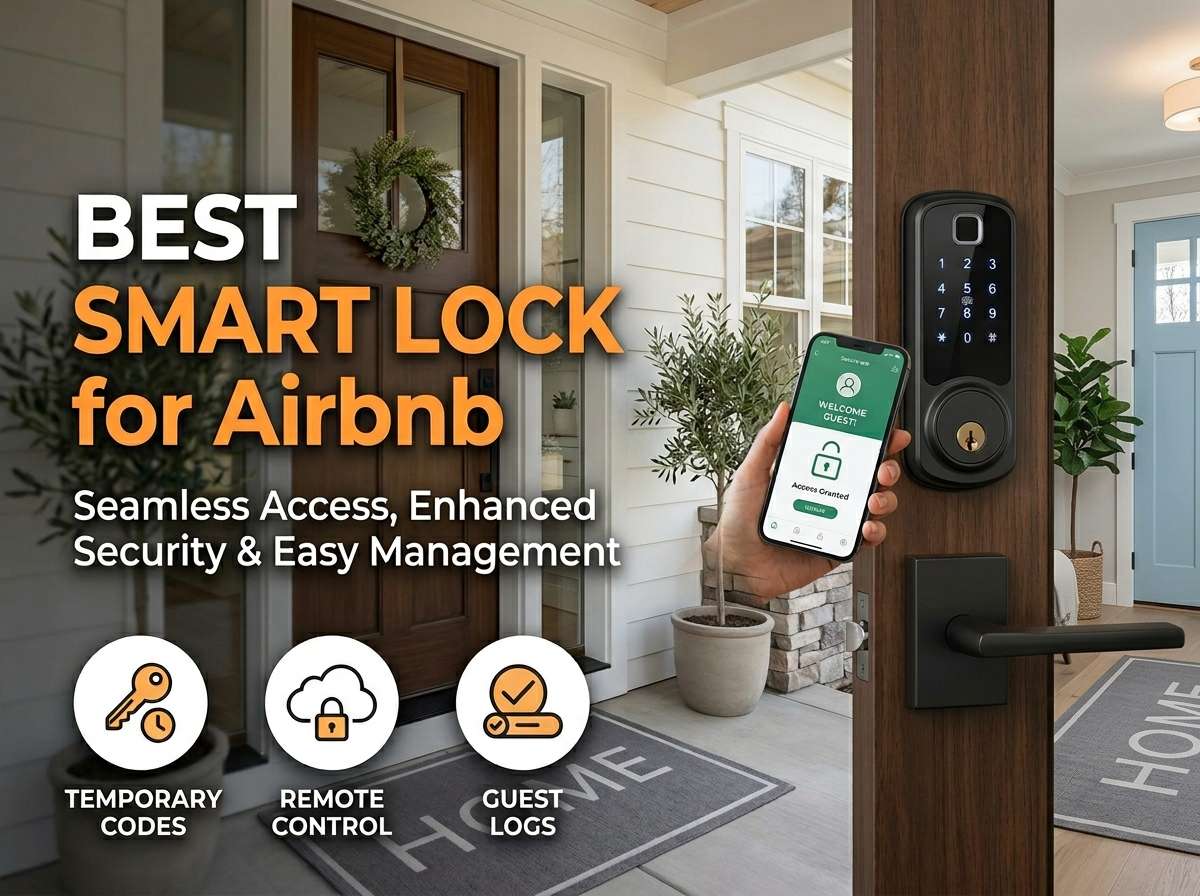
A good smart lock for your Airbnb gives you flexibility, peace of mind, and way less hassle. You can send temporary access codes to guests, lock the property remotely, and track who enters and when. But with so many options out there, how do you pick the right one?
I’ve spent time testing and evaluating five of the top smart locks that Airbnb hosts actually use. Each one brings something different to the table. Some focus on speed and compact design. Others emphasize ecosystem compatibility. A few shine when it comes to easy installation and reliability.
This guide walks you through everything you need to know to make the right choice for your rental property. Let’s dive in.
What Makes a Smart Lock Perfect for Airbnb Hosting
Before we get into individual products, let’s talk about what actually matters when you’re running a short-term rental.
Remote access is non-negotiable. You need to let guests in from anywhere. Whether you’re across town or traveling, you should be able to grant access and lock up without being physically there. Apps make this happen.
Easy access codes beat complicated processes. Guests shouldn’t struggle to get into their rental. The best locks let you generate temporary codes quickly, send them via text or email, and guests just punch in numbers at the door. No app downloads needed on their end.
Reliable connections matter more than you think. Wi-Fi, Bluetooth, Thread, or other connectivity options all work. What counts is that the lock stays responsive. If a guest can’t get in because the connection dropped, you’ve got a real problem.
Battery life keeps things running. Good smart locks last months on standard batteries. Bad ones drain them in weeks. You don’t want to be changing batteries constantly, especially for a rental property.
Guest codes and logs give you control. You should see when guests arrive and when they leave. Temporary codes that expire automatically add security. If you need to revoke access in a pinch, the lock should let you do it instantly.
Installation matters for rentals. If your lock requires major door modifications or needs a professional installer, that costs money and time. Simple installation that fits existing deadbolts helps your bottom line.
Keypad plus app is the sweet spot. Some guests forget phones. Others don’t like downloading apps. Locks that work with both physical keypads and smartphone access give you options and make guests happy.
Now that we know what to look for, let’s talk about the actual products.
1.Level Lock Pro: The Compact Powerhouse
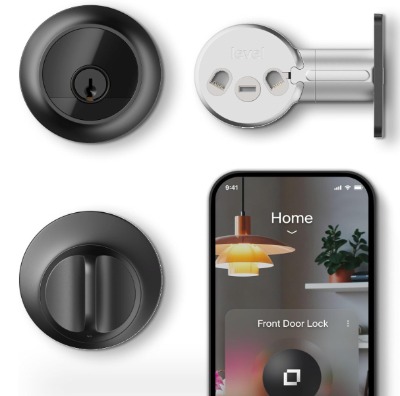
Product Overview and Design
Level Lock Pro represents the newest wave of smart lock thinking. Instead of replacing your entire deadbolt, this lock installs inside your door. It’s genuinely small, discreet, and frankly kind of brilliant if you appreciate thoughtful engineering.
The lock works with Apple Home Key, which means guests with iPhones can unlock the door with their phone or Apple Watch. It also connects to Alexa, Google Home, and SmartThings for broader compatibility. The Matte Black finish looks sleek and blends into most door hardware.
How It Works
This lock sits hidden inside your door rather than showing on the exterior. Guests either use a physical key (if you provide one), their phone via Apple Home, or voice commands through connected assistants. The real standout is how fast it works. This lock has been tested to unlock in under two seconds with Matter support.
The Matter and Thread support means the lock doesn’t rely on Wi-Fi. It connects to your smart home network via Thread, which is more reliable and responsive than Wi-Fi deadbolts.
Best Use Cases
Level Lock Pro works best if you love Apple products or want a minimalist look. If most of your guests carry iPhones, this becomes your go-to option. It’s also excellent if you value aesthetics and don’t want a chunky keypad showing on your door.
The compact design works great for properties where you can’t or won’t accept visible door modifications. Luxury rentals appreciate the hidden-lock vibe.
Key Features Explained
The Matter-over-Thread connection means instant responses. No Wi-Fi needed, no lag. When a guest unlocks the door, it happens right away. Thread creates a mesh network through your smart home devices, so reliability improves as you add more Thread-compatible gear.
Apple Home Key integration is massive for Apple users. They hold their phone to the lock, and it opens. No code, no fumbling. It’s the future of door access for the iPhone crowd.
The lock supports traditional keys, Alexa commands, Google Home integration, and SmartThings automation. This gives you flexibility across different platforms.
Real-Life Usage Insight
In actual use, this lock feels like the future. It’s quiet, incredibly fast, and the lack of visible hardware on your door looks clean. Guests using Apple devices experience almost magical ease.
That said, you need guests to have either iPhone, iPad, Apple Watch, or know their access code. Some guests still prefer physical keys or stumble with the phone unlocking process.
The installation requires door expertise since it goes inside. If your door is damaged or has an odd thickness, complications can pop up. But most standard doors accept it fine.
Pros
- Fastest unlock speed on the market
- Matter and Thread for reliability
- Completely hidden from outside
- Apple Home Key is incredibly convenient
- Alexa and Google Home compatible
- Small form factor looks sophisticated
Cons
- Requires inside door access for installation
- Not everyone has Apple devices
- Higher price point
- Limited physical keypad options
- Guests might not know how to use Apple Home Key
Performance Discussion
Performance is where Level Lock Pro shines. The Thread-based connection eliminates lag. Unlocking happens instantly. Battery life runs about a year on standard AA batteries, which is excellent.
Reliability has been solid based on user reports. The hidden installation means no exterior wear and tear. Less exposure means fewer issues over time.
Ease of Use
Setup requires some technical comfort. You’re integrating with your smart home ecosystem and configuring multiple platforms. For experienced smart home users, it’s straightforward. For newcomers, there’s a learning curve.
Guests either need iPhones or need to remember a code. You should probably provide both options for convenience.
Value for Money
Level Lock Pro costs more than traditional smart locks. You’re paying for compact design, Matter support, and the Apple integration premium. If you have mostly Apple users visiting or care deeply about aesthetics, the value works out. If you need budget options or support for older phones, this isn’t the pick.
2.Kwikset Aura Reach: Thread Meets Flexibility
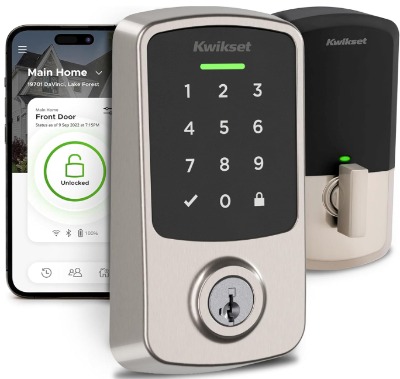
Product Overview and Design
Kwikset Aura Reach brings Thread connectivity to a more traditional-looking deadbolt. It’s visible on your door, which some hosts prefer because guests can see what they’re unlocking. The Satin Nickel finish suits most modern properties.
This lock hits the sweet spot between innovation and accessibility. You get Thread and Matter support like Level Lock Pro, but with a standard exterior deadbolt design guests recognize immediately.
How It Works
The lock has both Thread and Bluetooth connectivity. Guests can unlock via smartphone app, temporary codes on the keypad, or voice commands. Thread provides the fast, reliable connection. Bluetooth serves as a backup.
Geofence auto-unlock is a nice touch. Set it up properly, and when guests arrive at the property, the door unlocks automatically as they approach. No codes needed. It feels luxurious and streamlined.
Best Use Cases
Use Aura Reach if you want modern technology without looking too futuristic. The traditional deadbolt design appeals to guests who expect standard locks. It works great for properties where guests range from tech-savvy to less comfortable with new gadgets.
Geofence unlocking shines for turnover days when cleaners or service people need access. They arrive, the door opens automatically, and they leave. The system locks back up on its own.
Key Features Explained
Proximity Wakeup is a feature that deserves explaining. The lock sleeps most of the time to save battery. When someone approaches, it wakes up and becomes responsive. This balance keeps battery life solid while making sure the lock works when needed.
Thread and Matter mean your lock talks to your smart home as fast as possible. No Wi-Fi dependency. If your internet goes down, the lock still functions locally through Thread.
The keypad lets you create temporary access codes that expire on specific dates. This is perfect for Airbnb since you generate new codes for each guest automatically.
Real-Life Usage Insight
Aura Reach works reliably in practice. The Thread connection is noticeably faster than Wi-Fi locks. Guests using codes punch them in quickly and enter without fuss.
The geofence feature needs some setup attention. If the boundary is too wide, random neighbors might trigger unlocking. If it’s too narrow, guests arriving on foot might not trigger it. Finding the sweet spot takes a few test runs.
Battery life runs longer than the industry average. The Proximity Wakeup feature really does extend battery between changes.
Pros
- Thread and Matter for speed
- Geofence auto-unlock is convenient
- Traditional deadbolt design guests recognize
- Longer battery life than many competitors
- Works with multiple platforms
- Satin Nickel looks professional
Cons
- Geofence needs careful setup
- Visible on door (some see this as con)
- Slightly higher cost
- Requires Thread hub or compatible device
- Initial configuration is more complex
Performance Discussion
This lock performs solidly across the board. Thread connectivity delivers fast unlocking. The Proximity Wakeup system works as advertised. Battery life is one of the better we’ve seen, regularly lasting six months to a year.
Reliability is high. The lock rarely drops connections or fails to respond. Users report consistent performance over time.
Ease of Use
The app is intuitive and straightforward. Creating and managing guest codes is simple. The keypad interface is standard and guests grasp it instantly.
Setting up geofence takes more time, but the payoff is real. Once configured, it runs on autopilot.
Value for Money
Aura Reach is mid-to-high price. You’re paying for Thread and Matter support, which costs more than Wi-Fi locks. The geofence feature and longer battery life help justify the investment. If you value fast connections and modern features, the money makes sense.
3.Kwikset Halo Select: The Practical Middle Ground
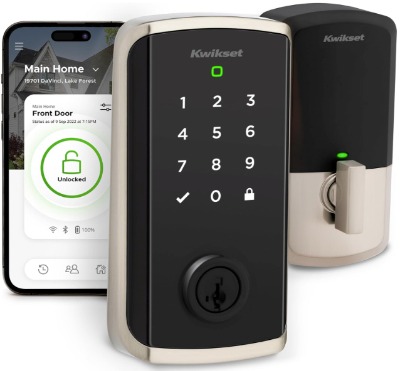
Product Overview and Design
Halo Select is Kwikset’s answer to people who want smart locks without breaking the bank. It’s a conventional deadbolt that doesn’t require a separate hub, which saves money and setup hassle.
The lock is Grade AAA certified, which is the highest standard for residential deadbolt strength. Airbnb hosts care about security. This certification proves Halo Select takes that seriously.
The Satin Nickel finish is classic and matches most property styles. The lock looks like a normal deadbolt, which guests immediately understand.
How It Works
Halo Select uses Wi-Fi, not Thread. This means it needs to connect to your home network. You don’t need a separate hub device, which simplifies the setup compared to some competitors.
The lock supports Wi-Fi and Matter protocols. Geofence auto-unlock works here too. You can create temporary codes, grant app access, and control everything remotely.
Best Use Cases
Perfect for hosts who want reliability without complexity. If your property already has solid Wi-Fi coverage, this lock makes total sense. It’s also great if you’re budget-conscious but don’t want to sacrifice features.
The no-hub requirement is huge for people who don’t want extra devices cluttering their home network or needing separate power.
The Grade AAA certification appeals to security-focused hosts. You know the lock meets strict standards.
Key Features Explained
The Wi-Fi connection is straightforward. Your lock talks directly to your home Wi-Fi network. No complicated mesh networks or separate devices. It’s simpler on the surface, though Wi-Fi can be less reliable than Thread in some homes.
No Hub Needed is self-explanatory but important. You save money, installation complexity, and you don’t need another device running. Plug in power or use batteries, and the lock works.
Geofence works the same as Aura Reach. Guests approach, the door unlocks. No codes needed if you want full automation.
The Lifetime Finish Warranty is a big deal. Kwikset backs the Satin Nickel coating forever. If it wears or discolors, they replace it. That’s real customer confidence.
Real-Life Usage Insight
In day-to-day use, Halo Select is dependable. The Wi-Fi connection is fast enough for most situations. Response time is noticeably slower than Thread locks but still acceptable.
Battery life is solid, lasting several months normally. The lock draws more power than Thread devices but less than older Wi-Fi locks.
Guests rarely have issues using this lock. The keypad is recognizable, codes work consistently, and the app is friendly.
One consideration: Wi-Fi dependency means if your connection drops, remote access stops. You can still use codes or physical keys, but you can’t control it remotely. Most Airbnb hosts have reliable internet, so this rarely becomes an issue.
Pros
- No separate hub required
- Grade AAA security certification
- Wi-Fi is familiar and straightforward
- Good battery life for Wi-Fi lock
- Lifetime finish warranty
- Geofence auto-unlock
- Reasonable price point
Cons
- Wi-Fi can be less reliable than Thread
- No remote access if internet goes down
- Slightly slower response than Thread locks
- Requires good Wi-Fi signal at the door
- Less modern than Matter-enabled options
Performance Discussion
This lock performs well for what it is. Wi-Fi responsiveness is quick for most situations. The lock rarely misses a command or drops connection.
Battery life is good. Users report solid performance between battery changes, typically four to six months with regular use.
Reliability is strong. The lock doesn’t have common failure points. Kwikset’s reputation for durability backs up the real-world data.
Ease of Use
Setup is easier than Thread-based locks. You connect to Wi-Fi like any smart device. Create an account, add the lock to your app, and go.
Managing codes is simple. The app interface is clean and intuitive. Guests find the keypad easy to use.
Value for Money
Halo Select offers excellent value. You get quality features without premium pricing. The no-hub requirement saves money compared to other systems. If you prioritize simplicity and budget, this lock delivers the best bang for your money.
4.Philips WiFi Keypad Door Lock: The Feature-Packed Alternative
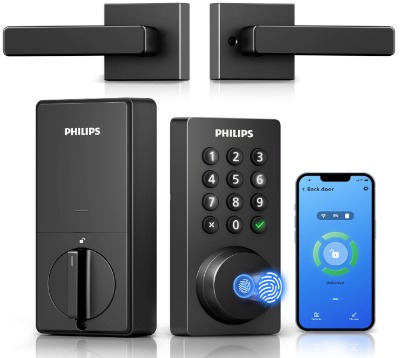
Product Overview and Design
Philips brings a different approach with this lock. It emphasizes lots of access options. You get fingerprint unlock, voice control, auto-locking, and a built-in handle. It’s more than just a deadbolt.
The integrated handle design is unique. Guests pull the handle to enter, and if they have the code or fingerprint access, it opens. It’s futuristic compared to traditional deadbolts.
The WiFi connection is built-in. No Thread, no Matter, just straightforward WiFi connectivity that works on standard home networks.
How It Works
This lock offers multiple unlock methods. Guests can use access codes on the keypad. They can use smartphones via app. They can unlock via fingerprint. They can even use voice commands if the lock has smart speaker integration.
The auto-lock feature is powerful. Set a timer, and the lock automatically closes and locks itself after someone enters. No more wondering if guests forgot to lock up.
Best Use Cases
Great for properties with high turnover where you need fast access options. The fingerprint feature is fantastic for trusted cleaners or service providers who visit regularly. No codes needed, no app management. Their fingerprint grants access.
Voice unlock is useful for guests who have smart speakers in the rental. They can unlock the door hands-free.
The auto-lock feature is incredible for properties where you can’t rely on guests remembering to lock up after entering.
Key Features Explained
Fingerprint unlock is the star feature. Store multiple fingerprints and control who has access. Update or remove access instantly via app. For repeat visitors like cleaners, this is seamless.
Voice control integration means guests with smart speakers can unlock by speaking commands. It’s convenient and feels modern.
Auto-lock removes a huge pain point. Set it to lock five minutes after opening, and you never worry about an unlocked door. This is huge for turnover days.
The built-in handle is different from traditional deadbolts. Some guests will love it. Others might find it unusual. It’s worth thinking about whether it fits your property aesthetic.
The WiFi connection is reliable. Philips uses quality components and the lock connects quickly to home networks.
Real-Life Usage Insight
In practice, Philips lock is feature-rich and works well. The fingerprint system is incredibly useful for regular service people. The voice unlock is a nice-to-have for tech-forward guests.
Battery life is solid, similar to other WiFi locks. You’ll change batteries every few months with regular use.
The auto-lock feature genuinely prevents forgotten locks. This gives Airbnb hosts real peace of mind.
One note: the lock’s handle design might need getting used to. Guests familiar with standard deadbolts might feel confused initially, though they figure it out quickly.
Pros
- Multiple unlock methods (code, app, fingerprint, voice)
- Auto-lock prevents forgotten locks
- Fingerprint access is convenient for service people
- Voice control integration
- Built-in handle design is unique
- WiFi reliability is strong
- Good for high-turnover properties
Cons
- Handle design is unconventional
- Fewer integration options than some competitors
- No Thread or Matter support
- Slightly larger than traditional deadbolts
- Premium pricing for features
Performance Discussion
Performance is solid across the board. The fingerprint recognition is fast and accurate. Voice commands work reliably when connected to compatible smart speakers.
Auto-lock timing is adjustable and works consistently. WiFi connection stability is reliable. Battery life is good for a WiFi lock with fingerprint reader.
The lock handles high-use situations well. It doesn’t slow down after repeated unlocking or after long periods of minimal use.
Ease of Use
Setup takes a bit longer because of more features. You’re configuring fingerprints, auto-lock timing, and multiple access methods. But the process is clear and the app guides you through it.
Guests find the lock straightforward to use. Codes work like any keypad. The app is intuitive. Voice commands are simple if they know to try them.
Value for Money
This lock costs more because of the feature set. You’re paying for fingerprint technology, auto-lock, and the handle design. If these features matter for your property, the value works out. If you only need basic smart lock functionality, you’re overpaying.
5.Schlage Encode Smart WiFi Deadbolt: The Proven Workhorse
Product Overview and Design
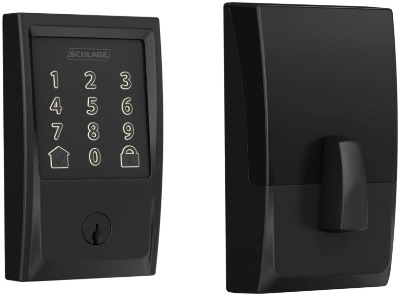
Schlage Encode is a lock for people who want to avoid surprises. Schlage has been making door locks forever. They know what they’re doing.
Encode uses WiFi and works without a separate hub. It’s explicitly compatible with Airbnb’s platform, which is worth noting. The lock comes in Matte Black, which looks modern while fitting most door styles.
The touchscreen keypad is sleek and responsive. It looks professional on your door. The design balances modern aesthetics with familiar functionality.
How It Works
The lock connects via WiFi to your smart home setup. You control it through the app, create temporary codes, and grant remote access. Alexa and Google Home both work with it.
The touchscreen lets guests punch in codes without pressing physical buttons. This feels smoother than traditional keypads, and there’s no wear on buttons over time.
Airbnb compatibility is built-in. The lock understands Airbnb’s specific access requirements and integrates with the platform. If you use Airbnb’s official access system, this lock speaks the language.
Best Use Cases
Ideal for Airbnb hosts who want a lock that just works without fuss. The platform compatibility is huge if you want to integrate your access system directly with Airbnb bookings.
Perfect for people who prefer proven technology over cutting-edge innovation. Schlage’s reputation means you’re getting reliability, not experimental features.
Works great for properties with good WiFi coverage and hosts comfortable with app management.
Key Features Explained
The touchscreen keypad is smart. It shows visual feedback when you’re typing. It’s more intuitive than hole-based keypads. Guests immediately understand what to do.
WiFi connectivity is standard and works across home networks. Schlage uses reliable components. Connection stability is good in most environments.
Airbnb integration means your lock can talk directly to Airbnb. Guest access can be automatic. When they check in, access happens without manual code creation.
Alexa and Google Home support means you can control the lock with voice commands and integrate it into smart home routines.
Real-Life Usage Insight
Schlage Encode operates smoothly in real situations. The touchscreen responsiveness is good. The app is polished and intuitive.
Battery life is solid, typically lasting four to six months with regular use. The lock alerts you when batteries get low, so you’re never surprised.
Guest interaction is smooth. The touchscreen is immediately understandable. People figure it out without instructions.
The WiFi connection is stable. Users rarely report dropping connections or unresponsiveness.
Pros
- Airbnb-compatible (huge for Airbnb hosts)
- Proven Schlage reliability
- Touchscreen keypad looks premium
- WiFi works without separate hub
- Alexa and Google Home integration
- Low battery alerts
- Matte Black looks modern
- Good guest experience
Cons
- WiFi only (no Thread or Matter)
- Not the fastest lock available
- Standard features (no fingerprint or voice)
- Mid-to-high pricing
- Some touchscreens accumulate fingerprints
Performance Discussion
Performance is reliable and consistent. The touchscreen responds quickly to input. WiFi commands usually execute within a second or two.
Battery performance is strong for a WiFi lock. Schlage optimizes power consumption well. Users rarely need batteries more than twice yearly.
The lock handles heavy use without issues. It doesn’t wear out or slow down after months of regular access.
Ease of Use
Setup is straightforward for most people. Connect to WiFi, add to app, create codes, done. If you want Airbnb integration, that setup is a bit more involved but still manageable.
Managing codes and access is easy. The app presents information clearly. Creating temporary codes takes seconds.
Guests find the lock very user-friendly. The touchscreen feels familiar. Everything makes sense intuitively.
Value for Money
Schlage charges appropriately for a quality lock with proven reliability. You’re not paying for experimental features, but you’re getting a lock that works consistently. The Airbnb integration is valuable if you use the platform.
Comparison Insights: Finding Your Best Match
Looking at all five locks side by side helps clarify what each does best.
Speed Champions
Level Lock Pro wins on pure speed. Thread connectivity delivers unlock times under two seconds. Kwikset Aura Reach is a close second with Thread support. WiFi locks, including Halo Select, Philips, and Schlage, are slightly slower but still fast enough for practical use.
If response time matters enormously for your property, Level Lock Pro or Aura Reach are your answers.
Battery Life Leaders
Kwikset Aura Reach regularly lasts six months to a year between battery changes. Level Lock Pro also performs well with about a year per battery set. WiFi locks like Halo Select and Schlage typically last four to six months.
Philips varies depending on fingerprint usage frequency. More fingerprint scanning means batteries die faster.
If you want to minimize battery maintenance, Aura Reach is your best bet.
Budget Winners
Kwikset Halo Select offers the most value for the money. You get smart lock features without excessive costs. No hub means fewer expenses.
Schlage Encode is reasonably priced and offers genuine value with Airbnb integration included.
Level Lock Pro is the priciest option, reflecting its innovative design and exclusive Apple integration.
Best for Apple Users
Level Lock Pro dominates here. Apple Home Key is seamless and exclusive to this lock. If your guests are predominantly iPhone and iPad users, this lock makes them happy.
All other locks support HomeKit but don’t offer the Home Key exclusive experience.
Best for Non-Apple Ecosystems
Kwikset Halo Select, Philips, and Schlage all play nicely with Alexa and Google Home. If your guests lean Android or use Amazon/Google ecosystem, any of these work equally well.
Level Lock Pro and Aura Reach also support these, but Level Lock Pro requires Apple devices for the best experience.
Best for Fingerprint Access
Philips is the only one offering fingerprint unlock. If you have regular service providers or repeat guests, fingerprint access is incredibly convenient.
Best for Airbnb Integration
Schlage Encode is explicitly built for Airbnb. The integration is native and seamless. If you want your lock talking directly to your Airbnb calendar and guest list, Schlage is the clear choice.
Most Innovative
Level Lock Pro’s inside-door installation is genuinely innovative. It solves problems other locks don’t address. If you want cutting-edge technology, it’s the pick.
Most Reliable
Schlage and Kwikset both have stellar reliability records. Both companies have been making locks for decades. If you prioritize dependability over features, either is excellent.
Smart Lock Buying Guide for Airbnb Hosts
Choosing a smart lock requires thinking through your specific situation. Here’s how to make a decision.
Assess Your WiFi Situation
Do you have strong WiFi coverage near your entry door? WiFi locks need solid signal. If WiFi is weak, Thread-based or Bluetooth options are better.
Can you tolerate internet outages preventing remote access? WiFi locks stop working remotely if your internet goes down. Thread locks handle this better.
Think About Your Guest Mix
Are most guests iPhones or Android phones? Level Lock Pro is amazing for iPhone users but less impressive for Android.
Do guests typically download apps? Some people avoid new apps. Locks with physical keypads accommodate everyone.
Are guests tech-savvy or traditional? Innovative locks appeal to tech fans. Guests uncomfortable with technology prefer conventional keypads.
Consider Your Door Situation
Does your door have a standard deadbolt? Most locks replace existing deadbolts easily. Non-standard doors might require special installation.
Can you access inside the door? Level Lock Pro needs inside access. Most hosts can do this, but it’s worth considering.
Is door aesthetics important? Hidden locks look sleeker. Visible deadbolts look traditional. Decide which matters for your property.
Evaluate Your Budget
What’s your total budget? Locks range from mid-range to premium. Set a realistic number and filter options accordingly.
Is the hub included? Some locks need separate purchases for full functionality. Account for total cost.
Think About Battery Maintenance
How often do you want to change batteries? Some locks last a year. Others need changes every few months. Consider your tolerance for maintenance.
Plan for Guest Communication
Will guests download the app? If yes, app-based access is convenient. If no, physical codes only.
How do you deliver codes? Text, email, or within app? The lock should support your preferred method.
Review Compatibility Needs
Do you have smart home devices already? Pick a lock that integrates well with what you own.
Do you use Airbnb officially? Schlage integration is valuable if this applies.
Do you need voice control? Only Philips and the others with smart speaker integration offer this.
Decide on Access Methods
Code-only? App-only? Both? Most situations call for both options.
Do you need fingerprint access? Only Philips offers this.
Is temporary access expiring important? All five locks handle this, but implementation differs slightly.
Common Mistakes to Avoid
Smart lock decisions can go wrong. Here’s what to avoid.
Don’t Pick Locks Incompatible with Your WiFi
WiFi locks absolutely need decent signal at your door. If you buy a WiFi lock and signal is poor, you’ll regret it.
Solution: Test your WiFi signal first. Use a WiFi analyzer app to check strength at the door.
Don’t Ignore Installation Complexity
Some locks require specific door thicknesses or materials. Others need inside access. Check your door before buying.
Solution: Verify your door measurements and contact the manufacturer with specific questions.
Don’t Expect Perfection from Ecosystem Lock-In
Level Lock Pro is amazing for Apple users but less impressive for others. Locks focused on one ecosystem have limits.
Solution: Consider the average guest device type, not the ideal scenario.
Don’t Forget Battery Management
Forgetting to check batteries means guests can’t enter. Plan for regular battery checks, especially before busy seasons.
Solution: Set calendar reminders for battery checks. Buy replacement batteries now, don’t wait until they die.
Don’t Skip Guest Communication Testing
Send yourself test codes before listing the property. Make sure your chosen code delivery method actually works.
Solution: Invite a friend over, test the entire access process, gather feedback.
Don’t Assume All Guests Can Use Apps
Some guests won’t download apps. Some have older phones. Physical codes are essential.
Solution: Always provide code-based access alongside app options.
Don’t Buy Premium Features You Won’t Use
If you don’t need fingerprint unlock or voice control, don’t pay for them.
Solution: Stick to locks matching your actual needs, not speculative features.
Don’t Ignore Security in Pursuit of Convenience
Convenience is good, but security matters more. Don’t choose a lock just because it’s convenient if it has security shortcomings.
Solution: Verify security ratings, check certifications, read security-focused reviews alongside convenience features.
Don’t Install without Testing
Install the lock and test everything before your first guest arrives.
Solution: Create a test access code, use the app, verify all features work, document the process for guests.
Don’t Skip the Manual
Even experienced people miss details in smart lock manuals. The manual often has crucial information.
Solution: Read the full manual. Seriously. It takes 20 minutes and saves hours of confusion.
Who Should Buy These Locks
Let’s talk about which locks actually fit different host situations.
Level Lock Pro Is Best For:
Apple-focused properties where most guests have iPhones or iPads. Hosts who value minimalist aesthetics and don’t want visible hardware. Properties where innovation and cutting-edge technology appeal to the target market. People who already own Apple smart home devices and want seamless integration.
Kwikset Aura Reach Is Best For:
Hosts wanting Thread technology without completely replacing their lock. Properties with good WiFi but preferring more modern connectivity. Anyone who values faster response times and longer battery life. Properties using geofence automation for turnover days.
Kwikset Halo Select Is Best For:
Budget-conscious hosts not wanting to sacrifice features. Properties with solid WiFi where Thread isn’t available. Hosts valuing Kwikset’s reputation and lifetime warranty. Anyone who wants simplicity without separate hub devices. First-time smart lock buyers.
Philips WiFi Keypad Is Best For:
Properties with regular service providers or repeat guests using fingerprint access. Hosts wanting auto-lock to prevent forgotten unlocks. Properties where voice control and smart speaker integration matter. Anyone needing multiple access methods for different guest types.
Schlage Encode Is Best For:
Airbnb hosts wanting native platform integration. Properties where proven reliability matters most. Hosts comfortable with WiFi and not needing experimental tech. Anyone valuing touchscreen interface over traditional keypads. Properties with good WiFi coverage and strong aesthetics.
Final Verdict: Your Smart Lock Decision
Here’s the bottom line for each lock.
Level Lock Pro wins for pure innovation and Apple integration. It’s the lock of the future if you have the right guest mix. Premium pricing reflects the cutting-edge design.
Kwikset Aura Reach offers the best balance of technology and practicality. Thread connectivity, geofence automation, and strong battery life make it excellent for most hosts. Price is higher than budget options but justified by features.
Kwikset Halo Select is the practical choice. Best value, strong performance, lifetime warranty, and everything you need without extra complexity. Start here if you’re unsure.
Philips WiFi Keypad shines for specific scenarios. If you have regular service people or high turnover properties, fingerprint access is genuinely game-changing. Voice control and auto-lock are bonuses.
Schlage Encode is the reliable choice for Airbnb hosts specifically. Native platform integration, proven durability, and a familiar interface make it rock-solid. Best if you use Airbnb officially and want straightforward reliability.
My Top Pick Overall: Kwikset Halo Select for most hosts. It balances price, features, reliability, and ease of use. No hub requirement saves money. Lifetime warranty backs Kwikset’s confidence. Geofence automation works great. It’s the smartest choice for the typical Airbnb property.
My Top Pick for Innovation: Level Lock Pro for Apple-focused properties. Yes, it costs more, but the experience is genuinely different. If your guests are iPhone users, they’ll appreciate it.
My Top Pick for Reliability: Schlage Encode for Airbnb hosts who want native integration and proven performance. Schlage’s reputation is earned. Touchscreen interface is smooth. The lock just works.
Next Steps After Choosing Your Lock
You’ve picked a lock. Now what?
Order and Schedule Installation
Get your lock delivered with enough time for installation before your next guests. Plan installation on a day you can be present.
Read the Entire Manual
Yes, the whole thing. It contains crucial information about setup, passwords, and troubleshooting.
Install and Test Thoroughly
Set up the lock following instructions exactly. Create test codes. Verify app functionality. Test voice commands if applicable.
Create a Guest Information Sheet
Write clear instructions for your guests. Include code, app information (if needed), and physical key backup (if available). Keep it simple.
Set Reminders for Maintenance
Schedule quarterly battery checks. Plan annual deep cleaning. Note any firmware updates.
Document Everything
Keep records of code creation and expiration. Take photos of your lock for insurance purposes. Document any issues or incidents.
Stay Updated
Manufacturers release firmware updates. Check occasionally for important security or functionality updates.
Smart locks have transformed short-term rental management. With the right choice, you’ll enjoy seamless guest access, better security, and genuine peace of mind. These five locks represent the best options available. Pick one that matches your situation, install it properly, and you’ll wonder how you ever managed without it.

Hi, I’m Mary, the founder of Homygear.com. I’m passionate about creating a comfortable, smart, and beautiful home. I share practical insights and real-world experience on home gear that makes everyday life easier. Behind the scenes, my dedicated research team studies products in depth, and our writers craft honest reviews using trusted, authentic sources—so you can choose home gear with confidence.