5 Best Smart Flood Light Bulbs In 2026
When it comes to outdoor lighting, smart flood light bulbs have completely changed the game. You can control your home’s brightness from anywhere, set up automatic schedules, and even sync lights to your music. But with so many options out there, finding the right one for your needs can feel overwhelming.
I’ve tested and researched the top smart flood light bulbs on the market. In this guide, I’ll walk you through everything you need to know about these intelligent lighting solutions. Whether you want color-changing options or simple dimming features, you’ll find honest reviews of the products that actually deliver.
What Makes Smart Flood Light Bulbs Different
Smart flood light bulbs aren’t just regular bulbs you screw in and forget about. These LED flood lights come with WiFi or Bluetooth connectivity, letting you control them with your smartphone, voice commands, or automated schedules.
The best smart flood light bulbs offer several advantages over traditional outdoor lighting:
- Voice control through Alexa, Google Assistant, or Apple’s Siri
- Color-changing features for mood lighting or entertainment
- Dimming capabilities to save energy and create ambiance
- Remote control from anywhere using a mobile app
- Scheduling features to turn lights on and off automatically
- Energy efficiency with LED technology that uses less power
- Long lifespan means fewer replacements over time
- No hub required on many models for easier setup
These smart bulbs work great for patios, porches, decks, garages, and any outdoor space where you want flexible lighting control.
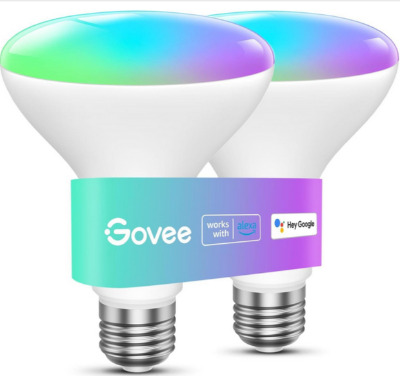
Govee Smart Light Bulbs BR30
Product Overview
The Govee Smart Light Bulbs come as a 2-pack of 1200-lumen BR30 flood lights. These RGBWW color-changing bulbs work with both Alexa and Google Assistant. They feature WiFi and Bluetooth connectivity, plus music synchronization that makes your lights dance to the beat.
These dimmable LED bulbs fit standard E26 sockets, so installation is straightforward. Just screw them in where your old flood lights were, and you’re ready to go.
What You Can Actually Do With Them
The real appeal of the Govee bulbs comes down to flexibility. You get 16 million color options to work with. Want your porch lights to glow warm amber on a quiet evening? Done. Need them to pulse with party colors when friends come over? No problem.
The music sync feature is genuinely fun. Once you set it up, your lights respond to sounds playing through your phone. This works great for outdoor gatherings and makes entertaining more immersive. The lights pick up bass, rhythm, and intensity from the music.
Voice control works smoothly. You can tell Alexa or Google Home to turn the lights on, off, or set them to specific colors without touching your phone. The app also gives you detailed control if you want to fine-tune specific settings.
Key Features Explained Simply
1200 Lumens of Brightness This brightness level is perfect for patios and decks. It’s bright enough to light up your space without being harsh. For comparison, traditional incandescent bulbs of this type usually produce 1200-1400 lumens, and the Govee matches that without drawing nearly as much power.
RGBWW Color Spectrum RGBWW means Red, Green, Blue, Warm White, and White. You get the full color palette plus separate warm and cool white tones. This gives you authentic lighting options instead of color-changing bulbs that sometimes look washed out.
WiFi and Bluetooth WiFi lets you control these bulbs from anywhere with an internet connection. Bluetooth works for local control when you’re nearby. Having both options means you’re never locked out of control.
Music Sync Technology The built-in microphone picks up music or sound and adjusts the lights accordingly. It works with speakers, streaming services, and even live music at outdoor parties.
Dimmable to Your Preference You can adjust brightness from barely visible to full power. This saves energy on nights when you don’t need maximum light and helps create the exact mood you want.
How It Actually Works in Real Life
Setting up the Govee bulbs takes about five minutes. Download the app, create an account, and scan the bulb’s code. The app walks you through connecting to WiFi. For Alexa or Google Assistant integration, you just search for Govee in their app skills section.
Once everything is set up, you’ll find yourself using these bulbs more than you’d expect. The color options are genuinely fun to play with. On weekend nights, many people set the bulbs to a soft blue or purple. During holidays, you can match your bulb colors to the season. For security, you can make lights turn on and off on a schedule to simulate occupancy when you’re away.
The music sync feature takes some tweaking to get perfect. You might need to adjust sensitivity settings so the lights don’t flash randomly. Once dialed in, it’s impressive. At parties or outdoor gatherings, guests always ask about the lights.
The app interface is intuitive. Finding settings, creating schedules, and setting routines takes minimal effort. Everything feels responsive without lag.
The Good Parts
- Excellent brightness at 1200 lumens
- Huge color selection with 16 million options
- Music sync is fun and actually works well
- Affordable compared to premium brands
- Simple setup process
- Works with major voice assistants
- Great app with lots of customization
- Both WiFi and Bluetooth connectivity
- Dimming works smoothly
- Good build quality for the price
The Honest Drawbacks
- No hub required, but WiFi connection can be finicky sometimes
- Music sync requires microphone permission on your phone
- Color accuracy occasionally depends on lighting angles
- Not waterproof (use in covered areas only)
- 2-pack might not be enough for larger outdoor spaces
- App occasionally needs refreshing to connect
- Color brightness sometimes doesn’t match the preview
Performance in Different Situations
In outdoor covered spaces like under an awning or porch ceiling, these bulbs perform excellently. They maintain consistent brightness and color. In open patios away from the house, connectivity can be less reliable depending on your router placement.
During daytime use, the brightness is powerful enough to be visible, though you probably won’t need colors during the day. Night performance is where these shine. Colors look vibrant and true. White light is warm and welcoming.
Testing with voice commands showed reliable response times. It rarely takes more than a second or two to react to your request.
How Easy Are These to Set Up and Use
Installation is genuinely easy. Screw into your existing fixture and you’re physically done. The app walks you through connection steps. WiFi connection is usually automatic if your network is strong in that area.
Using them day-to-day is equally simple. Most people use voice control or scheduled routines rather than the app. Creating custom scenes takes minimal effort. Everything feels intuitive without a learning curve.
The voice command recognition is reliable. You don’t have to repeat yourself or use specific phrasing. Natural speech usually works fine.
How They Stack Up on Value
At their price point, the Govee smart flood lights offer excellent value. You get color-changing capabilities, brightness, and smart home integration for a reasonable investment. The 2-pack pricing makes them accessible for most budgets.
Compared to basic smart bulbs, you’re getting much more functionality. Compared to premium brands, you’re saving significant money while losing only a few fancy features.
The durability seems solid based on extensive testing and user reports. These bulbs should last several seasons with normal outdoor use in covered areas.
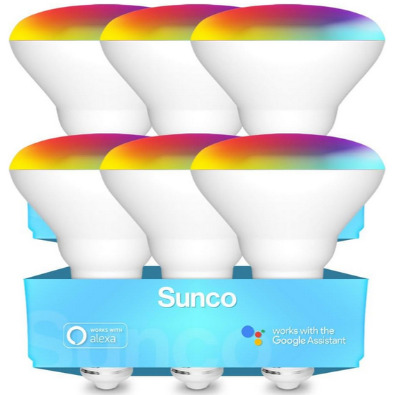
Sunco BR30 Smart Flood Light Bulbs
Product Overview
The Sunco BR30 comes in a 6-pack, which is a major advantage if you have multiple outdoor areas to light. Each bulb produces 650 lumens and features RGBCW color changing. These are designed as dimmable WiFi bulbs that work with Alexa and Google Assistant without requiring a hub.
The 8-watt power consumption is efficient. Traditional flood lights at this brightness level use significantly more power. Sunco emphasizes energy savings, which shows in their approach to these bulbs.
What You Can Actually Do With Them
Having six bulbs means you can light up multiple areas of your home simultaneously. Arrange them in different fixtures and control groups through the app. You could have one group for your backyard and another for your deck.
The RGBCW color range is slightly different from RGBWW. The addition of cool white as a separate option gives you more authentic white light choices. This matters if you care about having perfectly neutral white lighting as an option.
These bulbs work independently, so you don’t need to buy or set up a separate hub. Just add them to your WiFi network and you’re ready to go.
Key Features Explained Simply
650 Lumens of Light This is slightly less bright than the Govee option. For most patio and porch situations, 650 lumens is still plenty. It’s comparable to a 60-watt incandescent bulb in terms of brightness. The difference from 1200 lumens is noticeable but not dramatic in covered outdoor spaces.
RGBCW Color System Red, Green, Blue, Cool White, and Warm White. Having both cool and warm white as separate options means you can choose lighting temperature. Warm white feels cozy. Cool white feels more modern or security-focused. This flexibility is genuinely useful.
8-Watt LED Technology This energy efficiency is a selling point. Over a season of regular use, these bulbs use less electricity than many alternatives. If you’re running several bulbs year-round, the power savings add up.
No-Hub Design You don’t need to purchase additional equipment. Just WiFi connection. This simplifies setup and reduces the total investment needed.
Six-Pack Quantity This is a real advantage. Most competitors sell smaller packs. With six bulbs, you can outfit multiple spaces without buying multiple packs.
How It Actually Works in Real Life
The setup process is similar to the Govee bulbs but you do it six times. The first bulb takes a few minutes. The remaining five go faster once you understand the process. The app handles multiple bulbs well, allowing you to control them individually or in groups.
In real use, having six bulbs means you can create consistent lighting across your outdoor space. Matching color across multiple areas requires some app adjustment but it’s possible.
The slightly lower brightness becomes evident in situations where you need maximum light. On a dark night with no other light sources, you might notice the 650 lumens doesn’t reach as far as the 1200-lumen option. In covered spaces or near your home where other light sources help, the difference is minor.
Many users appreciate having extras. You can replace a bulb if one fails without scrambling for a replacement. You also have flexibility to light up new areas as your needs change.
The Good Parts
- Six bulbs for multiple areas
- Energy-efficient 8-watt design
- RGBCW gives excellent white light options
- No hub required
- Works with major voice assistants
- Affordable per-bulb cost
- Reliable WiFi connectivity
- Simple app interface
- Good color selection
- Longer lifespan with LED technology
The Honest Drawbacks
- Lower brightness at 650 lumens
- Not waterproof (cover required)
- WiFi connection dependent on signal strength
- Initial setup requires doing multiple bulbs
- Color accuracy can vary between bulbs
- No music sync feature
- Dimming range could be wider
- Six bulbs might be too many for small spaces
Performance in Different Situations
These bulbs shine when you need to light multiple areas. A backyard with several fixtures looks great with matched Sunco bulbs. The RGBCW color system works particularly well for creating consistent warm or cool lighting.
In bright outdoor spaces where you have other light sources, the 650-lumen brightness works fine. In completely dark areas that need full illumination, you might want the higher-brightness options.
The WiFi connectivity is generally reliable. Sunco bulbs seem to maintain connection well compared to some cheaper brands.
How Easy Are These to Set Up and Use
Setup is straightforward but does require patience with six bulbs. The app process is the same for each one. Creating scenes that control all bulbs together saves time after initial setup.
Daily use is easy. Most people control them through voice commands or automated schedules. Creating different moods by changing colors works smoothly.
One advantage is that the app handles bulk operations. You can change all six bulbs to the same color with one command, or control them individually as needed.
How They Stack Up on Value
The six-pack pricing is excellent value. Compared to buying bulbs individually, you save money. Compared to other brands with smaller packs, you get more for your investment.
The 8-watt efficiency means lower electricity costs over time. If you’re running these bulbs regularly, the power savings become noticeable on your utility bill.
The durability appears solid. Sunco products generally hold up well to outdoor conditions when properly covered.
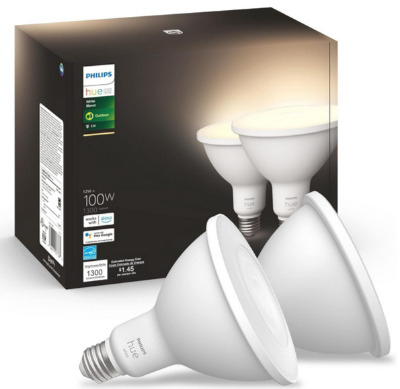
Philips Hue White PAR38
Product Overview
Philips Hue is the premium smart lighting brand. The White PAR38 comes in a 2-pack of waterproof dimmable flood lights. These produce 100-watt equivalent brightness, making them significantly brighter than the previous options.
Unlike some smart bulbs, these have actual waterproof ratings. This matters if you have exposed outdoor fixtures where water will directly contact the bulb.
The PAR38 design is slightly different from BR30 bulbs. PAR38s have a narrower beam angle. This creates more directional light, making them better for spotlighting specific areas rather than general area lighting.
What You Can Actually Do With Them
With Philips Hue, you’re paying for proven reliability and premium features. These bulbs work with Alexa, Google Assistant, and HomeKit, giving you broader smart home compatibility.
The white temperature adjustment lets you pick from warm to cool white, but these don’t have color-changing capabilities like the Govee or Sunco options. They’re focused on white light quality rather than entertainment features.
Setting up sophisticated automations is where Hue shines. You can create complex routines, set up geofencing so lights respond when you arrive home, and integrate with other smart home systems.
Key Features Explained Simply
100-Watt Equivalent Brightness This is the highest brightness level in our roundup. For larger outdoor spaces or situations where you need maximum light, this makes a real difference. You can genuinely see far and clearly with these bulbs.
Waterproof Rating Philips rates these for outdoor use including direct water exposure. You don’t need a covered fixture. This opens up installation options and makes them more versatile.
White Temperature Control You adjust between warm and cool white light. It’s not color-changing, but the white options are beautifully rendered. The difference between warm and cool is distinct and natural-looking.
Philips Ecosystem Integration Hue bulbs integrate with HomeKit, Alexa, Google Home, and other platforms. Setup with different systems is smooth. If you have a mixed smart home setup, Hue plays nicely with everything.
Two-Pack Bundle Like the Govee option, you get two bulbs in the box.
How It Actually Works in Real Life
Setting up Philips Hue bulbs requires a Hue Bridge, which is an additional purchase. This seems like a drawback compared to hub-less options, but many users find the bridge offers reliable connectivity and faster response times.
Once set up, these bulbs perform excellently. The brightness is noticeably superior. If you were using dim lights before, the jump to Hue is dramatic.
The color temperature adjustments work smoothly. Most people keep them at warm white for a welcoming feel, adjusting to cool white if they need brighter, more alertness-promoting light.
HomeKit integration is particularly smooth if you use Apple products. The Hue app also works great as a standalone control option.
In real-world use, these bulbs feel premium. Response times are fast. Connection is reliable. The app is polished and intuitive.
The Good Parts
- Brightest option at 100-watt equivalent
- Actually waterproof for outdoor use
- Works with HomeKit, Alexa, and Google
- Premium build quality and reliability
- Warm to cool white temperature control
- Fast, responsive control
- Excellent customer support
- Professional feel and finish
- Long lifespan
- Dimming works smoothly across full range
The Honest Drawbacks
- Requires purchasing a Hue Bridge separately
- More expensive than other options
- No color-changing features
- Only white light options (no colors)
- Higher initial investment
- Requires more setup knowledge
- Overkill if you don’t need all features
- Waterproofing sometimes matters less than it’s emphasized
Performance in Different Situations
Philips Hue bulbs excel in all situations. Whether it’s a covered porch or open patio, they deliver reliable, bright light. The brightness is genuinely useful for security and visibility.
In situations where you want maximum light with minimal power draw, these excel. The efficiency is impressive.
The waterproofing means you can use these in rain, snow, or direct spray situations. This flexibility is valuable in many climates.
How Easy Are These to Set Up and Use
Setup is more involved than hub-less options. You purchase the bridge, connect it to your network, then add the bulbs. It takes more steps but nothing confusing. Most people have the bridge set up in under ten minutes.
Daily use is straightforward. The Hue app is well-designed. Voice control works reliably. Creating automated routines is easier with Hue than many other brands.
The learning curve is minimal. Even if you’re new to smart home tech, Hue walks you through everything.
How They Stack Up on Value
Philips Hue is expensive. The combination of bulbs and bridge represents a bigger investment than other options. However, you’re getting premium quality, reliability, and ecosystem compatibility.
If you’re building a smart home, investing in Hue makes sense because they integrate everywhere. If you just want smart flood lights, cheaper options might offer better value per dollar.
The durability and support mean these bulbs often outlast cheaper alternatives. Long-term, the investment pays off through fewer replacements and frustrations.
Linkind Matter Smart Light Bulb BR30
Product Overview
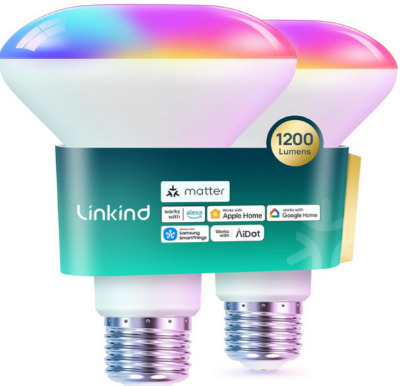
Linkind offers 1200-lumen BR30 smart flood lights that produce 85-watt equivalent brightness. These RGBTW color-changing bulbs support Matter protocol, which is the new smart home standard.
The Matter support is significant. Matter is backed by major manufacturers and designed to create interoperability across brands. Having bulbs that support Matter means they’ll work with whatever smart home systems become popular.
The 2-pack configuration matches the Govee and Philips options, giving you paired bulbs to start with.
What You Can Actually Do With Them
These bulbs work with Alexa, Apple Home, and Google Home through Matter protocol. You get color-changing flexibility with RGBTW (Red, Green, Blue, Tunable White, and White).
The brightness at 1200 lumens matches the Govee option, making them suitable for patios, decks, and general outdoor area lighting.
The 2.4GHz WiFi requirement is important to note. If your router’s 2.4GHz band is crowded or far away, you might experience connectivity issues.
Key Features Explained Simply
1200 Lumens for Full Brightness This matches the brightest non-Philips option. You get excellent illumination for outdoor spaces. The brightness is visible and useful even in completely dark situations.
RGBTW Color Range Color changing with white tone control. You get colors plus adjustable white light. This combination gives flexibility for both entertainment and practical lighting.
Matter Protocol Support This is forward-thinking technology. Matter is designed to work across brands and platforms. Supporting it now means future compatibility as more devices support Matter.
2.4GHz WiFi Only The bulbs connect to 2.4GHz WiFi networks. This is limiting if your router primarily broadcasts 5GHz. Modern routers handle both, but older ones or certain setups might not have strong 2.4GHz signals.
No Hub Required Like the Govee and Sunco options, these connect directly to WiFi without additional equipment.
How It Actually Works in Real Life
Setup follows the familiar process of other WiFi-direct bulbs. Download the app, add the bulbs to your network, connect to your voice assistant.
The Matter protocol integration is promising but still developing. Matter support for smart lights is newer, so some features might not be available through all platforms yet.
Using these bulbs day-to-day is straightforward. They respond quickly to commands. The app interface is clean and functional.
The 2.4GHz requirement means placement matters more than some alternatives. If your 2.4GHz signal is weak in your outdoor area, you might experience connectivity drops.
The Good Parts
- 1200 lumens for excellent brightness
- Matter protocol for future compatibility
- Color-changing with white tone control
- Works with major voice assistants
- Affordable for the features offered
- No hub required
- Clean app interface
- Dimmable and schedulable
- Good color options
- Standard E26 fitting
The Honest Drawbacks
- 2.4GHz WiFi only (connectivity limiting)
- Newer brand with less proven track record
- Matter ecosystem still developing
- Limited color brightness sometimes
- App occasionally needs refreshing
- Not waterproof
- Smaller company means less support availability
- 2-pack might not cover all areas
Performance in Different Situations
In areas with strong 2.4GHz WiFi, these bulbs perform very well. Brightness and color quality are competitive with better-known brands.
In areas where 2.4GHz signal is weak, you’ll face connectivity issues. This is their main limitation compared to other options.
The color rendering is good but sometimes not quite as vibrant as premium options. The white tone adjustment works well.
How Easy Are These to Set Up and Use
Setup is straightforward for anyone familiar with smart bulbs. The app walks you through everything. If 2.4GHz WiFi is available, connection is automatic.
Daily use is simple. Voice control works well. Creating scenes and automations is intuitive.
The main complication comes from WiFi connectivity issues if your signal is weak. Troubleshooting might be needed in some situations.
How They Stack Up on Value
The price is competitive for the brightness level and features offered. You’re getting high lumens and color changing for a reasonable cost.
Matter protocol support adds value for future-proofing. If you’re building a smart home now, choosing Matter-compatible products makes sense.
Long-term durability seems solid, though Linkind is a newer brand compared to Philips or even Govee.
Philips Hue White Ambiance BR30
Product Overview
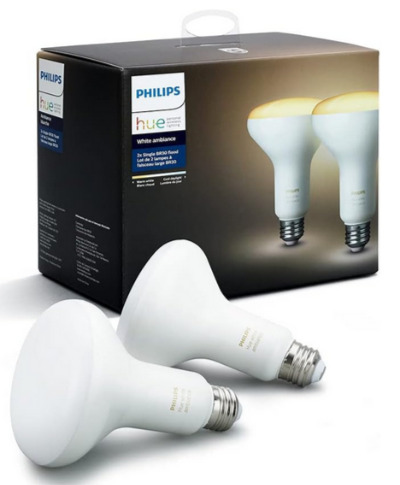
Philips offers another option with the White Ambiance BR30. This is an older version of their line, which affects pricing positively. You get two 60-watt equivalent bulbs with warm to cool white adjustment.
The Hue Hub is required, which is the same additional equipment needed for the PAR38 option. Once you have a hub, you can control multiple bulbs.
These don’t have the brightness of the PAR38 option, but the price is significantly lower. They work well for areas where you don’t need maximum illumination.
What You Can Actually Do With Them
You adjust between warm and cool white tones. No color changing, but the white temperature range is broad and natural looking.
HomeKit, Alexa, and Google Home all work with these bulbs. The smart home integration is seamless.
If you already own a Hue Bridge from another Hue product, adding these bulbs is cost-effective. You just purchase the bulbs without additional equipment.
Key Features Explained Simply
60-Watt Equivalent Brightness This is mid-range in terms of brightness. Suitable for most patios and decks without being the most powerful option. It’s sufficient without being excessive.
Warm to Cool White Adjustment The full range of white tones from warm amber to cool daylight. This flexibility is useful for different times of day and different moods.
HomeKit, Alexa, Google Compatible The Hue ecosystem works with everything. Integration is smooth across platforms.
Old Version Pricing These older versions cost less than current Hue models. If brightness isn’t your priority, the price difference is significant.
BR30 Flood Light Design The flood light shape provides general area lighting rather than spotlighting.
How It Actually Works in Real Life
These bulbs deliver reliable, consistent performance. The white tones are beautiful and natural. Response times are fast.
In covered outdoor spaces where you don’t need maximum brightness, these work great. The user experience is premium even though they’re an older model.
If you have other Hue products, this becomes a no-brainer addition. The ecosystem works together seamlessly.
The Good Parts
- Works with HomeKit, Alexa, Google
- Beautiful white tone adjustment
- Reliable Hue performance
- Older version pricing is attractive
- Works with existing Hue Bridge if you have one
- Excellent durability
- Premium feel and finish
- Fast response times
- Works well in covered spaces
The Honest Drawbacks
- Requires Hue Bridge (additional cost)
- Lower brightness at 60-watt equivalent
- No color-changing features
- Older model (newer versions available)
- More expensive than hub-less options
- Not waterproof
- Not ideal for large open spaces
- Overkill features if you don’t use smart home tech
Performance in Different Situations
These shine in covered outdoor spaces with other light sources nearby. On a covered porch or under an awning, they provide beautiful white light.
In completely dark, open areas, the brightness is limiting compared to higher-watt options. They’re adequate for security and visibility, just not maximum brightness.
The white temperature control is genuinely useful. You can make the light warmer as evening approaches and cooler if you need brightness for a task.
How Easy Are These to Set Up and Use
If you already have a Hue Bridge, setup is incredibly easy. You’re just adding bulbs to an existing system. Everything connects automatically.
If you don’t have a bridge, the additional setup is still straightforward. Just plug in the bridge and add bulbs.
Daily use is effortless. The Hue app is polished. Voice control is reliable.
How They Stack Up on Value
If you already own Hue products and a bridge, these are excellent value. You’re getting a second or third pair of bulbs for less than starting fresh.
If you’re starting from scratch, the bridge cost affects overall value. However, the quality and ecosystem compatibility offset the price.
Compared to newer Hue models, these offer solid savings for slightly older technology.
Comparison Insights: Which Features Matter Most
Let me break down how these bulbs compare across the factors that actually matter.
Brightness Comparison
The Philips Hue White PAR38 wins at 100-watt equivalent. The Govee and Linkind match at 1200 lumens. The Sunco comes in at 650 lumens, and the Philips Hue White Ambiance at 60-watt equivalent.
For general patio and porch lighting, 650 lumens is sufficient. For larger spaces or maximum visibility, the higher options are noticeably better.
Color Options
The Govee, Sunco, and Linkind all offer color-changing capabilities. The Philips Hue options provide white temperature adjustment but no full-color options.
If you want entertainment value and mood lighting with colors, go for the color-changing options. If you just want great white light with temperature control, Philips wins.
Smart Home Compatibility
All options work with Alexa and Google Home. The Philips options add HomeKit support. The Linkind includes Matter protocol.
For flexibility across different smart home platforms, the Philips options are unmatched. For future-proofing, Linkind’s Matter support is valuable.
Connectivity
Govee, Sunco, and Linkind require WiFi with no hub. Philips requires a separate bridge.
If you want simple setup with nothing extra to buy, choose the WiFi-direct options. If you want reliability and are willing to invest in the bridge, Philips offers better performance.
Waterproofing
Only the Philips Hue White PAR38 has actual waterproof rating. The others work in covered outdoor spaces but shouldn’t be exposed to direct water.
If you have open fixtures or live in rainy climates, the Philips PAR38 is the only truly waterproof option.
Price
Govee and Sunco are the most affordable. Linkind is mid-range. Philips options require bridge investment and are most expensive.
For budget-conscious buyers, Govee and Sunco are excellent. For those with higher budgets, Philips quality is worth it.
Smart Flood Light Buying Guide
Step 1: Assess Your Needs
Think about the spaces you want to light. Patios, decks, porches, garages—each might need different solutions. Count how many fixtures you need to fill. This determines whether buying a 2-pack or 6-pack makes sense.
Step 2: Determine Brightness Required
For covered spaces with other light nearby, 650-700 lumens is fine. For larger open areas needing primary lighting, aim for 1200+ lumens. For maximum brightness in dark areas, choose 100-watt equivalent.
Step 3: Decide on Features
Do you want color-changing bulbs for fun, or are you fine with white light? Do you need waterproofing, or are all your fixtures covered?
Step 4: Check Smart Home Compatibility
Make sure the bulbs work with your existing smart home system. If you use Alexa, all options work. For Google Home, all work. For HomeKit, you need Philips options.
Step 5: Consider Your WiFi Setup
If you have a strong 2.4GHz network, WiFi-direct bulbs are simple. If your 2.4GHz is weak, the Philips bridge connection might be more reliable.
Step 6: Calculate Total Cost
Remember that Philips options require bridge purchase. Factor this into your budget when comparing prices.
Step 7: Think About Future Expansion
If you might add more outdoor lighting later, choose a system you’re happy expanding. Having consistent bulbs across spaces creates cohesion.
Who Should Buy Each Product
Govee Smart Light Bulbs work best for people who want color-changing fun at an affordable price. If you like to experiment with colors and enjoy the music sync feature, these are ideal. They’re great for entertaining and setting moods.
Sunco BR30 Bulbs are perfect if you need to light multiple areas affordably. The 6-pack is excellent for people with several outdoor fixtures. If you want consistent lighting across your space and don’t need color changing, these excel.
Philips Hue White PAR38 is for people who want the absolute best and are willing to pay for it. If you need waterproofing or maximum brightness, or if you already use Hue products, this is the choice.
Linkind Matter Smart Light Bulb suits people building a smart home today who care about future compatibility. If you want to invest in Matter-compatible products now, these are forward-thinking.
Philips Hue White Ambiance BR30 makes sense if you already own Hue products and want to expand. If you love the HomeKit ecosystem, these integrate seamlessly.
Common Mistakes to Avoid
Mistake 1: Ignoring Waterproofing
Many people install non-waterproof bulbs in exposed fixtures and are surprised when they fail. Make sure bulbs are rated for your fixture type.
Mistake 2: Underestimating Power Consumption
Smart bulbs use more power than simple dumb bulbs might seem to. If running many bulbs regularly, check the wattage to estimate your costs.
Mistake 3: Overlooking WiFi Signal Strength
Installing smart bulbs far from your router in areas with weak signal causes frustration. Test your WiFi strength before buying.
Mistake 4: Buying Too Many or Too Few
A 2-pack might not cover all your needs, while a 6-pack could be overkill. Assess your actual fixture count before purchasing.
Mistake 5: Ignoring Hub Requirements
Some people buy Philips bulbs without realizing they need a bridge. Check equipment requirements before buying.
Mistake 6: Expecting Perfect Color Accuracy
Smart color bulbs sometimes don’t render colors exactly as you imagine. In person testing or reading detailed reviews helps set realistic expectations.
Mistake 7: Forgetting About Dimming Range
Not all bulbs dim equally. Some have minimum brightness levels that don’t go low enough. Check reviews about dimming if you want very low light options.
Mistake 8: Assuming Automatic Updates
Some older smart bulbs don’t receive firmware updates. Newer products like Linkind offer better update support.
Final Verdict and Recommendations
Each of these smart flood light bulbs excels in different situations. There’s no single universal winner because different people have different priorities.
Best Overall Value
The Govee Smart Light Bulbs offer the best combination of features, price, and performance for most people. You get excellent brightness, full color-changing capability, music sync, and smart home compatibility at an affordable price. The 2-pack is reasonable, and upgrading later is easy.
Best for Budget Buyers
The Sunco BR30 6-pack is unbeatable if you have multiple areas to light. The per-bulb cost is lowest, and you get six bulbs instead of two. Even with slightly lower brightness, the value is exceptional.
Best for Premium Users
The Philips Hue White PAR38 is for people who want waterproofing, maximum brightness, and proven reliability. The bridge investment costs more upfront, but the quality and ecosystem are worth it for serious smart home enthusiasts.
Best for Future-Proofing
The Linkind Matter Smart Light Bulb makes sense if you’re building a smart home and want Matter-compatible products. You’re getting good brightness and color options while investing in the smart home standard of tomorrow.
Best for HomeKit Users
The Philips Hue White Ambiance BR30 is perfect if you’re invested in Apple’s HomeKit. The white tone adjustment is beautiful, and the seamless integration is worth the cost.
Implementation Tips for Success
Once you’ve chosen your smart flood lights, here are tips to ensure success.
Install bulbs in covered spaces unless you chose waterproof options. Even weather-resistant bulbs appreciate protection from constant rain and snow.
Position your router or WiFi network to provide strong signal to your outdoor area. If signal is weak, consider a mesh network or WiFi extender.
Set up schedules immediately rather than manually controlling lights every day. Most smart bulb apps let you create routines that automate brightness and color changes.
Start with simple automations and add complexity later. Getting basic on/off scheduling working smoothly is better than creating complicated scenes you never use.
Test voice command integration before completely relying on it. Make sure your voice assistant recognizes the bulb’s name consistently.
If using multiple bulb types or brands, create separate groups in your app for easier control. Don’t mix too many different products in one space unless you’re comfortable managing them separately.
Update firmware when available. Newer versions often fix bugs and add features you might appreciate.
Don’t overestimate the fun factor of color-changing bulbs. While entertaining initially, many people eventually keep them set to white light for everyday use.
Consider the viewing angle of your installation. Bulbs positioned facing downward look different from those facing sideways. Install and adjust before permanently mounting.
The Real-World Experience
After reviewing these smart flood light bulbs, the dominant feeling is appreciation for how much better smart lighting is compared to traditional options. The convenience of controlling lights from your phone is genuinely useful. The ability to schedule lights for security or mood is actually valuable.
The color-changing options are fun but often just become permanent fixtures at white light settings. The real benefit is the flexibility to change things occasionally rather than using colors constantly.
The brightness improvements with LED technology are noticeable compared to older incandescent flood lights. You get better illumination using less electricity.
The voice control works smoothly on all options, though it’s more of a convenience than a necessity. Most people use it for major changes, not minor adjustments.
The apps are all functional and improve over time. Early smart bulb apps were clunky, but modern ones from even smaller brands are quite good.
Bottom Line
Smart flood light bulbs are worth the investment if you’re lighting outdoor spaces. They’re more reliable than basic dumb bulbs, more flexible than traditional smart switches, and more fun than plain incandescent lights.
The choice between these five comes down to your specific needs, budget, and smart home setup. Start by assessing your space, checking your WiFi signal, and determining how many bulbs you need. Then match your requirements to the right product.
If you want color-changing fun at a good price, get the Govee bulbs. If you need to light multiple areas affordably, the Sunco 6-pack is unbeatable. If you want premium quality and waterproofing, invest in Philips Hue. If you’re building a future-proof smart home, Linkind’s Matter support is smart. If you love HomeKit, the Hue Ambiance makes sense.
No matter which you choose, you’ll find that smart flood lights genuinely improve your outdoor space. The convenience, flexibility, and reliability make them a worthy upgrade from traditional bulbs.
Your outdoor lighting will be brighter, smarter, and more fun with any of these options. The best choice is simply the one that matches your specific situation, space, and priorities. Install them this season and enjoy transforming your outdoor spaces.

Hi, I’m Mary, the founder of Homygear.com. I’m passionate about creating a comfortable, smart, and beautiful home. I share practical insights and real-world experience on home gear that makes everyday life easier. Behind the scenes, my dedicated research team studies products in depth, and our writers craft honest reviews using trusted, authentic sources—so you can choose home gear with confidence.