5 Best Smart Lock For Existing Deadbolt In 2026
If you already have a deadbolt on your front door and you want to upgrade it without ripping out the whole door hardware, you are in the right place. A smart lock that fits your existing deadbolt setup is one of the easiest home upgrades you can make. No need to drill new holes, no need to hire a locksmith for hours, and no need to change your door. Most retrofit smart locks simply swap onto the same holes your old deadbolt used.
This guide walks you through five of the most talked-about smart locks that work great with an existing deadbolt setup. Each one has its own strengths, quirks, and ideal use case. We will break down the features in plain language, talk about how each one performs day to day, and help you figure out which one fits your home, your budget, and your habits.
By the end of this article, you will know exactly which smart lock suits your front door, your rental property, your Airbnb, or your family home. Let’s get into it.
Why Get A Smart Lock For Your Existing Deadbolt
Before we jump into the reviews, let’s talk about why so many homeowners are moving away from plain metal keys. A smart lock gives you keyless entry, which means you can unlock your door with a code, your phone, your fingerprint, or even your face, depending on the model. You never have to worry about losing a key or getting locked out again.
A smart lock also gives you control from anywhere. Most of these locks connect to an app on your phone, so you can check if your door is locked while you’re at work, or let a guest in remotely without being home. Some models also work with voice assistants like Alexa and Google Home, so you can just ask your speaker to lock up before bed.
Retrofit smart locks are built to replace the inside and outside part of a standard deadbolt without needing a new door prep. That means installation is usually a twenty to thirty minute job with a screwdriver, not a full afternoon project.
Now let’s get into the actual products.
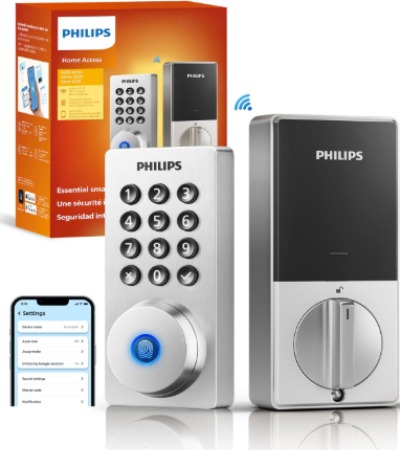
1. Philips Wi-Fi Door Lock (Fingerprint, Passcode, App, Auto Locking)
Product Description
This Philips lock is a full keyless entry deadbolt built for people who want built-in Wi-Fi without needing a separate hub or bridge. It supports fingerprint unlock, passcode entry, and app-based remote control, so you get three separate ways to get in without carrying a key. The auto-locking feature means the door locks itself behind you, so you never have to double check if you forgot to lock up.
Best Use Cases
This lock works really well for busy families who need multiple ways to unlock the door for different family members. Kids can use a fingerprint, parents can use the app, and guests can get a temporary passcode. It’s also a strong option for anyone who forgets to lock the door on the way out, since auto locking handles that automatically.
Key Features Explained Simply
- Built-in Wi-Fi: You don’t need to buy a separate bridge device to connect it to the internet. It links straight to your home network.
- Fingerprint unlock: Store multiple fingerprints so each family member can unlock with a touch.
- Passcode entry: Great for guests, cleaners, or dog walkers who need short-term access.
- App remote control: Lock or unlock the door from your phone no matter where you are, as long as you have an internet connection.
- Auto locking: The deadbolt locks itself after a set time once the door closes, cutting down the risk of an unlocked door.
Real-Life Usage Insight
In daily use, the fingerprint sensor tends to be the fastest way to get inside, often quicker than digging for a phone or typing a code, especially with hands full of groceries. The app works fine over stable Wi-Fi, though like most connected locks, response time can lag a bit if your home internet connection is spotty. Auto locking is handy, but it’s smart to test the delay timing so the door doesn’t lock while you’re still standing in the doorway juggling bags.
Pros
- Multiple unlock methods in one lock
- No separate hub needed for Wi-Fi
- Auto lock adds a layer of peace of mind
- Simple app layout that most people pick up fast
- Reasonable price point compared to premium brands
Cons
- Fingerprint sensors can act up in extreme cold or with wet hands
- App notifications sometimes arrive a little delayed
- Build quality feels a step below higher-end brands like Schlage or Yale
Performance Discussion
The lock handles daily locking and unlocking smoothly, and the motor sound isn’t too loud, which matters if your bedroom is close to the front door. Battery life is decent, generally lasting several months with regular use before you need to swap batteries, though heavy fingerprint use will drain it faster than passcode-only use.
Ease Of Installation And Use
Installation follows the standard swap-in process most retrofit locks use. You keep your existing exterior deadbolt hardware in many designs, or replace the whole assembly, and the interior module attaches with screws that come in the box. Setup on the app is guided step by step, so even folks who aren’t tech savvy can get through it without help.
Value For Money
For the price, you get three unlock methods and built-in Wi-Fi, which usually costs more with other brands. This makes it a solid pick if you want smart features without stretching your budget for a premium name.
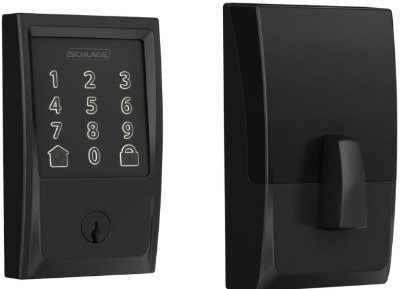
2. Schlage Encode Smart WiFi Deadbolt (Greenwich Trim, Matte Black)
Product Description
Schlage is one of the most trusted names in the lock industry, and the Encode line is their flagship smart deadbolt. This version comes with the Greenwich trim in a matte black finish, giving it a clean, modern look that fits well with most front door styles. It has a touchscreen keypad, built-in Wi-Fi, and works with Alexa, Google Home, Ring, and Airbnb’s smart lock integration.
Best Use Cases
This lock is a great fit for homeowners who want a lock built by a company with decades of physical security experience behind it. It’s also ideal for Airbnb hosts and property managers, since the Airbnb integration lets you generate and manage codes for guests directly through the Airbnb app, no separate lock app juggling required.
Key Features Explained Simply
- Touchscreen keypad: A sleek keypad that lights up only when touched, so there are no visible buttons giving away your code from wear patterns.
- Built-in Wi-Fi: Connects straight to your router with no bridge needed.
- Smart home compatibility: Works with Alexa and Google Home for voice control, and it pairs directly with Ring devices for a connected front door setup.
- Airbnb integration: Generate, edit, and delete guest codes right from the Airbnb host app.
- Certified security: Meets strict grade certification standards for both security and durability, which matters if you care about physical break-in resistance, not just tech features.
Real-Life Usage Insight
Homeowners renting out a room or a full property tend to appreciate how the Airbnb integration removes a big hassle. Instead of manually creating a code and texting it to a guest, the code generates automatically once a booking is confirmed. For regular home use, the touchscreen keypad is fast and responsive, and the matte black finish holds up well against fingerprints and smudges compared to shinier finishes.
Pros
- Backed by a well-known lock security brand
- Strong smart home ecosystem support
- Airbnb integration saves real time for hosts
- Sturdy, certified build quality
- Touchscreen keypad looks modern and clean
Cons
- Higher price tag than most competitors on this list
- Setup takes a little longer due to the number of features
- Batteries drain a bit faster with heavy touchscreen and Wi-Fi use
Performance Discussion
This lock is built solid, and it shows in daily use. The bolt throw feels sturdy, and the touchscreen responds quickly even in bright sunlight, which trips up some cheaper keypads. Wi-Fi connectivity stays stable for most home routers, and firmware updates roll out over the air without needing to unscrew anything.
Ease Of Use
The touchscreen interface is intuitive, and the companion app walks you through setup with clear steps. Voice control through Alexa or Google Home works reliably once linked, though initial account linking across multiple platforms (Schlage app, Alexa, Ring) does take a few extra minutes.
Value For Money
You’re paying a premium here, but you’re getting a well-built, well-supported lock with a strong reputation for reliability and physical security. For anyone renting out a space or managing multiple guests, the Airbnb feature alone can justify the price difference.
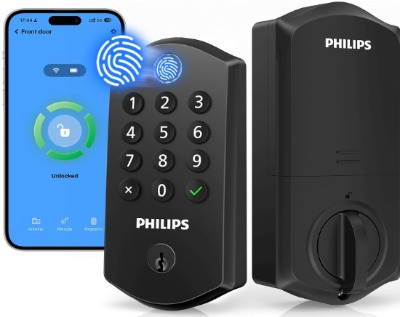
3. Philips Wi-Fi Smart Lock (Fingerprint, Electronic Keypad, Alexa & Google Compatible)
Product Description
This is another Philips model, but it leans more toward a simple, no-fuss electronic keypad design paired with fingerprint access. It works with Alexa and Google Assistant, has app remote control, and includes auto lock. Philips markets this one around easy installation, and it lives up to that with a straightforward setup process.
Best Use Cases
This lock is a strong pick for anyone replacing a basic deadbolt who wants smart features without a steep learning curve. It suits older adults living alone who want fingerprint access instead of memorizing a code, and it also works well for smaller households that don’t need advanced integrations like Airbnb management.
Key Features Explained Simply
- Electronic keypad: A simple number pad for entering a passcode, useful as a backup if fingerprint recognition fails.
- Fingerprint access: Fast, code-free entry for household members.
- App remote control: Lock and unlock from anywhere with data or Wi-Fi.
- Auto lock: Automatically re-locks the door after it closes.
- Alexa and Google compatibility: Voice commands for locking (unlocking through voice is usually restricted for security reasons across most brands).
Real-Life Usage Insight
Setup on this one tends to go quickly since the instructions are laid out in a clear, numbered format inside the box. Fingerprint recognition speed is solid for most fingers, though very dry skin can occasionally need a second attempt. The keypad backup is a nice safety net on days the fingerprint sensor struggles, like right after washing dishes or working outside in the yard.
Pros
- Genuinely easy installation process
- Reliable fingerprint access for daily use
- Backup keypad adds flexibility
- Competitive price for the feature set
- Voice assistant compatibility adds convenience
Cons
- Fewer premium extras compared to Schlage or Yale
- Plastic components feel less premium under close inspection
- Customer support response times can vary
Performance Discussion
Daily performance is smooth for typical households. The auto lock timer can be adjusted in the app, which helps avoid the door locking too soon while someone is still stepping through with their hands full. Battery life sits in the average range for this category, generally good for several months of regular use.
Ease Of Use
This is one of the simpler locks to install and set up on this list. The app avoids clutter and sticks to the basics: adding users, setting codes, checking lock status, and adjusting auto lock timing. For anyone who wants smart functions without a complicated setup, this is a comfortable entry point.
Value For Money
Given the fingerprint access, keypad backup, and voice assistant support, this lock offers strong value for a mid-range price. It’s a smart pick if you want core smart lock features without paying for extras you might not use.
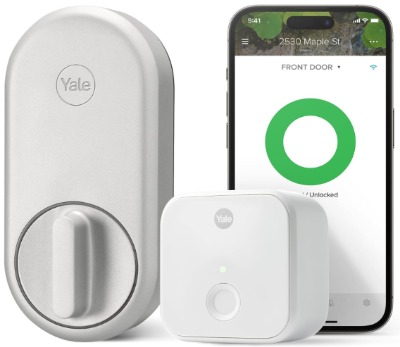
4. Yale Approach Smart Wi-Fi Deadbolt Retrofit Smart Lock (Unlimited Virtual Keys)
Product Description
Yale has built a name in lock manufacturing, and the Approach model is designed specifically as a retrofit option, meaning it’s made to work with your current deadbolt hardware setup with minimal changes. It offers unlimited virtual keys through the app, so you can hand out digital access to as many people as you need without extra hardware or fees.
Best Use Cases
This lock suits households that regularly have guests, family members, or service providers needing access, like a cleaning service, a pet sitter, or visiting relatives. Since virtual keys are unlimited, it also works well for larger families or shared living situations where several people need reliable app-based entry.
Key Features Explained Simply
- Retrofit design: Built to attach to your existing deadbolt setup without needing to swap out the whole door hardware.
- Unlimited virtual keys: Create as many digital keys as you want and send them to other people’s phones through the app.
- App remote control: Lock, unlock, and check status from your phone.
- Keyless entry: No physical key needed day to day, though a manual override option is usually kept as backup.
Real-Life Usage Insight
Families juggling multiple sets of physical keys often find the virtual key system to be a relief, since everyone just uses their own phone instead of carrying a separate key around. Sending a virtual key to a visiting relative or a service provider takes only a couple of taps in the app, and you can revoke it instantly once they no longer need access.
Pros
- True retrofit design keeps installation simple
- Unlimited virtual keys with no extra cost
- Strong brand reputation for lock durability
- Clean, minimal outer design that blends with most doors
- Easy to grant and revoke access on the fly
Cons
- No built-in keypad on some configurations, so entry relies mainly on the app or phone
- Requires a stable Bluetooth or Wi-Fi connection for smooth virtual key delivery
- Slightly steeper learning curve for less tech-savvy users compared to a plain keypad lock
Performance Discussion
The lock mechanism itself feels solid and consistent, which lines up with Yale’s general reputation for hardware quality. Virtual key delivery works reliably over a good connection, though users in areas with weak Wi-Fi signal near the front door may notice occasional delays when sending or receiving a new key.
Ease Of Use
Installation follows the standard retrofit process, fitting onto the existing deadbolt hole pattern most front doors already have. The app interface focuses heavily on key management, which makes sense given the unlimited virtual key feature, and most users get comfortable with it after a short learning period.
Value For Money
If your household deals with frequent guests or shared access needs, the unlimited virtual key system alone can make this lock worth the price. For a simpler single-user household, some of the extra key-sharing features might go unused, so it’s worth weighing your actual needs here.
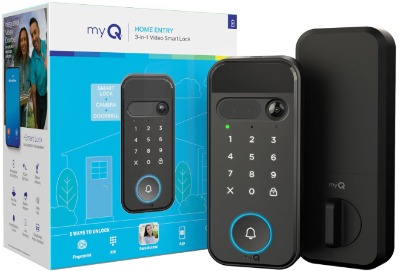
5. myQ Secure View 3-in-1 Smart Lock with 2K HDR Video Doorbell Camera
Product Description
This one stands apart from the rest of the list because it combines a smart lock with a built-in video doorbell camera in a single unit. It offers face access, fingerprint access, PIN entry, and app control, alongside a 2K HDR camera with color night vision and two-way audio. Instead of just replacing your deadbolt, it also replaces the need for a separate doorbell camera.
Best Use Cases
This is a great option for anyone who wants a security camera and a smart lock combined into one device instead of managing two separate gadgets and two separate apps. It works well for homeowners who care about seeing who is at the door before it even opens, and for those who want to keep an eye on packages, visitors, or entry activity throughout the day.
Key Features Explained Simply
- Face access: Unlock the door by having the camera recognize your face, no touch needed.
- Fingerprint access: A more traditional biometric option alongside face recognition.
- PIN and app control: Standard passcode and remote app-based entry, just like other smart locks on this list.
- 2K HDR video doorbell camera: High resolution video built directly into the lock unit, so you see clear detail of anyone approaching your door.
- Color night vision: Unlike black-and-white night vision on many older cameras, this shows color detail even after dark.
- Two-way audio: Talk to whoever is at the door through your phone, from anywhere.
Real-Life Usage Insight
Having the lock and camera in one unit cuts down on clutter around your front door and simplifies the app situation, since you check both lock status and camera footage from a single dashboard. Face access tends to work best in good lighting, and like most face-recognition systems, performance can dip slightly in very low light despite the night vision support, so fingerprint or PIN entry become useful backups after dark.
Pros
- Combines a lock and a doorbell camera into a single device
- Clear 2K video quality with color night vision
- Multiple unlock methods for flexibility
- Two-way audio adds a real security benefit
- Reduces the number of separate smart home gadgets on your door
Cons
- Higher price point since it covers two devices in one
- More features mean more things that could need troubleshooting
- Battery drain is naturally higher due to the camera running alongside lock functions
Performance Discussion
Video quality holds up well in daylight and reasonably well at night thanks to the color night vision feature. Face access is convenient, though it works best when paired with fingerprint or PIN as a backup method for low-light situations or when wearing a mask or hat. Because this device runs a camera continuously, battery life needs more regular attention compared to lock-only devices on this list.
Ease Of Use
Setup takes a bit longer than a standard lock since you’re pairing both a camera and a lock system at once, but the app organizes everything into clear sections so it doesn’t feel overwhelming. Once set up, daily use is simple: approach the door, let the camera detect your face or use a PIN, and you’re in.
Value For Money
Since this device replaces two separate purchases, a smart lock and a video doorbell, it can actually work out as good value if you were planning to buy both anyway. If you only want a lock without camera features, this might be more than you need.
Comparison Insights
Looking at these five locks side by side, a few patterns stand out.
The two Philips locks focus on affordability while still packing in fingerprint access and app control, making them great starter options if this is your first time trying a smart lock. The Schlage Encode leans into brand trust, physical build quality, and smart home ecosystem support, which appeals to people who want a name they recognize and features like Airbnb integration. The Yale Approach stands out for its true retrofit design and unlimited virtual key system, ideal for households with lots of comings and goings. The myQ Secure View goes furthest by merging a lock with a full video doorbell camera, appealing to anyone who wants an all-in-one front door security setup.
In terms of unlock methods, fingerprint access shows up in three of the five picks, showing just how popular biometric entry has become for everyday convenience. App control is standard across all five, so no matter which one you pick, remote access from your phone is a given. Auto locking appears on both Philips models, adding a safety net for forgetful moments.
Price-wise, the Philips locks sit on the more budget-friendly end, the Yale Approach and Schlage Encode land in the mid-to-premium range, and the myQ Secure View commands the highest price due to its combined camera and lock functionality.
Buying Guide: What To Look For In A Smart Lock For An Existing Deadbolt
Check Compatibility With Your Door First
Not every smart lock fits every door. Before buying, measure your door thickness and check the backset (the distance from the edge of the door to the center of the hole where your deadbolt sits). Most retrofit locks are built for standard door sizes, but it never hurts to double check the product listing for compatible measurements.
Decide On Unlock Methods You Actually Need
Fingerprint, PIN codes, app control, and even face access all sound nice on paper, but think about how your household actually behaves. If you have kids too young to reliably use a fingerprint sensor, a keypad backup matters more. If you host guests often, a lock with easy virtual key sharing saves you a lot of hassle.
Think About Connectivity: Wi-Fi Vs Bluetooth
Built-in Wi-Fi locks connect straight to your home network without needing a separate bridge, which is convenient but can drain batteries a bit faster. Bluetooth-only locks might need an added bridge device for full remote app access from outside your home network, so check what’s included in the box.
Battery Life Matters More Than It Seems
Smart locks run on batteries, and running out of power unexpectedly is one of the biggest complaints in this category. Look for locks with clear low-battery alerts sent to your phone, and check whether the lock has an external backup power option, like a 9-volt battery terminal, in case the internal batteries die completely.
Smart Home Integration
If you already use Alexa, Google Home, or Ring, picking a lock that plays nice with your existing setup saves you from juggling separate apps. Not every lock supports voice unlocking for security reasons, but most support voice-activated locking at the very least.
Certification And Build Quality
Look for locks with recognized security and durability certifications. These ratings test things like resistance to forced entry and how well the lock holds up over repeated daily use. A lock that looks great but lacks any certification is a bit of a gamble long term.
Consider Camera Features If You Want More Than Just A Lock
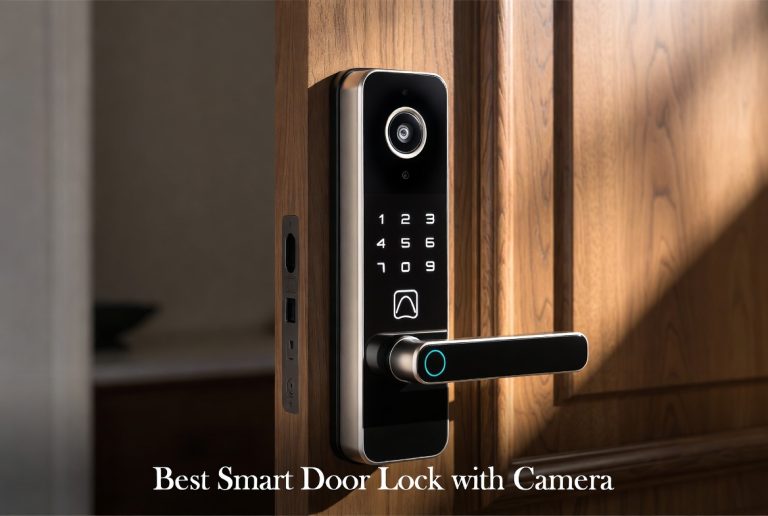
If you’re also in the market for a video doorbell, a combined lock and camera device like the myQ Secure View can save money and reduce clutter compared to buying two separate products.
Who Should Buy These Products
If you’re a first-time smart lock buyer on a budget, the Philips models are a comfortable entry point with fingerprint access and app control at a friendly price. If you manage a rental property or run an Airbnb, the Schlage Encode’s direct Airbnb integration removes a lot of manual code management. If your household deals with frequent guests, shared living arrangements, or multiple family members needing access, the Yale Approach’s unlimited virtual keys make life easier. If you want a true two-in-one setup covering both entry security and a video doorbell camera, the myQ Secure View gives you both in a single unit instead of buying two separate devices.
Renters should also pause and check with their landlord before installing any smart lock, and confirm the retrofit design won’t damage the existing door hardware, since some rental agreements have specific rules about hardware changes.
Common Mistakes To Avoid
Skipping the door measurement step. Many buyers assume all smart locks fit all doors. Take five minutes to measure your door thickness and backset before ordering, since returns due to fitment issues are common and avoidable.
Ignoring battery backup options. A dead battery on a smart lock can leave you locked out if there’s no backup power method. Always check if the lock supports an external 9-volt battery connection for emergencies.
Forgetting to test auto lock timing. Auto lock is convenient, but if the timer is too short, the door might lock while you’re still stepping through with groceries or kids in tow. Adjust the timing in the settings soon after installation.
Not updating firmware regularly. Smart locks receive updates that patch security issues and improve performance. Leaving firmware outdated for long periods can leave small bugs unresolved.
Overlooking Wi-Fi signal strength near the front door. A weak signal at your entry point can cause delays in app response or virtual key delivery. A Wi-Fi extender near the front door area can fix this if your signal is weak that far from your router.
Assuming voice assistants can unlock the door. Most smart home integrations restrict voice-activated unlocking for security reasons, even though locking by voice is usually supported. Don’t assume both directions work the same way without checking the specific lock’s feature list.
Not setting up guest codes properly. If you’re sharing access with cleaners, dog walkers, or family, take the time to set expiration dates or usage limits on temporary codes rather than leaving them open indefinitely.
Final Verdict
All five of these smart locks do a solid job of replacing a standard deadbolt with something more convenient, but they each shine in different situations.
If you want an affordable, easy way to add fingerprint and app-based entry to your door, either Philips model gets the job done without breaking the bank, with the fingerprint-and-keypad version standing out for its especially smooth installation process. If you want a trusted brand name, strong smart home support, and Airbnb-ready features, the Schlage Encode earns its higher price tag through reliability and build quality. If your home deals with a rotating cast of visitors and you want unlimited virtual keys without added fees, the Yale Approach fits that need better than anything else on this list. If you’re after an all-in-one entry system that also covers video security with a doorbell camera, the myQ Secure View brings the most features to the table, provided you’re comfortable with the higher price and the need to keep an eye on battery levels a bit more often.
There’s no single lock that wins for every household. It comes down to matching the lock’s strengths to your daily routine, your budget, and how many people need reliable access to your front door. Whichever one you land on, upgrading from a plain key to a smart lock built for your existing deadbolt is a genuinely practical step toward a more convenient and secure front entry.

Hi, I’m Mary, the founder of Homygear.com. I’m passionate about creating a comfortable, smart, and beautiful home. I share practical insights and real-world experience on home gear that makes everyday life easier. Behind the scenes, my dedicated research team studies products in depth, and our writers craft honest reviews using trusted, authentic sources—so you can choose home gear with confidence.