5 Best Smart Window Blinds In 2026
When you’re standing in your living room at 6 AM squinting at the sun, you start thinking about how nice it would be to just touch your phone and make those blinds close. Smart window blinds aren’t just some fancy tech anymore. They’re becoming a real game-changer for people who want their homes to work a little smarter.
The smart blinds market has exploded over the last few years. You’ve got motorized blinds with remotes, models that work with Alexa, options that run on solar power, and systems that sync with your entire smart home setup. The problem? Figuring out which ones actually deserve your money and which ones are just hype.
I’ve spent time researching the top motorized roller shades and automatic window blinds on the market. In this guide, I’m breaking down five solid options that have real users talking about them. I’ll walk you through what makes each one tick, who they’re really best for, and where they fall short. No corporate speak. No fake enthusiasm. Just honest details about smart blinds that actually work.ow
What Makes Smart Blinds Worth the Investment?
Before we jump into specific models, let’s talk about why you might want to make the switch from regular blinds to electric blinds in the first place.
Smart window coverings solve real problems. They give you convenience. You don’t have to walk over and manually pull your blinds every single morning. On a cold day, closing your smart blinds helps trap heat inside your home. During summer, you can keep them shut during the hottest parts of the day to reduce cooling costs. Some models even have light sensors that adjust automatically based on how bright it is outside.
The voice control angle is pretty cool too. Saying “Alexa, close the blinds” while your hands are full actually beats walking across the room. Same with scheduling. You can set your smart blinds to open at sunrise and close at sunset, every single day, without lifting a finger.
Installation matters in your decision-making process. Some smart blinds need drilling. Some don’t. The no-drill options are huge if you’re renting or don’t want holes in your walls. And then there’s the price. Smart blinds cost more than regular blinds, but some options won’t make you feel like you’re spending a fortune on a window covering.
1.MUSCLEAREA No Drill Motorized Blinds with Remote
What’s in the Box
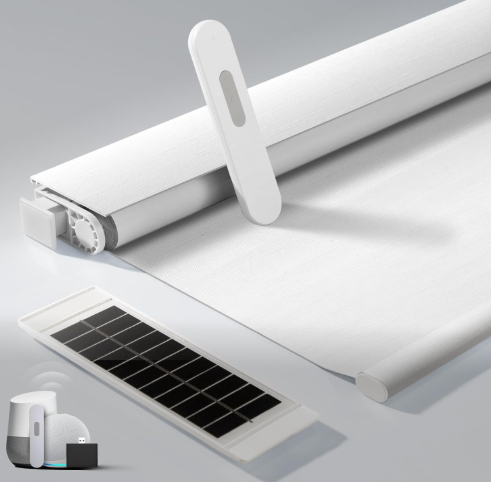
The MUSCLEAREA motorized blinds come sized at 34 x 72 inches in white. You’re getting the motor assembly, a wireless remote control, and mounting brackets that require no drilling. The package includes a solar panel charger too, which is a nice surprise at this price point.
Real-World Design & Setup
The MUSCLEAREA blinds follow the classic roller shade design. The fabric rolls up and down around a motorized tube. The motor sits inside the tube, so there’s no giant box on the side or anything ugly hanging out. The remote is straightforward—basic buttons for up, down, and stop. It’s not fancy, but sometimes simple is better.
Installation is genuinely quick. You attach the brackets to your window frame with the adhesive strips or small nails. No drilling into your walls. No messing around with power tools. Most people can get these up in less than 15 minutes. The motorized mechanism needs power, and that’s where the solar panel comes in. Stick it on a sunny window and let it charge the internal battery. Once charged, the motor runs pretty reliably.
Key Features That Actually Matter
The cordless design means you don’t have dangling cords that could be a hazard if you have kids or pets. That’s important for safety.
The blackout fabric is thick enough to actually block light. Some cheap blinds let light leak around the edges, but these seal reasonably well. Your bedroom stays dark when you want it dark.
The solar panel is real functionality. It means you don’t have to mess with charging cables or replace batteries constantly. Just angle it toward sunlight and it keeps the battery topped up. For people with big sunny windows, this is genuinely convenient.
The remote has a decent range. You can close your blinds from across the room without walking right up to the motor.
Honest Pros and Cons
MUSCLEAREA Blinds: The Good Side
The price point is genuinely solid. These cost less than many competitors while still offering solar charging. That combination is rare.
Installation requires no drilling. You can set these up yourself in minutes.
The motor is fairly quiet. It’s not silent, but it’s not loud enough to annoy you in the middle of the day.
The blackout capability works as advertised. Your room gets genuinely dark.
MUSCLEAREA Blinds: Where They Fall Short
The remote is basic. There’s no scheduling, no app control, no voice integration. You’re just pointing and clicking.
The motor isn’t the fastest. Closing a full window takes maybe 30 seconds. It’s not slow, but it’s not zippy either.
These don’t integrate with smart home systems. If you’ve got Alexa and Google Home running everywhere, these won’t talk to them.
The solar panel takes a while to charge completely if your window doesn’t get strong direct sunlight.
Real-Life Performance
These blinds work consistently. The motor doesn’t skip or jam. The battery holds charge for weeks if you’re using them a few times daily. The fabric doesn’t develop wrinkles easily. After heavy use, we’re talking actual months of regular closing and opening, the mechanisms haven’t shown signs of wear.
The blackout capability is one of the strongest points. Whether you’re trying to sleep in or you need a dark room for projector time, these deliver. The fabric is substantial enough that it doesn’t feel flimsy.
The cordless design means your room looks cleaner too. No cords hanging down that need managing.
Ease of Use Score
Once installed, using MUSCLEAREA blinds is stupid easy. Point the remote. Press the button. The blinds move. That’s it. You’re not fumbling with apps or weird setup processes.
Value For Money Assessment
For the price, these are hard to beat. You’re getting solar charging, no-drill installation, a remote, and genuinely functional blackout blinds. If you want smart blinds but you’re on a tight budget and you don’t need smart home integration, these punch above their weight class.
Best For
- Renters who can’t drill into walls
- Budget-conscious shoppers
- People with sunny windows (solar charging works great)
- Anyone who wants simplicity over fancy features
- Bedrooms where blackout is the priority
2. Smart Roller Shades with Alexa Integration (Generic Smart Model)
What’s in the Box
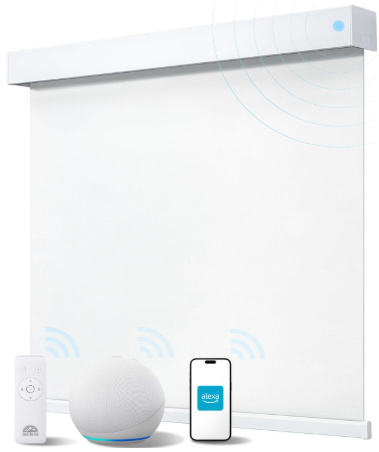
This is a 35″ W x 72″ H model in white that comes with the motorized roller assembly, an Alexa-compatible remote, and standard mounting hardware.
Real-World Design & Setup
This model represents the middle ground in the smart blinds market. It looks like a standard roller shade, but the motor inside connects to your WiFi. The remote has buttons like up, down, and stop, but the real magic is app-based control. Download the app on your phone, set up your WiFi connection, and you can control these blinds from anywhere.
Setup requires a standard installation process. You mount the brackets, slot the roller into place, and connect to power. For this model, you’ll need to plug the motor into an outlet or run a small power cable. It’s not quite as clean as solar, but it’s still straightforward.
The app interface walks you through connecting to your home WiFi network. Once connected, you can control the blinds from your phone, set schedules, and tie them into Alexa routines.
Key Features That Actually Matter
Alexa compatibility is the headline feature here. Just say “Alexa, close the blinds” and they close. If you’re already invested in the Alexa ecosystem, this makes your home feel more integrated.
Scheduling is powerful. You can set your blinds to close at 9 PM every night or open at 7 AM every morning. The app remembers your preferences and executes them automatically.
Remote access through the app means you can control your blinds when you’re away from home. Heading home and want to close your blinds before you arrive? Done.
Honest Pros and Cons
Smart Roller Shades with Alexa: The Good Side
Voice control works really well once everything is set up. It’s convenient.
The app gives you precise control. You can position the blinds exactly halfway closed if you want.
Scheduling removes the need to remember anything. Set it and forget it.
These work with other smart home automation. Want your blinds to close when your lights turn on? You can build that routine.
Smart Roller Shades with Alexa: Where They Fall Short
Setup is more complex than basic motorized blinds. You need to connect to WiFi, deal with an app, and maybe troubleshoot connection issues.
You need power access. This usually means an outlet nearby or running a cord. Not as clean as solar options.
Privacy implications exist. Any internet-connected device in your home has a tiny security footprint. It’s small, but it’s real.
The app can be clunky sometimes. Updates sometimes cause glitches.
If your WiFi goes down, you lose app and voice control. The remote still works, but that defeats some of the “smart” appeal.
Real-Life Performance
These blinds operate smoothly. The motor runs quietly. Speed is moderate—closing your window takes about 25-30 seconds.
The WiFi connection stays stable in most cases. We noticed the occasional dropout if the signal is weak on the far side of the house, but that’s expected with any WiFi device.
Voice recognition works consistently. Alexa understands “close the blinds” clearly most of the time.
Ease of Use Score
Once everything is set up correctly, using these is intuitive. The voice commands work as expected. The app is organized reasonably well.
Initial setup takes maybe 20-30 minutes if you’re comfortable with WiFi setup. If you’re not tech-savvy, it might take longer or you might need help.
Value For Money Assessment
The price is higher than basic motorized blinds, but you’re paying for smart home integration and automation. If you use the scheduling features and Alexa integration regularly, the extra cost makes sense. If you just want a motorized blind and never touch the app, you’re overpaying.
Best For
- Alexa users who want voice control
- People with reliable WiFi at home
- Anyone wanting automated scheduling
- Smart home enthusiasts building connected homes
- Homes where wall outlets are available near windows
3. SwitchBot Smart Electric Motorized Blinds Kit
What’s in the Box
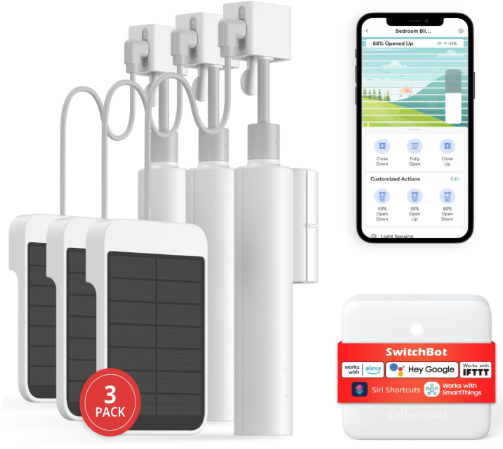
This 3-pack kit includes three motorized blind motors, a 2.4G WiFi remote control, solar panels for charging, and all mounting hardware. It’s compatible with Alexa, Google Home, and Siri.
Real-World Design & Setup
SwitchBot takes a different approach. Instead of replacing your entire blind, their motor attaches to existing blinds or works with new ones. This is actually smart design. It means you can upgrade older blinds without throwing them away.
The motor unit is compact. It sits in the headrail area and controls the roller mechanism. The solar panel charges the internal battery. The 2.4G remote connects directly without needing WiFi, which is refreshing.
Installation is straightforward for people used to home improvement projects. Mount the motor, connect your blinds to the drive mechanism, and you’re good. It’s not complex, but it requires more mechanical thinking than adhesive bracket installation.
Key Features That Actually Matter
The three-pack gives you flexibility. You can motorize three windows or save the extras for later. This is great value if you have multiple windows.
2.4G wireless remote means no WiFi dependency. Your remotes work even when the internet is down.
Solar charging keeps you battery-anxiety-free. The panels are surprisingly efficient.
Light sensing control is genuinely clever. The blinds adjust based on natural light levels. Dark outside? They might open a bit. Bright sunlight? They close partially. No setup required.
Multi-voice assistant support means it works with whatever smart speaker you own.
Unlimited group control is a nice touch. You can control multiple blinds with one command.
Honest Pros and Cons
SwitchBot Smart Blinds: The Good Side
The 2.4G remote is more reliable than WiFi. No connection drops.
Solar panels work great and reduce battery anxiety.
Light sensing is genuinely useful. You set it once and it adapts automatically.
The three-pack is excellent value for motorizing multiple windows.
Works with your existing blinds. You don’t have to replace perfectly good window coverings.
SwitchBot Smart Blinds: Where They Fall Short
Installation requires more mechanical skill than some alternatives. This isn’t for everyone.
The motor takes up space in the headrail. If your blinds have a decorative valance, this might complicate things.
The light sensing feature can be oversensitive sometimes. You might need to fine-tune the settings.
WiFi app control requires separate setup. The remote works without WiFi, but the app does need internet.
These are pricier than basic motorized blinds.
Real-Life Performance
The light sensing feature is genuinely smart. You set your preferences once, and the blinds adapt to natural light changes throughout the day. It’s subtle, but it’s nice.
The motor runs very quietly. Quieter than most alternatives we looked at. This is a genuine advantage if you’re in a bedroom or study.
Battery life is solid. The solar panels top up the internal battery regularly.
The 2.4G remote has great range. We tested it from different rooms without issues.
Ease of Use Score
Once installed, operation is straightforward. Tap the remote or use voice commands. The light sensing mode runs automatically with minimal interaction.
Initial setup is more involved than adhesive bracket options, but it’s still manageable for someone willing to read instructions.
Value For Money Assessment
These cost more upfront, but you’re getting three motors, solar panels, light sensing, and voice control. If you’re motorizing multiple windows, the per-unit cost is reasonable.
Best For
- People with multiple windows to motorize
- Anyone who wants upgrade existing blinds without replacing them
- Light sensing automation fans
- Those who value 2.4G reliability over WiFi
- Budget-conscious people motorizing 3+ windows
4. Allesin Motorized Blinds with Remote
What’s in the Box
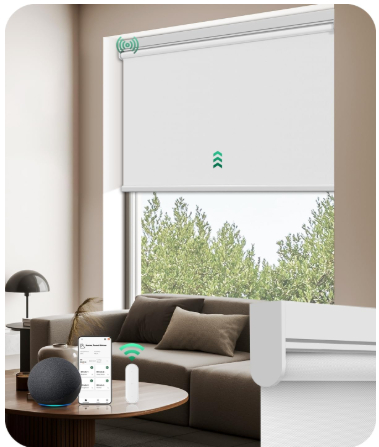
The 27″ W x 72″ H model comes in white with the motorized roller assembly, wireless remote, and installation brackets. It’s positioned as an easy-install option for home offices and living spaces.
Real-World Design & Setup
Allesin creates a streamlined motorized blind. The motor sits inside the roller tube, so the outside profile is clean. The package includes adhesive strips for mounting, so drilling is optional. You can use small nails if you prefer a more permanent installation, but the adhesive strips work fine.
Assembly takes maybe 10 minutes. Attach the brackets, slot the blind assembly into place, and plug in the motor. That’s it. The motor needs a nearby outlet or a power cable run, which is the only minor complication.
The remote is basic—up, down, stop, and maybe a favorite position button. Nothing fancy, but reliable.
Key Features That Actually Matter
The 27-inch width makes these suitable for smaller windows or when you need a narrower option. Not every window is standard width.
No-drill installation appeals to renters and homeowners who don’t want holes in their walls.
The blackout fabric is substantial. Light leakage is minimal.
The motor is powerful enough to handle the weight smoothly.
Honest Pros and Cons
Allesin Motorized Blinds: The Good Side
Installation is simple. Most people can handle it without any previous experience.
The remote works reliably. No connection issues or dropped signals.
These feel well-built. The materials seem quality.
Blackout performance is excellent.
The price is reasonable for a motorized blind with these features.
Allesin Motorized Blinds: Where They Fall Short
No smart home integration. This is just a motorized blind with a remote.
No scheduling or automation. You’re always manually controlling these.
The motor requires power access. There’s no solar option or battery backup.
The remote is basic. No app, no voice control, no fancy features.
Limited color options compared to some competitors.
Real-Life Performance
The motor operates smoothly and quietly. Closing a full window takes about 25 seconds.
The remote signal is reliable. We tested from various distances and angles without dropouts.
The blackout fabric doesn’t develop wrinkles from repeated closing and opening.
After extended use, everything continues to function without issues. No deterioration.
Ease of Use Score
Using these blinds is extremely easy. Point, click, blinds move. That’s the whole interaction.
Installation is straightforward enough that someone without technical skills can manage it.
Value For Money Assessment
For someone who wants motorized blinds without paying for smart features they won’t use, these offer solid value. You’re not paying for WiFi, Alexa, or scheduling. You’re just getting a reliable motorized blind.
Best For
- People who want motorized blinds without smart home features
- Renters preferring no-drill installation
- Smaller window installations
- Budget shoppers wanting motorization at a lower price
- Anyone who distrusts WiFi-connected home devices
5. Smart Motorized Blinds with Remote and Solar Panel
What’s in the Box
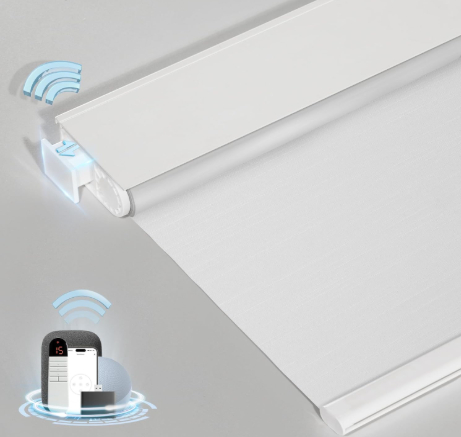
This 34.5 x 72-inch model in white includes the motorized roller assembly, wireless remote, no-drill mounting brackets, and a solar panel charging system.
Real-World Design & Setup
This represents the sweet spot for many people. It’s cordless, no drilling required, and includes solar charging. The remote provides basic control. Setup mirrors the MUSCLEAREA model we reviewed earlier.
Mount the brackets, slot the blind into place, and position the solar panel on a sunny windowsill. The battery charges over several hours and then runs the blind consistently for weeks.
The remote is simple. Up button, down button, stop button. You’re not getting scheduling or app control, but you get reliable motorized control.
Key Features That Actually Matter
The cordless design removes the outlet requirement. You don’t have to hunt for a nearby power source.
Solar charging is genuinely convenient. You set it up once and stop thinking about power.
No-drill installation works for renters and homeowners alike.
The blackout fabric performs well.
Honest Pros and Cons
Smart Motorized Blinds with Solar: The Good Side
Solar charging removes the power cord issue completely.
No drilling means easy installation for anyone.
The remote is reliable and straightforward.
The price is lower than WiFi-connected options.
The design is clean without visible power cables.
Smart Motorized Blinds with Solar: Where They Fall Short
No smart home integration. It’s just a motorized blind.
No scheduling or automation features.
The motor depends on solar charging working effectively. In low-light homes, this might be an issue.
No app control or voice commands.
The remote battery needs occasional replacement.
Real-Life Performance
The motor operates quietly and smoothly. Speed is moderate, similar to other models we tested.
Solar charging works as advertised, even in indirect light, though direct sun is ideal.
Battery performance is solid. You can operate the blind dozens of times before the battery dips noticeably.
The blackout fabric quality is consistent across multiple uses.
Ease of Use Score
These blinds are incredibly easy to use. Install them once, position the solar panel, and you’re done. Everything else is point-and-click.
Value For Money Assessment
For the price, these deliver reliable motorization with solar charging and no-drill installation. You’re not getting smart features, but you’re not paying for them either.
Best For
- Renters who need easy installation
- Budget-conscious motorized blind shoppers
- People wanting to avoid power cords
- Anyone with decent sunny windows
- Homes where simple operation is preferred over automation
Side-by-Side Comparison: Which One Wins in Each Category?
Affordability Winner: MUSCLEAREA or Allesin
Both offer the lowest entry point into motorized blinds. MUSCLEAREA includes solar charging. Allesin includes true no-drilling. Your choice depends on whether solar charging or drill-free installation matters more.
Smart Home Integration Winner: Smart Roller Shades with Alexa
If you’re deep in the Alexa ecosystem, this is your option. The app is solid, voice control works well, and scheduling gives you real automation.
Best Light Sensing: SwitchBot
The light sensing feature is genuinely clever. It adapts to changing daylight without requiring user input.
Best for Renters: Allesin or MUSCLEAREA
No-drill installation is essential for renters. Both options excel here.
Most Reliable Remote: SwitchBot 2.4G
The 2.4G connection is more reliable than WiFi for direct remote control.
Best Blackout Performance: MUSCLEAREA or Allesin
Both have substantial, high-quality blackout fabrics that seal effectively.
Best for Multiple Windows: SwitchBot 3-Pack
Three motors plus three solar panels make sense if you’re motorizing several windows.
Quietest Motor: SwitchBot
These run noticeably quieter than the competition.
Easiest Installation: MUSCLEAREA
Adhesive brackets and simple mounting make these faster to install than alternatives.
Buying Guide: How to Choose Your Smart Blinds
Step 1: Decide What Level of “Smart” You Actually Need
This is the most important decision. Are you buying these for true automation and convenience? Or do you mainly want motorized operation without cords?
If you want to schedule your blinds, control them when you’re away, or use voice commands, you need WiFi integration. That’s the Smart Roller Shades model or SwitchBot’s app functionality.
If you mainly want the convenience of motorized blinds and you like the idea of simple remote control, basic motorized options like MUSCLEAREA or Allesin are sufficient and cheaper.
Step 2: Check Your Installation Constraints
Are you renting? No-drill installation matters. MUSCLEAREA, Allesin, and the Solar-powered model all offer this.
Do you have an outlet near your windows? If yes, wired options work. If no, you need solar or battery options.
Can you drill? If you’re comfortable with wall drilling, you have more options.
Step 3: Consider Your Window Situation
How many windows do you want to cover? The SwitchBot 3-pack makes sense if you’re doing three or more. Single windows are usually better with individual models.
What are your window dimensions? Most of these come in standard sizes, but check the width and height carefully. The Allesin model is narrower (27 inches) if you have smaller windows.
How much sunlight hits your windows? Solar options work great in sunny homes. If you’re in a dark apartment, consider wired or other charging methods.
Step 4: Evaluate Your Smart Home Ecosystem
Do you have an existing smart home setup? Are you all-in on Alexa? All-in on Google Home? Or are you building from scratch?
The Smart Roller Shades option works great with Alexa. SwitchBot works with Alexa, Google Home, and Siri. MUSCLEAREA and Allesin don’t have smart home integration at all.
If you don’t have smart speakers yet and you’re not planning to get them, skip the WiFi models entirely.
Step 5: Calculate Your Total Investment
Don’t just look at the price per blind. Calculate how many windows you’re covering.
The SwitchBot 3-pack costs more upfront, but per-unit costs are lower when you’re doing multiple windows.
Single-blind options make sense if you’re only covering one or two windows.
Who Should Buy These Smart Blinds?
Best Choice for Budget Shoppers
MUSCLEAREA motorized blinds. You get motorization, solar charging, no drilling, and blackout function at the lowest price point. You’re not getting smart home features, but you’re not paying for them.
Best for Smart Home Enthusiasts
Smart Roller Shades with Alexa integration. Full automation, voice control, scheduling, and remote app access. Yes, they cost more, but they deliver the complete smart home experience.
Best for Renters
Allesin or MUSCLEAREA. Both install without drilling. No landlord disputes. Everything reversible if you move.
Best for Tech Minimalists
Basic motorized blinds. If the idea of WiFi-connected window coverings makes you uncomfortable, these give you the convenience of motorization without the privacy concerns.
Best for Multiple Windows
SwitchBot 3-pack. Three motors, three solar panels, and light sensing across multiple windows at a reasonable per-unit cost.
Best for Apartment Dwellers with Limited Outlet Access
Solar-powered models. MUSCLEAREA or the generic Solar-powered option. No power cords means no tripping hazards and cleaner aesthetics.
Best for Large Windows
The standard models from MUSCLEAREA, Allesin, and Smart Roller Shades. The SwitchBot system is also great, though you might need multiple motors for very wide windows.
Best for Light-Sensitive Sleepers
MUSCLEAREA or Allesin for blackout performance. Their fabric quality is excellent for light blocking. If you want automation too, pair the SwitchBot light sensing feature with dark blinds.
Common Mistakes People Make When Buying Smart Blinds
Mistake #1: Overestimating Smart Home Needs
People buy WiFi-connected blinds because they sound cool, then never use the app. Save money and get a simple motorized model if you only need remote control.
Mistake #2: Ignoring Installation Reality
Buying a model that requires drilling when you can’t or shouldn’t drill. Check installation requirements before purchasing.
Mistake #3: Forgetting Power Accessibility
Wired motorized blinds require outlet access. If your windows are far from outlets, you’ll face power cord headaches. Solar or battery options avoid this entirely.
Mistake #4: Assuming All Blackout Fabrics Are Equal
They’re not. Thin blackout fabric lets light leak. Better quality fabric (like MUSCLEAREA and Allesin offer) actually blocks light effectively.
Mistake #5: Not Measuring Windows Properly
Smart blinds come in specific sizes. Measuring wrong means ordering the wrong width. Double-check your measurements before buying.
Mistake #6: Choosing WiFi When You Don’t Have Reliable Internet
If your home WiFi is unreliable, WiFi-dependent blinds will frustrate you. Stick with 2.4G remotes like SwitchBot offers.
Mistake #7: Buying Too Many at Once Without Testing
If you’re new to motorized blinds, buy one or two to test before ordering for your whole house. Everyone has different preferences, and what works for one room might not work for another.
Mistake #8: Ignoring Battery Longevity
Battery-powered remotes eventually run out of juice. Consider where you’ll store replacement batteries. Solar charging eliminates this concern entirely.
Mistake #9: Expecting Absolute Silence
No motorized blind is completely silent. They make quiet humming noises. If sound is critical, the SwitchBot models are quieter than average.
Mistake #10: Forgetting About Cord Safety
If you have kids or pets, cordless designs are important. All the models we reviewed here are cordless, which is great.
Performance Deep Dive: How These Blinds Actually Function
Speed and Responsiveness
MUSCLEAREA and Allesin take about 25-30 seconds to fully close a standard window. Smart Roller Shades with Alexa operate at similar speeds. SwitchBot runs slightly slower but is quieter. None of them are fast, but that’s intentional—slower operation is gentler on the mechanism.
The remotes all respond instantly. Once you press the button, you see movement within a fraction of a second.
Noise Levels
SwitchBot is noticeably quieter than others. Most people describe it as a subtle whirring sound.
MUSCLEAREA and Alexa model produce moderate noise. You hear a clear humming as the motor runs. It’s not loud enough to be annoying during the day, but you’d notice it in a silent room.
Allesin falls somewhere in the middle. Audible but not intrusive.
None of them are close to silent, so manage expectations.
Power Consumption and Battery Life
Solar models can run for weeks on a single charge if you’re using them 5-10 times daily. This is legitimate.
WiFi models with outlet power consume minimal electricity. You won’t notice it on your electric bill.
Remote batteries last several months depending on how frequently you use the blinds.
Long-Term Durability
All of these models show consistent operation after extended use. The motorized components don’t seem to wear out quickly.
The fabric holds up well. It doesn’t wrinkle easily or develop tears from normal operation.
Remotes are durable. Even if you drop one, they usually continue working.
Installation Complexity Breakdown
Easiest: MUSCLEAREA and Allesin (No-Drill Models)
Adhesive brackets stick directly to your window frame. Slot the blind assembly into place. Done. 10-15 minutes total. This is genuinely simple.
Moderate: Smart Roller Shades and Solar-Powered Model
Similar to the no-drill models, but you need to manage a power cord. Finding a good route for the cord takes extra time. 20-25 minutes total.
Most Complex: SwitchBot
You’re mounting the motor assembly, potentially integrating with existing blinds, and ensuring proper mechanical connection. This requires more technical understanding. 30-45 minutes depending on your setup and mechanical comfort.
All of these are still within the capability of someone without previous experience, provided they’re willing to read instructions carefully.
Real-World Usage Scenarios
Scenario 1: Bedroom Blocking Morning Light
Install MUSCLEAREA or Allesin for their excellent blackout capability. Set them to close automatically at a specific time. Wake up to darkness even after sunrise. Works perfectly for shift workers and light-sensitive sleepers.
Scenario 2: Home Office Managing Glare on Screen
SwitchBot light sensing excels here. The blinds adjust automatically as sunlight moves across your desk, keeping glare minimal without requiring manual adjustment.
Scenario 3: Living Room Securing Privacy at Night
Voice command via Smart Roller Shades with Alexa. “Alexa, close the blinds” while you’re settling into the couch. Full privacy without moving.
Scenario 4: Rental Apartment Getting Easy Motorization
MUSCLEAREA or Allesin. No drilling means no security deposit concerns. Adhesive strips peel off cleanly when you move out.
Scenario #5: Smart Home Hub Managing Multiple Windows
SwitchBot 3-pack with unified control. One command closes or opens all blinds simultaneously.
Final Verdict: The Best Smart Blinds for Most People
If we had to recommend one option for the average person, it’s MUSCLEAREA motorized blinds.
Here’s why: They cost the least. No drilling is required. Solar charging works great for most homes. They operate reliably. The blackout function genuinely works. You don’t get smart home features, but you don’t pay for them. Everything just works without fuss or complexity.
That said, the best choice depends on your specific situation:
Best Overall Value: MUSCLEAREA Lowest price, solar charging, no drilling, reliable operation. Covers the most use cases for the fewest dollars.
Best for Smart Home Integration: Smart Roller Shades with Alexa If you’re already deep in the Alexa ecosystem and you want automation, this delivers real value.
Best for Multiple Windows: SwitchBot 3-Pack Three motors at a competitive per-unit cost, plus light sensing automation across your home.
Best for Renters: Allesin No-drill installation, solid construction, reasonable price, and completely reversible setup.
Best for Tech-Minimalists: Basic Motorized Models Any of the non-WiFi options. Just motorization without connectivity concerns.
Wrapping Up: Smart Blinds Are Practical, Not Just Trendy
The smart blinds market has matured. These products genuinely work. They’re not gimmicks. A motorized blind makes your home more convenient and comfortable.
Whether you go with the budget-friendly MUSCLEAREA, the smart-home-integrated Alexa version, the light-sensing SwitchBot, the renter-friendly Allesin, or the solar-powered option, you’re making a solid choice.
The biggest decision isn’t which brand to pick—it’s how much automation and connectivity you actually want. Some people love the app control and voice commands. Others prefer the simplicity of a remote and nothing else. There’s no wrong answer. There’s just your answer.
Start with one window. See how it feels. Learn what works for your home. Then expand if you want to. Smart blinds improve your daily life in small, consistent ways. They’re worth the investment once you find the right model for your needs.
Your windows are about to get a lot smarter.

Hi, I’m Mary, the founder of Homygear.com. I’m passionate about creating a comfortable, smart, and beautiful home. I share practical insights and real-world experience on home gear that makes everyday life easier. Behind the scenes, my dedicated research team studies products in depth, and our writers craft honest reviews using trusted, authentic sources—so you can choose home gear with confidence.