What Is Smart Home Technology?
If you’ve heard people talking about smart homes but don’t quite know what they mean, you’re in the right place. Smart home technology sounds complicated, but it’s actually pretty simple once you break it down. In this article, we’ll explore everything you need to know about turning your house into a smart home, why people want them, and how to get started.
So What Exactly Is a Smart Home?
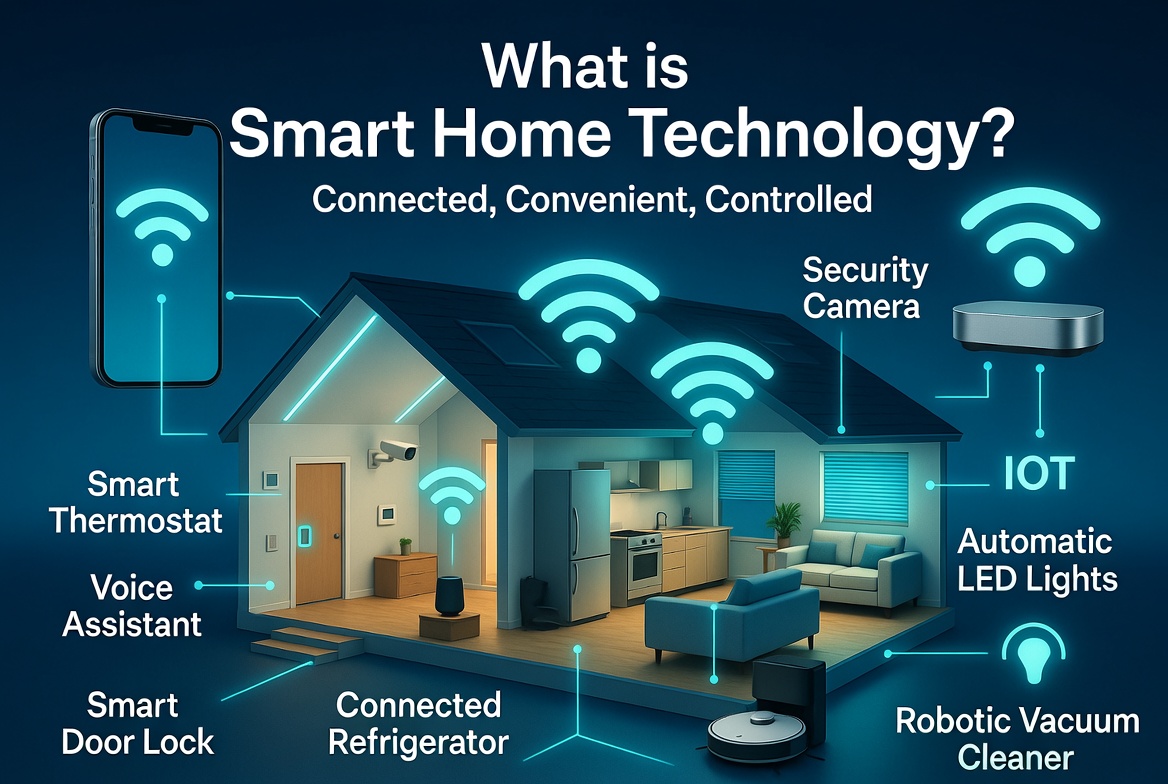
A smart home is basically a house that has devices and systems that can talk to each other and to you. These devices connect through the internet and let you control things in your home from your phone, computer, or voice commands. Instead of flipping light switches by hand or walking to your thermostat to change the temperature, your smart home does a lot of that for you—or lets you do it from anywhere.
Think of your house as a living space that learns your habits and responds to what you need. You wake up in the morning, and your lights gradually turn on. You leave for work, and your home locks the doors and adjusts the temperature to save energy. You’re relaxing on the couch, and you ask your voice assistant to turn on the TV. That’s smart home living.
The basic idea behind home automation technology is to make your life easier, safer, and more comfortable. It saves you time because you don’t have to manually control everything. It can save you money on energy bills because smart devices use power more efficiently. It also makes your home more secure because you can monitor and control things even when you’re away.
The Core Devices That Make Smart Homes Work
Smart home systems rely on several key types of devices working together. Let’s go through the main ones:
Smart Speakers and Voice Assistants
Smart speakers sit in your home and listen for voice commands. You can ask them questions, play music, check the weather, or control other smart devices just by talking. Popular examples include Amazon Echo, Google Home, and Apple Siri speakers. These devices have built-in microphones and speakers, so they hear you and talk back.
The voice assistant inside these speakers is basically an artificial intelligence that understands what you’re saying. You tell it what you want, and it carries out the command. Over time, these assistants learn your preferences and can predict what you might want next.
Smart Lighting Systems
Smart lights are bulbs or light fixtures that connect to your network. You can turn them on and off from your phone, set them to dim automatically, change their color, or create schedules. Some smart lighting brands even let your lights sync with music or movies for entertainment.
The cool part about smart lights is that you can control them from anywhere. Maybe you’re in bed and realize you left a light on downstairs—just tell your phone to turn it off. Or set your lights to turn on gradually in the morning so you wake up naturally. Smart lighting also tends to use less electricity than traditional bulbs, which helps your wallet and the environment.
Smart Thermostats
A smart thermostat is basically a thermostat that thinks for itself. Instead of manually changing your temperature when you get hot or cold, your smart thermostat learns when you’re home and what temperatures you like. It can adjust automatically, save energy when nobody’s home, and let you control it from your phone.
These devices track your heating and cooling patterns and make adjustments to keep your home comfortable while using as little energy as possible. You can see exactly how much energy you’re using and get tips on how to use even less. Some smart thermostats can even talk to your weather app and adjust the temperature before you come home.
Smart Locks and Door Cameras
Smart locks let you lock and unlock your doors without keys. You can use your phone, a keypad code, or even your fingerprint. Some smart locks work with voice commands too, so you can tell your home to lock up before bed.
Smart doorbell cameras let you see who’s at your door from anywhere in the world. You can talk to them through the camera, so you don’t have to be home to answer the door. These devices are fantastic for security and convenience.
Smart Security Systems
Smart security systems monitor your home for break-ins, fire, and other problems. They use motion sensors, window and door sensors, and cameras to keep watch. If something triggers an alarm, you get a notification on your phone right away, and the system can alert your security company or local police.
These systems are way different from old security systems. You can arm and disarm them from anywhere, watch live video feeds from multiple cameras, and get detailed reports about what’s happening in your home.
Smart Appliances
Your refrigerator, washing machine, oven, and other appliances can now be smart. A smart fridge can tell you what groceries you’re running low on. A smart washing machine sends you a notification when your laundry is done. Smart ovens let you preheat them from your phone before you get home.
These appliances make your daily chores more convenient and efficient. Some can even help you save energy by running during times when electricity is cheaper.
Smart Plugs
A smart plug is one of the easiest ways to start with smart home technology. You plug it into a wall outlet, then plug a regular device into it. Now that device becomes smart. You can turn it on and off from your phone, set schedules, and monitor how much energy it uses. Smart plugs work with lamps, coffee makers, fans, and tons of other devices.
How Smart Home Devices Connect Together
All these devices need to communicate with each other, and that’s where connectivity comes in. Most smart home devices connect through WiFi, which is probably what your internet uses at home. Some devices use other wireless technologies like Bluetooth, Zigbee, or Z-Wave.
The devices connect to a central hub or your WiFi router, then to a cloud system that you access through your phone. When you send a command from your phone, it goes to the cloud, and the cloud tells your device what to do. It sounds complicated, but it happens so fast you don’t even notice.
Some smart homes use a central hub that everything connects to. This hub acts like the brain of your home. It collects information from all your devices, makes decisions, and sends commands. Having a hub can make your smart home more reliable and faster because everything doesn’t have to go to the cloud and back.
Why People Want Smart Homes
Convenience and Comfort
Imagine controlling your entire home from your couch or from your phone while you’re at work. You don’t have to get up to adjust the temperature, close the curtains, or turn off lights. You can tell your voice assistant to play your favorite music, start a movie, or make the room darker without lifting a finger. This convenience is one of the biggest reasons people love smart homes.
Energy Savings and Lower Bills
Smart homes help you use less energy because devices can turn themselves off when they’re not needed. Your thermostat doesn’t heat or cool rooms when nobody’s home. Your lights turn off automatically when you leave a room. Over time, these small savings add up to real money on your utility bills.
Improved Home Security
Smart locks, cameras, and alarm systems let you keep watch on your home from anywhere. You know exactly when people arrive and leave. You can see if something suspicious is happening and alert authorities right away. Many burglars avoid homes that obviously have smart security systems because they’re harder to break into.
Better Health and Safety
Some smart homes include smoke detectors and carbon monoxide detectors that send alerts to your phone. Elderly family members can wear devices that call for help if they fall. Motion-activated lights make sure you never navigate a dark hallway.
Increased Home Value
Homes with smart technology often sell for more money. Buyers see smart homes as modern, efficient, and desirable. Installing smart devices is an investment that pays back when you sell.
Peace of Mind
Whether you’re at work, on vacation, or just in another room, you can check on your home. You can watch your kids after school, make sure your dog isn’t causing trouble, or verify that you locked the front door. This peace of mind is priceless.
Getting Started With Smart Home Automation
Start Small and Simple
You don’t need to automate your entire house right away. Start with one or two devices that would make your life better. Maybe a smart speaker, a smart light, or a smart plug. Get comfortable with how it works, then add more devices over time.
Choose a Platform
The main smart home platforms are Amazon Alexa, Google Assistant, and Apple Siri. Each one works with tons of different devices. Most smart home devices work with multiple platforms, so you have options. Think about which voice assistant you’d rather use or which you already have.
Check Compatibility
Before you buy a device, check that it works with your chosen platform. Look at the product description or package to see which smart home systems it supports. Most popular devices work with all the major platforms, but not always.
Set Up Your Network
A strong WiFi network is essential for a smart home. Your devices need good internet connectivity to work properly. If your WiFi is weak in certain rooms, consider a WiFi extender. Some smart home experts suggest a separate network just for your smart devices to keep things organized.
Install and Configure
Most smart devices are easy to set up. You download the device’s app, follow the instructions, and add it to your smart home system. The apps walk you through everything step by step. Activation usually takes less than five minutes per device.
Create Routines and Automation
Once your devices are connected, you can create routines that make multiple things happen at once. Tell your home “good morning,” and it turns on lights, starts the coffee maker, and reads the news to you. Tell it “good night,” and it locks doors, turns off lights, and adjusts the temperature.
These automations save time and make your home feel incredibly intelligent.
Popular Smart Home Technology Brands and Systems
Several companies lead the smart home market. Amazon Alexa is the most popular voice assistant platform by far. It works with thousands of devices and continues to grow. Google Home is another giant, especially popular with people who use Android phones or Google services.
Apple’s HomeKit is smaller but known for focusing on privacy and security. Devices that work with HomeKit encrypt your data and keep your information safe.
Other specialized companies focus on specific areas. Philips Hue dominates smart lighting. Nest (owned by Google) leads in smart thermostats. Wyze makes affordable smart cameras and gadgets. Nanoleaf creates modern smart light panels. Ecobee makes smart thermostats and speakers.
Many of these brands offer ecosystem deals where their devices work especially well together. When you’re choosing devices, research which brands play nicely with your chosen platform.
Common Worries People Have About Smart Homes
Privacy Concerns
Some people worry that their smart devices are always listening or collecting personal information. It’s true that these devices record audio and transmit data, but reputable companies have strict privacy policies. You can review privacy settings in your device apps and adjust what data gets collected.
Security Risks
Any device connected to the internet has some security risk. However, smart home devices use encryption and authentication to keep your information secure. As long as you use strong passwords and keep your devices updated with the latest software, the risks are minimal.
Expense
Setting up a smart home costs money, especially if you do it all at once. But start small, and costs stay reasonable. A basic smart speaker costs around thirty dollars. Smart bulbs cost a few dollars each. You can build a functional smart home gradually for less than buying a new couch.
Technical Problems
What if your internet goes down or a device stops working? Most smart devices have backup options. If your internet is down, you can often still use physical controls. Most quality devices are reliable and rarely break.
Complexity
Smart homes seem complicated, but they’re designed to be simple. Apps walk you through setup. Voice commands are intuitive. Most people figure it out without any technical background.
Advanced Smart Home Features
Once you master the basics, you can do more advanced things.
Geofencing
Geofencing uses your phone’s location to trigger actions. When you leave home, lights turn off and the door locks automatically. When you approach home, the door unlocks and lights turn on. No thinking required—your home takes care of it.
Scene Creation
Scenes are groups of actions that happen together. Create a “movie night” scene that dims lights, closes curtains, and turns off notifications. Create a “work from home” scene that adjusts lighting for your desk and mutes doorbell sounds. One tap activates everything.
Integration With Smart Displays
Smart displays are screens that show information. You can see weather, news, recipes, video calls, and camera feeds. These displays also control your smart home, so you can tap buttons to control devices.
Whole-Home Audio
Stream music throughout your home on multiple speakers that work together. Play the same song in every room or different songs in different areas. Control it all from one app.
Advanced Sensors
Temperature sensors, humidity sensors, and air quality sensors give your home data about its environment. Your smart home uses this information to make decisions automatically.
The Future of Smart Home Living
Smart home technology keeps improving. Artificial intelligence gets better at predicting what you want. More appliances become smart every day. Energy efficiency advances will make homes that nearly power themselves.
In the future, your home might talk to your car, work with your office building, and connect to city systems for better traffic flow. Your home could optimize itself in real-time based on your health data or emotions. The possibilities are endless.
Some technology experts predict that smart homes will become the standard, not the exception. Most new houses will probably have smart capabilities built in from day one.
Tips for Building Your Smart Home Right
Invest in Quality Over Quantity
One high-quality device beats ten cheap devices that barely work. Good devices are reliable, stay updated, and integrate well with other systems.
Future-Proof Your System
Choose devices and platforms that have large communities and strong company support. This ensures updates continue and you can always add new devices.
Document Your Setup
Keep notes about which devices you have, their passwords, and how they’re configured. This helps if something breaks or you need to troubleshoot.
Backup Your Data
Make sure important security footage and data back up to the cloud. If a device dies, you don’t lose everything.
Read Reviews
Before buying anything, read reviews from real users. See what problems people had and whether the company fixed them. Real experiences matter more than marketing claims.
Don’t Buy Everything at Once
Spread purchases over time. This lets you learn how each device works, budget properly, and avoid buyer’s remorse. It also means you won’t have a huge failure if multiple devices break at once.
Common Mistakes People Make When Starting Out
Many beginners buy devices without thinking about how they’ll work together. They end up with systems that don’t talk to each other. Pick your platform first, then choose devices that work with it.
Some people assume smart devices work perfectly out of the box without any setup. They need configuration and sometimes updates to work right.
Others expect smart homes to solve problems they don’t actually solve. Smart lights won’t make you happier, but the convenience might. Smart locks won’t stop determined burglars, but they make life easier. Have realistic expectations.
Some folks ignore security and use weak passwords or never update their devices. This creates real vulnerabilities. Treat smart home security seriously.
Making Your Smart Home Personal
The best smart homes are personalized to how you actually live. If you hate waking up early, don’t set an automatic wake-up routine. If you love adjusting temperature constantly, maybe skip the automatic thermostat. If privacy matters most to you, choose products that prioritize it.
Your smart home should work for you, not against you. Disable features you don’t want. Adjust settings until everything feels right. Delete routines that annoy you.
Conclusion
Smart home technology isn’t magic, and it’s not just for tech nerds anymore. It’s practical stuff that makes your life easier, your home safer, and your bills smaller. You don’t need to understand how it all works behind the scenes—you just need to know what you want your home to do and choose devices that do it.
Starting a smart home is simpler than ever. Prices keep dropping, devices keep improving, and setup keeps getting easier. Whether you want basic conveniences like smart lights or a fully automated security system, you can build it gradually at your own pace.
The smart home revolution isn’t coming—it’s here. Millions of people already enjoy the benefits every day. You can join them without spending a fortune or becoming a technology expert. Start small, learn as you go, and enjoy watching your home get smarter and more responsive to your needs. Your future home is waiting for you to build it.

Hi, I’m Mary, the founder of Homygear.com. I’m passionate about creating a comfortable, smart, and beautiful home. I share practical insights and real-world experience on home gear that makes everyday life easier. Behind the scenes, my dedicated research team studies products in depth, and our writers craft honest reviews using trusted, authentic sources—so you can choose home gear with confidence.