5 Best Smart Home Doorbell In 2026
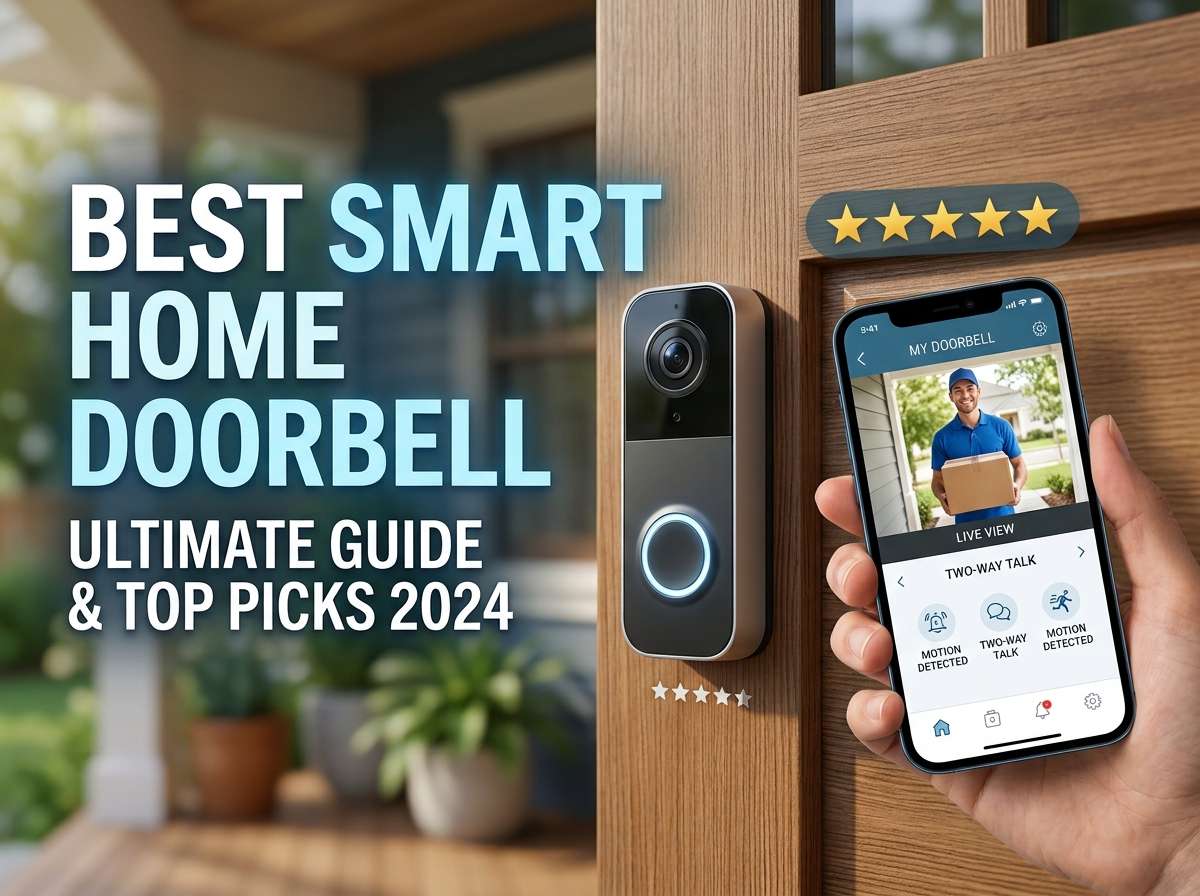
If you’re thinking about upgrading your front door with a smart doorbell camera, you’re making a smart move. A video doorbell lets you see who’s at your door from anywhere, talk to visitors without opening the door, and keep a record of all activity outside your home. The market has exploded with options, though, and picking the right one can feel overwhelming.
This guide walks you through five of the most popular smart doorbells that people are actually buying and using right now. We’ll dig into what makes each one different, who they work best for, and honestly what they’re not so great at. By the end, you’ll know exactly which doorbell fits your needs and budget.
Why a Smart Video Doorbell Is Worth Your Money
Before we jump into specific products, let’s talk about why people love smart doorbells. A video doorbell replaces your regular doorbell with a camera system that shows you live video of your front entrance. You can watch packages get delivered, see who’s knocking before you answer, and even talk to people through the speaker and microphone.
The security angle is huge. You get proof of who visited your home. If something shady happens, you have video. Many doorbells also send you alerts when motion happens, so you know right when someone approaches. If you travel a lot or just prefer not to answer the door every time, these devices give you total control.
The best smart doorbells work with your smartphone and let you watch clips back later. Some need batteries, others plug into existing wiring. Some give you cloud storage for videos, while others save everything locally on your network. The features vary a lot, which is why we’re testing and reviewing these five models.
Tapo 2K Wireless Smart Video Doorbell: The Privacy-First Option
What This Doorbell Actually Is
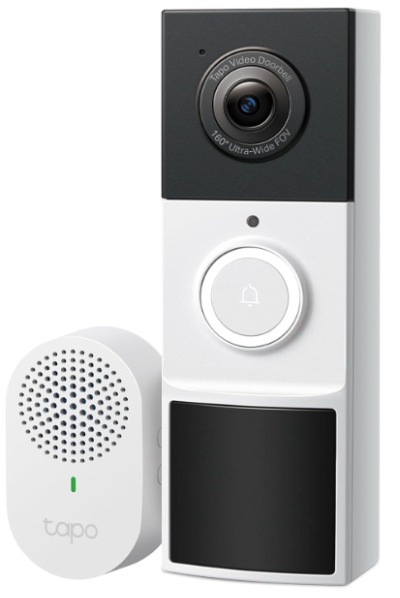
The TP-Link Tapo 2K is a wireless battery-powered doorbell that delivers solid video quality without forcing you into any monthly subscription plans. It shoots in 2K resolution, which is higher than regular 1080p. The camera has a super-wide 160-degree view, so you can see more of your porch and surroundings. It comes with its own chime unit that sits inside your home.
Best Situations for This Doorbell
This doorbell works perfectly if you want to avoid subscription fees and keep your videos stored locally. It’s great for renters since it doesn’t need any hard wiring to your home’s existing doorbell system. If you’re privacy-conscious and don’t like the idea of your video footage living on someone else’s servers, this one appeals to that concern hard. It also works well if you want straightforward doorbell features without lots of fancy AI stuff.
Features Explained in Plain Language
2K Video Quality: The camera records at 2560×1920 resolution. That’s sharper than 1080p doorbell cameras. When you’re watching someone at your door or reviewing past footage, you get clearer details. You can actually read faces and see what someone’s holding more easily.
160-Degree Field of View: This ultra-wide angle means you’re not missing anything happening on your porch. You see side to side, and you get a good view of the ground where packages land. This beats a lot of doorbells that only show 120 to 140 degrees.
Person Detection: The doorbell uses artificial intelligence to tell the difference between a person walking up and a car driving by or an animal moving around. Only when it detects an actual person does it send you an alert. This stops your phone from blowing up with notifications for every breeze that moves a leaf.
Ring Call Feature: When someone presses the doorbell button, the chime inside your home makes a sound. Your phone gets a notification. You can tap into your phone and answer them through two-way audio. This is your main way to interact with people at your door.
Local Storage Option: The doorbell can save videos right on the device or on a USB drive. You don’t have to upload anything to the cloud. This means your footage stays private and you never have to worry about subscription costs. You can also use TP-Link’s cloud service if you want to, but it’s optional.
Two-Way Audio: You can hear what people say at your door, and they can hear you talking back through the doorbell’s speaker. It’s genuinely helpful for telling a delivery driver where to leave a package or asking who’s there before you open up.
Motion-Only Alerts: You get notified when motion happens near your door. You can ignore doorbell presses if you want and just get alerts when something moves. This gives you flexibility in how often you want to be bothered.
Real-Life Usage Insight
In real situations, this doorbell handles regular tasks well. When someone walks up to your door, the detection kicks in fast. The video shows up on your phone within a second or two. The 160-degree view is genuinely useful because you can see if someone’s lurking at the edge of your porch before they press the button.
The battery lasts around three to four months between charges depending on how much motion your door gets. If you live on a quiet street, you might go longer. In a busier area or if lots of motion triggers alerts, you’ll charge it more often. The charging cable is USB-C, which is convenient.
The chime unit works well if you keep it near your door. If your home is huge and your bedroom is far away, you might not hear it. But you’ll always get the phone alert, so you’re covered anyway.
The Good and Bad
Pros:
- No monthly fees ever, which saves money long-term
- 2K video is sharper than most competitors at this price
- 160-degree view is genuinely wide, catches more action
- Person detection stops annoying false alerts
- Local storage means your videos stay yours
- Easy setup, works without a professional
- Good two-way audio quality
Cons:
- Battery needs charging every few months (not a deal-breaker, just something to know)
- The chime unit is separate hardware to place and plug in
- Cloud storage isn’t as robust as some brand-name options
- Might not be compatible with other smart home systems easily
- Video quality drops in low light compared to high-end models
Performance in Different Conditions
The Tapo doorbell performs well during daytime. Video is clear and colors look natural. When the sun is in certain positions, you might get some glare, but that’s physics, not a flaw with this device.
At night, the infrared night vision kicks in. Video becomes black and white and grainy. It’s usable, you can definitely see who’s at your door, but you don’t get the sharp details you do during day. This is true of nearly all battery doorbells in this price range.
Rain doesn’t bother it. The housing is weatherproof. Wind doesn’t affect the video.
How Easy Is It to Set Up and Use?
Setup is refreshingly simple. You charge the battery, download the app, scan a QR code, and connect to your Wi-Fi. The chime unit just needs a power outlet. You’re done in about ten minutes. The app interface is clean and not cluttered with buttons you don’t need.
Everyday use is straightforward. When you get a notification, tap it and you’re watching live video immediately. Answering the person is one more tap. Reviewing past clips is easy, you just scroll through a timeline.
Value for Money
At this price point, the Tapo 2K delivers genuine value. You get 2K video, no subscription costs, local storage, and decent smart features. If saving money on subscriptions matters to you, this doorbell pencils out as a smart long-term investment. The battery lasts well enough that you’re not charging it every month.
Chamberlain myQ Video Doorbell: The Garage Door Integration Pick
What This Doorbell Actually Is
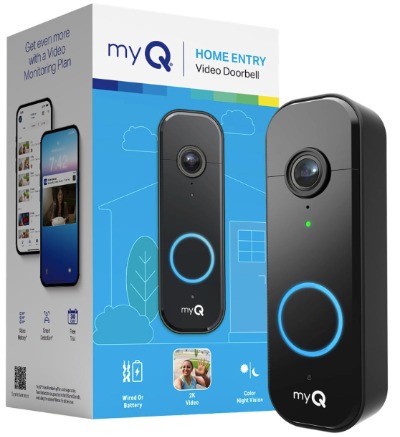
Chamberlain is known for garage doors, and their myQ doorbell brings that reliability to your front entrance. It’s a 2K camera doorbell that works on battery power or hardwired to your existing doorbell wires. You can use it without any subscription, though Chamberlain offers optional paid plans. It shoots in 2K and has a 150-degree field of view.
Best Situations for This Doorbell
This doorbell is perfect if you already own a Chamberlain garage door opener. The integration is seamless. You can see both your front door and your garage through one app. If you don’t have a Chamberlain garage, it’s still a fine doorbell on its own, but you lose that unique advantage.
It’s also good for people who can hardwire it into existing doorbell systems. If your home already has old doorbell wiring, this doorbell can tap into that power, and your battery lasts way longer or doesn’t drain at all.
Features Explained in Plain Language
2K Camera: Like the Tapo, this shoots at 2560×1920 resolution. You get clear video and can see details well.
Battery and Wired Option: You can run this on batteries, which last a long time if not constantly used. Or you can hardwire it into your existing doorbell system. This flexibility is huge. If your home has old doorbell wiring, you have a power source that never runs out.
Color Night Vision: This is where Chamberlain steps ahead. Instead of black and white infrared at night, you get color video with low light correction. It’s not perfect, but seeing colors at night beats seeing black and white. You can identify people better.
150-Degree View: This is slightly less than the Tapo’s 160 degrees, but it’s still plenty wide. You see most of your porch and front yard.
Two-Way Audio: You hear and speak to visitors just like other smart doorbells.
Motion Detection: Sensors detect movement and send you alerts.
Real-Time Alerts: You get notified quickly when something happens.
No Subscription Required: You can use all the core features without paying monthly. Chamberlain offers paid tiers if you want more cloud storage or other perks, but they’re optional.
Real-Life Usage Insight
In actual daily use, this doorbell shines when you have it hardwired. The power never stops, battery anxiety disappears, and the color night vision genuinely helps you see who’s at your door after dark.
If you’re running on batteries, expect similar battery life to other models. You’re looking at several months between charges.
The app is clean and responsive. Watching live video is instant. Talking to people at your door happens without noticeable delay.
The Good and Bad
Pros:
- Color night vision is genuinely better than infrared
- Hardwired option means unlimited power if your home has existing doorbell wires
- Excellent garage door integration if you have Chamberlain system
- 2K video quality is sharp
- No required subscription
- Good overall performance
- Reliable brand with solid support
Cons:
- 150-degree view is slightly narrower than some competitors
- Hardwiring requires some DIY electrical work (not hard, but it’s a step)
- If running on battery only, still needs charging every few months
- Cloud storage features cost extra
- App could use more customization options
Performance in Different Conditions
The Tapo’s daytime video is excellent. Color is accurate and details are clear. The 150-degree view covers most situations.
Where this doorbell really shows its quality is nighttime. The color night vision is noticeable and helpful. Instead of grainy black and white, you see colors with a slight blue tint. It’s obviously not as clear as daylight, but it’s a meaningful step up.
Weather resistance is solid. It handles rain, sun, and temperature swings without issues.
How Easy Is It to Set Up and Use?
Setup on battery is simple, like other doorbell cameras. Download the app, scan the QR code, connect to Wi-Fi, and you’re set.
If you want to hardwire it, the setup takes a bit longer. You need to turn off power to your old doorbell, connect the new wires into the Chamberlain unit, and restore power. If you’ve never done this before, the instructions are straightforward. Most people can do it in thirty minutes.
Using the doorbell daily is intuitive. The myQ app works well, loads fast, and makes it easy to see your door, garage, and other myQ devices all in one place.
Value for Money
The price sits a bit higher than basic models, but the color night vision and hardwired option justify it. If you have an existing doorbell wiring or own a Chamberlain garage, this becomes an even better value. You’re getting a 2K doorbell with quality features and brand reliability.
Google Nest Doorbell (Battery): The Ecosystem Play
What This Doorbell Actually Is
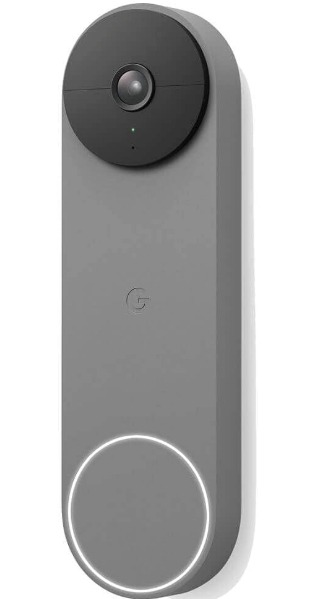
Google Nest is the video doorbell built by Google. It’s battery-powered, shoots in 2K, and connects into Google’s ecosystem. If you use Google Home, Google Assistant, or other Nest products, this doorbell fits into that world seamlessly. It’s simple and clean, without tons of settings to configure.
Best Situations for This Doorbell
This is the pick if you’re already all-in on Google’s smart home stuff. You have Google Home speakers, maybe a Nest thermostat or Nest cameras elsewhere. The Nest doorbell works flawlessly with all of it. You can see your front door on any Google Home display.
It’s also good if you want the simplest possible interface. Google doesn’t overload you with options. You turn it on, set it up, and it works. Beginners love this about Google’s approach.
Features Explained in Plain Language
2K Video: Clear video at 2560×1920 resolution. Details are sharp and faces are recognizable.
Battery Power: Runs on batteries. Lasts several months depending on usage. No need for hardwiring.
Google Assistant Integration: You can see your doorbell on Google Home displays. You can talk to people at your door using your Google Home speaker if you want.
Alerts: You get notifications on your phone and can set up alerts through Google Home.
Two-Way Audio: Talk to people at your door through your phone.
Video History: Google stores video in the cloud. You can review past footage. Some features require a Google Home subscription plan (paid).
Simple App: The interface is clean and not overwhelming. Everything is where you expect it to be.
Real-Life Usage Insight
In everyday use, Google Nest works smoothly. The setup is actually faster than most. You’re up and running in minutes if you already use Google services.
The real strength shows if you have a Google Home display in your living room. Someone rings the doorbell, and a live video automatically pops up on your display. You don’t need to grab your phone. You can talk right there through the speaker.
The app notifications are timely. You’re not waiting around wondering if you missed something. The alerts hit your phone fast.
The Good and Bad
Pros:
- Seamless Google Home ecosystem integration
- Extremely simple to set up and use
- Clean, uncluttered app interface
- 2K video quality
- Google Home display support is awesome
- Google’s infrastructure means reliable cloud services
- Good customer support
Cons:
- Battery-only means charging every several months
- Video history requires a paid Google Home subscription
- Narrower field of view compared to some options
- Limited customization of alerts
- Less flexible than some competitors for advanced features
- Harder to use local storage options
- Relies on Google cloud services (not for privacy-focused users)
Performance in Different Conditions
Daytime video from the Nest doorbell is excellent. Colors are natural and details are crisp. The field of view is decent but not ultra-wide like some others.
Night video uses infrared and comes out in black and white. It’s grainy but usable. You can see who’s at your door, but not with perfect clarity.
Weather handling is fine. The unit resists rain and temperature changes without problem.
How Easy Is It to Set Up and Use?
Setup is the easiest of all these doorbells. Charge it, download the Google Home app or Nest app, scan the QR code, and you’re done. The whole process takes about five minutes.
Daily use is brain-dead simple. Get an alert, tap to watch video, tap to talk. No confusing menus or settings you need to tweak.
Value for Money
The Nest doorbell costs more than basic models, but you’re paying for simplicity and Google’s ecosystem. If you already have Google Home devices, it’s a no-brainer value. You get seamless integration that no other doorbell matches.
If you don’t use Google Home, you might find better value with other options that cost less and offer more standalone features.
Orbitell 1080p Wireless Wi-Fi Video Doorbell: The Budget-Friendly Choice
What This Doorbell Actually Is
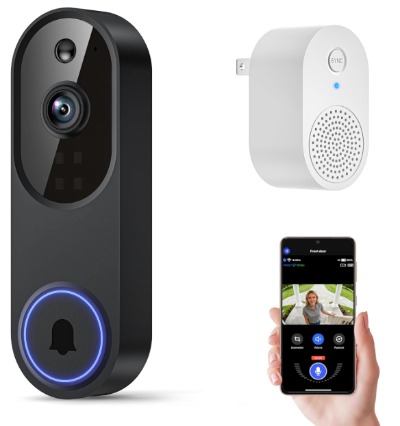
Orbitell is a budget-friendly wireless video doorbell that shoots in 1080p resolution. It’s battery-powered and offers cloud storage for your videos. The goal with this doorbell is to give you smart doorbell features without spending a lot of money.
Best Situations for This Doorbell
This doorbell is perfect if you’re on a tight budget and just want the basics. You want to see who’s at your door, talk to them, and get alerts. You don’t need cutting-edge 2K resolution or fancy AI features. This does the job at a lower price than premium options.
It’s also good for a secondary door. If you want to add a doorbell to a side entrance or garage door without spending much, Orbitell works.
Features Explained in Plain Language
1080p Camera: Shoots at 1920×1080 resolution. It’s not as sharp as 2K, but it’s still clear enough to see who’s at your door and recognize faces. For most situations, it does the job.
Wireless Battery Power: Runs on batteries. The battery lasts several months.
Night Vision: Infrared black and white video at night. It’s grainy but usable.
Two-Way Audio: You can hear people and talk back to them.
Cloud Storage: Videos upload to the cloud so you can review them later. Some cloud features might require a paid plan.
Motion Detection: Alerts you when motion happens.
2.4GHz Wi-Fi Only: This is important to note. It only connects to 2.4GHz Wi-Fi networks, not 5GHz. If your router only has 5GHz, this doorbell won’t work.
Real-Life Usage Insight
In actual use, the Orbitell doorbell does what it promises. It’s not fancy, but it works. Video is clear enough during the day. At night, the infrared gives you a usable black and white view.
The battery lasts a reasonable amount of time, though frequent motion triggers drain it faster. You’re probably charging it every three to four months.
The cloud storage works, and you can scroll through past video clips. The app is basic but functional.
The Good and Bad
Pros:
- Very affordable entry price
- Works for basic doorbell needs
- Cloud storage included
- Battery lasts several months
- Easy to install as a renter
- Two-way audio works fine
- Good for secondary doors
Cons:
- 1080p is lower resolution than competitors (not terrible, just less sharp)
- Only connects to 2.4GHz Wi-Fi, not 5GHz
- Battery life is shorter with heavy use
- Night vision is grainy and hard to see details
- Narrower field of view
- Limited app features
- Cloud storage may require paid subscription
- Less reliable than brand-name alternatives
Performance in Different Conditions
Daytime video is decent. You can see what’s happening and identify people reasonably well. The lower resolution is noticeable if you zoom in, but for normal viewing, it’s acceptable.
Night video is the weakest point. The infrared is grainy and lacks detail. You can tell someone’s there, but you won’t see fine details like what they’re wearing clearly.
Rain and cold don’t cause problems. The unit is weatherproof.
How Easy Is It to Set Up and Use?
Setup is straightforward. Charge the battery, download the app, connect to Wi-Fi, and scan the QR code. You’re running in about ten minutes.
One thing to watch out for: make sure your Wi-Fi router broadcasts 2.4GHz. If you only have a 5GHz network, this doorbell won’t connect. Many newer routers do both, so check your settings if you buy this.
Using it daily is simple. Tap the alert, watch video, talk to people at your door. The app is basic, which means simple but also limited in customization.
Value for Money
For the price, Orbitell gives you smart doorbell features that work. It’s not going to wow you, but it won’t disappoint either if your expectations are realistic. The low price makes it an easy gamble if you want to try a smart doorbell without investing heavily.
Ring Battery Doorbell: The Feature-Rich Option
What This Doorbell Actually Is
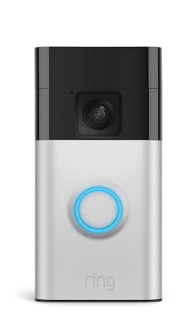
Ring, owned by Amazon, is one of the biggest names in smart doorbells. The Ring Battery Doorbell is their wireless option that shoots in 1080p. Unlike Google Nest, this doorbell is packed with features and customization options. It integrates with Amazon’s ecosystem, though it works fine standalone.
Best Situations for This Doorbell
This doorbell is ideal if you want lots of features and customization but don’t want to hardwire. It’s great for people who use Alexa or Amazon devices. It’s also perfect if you like having tons of options and want to tweak settings to match your exact needs.
It works well for people who want professional security features at a consumer price. Ring’s technology is mature and reliable.
Features Explained in Plain Language
1080p Video: Records at 1920×1080 resolution. Not as sharp as 2K but perfectly usable. You can see who’s at your door clearly.
Head-to-Toe Video: The field of view captures people from head to foot. This is helpful because you see not just their face but what they’re holding and wearing. Helps with delivery packages and identifying suspicious people.
Battery Power: Runs on batteries that last months between charges. The drain depends on motion and usage.
Night Vision: Infrared provides night video in black and white. It’s grainy but usable.
Two-Way Audio: Talk to people at your door through your phone or Alexa device.
Motion Detection and Alerts: Detects movement and sends you notifications.
Live View: Watch what’s happening at your door in real-time.
Video Storage: Ring offers cloud storage. Some is free, some requires a Ring Protect subscription plan (paid).
Alexa Integration: Works seamlessly with Echo devices. You can see your doorbell on Echo displays.
Package Detection: Ring can detect when packages are delivered and alerts you specifically.
Person Detection: Differentiates between people, animals, and vehicles to reduce false alerts.
Three-Color Options: Available in Satin Nickel and other finishes to match your door.
Real-Life Usage Insight
Ring has a massive user base, and for good reason. The doorbell works reliably day after day. When someone rings or motion happens, you get the alert fast. The video loads quickly on your phone.
The Alexa integration is genuinely useful. If you have an Echo Show, seeing your front door pop up automatically is convenient.
The battery lasts a solid amount of time between charges. How long depends on your neighborhood’s foot traffic and how sensitive you set the motion detection. Three to four months is typical.
Ring’s community features let you share footage with neighbors and see what’s happening around your area. Some people love this, others find it creepy. It’s optional to use.
The Good and Bad
Pros:
- Tons of features and settings to customize
- Reliable performance, mature technology
- Excellent Alexa integration
- Person detection reduces false alerts
- Package detection is helpful
- Community features can feel like neighborhood watch
- 1080p is acceptable video quality
- Good customer support
- Multiple color options
Cons:
- Video storage requires paid Ring Protect plan (clouds aren’t free like some competitors)
- 1080p is lower than 2K options
- Battery-only, needs charging every few months
- Can be overwhelming with too many settings
- Monthly subscription can add up over time
- Night vision is black and white and grainy
- Narrower view than some ultra-wide options
- Privacy concerns about Amazon data collection
Performance in Different Conditions
Daytime video is clear and useful. The head-to-toe framing means you see people well and can identify what they’re carrying.
Night video uses infrared and is grainy. Details are limited, but you know someone’s there. If you buy the Ring Protect plan, you can store video longer, and the quality isn’t worse or better at night than daytime options.
Weather isn’t a problem. The unit is made to handle outdoor conditions.
How Easy Is It to Set Up and Use?
Setup is simple. Charge the battery, download the Ring app, scan the QR code, connect to Wi-Fi, and you’re done. Takes about ten minutes.
The app has tons of settings. This is a pro if you like customizing things, a con if you prefer simplicity. You can adjust motion zones, notification types, alert delays, and more. Most people just leave defaults and it works fine.
Daily use is straightforward. Get an alert, tap the app, see live video, talk to someone. Simple stuff.
Value for Money
Ring offers great features and reliability. The downside is that full functionality requires the paid Ring Protect subscription. If you add that cost up over years, it’s more expensive than some no-subscription alternatives. However, the feature set is expansive and the service is solid.
If you use Alexa already, Ring becomes an even better value because the integration saves you money in other ways.
Comparing These Five Doorbells Head to Head
Each doorbell has strengths and weaknesses. Let’s compare them directly across key factors.
Video Quality: Tapo 2K and Chamberlain both shoot in 2K and win here. Google Nest also does 2K and has the cleanest interface. Ring and Orbitell shoot in 1080p, which is fine but not as sharp.
Night Vision: Chamberlain’s color night vision beats everyone else. It’s genuinely easier to see at night. Google Nest, Tapo, Ring, and Orbitell all use black and white infrared, with Ring having the most mature implementation.
Field of View: Tapo’s 160 degrees is the widest. Chamberlain and Ring do 150 degrees. Google Nest and Orbitell are narrower.
No Subscription Cost: Tapo wins decisively here. You get everything without paying monthly. Chamberlain and Google Nest have optional subscriptions. Ring basically requires their Protect plan for full features.
Ease of Setup: Google Nest is the simplest if you use Google services. Ring is next. Tapo, Chamberlain, and Orbitell are all straightforward.
Ecosystem Integration: Google Nest and Chamberlain (if you have a Chamberlain garage) win. Ring wins for Alexa users. Tapo and Orbitell are more standalone.
Battery Life: All of them last several months. Chamberlain lasts longest if hardwired, eliminating battery concerns entirely.
Affordability: Orbitell is cheapest. Tapo and Ring are mid-range. Google Nest and Chamberlain cost the most but offer premium features.
Advanced Features: Ring has the most customization and smarts. Tapo has person detection and great video quality. Google Nest keeps it simple but reliable.
Doorbell Buying Guide: What to Think About
Before buying any smart doorbell, ask yourself these questions.
Do You Want to Hardwire or Use Batteries? If your house has existing doorbell wiring, hardwiring saves you battery charging hassles. Chamberlain offers this option. If you’re a renter or don’t have wires, battery is simpler.
How Important Is Video Quality? If you need to identify faces and details clearly, go for 2K. If you just need to know someone’s there, 1080p is fine.
Do You Want to Avoid Monthly Subscriptions? Tapo is your best bet. Ring basically requires it. Google Nest and Chamberlain make subscriptions optional.
Do You Use Google Home or Alexa? This matters more than you might think. Google Nest works beautifully with Google Home. Ring integrates seamlessly with Alexa. If you don’t use either, Tapo or Chamberlain make sense.
What’s Your Budget? Orbitell is cheapest. Tapo and Ring are mid-price. Google Nest and Chamberlain are pricier but offer more.
How Much Foot Traffic Does Your Door Get? High traffic areas drain batteries faster. Hardwiring becomes more attractive. This shouldn’t rule out battery options, just know you’ll charge them more often.
Do You Care About Night Vision Quality? Chamberlain’s color night vision is a real advantage. If night viewing matters, it’s worth the extra cost.
How Tech-Savvy Are You? Google Nest is best for non-technical people. Ring offers tons of options but can overwhelm beginners. Tapo and Chamberlain are in the middle.
What’s Your Home’s Wi-Fi Like? All these doorbell need decent Wi-Fi signal. Make sure your router reaches your front door. Orbitell only does 2.4GHz, so check your Wi-Fi band compatibility.
Who Should Buy Each Doorbell
Tapo 2K: Buy this if you want great video quality, dislike subscriptions, and value privacy. Privacy-conscious people and those who want to avoid monthly fees love this one. Tech enthusiasts also appreciate the local storage option.
Chamberlain myQ: Buy this if you have a Chamberlain garage, want color night vision, or can hardwire into existing doorbell wiring. Homeowners with established wiring should seriously consider this.
Google Nest: Buy this if you use Google Home devices and want the simplest possible experience. Google’s ecosystem integration is unmatched.
Orbitell: Buy this if you’re on a super tight budget and just need basic doorbell features. It’s also good for a second doorbell on a side entrance where premium features aren’t necessary.
Ring: Buy this if you use Alexa, want lots of customization, don’t mind paying for a subscription, and want access to Ring’s extensive feature set. People who like tweaking settings should pick Ring.
Common Mistakes People Make With Smart Doorbells
Not Checking Wi-Fi Signal: Before buying, walk to your front door and make sure your Wi-Fi signal is strong there. A smart doorbell that can’t connect to Wi-Fi is useless. Test this first.
Forgetting About Battery Maintenance: Battery doorbells need charging every few months. Set a calendar reminder. Don’t be that person who realizes their doorbell is dead when a burglar shows up.
Not Understanding Subscription Costs: Ring and Google Nest offer cloud storage, but it costs money long-term. Tapo avoids this. Do the math on what you’re willing to spend.
Assuming Installation Is Too Hard: Most of these doorbells are dead simple to install. Don’t let fear stop you from trying.
Not Adjusting Motion Sensitivity: Out of the box, motion detection is often too sensitive. You get notifications for shadows and leaves blowing. Dial in the settings so you only get alerts for meaningful motion. You’ll be happier.
Expecting Perfect Night Video: All battery doorbells have grainy night vision. It’s physics. Don’t expect daytime clarity at night. Chamberlain’s color night vision is the exception, and it’s better but still not perfect.
Not Using Cloud Storage: Most of these doorbells offer storage so you can review past footage. Actually use it. It’s incredibly helpful for proving who was at your door and when.
Ignoring Firmware Updates: When the app tells you there’s an update, do it. These updates fix bugs and improve performance. Ignore them and you’re missing out on improvements.
Rushing Through Setup: Take your time connecting everything. A few extra minutes upfront prevents headaches later.
Not Thinking About Weather: Make sure whatever you buy is weatherproof. All the ones we reviewed are, but always double-check the specs.
The Verdict: Which Smart Doorbell Wins?
There’s no single best smart doorbell for everyone. The right one depends on your situation.
Best Overall: Tapo 2K Wireless Smart Video Doorbell wins for most people. You get 2K video quality, no subscription costs, great person detection, and an ultra-wide 160-degree view. The price is reasonable, and the performance is solid. If you want one doorbell that does everything well without breaking the bank, this is it.
Best for Google Ecosystem: Google Nest Doorbell (Battery) is the clear winner here. The integration with Google Home is seamless. If you already have Google Home speakers or displays, the Nest doorbell becomes incredibly useful.
Best Overall Performance: Chamberlain myQ Video Doorbell delivers the best all-around performance if you can hardwire it. The color night vision is genuinely better than competitors, and the 2K video is sharp. If your home has existing doorbell wiring, strongly consider this one.
Best for Alexa Users: Ring Battery Doorbell integrates perfectly with Amazon’s ecosystem. The customization options are extensive, and the reliability is proven. You’ll pay for cloud storage, but for Alexa users, the integration value justifies the cost.
Best Budget Option: Orbitell 1080p Wireless Wi-Fi Video Doorbell is affordable and works. If you’re testing whether a smart doorbell works for you before spending more, this is a good starting point.
Final Thoughts on Getting a Smart Doorbell
A smart video doorbell honestly does improve your home security and convenience. You stop wondering who’s at the door and start knowing. Packages get delivered safely because you can see them. Unwanted visitors get deterred by the camera. You can check on deliveries from work or vacation.
The market has matured enough that you can’t really go wrong picking any of these five. They all work. The differences are in the details. Do you want the absolute best video quality? Tapo 2K and Chamberlain deliver. Do you want zero subscriptions? Tapo is your answer. Want the simplest interface? Google Nest. Want features and customization? Ring has it. Want the lowest price? Orbitell works.
Take an hour to think about which of these factors matters most to you. Are you privacy-conscious? Want to integrate with your smart home? On a budget? Work from home and want to monitor your door constantly? Your answers point you toward the right choice.
These are all real products that real people buy and use. None of them are perfect, but they’re all effective. Pick the one that fits your needs, set it up, and enjoy the security and convenience of knowing exactly what’s happening at your front door anytime, anywhere.
Your home security is worth the investment. Start with whichever of these doorbells appeals to you most, and upgrade your front door today.

Hi, I’m Mary, the founder of Homygear.com. I’m passionate about creating a comfortable, smart, and beautiful home. I share practical insights and real-world experience on home gear that makes everyday life easier. Behind the scenes, my dedicated research team studies products in depth, and our writers craft honest reviews using trusted, authentic sources—so you can choose home gear with confidence.