How to Install Smart Home Devices Easily?
Smart homes are no longer just a thing of the future. They’re here now, and they’re easier to set up than you might think. Whether you live in a small apartment or a large house, you can turn your space into a connected home without breaking the bank or pulling your hair out. This guide walks you through everything you need to know about setting up smart home technology.
What Exactly Is a Smart Home?
A smart home means your devices talk to each other and to you through the internet. Your lights turn on when you walk in. Your thermostat learns your schedule. Your security camera sends alerts to your phone. These things happen automatically or with just a tap on your phone. This is the power of a connected home system.
Smart home automation lets you control things from anywhere. You can adjust your home temperature from work. You can check your security system while on vacation. You can even start your coffee maker from bed. It all comes down to having devices that connect to the same network.
Start with the Basics
Before you buy anything, think about what you actually need. Do you want to save energy with a smart thermostat? Do you want better security with cameras and doorbells? Do you want convenience with smart lights and speakers? Your answer tells you where to start.
Most people begin with one of these three things:
Smart Speakers: These are voice-controlled devices that sit on your shelf. Say “turn off the lights” and they do it. They work as hubs that help other devices connect. Popular options include Amazon Echo and Google Home devices.
Smart Lights: You screw them into existing fixtures. Then you control them from your phone or voice commands. They’re cheap, easy to install, and they show you the power of home automation right away.
Smart Thermostat: This device learns when you’re home and adjusts the temperature automatically. It saves money on heating and cooling bills while keeping you comfortable.
Start small. Get one device working well. Then add more as you feel confident.
Getting Your Network Ready
Every smart device needs internet to work. So your first job is making sure you have a strong WiFi connection throughout your home. You’ll need a reliable wireless network for all your connected devices.
Check your current WiFi coverage. Walk around your house with your phone and see if you get strong signal everywhere. Weak spots mean your smart devices might disconnect or work slowly.
If you have dead zones, you have options. Move your router to a central location. Buy a WiFi extender to reach farther. Or upgrade to a mesh WiFi system that gives you strong signal everywhere. Good network coverage is worth the investment.
You also need decent internet speed. Smart home devices don’t need much, but you want at least 25 Mbps download speed for smooth operation. Call your internet provider if you’re unsure about your speed.
Choose the Right Smart Hub
A smart hub is the brain of your connected home system. It lets different devices talk to each other even when they’re from different brands. Some hubs are built into smart speakers. Others are separate boxes.
The main hubs on the market are:
Amazon Echo devices: These serve double duty as speakers and hubs. They work with thousands of smart home products. They’re affordable and popular.
Google Nest Hub: Google’s option works similarly. It has a screen, which is nice for seeing information at a glance.
Apple HomePod mini: This works best if you have iPhones and other Apple devices. It’s pricier but integrates smoothly.
Samsung SmartThings Hub: A dedicated hub that works with many brands of smart devices. It’s good if you don’t want a speaker.
Your hub choice matters because it determines which devices work best with your system. Most popular smart home products work with multiple hubs, so you have flexibility.
Pick Your Smart Devices Wisely
When you’re ready to add devices, think about compatibility first. Will this device work with your hub? Check the product description. It should say “compatible with” your specific hub.
Common smart home products include:
Smart Lights: Plug-and-play bulbs that screw into regular sockets. Brands like Philips Hue and LIFX work well.
Smart Plugs: Simple outlets that make any device “smart.” Plug in a fan or lamp and control it remotely.
Smart Locks: Replace your door lock with one you unlock from your phone. Schlage and Yale make popular models.
Smart Cameras: Security cameras that send footage to your phone. Ring and Wyze are common choices.
Smart Thermostat: Nest and Ecobee are popular for learning your patterns and saving energy.
Door Sensors: Small devices that alert you when doors or windows open. Great for security.
Motion Sensors: They trigger lights or cameras when they detect movement.
Don’t try to automate everything at once. Add devices slowly so you can learn how each one works.
Installation Step by Step
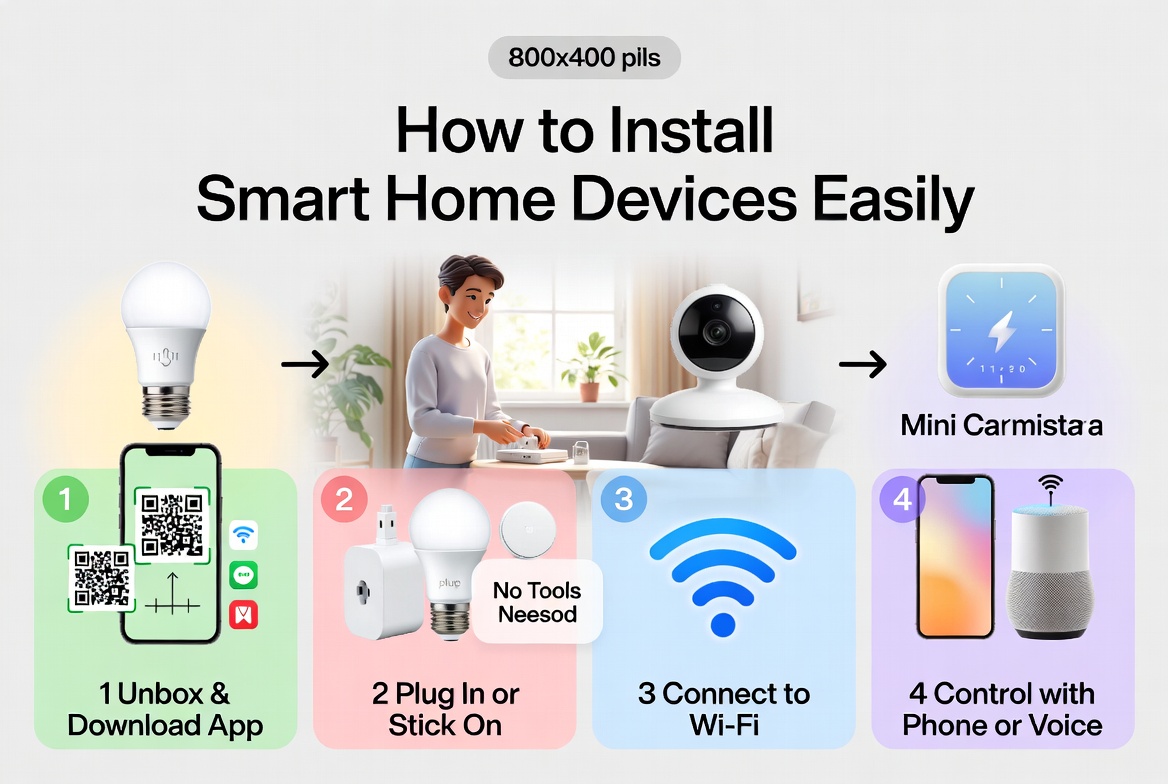
Installing smart home devices is simpler than it seems. Most don’t need technical skills. Here’s the basic process:
Step 1: Unbox and Read the Manual
Take your device out of the box. Read the quick start guide. It has important information about batteries, charging, or setup requirements. Some devices need batteries. Others plug in. Knowing this first prevents frustration.
Step 2: Download the Right App
Each device has its own app. Go to your phone’s app store and download it. For some devices, you use the hub’s app instead. Create an account and log in. Keep your password somewhere safe.
Step 3: Put the Device in Pairing Mode
This makes your device searchable by your hub. Usually you press a button for a few seconds until a light blinks. The device manual tells you exactly how.
Step 4: Add the Device to Your Hub
Open your hub’s app. Look for an option to add a new device or accessory. The app searches for nearby devices. When it finds your device, select it. The app asks you to name it and choose a room.
Step 5: Test and Confirm
Once added, test your device. If it’s a light, turn it on and off from the app. If it’s a camera, check the video feed. Make sure everything works before you call it done.
Step 6: Set Up Automations (Optional)
This is where smart homes get smart. You can create rules like “when the sun sets, turn on the lights” or “when everyone leaves, lock the door.” These rules make your life easier by doing things automatically.
Placement Tips for Best Results
Where you put your devices matters a lot. Bad placement means poor performance.
Smart Speakers and Hubs: Put them in central locations. A hallway or main living space works well. Keep them away from corners and enclosed spaces. These block WiFi signals.
Smart Lights: Install them in rooms you use most. Bedrooms, bathrooms, and kitchens benefit from automated lighting.
Security Cameras: Position them to see entry points. Front doors and back doors are priorities. Make sure nothing blocks the camera lens.
Thermostats: Mount them on an interior wall away from windows. Windows affect temperature readings. Keep them away from heat sources like lamps or ovens.
Door Sensors: Put them on entry doors and windows you want to monitor. Make sure the sensor parts stay aligned for proper function.
Motion Sensors: Place them where they can see the area you want to monitor. Corners work well. Height matters, so follow the instructions.
Connecting Everything Together
Once you have several devices, you’ll want them to work together. This is automation.
Simple automations you can set up:
- Turn on lights when you unlock the door
- Send you a notification when someone presses your doorbell
- Adjust temperature based on the time of day
- Turn on outdoor lights at sunset
- Lock doors automatically at bedtime
To create automation, open your hub’s app. Look for routines, automations, or scenes. Give it a name. Set the trigger (what makes it happen). Set the action (what you want to happen). Save it.
Your hub checks these rules constantly. When the trigger happens, the action follows automatically.
Troubleshooting Common Problems
Things don’t always work perfectly. Here are solutions to common issues:
Device Won’t Connect
Make sure your device is in pairing mode. Check that you’re close to your WiFi router. Restart the device by unplugging it for 30 seconds. Try again.
Device Connects Then Disconnects
Your WiFi signal might be too weak. Move closer to your router. Try a WiFi extender. Restart your hub too.
Voice Commands Don’t Work
Your hub needs internet. Check your internet connection. Make sure your device is added to the hub’s app. Try saying the full name you gave the device.
App Can’t Find the Device
Restart both your phone and the device. Make sure they’re on the same WiFi network. Check that your hub is online. Try factory resetting the device.
Automations Aren’t Triggering
Double-check your trigger condition. Make sure the device you’re controlling is actually connected. Restart your hub if nothing works.
Keep Your Smart Home Secure
Smart devices can be hacked, so security matters.
Use Strong Passwords: Make passwords long and unique. Don’t use “123456” or your birthday.
Update Everything: When you get notifications to update your devices or apps, do it. Updates fix security problems.
Use Two-Factor Authentication: This adds an extra layer of protection. Your hub app should support it.
Secure Your WiFi: Use WPA3 encryption on your router. This prevents people from hacking into your network.
Review Permissions: Check what permissions you give each app. Does your camera app really need access to your contacts? Probably not.
Create a Guest Network: If visitors need WiFi, give them a separate network. They won’t access your smart devices.
Budget for Your Smart Home
You don’t need to spend thousands of dollars. Start small and grow.
Basic Setup: A smart speaker ($50-$100) plus two or three smart bulbs ($15-$30 each). Total: around $100-$200.
Growing Your System: Add a smart plug, door sensor, and another bulb. Total: another $50-$100.
Full Automation: Add thermostat ($200-$300), cameras ($100-$200), locks ($200-$300), and more sensors ($15-$30 each).
Start with the basics. As you save money and get comfortable with automation, add more devices.
Common Mistakes to Avoid
Learn from others’ mistakes:
Buying Too Many Devices at Once
You’ll feel overwhelmed. Start with one or two devices. Master them first.
Not Reading Instructions
The manual has important info. It takes five minutes to read and saves you hours of frustration.
Ignoring WiFi Problems
Poor WiFi is the number one reason smart homes fail. Fix your network first.
Using Weak Passwords
This is how people get hacked. Use complex passwords.
Forgetting to Update Software
Keep everything updated. It improves performance and security.
Not Planning for the Future
Will you want to add more devices? Buy hubs and systems that support expansion.
Getting Help When You Need It
Don’t panic if something goes wrong.
Official Support: Contact the device maker. They have customer service that actually helps.
Online Communities: Reddit and forums have helpful people who’ve solved similar problems.
YouTube Tutorials: Search for your specific device. Thousands of people have made setup videos.
Smart Home Professionals: If it’s too complicated, hire someone. They set everything up for you.
The Benefits You’ll Actually Experience
After installation, you’ll notice real changes:
More Convenience: No more flipping light switches. No more guessing if you locked the door.
Better Security: Cameras show you what’s happening at home. Notifications alert you immediately.
Lower Bills: Smart thermostats cut heating and cooling costs. Smart lights save electricity.
Peace of Mind: Check on your home anytime. Know your family is safe.
More Free Time: Automations do tasks for you. You get more time for things you enjoy.
Final Thoughts on Building Your Smart Home
Setting up a smart home is not as hard as it looks. You don’t need to be tech-savvy. Follow the steps in this guide and take your time. Start with one device. Get comfortable with it. Then add more.
Your smart home grows as you grow. What matters today might change tomorrow. The nice thing about smart home systems is they adapt. You can remove devices. You can add new ones. You can change automations whenever you want.
The future of home automation is now. You can be part of it. Start today with a simple device and enjoy the convenience, security, and savings that come with a connected home. Your future self will thank you for making the switch.
Get started now. Pick one device. Order it today. Follow this guide. In an hour, you’ll have your first smart device working. That’s all it takes to begin your smart home journey.

Hi, I’m Mary, the founder of Homygear.com. I’m passionate about creating a comfortable, smart, and beautiful home. I share practical insights and real-world experience on home gear that makes everyday life easier. Behind the scenes, my dedicated research team studies products in depth, and our writers craft honest reviews using trusted, authentic sources—so you can choose home gear with confidence.