How Remote Thermostat Sensors Work?
Your home’s temperature control doesn’t have to stay stuck in one place. Remote thermostat sensors let you take charge of your comfort from anywhere in your house, and honestly, once you understand how they work, you’ll wonder why you didn’t get them sooner. Let’s dive into the world of wireless temperature monitoring and see how these clever devices keep your home feeling just right.
What Are Remote Thermostat Sensors?
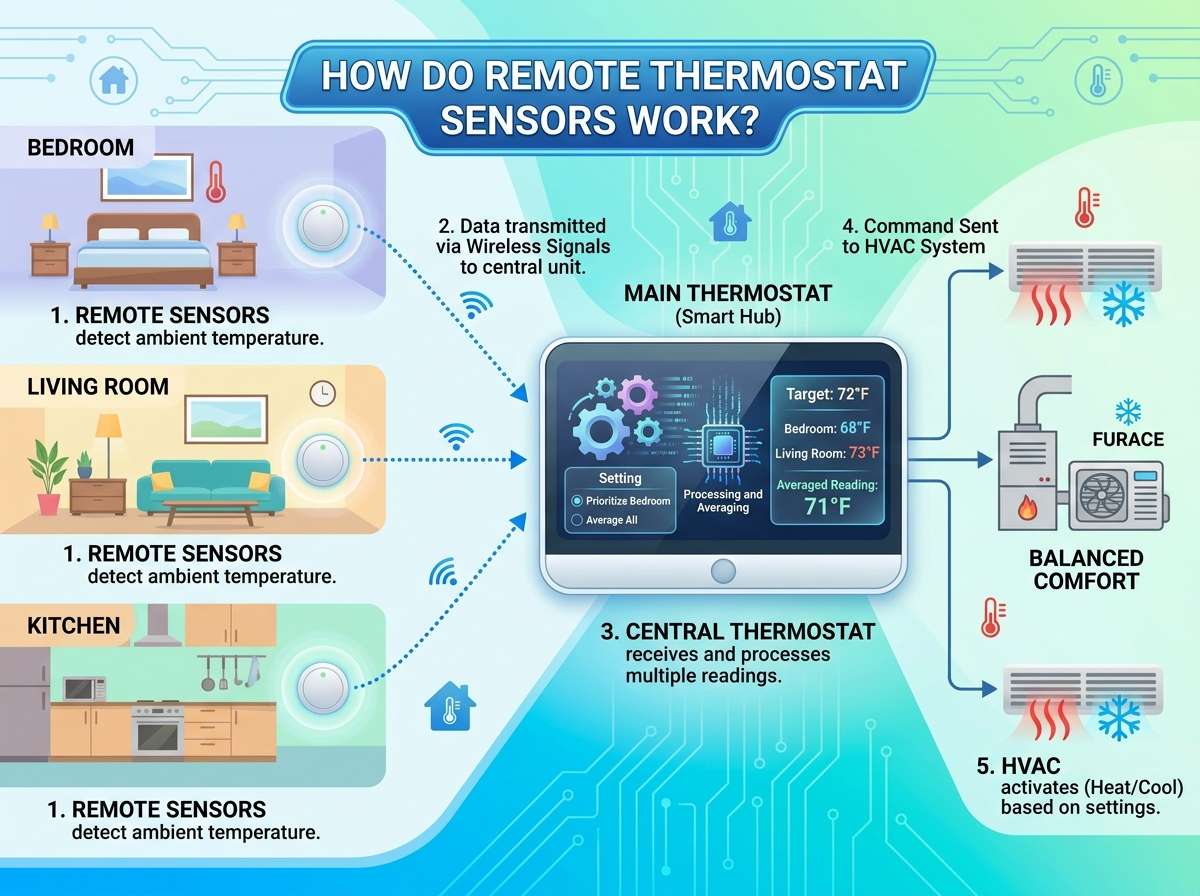
A remote thermostat sensor is basically a small device that measures the temperature in different rooms and sends that information to your main thermostat. Think of it as an extra set of eyes for your heating and cooling system. Instead of your thermostat only knowing what the temperature is in the hallway where it’s mounted, it can now sense the temperature in your bedroom, living room, kitchen, or any other space where you place a sensor.
These sensors work without wires running through your walls. They communicate wirelessly, which makes installation simple and keeps your home looking clean without visible cables everywhere. The sensors are usually small boxes that you can place on shelves, nightstands, or mounting brackets on the wall.
The Basic Technology Behind Wireless Sensors
Remote thermostat sensors rely on wireless communication to send temperature data back to your main thermostat unit. Most modern systems use one of several wireless technologies, with Bluetooth and WiFi being the most common options these days.
Bluetooth sensors typically have a shorter range than WiFi options, usually working within 30 to 100 feet of your thermostat. WiFi sensors can reach much farther since they connect through your home’s internet network. Some advanced systems use proprietary wireless protocols, which are custom technologies designed specifically for thermostat communication. These proprietary systems often work well because they’re optimized for the job at hand.
The sensors contain a small circuit board with a thermistor or resistance temperature detector (RTD). These components measure temperature by detecting how electrical resistance changes as heat increases or decreases. As the temperature around the sensor shifts, the thermistor responds almost instantly, and the sensor translates this measurement into data that it can transmit wirelessly.
How Temperature Sensing Actually Works
Let’s get into the actual mechanics of how these sensors detect temperature. Inside every remote sensor is a temperature-sensing element that reacts to heat changes. The most common type is a thermistor, which is a special type of resistor that changes its electrical resistance based on temperature fluctuations.
When it’s cold, the thermistor has high resistance. As the area gets warmer, the resistance drops. Your sensor’s circuit board measures this resistance and converts it into an actual temperature reading. The conversion happens through a mathematical formula that’s built into the sensor’s processor. This whole process takes just seconds, so your sensor delivers nearly real-time temperature information.
Some premium sensors use platinum RTDs instead of thermistors. These are slightly more accurate and tend to work better across very wide temperature ranges. RTDs also hold their accuracy longer as they age, so if you’re picky about precision, an RTD-based sensor might be worth the extra investment.
The sensor doesn’t just measure temperature once and stop. It takes multiple readings continuously, sometimes checking the temperature dozens of times per minute. This constant monitoring means your thermostat gets updated information and can make quick adjustments to your heating or cooling system whenever needed.
Wireless Communication Methods Explained
For your sensors to actually help control your temperature, they need to talk to your thermostat. This is where wireless communication comes into play. Let’s look at the main options you’ll encounter.
WiFi-Based Sensors
WiFi remote thermostat sensors connect directly to your home internet network. They work just like your phone or laptop would. Your sensor links to your router, and then it sends temperature data to your thermostat, which also connects to your WiFi. Since they’re using your existing internet, these sensors can reach your thermostat from pretty much anywhere in your house, even through multiple walls.
The downside of WiFi sensors is that they use a bit more power than other wireless options, which means they need battery replacement more often. If your internet goes down, some WiFi thermostats won’t work properly until service returns. However, many modern WiFi-based systems have a backup mode that lets them function even without internet.
Bluetooth Sensors
Bluetooth sensors use a direct wireless connection to communicate with your thermostat. They don’t need to connect to your internet at all, which means they use less power and don’t depend on your WiFi being available. The trade-off is that Bluetooth has a shorter range. Most Bluetooth thermostat sensors work reliably within 30 to 100 feet, but walls and large obstacles can reduce this range.
Bluetooth sensors are great for smaller homes or apartments where distance isn’t really an issue. They’re also typically cheaper than WiFi options since they’re less complex.
Proprietary Wireless Protocols
Some smart thermostat systems use their own custom wireless technology instead of standard Bluetooth or WiFi. Brands like Ecobee and some others developed their own protocols that work really well for thermostat communication. These systems often have excellent range and reliability because they’re specifically designed for the job.
The trade-off is that if you want to add sensors to your system, you have to buy sensors made by the same brand as your thermostat. You can’t mix and match like you sometimes can with Bluetooth options.
How Data Gets Transmitted
When your remote sensor takes a temperature reading, it doesn’t send a huge amount of data. The reading is compressed into a small digital package and broadcast wirelessly. Your thermostat listens for these transmissions and receives the data.
The transmission happens over radio frequencies. WiFi sensors broadcast on the 2.4 GHz or 5 GHz frequency bands, the same ones your phone and laptop use. Bluetooth sensors use the 2.4 GHz band. Proprietary systems might use different frequencies depending on what the manufacturer chose.
To keep things running smoothly, sensors send updates at regular intervals. Many sensors transmit their reading every 30 seconds or every minute. Some can be set to transmit more or less often depending on your preferences and battery life concerns. More frequent updates mean faster response times but also mean the batteries drain faster.
The Role of the Smart Thermostat
Your remote sensors only work well if your thermostat is smart enough to use the information they send. A smart thermostat has a processor and software that can receive data from multiple sensors, evaluate the information, and make decisions about when to run your heating or cooling system.
Most smart thermostats can work with multiple sensors at once. You might have one sensor in your bedroom, one in your living room, and one in your home office. The thermostat collects temperature readings from all of them and uses different strategies to maintain comfort.
Some smart thermostats average all the sensor readings together. Others will use the highest reading or the lowest reading depending on how you set it up. More advanced systems use occupancy information combined with the sensor data. They might heat or cool based on where people are actually spending time in the home. If everyone’s in the living room, the thermostat might prioritize keeping that room comfortable.
Battery Power and Energy Considerations
Remote thermostat sensors need power to operate. Almost all of them run on batteries, typically AA or AAA alkaline batteries. A few premium models use rechargeable batteries instead.
Battery life varies depending on how often the sensor transmits data and what type of wireless technology it uses. WiFi sensors generally need battery replacement every 6 to 12 months. Bluetooth sensors often last 12 to 24 months on the same batteries. Some low-power sensors can stretch to 2 to 3 years between replacements.
Your thermostat usually alerts you when sensor batteries run low, so you won’t come home to find your temperature control has stopped working. Most systems warn you well before the batteries actually die.
If you have a lot of remote sensors, battery replacement can get annoying. Some people solve this problem by choosing sensors with longer battery life or switching to rechargeable battery options. You can buy rechargeable AA and AAA batteries that work in most sensors, though you’ll need to recharge them more often.
The actual power draw from sensors is tiny. They’re not running cooling fans or heating elements. They’re just reading temperature and sending data, so even with rechargeable batteries, you’re only charging them every few months at most.
Installation and Setup
Getting remote thermostat sensors installed is usually straightforward because they’re wireless. You don’t need to hire an electrician or run new cables through your walls. Most people can install them in just a few minutes.
Start by choosing where you want to place each sensor. You want them in rooms where temperature matters to you. Bedrooms are popular because people are sensitive to temperature while sleeping. Living rooms make sense too since that’s where families often gather. Avoid placing sensors in direct sunlight, near heat sources like lamps or space heaters, or in drafty areas near doors and windows. These locations give false readings that don’t reflect actual comfort in the room.
Once you’ve picked your location, you’ll mount or place the sensor. Some sensors have small mounting brackets that stick to the wall. Others just sit on a shelf or nightstand. Follow the manufacturer’s instructions for your specific model.
Next comes pairing the sensor with your thermostat. Most systems use a simple pairing process. You’ll put your thermostat into pairing mode, activate the sensor, and they’ll communicate to link up. Some systems use an app on your phone to manage pairing and placement.
After pairing, you’ll typically give each sensor a name so your thermostat knows which sensor is in which room. You might name them “Master Bedroom,” “Living Room,” or “Upstairs Guest Room.” This helps when you’re checking the app or adjusting temperature settings for specific zones.
How Smart Thermostats Use Multiple Sensor Data
Once you have multiple sensors installed, your smart thermostat becomes more powerful. Instead of relying on a single temperature reading from wherever your main unit is mounted, it can use information from multiple rooms to make better decisions.
The thermostat collects data from all your sensors and processes it according to your settings. If you’ve set it to average the temperatures, the system adds all the readings together and divides by the number of sensors. This gives you the average comfort level across all the monitored rooms.
Your system might have priority settings. You could tell your thermostat that your bedroom is the most important room to keep at a set temperature, while other rooms can be slightly warmer or cooler. The thermostat will work harder to maintain your bedroom temperature while being less strict about other spaces.
Some advanced thermostats use time-based priority. During the day, the system might focus on keeping your living room comfortable because that’s where you spend time. At night, it switches to prioritizing your bedroom. This flexibility lets your heating and cooling system work more efficiently by not worrying about unused spaces.
Occupancy Sensing and Smart Features
The newest remote sensor systems sometimes include occupancy detection, which means they sense whether people are actually in the room. These sensors might use motion detection or other technologies to figure out if someone’s home and where they are.
When your thermostat knows which rooms have people in them, it can be smarter about where to direct heating and cooling. During work hours, if nobody’s home, the thermostat might let unused rooms stay at less comfortable temperatures to save energy. Once someone comes home and activates a motion-detecting sensor, the system adjusts that room’s temperature back to normal.
This kind of intelligent behavior saves money on your energy bills because you’re not heating and cooling empty spaces. It also improves comfort because your thermostat knows what matters right now.
Common Challenges and How They’re Solved
Even though remote thermostat sensors are pretty reliable, a few challenges come up sometimes. Understanding these issues helps you get the best results from your system.
Wireless Range Issues
If your house is large or you have lots of walls, some sensors might be too far from your thermostat. Walls with metal studs or insulation materials can block wireless signals. If you’re having range problems, try moving your thermostat closer to where the sensors are, or move the sensors closer to the thermostat. Some people add WiFi extenders or mesh WiFi systems to improve signal strength throughout their home.
Temperature Reading Accuracy
If your sensor gives strange temperature readings, it might be in a bad location. Sunlight streaming through a window, heat from a lamp, or cold air from an air vent can make a sensor read incorrectly. Move it away from these things and it should read more accurately.
Battery Drainage
If your sensor batteries die much faster than expected, the sensor might be transmitting too often or struggling to maintain connection with your thermostat. Check that the sensor’s in a good location with strong wireless signal. You can also adjust transmission frequency in many systems to extend battery life.
Pairing and Connection Problems
Sometimes sensors won’t pair with your thermostat on the first try. Reset both devices and try again. Make sure they’re close to each other during pairing. If you still have trouble, check the manufacturer’s support website for specific troubleshooting steps for your model.
The Benefits of Using Remote Sensors
Once you get remote thermostat sensors working in your home, you’ll probably wonder why you waited so long. The benefits are real and noticeable.
Better Comfort
You get actual temperature readings from the rooms you care about, not just the hallway where your thermostat is mounted. This means your heating and cooling system can keep you more comfortable throughout your home.
Energy Savings
Smart temperature control based on actual room-by-room data uses less energy than systems that guess based on a single sensor. Your heating and cooling system doesn’t waste effort on unused rooms. Studies show that homes with multi-sensor thermostats can cut their energy bills by 10 to 15 percent.
Zoned Temperature Control
You can keep your bedroom cool while your living room stays warmer, or vice versa. Different people have different temperature preferences, and remote sensors let your system handle that without argument.
Convenience and Remote Access
Many smart thermostat systems with remote sensors also connect to your phone or computer. You can check temperatures in different rooms and adjust settings from anywhere. Left for vacation? You can lower your thermostat remotely to save energy. Coming home early? Warm the house up before you arrive.
Awareness and Data
Smart thermostat apps show you temperature data from all your sensors. Over time, you start noticing patterns about how your home heats and cools. You might discover that your kitchen gets hot in the afternoon or your basement stays cold. This knowledge helps you manage your home more effectively.
Choosing the Right System for Your Home
When you’re looking for remote thermostat sensors, start by thinking about your thermostat. Do you already have a smart thermostat that supports remote sensors? If so, find out what brand and type of sensors it accepts. If you don’t have a smart thermostat yet, research models that support multi-sensor systems.
Consider your home’s size and layout. If you have a small apartment, a couple of Bluetooth sensors might work great. For a large house, WiFi-based sensors or a proprietary system might be more reliable.
Think about how many sensors you actually need. Most people find that 2 to 4 sensors give them good coverage without being expensive or complicated. Put sensors in rooms where you spend the most time and care most about comfort.
Look at battery life expectations for different sensor models. If you don’t want to replace batteries often, choose sensors with longer battery life or the option to use rechargeable batteries.
Check out the app or control interface for the system. Some are really user-friendly and make adjusting temperatures simple. Others have more options but are harder to figure out. Pick whichever matches your comfort level with technology.
Installation Tips for Best Results
When you’re ready to install your remote sensors, keep a few things in mind. First, place sensors away from direct sunlight and heat sources. They need to measure the actual temperature of the room, not the warmth from a lamp or a sunny window.
Don’t put sensors in drafty areas near doors and windows. The moving air will make your readings jump around and give false information.
Mount sensors at a similar height to your thermostat if possible. Temperature can vary a bit based on height, so consistent heights give more accurate comparisons.
Make sure sensors have good wireless signal. If possible, place them where they have a clear line of sight to your thermostat or WiFi router. Avoid putting them in cabinets or enclosed spaces.
Label each sensor clearly in your system so you remember which one is where. This seems simple, but it helps a lot when you’re adjusting settings weeks or months later and can’t remember if “Bedroom 1” is the master bedroom or the guest room.
Troubleshooting Tips That Actually Work
If your remote thermostat sensors aren’t working right, try these fixes before calling for help.
First, check batteries. Most problems come from low batteries or dead batteries. Replace them and see if everything works again. Many systems alert you about low batteries, but not all of them do loudly enough to notice.
Next, check your wireless connection. If a sensor seems to have stopped communicating, move it closer to your thermostat or WiFi router for a day and see if it reconnects. Sometimes distance is the issue.
Restart your thermostat and sensors. Power down your thermostat for 30 seconds, then turn it back on. If that doesn’t help, also pull batteries from the sensor for 30 seconds. This resets everything and often fixes weird issues.
Check your thermostat settings. Make sure your sensors are actually activated in the system settings. Sometimes a sensor that’s paired isn’t being used because it’s disabled in the configuration.
Look at your app or thermostat display. Most systems show you which sensors are connected and which ones aren’t. If a sensor shows as disconnected, try re-pairing it.
The Future of Home Temperature Control
Remote thermostat sensors keep getting better. New models are adding features like humidity sensing, air quality monitoring, and even occupancy detection that doesn’t need motion sensors. Some sensors now measure light levels to help your thermostat understand time of day and occupancy patterns better.
Integration with other smart home systems is improving too. Your thermostat might soon coordinate with your lighting system or window blinds to optimize comfort and energy use together.
Voice control through systems like Alexa or Google Home is becoming standard. You’ll be able to ask for temperature adjustments without touching anything or opening an app.
Wrapping Up
Remote thermostat sensors work by measuring temperature with special electronic components, converting those measurements into digital data, and sending that data wirelessly to your smart thermostat. Your thermostat then uses this information from multiple rooms to make smarter decisions about heating and cooling your home.
The technology is straightforward, the installation is simple, and the benefits are real. Better comfort, lower energy bills, and more control over your home’s temperature make remote sensors a smart investment. Whether you’re tech-savvy or just getting started with smart home stuff, remote thermostat sensors are easy to understand and even easier to use. Once you have them working in your home, you’ll enjoy the comfort and convenience they bring to your daily life.

Hi, I’m Mary, the founder of Homygear.com. I’m passionate about creating a comfortable, smart, and beautiful home. I share practical insights and real-world experience on home gear that makes everyday life easier. Behind the scenes, my dedicated research team studies products in depth, and our writers craft honest reviews using trusted, authentic sources—so you can choose home gear with confidence.